
Quick answer
To repurpose one YouTube video into 10 pieces of content, identify its most useful ideas, extract standalone clips, and turn other insights into Instagram carousels, graphics, and interactive posts.
Tools like ytZolo can help simplify parts of the workflow, such as generating scripts, titles, and content ideas for different formats. Adapt each asset to its platform instead of publishing the same content everywhere.
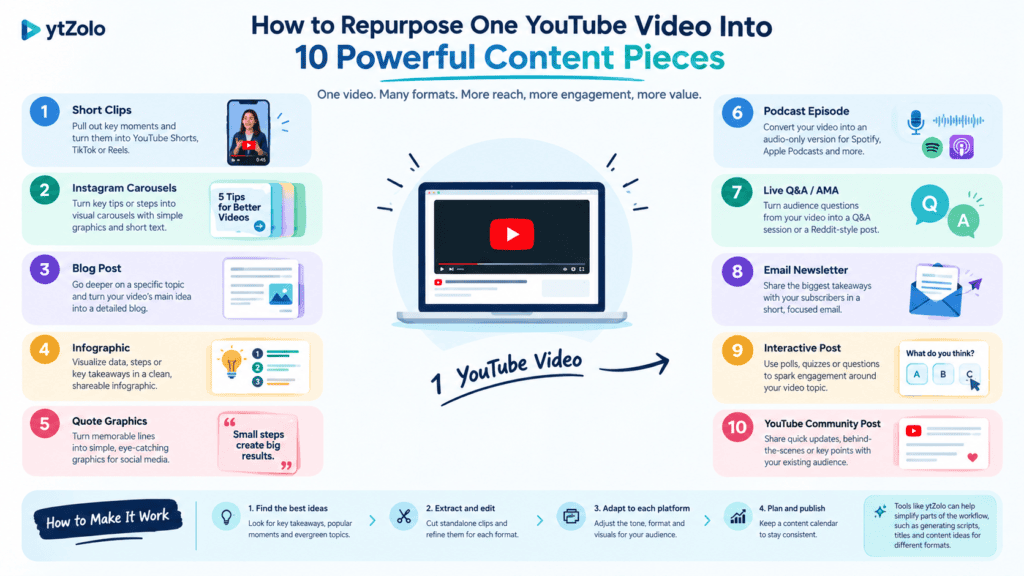
Table of Contents
Introduction
A single YouTube video can contain several useful lessons, but viewers won’t necessarily discover every one of them. Repurposing allows you to present these ideas in various formats without recording an entire new video for each post.
For example, a tutorial on YouTube thumbnail creation could yield three short videos, two carousels, a handful of graphics, and an interactive Instagram Story.
The process works best when each asset serves a different purpose. Here’s how to repurpose one YouTube video into 10 pieces of content across platforms, with a practical example for each format.
How do you choose the right YouTube video to repurpose?
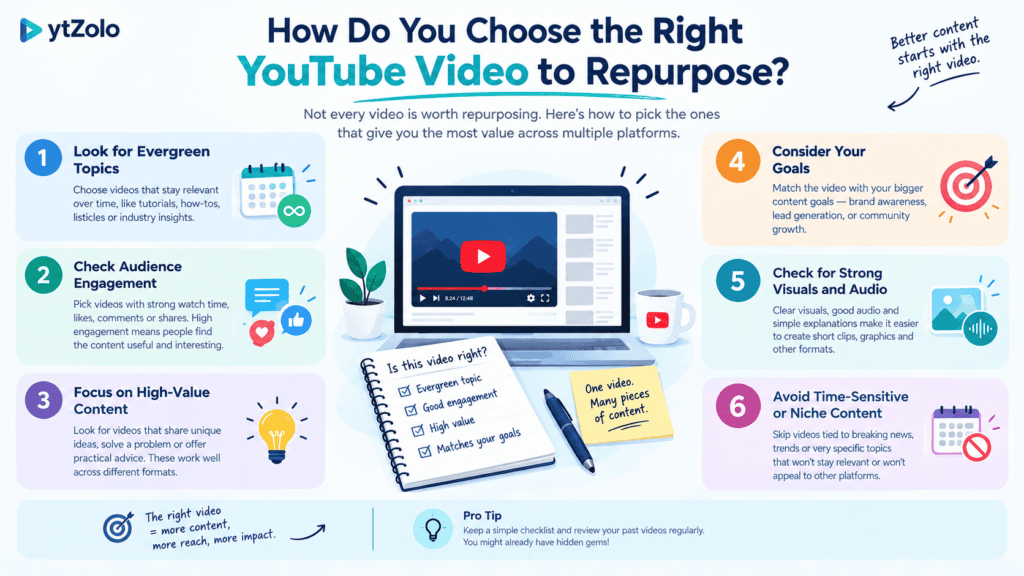
Choose a video that contains several independent ideas, demonstrations, or practical tips. A tutorial or interview is a great option because it can be dissected to derive multiple useful ideas or separate pieces of information.
Before editing, review the video or its transcript and mark moments that:
- Answer a specific question.
- Demonstrate a useful technique.
- Explain a common mistake.
- Present a memorable insight.
- Describe a process viewers can follow.
Imagine you’ve published a 15-minute video about making better YouTube thumbnails. It covers such points as visual hierarchy, text placement, common design mistakes, and a review checklist.
Each of them can be expanded into a separate asset. Still, make sure that a particular moment does not require too much context to be explained, so it is better to move to another paragraph.
How can you repurpose one YouTube video into 10 pieces of content?
The following example uses the thumbnail tutorial to demonstrate ten distinct assets. You can apply the same method to educational videos, product demonstrations, podcasts, and other content that contains reusable ideas.
1. How can you turn a useful moment into a YouTube Short?
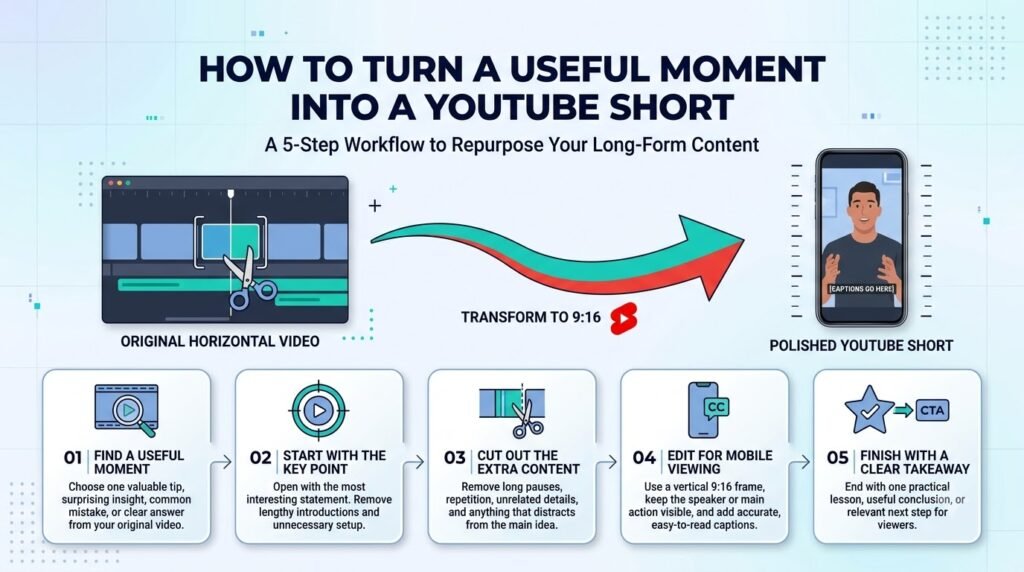
Extract a moment that delivers one complete lesson in a short time. Remove the unnecessary introduction and focus on a problem and explanation/takeaway. Maybe show a section with an example of why tiny text is hard to read on a thumbnail, show the original and the explanation, etc.
Use vertical framing and readable captions. YouTube’s official Shorts upload guide explains the current upload requirements.
Your asset: One standalone YouTube Short.
2. How can you adapt another idea into an Instagram Reel?
Choose a different insight from the original video rather than reposting the same clip with a new caption. A Reel can demonstrate one improvement visually, making it useful even for viewers who haven’t seen the original tutorial.
For example, show how removing unnecessary background elements makes a thumbnail easier to understand. Open with the problem, show the change, and finish with a practical takeaway.
Your asset: One Instagram Reel with its own opening and edit.
3. How can you create a TikTok video from the same source?
Select another demonstration or explanation and present it in a direct, conversational style. Focus on one problem rather than summarizing the entire YouTube video.
For instance, compare two thumbnail versions and explain which visual elements make the main subject easier to identify.
Adjust the pacing and on-screen text to suit the specific video.
Your asset: One TikTok video using footage from the original recording.
4. How can you turn a tutorial into an Instagram carousel?
A carousel works well when an idea involves several steps that readers may want to revisit. Break the process into a sequence, with each slide explaining one action.
For the thumbnail tutorial, create a six-slide carousel:
- Cover: A simple checklist for reviewing your thumbnail.
- Identify the main subject.
- Remove elements that compete for attention.
- Check whether text is readable at a small size.
- Make sure the image matches the video’s topic.
- Review the thumbnail alongside the title.
Keep each slide focused on one point. Readers should understand the process without needing to watch the original video.
Your asset: One step-by-step Instagram carousel.
5. How can you turn a useful statement into a quote graphic?
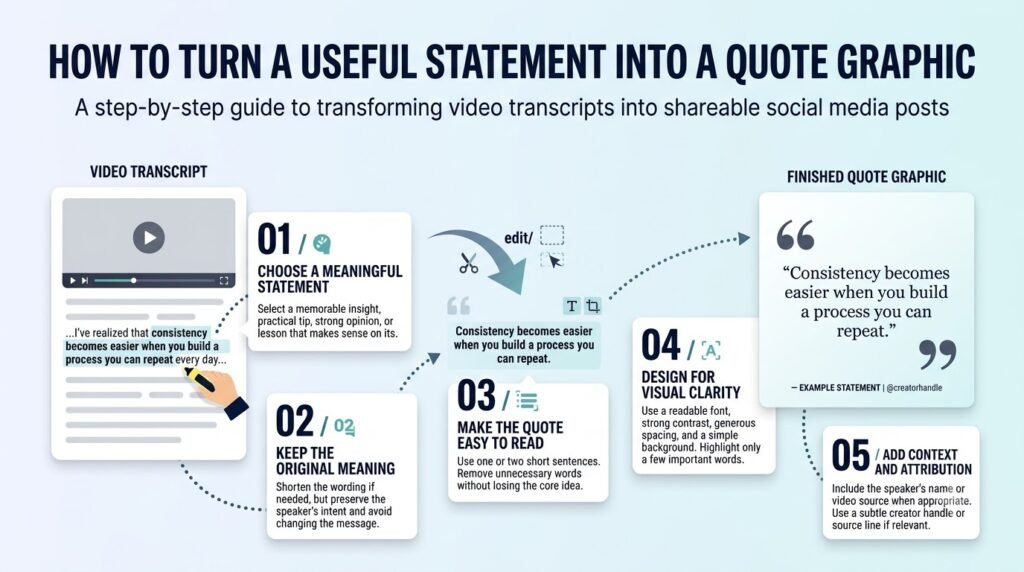
Look for a concise observation in the video that communicates a lesson on its own. A strong quote graphic should offer more than a decorative sentence.
For example, a discussion about thumbnails might include the idea that the image should accurately represent what viewers will find in the video.
Place the statement on a simple background with readable typography. Use the speaker’s exact words if you present it as a direct quotation; otherwise, label it as a takeaway.
Your asset: One Instagram quote graphic.
6. How can you turn a misconception into a myth-versus-fact carousel?
Find a misconception the original video explains and show why a different approach may be more useful. This format works particularly well for educational content.
For example:
- Myth: Adding more text always makes a thumbnail clearer.
- Fact: Extra text can compete with the main subject and make the design harder to scan.
Follow the comparison with a visual example and a practical recommendation. Avoid turning a nuanced topic into an absolute rule.
Your asset: One myth-versus-fact carousel.
7. How can you turn the video’s advice into a checklist graphic?
Extract a few related actions that viewers can use when completing a task. A checklist is different from a quote graphic because its purpose is to help people review their own work.
For the thumbnail tutorial, include questions such as:
- Is the main subject easy to identify?
- Is the text readable at a small size?
- Are unnecessary details removed?
- Does the image match the video topic?
Use a layout that remains readable on a phone. If you have too many items, split them into a carousel.
Your asset: One practical checklist graphic.
8. How can you make a before-and-after visual post?
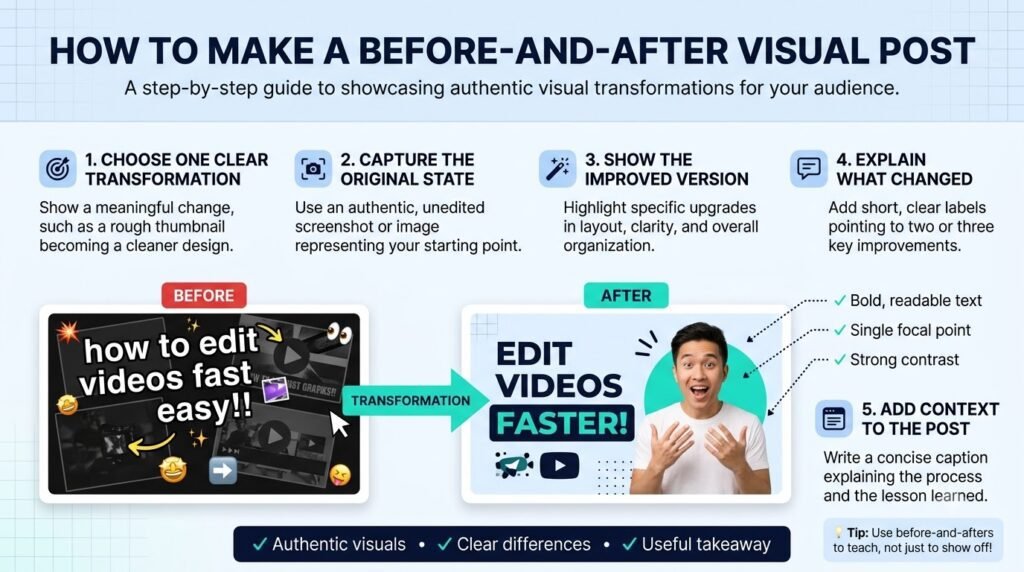
Find a section where the video demonstrates an improvement. Use the original and revised versions to explain what changed and why.
For example, place a crowded thumbnail beside a simplified version. Add short labels identifying the changes, such as removing distracting elements or making the main subject more prominent.
Make sure the comparison reflects an actual edit or a clearly labelled illustrative example. Don’t claim that one design will generate more clicks unless you have evidence to support that claim.
Your asset: One before-and-after graphic.
9. How can you turn the main lesson into a summary graphic?
A summary graphic combines the video’s central ideas into one visual. Unlike a checklist, it gives readers an overview rather than asking them to complete a series of checks.
For the thumbnail tutorial, summarize three principles: a clear focal point, readable details, and an image that matches the title.
Use a clear heading and a few supporting points. If the information becomes difficult to read, simplify the graphic instead of squeezing in more text.
Your asset: One visual summary of the original video.
10. How can you turn the video into an interactive Instagram Story?
Use a question from the original video to invite viewers to participate. An interactive Story can help you discover what your audience understands, prefers, or wants explained next.
For example, show two thumbnail designs and ask, “Which one makes the video’s topic clearer?” Use an available poll or question sticker, then share a short explanation of the design choices.
Keep the question relevant to the original topic. The goal is to encourage a useful discussion, not simply to add another post to the schedule.
Your asset: One interactive Instagram Story.
How should you adapt content for each platform?
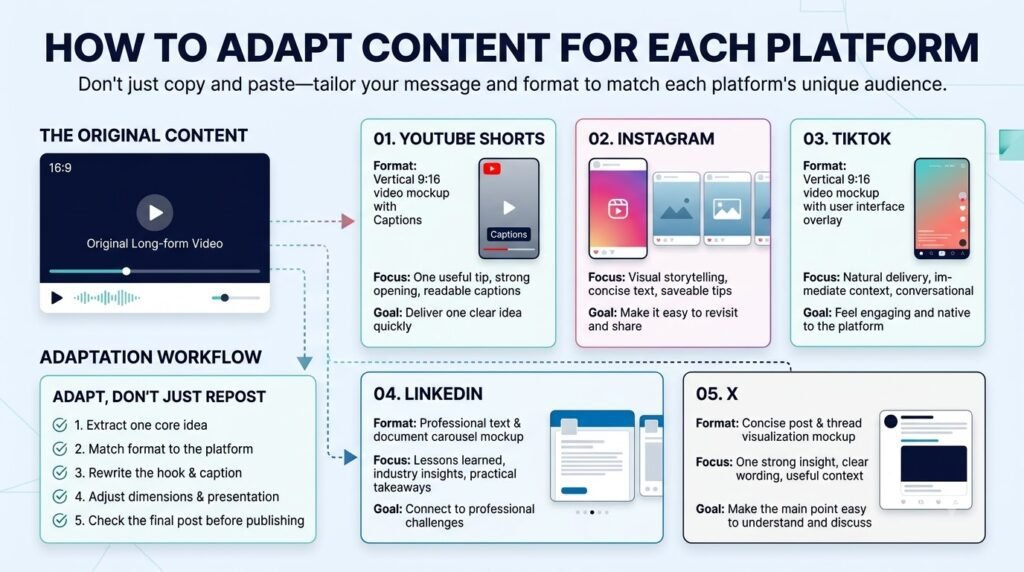
Keep the central idea consistent, but adjust the presentation to the format. Short videos need a clear opening and readable captions, while carousels and graphics need a visual structure that makes the information easy to understand.
| Platform | Main purpose | What to adapt |
| YouTube Shorts | Deliver one concise lesson | Opening, framing, captions |
| Instagram Reels | Explain an idea visually | Pacing, overlays, opening |
| TikTok | Demonstrate or explain one point | Delivery, pacing, text |
| Instagram carousels | Explain a process or misconception | Slide order, examples |
| Instagram graphics | Summarize or illustrate an idea | Layout, text length, contrast |
| Instagram Stories | Invite a response | Question, poll, supporting context |
You can reuse the original footage, but review each finished post before publishing. Check the crop, captions, audio rights, and platform requirements.
How can you organize the repurposing workflow?
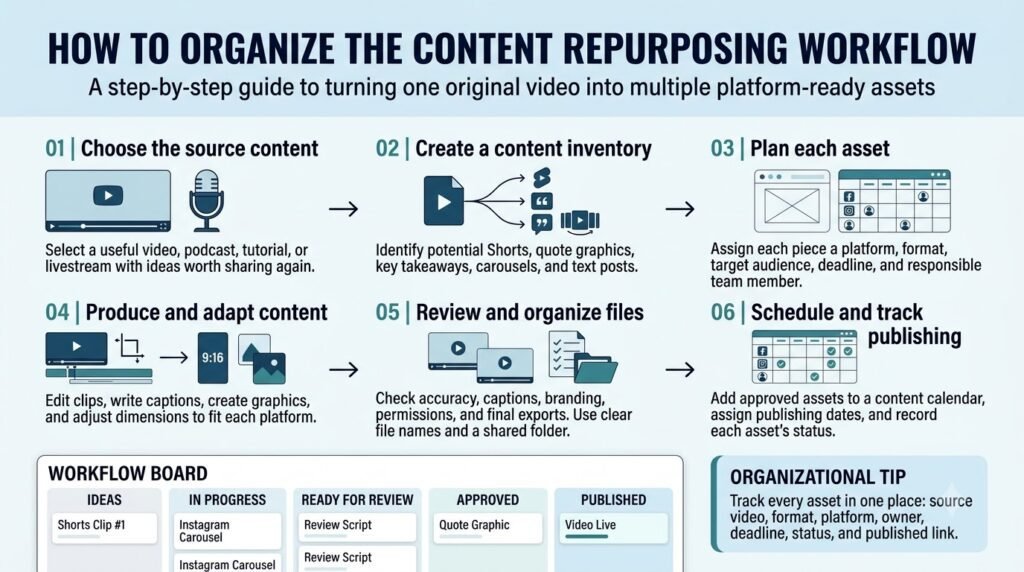
You don’t need to edit and design every asset separately from scratch. Group similar tasks together so you can work through the source material systematically.
Step 1: Review the source video. Mark useful moments and record their timestamps.
Step 2: Create an asset plan. Note the idea, format, destination platform, and any extra editing required for each post.
Step 3: Prepare the video clips. Extract the selected sections and edit them into standalone lessons.
Step 4: Create the visual assets. Use the transcript and key points to prepare carousel slides, graphics, and the interactive Story.
Step 5: Review each asset. Confirm that it is accurate, easy to understand, and useful without requiring viewers to watch the full video.
Step 6: Schedule and evaluate. Publish the assets at a manageable pace and review the available analytics for each platform.
If you’re coordinating these tasks with other people, ytZolo’s guide on running a YouTube channel with a small team covers the broader workflow and delegation considerations.
Can AI tools help you repurpose YouTube videos?
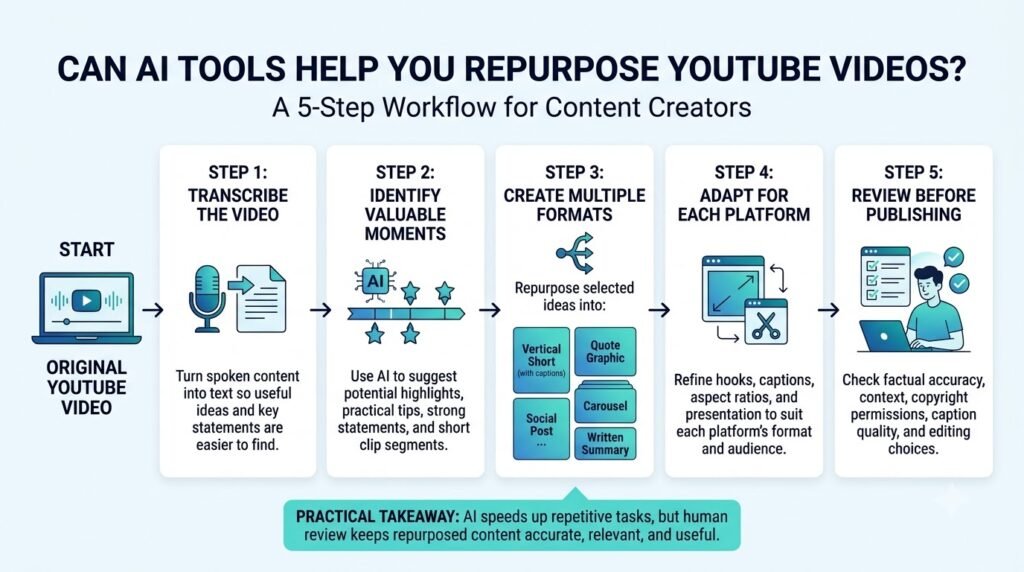
Yes. AI tools can assist with transcript summaries, clip ideas, caption drafts, and outlines for visual posts. They can reduce some preparation work, but they don’t remove the need to review the original material.
For example, an automatically generated summary might omit a qualification that changes the speaker’s meaning. A suggested clip might also begin too late to make sense on its own.
Review every output against the original video before publishing. For a broader look at tools used in creator workflows, see AI tools for YouTube creators.
ytZolo can also be considered for relevant YouTube content tasks such as preparing scripts, titles, descriptions, and tags. Check the ytZolo website for its current features. Video editing and graphic design may still require separate tools.
What mistakes should you avoid when repurposing content?
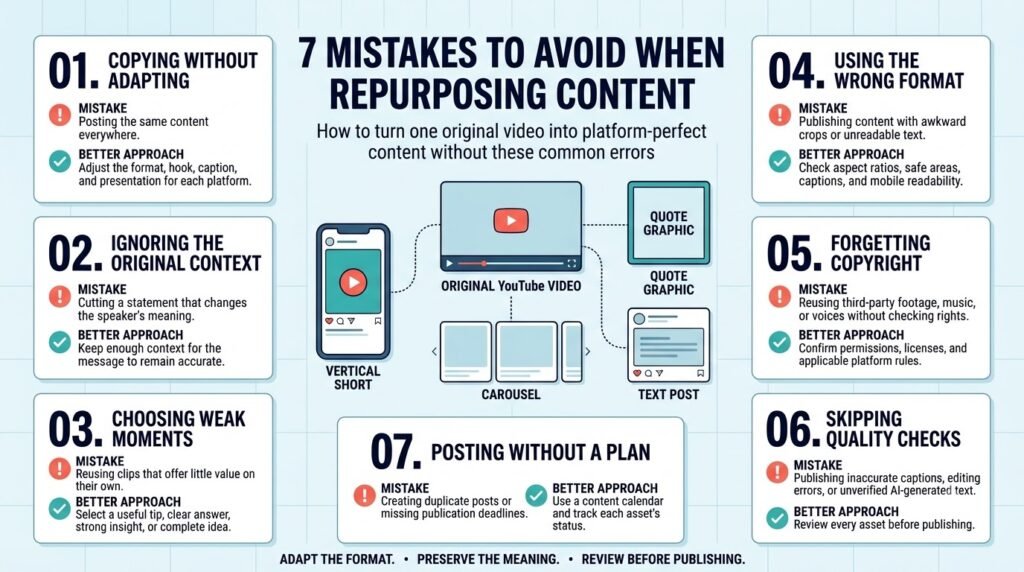
Posting identical edits everywhere: Reusing footage is fine, but change the presentation when the destination platform or audience calls for it.
Removing important context: A short clip can misrepresent the original message if you cut out a necessary explanation.
Repeating the same idea: Give each asset a distinct purpose. A checklist, for example, should help viewers review their work rather than repeat the summary graphic.
Publishing just to reach ten posts: Some videos won’t support ten useful assets. Choose quality and clarity over an arbitrary publishing target.
Ignoring performance data: Review relevant measures such as views, watch time, saves, and shares where available. Use the results to guide future decisions rather than assuming one post’s performance applies to every format.
Frequently asked questions
Can one YouTube video really produce 10 pieces of content?
Yes, if it contains enough distinct ideas, examples, or demonstrations. The ten assets can include short videos, carousels, graphics, and interactive posts. Some videos will naturally support fewer.
Should you upload the same clip to Shorts, Reels, and TikTok?
You can reuse the footage, but review the opening, pacing, captions, framing, and music for each destination. Export a clean version and follow each platform’s current publishing requirements.
Do you need AI tools to repurpose YouTube videos?
No. You can work from a transcript, edit clips manually, and create graphics with a design tool. AI is optional and should be used where it genuinely saves time.
How often should you publish repurposed content?
Choose a schedule you can maintain without reducing quality. Spread the assets across suitable publishing dates based on your audience and production capacity.
How do you choose which moments from a YouTube video to repurpose?
Choose moments that deliver a complete takeaway on their own, such as a practical tip, a common mistake, or a short explanation. Review the transcript and select sections that make sense without requiring viewers to watch the full video first.
How can you turn one YouTube tutorial into Instagram carousel slides?
Break the tutorial into a sequence of simple steps. Use the first slide to introduce the problem, the next slides to explain each step, and the final slide to summarize the lesson or suggest an action.
How do you adapt one video idea for TikTok, Instagram Reels, and YouTube Shorts?
Keep the central idea but adjust the opening hook, on-screen text, pacing, and caption for each audience. Review each platform’s current format requirements, and avoid assuming that a clip performing well on one platform will perform equally well on another.
How do you plan 10 pieces of content from one YouTube video without repeating yourself?
Give each piece a different purpose. For example, one can teach a step, another can correct a misconception, and another can share a checklist. Use different insights from the original video rather than repeating the same clip or message in every format.
Conclusion: Repurpose YouTube Videos With Purpose
Repurposing one YouTube video works best when every new asset delivers value in a format suited to its audience. Start with your strongest moments, then create short clips, quote graphics, and social posts. Tools like ytZolo can support your content planning process and help you organize future uploads using a video content planning workflow.
To make the process more manageable, maintain a simple content calendar to track ideas, formats, publishing dates, and completed assets.
Pay attention to which topics generate meaningful conversations or provide practical value to viewers. Over time, this helps you build a repeatable workflow that makes better use of existing content without sacrificing quality.
About the author
Anshika Verma is a content researcher and writer at ytZolo who covers AI creator tools and content production workflows. Her work focuses on researching tool capabilities, reviewing available evidence, and explaining practical approaches to content creation.
For questions about this article, contact anshika@ytzolo.com.

