
]
Introduction: The ChatGPT Script Hack Every Creator Is Talking About
It started with a tweet.
A creator posted a screenshot of a 3-minute YouTube script — fully written, hooked, structured, and ready to film. Time to generate: 12 seconds. The tool? ChatGPT.
The tweet went viral. Thousands of creators rushed to try it. And honestly? It worked. Somewhat.
ChatGPT for YouTube scripts is genuinely useful. Creators using AI scripting tools now report saving an average of 5 to 7 hours per week while increasing their content output by 40%. Those aren’t small numbers.
But here’s what that viral tweet didn’t show you: the hours spent crafting the perfect prompt. The generic hooks that needed complete rewrites. The missing SEO context. The thumbnails, titles, descriptions, and tags still left to figure out — all separately, all manually.
ChatGPT for YouTube scripts is a powerful starting point. But it’s just that — a starting point.
The creators growing the fastest in 2026 have moved beyond raw ChatGPT and are using purpose-built YouTube AI platforms like ytZolo — tools that combine script generation with everything else a growing channel needs in one seamless workflow.
In this guide, you’ll get the full truth about using ChatGPT for YouTube scripts: how to do it right, where it falls short, and how ytZolo closes every gap to become the all-in-one growth tool your channel actually needs.
Let’s get into it.
Table of Contents
1. Why AI Scripting Is Now a Non-Negotiable for YouTube Growth
Let’s start with something most creators don’t want to admit.
The gap between a channel that grows and one that stagnates usually has nothing to do with the quality of the camera, the size of the niche, or how likeable the host is on camera.
It comes down to consistency and structure — two things that are brutally hard to maintain when you’re writing scripts manually from scratch every week.
According to the YouTube Creator Blog, audience retention is one of the strongest signals YouTube uses to determine whether to push a video to new viewers. And what drives retention more than anything else? How well your video is written and structured before you ever hit record.
A well-scripted video keeps viewers watching. A rambling, unscripted video loses them in the first 90 seconds. And once YouTube sees early drop-offs, it stops recommending your video entirely.
That’s why ChatGPT for YouTube scripts became such a big deal so fast. It gave every creator — regardless of skill level — access to a tool that could produce structured, retention-aware scripts in under a minute.
Over 70% of creators in the US now use some form of AI in their content creation workflow, according to research cited by HubSpot. That number will only climb. The creators who haven’t started yet are already behind the curve.
2. How ChatGPT for YouTube Scripts Actually Works
If you’ve never used ChatGPT for YouTube scripts, here’s exactly how the process works.
ChatGPT is a large language model developed by OpenAI. You give it a text prompt — a description of what you want — and it generates human-like text based on that input. It’s trained on an enormous dataset of books, articles, websites, and online content, which means it has a broad understanding of writing styles, storytelling structures, and audience communication.
For YouTube scripting specifically, this means you can ask ChatGPT to:
- Write a complete video script on any topic in any tone
- Generate hooks, intros, and calls to action on demand
- Rewrite sections that feel flat or generic
- Adjust the length of a script to match a target video duration
- Create multiple versions of the same script with different angles
The basic free version of ChatGPT is accessible to anyone. You just visit chat.openai.com, create a free account, and start prompting.
The paid ChatGPT Plus subscription unlocks GPT-4, which produces noticeably better creative writing, more nuanced tone control, and longer, more coherent scripts. For creators serious about using ChatGPT for YouTube scripts, GPT-4 is worth the upgrade.
The core idea is simple: you provide the context, and the AI provides the structure. You bring the topic and personality; ChatGPT builds the framework.
That’s a genuinely powerful exchange — when it works. And we’ll get to when it doesn’t in just a moment.
3. The Best ChatGPT Prompts for YouTube Scripts
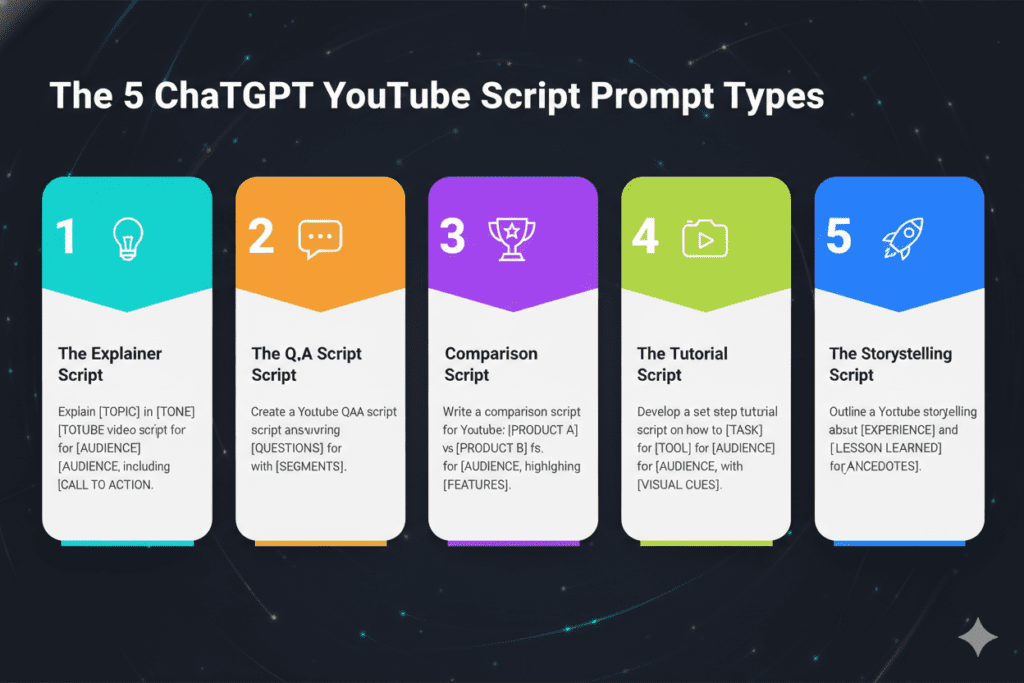
The quality of your ChatGPT for YouTube scripts output depends almost entirely on the quality of your prompts. Vague prompts produce generic scripts. Specific, well-structured prompts produce scripts that are ready to film.
Here are the most effective prompt frameworks working for creators right now:
The Full Script Prompt
“Write a complete YouTube script for a [length]-minute video titled ‘[Your Title]’. My target audience is [describe audience]. Use a [tone: conversational/educational/exciting] tone. Include a strong hook in the first 15 seconds, three main talking points with examples, and a clear call to action at the end.”
This is your bread-and-butter prompt for using ChatGPT for YouTube scripts. The more specific you are about your audience and tone, the better the output.
The Hook Generator Prompt
“Write 5 different hooks for a YouTube video about [topic]. Each hook should be under 20 seconds when read aloud and create immediate curiosity or urgency. My audience is [describe audience].”
Hooks are where most AI scripts fall flat. This dedicated prompt forces ChatGPT to focus entirely on the opening — the most critical part of any YouTube video.
The Retention Mechanics Prompt
“Rewrite this YouTube script section to improve audience retention. Add an open loop near the beginning, a pattern interrupt halfway through, and a mini-cliffhanger before the conclusion: [paste section].”
This advanced prompt applies specific retention mechanics — the psychological techniques that prevent viewers from clicking away mid-video.
The Brand Voice Prompt
“Rewrite this AI-generated script so it sounds like me. Here are examples of how I naturally speak: [paste 2–3 examples of your previous scripts or comments]. Keep the structure but adjust the language to match my tone: [paste script].”
This is the secret to making ChatGPT for YouTube scripts output feel authentically human and channel-specific.
The SEO Script Prompt
“Write a YouTube script on ‘[topic]’ optimized for the search keyword ‘[your keyword]’. Include the keyword naturally at least 3 times throughout the script. My audience is [describe audience], and the video should be approximately [length] minutes long.”
Using ChatGPT for YouTube scripts with SEO intent built into the prompt gives you scripts that perform in both search and the algorithm.
4. Where ChatGPT Falls Short for YouTube Creators
Here’s the honest truth about using ChatGPT for YouTube scripts that most enthusiastic tutorials skip over.
ChatGPT is a general-purpose AI. It wasn’t built for YouTube. It doesn’t know your niche’s trends. It can’t see what’s performing well for your competitors this week. It has no access to real-time YouTube data. And it has absolutely no idea what your ideal thumbnail, title, or SEO tags should look like.
That last point is critical. A great YouTube video isn’t just a great script. It’s a great script plus a click-worthy title, an optimized thumbnail, an SEO-rich description, the right tags, and a content strategy that connects all of these elements together.
When you use ChatGPT for YouTube scripts alone, you’re solving one piece of a five-piece puzzle. You still have to jump to another tool for your title. Then another for your thumbnail. Then another for your description and tags. Then maybe yet another to check your SEO.
That’s four extra tools, four extra workflows, and four extra hours per video — every single week.
There’s also the prompt skill gap. ChatGPT is only as good as the prompts you give it. Creators who are new to AI prompting often get generic, surface-level scripts that need heavy rewrites. The learning curve is real — and it takes time to master.
Finally, there’s consistency. ChatGPT produces different output quality every session. Sometimes the scripts are excellent. Sometimes they’re flat. Without a YouTube-specific training layer, there’s no guarantee your script follows proven retention frameworks or viral content structures.
These aren’t dealbreakers. They’re limitations. And understanding them is the first step to fixing them.

5. Why ytZolo Is the Smarter Alternative to ChatGPT for YouTube Scripts
This is where ytZolo enters the picture — and where the conversation about ChatGPT for YouTube scripts gets a lot more interesting.
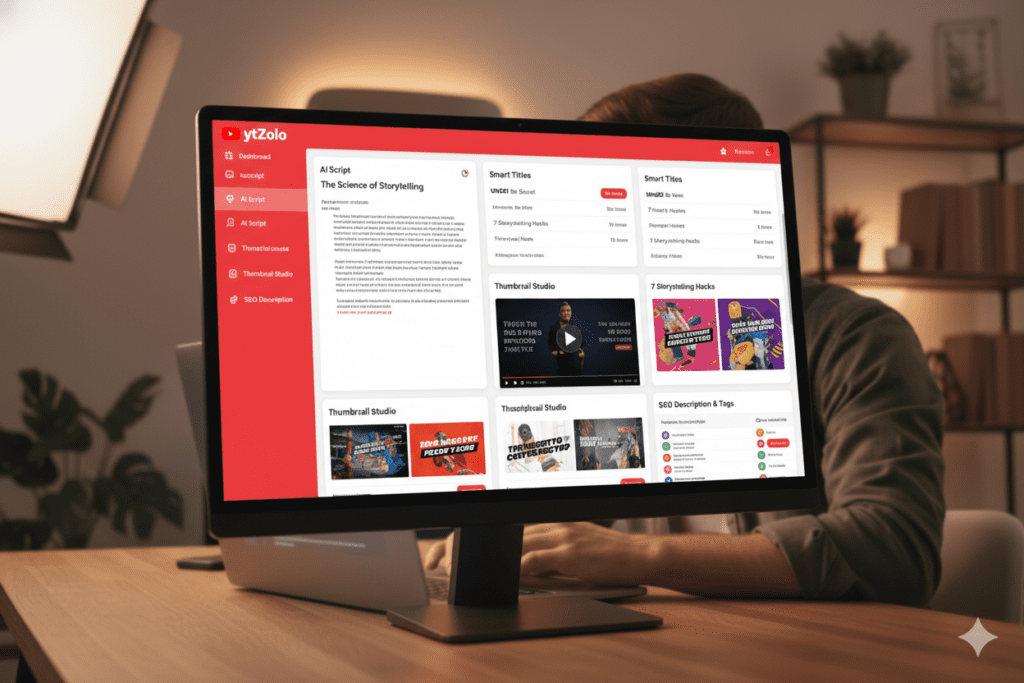
ytZolo isn’t just another AI writing tool. It’s a purpose-built YouTube growth platform that does everything ChatGPT does for scripting — and then handles the five other things ChatGPT can’t do at all.
Scripts Engineered for YouTube, Not Just Writing
While ChatGPT for YouTube scripts draws from general writing patterns, ytZolo’s AI is trained specifically on what works on YouTube. It understands hook psychology, open loops, retention mechanics, and the structural differences between a 60-second Short and a 15-minute deep-dive tutorial. Every script it generates is built on YouTube-native frameworks — not generic creative writing templates.
One Platform for Your Entire Content Workflow
With ytZolo, your script generation is the beginning of a complete content creation workflow — not the end of it. After generating your script, ytZolo immediately helps you build:
- An AI-optimized video title designed for maximum CTR
- A thumbnail concept analyzed for click-through performance
- An SEO-rich video description built around your target keywords
- The right tags to maximize search discoverability
Everything connects. Everything aligns. No jumping between five separate tools. No disconnected content strategy. Just one streamlined workflow that turns an idea into a fully optimized, ready-to-publish video.
No Prompt Engineering Required
One of the biggest friction points with ChatGPT for YouTube scripts is the prompting process. You need to know what to ask and how to ask it to get quality results. That’s a skill in itself — and it takes time to develop.
ytZolo removes that friction entirely. The platform is built with YouTube creators in mind, so the inputs are intuitive and creator-friendly. You don’t need to craft complex prompts. You just tell ytZolo what your video is about, and it handles the rest.
Built for Growth, Not Just Content Creation
Every feature inside ytZolo exists to serve one goal: helping your channel grow faster. That’s a fundamentally different design philosophy than ChatGPT for YouTube scripts, which is a general-purpose AI that you happen to use for video content.
For real creator strategies and examples of ytZolo in action, explore the ytZolo blog — it’s packed with proven frameworks for growing your channel with AI.
6. Why ytZolo Beats Every Other Tool
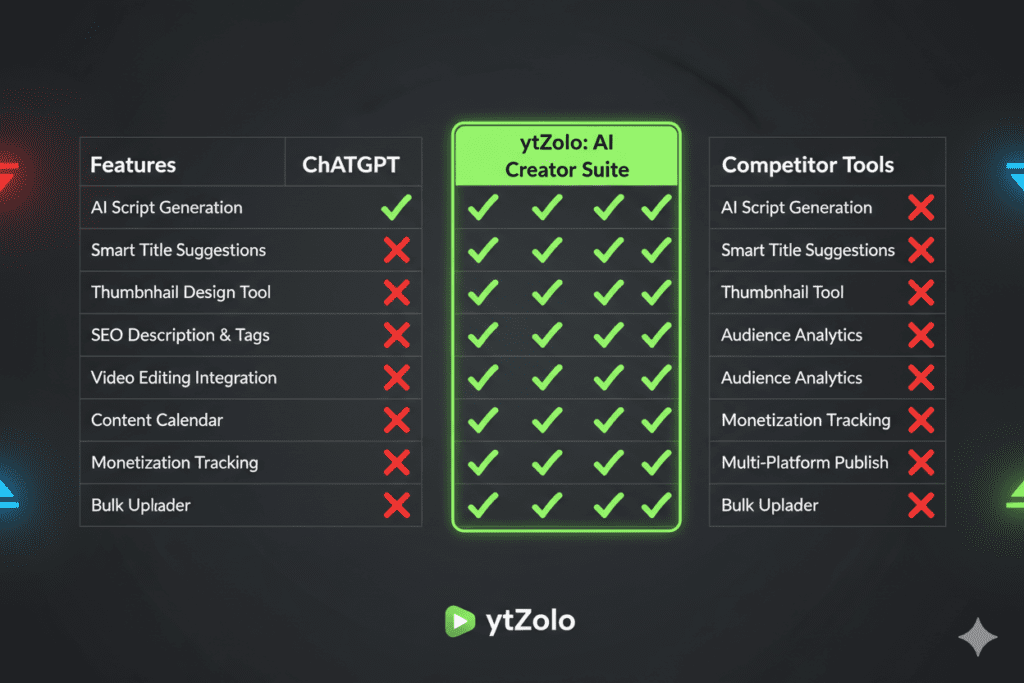
When you put every major ChatGPT for YouTube scripts alternative side by side, the comparison is clear.
| Feature | ytZolo | ChatGPT | vidIQ | Subscribr | Jasper |
|---|---|---|---|---|---|
| AI Script Generation | ✅ | ✅ | ✅ | ✅ | ✅ |
| YouTube-Specific AI Training | ✅ | ❌ | ✅ | ✅ | ❌ |
| No Prompt Engineering Needed | ✅ | ❌ | ✅ | ✅ | ❌ |
| AI Title Generator | ✅ | ❌ | ✅ | ❌ | ❌ |
| AI Thumbnail Optimization | ✅ | ❌ | Limited | ❌ | ❌ |
| AI Description + Tags | ✅ | ❌ | ✅ | ❌ | ❌ |
| All-in-One Content Workflow | ✅ | ❌ | ❌ | ❌ | ❌ |
| Retention Frameworks Built-In | ✅ | ❌ | ❌ | ✅ | ❌ |
| Accessible Free Features | ✅ | ✅ | Limited | Limited | Trial Only |
| Built Specifically for Growth | ✅ | ❌ | ❌ | ❌ | ❌ |
The pattern is obvious. ChatGPT handles the writing. vidIQ handles some analytics. Subscribr handles script analysis. Jasper handles general copy. Each tool solves one problem — and leaves you to stitch everything else together manually.
ytZolo solves the whole problem. Script, title, thumbnail, description, tags — one platform, one workflow, one growth strategy.
When creators talk about using ChatGPT for YouTube scripts, what they’re really describing is a workaround. ytZolo is the solution.
For more in-depth comparisons and creator success stories, head to the ytZolo blog.
7. Step-by-Step: How to Write a Viral YouTube Script With AI
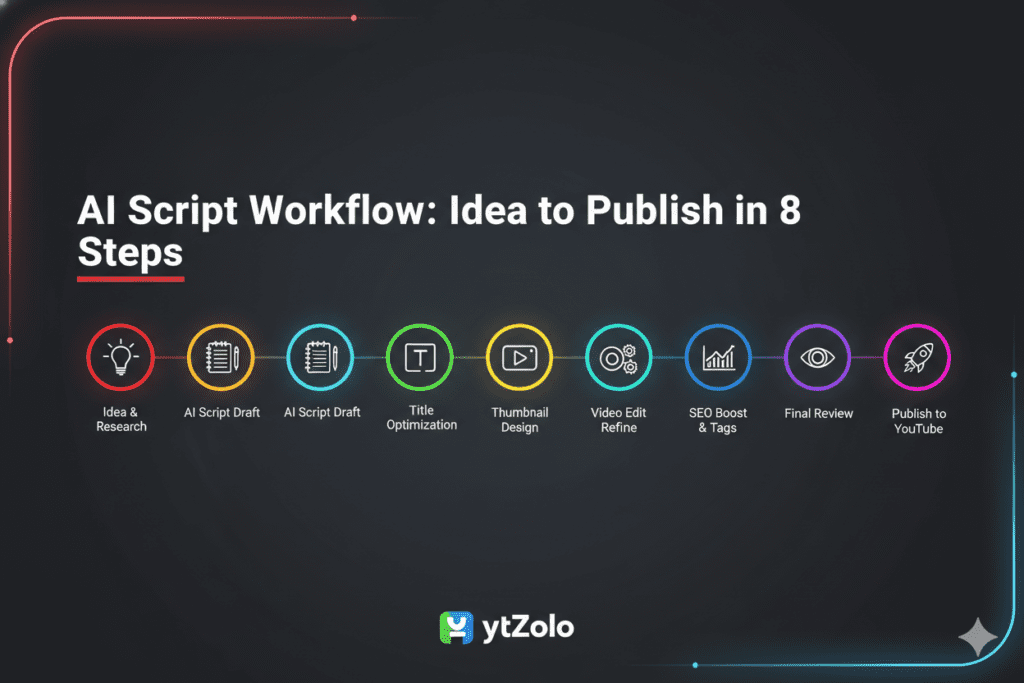
Whether you’re starting with ChatGPT for YouTube scripts or jumping straight to ytZolo, here’s the exact process top creators use to go from blank idea to camera-ready script — fast.
Step 1: Define Your Video With Precision
Before any AI tool touches your script, spend three minutes answering these questions:
- What specific problem or question does this video answer?
- Who is the exact viewer watching this? (age, experience level, goal)
- What do you want them to feel, know, or do after watching?
The more precisely you answer these, the better your AI output will be. Precision in = precision out.
Step 2: Choose Your Core Keyword
Every YouTube video targeting search growth needs a core keyword. Identify the phrase your ideal viewer is actually typing into YouTube’s search bar. Build your script around answering that search query better than anyone else currently ranking for it.
Step 3: Generate Your Script With ytZolo
Head to ytZolo and enter your video topic, audience description, tone, and target keyword. ytZolo’s AI will generate a complete script — hook, intro, main sections, transitions, and CTA — in under 60 seconds.
If you’re using ChatGPT for YouTube scripts instead, use the Full Script Prompt from Section 3 of this guide and include all four context details: topic, audience, tone, and target keyword.
Step 4: Evaluate the Hook First — Always
The first 15 to 30 seconds of your video are everything. Read your AI-generated hook out loud and ask:
- Does this make me want to keep watching?
- Is there a clear promise of value?
- Is there an emotional trigger — curiosity, urgency, or FOMO?
- Would I click away from this, or stay?
If the answer to any of those is no, regenerate or rewrite the hook before touching anything else.
Step 5: Inject Your Voice Into Every Section
This is the step that separates great AI-assisted videos from robotic ones. Go through each section and add:
- A personal story, real experience, or specific example
- Real data, stats, or case studies you’ve researched
- Your natural vocabulary — replace formal AI language with how you actually talk
- Niche-specific context the AI couldn’t know without you
The AI builds the architecture. You bring everything that makes your channel worth watching.
Step 6: Tighten Every Transition
Weak transitions are where viewers mentally check out — even when the content itself is great. Read every transition line and ask: does this create enough curiosity to pull the viewer into the next section? If not, add an open loop: a teased question or statement that only gets resolved later in the video.
Step 7: Finalize With ytZolo’s Full Content Stack
This is where ytZolo’s complete platform creates a compounding advantage. After locking in your script, use ytZolo to generate your video title, thumbnail concept, SEO description, and tags — all aligned with your script’s core message.
This unified content stack is what separates channels that grow predictably from channels that post and pray.
Step 8: Read Aloud — Then Film
Read your entire script out loud at filming pace before a single camera is turned on. Your ears will catch what your eyes missed — awkward phrasing, sentences too long to say in one breath, transitions that feel stiff. Fix those first. Then film.
8. Pro Tips to Make Any AI Script Sound Like You
The most common question about using ChatGPT for YouTube scripts — and AI scripting tools in general — is whether the output will sound authentic.
The answer: it depends entirely on what you do with it after the AI generates it.
Here’s how the best creators make every AI-assisted script sound unmistakably human:
- Use your real vocabulary. AI tends to write in formal, slightly elevated language. Read through every paragraph and swap out phrases you’d never actually say. If you say “pretty solid” in real life, don’t let the script say “notably impressive.”
- Open with a personal anecdote. Nothing signals authenticity faster than a real story from your life. Start your video with something that happened to you — something your AI script can’t generate because only you lived it.
- Break up long sentences. AI writing tools, including ChatGPT for YouTube scripts, sometimes produce multi-clause sentences that sound great on paper but are exhausting to say on camera. Cut them in half. Short sentences hit harder on video.
- Add real numbers and specifics. Replace vague AI phrases like “many creators” or “significant results” with actual data you’ve researched. Specificity builds credibility. Credibility builds trust. Trust builds subscribers.
- Use the script as a guide — not a teleprompter. The best delivery happens when you know your content deeply and speak naturally around it. Learn the script, then let the camera see that you’ve learned it — not that you’re reading it.
- Record a test take first. Film one complete run-through using the AI script as written. Watch it back. Circle every moment that feels stiff, unnatural, or “not you.” Rewrite only those moments. Your second take will feel dramatically more authentic.
- Adjust pacing to your niche. A finance education script needs slower, more measured delivery. A fitness motivation script needs high energy and punchy rhythm. Review your script’s sentence length and pacing to match the energy your specific audience expects.
According to Ahrefs’ YouTube SEO research, audience retention and watch time are YouTube’s top ranking factors. A script that’s both AI-optimized and authentically personalized gives you the best of both worlds — and the best possible chance at strong rankings.

FAQ: ChatGPT for YouTube Scripts
Q1: Can I really use ChatGPT for YouTube scripts for free?
Yes. The free version of ChatGPT is genuinely capable of generating full YouTube scripts from well-crafted prompts — no subscription required. However, free ChatGPT has usage limits and doesn’t include GPT-4’s improved quality. For creators who want YouTube-specific script generation with no prompt engineering needed, ytZolo offers accessible AI-powered scripting built specifically for YouTube growth — going well beyond what basic ChatGPT for YouTube scripts usage can achieve.
Q2: How do I make ChatGPT YouTube scripts sound less robotic?
The key is personalization after generation. Never publish an AI script without reading it out loud first and adjusting the language to match how you naturally speak. Add personal stories, replace formal language with your real vocabulary, break up long sentences, and insert specific real-world examples. The best results come from treating ChatGPT for YouTube scripts as a first draft — not a final product.
Q3: Will using ChatGPT for YouTube scripts hurt my channel’s authenticity?
No — when done correctly. YouTube doesn’t penalize AI-assisted content. What matters is whether your video provides genuine value to viewers. Creators who use ChatGPT for YouTube scripts as a structural starting point and then layer in their own voice, personality, and expertise consistently produce high-performing, authentic content. The AI handles the architecture; you supply the soul.
Q4: Is ChatGPT or ytZolo better for YouTube script writing?
For pure text generation with full creative control, ChatGPT for YouTube scripts is a powerful free option — if you’re skilled at prompting. But for creators who want YouTube-specific AI training, no prompting required, and a complete content workflow that includes titles, thumbnails, descriptions, and tags alongside scripts, ytZolo is the clear winner. It’s the difference between a general tool and a purpose-built growth platform.
Q5: What are the best ChatGPT prompts for YouTube scripts?
The most effective prompts for using ChatGPT for YouTube scripts include your video topic, target audience, preferred tone, video length, and target keyword — all in one prompt. Dedicated hook-generation prompts, retention mechanics prompts, and brand voice prompts (covered in Section 3 of this guide) consistently produce the strongest results. For creators who want to skip prompt engineering entirely, ytZolo automates this entire process with YouTube-native AI built into every output.
Conclusion: Beyond ChatGPT — The Growth Tool You Actually Need
Let’s give ChatGPT for YouTube scripts the credit it deserves.
It democratized AI-powered scripting for creators worldwide. It saved thousands of hours. It helped millions of videos get made that probably never would have been. Using ChatGPT for YouTube scripts is a genuine competitive advantage over the millions of creators who still write everything manually.
But here’s the honest truth: it was always a workaround, not a solution.
A growing YouTube channel needs more than great scripts. It needs optimized titles, high-converting thumbnails, SEO-rich descriptions, and the right tags — all aligned and working together as a unified content strategy. ChatGPT for YouTube scripts gives you one piece of that puzzle and leaves everything else to you.
ytZolo gives you the complete picture.
As the only all-in-one AI YouTube growth platform designed from the ground up for creators, ytZolo handles your scripts, titles, thumbnails, descriptions, and tags — all in one place, all in one workflow, all working together to maximize every video’s reach and performance.
The creators winning on YouTube in 2026 aren’t just using ChatGPT for YouTube scripts anymore. They’ve upgraded to a purpose-built growth tool that treats every video as a complete content strategy — not just a writing exercise.
You now know exactly how to use ChatGPT for YouTube scripts the right way. You know its limits. And you know the smarter, faster alternative that top creators are choosing.
The only question left is: how much longer are you going to let other channels pull ahead while you’re still stitching five tools together?
Start creating smarter, faster, and more viral YouTube content with ytZolo today.
Want more strategies for building a high-performance YouTube channel with AI? Explore creator guides, tool comparisons, and growth frameworks on the ytZolo blog.
External Resources:
- YouTube Creator Blog — Audience Retention & Algorithm Best Practices
- HubSpot — Video Marketing & AI Creator Statistics
- Ahrefs — YouTube SEO: The Complete Guide

