

Introduction
You just uploaded a YouTube video. Great title. Killer thumbnail. Solid description.
Then YouTube asks you for tags — and you freeze.
You type a few obvious ones, throw in some random keywords, and hit publish. Sound familiar?
Here’s the painful truth: most creators are leaving serious views on the table because they’re not using the right tags. Not because tags are some magical silver bullet — but because wrong or missing tags are a missed opportunity to give YouTube’s algorithm the context it needs to put your video in front of the right people.
And manually brainstorming tags every single upload? It’s tedious, time-consuming, and honestly, most people get it wrong anyway.
That’s exactly why using a video tag generator for YouTube free is one of the smartest things you can do for your channel. And in 2026, the best ones are powered by AI — doing in seconds what would take you 20 minutes of research.
In this guide, you’ll learn exactly how YouTube tags work, why the right AI tool makes all the difference, and why creators who are serious about growth are turning to ytZolo — the all-in-one AI YouTube growth platform — to handle their entire metadata strategy.
Let’s get into it.
Table of Contents
1. What Are YouTube Tags and Why Do They Still Matter?
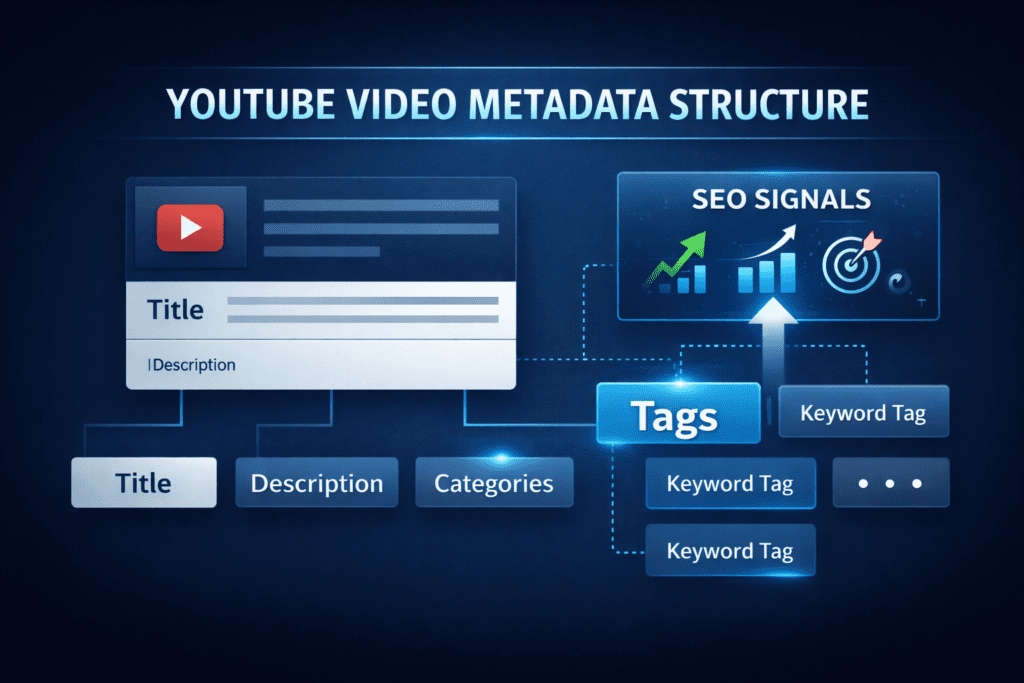
YouTube tags are hidden keywords you add to your video when you upload it. Viewers never see them. But YouTube’s algorithm reads every single one.
Think of them as behind-the-scenes signals you send directly to the algorithm. You’re telling YouTube with a video tag generator for youtube free: “This video is about this topic, this niche, and these search queries.”
Now, before you ask — yes, tags still matter in 2026. Just not in the same way they used to.
YouTube has made it clear that tags have a supporting role in video SEO. They help confirm context, especially when your title or description isn’t 100% obvious about the topic. They also help YouTube surface your video for keyword variations and misspellings your audience might be typing into the search bar.
Here’s the bigger picture. Tags are one piece of a larger SEO puzzle that includes your title, description, thumbnail, watch time, and click-through rate. Using a video tag generator for YouTube free helps you nail that one piece quickly — so you can focus on the pieces that require your creative energy.
According to the YouTube Creator Blog, accurate metadata — including tags — helps the platform match your video to the viewers most likely to enjoy it. When your tags are on point, your video reaches the right people. When they’re off, you’re invisible.
The creators growing the fastest right now are optimizing everything — including their tags. A reliable video tag generator for YouTube free ensures that happens consistently, with zero guesswork.
2. The Real Problem with Manual Tag Research
Let’s talk about what manual tag research actually costs you.
It kills your time. Properly researching YouTube tags — checking search volume, analyzing competitor videos, finding keyword variations — takes anywhere from 15 to 30 minutes per video. Upload twice a week, and you’re burning an hour or more every week on just tags.
It’s wildly inconsistent. Some uploads you spend time on your tags and nail them. Other times you’re tired, rushing, and you slap on five generic keywords. That inconsistency signals low quality to YouTube’s algorithm, which means inconsistent discoverability.
You don’t know what you don’t know. The most valuable tags are often the ones you’d never think of on your own — niche long-tail keywords, common misspellings of your topic, related phrases your audience searches but you’ve never considered. Manual brainstorming misses these every time.
You’re guessing, not optimizing. Without data behind your tags, you’re essentially throwing darts in the dark. Some might land. Most won’t.
Manual methods are outdated. Top creators have already moved on. They’re using video tag generator for YouTube free tools powered by AI to research, compile, and optimize their tags in under 60 seconds — and it shows in their analytics.
If your competitors are using AI-powered tools and you’re still doing it by hand, you’re already at a disadvantage. That gap compounds with every upload.

3. What Is a Video Tag Generator for YouTube Free?
A video tag generator for YouTube free is exactly what it sounds like — a tool that automatically produces a list of optimized, relevant tags for your YouTube video, at no cost.
You enter your video title or topic, and the tool generates a curated set of tags designed to help your video rank in YouTube search results and appear in suggested video feeds.
The best free video tag generator for YouTube tools don’t just throw random keywords at you. They analyze:
- Search demand — What terms are people actually typing into YouTube
- Competitor tags — What keywords top-ranking videos in your niche are using
- Keyword variations — Related terms, synonyms, and long-tail phrases your audience searches
- Algorithm signals — Tags that help YouTube categorize your content correctly
In 2026, the most powerful video tag generator for YouTube free tools are AI-driven. They go far beyond simple autocomplete suggestions. They understand content context, search intent, and YouTube’s current ranking signals — and they put that intelligence to work in seconds.
The best part? You don’t need to be an SEO expert to use one. You just need your video title. The AI handles the rest.

4. How AI-Powered Tag Generators Work
Modern AI tag generators — especially those built into platforms like ytZolo — are built on large language models trained specifically on YouTube data.
Here’s what happens under the hood when you use a great video tag generator for YouTube free:
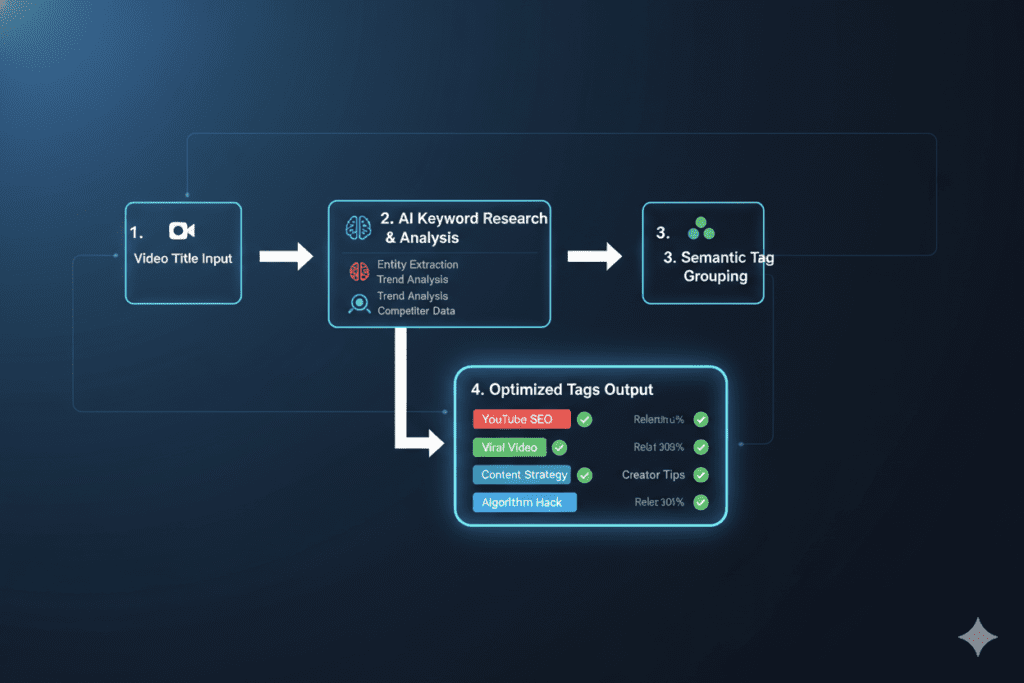
Step 1 — Content Analysis You input your video title, topic, or a short description. The AI identifies the core subject, subtopics, and related themes of your content.
Step 2 — Keyword Intelligence The AI cross-references its training data against real YouTube search patterns, trending topics in your niche, and high-performing videos to surface the most relevant keywords.
Step 3 — Tag Structuring The AI organizes tags by importance — leading with your exact primary keyword, followed by related phrases, long-tail variations, and category tags. This structure matters because YouTube weights your first few tags more heavily.
Step 4 — Optimization Checks A quality AI tool ensures you’re within YouTube’s 500-character tag limit, avoids repetition, and balances broad vs. niche tags for maximum reach.
Step 5 — Output You get a ready-to-copy tag list. Click, paste, and publish — in under a minute.
What makes ytZolo’s video tag generator for youtube free different is that the AI isn’t working in isolation. It generates your tags in context with your title, description, and video content — making sure every part of your metadata works together as a unified SEO strategy.
That’s the difference between a free video tag generator for YouTube that gives you a list — and one that actually helps you grow.
5. Key Features of the Best Free Video Tag Generator for YouTube
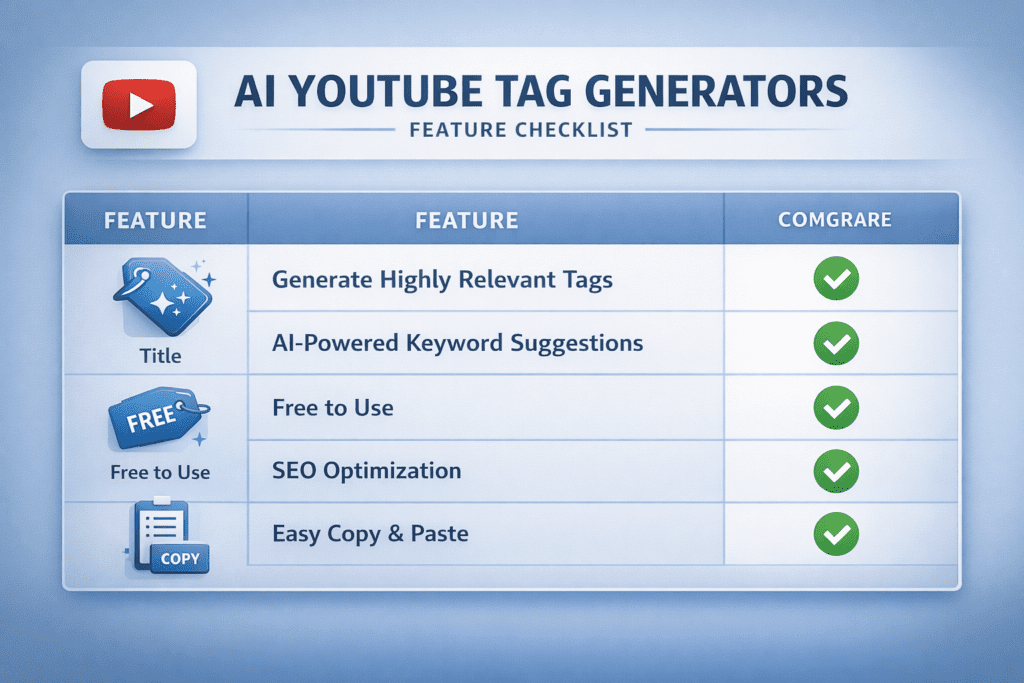
Not every free video tag generator for YouTube is worth your time. Here’s what separates the great tools from the mediocre ones:
✅ AI-Powered Tag Suggestions The tool should use real AI — not just a keyword database — to generate tags based on current search trends and your specific content. The difference in quality is night and day.
✅ Primary Keyword First Your most important tag (your main keyword) should always appear first in the list. YouTube weights earlier tags more heavily. Any video tag generator for youtube free that ignores this is leaving SEO value on the table.
✅ Long-Tail Keyword Coverage The best tools include a mix of broad tags and specific long-tail phrases. Long-tail tags have less competition and attract highly targeted viewers — exactly the audience most likely to watch, engage, and subscribe.
✅ Misspelling and Variation Coverage A large percentage of YouTube searches contain typos or alternate phrasings. Quality AI tools account for this and include smart variations in your tag list automatically.
✅ Character Count Awareness YouTube allows up to 500 characters for tags. The best tools show you exactly how many characters you’re using and keep you in the optimal range.
✅ Niche-Specific Relevance Generic tools generate generic tags. The best video tag generator for YouTube free tools understand your niche and generate tags that match your actual audience — not just the topic in the broadest sense.
✅ Integration with Full Metadata Suite The most powerful tools don’t stop at tags. They connect tag generation to your title, description, and thumbnail strategy — creating a fully optimized metadata package with one workflow.
ytZolo checks every single box on this list. And it goes further by combining your tag generation with AI title writing, description generation, script creation, and thumbnail ideation — all under one roof.
6. Why ytZolo Is the Best Video Tag Generator for YouTube Free
There are plenty of tools out there that call themselves a video tag generator for YouTube free. Most of them give you a generic keyword list and call it a day.
ytZolo is built differently. It’s an all-in-one AI YouTube growth platform — and its tag generator is just one powerful piece of a much bigger engine.
Here’s why creators are choosing ytZolo over every other free video tag generator for YouTube:
Tags That Are Built for Your Specific Video
Most tag generators take your title and return a generic list of keywords anyone could have generated. ytZolo’s AI actually understands the context of your video — your niche, your audience, your content angle — and produces tags that are laser-targeted to your specific content.
The result: tags that tell YouTube’s algorithm exactly what your video is about, instead of confusing it with mismatched keywords.
Part of a Complete YouTube Metadata System
This is where ytZolo truly separates itself. When you generate tags with ytZolo, those tags work in harmony with the rest of your metadata — your AI-generated title, your SEO-optimized description, your hashtag recommendations.
Why does this matter? Because YouTube’s algorithm doesn’t evaluate each metadata element in isolation. It reads everything together. Consistent, aligned metadata across title, description, and tags from a video tag generator for youtube free sends a powerful, unified signal that helps your video rank higher and get recommended more often.
Full Suite: Not Just Tags
ytZolo generates everything you need to publish a fully optimized video — in one workflow:
- 🏷️ AI Video Tags — Relevant, keyword-rich, structured for the algorithm
- ✍️ AI Video Titles — Click-optimized, SEO-driven, built to go viral
- 📝 AI Video Descriptions — Long-form, keyword-rich, structured for ranking
- 🎬 AI Video Scripts — Full scripts from your topic to final talking points
- 🖼️ AI Thumbnail Ideas — Data-backed concepts built to maximize CTR
That’s five tools in one. No juggling between platforms. No wasted time.
Built for Viral Content, Not Just SEO
ytZolo isn’t just about ranking. It’s about growth. The platform is designed to help you create content that the algorithm loves — and that real people actually click, watch, and share.
Using a video tag generator for YouTube free is step one. Using ytZolo means your tags, title, description, script, and thumbnail are all aligned toward one goal: more views, more subscribers, more growth.
Check out the ytZolo blog for creator guides, YouTube SEO deep dives, and growth strategies that are working right now in 2026.

7. Why ytZolo Is Better Than Other Tools
Let’s put the tools head-to-head. Here’s how ytZolo stacks up against the competition when it comes to using a video tag generator for YouTube free:
| Feature | ytZolo | RapidTags | vidIQ | TubeBuddy | Keyword Tool |
|---|---|---|---|---|---|
| AI-Powered Tag Generation | ✅ Context-aware AI | ⚠️ Basic AI | ✅ Available | ✅ Available | ⚠️ Autocomplete-based |
| Long-Tail Keyword Suggestions | ✅ Deep coverage | ⚠️ Limited | ✅ Available | ✅ Available | ✅ Available |
| Primary Keyword First Ordering | ✅ Automatic | ⚠️ Manual | ⚠️ Manual | ⚠️ Manual | ⚠️ Manual |
| AI Title Generator | ✅ Full viral-focused | ❌ No | ✅ Available | ✅ Available | ❌ No |
| AI Description Generator | ✅ SEO-optimized | ❌ No | ⚠️ Basic | ⚠️ Basic | ❌ No |
| AI Script Writer | ✅ Full scripts | ❌ No | ❌ No | ❌ No | ❌ No |
| AI Thumbnail Generator | ✅ Click-optimized | ❌ No | ⚠️ Limited | ⚠️ A/B only | ❌ No |
| All-in-One YouTube Growth | ✅ Core platform | ❌ No | ⚠️ Partial | ⚠️ Partial | ❌ No |
| Built for Viral Growth | ✅ Yes | ❌ No | ⚠️ Analytics focus | ⚠️ SEO focus | ❌ No |
The verdict:
Tools like RapidTags and Keyword Tool are fine for a quick tag list. vidIQ and TubeBuddy are solid analytics platforms. But none of them are built to handle your entire YouTube content and SEO workflow in one place.
ytZolo is the only tool that combines AI tags, titles, descriptions, scripts, and thumbnail creation — all optimized for YouTube growth, all in a single platform.
If you want the best video tag generator for YouTube free and a complete content creation system, there’s one clear answer.

8. Step-by-Step: How to Generate Perfect YouTube Tags with ytZolo
Ready to stop guessing and start optimizing? Here’s exactly how to use ytZolo as your video tag generator for YouTube free:
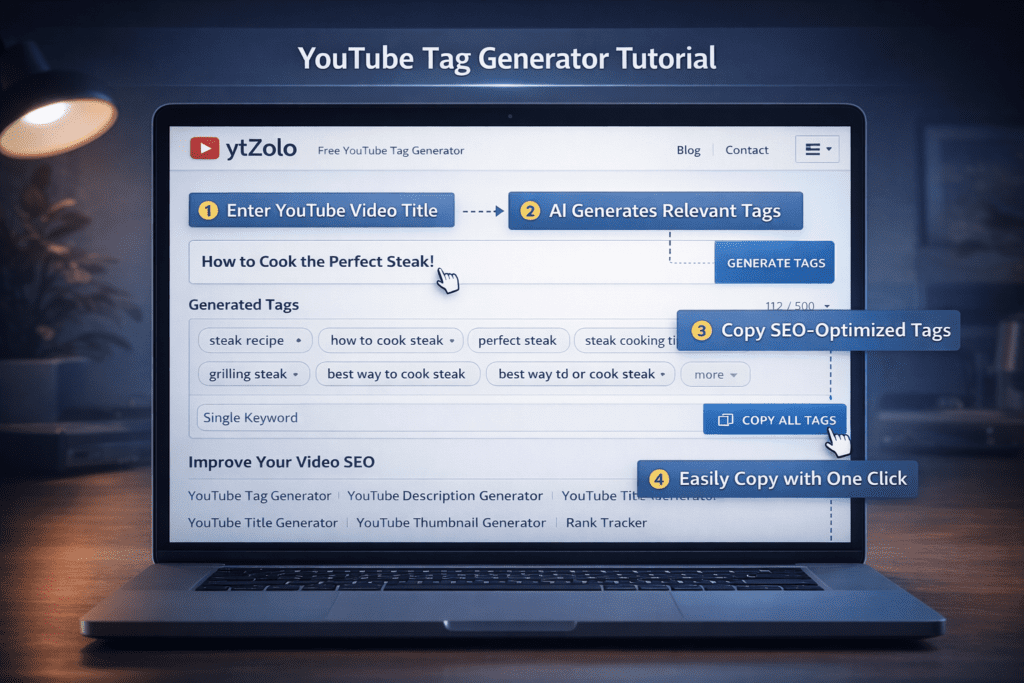
Step 1: Head to ytZolo Go to ytzolo.com and create your free account. No credit card needed to get started.
Step 2: Enter Your Video Title Type in your video title — or use ytZolo’s AI title generator to create one from scratch before you generate tags.
Step 3: Add Your Topic and Niche Give ytZolo a bit more context about your video. The more information you provide, the more precise and targeted your tags will be.
Step 4: Hit Generate Click the generate button. Within seconds, ytZolo’s AI produces a full, optimized tag list — structured with your primary keyword first, followed by long-tail phrases and related keywords.
Step 5: Review and Customize Scan through the generated tags. Remove anything that doesn’t fit your content. Add any hyper-specific terms unique to your niche or community. ytZolo shows your character count in real time so you stay within YouTube’s 500-character limit.
Step 6: Generate the Rest of Your Metadata While you’re there, use ytZolo to generate your video description, title (if you haven’t already), and thumbnail ideas. Get your entire metadata package done in one session — in under 5 minutes.
Step 7: Paste into YouTube Studio and Publish Copy your tags directly into YouTube Studio’s tag field. You’re done. What used to take 20+ minutes of manual research now takes less than five.
9. YouTube Tag Best Practices for 2026
Using a video tag generator for YouTube free gives you a strong starting point. These best practices will help you get every drop of SEO value out of your tags:
🎯 Lead with Your Exact Primary Keyword Your first tag should be the exact phrase you want your video to rank for. YouTube gives slightly more algorithmic weight to the tags at the beginning of your list. Don’t waste that first spot on anything generic.
📏 Aim for 10–20 High-Quality Tags YouTube allows up to 500 characters. You don’t need to use all of them. Focus on quality over quantity — 10 to 20 highly relevant, strategically chosen tags outperform 50 random ones every time.
🔀 Mix Broad and Long-Tail Tags Broad tags (e.g., “YouTube SEO”) cast a wide net. Long-tail tags (e.g., “how to rank YouTube videos in 2026”) target specific, lower-competition searches. A balanced mix maximizes both reach and relevance.
🔤 Include Common Misspellings A surprisingly large number of YouTube searches contain typos. If your topic has a commonly misspelled word, include that spelling as a tag. It’s a small thing that can capture extra traffic with zero extra effort.
🔗 Keep Tags Consistent with Your Title and Description Your tags should reinforce the keywords in your title and description — not contradict them. Consistent metadata sends a unified signal to YouTube’s algorithm, which improves your overall ranking and recommendation rate.
🚫 Never Use Misleading or Irrelevant Tags Tagging your video with popular but unrelated topics (like adding a major creator’s name when your video has nothing to do with them) doesn’t just waste tag space — it can actually hurt your performance. YouTube penalizes misleading metadata.
🔄 Update Old Video Tags Go back and refresh the tags on your older videos using AI. Updated metadata can revive underperforming videos and get them ranking again for new search terms. This is one of the most underrated growth tactics for existing channels.
📊 Track What’s Working After publishing, check YouTube Studio to see which search queries are driving traffic to your video. Use those insights to refine your tag strategy for future uploads.
For more YouTube growth tactics and content optimization strategies, explore the ytZolo blog — it’s packed with actionable advice for creators at every stage.

10. Frequently Asked Questions
Q1: What is a video tag generator for YouTube free?
A video tag generator for YouTube free is an online tool that automatically creates a list of optimized keywords (tags) for your YouTube video at no cost. You input your video title or topic, and the tool generates relevant, SEO-friendly tags designed to help your video appear in YouTube search results and suggested video feeds. AI-powered tools like ytZolo go further by generating tags alongside titles, descriptions, and thumbnail ideas in one platform.
Q2: Do YouTube tags actually help with SEO in 2026?
Yes — but their role has changed. YouTube tags are no longer the dominant ranking factor they once were. Today, they serve as supporting signals that help YouTube confirm the context of your video, especially when your title or description leaves any ambiguity. Tags are most valuable for capturing keyword variations, common misspellings, and related search phrases. They work best as part of a complete metadata strategy that includes a strong title, description, and high-quality content.
Q3: How many tags should I use on a YouTube video?
YouTube allows up to 500 characters for tags. Most experts recommend using 10 to 20 highly relevant tags rather than maxing out the character limit with lower-quality keywords. Quality beats quantity every time. Lead with your primary keyword as your first tag, follow with long-tail variations, and finish with broader category tags. Using a video tag generator for YouTube free like ytZolo ensures every tag is purposeful and strategically structured.
Q4: Can I use a free video tag generator for YouTube Shorts?
Yes. The same tag generation principles apply to YouTube Shorts as to long-form videos. Use 3 to 5 specific, highly relevant tags that describe your Short’s exact topic. Include trending niche keywords, and avoid generic tags like “shorts” or “viral” since YouTube already categorizes your content as a Short. AI tools like ytZolo can generate optimized tags for both Shorts and long-form videos in the same workflow.
Q5: Why is ytZolo the best free video tag generator for YouTube?
ytZolo stands out because it’s not just a tag generator — it’s a complete AI YouTube growth platform. While other free tools produce a basic keyword list, ytZolo generates context-aware tags that align with your specific video content and niche. More importantly, it integrates tag generation with AI-powered titles, descriptions, scripts, and thumbnail creation — so your entire metadata package is optimized in one workflow. For creators who want to grow faster, rank higher, and spend less time on manual optimization, ytZolo is the clear choice.
Conclusion
Here’s the bottom line.
Tags alone won’t make your channel explode. But consistently using the right tags — generated by AI, structured correctly, and aligned with your full metadata — gives your videos a real, compounding advantage every time you publish.
The creators winning on YouTube right now aren’t just making better videos. They’re optimizing smarter. They’re using a video tag generator for YouTube free powered by AI so they can spend less time on tedious research and more time on what matters: creating content people actually want to watch.
Every upload without optimized tags is a missed opportunity. Every upload where you guessed instead of knowing is a video that could have ranked higher, reached more people, and grown your channel faster.
You now know exactly what to do.
ytZolo gives you everything you need — AI-powered tags, viral titles, SEO descriptions, full video scripts, and thumbnail ideas — all in one platform, all working together to turn every upload into an optimized, growth-driving piece of content.
Stop guessing. Stop wasting time on manual research. Stop leaving views on the table.
Start creating smarter, faster, and more viral YouTube content with ytZolo today.
👉 Get started free at ytZolo.com
Helpful Resources:

