
Introduction: The Hidden Reason Your Videos Aren’t Getting Views
You’ve spent hours filming. Your editing is clean. Your thumbnail looks great.
But your video just… sits there. No views. No clicks. No growth.
Here’s the painful truth — your YouTube description might be killing your channel.
Most creators treat their video description like an afterthought. They slap in a sentence or two, maybe copy-paste their title, and hit publish. Then they wonder why the YouTube algorithm keeps ignoring them.
This is where your YouTube description keyword guide becomes your most powerful growth weapon.
Your video description is one of the most underutilized SEO tools on the entire platform. YouTube’s algorithm reads every word. Google reads every word. And the right keywords in the right places can completely transform how many people discover your content.
In this complete YouTube description keyword guide, you’ll learn exactly how to write descriptions that rank, convert, and grow your subscriber count — even if you’re starting from zero. Plus, you’ll discover how tools like ytZolo are helping thousands of creators automate the entire process and save hours every week.
Let’s dive in.
Table of Contents
What Is a YouTube Description and Why Does It Matter?
A YouTube description is the text block that appears below every video. You get up to 5,000 characters to work with.
That’s a LOT of real estate most creators completely waste.
Your description does three critical things for your channel:
- Tells YouTube what your video is about so it can rank it correctly in search results
- Tells viewers why they should watch so they click instead of scroll
- Gives Google extra signals to surface your video in web search results too
Think of your description as a mini webpage for every single video you upload. The more intelligently you optimize it with the right keywords, the more chances you have of being discovered by your ideal audience.
A strong YouTube description keyword guide isn’t just about stuffing in terms. It’s about strategic placement, natural language, and giving both the algorithm and real humans exactly what they’re looking for.

How YouTube Description Keywords Actually Work
YouTube is the second-largest search engine in the world with over 2.85 billion monthly active users. Every time someone types a query into that search bar, YouTube’s algorithm scans thousands of videos to decide which ones match best.
Keywords in your description are one of the primary signals it uses.
Here’s how the process works:
- A viewer types a search query — like “how to grow on YouTube fast”
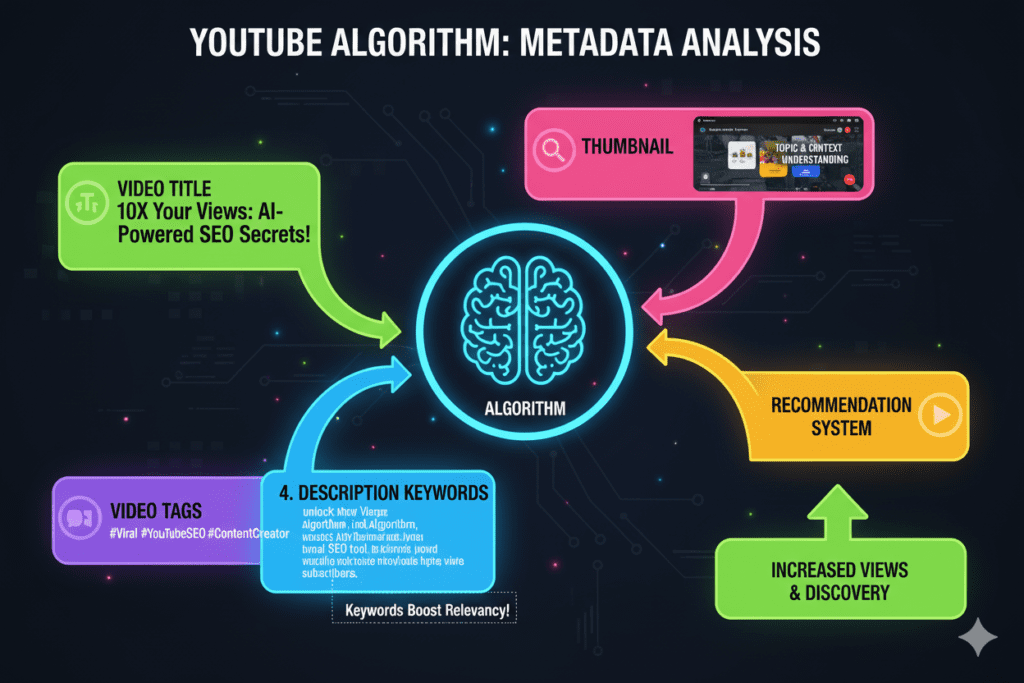
- YouTube’s algorithm scans metadata — including titles, descriptions, and tags
- It ranks videos based on keyword relevance + engagement signals
- The most optimized videos show up at the top
Without the right YouTube description keywords, your video is essentially invisible. It doesn’t matter how good your content is. If YouTube can’t understand what your video is about, it won’t recommend it to anyone.
According to YouTube’s Creator Academy, your description helps the algorithm match your content to what real viewers are actively searching for. That’s not optional advice — it’s the foundation of video discoverability.
The YouTube Description Keyword Guide: Step-by-Step Framework
Ready to write descriptions that actually rank? Here’s the full YouTube description keyword guide framework used by top-performing creators.
Step 1: Identify Your Primary Keyword
Before you write a single word, you need your main keyword. This is the exact phrase your ideal viewer would type into YouTube to find your video.
Examples:
- “how to lose weight fast for beginners”
- “best budget microphone for YouTube”
- “vlog editing tips for beginners”
Your primary keyword should appear in the first 25 words of your description. This is crucial. YouTube and Google both read that opening section first.
Step 2: Find 3–5 Secondary Keywords
Secondary keywords are related phrases that support your main topic. They help YouTube understand the full context of your video.
If your primary keyword is “YouTube description keyword guide,” your secondary keywords might include:
- YouTube SEO description tips
- how to write a YouTube description
- video description optimization
- YouTube search ranking keywords
- YouTube metadata strategy
Step 3: Map LSI and Semantic Keywords
LSI (Latent Semantic Indexing) keywords are words and phrases that naturally appear alongside your main topic. They signal depth and relevance to the algorithm.
For a video about YouTube descriptions, LSI keywords include: video metadata, search visibility, video tags, content discoverability, YouTube Studio, watch time, click-through rate.
Step 4: Write Naturally First, Optimize Second
Write your description like you’re talking to a friend. Make it genuinely helpful. Then go back and weave in your keywords where they fit naturally.
Never force keywords. If your description reads like a robot wrote it, viewers will bounce — and that kills your watch time, which tanks your rankings.

How to Find the Best Keywords for Your YouTube Description
Finding the right YouTube description keywords doesn’t have to be complicated. Here are the most effective methods creators use in 2025.
YouTube Autocomplete (Free & Powerful)
Start typing your topic into YouTube’s search bar. The suggestions that drop down are real searches from real people. These autocomplete terms are pure keyword gold.
Example: Type “how to grow on YouTube” and you’ll see suggestions like:
- how to grow on YouTube fast
- how to grow on YouTube from 0
- how to grow on YouTube without showing your face
Every one of those is a potential keyword for your description.
Google Trends for YouTube
Google Trends has a YouTube search filter. Use it to compare keyword popularity over time. You want keywords with consistent or rising interest — not ones that have already peaked.
Competitor Analysis
Look at the top-ranking videos in your niche. Study their descriptions carefully. What keywords keep showing up? What phrases do all the top creators use? That’s your roadmap.
AI-Powered Keyword Research with ytZolo
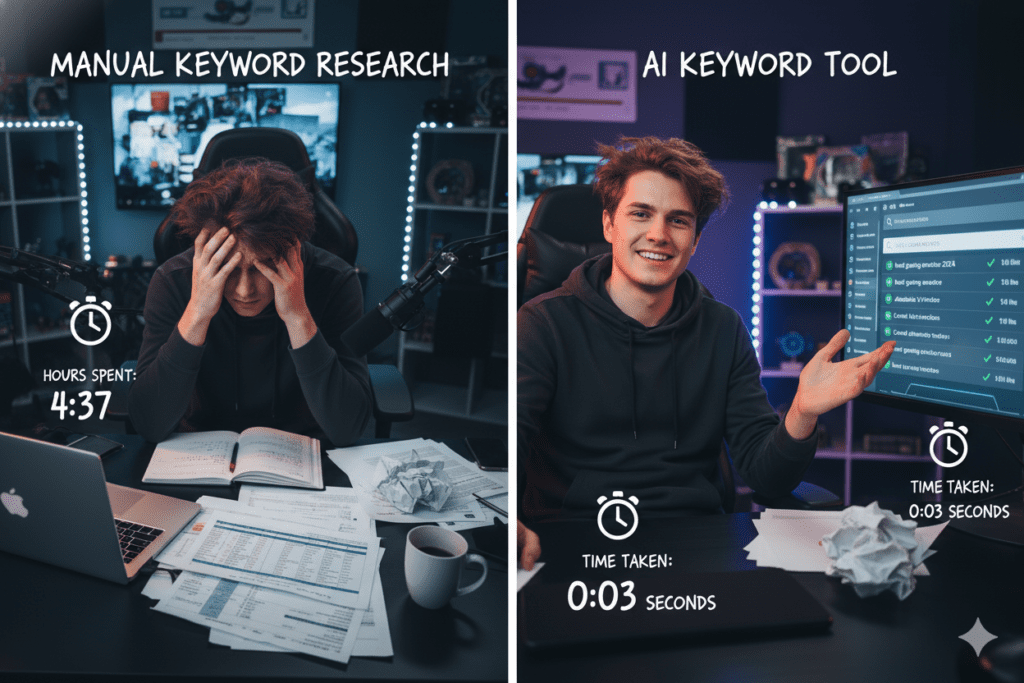
The fastest and most accurate way to find YouTube description keywords in 2025 is using AI. ytZolo analyzes your video topic and instantly generates a complete set of optimized keywords — primary terms, long-tail variations, semantic phrases, and trending tags.
What used to take 2–3 hours of manual research now takes about 30 seconds. Creators who use ytZolo’s keyword feature consistently report higher search rankings and more organic discovery. Check out the ytZolo blog for deep-dive guides on every part of YouTube SEO.

Where to Place Keywords in Your YouTube Description
Knowing your keywords is only half the battle. WHERE you place them matters just as much.
Here’s the exact placement strategy from this YouTube description keyword guide:
The First 2–3 Sentences (Critical Zone)
This is the most important section of your entire description. YouTube and Google both prioritize these opening lines when indexing your video.
Always include:
- Your primary keyword in the first 25 words
- A compelling reason for viewers to keep watching
- A natural, readable sentence (not forced keyword stuffing)
Example opening: “In this complete YouTube description keyword guide, I’m breaking down exactly how to write video descriptions that rank on YouTube and Google — even if you’re brand new to SEO.”
The Middle Section (Context Zone)
Use this section to expand on your video’s topic. Include your secondary keywords and LSI terms naturally as you summarize what viewers will learn.
Add timestamps here if your video is longer than 5 minutes. Timestamps improve user experience, increase watch time, and give YouTube more keyword-rich text to index.
The Bottom Section (Value-Add Zone)
Use the final section of your description for:
- Links to related videos or playlists
- Your social media profiles
- A call-to-action (subscribe, comment, share)
- 2–3 relevant hashtags
Keep your hashtags focused. YouTube recommends using 3–5 hashtags max. More than that can actually hurt your visibility.

The Anatomy of a Perfect YouTube Description
Let’s break down what a high-performing YouTube description actually looks like — using this YouTube description keyword guide as a framework.
Section 1: The Hook (First 150 characters)
This is what viewers see before clicking “Show More.” It needs to grab attention immediately.
✅ Include your primary keyword ✅ Create curiosity or promise value ✅ Keep it under 150 characters for full visibility
Section 2: The Summary (150–500 characters)
Expand on what the video covers. Weave in your secondary keywords. Write for humans, not just algorithms.
✅ Mention 2–3 key topics you cover ✅ Include long-tail variations of your keyword ✅ Use short, punchy sentences
Section 3: Timestamps (Optional but Powerful)
For videos over 5 minutes, timestamps dramatically improve user experience and average watch time.
Format: 0:00 – Intro / 1:45 – Keyword Research Methods / 5:20 – Placing Keywords Correctly
Section 4: Resource Links
Add relevant links — your website, related videos, tools you mention, or affiliate links. This signals to YouTube that your description is genuinely useful.
Section 5: Call to Action + Hashtags
End with a simple, clear CTA. Ask viewers to subscribe, like, or check out another video. Add 3–5 relevant hashtags on the final line.

Common YouTube Description Mistakes That Kill Your Rankings
Even experienced creators make these mistakes. If you’re doing any of these, your YouTube description keyword strategy is working against you.
❌ Mistake #1: Leaving the Description Blank or Too Short
A blank description is invisible to the algorithm. YouTube has no idea what your video is about — so it won’t recommend it to anyone.
Aim for 250–500 words minimum in every description. Quality over quantity, but don’t leave it empty.
❌ Mistake #2: Keyword Stuffing
Repeating your keyword 20 times in a single paragraph doesn’t help. It actually flags your content as spam and can result in penalties from YouTube.
Use your primary keyword 2–4 times naturally. Let your secondary and semantic keywords do the rest of the heavy lifting.
❌ Mistake #3: Copying Your Title Word-for-Word
Your description should complement your title, not repeat it. Use different keyword variations to expand your search coverage, not duplicate it.
❌ Mistake #4: Generic Descriptions for Every Video
Copy-pasting the same boilerplate description to every video signals low effort to the algorithm. Each video deserves a unique, tailored description with its own keyword strategy.
❌ Mistake #5: Ignoring the First Line
The first line of your description is seen by viewers before they click “Show More.” If it’s boring or generic, they’ll assume your content is too.
Make that first line count every single time.

Why Manual Keyword Research Is Outdated (And What to Do Instead)
Here’s something most YouTube gurus won’t tell you.
Manual keyword research worked well in 2020. In 2025, it’s holding you back.
The YouTube search landscape changes constantly. Trending keywords shift daily. Competition levels fluctuate. What ranked 6 months ago might be oversaturated today.
Doing manual keyword research for every video means:
- Hours of time wasted every single week
- Guessing at keyword difficulty and search volume
- Missing trending opportunities because you’re always behind
- Inconsistent results because your data is always slightly outdated
According to research published on HubSpot’s Marketing Blog, over 64% of marketers now use AI tools to speed up content production — and YouTube creators are no exception.
The smartest creators in 2025 are using AI to automate the tedious work. And that’s where ytZolo comes in as a complete game-changer.
ytZolo’s AI-powered keyword engine analyzes your video topic in real time, pulls current search trends, maps semantic relationships, and delivers a complete, optimized keyword strategy for your description in seconds.
You stop guessing. You start ranking.
Why ytZolo Is Better Than Other YouTube SEO Tools
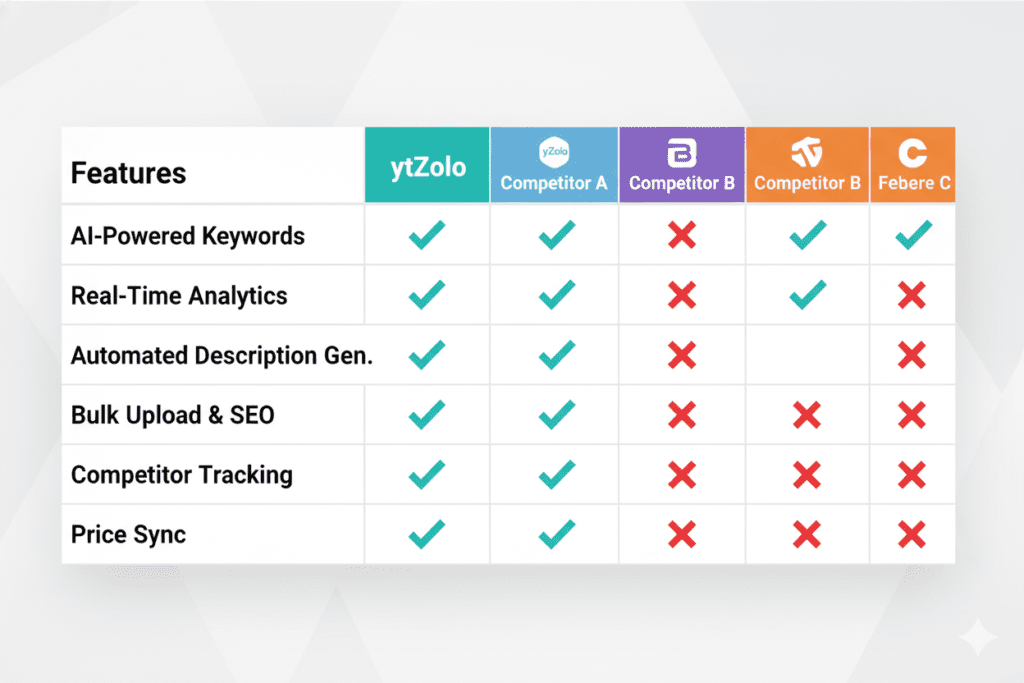
There are plenty of YouTube SEO tools out there. TubeBuddy. VidIQ. Morningfame. ChatGPT. So why do serious creators keep choosing ytZolo?
The answer is simple: ytZolo was built exclusively for YouTube creators who want to grow faster.
ytZolo vs. TubeBuddy
TubeBuddy is a browser extension with solid keyword data. But it’s primarily an analytics tool — it shows you numbers and leaves the actual optimization work to you.
ytZolo doesn’t just show you data. It creates your content for you. Description, tags, title, thumbnail, script — all optimized and ready to use in minutes.
ytZolo vs. VidIQ
VidIQ is great for competitor analysis and trend spotting. But like TubeBuddy, it’s a data dashboard, not a creation engine.
ytZolo takes that data and turns it into ready-to-publish content. That’s not a small difference — it’s the difference between knowing what to do and actually doing it.
ytZolo vs. Generic AI Tools (ChatGPT, Jasper)
Generic AI tools are powerful writers. But they don’t understand YouTube-specific needs.
They don’t know what makes a description algorithm-friendly. They don’t understand keyword density for YouTube. They weren’t trained on viral content patterns.
ytZolo was designed from the ground up for YouTube creators — and that specialization shows in the results.
What Makes ytZolo the Best Choice:
- ✅ All-in-one platform — titles, scripts, descriptions, tags, and thumbnails in one place
- ✅ YouTube-specific AI — trained on what actually performs on the platform
- ✅ Real-time trend intelligence — keywords based on current search data, not outdated training sets
- ✅ Niche-aware optimization — understands the difference between a gaming channel and a finance channel
- ✅ Speed — complete video metadata in under 2 minutes
- ✅ Built for growth — every feature is designed to maximize views, clicks, and subscribers
Whether you’re writing your YouTube description keywords, generating viral titles, designing click-worthy thumbnails, or scripting your next video, ytZolo handles it all. Visit ytzolo.com to see why thousands of creators are making the switch.
Actionable Steps to Optimize Your Descriptions Starting Today
Let’s make this practical. Here’s your action plan for implementing this YouTube description keyword guide right now.
✅ Step 1: Audit Your Last 10 Videos
Go through your 10 most recent uploads and check:
- Is the primary keyword in the first 25 words?
- Is the description at least 250 words?
- Are secondary and LSI keywords included naturally?
- Are timestamps included for longer videos?
Fix every video that’s missing these elements. Refreshing old descriptions can revive videos that stopped getting traffic.
✅ Step 2: Create a Description Template
Build a personal template you can customize for each video upload. Include:
- Hook line with primary keyword placeholder
- 3–5 sentence video summary
- Timestamps section
- Resource links section
- CTA + hashtags section
✅ Step 3: Set Up a Keyword Research Workflow
Before every video, do a 10-minute keyword research session. Use YouTube autocomplete, check competitor descriptions, and identify your primary + secondary keywords.
Or skip all that manual work entirely. Use ytZolo to generate your complete keyword strategy in 30 seconds flat.
✅ Step 4: Track Your Results
After optimizing your descriptions, monitor your YouTube Analytics for:
- Impressions from YouTube search
- Click-through rate (CTR)
- Average view duration
- Traffic source: YouTube Search
Give each optimized video 2–4 weeks to show results. YouTube’s algorithm needs time to re-index your updated metadata.
✅ Step 5: Keep Updating
The YouTube description keyword landscape changes constantly. Set a reminder every 3–6 months to revisit your top-performing videos and refresh their descriptions with updated keywords and new information.

FAQ: YouTube Description Keyword Guide
Q1: How many keywords should I use in my YouTube description?
Use your primary keyword 2–4 times naturally throughout your description. Include 3–5 secondary keywords and several LSI/semantic keywords to build topical depth. Avoid stuffing — if the description reads unnaturally, it will hurt your rankings, not help them.
Q2: Where should I put my primary keyword in a YouTube description?
Your primary keyword should appear in the first 25 words of your description. YouTube and Google both prioritize this opening section when indexing your video. A natural opening sentence that includes your keyword and communicates value to viewers is ideal.
Q3: How long should a YouTube description be for best SEO results?
Aim for 250–500 words minimum for most videos. The more context you give YouTube about your content, the better it can rank and recommend your video. Avoid padding with irrelevant content — every sentence should add genuine value for viewers or the algorithm.
Q4: Do keywords in YouTube descriptions actually affect rankings?
Yes, absolutely. Keywords in your description are a direct signal YouTube uses to understand your video’s topic and match it to relevant search queries. According to YouTube’s own documentation, your title, description, and tags are all important for helping viewers find your content. Optimized descriptions consistently outperform blank or generic ones.
Q5: Can AI tools help me write YouTube descriptions with the right keywords?
Yes — and this is one of the biggest advantages serious creators have in 2025. AI tools like ytZolo can analyze your video topic and generate a fully optimized description — complete with primary keywords, secondary terms, LSI phrases, timestamps structure, and a CTA — in seconds. This saves hours of manual work and consistently produces better keyword coverage than most creators can achieve manually.
Conclusion: Your YouTube Description Keyword Guide Starts Now
Here’s the reality every growing creator needs to accept.
You can have the best content on YouTube. But if your descriptions are empty, generic, or keyword-free, you’re leaving thousands of views — and thousands of subscribers — on the table every single month.
Your YouTube description keyword guide is now in your hands. You know what keywords to use, where to place them, how to structure your descriptions, and what mistakes to avoid.
The creators growing the fastest in 2025 aren’t working harder. They’re working smarter. They’re using AI to handle the technical optimization while they focus on creating content their audience loves.
ytZolo is the tool that makes it all possible. It generates your description keywords, writes your SEO-optimized description, creates your viral title, suggests your tags, and even helps with your thumbnail and script — all from one platform, in a fraction of the time.
Don’t let another video upload without an optimized description. Every day you wait is another day competitors are outranking you in search.
Start creating smarter, faster, and more viral YouTube content with ytZolo today.
Want more YouTube growth strategies? Head over to the ytZolo blog for actionable guides on titles, tags, thumbnails, scripts, and everything in between.

