

Introduction: Why Your Videos Are Stuck at Zero Views
You spent hours filming. You edited like a pro. You hit publish — and then… nothing.
The views barely trickle in. The algorithm ignores your video. You start wondering if YouTube is even worth it anymore.
Here’s the hard truth: great content alone won’t save you.
YouTube tags best practices are one of the most ignored — yet most powerful — levers you have for getting your videos discovered. Get them right, and the algorithm sends your video to thousands of hungry viewers. Get them wrong, and your content collects digital dust.
In this guide, you’ll learn everything about YouTube tags best practices — what they are, why they matter in 2026, and how smart creators are using AI tools like ytZolo to make the entire process faster, smarter, and more effective.
Let’s dive in.
Table of Contents
What Are YouTube Tags and Why Do They Still Matter?
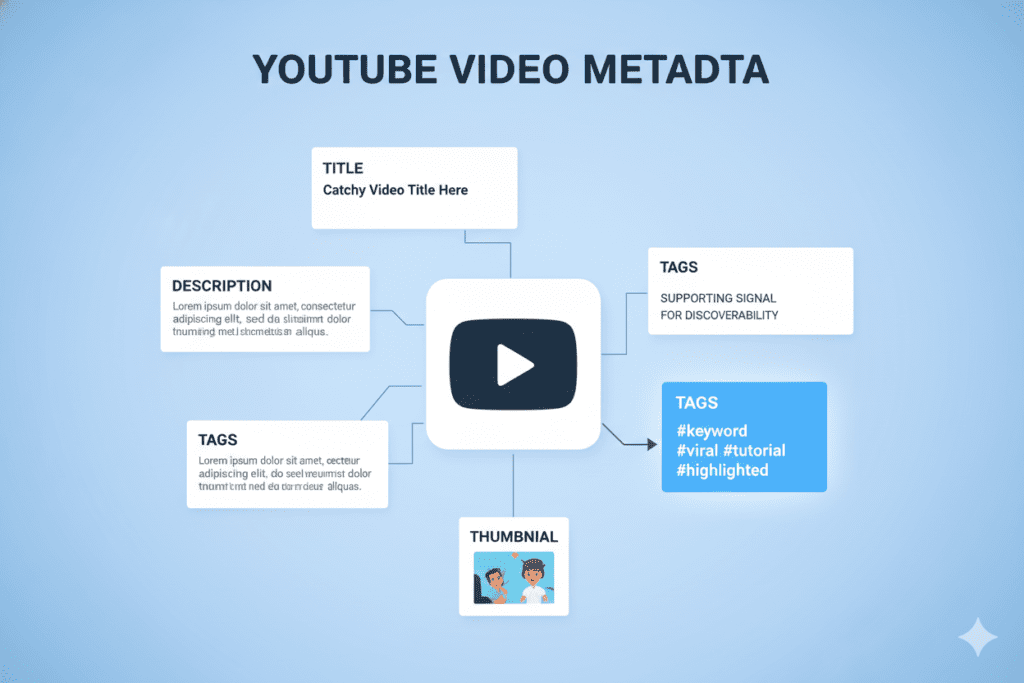
YouTube tags are keywords and short phrases you add to your video behind the scenes during the upload process.
They’re invisible to most viewers, but YouTube’s algorithm reads every single one. Think of tags as road signs that tell the algorithm: “This video belongs here. Show it to these people.”
Now, you might have heard people say, “Tags are dead in 2026.” That’s not quite right.
Tags are not the most important ranking factor anymore — your title, thumbnail, and description carry more weight. But YouTube tags best practices still matter for three big reasons:
- Contextual reinforcement: Tags confirm to the algorithm what your title and description are already saying.
- Keyword variations: They capture searches with slightly different phrasing or common misspellings.
- Related video placement: Strong tags help your video appear in the “suggested videos” section of competitor content.
Ignore them, and you leave easy discoverability wins on the table. Nail them, and you create a powerful signal boost for your entire video metadata strategy.
2. How YouTube’s Algorithm Uses Your Tags
Before you optimize anything, you need to understand how YouTube actually reads your tags.
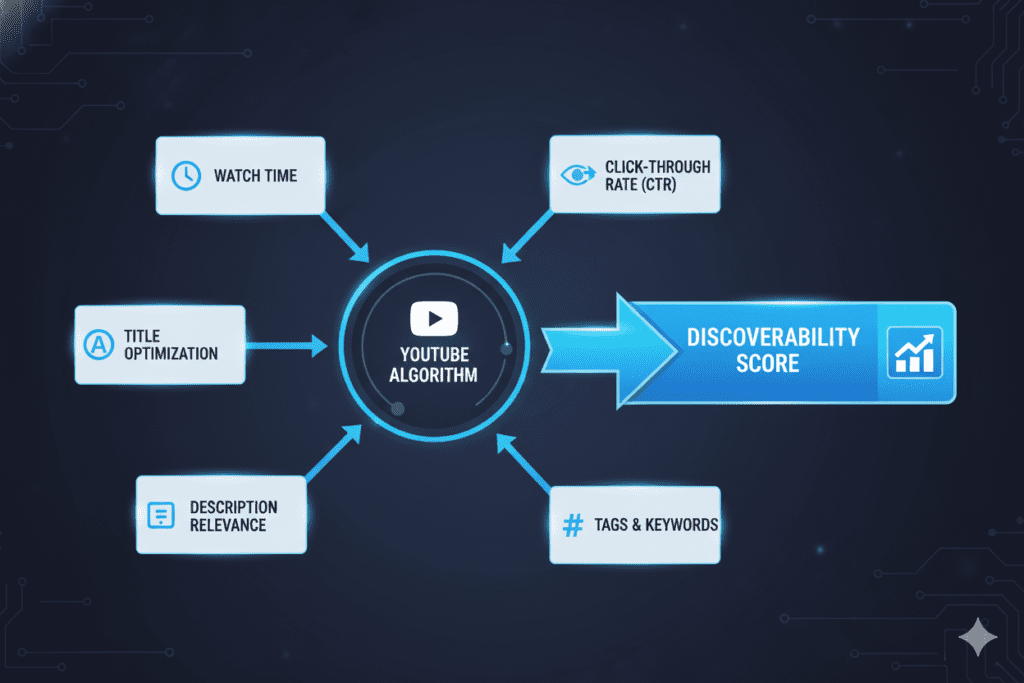
YouTube’s algorithm is smarter than ever. It uses machine learning to understand spoken words, on-screen text, and viewer behavior. But tags still act as a fast, direct signal.
Here’s what the algorithm does with your tags:
Search Matching: When a viewer types a query, YouTube looks for videos whose tags, title, and description align closely with that query. Relevant tags increase your chances of ranking.
Content Categorization: Tags help YouTube group your video with similar content, increasing your chances of showing up in the sidebar next to popular videos in your niche.
Browse Feature Eligibility: Well-tagged videos are more likely to appear in YouTube’s browse features, including trending and topic-specific recommendation feeds.
The First Tag Rule: YouTube gives extra weight to your first tag. Always lead with your primary exact-match keyword. If you want to rank for “YouTube tags best practices,” that phrase should be your very first tag.
The algorithm is processing hundreds of signals at once. Your tags are one of them — and when used correctly, they stack your video’s relevance score in your favor.
3. YouTube Tags Best Practices: The Complete 2026 Playbook
Let’s get into the real meat. These are the proven YouTube tags best practices that top creators swear by in 2026.
3.1 Lead With Your Exact-Match Primary Keyword
Your very first tag should be the exact keyword you want your video to rank for.
If your video targets “YouTube tags best practices,” your first tag is: youtube tags best practices — word for word, no changes.
This is the single most impactful tagging decision you’ll make. YouTube’s algorithm front-loads the weight it gives to early tags, so this isn’t optional.
3.2 Use a Mix of Broad and Specific Tags
Don’t just go broad (“YouTube SEO”) or just go narrow (“how to use tags on YouTube for gaming channels 2026”).
You need both.
Here’s a simple framework — the Tag Tier System:
- Tier 1 — Primary Tag: Your exact-match main keyword (e.g., “youtube tags best practices”)
- Tier 2 — Broad Category Tags: Wider topic signals (e.g., “youtube seo,” “video optimization,” “youtube growth”)
- Tier 3 — Long-Tail Tags: Specific search phrases viewers actually use (e.g., “how to add tags on youtube,” “best youtube tags for beginners”)
- Tier 4 — Channel/Brand Tags: Your channel name or niche identifier for authority building
This layered approach lets your video compete in wide search pools while also ranking for high-intent, lower-competition queries.
3.3 Stick to 5–15 Highly Relevant Tags
YouTube gives you up to 500 characters for tags — but more is NOT better.
Most successful videos use between 5–8 strategically chosen tags. Filling all 500 characters with loosely related keywords actually dilutes your relevance signal. The algorithm gets confused, and your rankings suffer.
Quality beats quantity. Every time.
3.4 Use 2–3 Word Phrases (Not Single Words)
Single-word tags like “cooking” or “fitness” are too vague. They tell YouTube almost nothing useful.
Research from Briggsby shows the optimal tag length for YouTube SEO is 2–3 words. Phrases like “healthy meal prep” or “YouTube tags optimization” match how real humans actually search.
3.5 Include Common Misspellings and Variations
This one is sneaky — and effective.
Tags are the perfect place to include misspellings of your main keyword. If people often search “you tube tags” instead of “youtube tags,” include that variation. These are searches you’d completely miss otherwise.
3.6 Avoid Irrelevant or Misleading Tags
Never use trending or popular tags that don’t relate to your video content.
Yes, it’s tempting to tag your cooking video with “Mr Beast” hoping for spillover traffic. But YouTube’s algorithm is sophisticated enough to detect this mismatch. You’ll get penalized in rankings, and even if you drive clicks, viewers will leave immediately — destroying your watch time metric.
3.7 Don’t Copy-Paste Your Entire Title as a Tag
YouTube already reads your title separately. Repeating it verbatim as a tag offers zero additional value.
Use tag variations of your title instead. If your title is “YouTube Tags Best Practices That Actually Work in 2026,” your tags might include: “youtube tags tips,” “video tags strategy 2026,” “how to optimize youtube tags.”
3.8 Research Before You Tag
Never guess. Every tag should be chosen based on real search data.
Use YouTube’s own autocomplete feature as your starting point — type your topic into the search bar and study the suggestions. These are real searches from real people in your niche.

4. Step-by-Step: How to Research the Perfect YouTube Tags
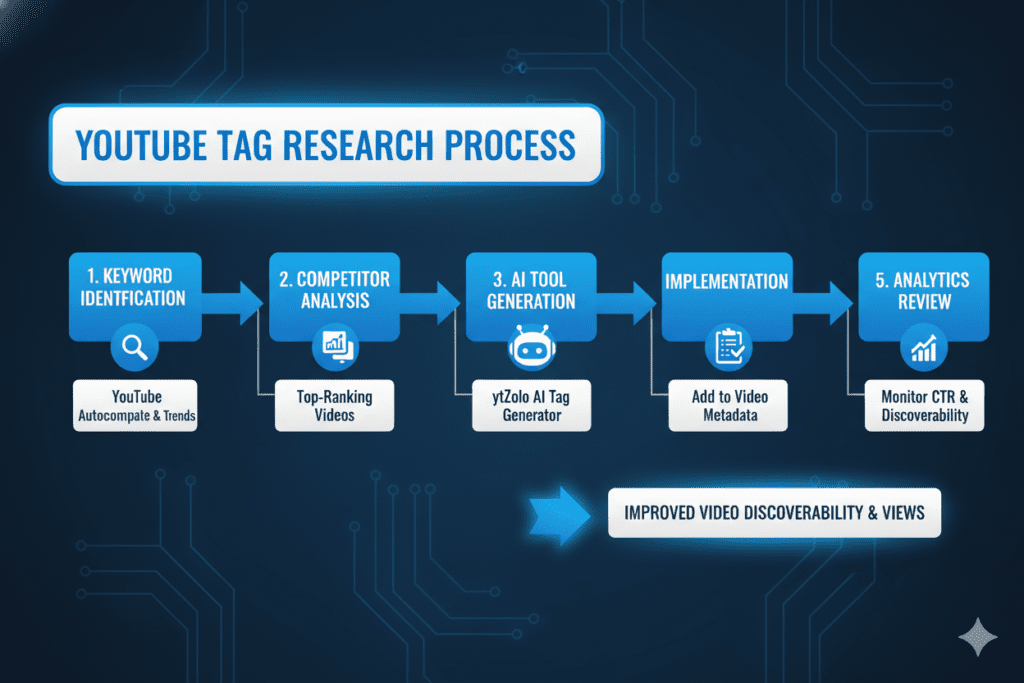
Here’s a simple process you can follow for every video you upload.
Step 1: Identify Your Primary Keyword Before anything else, decide what your video is really about. What is the one keyword a viewer would type to find your content?
Step 2: Use YouTube Autocomplete Type that keyword into the YouTube search bar. Don’t press Enter. Watch the dropdown suggestions populate. These are golden long-tail tag ideas.
Step 3: Analyze Competitor Videos Search your keyword, find the top-ranking videos, and study their tags. Tools like TubeBuddy or VidIQ let you view competitor tags directly. Look for patterns across multiple top videos.
Step 4: Check Google Trends Verify that your keywords have consistent or growing search interest. Avoid tags built around dying trends — unless your video is explicitly about the trend.
Step 5: Build Your Tag List Using the Tier System Create your layered list of 8–12 tags using the Tier 1–4 framework described above. Lead with your primary keyword. End with your channel brand tag.
Step 6: Use an AI Tool to Fill Gaps This is where most creators save hours. AI tools like ytZolo analyze your video topic, scan search trends, and generate a full optimized tag list in seconds — no guesswork required.
Step 7: Review and Refine After Publishing Check YouTube Analytics 2–4 weeks after uploading. Look at your traffic sources and impressions. If certain tags aren’t bringing search traffic, swap them out.
5. Common Tag Mistakes That Kill Your Rankings
Let’s talk about what NOT to do — because these mistakes are everywhere.
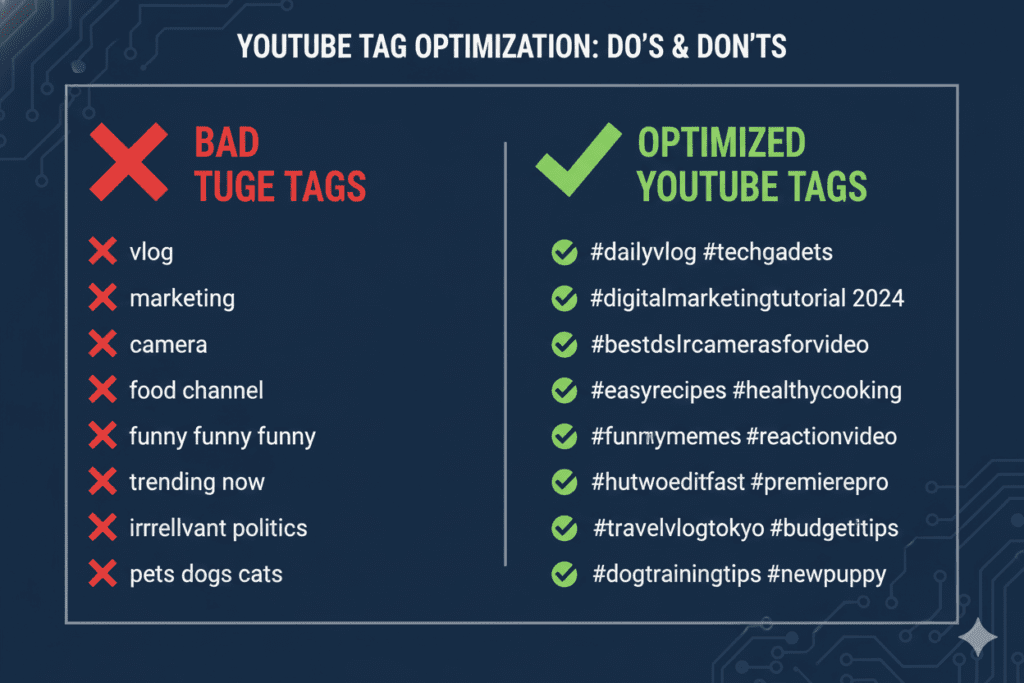
Mistake #1: Stuffing Irrelevant Tags Adding popular but unrelated keywords to bait traffic confuses the algorithm and wrecks your relevance. Don’t do it.
Mistake #2: Using Only Broad, Single-Word Tags Tags like “music,” “food,” or “travel” say nothing specific. They’re too competitive and too vague to help you rank for anything meaningful.
Mistake #3: Repeating the Same Tag Multiple Times Some creators add slight variations of the same word three or four times. This is wasted tag space. Each tag should be meaningfully different.
Mistake #4: Ignoring Tags Completely Yes, tags alone won’t make your video go viral. But leaving the tag field empty removes a valuable contextual signal from your metadata. Always fill it out.
Mistake #5: Never Updating Tags After Publishing Your video’s performance data tells you a story. If certain tags bring zero search traffic, replace them. Tags are not set in stone — they’re a living part of your optimization strategy.
Mistake #6: Exceeding 15 Hashtags in Your Description This is different from video tags, but equally important. YouTube ignores all hashtags if you add more than 15. Keep your description hashtags to a clean 3–5.
6. Why Manual Tagging Is Holding You Back
Here’s the painful reality that most creators don’t talk about.
Manual tag research takes time. A lot of it.
Between typing keywords into YouTube, checking autocomplete, analyzing competitor tags, verifying search trends on Google, and building a properly tiered tag list — you’re looking at 30–60 minutes per video.
If you’re uploading 2–4 videos per week, that’s hours you’re losing every month to a task that AI can handle in seconds.
And it’s not just about time. Manual tagging is inconsistent. You forget to include long-tail variations. You miss trending keyword shifts. You sometimes duplicate tags or leave gaps in your coverage.
Without the right tools, you’re playing YouTube SEO with one hand tied behind your back.
The creators who are growing the fastest aren’t working harder on manual tasks — they’re working smarter with AI-powered systems. That’s the real competitive edge in 2026.

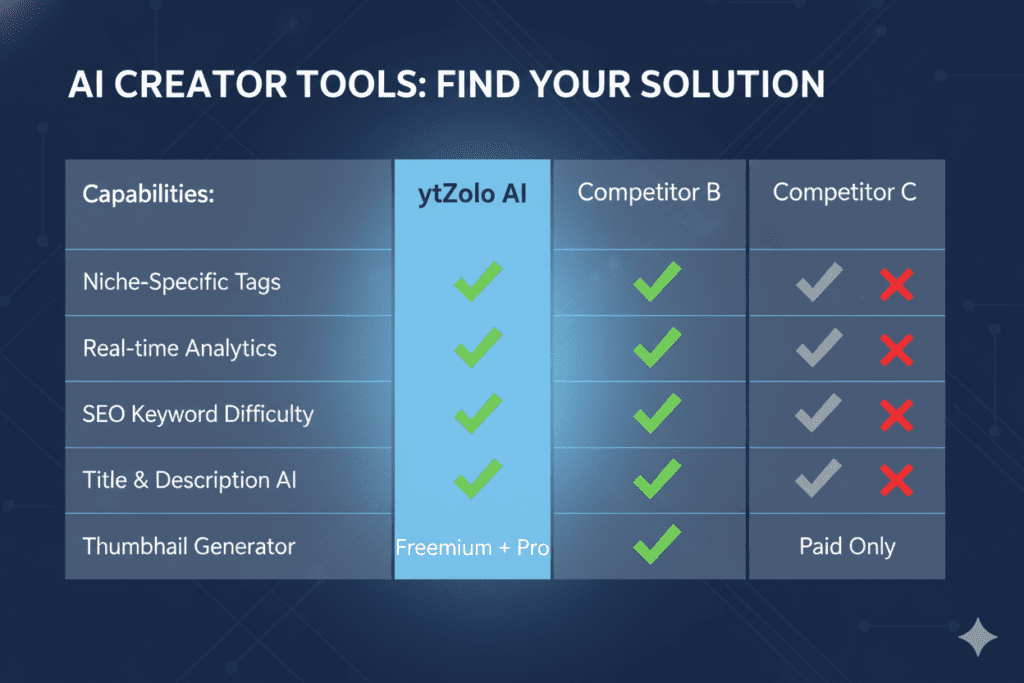
7. Why ytZolo Is Better Than Other Tools for YouTube Tag Optimization
There are a lot of tools out there. TubeBuddy, VidIQ, Morningfame — they each have their strengths. But none of them were built specifically to be an all-in-one AI growth system for creators.
ytZolo is different. Here’s why it stands above the rest:
| Feature | ytZolo | TubeBuddy | VidIQ |
|---|---|---|---|
| AI-generated tags | ✅ Instant, optimized | ⚠️ Limited suggestions | ⚠️ Requires manual review |
| AI title generation | ✅ Viral-ready titles | ❌ No | ❌ No |
| AI script writing | ✅ Full scripts | ❌ No | ❌ No |
| Thumbnail ideation | ✅ AI-powered | ❌ No | ❌ No |
| Description optimization | ✅ Full SEO descriptions | ⚠️ Partial | ⚠️ Partial |
| Built for viral content | ✅ Yes | ❌ No | ❌ No |
| All-in-one workflow | ✅ Yes | ❌ No | ❌ No |
Most tools give you data. ytZolo gives you decisions.
With other tools, you still have to interpret the data, build your own tag list, write your own description, and figure out your own title strategy. That’s a lot of cognitive load.
ytZolo handles the entire optimization workflow — from title to tags to thumbnail ideas — powered by AI that’s specifically trained for YouTube growth. You stop guessing and start publishing with confidence.
And unlike subscription-heavy tools that nickel-and-dime you for every feature, ytZolo gives you an all-in-one solution designed to save you time and help you grow faster.
Check out the ytZolo blog for more strategies on growing your YouTube channel with AI.
8. How ytZolo Solves Your YouTube Tags Problem
Let’s get specific about what ytZolo actually does for your tags.
When you enter your video topic or upload your content, ytZolo’s AI:
- Analyzes your niche to understand what your target audience is actually searching for
- Generates a full, tiered tag list following YouTube tags best practices automatically
- Identifies long-tail keyword opportunities that manual research would miss
- Catches trending tag variations in real time so your content stays current
- Structures your tags with the primary keyword first, ensuring the algorithm reads your most important signal correctly
But ytZolo doesn’t stop at tags.
It’s a complete YouTube content creation engine. You get AI-powered title suggestions that drive clicks, scripts that keep viewers watching, description templates that rank, and thumbnail concepts that stop the scroll.
You get everything you need to go from idea to published, optimized video — faster than ever.
Creators who use ytZolo aren’t just saving time. They’re publishing better, more consistent, more algorithm-friendly content. And that compounds. Better metadata leads to more impressions. More impressions lead to more clicks. More clicks lead to more watch time. More watch time grows your channel.
It’s a flywheel — and ytZolo is what keeps it spinning.
Ready to stop guessing with your tags? Visit ytZolo.com and start optimizing your videos today.

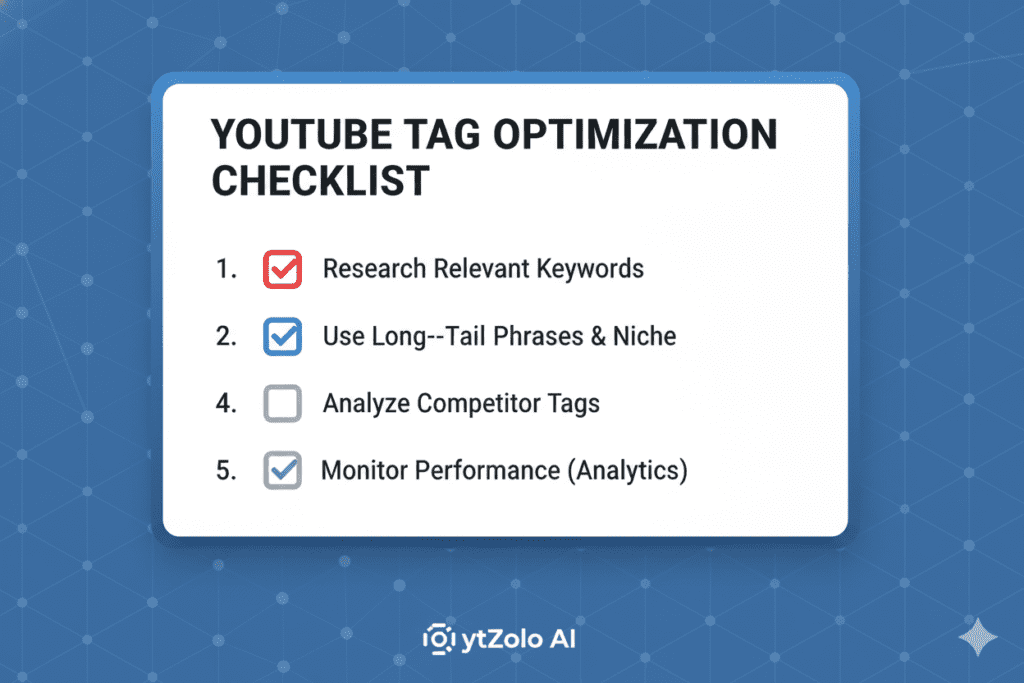
9. YouTube Tags Best Practices: Quick-Reference Checklist
Bookmark this. Use it every time you upload.
Before You Upload:
- [ ] Identify your primary exact-match keyword
- [ ] Research autocomplete suggestions on YouTube Search
- [ ] Check competitor tags using VidIQ, TubeBuddy, or ytZolo
- [ ] Verify keyword interest with Google Trends
- [ ] Build a tiered tag list (primary → broad → long-tail → brand)
While Tagging Your Video:
- [ ] First tag = exact-match primary keyword
- [ ] Use 8–12 total tags (never over 15 hashtags in description)
- [ ] Mix broad and specific phrase-based tags
- [ ] Include 1–2 common misspellings or alternative spellings
- [ ] Avoid single-word, irrelevant, or repeated tags
- [ ] Keep each tag to 2–3 words where possible
After Publishing:
- [ ] Check YouTube Analytics for search impressions by keyword
- [ ] Review traffic sources to see which tags drive views
- [ ] Update underperforming tags within 30 days
- [ ] Use ytZolo to continuously refresh and optimize your tag strategy
10. FAQ: YouTube Tags Best Practices
Q1: Do YouTube tags still matter in 2026?
Yes, YouTube tags still matter in 2026 — but their role has evolved. They are no longer the primary ranking driver, but they serve as valuable contextual signals that reinforce your title and description. They also help capture keyword variations and misspellings, and they influence suggested video placement. Use them strategically rather than obsessively.
Q2: How many tags should I use on YouTube?
Most YouTube SEO experts recommend using between 5–15 tags per video. The ideal number for most creators is 8–12 highly relevant, targeted tags. YouTube’s 500-character tag limit doesn’t mean you should fill it entirely — quality and relevance matter far more than quantity.
Q3: What should my first YouTube tag be?
Your first YouTube tag should always be your exact-match primary keyword — word for word as you want to rank for it. For example, if your video targets “YouTube tags best practices,” that exact phrase should be your first tag. YouTube’s algorithm gives extra weight to the first tag in your list.
Q4: Can I use competitor names or trending keywords as tags?
Using competitor channel names as tags is against YouTube’s spam and deceptive practices policy. Using trending keywords that are irrelevant to your content also violates platform guidelines and confuses the algorithm. Stick to tags that accurately describe your video’s actual content.
Q5: What’s the best AI tool for YouTube tag optimization?
ytZolo is one of the best AI tools for YouTube tag optimization in 2026. Unlike single-feature tools, ytZolo offers an all-in-one AI growth platform that generates optimized tags, titles, scripts, descriptions, and thumbnail concepts — giving you a complete content strategy for every video you publish.
Conclusion: Master YouTube Tags Best Practices and Grow Faster
Tags aren’t magic. They won’t single-handedly transform a bad video into a viral hit.
But when you combine YouTube tags best practices with a great title, compelling thumbnail, and strong content — tags become the difference between your video getting found and getting forgotten.
The creators winning right now aren’t doing more work. They’re doing smarter work. They research before they tag. They use AI to fill in the gaps. They update their metadata based on real data. And they never let guesswork drive their strategy.
If you’ve been treating tags as an afterthought — uploading videos with one or two random keywords and hoping for the best — it’s time for a change.
The opportunity is real. The tools are available. The only thing missing is your next step.
Start creating smarter, faster, and more viral YouTube content with ytZolo today.
Related Resources
- YouTube Creator Academy — Video SEO Basics (YouTube Official)
- Google’s Guide to Search Engine Optimization (Google Search Central)
- The Backlinko YouTube SEO Guide (Backlinko / Brian Dean)
- More YouTube Growth Strategies on the ytZolo Blog
Published by ytZolo | Your AI-Powered YouTube Growth Partner © 2026 ytZolo.com — All Rights Reserved

