

Introduction: The 3-Second Moment That Decides Everything
Imagine spending 10 hours filming, editing, and polishing your best video ever.
You hit publish. You wait. And… nothing. A handful of views. A flat click-through rate. Crickets.
Sound familiar?
Here’s the brutal truth most creators learn too late — your YouTube thumbnail best practices matter more than your content quality. Before a single viewer hears your voice or watches a single frame, they judge your video by that tiny 1280×720 image.
According to YouTube’s Creator Academy, 90% of the best-performing videos on YouTube use custom thumbnails. That’s not a coincidence. That’s a pattern you need to follow.
In this guide, you’ll learn every proven YouTube thumbnail best practice that top creators use to crush the competition — plus how AI tools like ytZolo are changing the game for smart creators everywhere.
Let’s dive in.
Table of Contents
What Makes a YouTube Thumbnail “Best Practice”?
A YouTube thumbnail best practice isn’t just about making something pretty.
It’s about designing a visual that communicates value instantly, triggers an emotional response, and convinces someone to click — all within 3 seconds of scrolling. This is exactly why understanding YouTube thumbnail best practices is so important for creators who want to increase their click-through rate and get more views. By applying the right YouTube thumbnail best practices, you can turn a simple image into a powerful tool that grabs attention and drives more clicks to your videos.
Think of your thumbnail as a billboard on a highway. You have one moment to stop traffic.
The best thumbnails consistently do three things:
- They promise something the viewer wants
- They stand out in a sea of competing videos
- They match the energy of the actual content
That last point matters more than people realize. Misleading thumbnails may spike your initial clicks, but they destroy your watch time — and YouTube’s algorithm will bury you fast. This is why following YouTube thumbnail best practices is crucial for long-term growth on the platform. When creators focus on honest and engaging visuals using proper YouTube thumbnail best practices, they build trust with viewers and improve both click-through rate and watch time.

YouTube Thumbnail Technical Specifications
Before you think about design, you need to get the basics right.
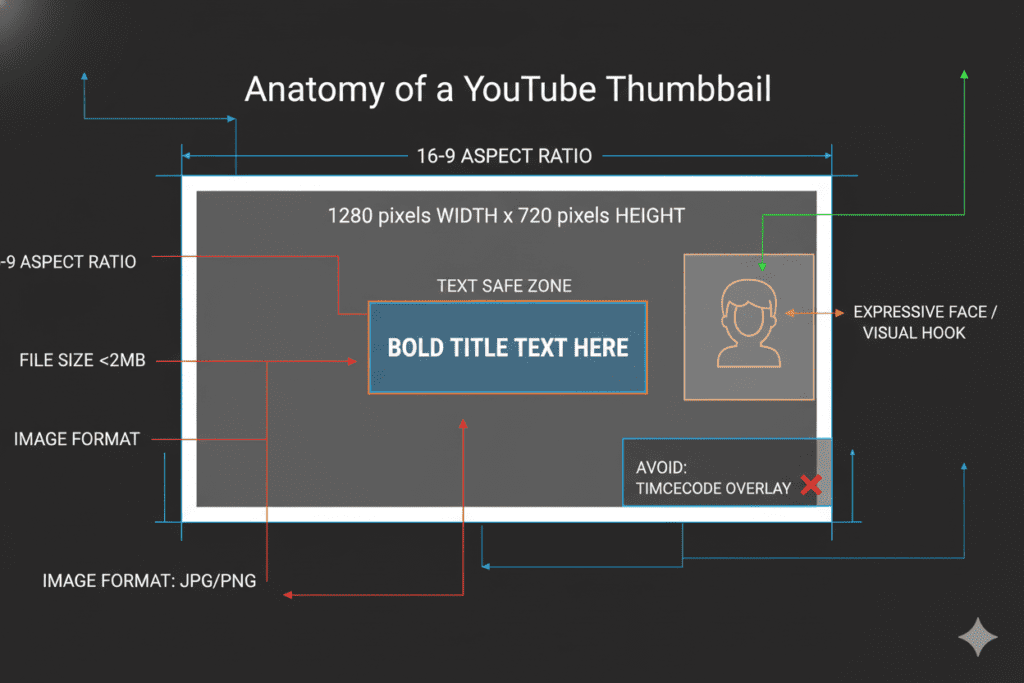
Using the wrong dimensions is one of the fastest ways to kill your YouTube thumbnail best practices before you even start. Here’s exactly what YouTube requires:
- Resolution: 1280 × 720 pixels
- Aspect Ratio: 16:9
- Minimum Width: 640 pixels
- Accepted Formats: JPG, PNG, GIF, BMP
- Maximum File Size: 2MB
- Safe Zone for Text: Center 1235 × 338 pixels
Pro tip: Design at 1280×760 pixels instead of the standard 720. Why? This small adjustment accounts for YouTube’s interface overlays, preventing the video duration indicator from hiding your key elements. Following smart YouTube thumbnail best practices like this ensures your most important visuals stay clear and visible. Small details like proper sizing can make a big difference in how professional and clickable your thumbnail looks.
Always use PNG format when possible — it delivers the best quality-to-file-size ratio for crisp, professional thumbnails.
The 10 Proven YouTube Thumbnail Best Practices
These aren’t guesses. These are battle-tested strategies used by the fastest-growing channels on the platform.
Practice #1: Use One Clear Focal Point
Cluttered thumbnails confuse viewers. Your eye doesn’t know where to look.
Pick one dominant subject — a face, a product, a dramatic scene — and build everything else around it. Simplicity always wins on small screens.
Practice #2: Make Faces Your Secret Weapon
Thumbnails featuring human faces with strong emotions consistently outperform faceless designs. Research from VidIQ shows that emotional expressions can increase CTR by 20–30%.
Surprise, excitement, curiosity, fear — these trigger an instant human connection. Use them strategically.
Practice #3: Bold, Readable Text (3–5 Words Max)
Your text isn’t there to explain everything. That’s your title’s job.
Thumbnail text should deliver one powerful hook. Think of it as the headline on a newspaper front page — short, punchy, and irresistible. Keep it under 5 words, use bold fonts, and make sure it’s readable on a 6-inch phone screen.
Practice #4: High-Contrast Color Combinations
YouTube’s interface is mostly white and red. Use colors that fight against that palette.
Deep blues, electric yellows, and neon oranges pop beautifully. Pair contrasting colors — like dark backgrounds with bright text — to ensure your thumbnail jumps off the screen.
Practice #5: Design for Mobile First
Over 70% of YouTube views happen on mobile devices. If your thumbnail looks great on a desktop but turns into a blurry mess on a phone, you’re losing the majority of your potential audience.
Always preview your finished design on mobile before uploading.
Practice #6: Tell a Visual Story
The best YouTube thumbnails don’t just show something — they imply a story.
A before-and-after image, a character in conflict, a shocking reveal — these create open loops in the viewer’s mind. Their brain wants resolution, so they click to get it.
Practice #7: Stay Consistent with Branding
Consistent branding builds channel recognition over time. When viewers see your thumbnails in their feed, they should immediately know it’s you — even before reading your name.
Develop 2–3 core templates. Use consistent color palettes, logo placement, and font choices across your content.
Practice #8: Avoid Misleading Clickbait
Misleading thumbnails are a short-term trick with long-term consequences.
They spike your initial CTR but destroy watch time and audience trust. YouTube’s algorithm punishes high bounce rates brutally. Always make sure your thumbnail accurately reflects your video content.
Practice #9: Optimize for All Screens
More people are watching YouTube on smart TVs than ever before. Your thumbnail needs to look sharp at any size — from a 6-inch smartphone to a 65-inch 4K television.
This is exactly why designing at 1280×720 (minimum) is non-negotiable.
Practice #10: Refresh Underperforming Thumbnails
Your work isn’t done at upload. Revisit your older videos every 3–6 months.
If a video has a low CTR, a fresh thumbnail can dramatically revive it. Evergreen content especially benefits from thumbnail refreshes — sometimes a simple redesign can double your views overnight.

The Psychology Behind High-CTR Thumbnails
Great YouTube thumbnail best practices aren’t just about design — they’re about human psychology.
Every click is an emotional decision, not a rational one. Understanding what drives that split-second emotional reaction is what separates creators with 100 views from creators with 1 million.
Here are the core psychological triggers that make people click:
Curiosity Gaps — Thumbnails that show part of a story but not the conclusion force the brain to seek resolution. “I need to watch this to find out what happens.”
FOMO (Fear of Missing Out) — Thumbnails that imply you’re missing something valuable or trending create urgency. “Everyone else already knows this. I need to catch up.”
Social Proof — Reaction thumbnails, shocked faces, and “everyone is talking about this” visual cues signal importance and relevance.
Pain + Promise — Show a pain point your audience recognizes, then imply the solution exists in the video. This is the formula behind some of the most viral thumbnails ever created.
Understanding these triggers doesn’t just improve your YouTube thumbnail best practices — it transforms how you think about content strategy entirely.

Common YouTube Thumbnail Mistakes to Avoid
Knowing what to do is important. But knowing what not to do is just as valuable.
Here are the most common thumbnail mistakes that quietly destroy channels:
- Using YouTube’s auto-generated thumbnail — This is the #1 fastest way to kill your CTR. Auto thumbnails are random frames, almost always unflattering and off-brand.
- Too much text — If viewers need 5 seconds to read your thumbnail, they’ve already scrolled past it.
- Low resolution or pixelated images — This signals low quality to viewers before they’ve even clicked.
- No human element — Text-only or graphic-only thumbnails almost always underperform compared to thumbnails featuring faces.
- Ignoring the safe zone — Key elements placed too close to the edges get cropped on different devices.
- Copying other creators’ styles too closely — Imitation might get you some clicks short-term, but it prevents you from building your own recognizable brand.
Every one of these mistakes is fixable. And with the right tools, they become nearly impossible to make in the first place.

How AI Is Revolutionizing YouTube Thumbnail Creation
Here’s something the top 1% of creators already know that most creators don’t:
Manual thumbnail creation is becoming obsolete.
Not because design skills don’t matter. They do. But because AI has made it possible to generate, test, and optimize thumbnails 10x faster than any human designer working alone.
Think about what used to take hours:
- Researching competitor thumbnails in your niche
- Generating color palettes that work together
- Writing compelling thumbnail text hooks
- Creating multiple A/B test variations
- Analyzing which designs drive the highest CTR
With AI-powered tools, this entire workflow now takes minutes.
The creators who embrace AI aren’t working harder — they’re working smarter. And in 2025’s competitive YouTube landscape, that competitive edge is everything.
This is exactly where ytZolo comes in.

Why ytZolo Is the Best Tool for YouTube Thumbnail Optimization
ytZolo isn’t just another thumbnail tool. It’s a complete AI-powered YouTube growth engine built specifically for creators who are serious about scaling their channels.
Here’s how ytZolo directly solves your YouTube thumbnail best practices challenges:
AI Thumbnail Ideas and Concepts ytZolo analyzes top-performing videos in your niche and generates thumbnail concepts proven to drive high CTR. No more guessing what will work — the AI already knows.
Title + Thumbnail Synergy Most creators design thumbnails and titles separately. ytZolo creates both together, ensuring your visual and text work as one unified click magnet instead of two disconnected pieces.
Viral Hook Generation ytZolo’s AI generates thumbnail text hooks — those powerful 3–5 word phrases that create curiosity and urgency. It’s like having a copywriter and designer working simultaneously.
Time-Saving Workflow Instead of spending 2–3 hours on a single thumbnail, ytZolo users report completing their entire thumbnail and title workflow in under 20 minutes. That’s hours of your creative life back every single week.
Built for Viral Content Creation Everything in ytZolo — from title generators to description writers to tag optimizers — is designed with one goal: helping your content go viral. Your thumbnails don’t exist in isolation, and ytZolo treats them as part of your complete video strategy.
Beyond thumbnails, ytZolo also handles:
- AI-generated video scripts
- SEO-optimized video descriptions
- Smart tag suggestions
- Video title A/B testing concepts
If you’ve been struggling with YouTube growth, you don’t just need better thumbnails. You need ytZolo.
Check out the ytZolo blog for more creator tips, strategies, and tutorials built around helping you grow faster.

Why ytZolo Is Better Than Other Tools
There are plenty of YouTube tools out there. So why is ytZolo the one creators keep coming back to?
Let’s be honest about what the alternatives offer — and where they fall short.
| Feature | ytZolo | TubeBuddy | VidIQ | Canva |
|---|---|---|---|---|
| AI Thumbnail Concepts | ✅ Yes | ❌ No | ❌ No | ❌ No |
| Title + Thumbnail Synergy | ✅ Yes | ❌ No | ❌ No | ❌ No |
| AI Script Writing | ✅ Yes | ❌ No | ❌ No | ❌ No |
| Viral Hook Generator | ✅ Yes | ❌ Limited | ✅ Limited | ❌ No |
| All-in-One Growth Platform | ✅ Yes | ❌ Partial | ❌ Partial | ❌ No |
| Built for Content Virality | ✅ Yes | ❌ No | ❌ No | ❌ No |
The core difference?
Tools like TubeBuddy and VidIQ are great at analytics. Canva is a fantastic design tool. But none of them connect the dots between your thumbnail, your title, your script, and your overall growth strategy the way ytZolo does.
ytZolo was built from the ground up as an all-in-one AI YouTube growth platform. Every feature is connected. Every tool feeds into your larger goal: more views, more subscribers, more impact.
Other tools make you better at one thing. ytZolo makes you better at everything.

How to A/B Test Your YouTube Thumbnails
Even the best thumbnail instincts need data to back them up.
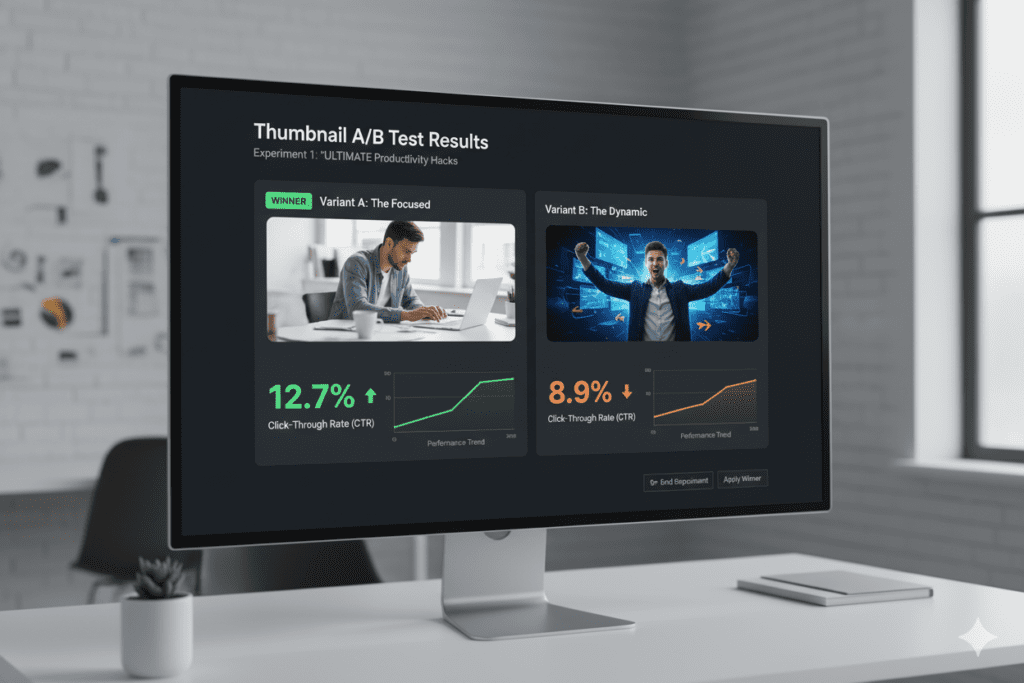
YouTube’s “Test & Compare” feature (available in YouTube Studio) lets you upload up to three different thumbnails for a single video and let YouTube test them with real audience traffic.
Here’s how to run an effective thumbnail A/B test:
Step 1: Create 2–3 thumbnail variations Change only one element between versions — text, face expression, background color, or composition. Testing multiple variables at once makes it impossible to know what actually worked.
Step 2: Upload through YouTube Studio Navigate to your video settings and find the “Test & Compare” option in the thumbnail section. Upload your variations.
Step 3: Let YouTube run the test YouTube will distribute traffic between your thumbnail variations and collect CTR data.
Step 4: Analyze and apply The thumbnail with the highest CTR wins. More importantly, document why it won — the lessons you learn apply to every future thumbnail you create.
Step 5: Build your winning formula Over time, your A/B test data reveals patterns. Maybe your audience always responds to shocked expressions. Maybe yellow backgrounds outperform blue ones. These insights are gold for your YouTube thumbnail best practices going forward.
Use ytZolo to generate multiple thumbnail concept variations quickly — so you always have great options to test instead of scrambling to create a second version last minute.
FAQ: YouTube Thumbnail Best Practices
Q1: What is the ideal size for a YouTube thumbnail?
The ideal YouTube thumbnail size is 1280 × 720 pixels with a 16:9 aspect ratio. Keep the file under 2MB and use PNG or JPG format. Designing at 1280×760 can also help prevent YouTube’s duration overlay from covering important elements.
Q2: How many words should a YouTube thumbnail have?
Keep thumbnail text to 3–5 words maximum. Your thumbnail text should deliver one powerful hook or curiosity trigger, not a full description. Let your video title handle the details — your thumbnail’s job is to grab attention instantly.
Q3: Do faces really improve YouTube thumbnail CTR?
Yes — significantly. Research consistently shows that thumbnails featuring human faces with strong emotional expressions (surprise, excitement, fear) can increase CTR by 20–30% compared to thumbnails without faces. Emotional expressions create instant human connection and signal relatability.
Q4: How often should I update my YouTube thumbnails?
Review and consider updating thumbnails for underperforming videos every 3–6 months. Evergreen content especially benefits from refreshed thumbnails. A new design on an old video can dramatically revive its performance — sometimes doubling or tripling views overnight.
Q5: Can AI tools really help improve YouTube thumbnails?
Absolutely. AI tools like ytZolo analyze top-performing content in your niche, generate thumbnail concept ideas, create compelling text hooks, and help you build A/B test variations in a fraction of the time it would take manually. In 2025’s competitive YouTube environment, creators who use AI have a massive advantage over those who don’t.
Conclusion: Your Thumbnails Are Your Growth Engine
Every YouTube thumbnail best practice in this guide comes back to one core idea: your thumbnail is not decoration. It is strategy.
It’s the difference between a video that gets buried and a video that goes viral. Between a channel that plateaus and a channel that explodes.
The creators dominating YouTube right now understand that thumbnails, titles, and content strategy all work together as one unified system. They’re not designing thumbnails in isolation — they’re building click magnets as part of a larger growth machine.
And the smartest ones? They’re using ytZolo to make that entire process faster, smarter, and more effective than ever before.
You don’t need to spend hours on every thumbnail anymore. You don’t need to guess what will work. You don’t need to watch competitors pull ahead while you struggle with outdated, manual methods.
Apply the YouTube thumbnail best practices in this guide. Test aggressively. Learn from your data. And let AI do the heavy lifting.
Start creating smarter, faster, and more viral YouTube content with ytZolo today.
Want more YouTube growth strategies? Explore the ytZolo blog for expert creator tips, AI tool guides, and proven tactics to grow your channel faster.
External Resources:


Pingback: YouTube Creator Academy Thumbnail Best Practices High contrast text faces : 5 Critical Mistakes
Pingback: Best AI for YouTube Titles and Thumbnails 2026 | ytZolo