
What are the best Poe AI alternatives?
The strongest Poe alternatives in 2026 are AiZolo (best overall value for an all-in-one AI subscription), ChatGPT and Claude (best single-model depth), Perplexity (best for cited research), and OpenRouter (best for developers who want pay-per-token access to 300+ models). Which one is “best” depends mostly on whether you want a bundled subscription, a single best-in-class model, or full control over your own API keys.
Table of Contents
Why people look for a Poe alternative
Poe, built by Quora, was one of the first products to let you talk to GPT, Claude, and Gemini from a single app. That idea hasn’t gone away — if anything, more people want it now. But Poe itself has changed shape a few times.
As of mid-2026, Poe runs on a points-based system across six tiers: a free plan, Starter at $4.99/month, Premium at $19.99/month, Premium Plus at $49.99/month, Pro at $99.99/month, and Pro Max at $249.99/month. Every message, image, or video generation draws down a shared pool of points, and different models cost different amounts of points to use.
That system is genuinely useful for testing new models cheaply. It’s also the main reason people go looking for something else:
- Points run out unpredictably. A single image or video generation can burn through a big share of a day’s or month’s allotment, so heavy users often find themselves needing to jump tiers.
- You’re renting a diminished version of each model. Poe sits between you and the model provider, which can mean fewer messages, delayed access to new model versions, and less integration depth than going direct.
- Team and enterprise controls are limited. Poe was built for individual power users first, not for teams that need shared billing, admin controls, or data governance.
- Custom bots aren’t the same as a real workspace. Poe’s bot-building is a strength for prompt tinkering, but it isn’t a substitute for project folders, prompt libraries, or document workspaces that some competitors bundle in.
None of this makes Poe a bad product — it’s still a reasonable way to sample a lot of models cheaply. But if you’ve hit its limits, here’s how the alternatives stack up.
What makes a good Poe alternative?
Before comparing platforms, it helps to know what actually separates a good multi-model tool from a mediocre one:
- Model breadth and freshness — how many models, and how quickly new releases show up
- Real pricing math — what you actually pay once you account for usage limits, not just the sticker price
- Interface quality — can you actually manage multiple conversations, prompts, and projects without friction
- Extras that matter — image/video/audio generation, document handling, memory, team seats
- Data handling — where your conversations and files are stored, and whether they’re used for training
- Who it’s actually built for — casual chat, professional workflows, developers, or teams
With that in mind, here are 13 platforms worth considering.
Best Poe AI alternatives in 2026
1. AiZolo — best all-in-one subscription for comparing models side-by-side
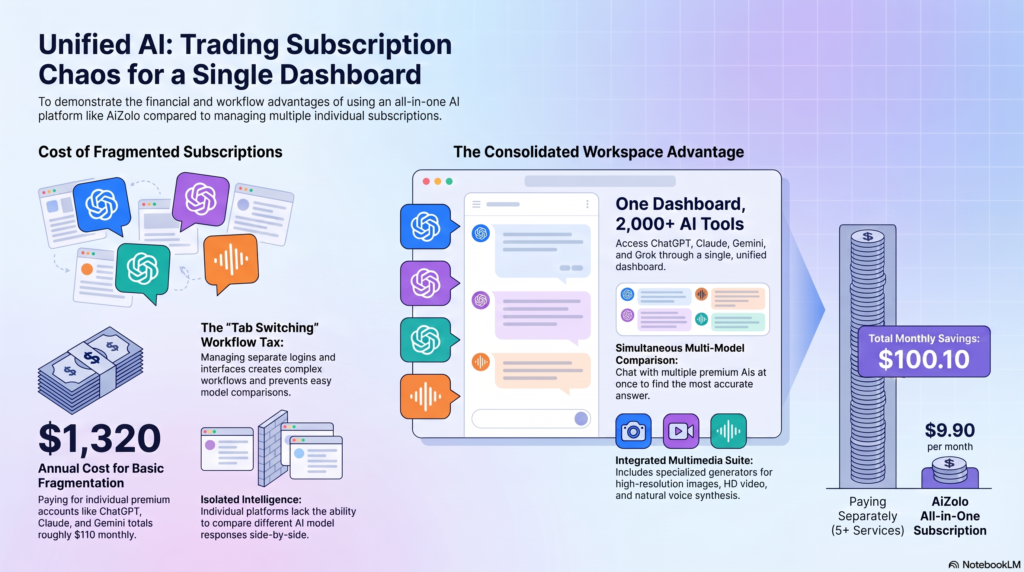
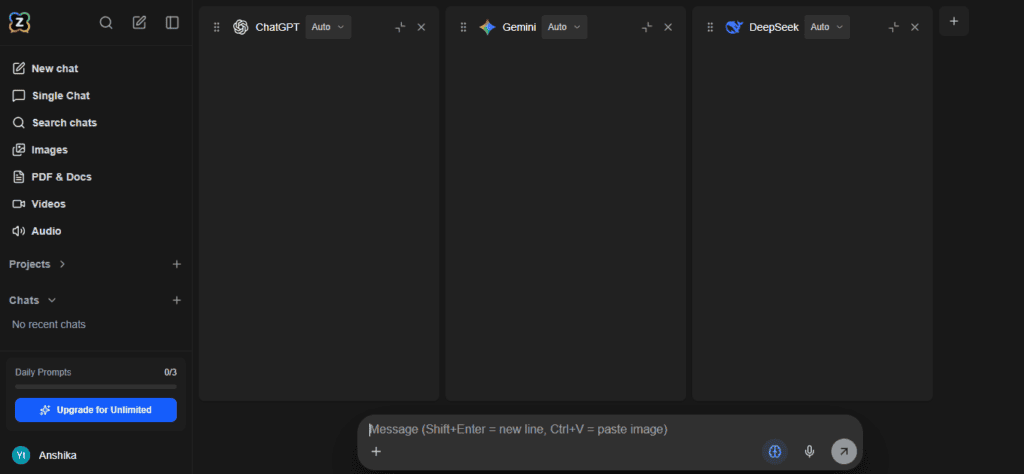
AiZolo is an all-in-one AI subscription that gives you GPT, Claude, Gemini, Perplexity’s Sonar, Grok, and other premium models in a single dashboard, plus its own image, video, and audio generation tools. Its headline feature is running multiple models on the same prompt side-by-side, so you can compare answers directly instead of tab-switching between five apps.
- Best for: People currently paying for 2+ separate AI subscriptions who want one bill and a side-by-side comparison view
- Pricing: Free tier with limited models and tokens; Pro at $9.9/month or $99.9/year, including 3,000,000 tokens/month, image/video/audio generation, a prompt manager, AI memory, and one-click chat import from ChatGPT and Claude
- Models: GPT, Claude, Gemini, Perplexity Sonar Pro, Grok, plus 2,000+ additional AI tools
- Standout features: side-by-side model comparison, encrypted bring-your-own-API-key support (so the free plan can still be used with unlimited tokens), chat import from ChatGPT and Claude
- Pros: Lower entry price than most single-model subscriptions; BYOK support means you’re not locked into AiZolo’s token pool if you don’t want to be; genuinely broad model list for the price
- Cons: Smaller company than Poe or the frontier labs, so fewer third-party reviews to lean on; video/image generation quality depends on which underlying model you route to, same as any aggregator
- Ideal users: Freelancers, students, and small teams who currently juggle multiple $20/month subscriptions and want to consolidate
2. ChatGPT — best for general-purpose depth
ChatGPT remains the most widely used single-model assistant, and going direct means you get OpenAI’s latest models the moment they ship, with no aggregator delay.
- Best for: General writing, coding help, and everyday questions where one strong model is enough
- Pricing: Free tier; ChatGPT Go around $8/month; Plus at $20/month; Pro at $100–200/month depending on region and current tier
- Pros: Deepest single-model integration (memory, custom GPTs, native image generation); huge plugin/connector ecosystem
- Cons: No built-in way to compare against Claude or Gemini without a separate tool; higher tiers get expensive fast
- Ideal users: People who’ve settled on GPT as their preferred model and don’t need multi-model comparison
3. Claude — best for reasoning, writing, and long documents
Claude (Anthropic) is generally the strongest pick for people who work with long documents, want careful reasoning, or write a lot of text that needs to sound human.
- Best for: Long-context work, coding, writing, and cautious, well-reasoned answers
- Pricing: Free tier; Pro around $20/month; Max tiers scale up to $100–200/month
- Pros: Large context windows; strong at following detailed instructions; Artifacts feature for building documents, code, and visuals inline
- Cons: Single-model only — no built-in access to GPT or Gemini
- Ideal users: Writers, researchers, developers, and anyone regularly working with long documents
4. Google Gemini — best for Google Workspace users
Gemini’s biggest advantage is how deeply it’s wired into Gmail, Docs, Sheets, and Google Search — useful if your work already lives in Google’s ecosystem.
- Best for: People embedded in Google Workspace who want AI inside Docs, Sheets, and Gmail
- Pricing: Free tier; AI Plus around $4.99/month; AI Pro around $19.99/month; AI Ultra around $99.99/month
- Pros: Native Workspace integration; competitive pricing at the entry tier; strong multimodal (image/video) capability
- Cons: Single-model only, same limitation as ChatGPT and Claude on their own
- Ideal users: Google Workspace-heavy teams and individuals
5. Perplexity — best for research with citations
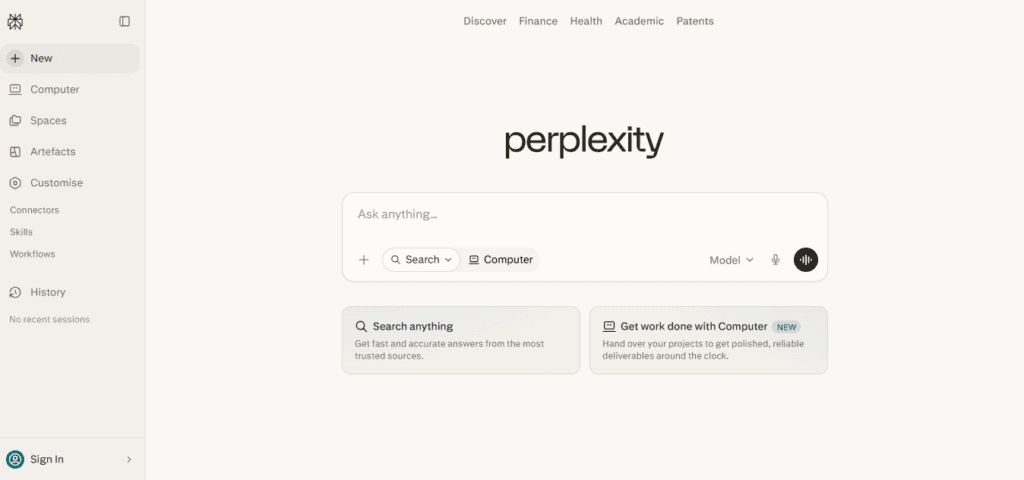
Perplexity is less a chatbot and more a research engine: it reads the live web and returns sourced, cited answers instead of relying purely on training data.
- Best for: Fact-checking, research, and questions that need current, sourced information
- Pricing: Free tier with unlimited basic search; Pro at $20/month; Max at $200/month; Education Pro discount available for students
- Pros: Citations by default; Deep Research mode for multi-step research tasks; Comet browser integration
- Cons: Weaker for pure creative writing or coding compared to dedicated models; Deep Research query limits were tightened in 2026 compared to 2025
- Ideal users: Analysts, students, journalists, and anyone who needs sourced answers, not just fluent ones
6. OpenRouter — best for developers who want raw model access
OpenRouter is a unified API gateway rather than a consumer chat app. It gives you one API key and one bill for 300+ models across every major provider, priced at or near each provider’s direct API cost.
- Best for: Developers building on top of multiple models, or technical users who want to pay exactly for what they use
- Pricing: No subscription — pay-per-token, added to your account as credits with no expiration
- Pros: Enormous model selection; near-direct pricing with no markup on most models; OpenAI-compatible API for easy integration
- Cons: No polished chat interface of its own — most people pair it with a front end like TypingMind; requires managing your own credit balance
- Ideal users: Developers, and anyone comfortable pairing it with a chat front end
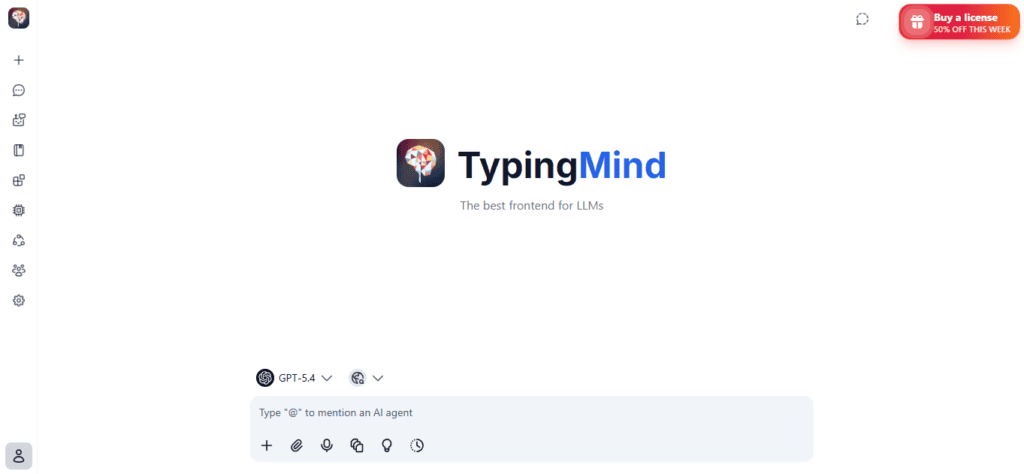
7. TypingMind — best interface for your own API keys
TypingMind is a polished chat interface that connects to your own API keys (including OpenRouter’s), rather than bundling a subscription of its own.
- Best for: People who want a well-designed chat UI but don’t want to depend on someone else’s model markup
- Pricing: One-time purchase around $59, or subscription options for team plans
- Pros: Excellent interface — keyboard shortcuts, conversation search, and management feel like a finished product; connects to 200+ models via OpenRouter
- Cons: You supply and pay for your own API access separately; no bundled free tier of meaningful size
- Ideal users: Technical users who already have API keys and want a better front end than the provider’s own app
8. LibreChat — best free, self-hosted option
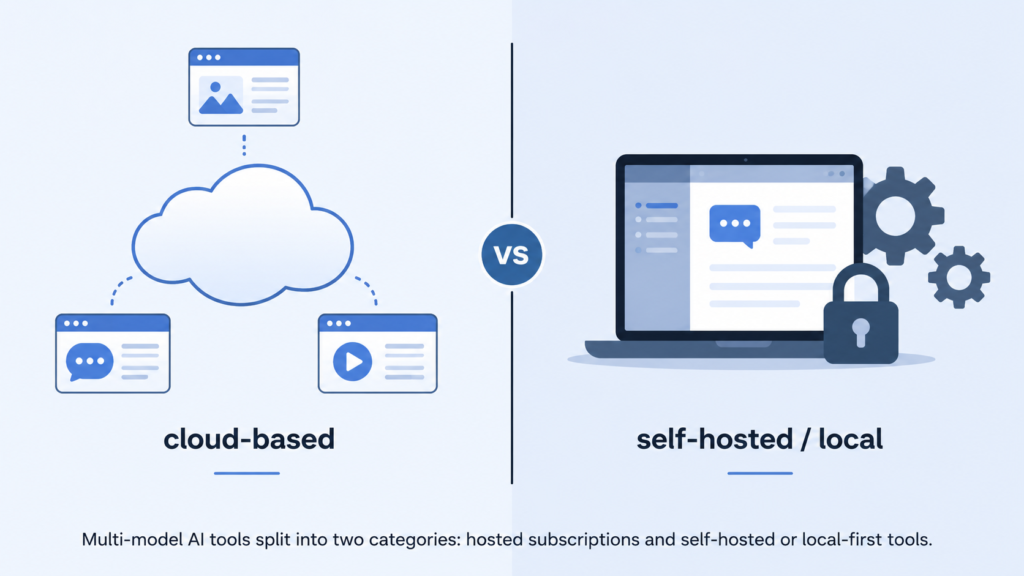
LibreChat is an open-source chat platform you host yourself, connecting to whichever model providers you choose.
- Best for: Teams and individuals who want a ChatGPT-style interface with zero per-seat software cost
- Pricing: Free software; you only pay for your own server and API usage
- Pros: Fully open source; code interpreter and multimodal support; active, fast-growing project
- Cons: Requires technical setup and ongoing hosting; no bundled model access — you bring your own API keys
- Ideal users: Technical teams that want full control and are comfortable self-hosting
9. AnythingLLM — best for chatting with your own documents
AnythingLLM is built around “workspaces” for querying your own documents with a local or cloud model, rather than general-purpose chat.
- Best for: Document-heavy research and internal knowledge bases
- Pricing: Free, open-source core; paid team/cloud tiers available
- Pros: Strong retrieval-augmented generation (RAG) setup; multi-user workspaces; built-in agent tools (web search, SQL)
- Cons: Built around documents and workspaces first, general chat second — less suited if you just want a Poe-style chat app
- Ideal users: Teams that need private, searchable document Q&A more than open-ended conversation
10. Msty — best beginner-friendly local AI app
Msty combines local and cloud models in one desktop app, aimed at people who don’t want to think about embeddings or servers.
- Best for: Non-technical users who want to try local AI without command-line setup
- Pricing: Free tier; paid plans for extended features
- Pros: Simple “Knowledge Stacks” document Q&A; zero forced sign-in; works with both local and cloud models
- Cons: Closed source, unlike Jan or LibreChat; smaller model catalog than aggregators like OpenRouter
- Ideal users: Privacy-conscious beginners who want local AI without the learning curve
11. Jan — best fully open-source local app
Jan is a local AI app that both runs models and provides the interface, with a fully open-source codebase.
- Best for: Users who specifically want open-source software running fully on their own hardware
- Pricing: Free
- Pros: No cloud dependency; genuinely open source, unlike closed-source local apps like LM Studio or Msty
- Cons: Local model quality is capped by your own hardware; smaller community than Ollama or LM Studio
- Ideal users: Privacy-first users and open-source purists
12. LM Studio — best polished desktop app for running local models
LM Studio is a clean, well-designed desktop app for downloading and running open-weight models on your own machine.
- Best for: Developers and enthusiasts who want a no-terminal way to run local models
- Pricing: Free
- Pros: Clean interface; developer SDK; document chat built in; no usage caps since everything runs locally
- Cons: Closed source; performance depends entirely on your hardware; no access to frontier closed models like GPT-5 or Claude Opus
- Ideal users: Developers who want to prototype against local open-weight models before paying for API access
13. DeepSeek Chat — best free option for coding and reasoning
DeepSeek’s web chat is free with no published daily cap, and its API pricing is dramatically lower than most competitors for similar reasoning and coding performance.
- Best for: Budget-conscious users who mainly want coding and reasoning help
- Pricing: Free web chat; API priced per token (V4-Flash and V4-Pro tiers), far below most Western competitors
- Pros: Genuinely free tier with no paywall tricks; very low API cost for developers; strong coding benchmarks
- Cons: No polished power-user subscription tier; data handling and hosting are based in China, which matters for some privacy-sensitive users and organizations
- Ideal users: Developers and cost-conscious users who mainly need coding and reasoning support
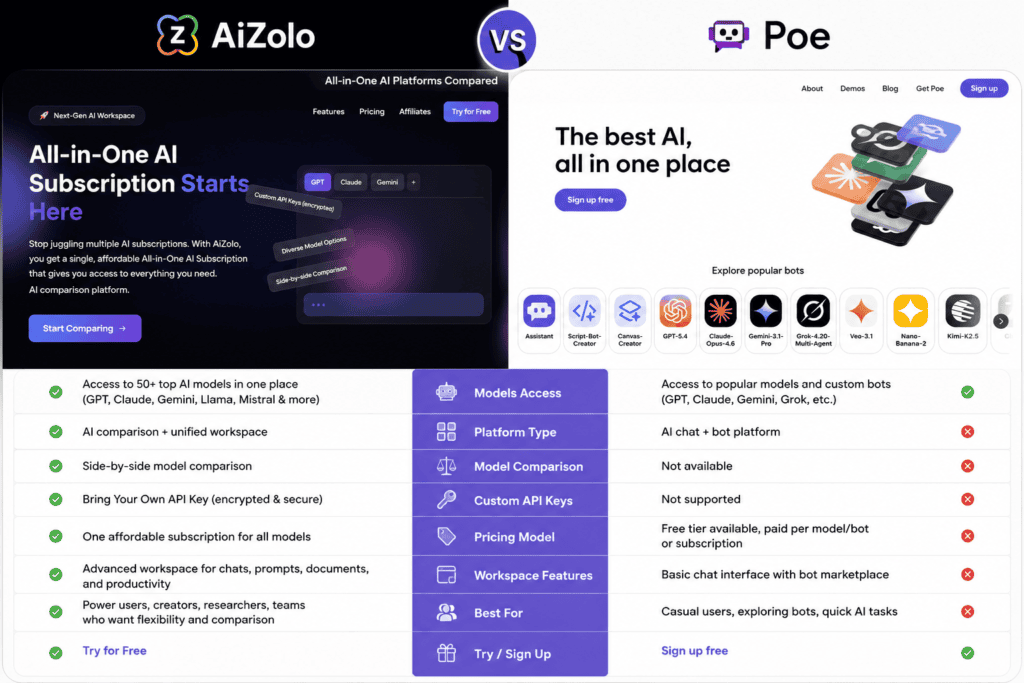
Best Poe alternative: AiZolo vs Poe AI
| Feature | AiZolo | Poe |
|---|---|---|
| Entry price | Free tier; Pro at $9.9/mo | Free tier; Starter at $4.99/mo |
| Mid-tier price | $9.9/mo (Pro) | $19.99/mo (Premium) |
| Model access | GPT, Claude, Gemini, Perplexity Sonar Pro, Grok + 2,000+ tools | 200+ models via points system |
| Side-by-side comparison | Yes, built-in | No — one bot per chat |
| Bring your own API key | Yes, encrypted, unlimited tokens on free plan | Not supported |
| Image generation | Included on Pro | Included on paid tiers |
| Video generation | Included on Pro | Included on higher tiers |
| Audio generation | Included on Pro | Included on higher tiers |
| Chat import from ChatGPT/Claude | Yes | No |
| Prompt manager | Yes | Custom bots (different mechanism) |
| AI memory | Yes | Limited |
| Team/collaboration | Not a current strength | Subscription sharing via invite link |
| Monthly token/point allowance (mid-tier) | 3,000,000 tokens | 660,000 compute points |
| Best for | Comparing model outputs directly, consolidating subscriptions | Sampling many models cheaply, custom bot-building |
Where AiZolo wins: a lower mid-tier price, built-in side-by-side comparison instead of single-bot chat, and BYOK support that lets you skip the token pool entirely if you already pay for API access.
Where Poe wins: a larger raw model catalog (200+ vs AiZolo’s headline models plus its tool library) and a more mature points-transparency system that shows exact USD cost per model.
Neither is a strict upgrade over the other — the honest answer is that AiZolo suits people who want to actively compare models, while Poe suits people who want to sample the widest possible catalog and don’t mind managing a points budget.
Which platform is best for different users?
| User type | Best pick | Why |
|---|---|---|
| Students | AiZolo or Gemini | Low entry price; Gemini if already using Google Docs |
| Developers | OpenRouter or DeepSeek | Pay-per-token access, no subscription markup |
| Researchers | Perplexity | Citations and Deep Research by default |
| Businesses/teams | AiZolo, LibreChat, or Open WebUI | Consolidated billing, or full self-hosted control |
| Content creators | Claude or AiZolo | Long-form writing quality, or side-by-side drafts |
| Freelancers | AiZolo | Lowest cost to replace multiple subscriptions |
| Privacy-conscious users | Jan, LM Studio, or LibreChat (self-hosted) | Nothing leaves your machine |
| Power users comparing models | AiZolo or Poe | Built for exactly this use case |
Poe AI alternatives: Pricing comparison
| Platform | Free tier? | Entry paid tier | Mid tier |
|---|---|---|---|
| AiZolo | Yes | — | $9.9/mo |
| Poe | Yes | $4.99/mo | $19.99/mo |
| ChatGPT | Yes | $8/mo | $20/mo |
| Claude | Yes | — | ~$20/mo |
| Gemini | Yes | $4.99/mo | $19.99/mo |
| Perplexity | Yes | — | $20/mo |
| OpenRouter | Pay-per-token | — | — |
| TypingMind | No | ~$59 one-time | — |
| LibreChat | Free (self-hosted) | — | — |
| AnythingLLM | Free core | — | Paid team tiers |
| Msty | Yes | — | Paid tiers available |
| Jan | Free | — | — |
| LM Studio | Free | — | — |
| DeepSeek Chat | Yes, unlimited | Pay-per-token API | — |
Prices change often — always confirm current pricing on each provider’s site before subscribing.
Privacy comparison
Data handling varies more than most comparison articles admit:
- Poe, ChatGPT, Claude, Gemini, Perplexity, AiZolo are all cloud-hosted. Read each provider’s current privacy policy for training-data opt-outs, since these change over time.
- DeepSeek Chat is hosted in China. That’s not automatically disqualifying, but it’s a real factor for regulated industries or anyone with strict data-residency requirements.
- LibreChat, AnythingLLM (self-hosted), Jan, LM Studio, Msty can all run fully locally or on your own server, meaning nothing leaves your machine unless you explicitly connect a cloud API.
- Enterprise tiers (available on Perplexity, ChatGPT, Claude, and Gemini) typically add contractual guarantees that consumer tiers don’t include, such as no-training clauses and admin-level data controls.
If data residency is a hard requirement, self-hosted tools are the only category here that removes the question entirely.
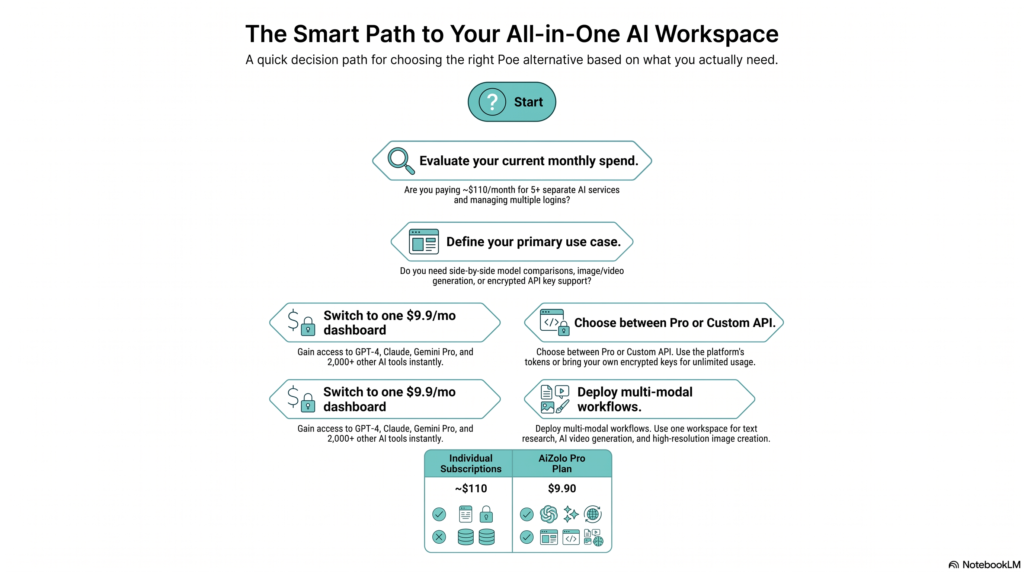
Decision framework
Use this quick flow to narrow it down:
- Do you need everything to stay on your own hardware? → Jan, LM Studio, or self-hosted LibreChat/AnythingLLM.
- Do you already have API keys and just want a better interface? → TypingMind or OpenRouter.
- Do you mainly need one really strong model, not a comparison tool? → ChatGPT, Claude, or Gemini, based on your workflow.
- Do you need sourced, cited research answers? → Perplexity.
- Do you want to compare multiple models side-by-side without managing separate subscriptions? → AiZolo or Poe, depending on whether you value comparison tooling (AiZolo) or catalog breadth (Poe).
- Is budget the only factor and you mostly need coding help? → DeepSeek Chat.
Frequently asked questions
Is Poe AI still worth using in 2026? Yes, for people who want to sample a very wide catalog of models cheaply and don’t mind managing a points budget. It’s less competitive for teams or anyone who wants side-by-side comparison built in.
What is the cheapest Poe alternative? DeepSeek Chat’s web interface is free with no published cap. Among bundled multi-model subscriptions, AiZolo’s Pro tier at $9.9/month is currently cheaper than Poe’s comparable Premium tier at $19.99/month.
Which Poe alternative gives access to the most models? OpenRouter, with 300+ models via pay-per-token API access. Among consumer subscriptions, Poe’s 200+ model catalog is the largest.
Is AiZolo better than Poe? It depends on what you value. AiZolo is cheaper at the mid-tier and has built-in side-by-side comparison; Poe has a larger raw model catalog and a more established points-transparency system. Neither is a universal winner.
Can I use my own API keys instead of paying a subscription? Yes — AiZolo, TypingMind, OpenRouter, LibreChat, and AnythingLLM all support bringing your own API keys.
What’s the best Poe alternative for teams? LibreChat or Open WebUI if you want full self-hosted control; AiZolo if you want a bundled subscription without managing infrastructure.
Does ChatGPT let you switch between multiple AI models? No — ChatGPT gives you OpenAI’s models only. For multi-model comparison you’d need an aggregator like AiZolo, Poe, or OpenRouter.
Is Claude a good Poe alternative? Claude is a strong single-model alternative, particularly for long documents and coding, but it doesn’t offer multi-model switching on its own.
What’s the best free Poe alternative? DeepSeek Chat for coding and reasoning; Gemini or ChatGPT’s free tiers for general use; Jan or LM Studio if you want local models with zero ongoing cost.
Is Perplexity a replacement for Poe? Not directly — Perplexity is a research and search tool first, not a general multi-model chat aggregator. It’s a better fit if your main need is cited, sourced answers.
Are self-hosted alternatives hard to set up? LibreChat and AnythingLLM require some technical comfort (server setup, API keys). Jan, LM Studio, and Msty are designed for non-technical users and install like normal desktop apps.
Does AiZolo support image and video generation? Yes, on the Pro tier, alongside text chat with GPT, Claude, Gemini, and other models.
Can I import my old ChatGPT or Claude conversations into a new platform? AiZolo supports one-click import from ChatGPT and Claude. Most other alternatives on this list do not currently offer this.
Which alternative is best for coding specifically? DeepSeek Chat and Claude both perform well on coding benchmarks; developers who want raw model access for coding tools often prefer OpenRouter paired with a code-focused model.
Do any of these alternatives offer enterprise-grade data controls? ChatGPT, Claude, Gemini, and Perplexity all offer enterprise tiers with stronger data governance than their consumer plans. Self-hosted tools (LibreChat, AnythingLLM) give you full control by default since data never leaves your infrastructure.
Final verdict
There’s no single “best” Poe alternative — the right pick depends on what you were actually using Poe for.
- If you liked Poe’s core idea (one place to compare multiple AI models) but wanted a better price and built-in side-by-side comparison, AiZolo is worth trying.
- If you’ve settled on one model you trust and don’t need to compare others, go direct to ChatGPT, Claude, or Gemini.
- If your main need is sourced research, Perplexity is purpose-built for that.
- If you’re technical and want maximum model choice at near-direct pricing, OpenRouter paired with a front end like TypingMind gives you the most control.
- If privacy and local hosting matter more than convenience, Jan, LM Studio, or a self-hosted LibreChat/AnythingLLM setup keeps everything on your own hardware.
- If budget is the deciding factor, DeepSeek Chat‘s free tier is hard to beat for coding and reasoning.
Try the free tier of whichever platform matches your actual workflow before committing to a paid plan — every tool on this list offers one.
Author
YtZolo Editorial Team
This comparison was researched and written by a technology writer who evaluates AI productivity tools for a living, cross-checking pricing and feature claims directly against each provider’s official site rather than relying on other roundups. Product details change quickly in this space — if you spot something outdated, let us know and we’ll correct it.

