
If you’ve ever asked ChatGPT, Claude, and Gemini the exact same question and gotten three different answers, you already understand why a side-by-side AI comparison matters more than any “best AI tool” listicle. Rankings go stale the moment a new model ships. Your own test doesn’t. It reflects your prompts, your use case, and your standards — not someone else’s screenshots from three months ago.
This guide walks through exactly how to set up, run, and score this kind of test on your own, using nothing more than a spreadsheet, a handful of prompts, and about thirty minutes of focused time. It’s the same process the aizolo team relies on before recommending any AI tool.
By the end, you’ll have a repeatable process you can rerun any time a new model launches or an existing one gets an update.
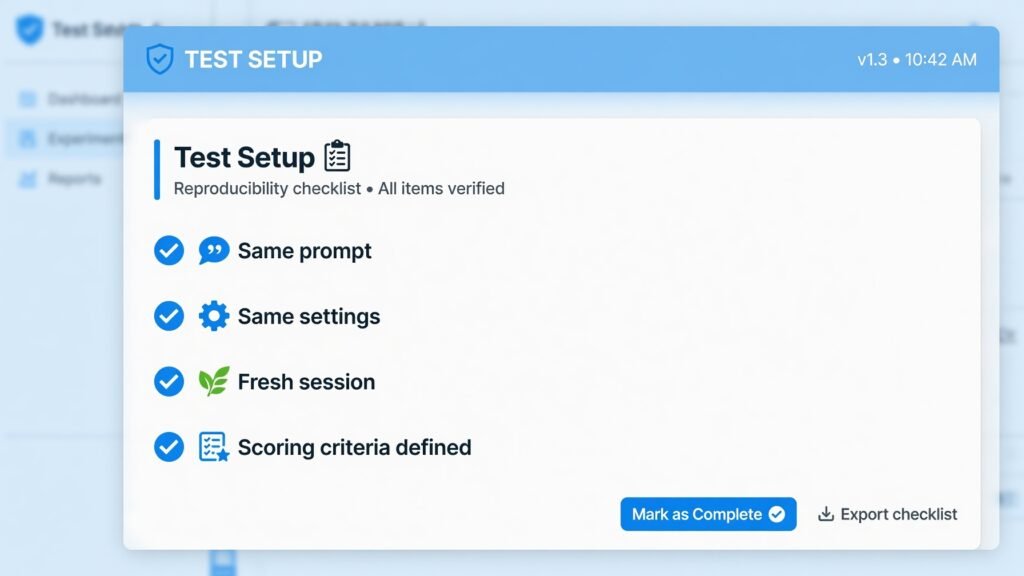
Table of Contents
Why Bother With Your Own Side-By-Side AI Comparison?
Public benchmark leaderboards are useful, but they measure narrow, standardized tasks — math problems, coding puzzles, multiple-choice trivia. They rarely reflect what you actually do day to day: drafting emails, summarizing contracts, brainstorming product names, debugging a specific piece of code, or writing in your brand’s voice.
A side-by-side AI comparison you run yourself closes that gap. It tells you which model handles your real workload best, not which model wins an abstract test. It also protects you from marketing claims. Every AI company highlights the benchmarks where its model looks strongest, so an independent, hands-on test is the only way to get an honest picture.
There’s a secondary benefit too: once you’ve built the habit of running this kind of test every time a major model update drops, you stop chasing hype cycles. You make decisions based on evidence sitting in your own spreadsheet, not on someone else’s headline.
Think of it the way you’d think about buying a mattress. Star ratings give you a rough sense of quality, but nothing replaces actually lying down on it for ten minutes. The same logic applies here: a generic ranking article gives you a rough sense of which tools are strong, but only hands-on testing reveals which one works best for the tasks you actually do every day.
Platforms like AiZolo make that process easier by letting you compare multiple AI models in one place, so you can test the same prompt across different models and choose the one that fits your workflow instead of relying solely on rankings.
There’s a practical business case for building this habit, too. Teams that adopt new tools without ever testing them properly tend to standardize on whichever option the loudest person on the team already liked.
That’s not really a decision process — it’s closer to an accident. Running a structured, repeatable evaluation turns tool selection into something you can defend, document, and revisit later, instead of something that happened by default.
Step 1: Set Up a Fair Test
Fairness is the single biggest factor that separates a useful side-by-side AI comparison from a misleading one. Most amateur comparisons fail here — not because the tester picked bad prompts, but because the test conditions weren’t controlled. Before you run anything, lock in these four variables.
Pick your contenders. Three models is the sweet spot for this kind of test — enough to see meaningful variation, not so many that scoring becomes overwhelming. A common setup pairs a general-purpose flagship model, a fast or budget-tier variant, and a specialized competitor relevant to your task, such as a coding-focused model if you’re evaluating development work.
It’s tempting to test five or six models at once, especially if you’re curious about everything on the market. Resist that urge for your first round. A wider test multiplies the time you spend scoring without necessarily improving your decision, and it makes it harder to spot patterns across your prompt set. You can always run a second, smaller round later against whichever model won the first pass.
Use identical settings. If one model is running with web search enabled and another isn’t, you’re not comparing models — you’re comparing configurations. Match temperature settings where the interface allows it, and disable any tool use (search, code execution, plugins) unless you’re deliberately testing that feature.
Fix the environment. Run every model in a fresh conversation. Prior chat history, saved memory, or custom instructions will quietly bias results in one model’s favor, and you won’t be able to tell whether the model or the context produced the better answer.
Decide your scoring criteria before you start. Write down what “good” looks like — accuracy, tone, structure, creativity, factual grounding — before you see a single response. Scoring after the fact almost always drifts toward whichever answer “feels” better, which defeats the purpose of a controlled test.
Time-box each session. Give yourself a fixed window — say, forty-five minutes — to run and score the whole set. Open-ended testing tends to sprawl, and you’ll end up over-analyzing the first prompt while rushing the last one. A time limit keeps your attention even across the whole set.

Step 2: Choose Prompts That Actually Reflect Your Work
The prompts you choose make or break this kind of test. Generic prompts like “write me a poem about the ocean” tell you almost nothing useful, because nearly every current model handles them competently. Instead, pull prompts directly from your own backlog:
- A real email you need to write this week
- An actual snippet of code you’re stuck on
- A summary task using a document you already have permission to share
- A creative brief similar to ones you regularly hand off to freelancers
- A multi-step instruction that requires the model to follow several constraints at once
Aim for three to five prompts that vary in difficulty. One should be simple (a sanity check), one should be moderately complex (your typical daily task), and at least one should be genuinely hard — something with ambiguous instructions, a tight word limit, or a tricky edge case. A side-by-side comparison built entirely around easy prompts will make every model look identical, which isn’t useful information.
Step 3: Run the Same Prompt Across Three Models
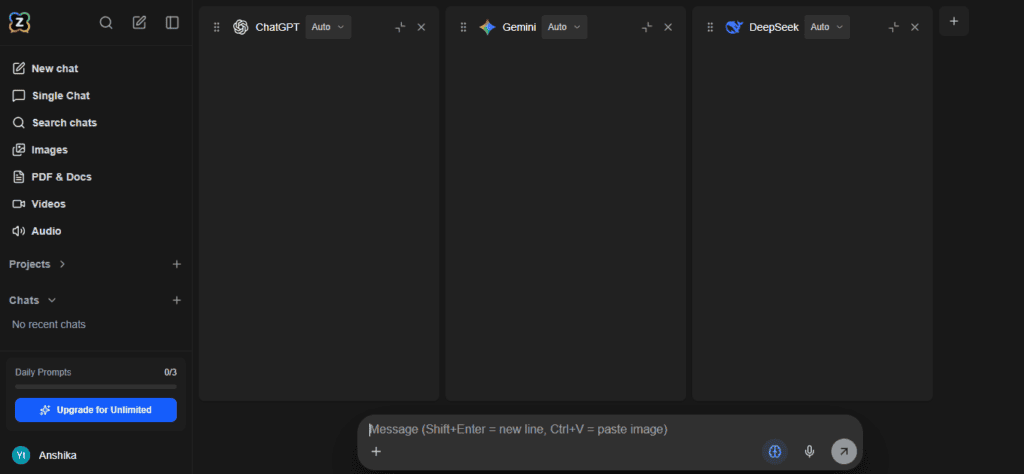
This is the core of the whole process: taking one identical prompt and feeding it, word for word, into each model you’re testing. Copy and paste rather than retyping, so you eliminate any chance of accidental wording differences.
Run all three responses before you evaluate any of them. Reading response one, judging it, then reading response two introduces a subtle bias called anchoring — your opinion of the first answer colors how you read the rest. Instead, generate all three responses first, paste them into adjacent columns of a spreadsheet, and only then start reading and scoring.
For a text-heavy test like this, a simple table works well:
| Prompt | Model A Response | Model B Response | Model C Response |
|---|---|---|---|
| Prompt 1 | [paste] | [paste] | [paste] |
| Prompt 2 | [paste] | [paste] | [paste] |
Repeat this process for every prompt in your set. If you’re testing coding tasks, actually run the generated code rather than just reading it — a snippet that looks elegant but throws an error tells you far more than a polished-looking wall of text.
Step 4: How to Read and Score Benchmark Results
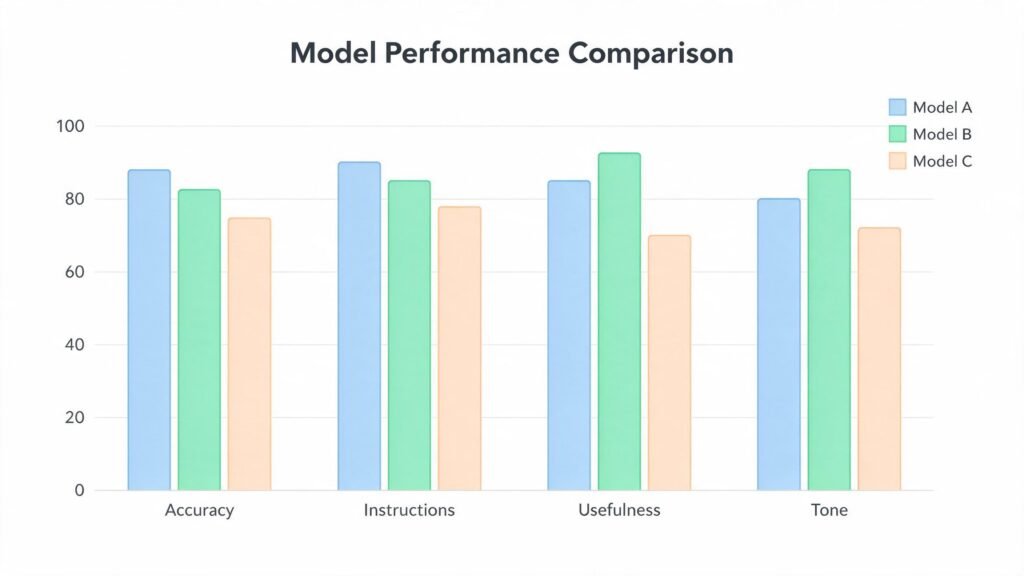
Once your responses are collected, scoring turns a pile of text into an actual decision. A reliable evaluation uses a simple rubric rather than a vague gut feeling. Score each response on a 1–5 scale across a few fixed dimensions:
Accuracy — Are the facts, code, or calculations actually correct? For anything checkable (math, code, citations), verify it rather than assuming fluency equals correctness.
Instruction-following — Did the AI model respect every constraint in the prompt (word count, format, tone, required sections), or did it quietly drop one?
Usefulness as-is — Could you use this response with zero edits, or does it need substantial rework before it’s usable?
Tone and voice fit — Does the writing sound like something you’d actually publish or send, or does it read as generic AI output?
Add the scores per model per prompt, then total them across your whole prompt set. The model with the highest total isn’t necessarily the “best AI” in some abstract sense — it’s the best fit for the specific tasks you tested, which is exactly the point of doing a side-by-side AI comparison yourself instead of trusting a generic ranking.
Keep your spreadsheet. When a new model version launches, you can rerun the same prompts against the update and compare it directly to your saved scores, turning a one-time test into an ongoing benchmark you fully control.
Common Mistakes That Ruin a Side-By-Side AI Comparison
Even careful testers fall into a few predictable traps. Watch for these:
Testing only easy prompts. If every AI model produces a near-identical answer, you’ve learned nothing about where they actually diverge.
Judging length as quality. Longer isn’t better. Score against your rubric, not against which response simply says more.
Ignoring cost and speed. A test focused purely on output quality misses half the picture. Note the response time and, if relevant, the per-message or per-token cost, since a marginally better answer that costs three times as much may not be the right tradeoff for your workflow.
Running the test once and calling it final. Model outputs have some variability even under identical settings. If a result surprises you, rerun that specific prompt two or three times before drawing a conclusion.
Comparing different tiers of the same model family. Make sure you’re testing comparable tiers — a flagship model against another flagship, not a flagship against a lightweight, budget-tier variant — or your side-by-side AI comparison will simply reflect pricing tiers rather than genuine AI model capability.

Tools That Make This Easier
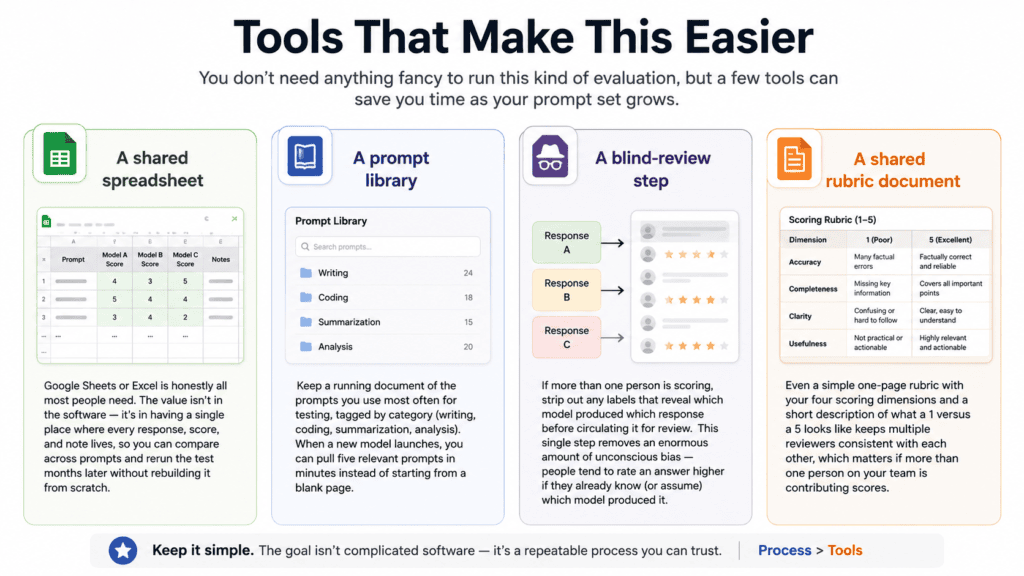
You don’t need anything fancy to run this kind of evaluation, but a few tools can save you time as your prompt set grows. At aizolo, we keep this deliberately low-tech — the value is in the process, not the software:
A shared spreadsheet. Google Sheets or Excel is honestly all most people need. The value isn’t in the software — it’s in having a single place where every response, score, and note lives, so you can compare across prompts and rerun the test months later without rebuilding it from scratch.
A prompt library. Keep a running document of the prompts you use most often for testing, tagged by category (writing, coding, summarization, analysis). When a new model launches, you can pull five relevant prompts in minutes instead of starting from a blank page.
A blind-review step, if you’re testing with a team. If more than one person is scoring, strip out any labels that reveal which AI model produced which response before circulating it for review. This single step removes an enormous amount of unconscious bias — people tend to rate an answer higher if they already know (or assume) which model produced it.
A shared rubric document. Even a simple one-page rubric with your four scoring dimensions and a short description of what a 1 versus a 5 looks like keeps multiple reviewers consistent with each other, which matters if more than one person on your team is contributing scores.
Frequently Asked Questions
How often should I rerun the test? Rerun it whenever an AI model you rely on ships a major update, and at minimum once or twice a year even if nothing has obviously changed. Quiet updates happen more often than companies advertise.
Is three prompts really enough? Three is a reasonable minimum for a quick check, but five to seven gives you a much more reliable signal, especially if they span a range of difficulty. Fewer than three makes it too easy for one lucky or unlucky response to skew your impression of an entire model.
Should I test with the free tier or a paid plan? Test whichever tier you actually intend to use day to day. Comparing a free tier of one tool against a paid tier of another will quietly bias your results toward whichever one you’re paying for.
What if two models tie? Look past the total score to your specific priorities. If cost or speed matters more to you than a marginal quality difference, let that break the tie. There’s no universally “correct” winner — only the right fit for your situation.
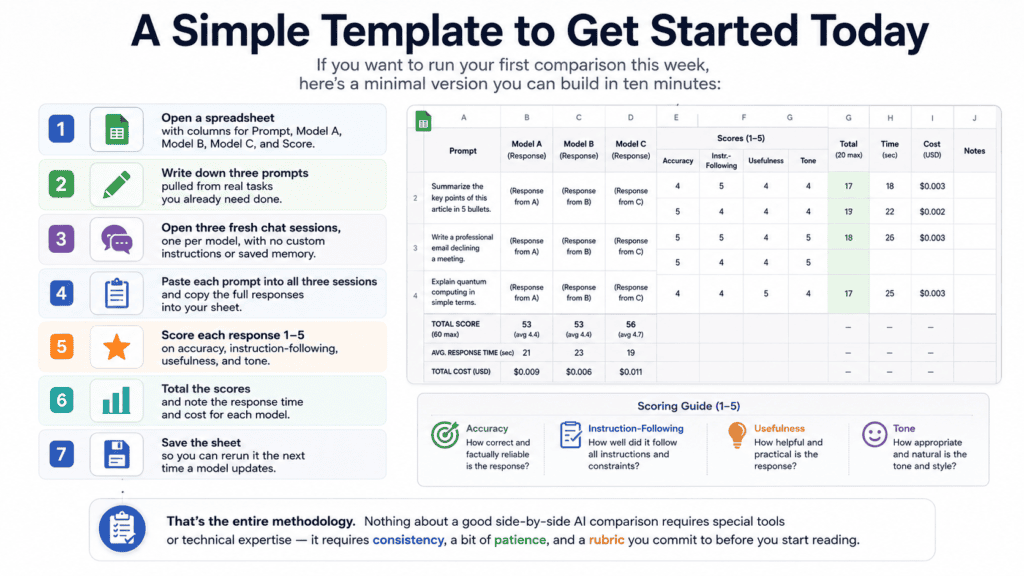
A Simple Template to Get Started Today
If you want to run your first comparison this week, here’s a minimal version you can build in ten minutes:
- Open a spreadsheet with columns for Prompt, Model A, Model B, Model C, and Score.
- Write down three prompts pulled from real tasks you already need done.
- Open three fresh chat sessions, one per model, with no custom instructions or saved memory.
- Paste each prompt into all three sessions and copy the full responses into your sheet.
- Score each response 1–5 on accuracy, instruction-following, usefulness, and tone.
- Total the scores and note the response time and cost for each model.
- Save the sheet so you can rerun it the next time a model updates.
That’s the entire methodology. Nothing about a good side-by-side AI comparison requires special tools or technical expertise — it requires consistency, a bit of patience, and a rubric you commit to before you start reading.
Final Thoughts
Model rankings change constantly, but the ability to run your own side-by-side AI comparison never goes out of date. New models launch every few weeks, benchmarks shift, and yesterday’s leader can quickly be replaced. What stays valuable is having a simple process to evaluate AI tools based on the work you actually do.
After you’ve compared a few AI models yourself, the process becomes a five-minute habit instead of a research project. Test the same prompt across multiple models, compare the quality of the output, check the speed, verify the citations, and decide which one genuinely helps you complete your task faster. Over time, you’ll build your own trusted workflow instead of relying on someone else’s rankings.
That’s where platforms like AiZolo add real value. Rather than opening multiple AI apps in different browser tabs, you can compare leading models side by side in one workspace using identical prompts. It removes the guesswork and makes choosing the right model much faster, whether you’re writing, coding, researching, or creating content.
The best AI isn’t the one sitting at the top of a leaderboard—it’s the one that consistently delivers the best results for your workflow. Rankings can point you in the right direction, but your own testing is what turns information into confidence.
So the next time someone asks, “Which AI is actually better?”, you won’t have to quote another review or repeat a trending headline. You’ll have something far more valuable: first-hand experience backed by real comparisons. That’s the philosophy behind everything we publish at AiZolo—test it yourself, compare with confidence, and trust the results.
About the Author
Anshika Verma is an AI content writer at ytZolo, specializing in applied AI tools, workflow automation, and practical AI adoption. She researches, tests, and writes about AI solutions that help creators and teams work more efficiently through real-world, hands-on insights.

