
Running a YouTube channel with a small team isn’t mainly a hiring problem. It’s a workflow problem. Knowing how to run a YouTube channel with a small team starts with creating a clear system for who does what and when.
With two to four people, the idea is not to recreate a big production studio. It is about defining who will own all the important tasks, reducing the number of required handoffs, and making sure that the content creation pipeline is not slowed down by too many people managing it.
The easiest approach is to separate content decisions, production, packaging, publishing, and performance review. Individuals can own more than one area, but everything is supposed to have one owner.
Tools like ytZolo can also help organize parts of the YouTube content workflow, so a small team can spend more time on content decisions and less time switching between tools.
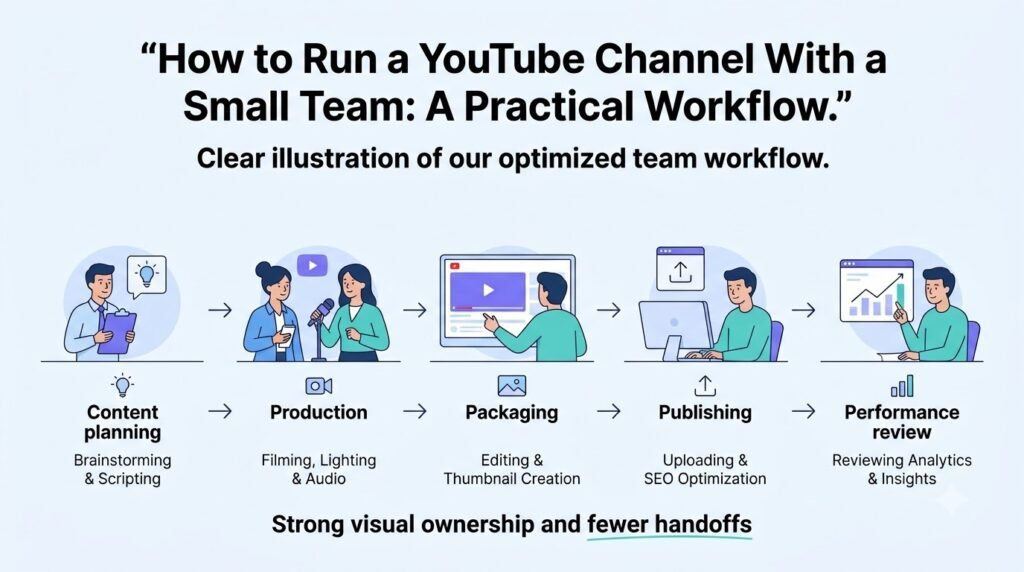
Table of Contents
Quick answer
To run a YouTube channel with a small team, divide the work into clear stages: research, scripting, production, editing, packaging, publishing, and analytics.
A two-person team can combine several roles. A three-person team can separate content from editing. A four-person team can add channel operations or analytics.
The right structure depends more on the channel format, publishing frequency, and production workload than subscriber count.
The most important rule is simple: don’t make the creator the middleman between every team member.
What does a small YouTube team actually need?
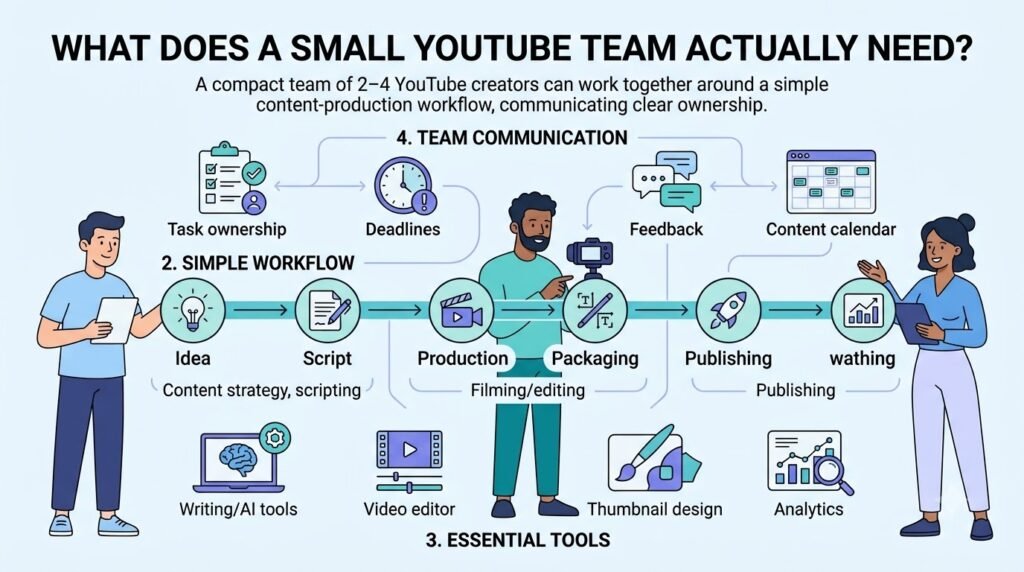
A small YouTube team doesn’t need ten separate specialists.
The core responsibilities are usually:
| Responsibility | What it covers |
| Content strategy | Topics, formats, audience needs |
| Research | Sources, examples, competitors, factual checking |
| Scripting | Outlines, scripts, hooks, and structure |
| Production | Filming, recording, or asset collection |
| Editing | Video assembly, pacing, graphics, and audio |
| Packaging | Titles and thumbnails |
| Publishing | Descriptions, metadata, scheduling, and uploads |
| Analytics | Performance review and next-video decisions |
One person can own several of these responsibilities.
For example, a creator might own strategy and final creative approval, while another person handles research, scripting, editing, and channel operations.
The mistake isn’t combining roles.
The mistake is combining responsibilities without defining ownership.
Every recurring task should have one primary owner, even when another person helps with it.
Choose the right small-team structure
There is no ideal team size for a YouTube channel. Build a structure around the tasks your team needs to do regularly.
Two-person YouTube team
A two-person team can work well when the channel has a relatively simple production format.
Person 1: Creator / content lead
Owns:
- Channel direction
- Topic selection
- Final script approval
- Filming or recording
- Creative decisions
- Final video approval
- Performance review
Person 2: Production / operations
Owns:
- Research support
- Script preparation
- Editing
- Thumbnail coordination
- Upload preparation
- Content calendar
- File organization
This ensures that while the creator focuses on the channel’s voice, the second person takes over the continuous creation process. The primary risk is the overworked second person, for whom editing takes up too much time, who then finds himself in charge of research, thumbnails, and publishing.
Three-person YouTube team
Three people allow the workflow to separate more cleanly.
Person 1: Creator / creative lead
Owns the channel’s direction, on-camera work, final creative decisions, and high-level analytics.
Person 2: Content lead
Owns research, ideas, outlines, scripts, and content planning.
Person 3: Editor / production
Owns editing, audio, visual assets, and final video assembly.
The workflow becomes:
Idea → Research → Script → Recording → Edit → Approval → Publish → Analysis
The creator no longer needs to write every script or edit every video.
Four-person YouTube team
A fourth person can help when publishing, packaging, and coordination become recurring bottlenecks.
A practical structure is:
- Creator / creative lead
- Researcher / scriptwriter
- Editor
- Channel manager / packaging specialist
The fourth role can handle:
- Content calendar
- Upload preparation
- Titles
- Thumbnails
- Descriptions
- Publishing
- Sponsor requirements
- Performance reporting
- Team coordination
The roles don’t have to be exclusive.
For example, the channel manager might also handle thumbnails, while the creator continues to approve final packaging.
Hybrid staffing
A small team also doesn’t need every role to be a full-time position.
| Work | Possible staffing model |
| Creative direction | Internal |
| Research | Internal or recurring freelancer |
| Scriptwriting | Internal or freelancer |
| Editing | Freelancer or internal |
| Thumbnail design | Freelancer or specialist |
| Publishing | Internal |
| Analytics | Internal |
| Voiceover | Project-based |
| Dubbing | Project-based |
Decisions should be based on workload and continuity.
If a person has worked on every video, the issue of continuity may outweigh the need for a cheaper but less committed freelancer, while the two people working on an intermittent basis would rather be experts on demand.
Build a clear YouTube content pipeline
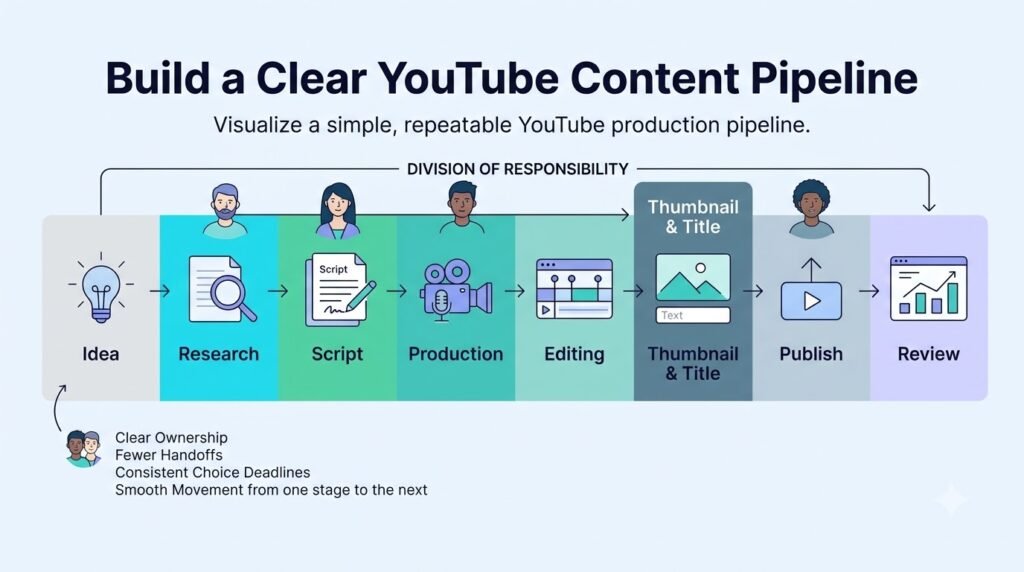
Job titles can create the illusion of order in a small team, while the details get lost in the chaos. Instead, organize your team by production stage.
A useful pipeline is:
1. Topic approved
↓
2. Research complete
↓
3. Script approved
↓
4. Recording complete
↓
5. Edit in progress
↓
6. Thumbnail and title ready
↓
7. Upload approved
↓
8. Published
↓
9. Performance reviewed
Each stage should have:
- One owner
- One deadline
- One location for files
- One definition of “done”
That last point matters.
“Script finished” shouldn’t simply mean the writer thinks it’s finished.
It could mean:
- Hook approved
- Main points set
- Sources checked
- Visual notes added
- Final reviewer approved
This makes handoffs simple and clear.
Use one source of truth
The biggest operational problem in a small YouTube team is often information being scattered across email, chat, documents, cloud storage, and private messages.
A simple content board can solve much of this.
| Stage | Owner | Output |
| Ideas | Content lead | Approved topic |
| Research | Researcher | Research brief |
| Script | Writer | Final script |
| Production | Creator | Raw footage |
| Editing | Editor | First cut |
| Packaging | Creator / thumbnail owner | Title + thumbnail |
| Upload | Channel manager | Scheduled video |
| Review | Strategy owner | Performance notes |
The software isn’t as important as having a single source of truth.
A team member should be able to answer three questions without messaging the creator:
- What am I working on?
- What files do I need?
- What happens after I finish?
Keep the creator out of unnecessary handoffs
Consider this workflow:
Writer → Creator → Editor → Creator → Thumbnail designer → Creator → Channel manager → Creator
The work has technically been delegated, but the creator is still managing every handoff.
A better workflow is:
Research → Writer → Editor → Packaging → Channel manager
The creator steps in at defined approval points:
- Approve topic
- Approve script
- Review first edit
- Approve final package
The rest should move between the assigned owners.
Create briefs that reduce revisions
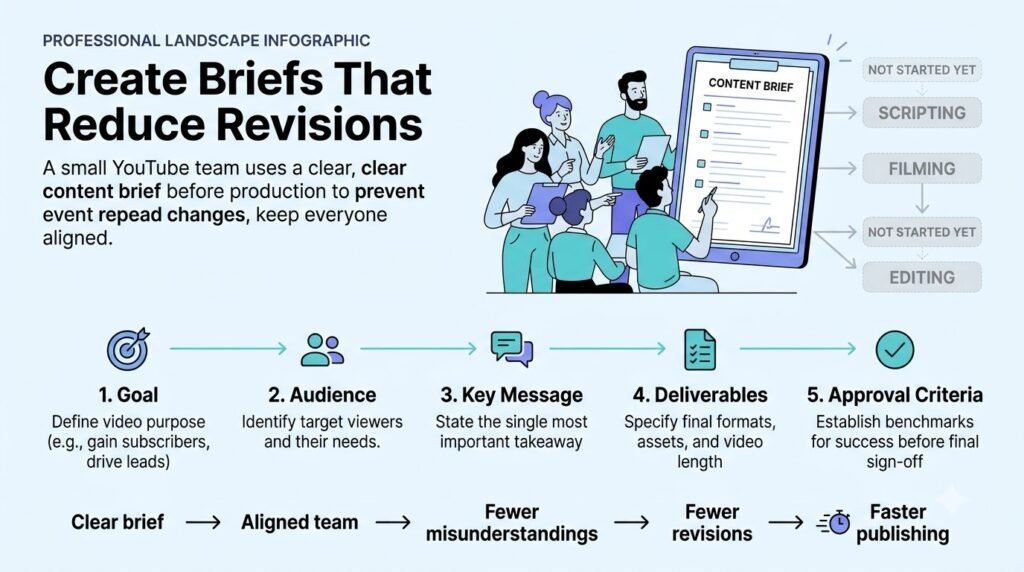
Clear briefs prevent small teams from wasting time on repeated explanations.
Start with a research brief
Before the writer starts, prepare a short research brief based on the following items:
- Working title
- Target viewer
- Main question
- Primary angle
- Supporting points
- Important sources
- Examples
- Competitor videos
- Claims requiring verification
- Visual ideas
This will help him or her get started on the right foot and provide the necessary information for double-checking the facts. The brief should not require much additional research on the writer’s part.
Give the editor a useful brief
“Make this video engaging” is not a useful editing brief. Instead, give the editor information that can guide actual decisions.
Video goal: Explain how a beginner can build a small YouTube team.
Audience: People who currently do most production tasks themselves.
Priority: Keep the explanation tight and to the point since the audience will find long speeches boring.
Visual requirements:
- Use screenshots where instructions are involved
- Highlight important numbers
- Add supporting visuals rather than decorative effects
- Keep branding consistent
Avoid:
- Unnecessary transitions
- Excessive stock footage
- Visual effects that distract from the explanation
This gives the editor with a broader definition of the completed video and limits subjective revision cycles.
Plan packaging before the video is finished
The title and thumbnail have separate functions.
The title supplies context and indicates the video’s theme.
The thumbnail offers viewers an incentive to stop and explore.
A simple packaging process is:
- Identify the video’s central promise.
- Write several title concepts.
- Create several thumbnail concepts.
- Check whether they work together.
- Remove unnecessary thumbnail text.
- Make sure the package accurately represents the video.
- Choose the final version.
Packaging shouldn’t promise something the video doesn’t d
Create a weekly production workflow
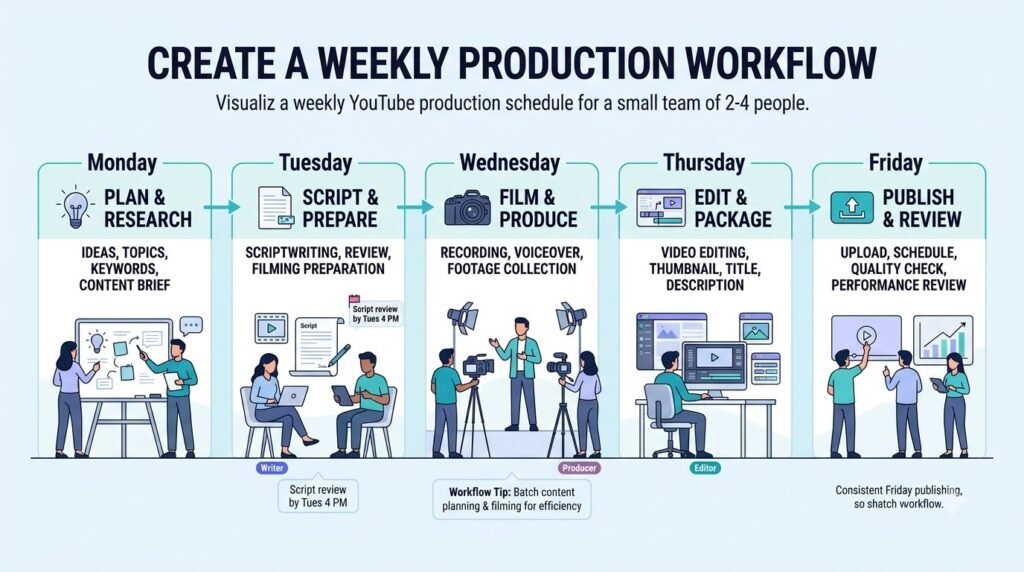
A small team benefits from a predictable schedule. You don’t necessarily need to publish every day. Choose a schedule the team can maintain without reducing research, production, or review quality.
For example:
Monday
- Review analytics
- Select upcoming topics
- Confirm priorities
- Assign deadlines
Tuesday
- Research
- Scriptwriting
- Thumbnail concepts
Wednesday
- Script approval
- Recording
- Editing previous video
Thursday
- Editing
- Thumbnail production
- Metadata preparation
Friday
- Final review
- Schedule publication
- Review published content
- Update the next week’s pipeline
YouTube Studio supports scheduled publishing, so completed videos can be prepared ahead of their publication time.
The schedule should support the production system rather than become a target that forces the team to publish low-quality videos.
A simple production SOP
The weekly schedule can follow the same basic sequence for every video:
Step 1: Choose the topic
Define:
- Topic
- Target viewer
- Main promise
- Format
- Deadline
Step 2: Prepare the research brief
Collect:
- Primary sources
- Supporting evidence
- Examples
- Competitor observations
- Questions the video needs to answer
Step 3: Create the outline
Turn the research into a logical structure.
Step 4: Approve the script
Check:
- Accuracy
- Voice
- Structure
- Value
- Missing information
Step 5: Record or create production assets
Depending on the channel, this can include:
- Camera footage
- Voiceover
- Screen recordings
- B-roll
- Music
- Sound effects
Step 6: Edit
The editor creates the first cut using the approved script and production brief.
Step 7: Package
Prepare:
- Title
- Thumbnail
- Description
- Chapters where useful
- Relevant metadata
Step 8: Final review
Check:
- Accuracy
- Audio
- Visuals
- Claims
- Links
- Thumbnail
- Title
- Description
- End screens and cards where applicable
Step 9: Schedule
Prepare the video for its planned publication time.
Step 10: Review performance
Record the important observations and feed them into the next planning session. A healthy workflow should feel relatively boring.
- The writer knows what to write.
- The editor knows what to edit.
- The thumbnail designer understands the video’s promise.
- The channel manager knows when the video needs to be published.
- The creator knows when approval is required.
Decide what to delegate and what the creator should keep
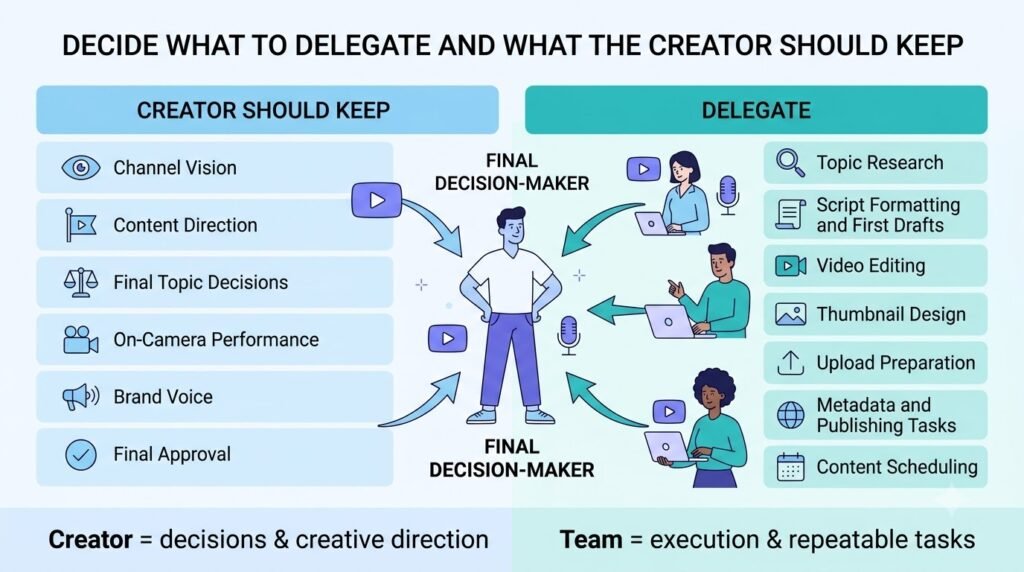
Delegation doesn’t mean the creator should disappear from the workflow.
Some decisions are closely tied to the channel’s identity and are difficult to delegate completely.
The creator should usually retain
- Channel positioning
- Final topic selection
- Editorial direction
- Personal stories or opinions
- Final creative approval
- Important audience decisions
Tasks that are easier to delegate
- Research organization
- First-draft scripts
- Video editing
- Thumbnail production
- Upload preparation
- File management
- Routine reporting
The exact split depends on the channel format.
A personality-driven channel may require more creator involvement in scripting.
A faceless educational channel may delegate much more of the writing and production process.
Hire to remove a bottleneck
Don’t hire because the channel has reached an arbitrary subscriber number.
Hire when a recurring task is limiting the team’s output or consuming time that could be spent elsewhere.
Consider an editor when:
The creator spends most of the week editing and has little time for content development.
Consider a researcher or writer when:
The creator spends more time preparing scripts than creating or reviewing them.
Consider a thumbnail specialist when:
Packaging has become a recurring bottleneck and the existing team can’t give titles and thumbnails enough attention.
Consider a channel manager when:
Several people are involved and the creator spends too much time assigning tasks, checking files, and chasing deadlines.
The principle is simple:
Hire to remove a bottleneck, not to make the team look bigger.
Use AI without losing editorial control
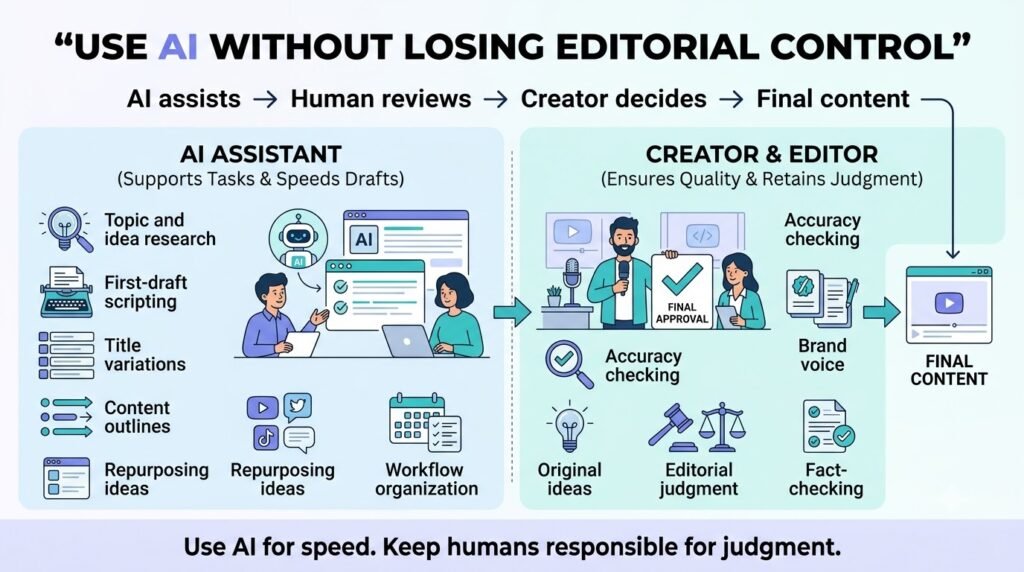
AI can remove repetitive work from a small team’s production queue.
Useful areas include:
- Topic brainstorming
- First-draft outlines
- Script drafts
- Title variations
- Description drafts
- Tag suggestions
- Thumbnail concepts
- Voice generation
- Background music
- Sound effects
- Audio cleanup
- Dubbing
- Transcript alignment
But AI shouldn’t become the editorial decision-maker.
Human review remains important for:
- Accuracy
- Original ideas
- Brand voice
- Factual claims
- Sensitive topics
- Final editorial decisions
- Audience understanding
YouTube also requires creators to disclose certain AI-generated or meaningfully altered content when it realistically depicts a real person, event, or place in a way that could mislead viewers about what actually happened.
That makes AI usage both a production and publishing consideration.
Where ytZolo can fit
ytZolo can be used as a production-support layer for tasks that would otherwise require several separate tools.
Its current toolset includes capabilities for:
- YouTube scripts
- Titles
- Descriptions
- Tags
- Thumbnail generation
- AI voice generation
- AI music
- Multi-voice dialogue
- Voice changing
- Voice isolation
- AI dubbing
- AI sound effects
- Forced alignment
For example, a small team could use a workflow such as:
Researcher → script draft → creator review → AI voice → editor → packaging → publish
Or:
Creator script → voice isolation → editing → AI music/SFX → final review
The useful question isn’t how many AI features the team can use.
It’s which repetitive tasks are taking up time that could be removed from the manual production queue.
AI should support the team’s workflow rather than replace its editorial judgment.
Use YouTube Analytics to improve the next video
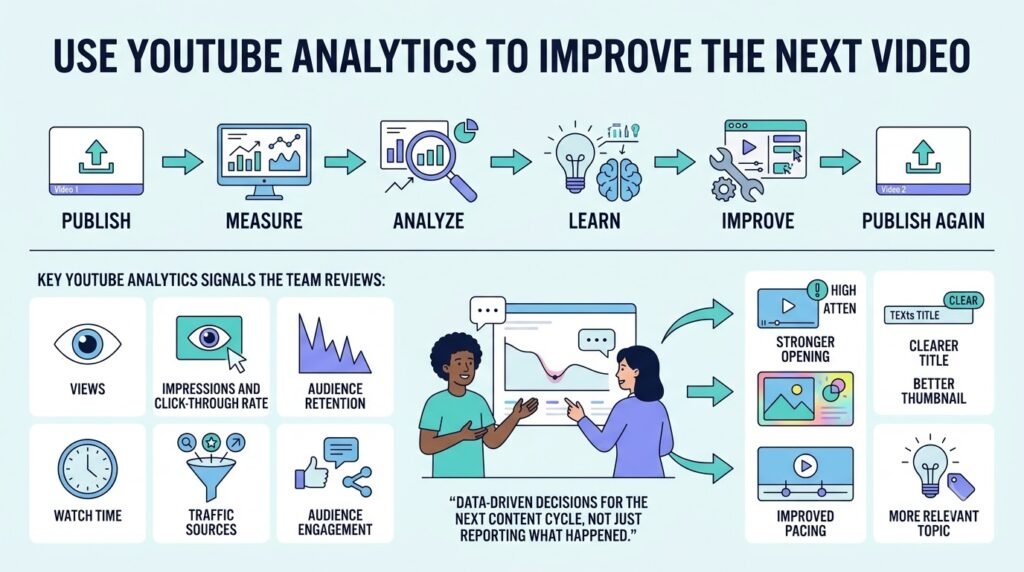
Analytics shouldn’t belong to one person who occasionally sends screenshots to everyone else.
It should feed the next production cycle.
YouTube Analytics provides channel and video-level information covering areas such as audience, content, engagement, and revenue. Advanced Mode can also be used to compare performance and export reports.
A small team can keep its review simple.
Review packaging
Ask:
- Did viewers respond to the title and thumbnail?
- Did the package accurately communicate the video’s value?
Review retention
Ask:
- Where did viewers leave?
- Were there obvious dips?
- Which sections held attention?
YouTube’s audience-retention reporting can help identify spikes, dips, gradual declines, and other patterns in viewer attention.
Review audience
Ask:
- Did the video reach the intended viewers?
- Did it bring new, casual, or returning viewers?
Review content
Ask:
- Which topic or format performed differently from recent uploads?
- What should the team test next?
The important part is what happens after the review.
Don’t create an analytics report just to archive numbers.
Turn one observation into one production change.
For example:
“Viewers consistently left during long explanations.”
Possible next experiment:
“Shorten the setup and move the example earlier.”
That creates a feedback loop between publishing and production.
Use a simple post-publish review
A small team doesn’t need a 20-page performance report.
Use five questions:
- What worked?
- What didn’t?
- Where did viewers leave?
- What should we repeat?
- What should we change next time?
Keep these notes attached to the video or content record.
Over time, this creates a channel-specific knowledge base instead of forcing the team to start from zero every week.
Track internal workflow metrics
YouTube performance isn’t the only thing worth measuring.
Useful internal measures include:
- Time from approved idea to published video
- Number of revision rounds
- Average editing turnaround
- Percentage of videos delivered on schedule
- Number of blocked tasks
- Time spent by the creator on production
- Time spent on revisions
- Percentage of tasks completed without creator intervention
These aren’t YouTube ranking factors.
They’re operational measurements that show where the production system is slowing down.
Manage access, files, and team operations
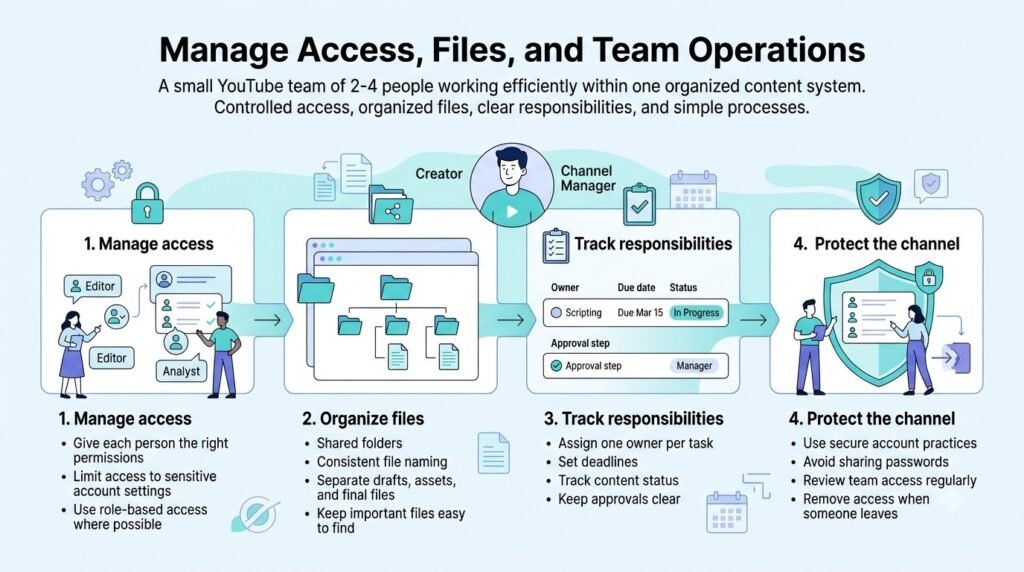
Small teams should also create basic operational rules.
Use YouTube permissions
Don’t share the channel owner’s password.
YouTube provides channel permissions that allow multiple people to work through their own Google Accounts with different access levels.
Available roles include levels such as:
- Manager
- Editor
- Editor (limited)
- Viewer
- Viewer (limited)
Not everyone needs access to everything.
For example:
| Team member | Possible access |
| Creator | Highest required access |
| Channel manager | Publishing and channel operations |
| Editor | Editing and content-related tasks |
| Analytics reviewer | Viewer access where appropriate |
| Freelancer | Only the access needed for the job |
Review permissions when someone leaves the team.
Keep files organized
Use a consistent structure for every video.
For example:
01 Research
02 Script
03 Raw footage
04 Project files
05 Audio
06 Thumbnail
07 Final export
08 Published
File names should also follow a predictable format.
For example:
video-topic_script_v1
video-topic_edit_v2
video-topic_final
This makes it easier for team members to identify the current version without asking in chat.
Common mistakes when running a YouTube channel with a small team
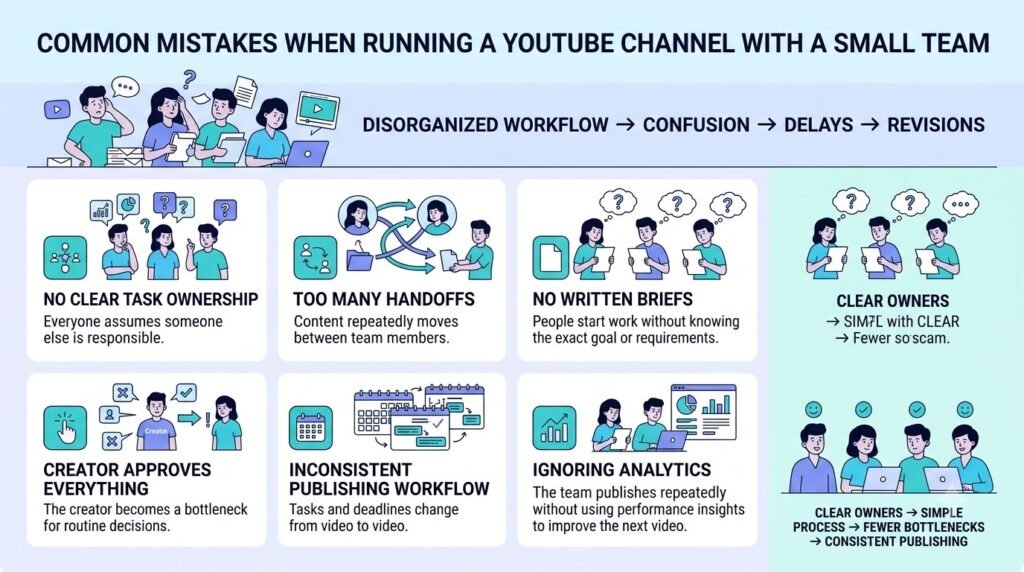
Hiring too many specialists too early
More people can create more coordination.
Start with the bottleneck that consumes the most valuable time.
Giving everyone the same responsibilities
Shared responsibility can quickly become unclear responsibility.
Give each recurring task one primary owner.
Making the creator approve everything
The creator should protect the channel’s direction, not become a human project-management system.
Starting editing before the script is ready
This creates unnecessary revisions. Keep production stages clearly defined.
Treating thumbnails as the final step
Packaging should be considered before the video is finished.
Using AI without review
AI can quicken production, but can also lead to false claims, generic writing,or varying creative decisions.
Measuring only views
Views don’t explain why a video performed the way it did.
Use audience, engagement, and retention information to discover what happened and decide what to test next.
FAQs: How to Run a YouTube Channel With a Small Team
How many people do you need to run a YouTube channel?
You can run a YouTube channel with one person, while a small team commonly means around two to four people sharing several responsibilities. The right number depends on the channel format, publishing frequency, and production complexity.
What roles do you need for a small YouTube team?
The essential responsibilities are content strategy, research, scripting, production, editing, packaging, publishing, and analytics. One person can own multiple responsibilities.
Should a small YouTube team hire an editor first?
If editing is the largest recurring time commitment, an editor can remove a significant production bottleneck. The first role to delegate should be based on the team’s actual workload rather than a universal hiring rule.
Can AI replace a YouTube team?
AI can assist with many production tasks, including scripting, titles, thumbnails, voice generation, music, sound effects, and dubbing.
It doesn’t remove the need for editorial decisions, quality control, fact checking, or channel strategy.
How do you manage a YouTube team remotely?
Use one shared content pipeline, clear task ownership, standardized briefs, shared file organization, and defined approval stages.
The exact software is less important than making the workflow visible to everyone.
How do you give employees access to a YouTube channel?
Use YouTube channel permissions rather than sharing the owner’s Google password. YouTube provides different permission levels for people who need to manage or view channel information.
How often should a small YouTube team publish?
There isn’t one universal publishing frequency. Choose a schedule the team can maintain while leaving enough time for research, production, review, and analysis.
How should a small team use YouTube Analytics?
Review performance after publishing, identify meaningful audience or retention patterns, and convert those observations into changes for future videos.
Final comparison: which small-team structure fits?
| Team structure | Main advantage | Main limitation | Suitable when |
| 2 people | Low coordination overhead | Roles become broad | Simple production format |
| 3 people | Cleaner content-to-production split | Limited specialist capacity | Regular publishing |
| 4 people | Better separation of operations and production | More coordination required | Multiple recurring workflows |
| Hybrid | Flexible access to specialists | Requires stronger project management | Variable workloads |
There isn’t a universally correct team structure.
A two-person team can manage an impressively broad production workflow if responsibilities, handoffs, and approvals are clear-cut.
The point is to set up a pipeline in which work can proceed without every single decision being returned to the producer for approval. Start by identifying the task that consumes the most time today. Give it to one owner, define done, and move on to the next phase based on that handoff.
Then use YouTube Analytics to understand what viewers respond to and feed those observations back into the next production cycle.
That’s the foundation for running a YouTube channel with a small team without turning the creator into the project manager for every single task.
About the author
Anshika Verma
Content & SEO Researcher, ytZolo
Email: anshika@ytzolo.com
Anshika Verma researches and evaluates AI and creator tools with a focus on practical workflows, product capabilities, and evidence-based content.

