
You still need a way to host episodes, publish your show on to listening platforms, and make new episodes live without having to upload everything manually.
This podcast distribution guide explains how RSS feeds and podcast hosting work, how to submit your show to Spotify and Apple Podcasts, and how to distribute audio to YouTube and other directories. It also includes a section on AI specific checks, common publishing issues, and a repeatable workflow for each episode.
The key decision is to choose a hosting setup that gives you a stable RSS feed, then submit your show to the platforms you want to reach. After that, it’s important to double-check each listing rather than assuming that just because it’s published somewhere it’s available everywhere.
Table of Contents
What is podcast distribution, and how does it work?
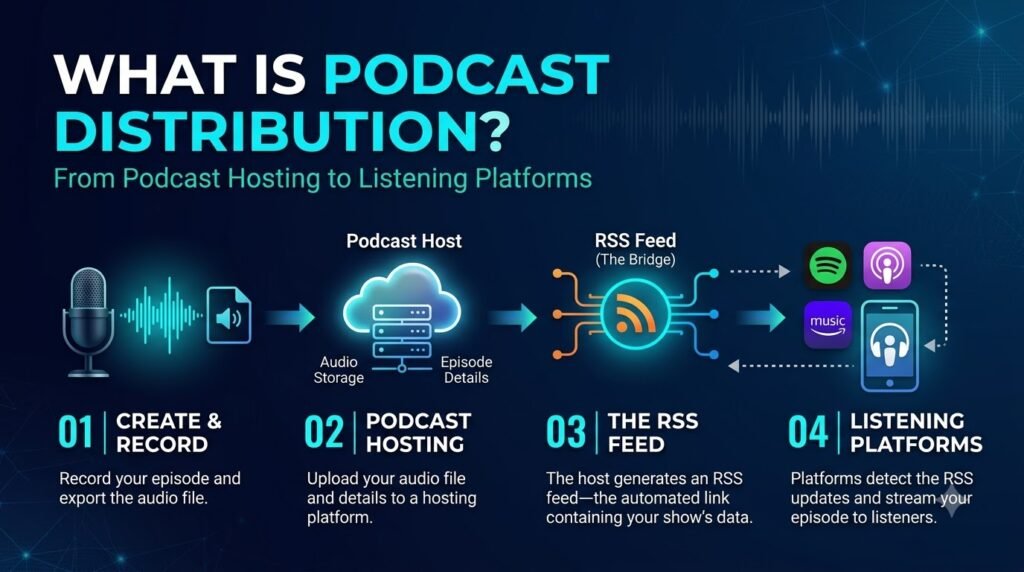
Podcast distribution is the process of making episodes available through podcast apps, directories, and other listening platforms. A hosting provider stores your audio and supplies the feed or publishing mechanism used to deliver it.
For an RSS-based podcast, the workflow usually looks like this:
- Prepare the episode: Review audio, metadata, artwork, and publishing rights.
- Upload to a podcast host: Store the audio and publish the episode information.
- Update the RSS feed: The feed identifies your show and its episodes.
- Distribute to listening platforms: Submit the feed where required and verify each listing.
An RSS feed is a structured document containing information about a podcast and links to its episodes. When a creator publishes a new episode through a feed-based hosting setup, participating platforms can retrieve the updated information.
There is one important distinction: a podcast host is not the same as a podcast directory. The host stores or serves your content, while a directory or listening app helps people find and play it.
Do you need a podcast host to distribute an AI-generated podcast?
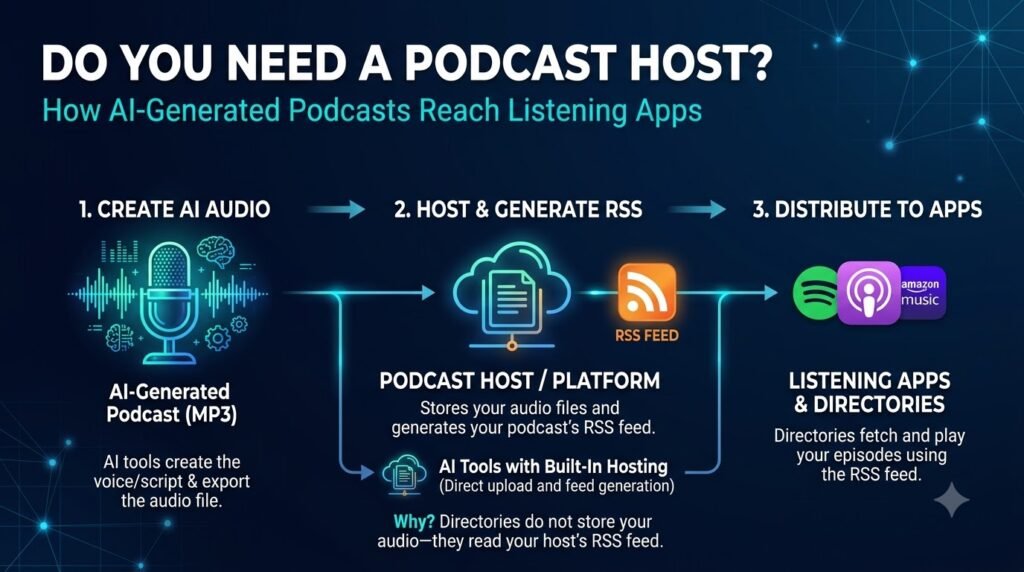
Usually, you need a hosting arrangement that can reliably deliver your episodes to the services you choose. That does not always mean paying for a separate third-party host, because some platforms provide their own publishing systems.
An AI audio generator creates the episode file. It does not automatically provide the public RSS feed, manage your directory submissions, or guarantee that the show is listed on every podcast app.
When comparing hosting options, consider the following:
- RSS availability: Can you obtain a stable, public feed URL?
- Distribution support: Does the host submit your show to directories, or must you submit it yourself?
- Storage and bandwidth: Does the plan’s limits apply to your episodes’ length and publishing frequency?
- Portability: Can you migrate your feed and episode files if you switch providers?
- Analytics:Can you tell the difference between downloads and listens and their performance on video and social feeds?
- Monetization: Does the host support your intended advertising, subscription, or sponsorship model?
A weekly AI-powered podcast can rely on a host that takes care of the RSS feed and offers to automate other regular tasks.
However, confirm exactly which directories it supports. Automatic submission to one service does not guarantee distribution to all others.
How do you distribute a podcast to Spotify?
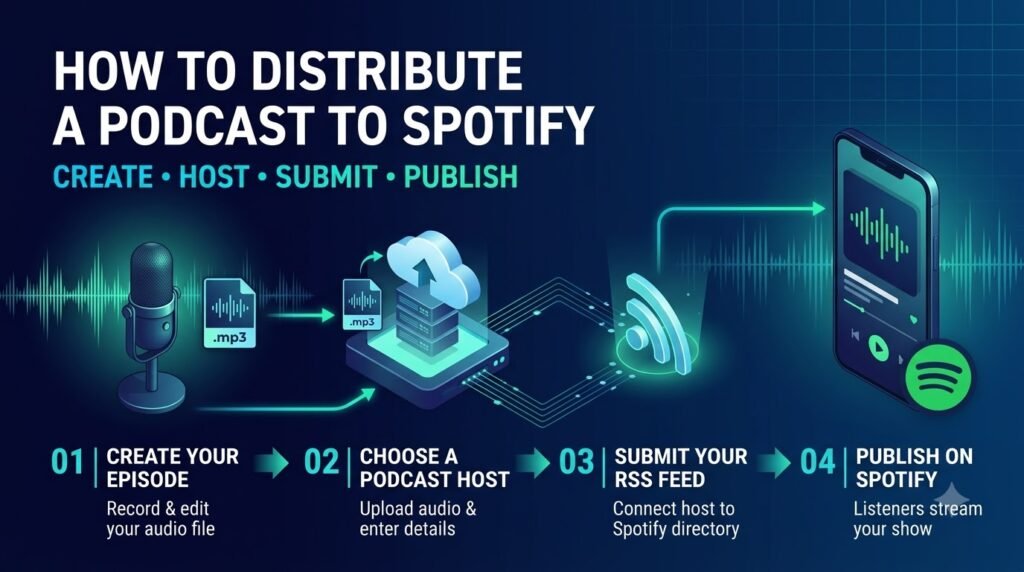
Spotify-hosted shows are available on Spotify through its publishing system. If you use another hosting provider, you can submit your show to Spotify separately.
Spotify also makes an important distinction: hosting a show on Spotify does not automatically publish it to every other podcast service.
Follow these steps:
- Prepare the episode. Finalize the audio, title, description, artwork, and any required episode details.
- Choose your hosting method. Use Spotify for Creators or a compatible external podcast host.
- Create or claim your show. Follow the relevant publishing or submission process for your hosting arrangement.
- Complete the required show information. Check the title, description, category, artwork, and any applicable content declarations.
- Publish and verify. Open the public show page and play the episode to confirm that the listing works.
If Spotify hosts your show and you want to reach Apple Podcasts or other services, you will need to submit it to those platforms as well.
For current instructions, use Spotify’s official distribution guide.
What if the podcast is already on Spotify?
Don’t create a duplicate show just because you want to distribute elsewhere. First, check whether the existing show has a public RSS feed and whether you can access its publishing settings.
Spotify’s support documentation identifies the RSS feed under the show’s availability settings for relevant Spotify-hosted shows. Use that feed when submitting to other compatible platforms.
Also keep a record of the public URL for your Spotify listing. You’ll need it for your website, episode pages, newsletters, and promotional posts.
How do you submit a podcast to Apple Podcasts using RSS?
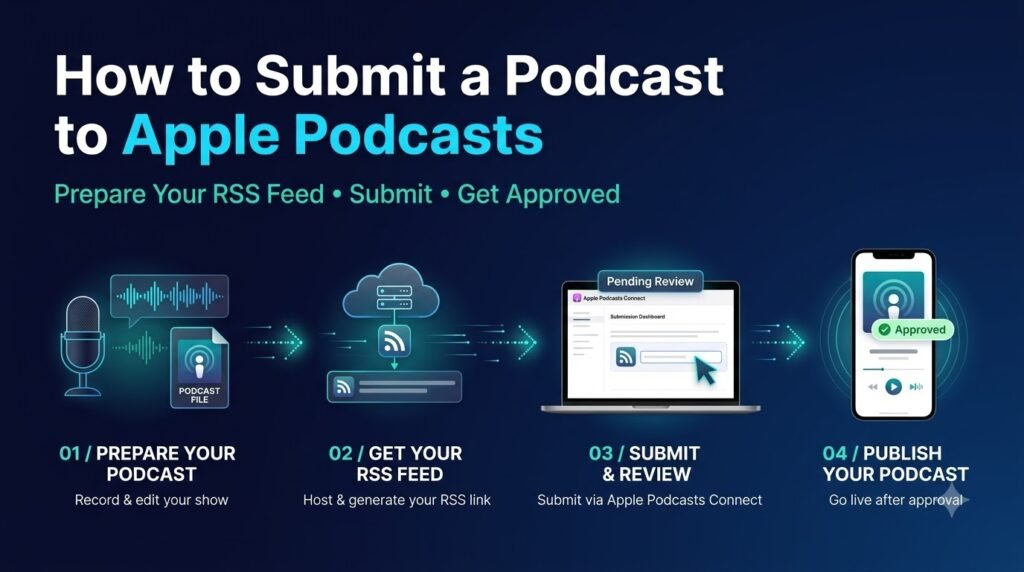
Apple Podcasts accepts shows submitted through Apple Podcasts Connect using a third-party-hosted RSS feed. It also offers a publishing route through Apple Podcasts Connect for eligible subscription-based workflows.
For a typical RSS-based show, the process is:
- Sign in to Apple Podcasts Connect.
- Choose the option to add a new show using an RSS feed.
- Enter your public RSS feed URL.
- Review the show information imported from the feed.
- Complete the required content-rights, contact, and availability information.
- Submit the show for validation and review.
- Check the show’s status and resolve any errors before publishing.
Apple requires a technically valid feed with the necessary tags, at least one episode, and show artwork. Its review process is separate from technical validation, so a feed passing validation does not guarantee approval.
Read Apple’s official podcast RSS feed requirements before submitting your show.
What should you check before submitting to Apple Podcasts?
Your hosting provider should handle much of the technical work, but you should still check the following:
- The RSS feed is publicly accessible and follows the required RSS format.
- The show has a title, description, category, and language.
- The feed contains valid episode entries and working audio links.
- Each episode has a unique identifier that remains stable.
- The artwork meets Apple’s current requirements.
- You have the necessary rights to distribute the audio and other content.
If Apple reports a feed error, check the actual error message instead of repeatedly submitting the same feed. Missing metadata, inaccessible audio, and malformed feed information require different fixes.
How does RSS podcast distribution work?
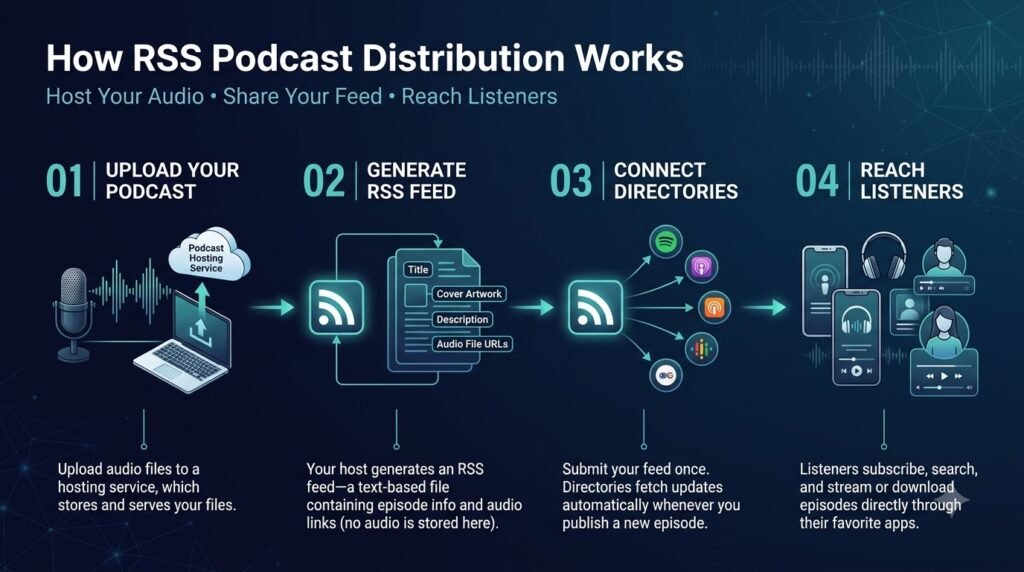
RSS is the foundation of many podcast distribution workflows because it allows participating services to retrieve episode information from a common feed.
A typical podcast RSS feed contains show-level information and episode-level entries. These may include titles, descriptions, release dates, audio links, and other metadata required by the relevant platforms.
The important thing is that the feed must remain available and correctly maintained.
Can you distribute a podcast through RSS without manually uploading each episode everywhere?
Yes, for services that support the RSS feed you’ve configured. Once the show is approved and a platform is following the feed, new episodes can be discovered through subsequent feed updates.
However, three steps are distinct:
- Creating the feed: Your host or publishing system generates and maintains the RSS document.
- Submitting the show: You authorize or register the feed with a platform where required.
- Updating episodes: The platform retrieves new or updated information from the feed.
A feed does not automatically register your show with every directory on the internet. Some services require an initial submission, while others may discover public feeds independently.
What happens if you change podcast hosts?
Moving hosts requires care because your feed URL, episode links, and distribution settings may be involved.
Before switching, check whether the old provider supports feed redirection and whether the new provider can preserve your episode history and identifiers. Follow the migration instructions from both providers.
Apple’s guide to changing podcast hosting providers recommends checking the new feed and comparing metadata and media before completing a migration.
Do not cancel the old hosting account until the migration is complete and you’ve confirmed that the feed works as expected.
How do you distribute an AI-generated podcast to YouTube?
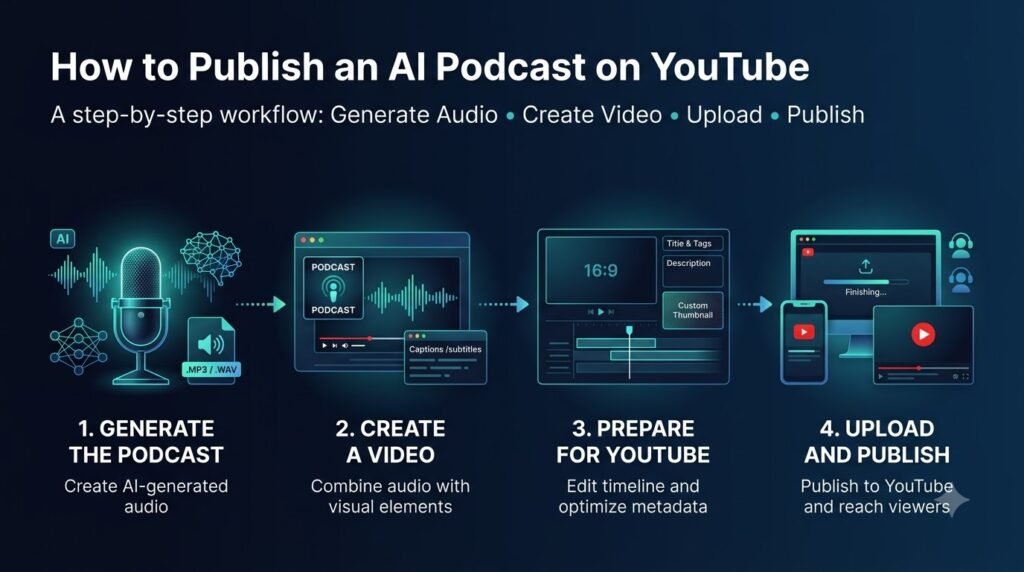
YouTube offers a separate route for creators who already publish audio podcasts through RSS. In supported countries and regions, eligible creators can submit an RSS feed through YouTube Studio.
YouTube can then create videos from selected episodes using the podcast’s show artwork as a static image. New episodes added to the feed can be uploaded to the YouTube channel automatically through this setup.
To use RSS ingestion:
- Open YouTube Studio.
- Go to Content and select Podcasts.
- Choose the relevant podcast or create the appropriate podcast setup.
- Open its details and look for the RSS settings.
- Connect the feed and follow the submission instructions.
- Review your selection of episodes and publishing settings to make your podcast public.
To publish an AI-generated podcast on YouTube, you can upload it as a video with a static cover image, an audiogram, relevant visuals, or footage of the speakers. Choose a format that suits your content, add a clear title and description, and upload the finished video through YouTube Studio.
If you need help preparing the video, follow our guide on how to turn a podcast into a YouTube video, which explains the process step by step.
See Google’s official documentation for details on how to submit your RSS feed and your eligibility for YouTube’s RSS Podcasting program.
Is an RSS-uploaded podcast the same as a video podcast?
No. YouTube’s RSS ingestion can create a video using static artwork and the episode audio. That is different from publishing a podcast episode with recorded video, animated visuals, or a full talking-head presentation.
Choose the approach based on the listening and viewing experience you want to provide.
| Publishing method | What the audience receives | Best suited to |
| Audio podcast through RSS | Audio in supported listening apps | Listeners who prefer audio |
| RSS ingestion on YouTube | Audio with a static-image video | Audio-first shows seeking a YouTube presence |
| Edited video podcast | Video footage, visuals, and audio | Interviews, demonstrations, and visual storytelling |
If you want a full production video, you’ll have to plan for the conversion to happen separately. There might be a process of trimming and arranging the video, overlaying with captions, and reviewing the video before publishing.
Your supporting article about turning a podcast into a YouTube video should cover that production workflow in depth. Keep this pillar page focused on distribution and the differences between publishing methods.
How do you distribute a podcast to other directories?
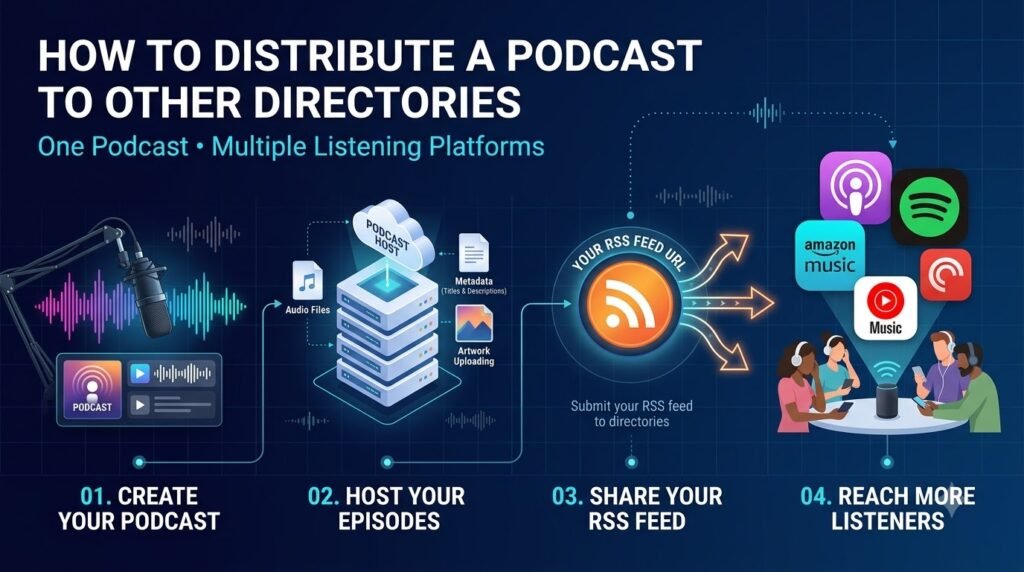
Spotify and Apple Podcasts are important destinations, but they aren’t the only places people listen. Depending on your audience, you may also want to submit your show to Amazon Music, Pocket Casts, Overcast, iHeartRadio, and other relevant podcast services.
Start with the directory list provided by your host. Then check the official submission process for any platform that isn’t included.
Spotify’s documentation lists several services that require their own submission steps when a show is hosted with Spotify.
Use this approach:
- Make a list of the listening apps relevant to your audience.
- Identify which ones your host supports directly.
- Submit your show to the remaining services using their official guidlines.
- Save each public show URL in one document.
- Check the listings after the initial submission and after major changes.
Don’t resubmit the same show multiple times without checking if a similar entry already exists. In the event of a duplicate entry, use the service’s official procedure for removing duplicate shows.
How should you prepare AI-generated audio before distribution?
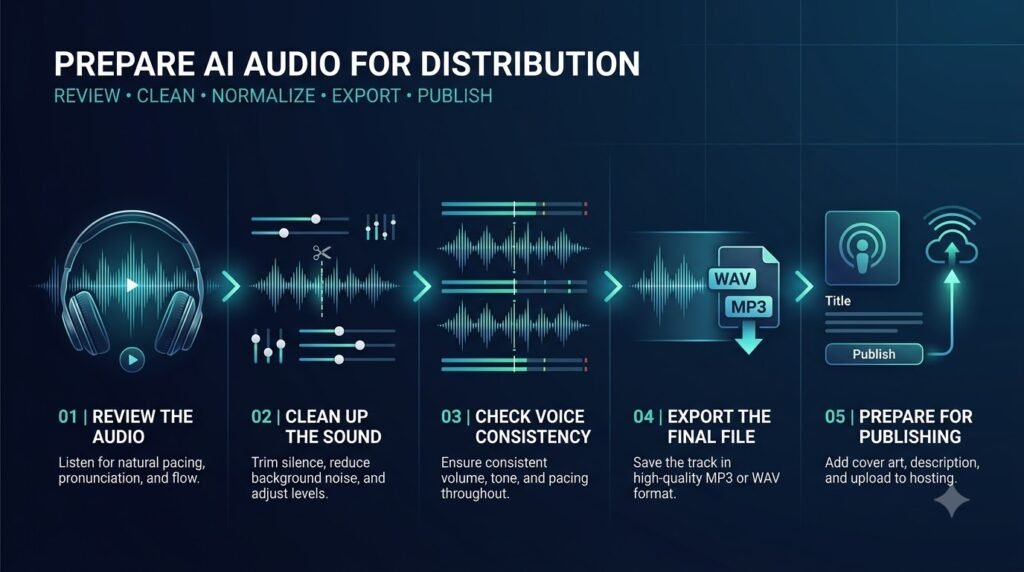
Distribution cannot make up for an episode that sounds dubious, has mistakes, or uses material for which you do not have permission to publish.
Before submitting an AI-generated podcast, review the episode as if you were the listener. The goal is to find issues that are not apparent when inspecting the script or generation parameters.
Check narration and pronunciation
Listen to the full episode before publishing. Watch out for strange pauses, repetitions, mispronunciations, abrupt cuts, unnatural sentence structures and acoustics.
When using multiple voices, make sure that they are all easily differentiable and that the conversation between them makes sense. Always regenerate or edit concerning parts instead of simply accepting the first result as perfect.
Confirm rights to audio and voices
Check the applicable terms for generated narration, music, sound effects, and other assets. Commercial use may depend on the provider and plan.
If you clone or imitate an identifiable person’s voice, establish the necessary permission before publishing. Also consider whether the content could mislead listeners about who is speaking.
Keep records of the licenses and permissions relevant to the episode. This is especially useful for shows that publish regularly or work with sponsors.
Check music and sound effects
Background music should support the narration rather than make it harder to understand. Listen for clipping, sudden volume changes, long silences, and sound effects that obscure spoken words.
Make sure you have the right to use each audio asset on the platforms where the episode will appear. A track being available in a generation tool does not, by itself, establish that every possible use is permitted.
Prepare the final publishing assets
Before uploading the episode, make sure to include the episode audio, title, description, show artwork, and any other information required by your host.
If your workflow uses synthetic narration, ytZolo’s AI voice generator for podcasts guide covers voice consistency, production choices, and reviewing generated segments. The distribution decision still belongs to the creator: an audio file should be reviewed and approved before it is published.
The ytZolo Audio Studio lists tools for voice generation, multi-voice dialogue, AI music, sound effects, voice isolation, dubbing, and forced alignment. These are production capabilities, not a substitute for a podcast host or directory submission system.
How do you write podcast titles and descriptions for discovery?
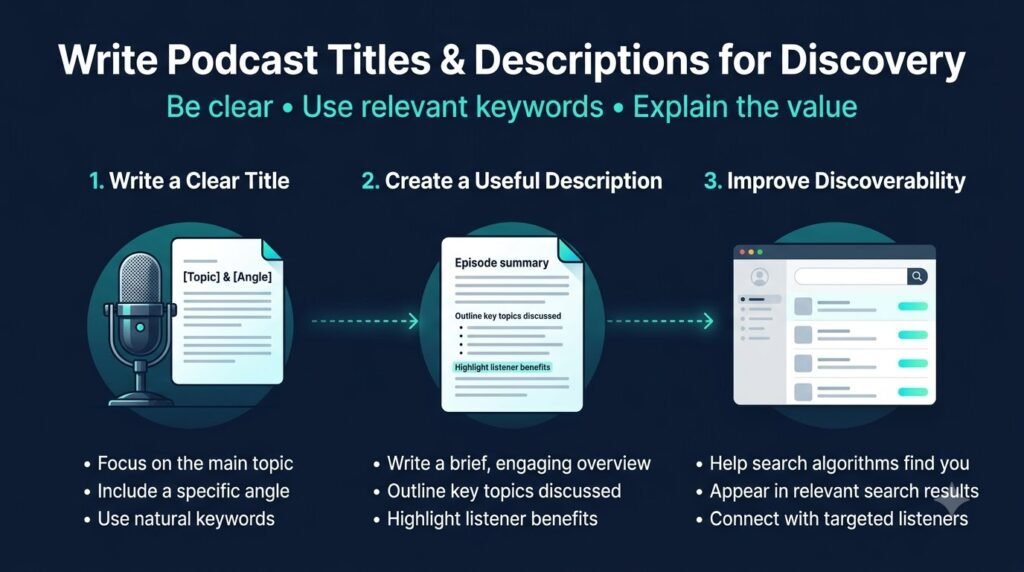
Your metadata should help people understand what a show covers and whether an episode is relevant to them. It also helps platforms display the show consistently.
Avoid treating metadata as a place to repeat keywords. Write for a listener deciding whether to press play.
Write a descriptive episode title
A useful title communicates the subject clearly and distinguishes the episode from others in the series.
For example:
- Vague: “Episode 12: New Ideas”
- Clearer: “How to Plan a Weekly Podcast Without Missing Deadlines”
The second title gives prospective listeners a better idea of the episode’s subject. Use episode numbers when they help listeners navigate the series, but don’t make them the only meaningful information in the title.
Write a useful episode description
Start with the main subject and explain what listeners will learn. Include the important discussion points, relevant guests, and useful resources when applicable.
A practical description might look like this:
This episode explains how to plan a weekly podcast production schedule. It covers scripting, audio review, publishing deadlines, and a simple checklist for distributing new episodes across listening platforms.
Use accurate descriptions of the actual episode. Don’t promise an interview, a resource, or a topic that isn’t included.
Keep your show metadata consistent
Check that your show title, author or publisher name, artwork, category, and description match across your hosting dashboard and directory listings.
When you update metadata, allow time for the relevant platforms to refresh their information. Check the public listing rather than assuming that saving the changes in your host updated every destination immediately.
How can you distribute a podcast without creating a manual workflow for every platform?
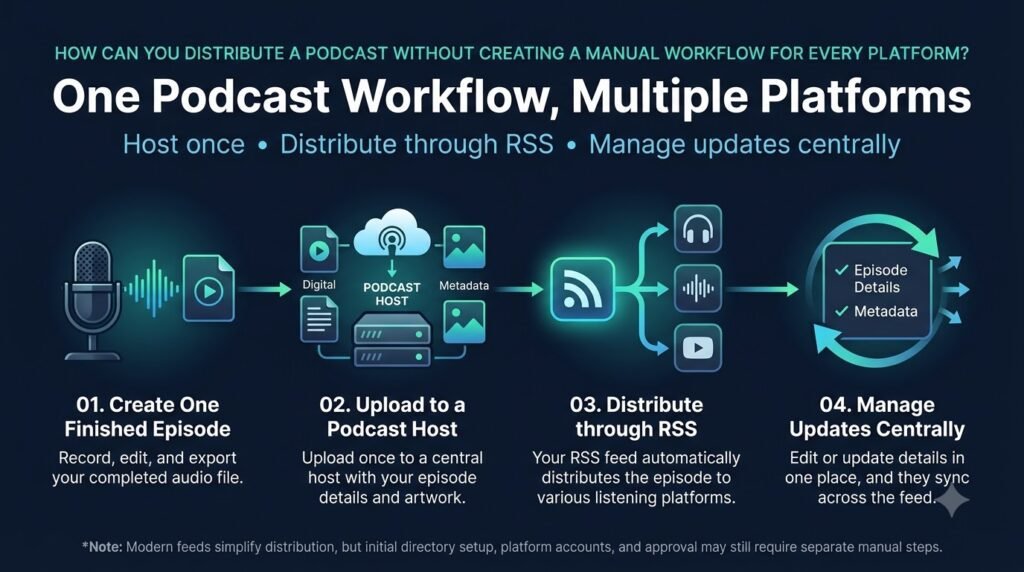
A repeatable publishing checklist helps reduce mistakes, particularly if you produce several episodes per week or operate multiple shows.
The aim is not to remove every manual step. It is to make the steps that require attention predictable, while letting your hosting setup handle the routine feed updates it supports.
Use the following workflow for each release.
Episode publishing checklist
- Approve the final audio and check pronunciation, pacing, and sound quality.
- Confirm music, voice, and other content permissions.
- Prepare the episode title, description, artwork, and release date.
- Upload the episode and check the published RSS feed.
- Verify that Spotify and Apple Podcasts display the episode correctly.
- Check YouTube or other selected destinations separately.
- Save the public episode URLs and record any publishing errors.
- Publish the episode page, transcript, or promotional content if planned.
Publish supporting content without duplicating the episode
Your podcast can also support a website article, transcript, newsletter, or short-form video. Each asset should serve a distinct purpose rather than repeat the episode description in slightly different wording.
For example, a podcast about planning a YouTube channel could have:
- An episode distributed through podcast apps.
- A website page with a summary, transcript, and useful references.
- A video version for viewers who prefer YouTube.
- Short clips that answer specific questions from the episode.
If you already have a YouTube video, ytZolo’s guide to repurposing one YouTube video into 10 pieces of content provides a related workflow for extending that content to other formats.
Keep the podcast feed as the source for audio distribution and manage each additional format according to its own publishing requirements.
How do you troubleshoot podcast distribution problems?
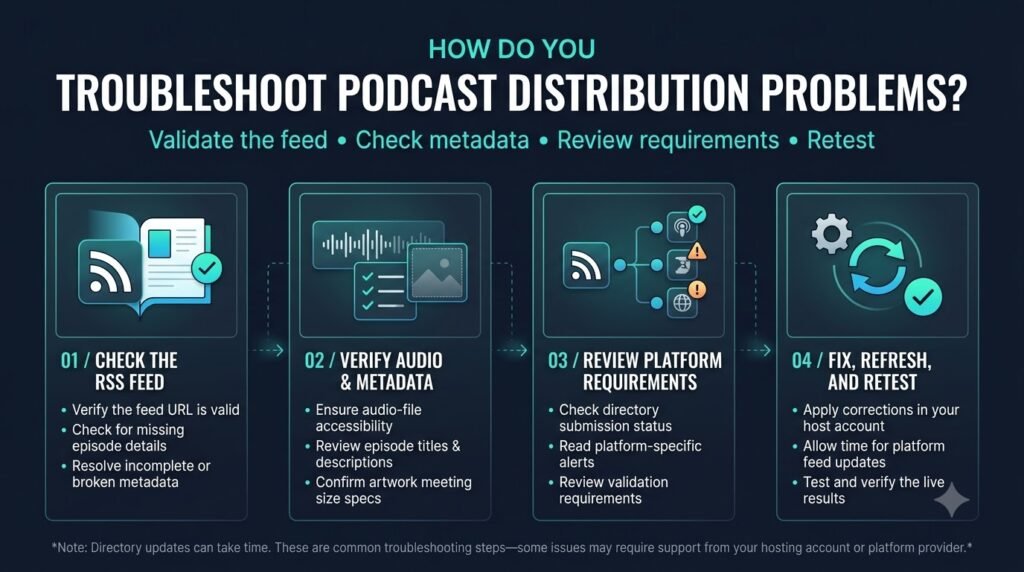
Most publishing issues can be narrowed down by checking the feed, the hosting dashboard, and the destination platform separately.
| Problem | What to check |
| The show isn’t appearing | Confirm submission status, feed accessibility, and any outstanding review requirements. |
| A new episode is missing | Check that the episode was published in the host and appears in the RSS feed. |
| Artwork hasn’t updated | Check the feed’s artwork reference and the platform’s refresh status. |
| A duplicate show appears | Compare the listings and follow the platform’s process for resolving duplicates. |
| Apple reports a validation error | Read the error details and correct the feed, metadata, or media issue it identifies. |
Apple provides an official podcast feed validation guide covering technical errors such as invalid feed URLs, inaccessible media, and missing required metadata.
If an episode is present in the feed but missing from a listening app, don’t immediately upload it as a separate show. First determine whether the issue is in the source feed, the submission status, or the destination’s refresh process.
How should you measure whether podcast distribution is working?
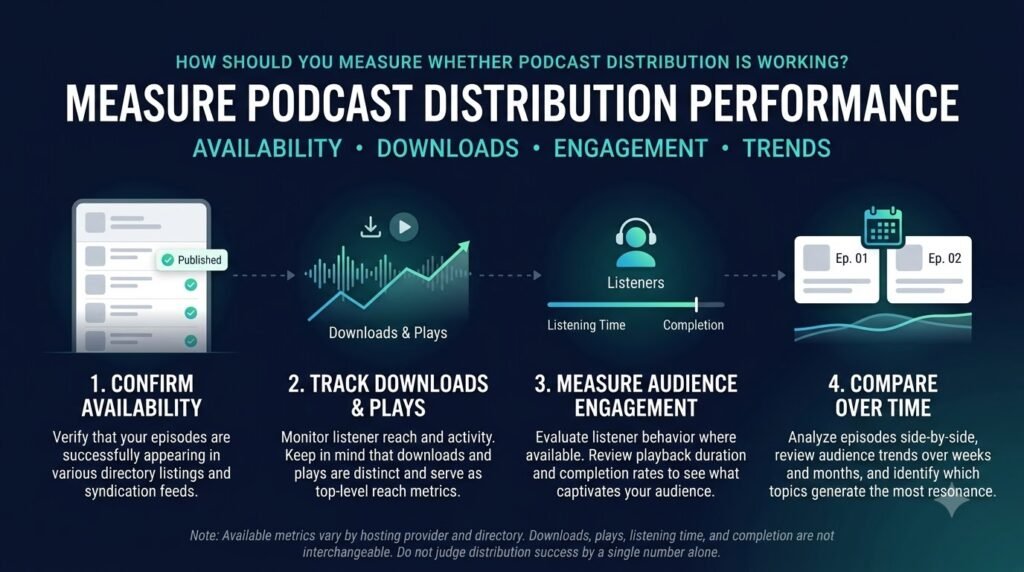
Distribution success starts with availability, not audience growth. First verify that the show is listed correctly and that each episode plays on the platforms you selected.
Then review the analytics available from your hosting provider and the platforms that offer them. It might be downloads, plays, listens, followers, and audience retention, depending on the program.
Use each metric in context. A download reported by one host may not be directly comparable to a play or view reported by another platform because the measurement definitions can differ.
You can also track whether someone who has listened to your episode gone to your website via the link in the episode, subscribed to your newsletter, or viewed any companion videos.
These are all great metrics to determine how well your content strategy is working, but they don’t indicate how healthy your podcast feed is.
Frequently asked questions
Can I distribute an AI-generated podcast to Spotify and Apple Podcasts?
AI-generated audio can be submitted through the appropriate publishing workflows, as long as the show complies with the technical specifications and content guidelines of the platforms. You should also make sure to have the necessary rights and permissions for the voices, music, and other elements you publish.
Is a podcast RSS feed free?
An RSS feed is a publishing format, not a single paid product. Some hosting providers offer the creation of a feed as part of the free plan, while others offer it as a paid option. Some companies charge for hosting or storage, analytics, or other functions. Be sure to research the terms of the selected provider.
Do I need to upload every episode separately to Spotify and Apple Podcasts?
Not necessarily. If your show uses a compatible RSS-based hosting setup and the platforms are connected to that feed, new episodes can be retrieved from it. Initial submission and approval may still be required, and each platform should be checked after publishing.
How long does podcast distribution take?
The time varies depending on the platform and whether they have a manual review process or not. According to Spotify, many platforms will publish your submission within hours, however, some require a manual review process. They recommend allowing up to 24 hours for newly submitted or updated shows to be published across all platforms.
Can I use the same RSS feed for Spotify, Apple Podcasts, and YouTube?
You can use the same feed for compatible services, but the submission processes and resulting formats differ. YouTube’s RSS ingestion, for example, creates videos from selected episodes and does not distribute the show to other podcast platforms. Check each destination’s requirements before connecting the feed.
Should I publish a separate video podcast?
Only if a video format serves your audience and production goals. An audio-first show may be adequately served by RSS distribution and a static-image version on YouTube. An interview or demonstration show may benefit from recorded footage, edited visuals, or a dedicated video workflow.
What should I do if I change podcast hosting providers?
Plan the migration before cancelling the existing service. Preserve your feed and episode information where possible, follow the providers’ migration instructions, and verify that the new feed and public listings work as expected.
Conclusion
A reliable podcast distribution guide starts with one practical principle: prepare a publish-ready episode, use a hosting setup that maintains your feed, submit the show to the right platforms, and verify each destination.
For an AI-generated podcast, audio review and rights checks belong in the workflow before distribution. Once the process is established, use a consistent checklist for every release and add video or other supporting content when it serves a clear purpose.
The next step is to choose your hosting arrangement, test the RSS feed, and submit the show to the platforms most relevant to your audience.
About the author
Anshika Verma
AI and creator-tools researcher at ytZolo
Anshika Verma researches AI creator tools, voice synthesis, and podcast and YouTube production workflows for the ytZolo blog. Her work focuses on evaluating tools against practical creator use cases, checking product claims against available evidence, and translating technical workflows into clear guidance.
Email: anshika@ytzolo.com

