
📋 Quick Summary: An AI voice generator for podcasts doesn’t have to mean a fully synthetic show. Most working podcasters use one for a handful of specific jobs — intros, ad reads, or filling in for a missed recording day — while a human host still carries the main conversation. This guide walks through exactly where AI voice fits into a real podcast workflow, how to keep a voice consistent across dozens of episodes, and the step-by-step process for producing a segment inside ytZolo‘s Audio Studio.
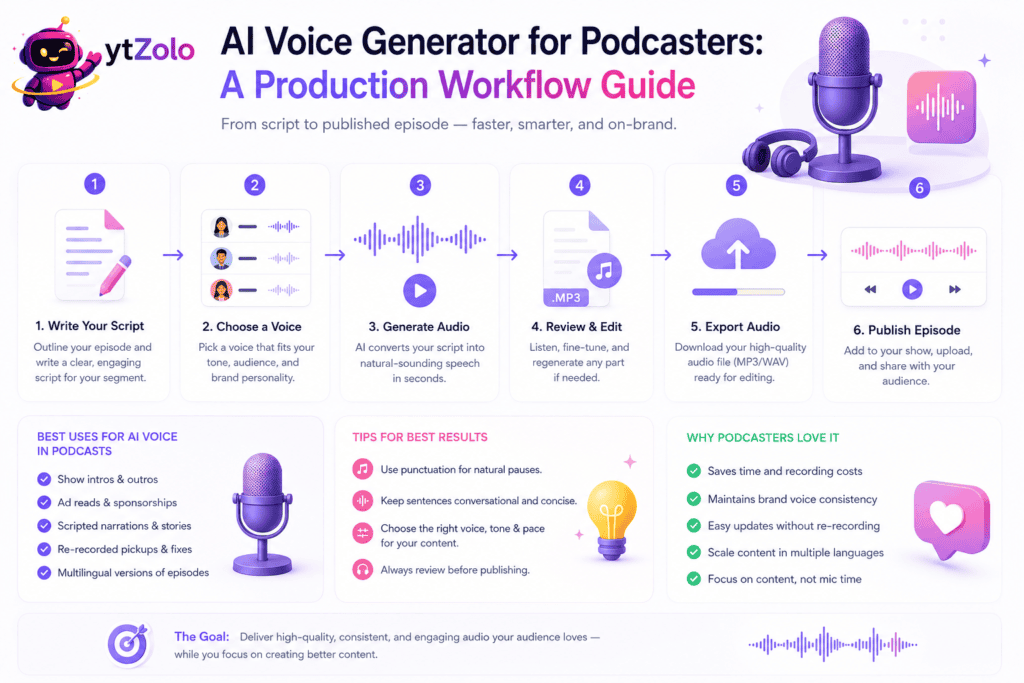
A weekly podcast has a lot of moving parts that have nothing to do with the actual conversation: intros, outros, ad reads, show notes, and the ten-minute segment nobody wants to re-record because a dog started barking mid-take.
That’s the gap an AI voice generator for podcasts is actually good at filling. Not replacing a host’s voice — patching the production gaps around it.
Search interest in a podcast AI voice generator has climbed alongside the wider bo
om in synthetic narration, and for good reason: it’s one of the few AI audio tools with an obvious, narrow job instead of a vague promise to “make content faster.”
This guide breaks down where AI voice tools genuinely help a podcast workflow, where they don’t, and how to produce a consistent-sounding segment without hiring a full audio engineer.
Table of Contents
Why Podcasters Are Adopting AI Voice Tools
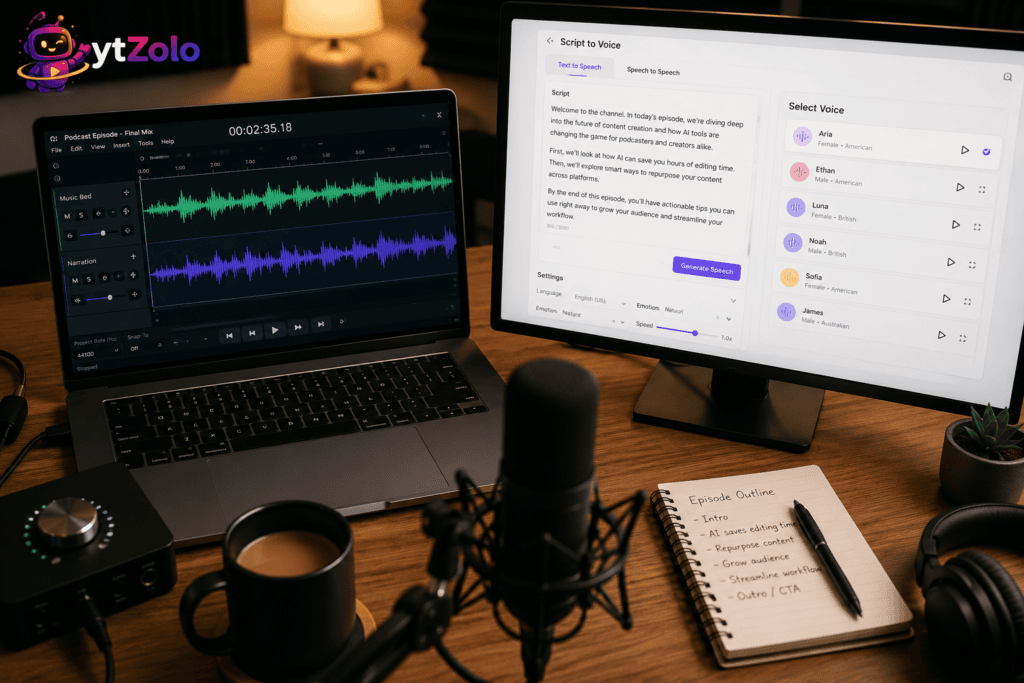
Podcasting rewards consistency more than almost any other content format. Listeners subscribe to a voice, a pace, a feeling — and they notice immediately when an episode sounds rushed or inconsistent with the last one.
An AI voice generator for podcasts solves a few very specific production headaches. Re-recording a flubbed line no longer means booking studio time again.
Show intros and outros can be locked to one clean take instead of a slightly different read every week. Ad reads can be swapped per sponsor without re-recording the entire episode around them.
There’s also a volume argument. A creator running two or three shows, or producing a daily news-format podcast, simply can’t record every segment personally — a podcast voice generator absorbs the parts of the show that don’t need a human’s spontaneous energy.
This is essentially the same shift the pillar guide describes for AI voice for podcasts broadly — narration and repeatable segments moving to synthetic voice while the parts that need a real person stay human.
None of this is about removing the host. It’s about giving a small team, or a solo podcaster, back the hours that used to go into re-takes, punch-ins, and chasing down a guest for a five-second pickup line.
Cost plays a role too. A podcast producer booking a professional voice-over artist for weekly intro updates pays for that every single time; an AI voice generator for podcasts produces the same segment for a fraction of the cost, with a re-record costing almost nothing if the script changes.
For shows with a rotating guest-host format, a synthetic voice also solves a subtler problem: keeping the branded parts of the show — the open, the sponsor read, the outro — sounding identical no matter who’s behind the mic that week.
Where AI Voices Fit in a Podcast Workflow
Not every part of an episode is a good candidate for synthetic voice. The parts that work best share one trait: they’re scripted, repeatable, and don’t rely on spontaneous back-and-forth.
Here’s where an AI voice generator for podcasts earns its place in a real production pipeline, broken down by segment type.
Thinking about it segment-by-segment, rather than “should my whole show be AI or not,” is the mindset shift that gets the best results. Most successful implementations mix synthetic and human voice deliberately rather than picking one extreme.
Intros and Outros
The show open is usually the same structure every week — a few lines of branding, a quick preview of the episode, maybe a sponsor mention. That repetition is exactly what synthetic voice handles well.
Generating the intro once, in a fixed voice, means every episode opens identically regardless of who’s hosting that week or how tired anyone’s voice is on recording day.
Outros work the same way. A closing line reminding listeners to subscribe doesn’t need a fresh human take every single episode — it needs to sound the same every time.
Ad Reads and Dynamic Insertion
Ad reads are where AI voice generation solves a genuinely annoying production problem: swapping sponsors without touching the rest of the episode.
Instead of re-recording a full segment because one sponsor’s copy changed, a generated ad read can be dropped into the same slot, in the same voice, at the same length. That’s a real time saver for shows running rotating or regional ad campaigns.
The tradeoff worth knowing upfront: most ad networks and platforms expect published sponsor content to carry proper commercial rights. Before publishing generated ad reads at scale, it’s worth understanding commercial licensing for published audio and which plan tier actually covers it.
Fully AI-Hosted or Co-Hosted Episodes
This is the more ambitious use case, and it’s growing — news-format shows, summary podcasts, and niche-topic shows that publish daily are increasingly using a synthetic voice as a full or partial host.
It works best for information-dense, low-improvisation formats: daily briefings, curated news roundups, or a “second host” that reacts to pre-written prompts rather than genuine live conversation.
It works worst for interview shows, comedy, or anything where the appeal is two real people riffing off each other in the moment — synthetic delivery still can’t replicate that kind of spontaneity convincingly.
If a fully AI-hosted format is genuinely the goal, it’s worth reading up on AI voice cloning specifically, since a consistent, ownable host voice is usually cloned once rather than picked fresh from a stock library each time.
That said, most podcasters don’t need to compare every platform on the market to get started — our best AI voice generator comparison is a faster way to shortlist a tool by pricing, realism, and licensing before testing it on your own script.
Keeping Voice Consistency Across a Multi-Episode Series
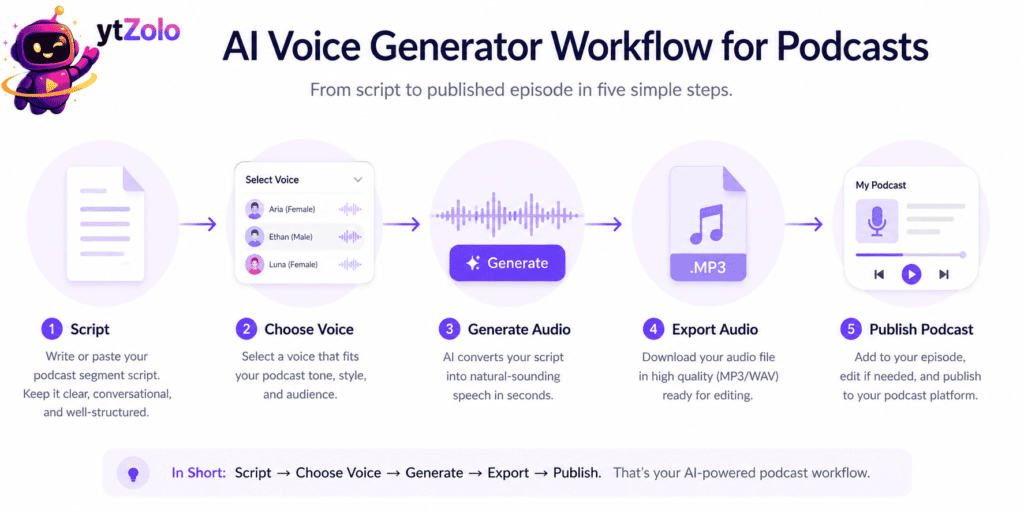
The single biggest complaint about synthetic podcast voices isn’t realism anymore — it’s drift. A voice that sounds slightly different episode to episode is more distracting to a listener than a voice that’s a little robotic but perfectly consistent.
A few habits keep this from happening. Locking the same voice profile, not just the same voice name, matters — some libraries update or retrain voices over time, which can shift tone subtly between updates.
Keeping pacing and pitch settings identical across episodes prevents the “why does this week sound different” effect, even when the script content changes a lot. Small manual tweaks per episode compound into a noticeably inconsistent show over a season.
Saving a short reference script — the same handful of test sentences — and generating it against any new voice or setting change is a cheap way to catch drift before it ships in a live episode.
It also helps to document the settings themselves, not just remember them. A simple note with the exact voice name, speed, and pitch values means a co-producer — or you, six months from now — can reproduce the same sound without guessing. Shows that skip this step are the ones most likely to post a listener comment asking why the host “sounds different this week.”
This is also the reason robotic-sounding delivery tends to creep back in on longer or more complex scripts specifically; if that starts happening on your show, our breakdown of why AI voice output sounds robotic and how to fix it covers the nine most common causes.
For a full checklist of what to actually look for in a tool before committing a whole series to it, the pillar guide’s section on key features to look for is worth reviewing before you lock in a platform — voice variety, emotion control, and consistency support are the ones that matter most for a multi-episode show.
If the show is also planning bonus content like AI voice for audiobooks — a narrated show-notes companion or a book tie-in — it’s worth knowing the workflow barely changes. See our similar workflow for audiobook narration guide for the longer-form version of the same process.
Step-by-Step: Producing a Podcast Segment in ytZolo
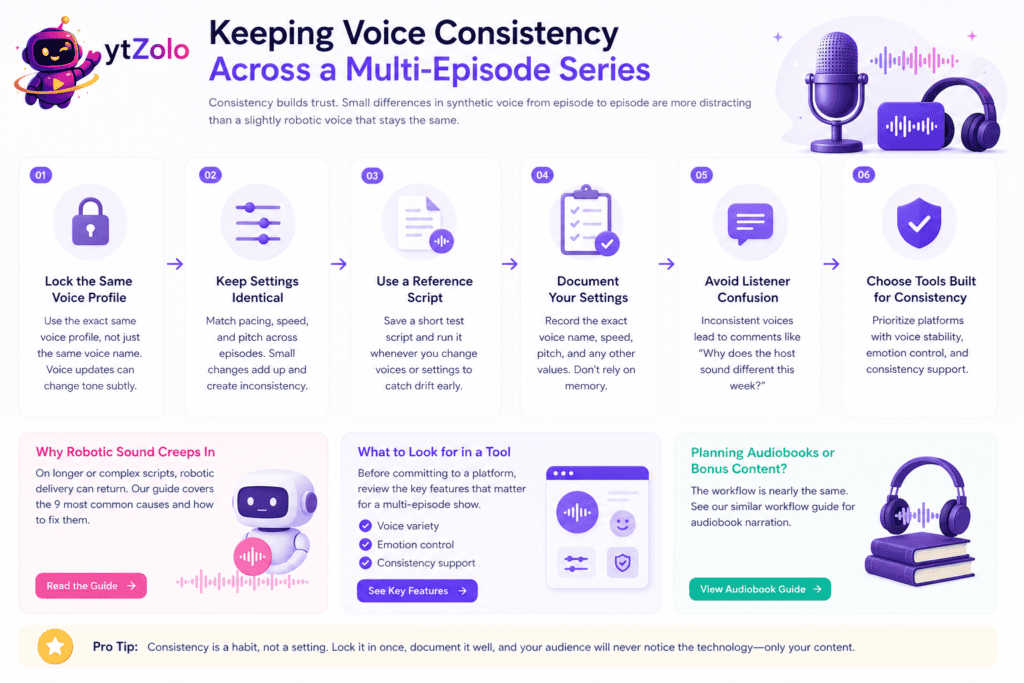
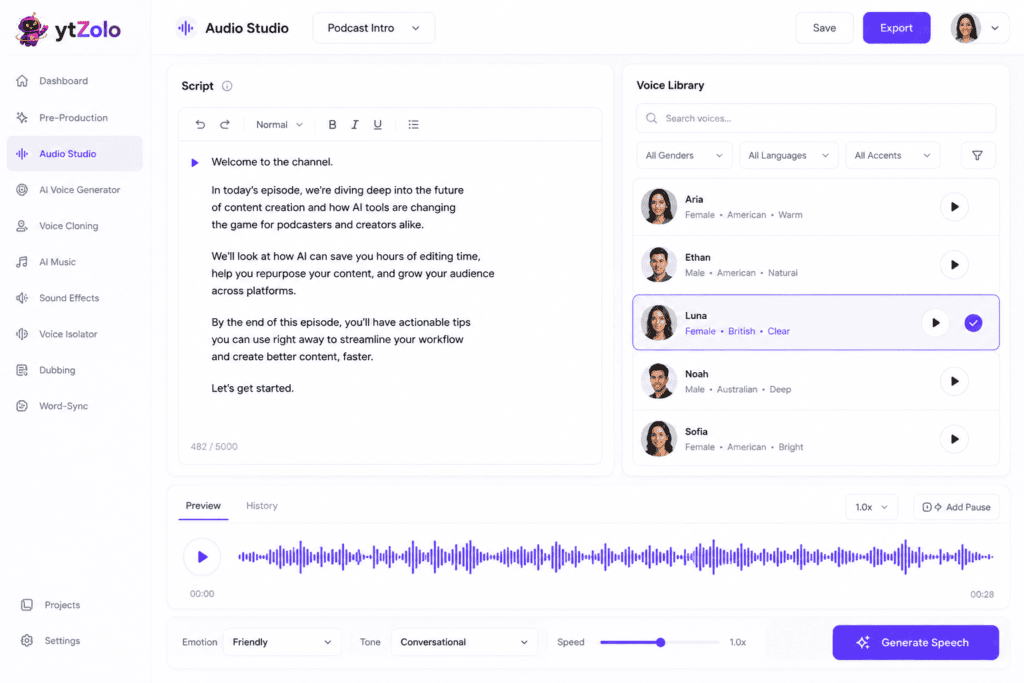
Here’s the actual process for generating a podcast segment inside ytZolo’s Audio Studio, from script to exported file.
Step 1 — Open the Audio Studio. Log into your ytZolo dashboard and open the voice generation tool.
Step 2 — Paste the segment script. Drop in the intro, outro, or ad-read copy for the episode. Keep sentences short — podcast scripts read more naturally when they’re written the way people actually talk.
Step 3 — Select and lock the voice. Choose the voice for this show and save it as the default for future episodes, so every segment pulls from the same profile automatically.
Step 4 — Preview before committing. Generate a short preview first and listen for pacing issues, mispronounced names, or emphasis in the wrong place before running the full script.
Step 5 — Adjust pacing and tone. Fine-tune speed and delivery if the preview sounds rushed or flat, then regenerate just the affected lines rather than the whole segment.
Step 6 — Generate and export. Download the finished audio as an MP3 or WAV and drop it directly into your episode timeline.
Step 7 — Repeat with a saved template. For recurring segments like intros, save the script and voice settings as a reusable template so next week’s episode takes minutes, not a fresh setup each time.
Because voice generation sits in the same dashboard as ytZolo’s script and description tools, a full episode’s supporting assets — show notes, an SEO-friendly episode description, even a YouTube-repurposed clip title — can come out of one workflow instead of five separate logins.
For shows that publish weekly, this template-based approach is what actually makes an AI voice generator for podcasts worth adopting long-term. The time saved isn’t in any single generation — it’s in never rebuilding the same setup from scratch every episode.
When to Still Use a Human Host
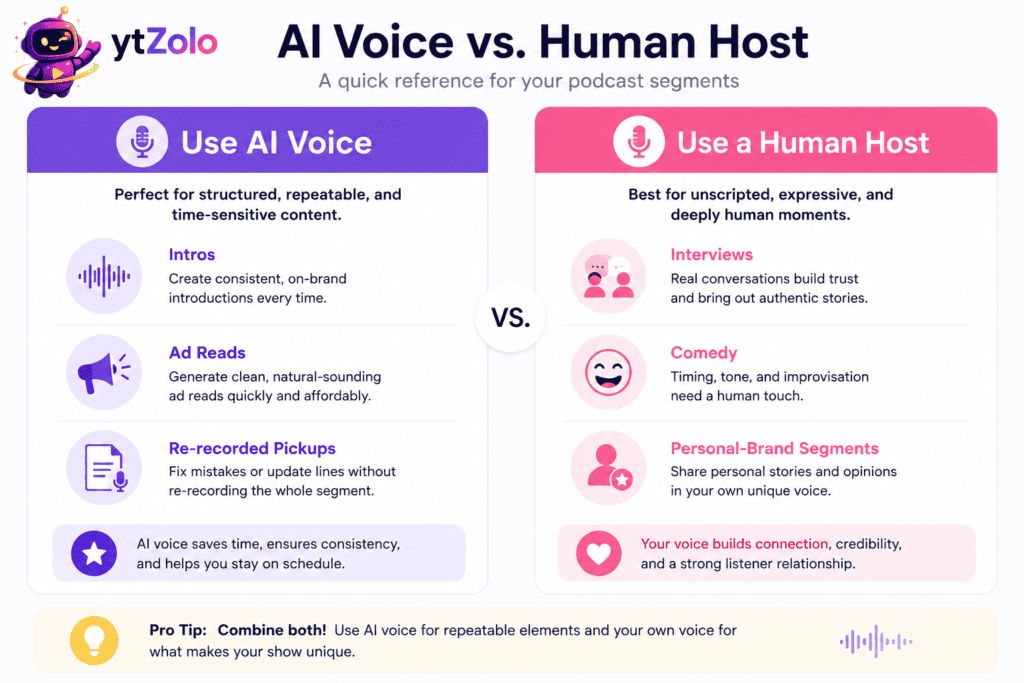
None of this replaces the reason people subscribe to a podcast in the first place — a real voice with real reactions, timing, and personality.
Interview-format shows lean almost entirely on unscripted back-and-forth, and that’s exactly the territory where synthetic delivery still falls short. A generated voice can’t ask a genuine follow-up question it wasn’t scripted for.
Comedy and banter-driven shows depend on timing that comes from two people actually listening to each other, not a script read in isolation. That chemistry doesn’t translate to a generated track.
Anything built around a host’s personal brand — a signature laugh, a specific speaking style listeners associate with the person — should stay a real recording. A synthetic version of “you” reading a script is a different thing from you actually hosting.
The practical rule that holds up across most working shows: use a human host for the conversation itself, and let a podcast voice generator carry the repeatable production work around it — intros, ad reads, and the occasional emergency re-record.
For the version of this decision that applies to voice used inside recorded video content rather than audio-only feeds, our guide on how to add an AI voiceover to a YouTube video covers the same tradeoff for creators repurposing podcast episodes as video.
And for anyone still deciding between a voice that reads from text versus one that reshapes an existing recording, it’s worth understanding the difference — our AI voice changer vs. AI voice generator comparison breaks down which category actually fits a podcast production need.
FAQ
Can I use an AI voice generator for my whole podcast? Yes, technically — some shows, particularly daily news-format or summary podcasts, run almost entirely on synthetic narration. For interview or conversational formats, most creators get better results mixing a real host with AI-generated intros, outros, and ad reads.
Will listeners notice if my podcast intro uses an AI voice? On modern, paid-tier tools, most listeners won’t clock it as synthetic unless they’re specifically listening for it. Consistency across episodes matters more to how “produced” a show sounds than whether the voice is human or generated.
Is it legal to use an AI voice generator for a monetized podcast? Yes, as long as your plan includes commercial licensing. Free tiers on most platforms restrict commercial or monetized use — always confirm your tier’s terms before publishing to ad-supported feeds.
Can I clone my own voice to use as a podcast host? Many platforms support this from a short voice sample. It’s a reasonable option for a solo host who wants a consistent backup for days they can’t record, as long as it’s your own voice or one you have documented consent to use.
How do I keep my AI podcast voice sounding the same every episode? Lock the exact voice profile, pacing, and pitch settings once, save them as a template, and reuse them for every episode rather than adjusting settings project by project. Small per-episode tweaks are the most common cause of a drifting or inconsistent-sounding show.
Does an AI voice generator work for podcast ad reads with rotating sponsors? Yes — this is one of the strongest use cases. A generated ad read can be swapped into the same slot without re-recording the surrounding episode, which is especially useful for dynamically inserted or regionally rotated ads.
What’s the difference between an AI voice generator and an AI voice changer for podcasting? A voice generator creates speech from a written script. A voice changer takes an existing recording — your actual voice on tape — and transforms how it sounds. Podcasters producing a scripted intro typically want a generator; podcasters disguising or stylizing a recorded voice want a changer.
Can I use different AI voices for co-hosts on the same show? Yes, and this is common for multi-speaker or dialogue-style formats. The key is locking each co-host’s voice profile separately so listeners can consistently tell them apart episode to episode.
Do I need special equipment to use an AI voice generator for a podcast? No — this is one of the main appeals. A script and a laptop are enough; there’s no microphone, recording booth, or acoustic treatment required for the AI-generated portions of an episode.
How long does it take to generate a podcast segment with AI voice? Most short segments — intros, outros, ad reads — generate in seconds to a couple of minutes. Longer, full-episode narration takes proportionally longer depending on script length and the platform’s processing queue.
About the Author
Anshika Verma Email: anshika@ytzolo.com
Anshika Verma researches AI creator tools, voice synthesis, and podcast and YouTube production workflows for the ytZolo blog. Her work focuses on testing AI voice and audio platforms against real production use cases, and translating that testing into practical guidance for podcasters, creators, and content teams.

