
📋 Quick Summary An AI voice generator turns written text into natural-sounding speech in seconds — no mic, no studio, no voice actor. This guide covers what it is, how it works, where and who it’s used by, free vs. paid tradeoffs, and how to generate your first AI voice with ytZolo.
Typing out a script and getting back a voice that actually sounds human used to feel like a novelty. In 2026, it’s a normal part of how videos, podcasts, and courses get made.
An voice generator AI turns written text into spoken audio in seconds. No microphone, no recording booth, no voice actor booking.
Sometimes called a text to speech AI tool or an AI audio creator, it’s built for anyone who wants to generate audio with AI instead of booking a live recording session.
This guide covers what an AI voice generator actually is, how the technology works, what to look for before you pick one, and how to generate your first AI voice with ytZolo.
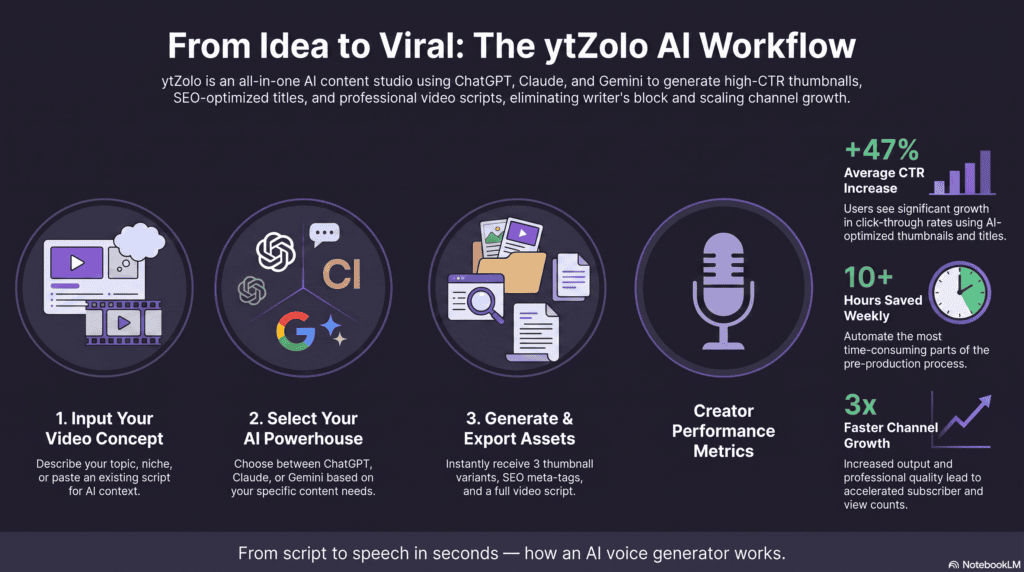
Table of Contents
What is an AI Voice Generator?
This kind of tool is software that converts written text into spoken audio using machine learning models trained on human speech.
You type a script, choose a voice, and the tool generates a spoken version — no recording equipment or voice acting experience required.
This is different from old-school, robotic text-to-speech (TTS). Early TTS stitched together pre-recorded syllables, which is why it sounded flat and mechanical.
Modern voice synthesis tools use neural networks that learn pitch, pacing, and emphasis from thousands of hours of real speech. The result sounds like a person reading a script, not a machine reciting text.
Because of this shift, “AI voice generator” has become the everyday term people search for — even though the underlying technology is often called neural text-to-speech or speech synthesis.
You’ll also see the same category listed as an AI voice audio generator, depending on which platform you’re comparing.
How AI Voice Generators Work
You don’t need to understand the technical pipeline to use one, but knowing how to generate audio with AI helps you get better results.
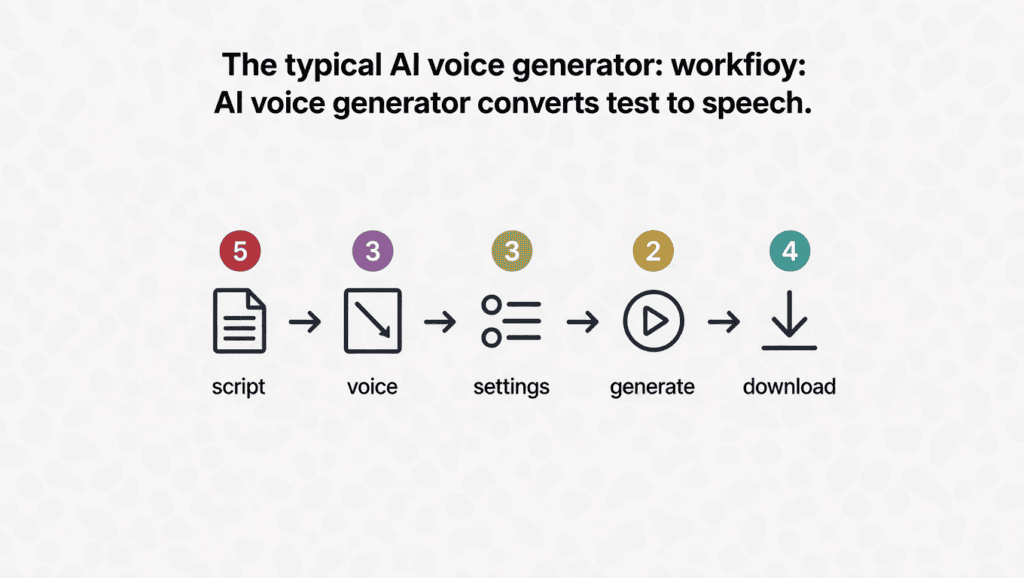
1. Write or paste your script. Most tools accept plain text, though some also support SSML for advanced pacing control.
2. Choose a voice. Pick from a library of pre-built voices, filtering by language, gender — male vs female AI voices, plus various accents — and tone.
3. Adjust settings. Fine-tune speed, pitch, and emotional tone if the platform supports it.
4. Generate. The AI voice generator processes your text and produces an audio file, typically in seconds to a couple of minutes.
5. Download and use. Export as MP3 or WAV and drop it straight into your video, podcast, or app.
For a YouTube-specific version of this workflow — including syncing narration to your footage — see our step-by-step voiceover tutorial.
That’s the whole loop. Compare that to booking a voice actor, scheduling a session, and waiting days for revisions.
Benefits of Using an AI Voice Generator
AI voice generators help creators and businesses produce professional voiceovers faster and at a lower cost than traditional recording methods.
Some of the biggest benefits include:
- Save hours of recording and editing time
- Eliminate the need for expensive microphones or studios
- Create consistent voiceovers across multiple videos
- Produce content in multiple languages
- Update scripts without re-recording everything
- Scale YouTube, podcast, and marketing content efficiently
Whether you’re creating tutorials, ads, or online courses, AI-generated voices simplify production while maintaining high audio quality.
Key Features to Look For
Not every voice tool online is built the same way. Here’s what actually separates a good one from a mediocre one.
Voice variety and languages. A wide voice library matters if you’re producing content for different tones, characters, or global audiences.
Emotion and tone control. Look for tools that let you direct delivery — excited, calm, serious — rather than a single flat reading style. This is the biggest factor in how to make natural AI voices sound less robotic on longer scripts.
Speed and pitch control. The ability to slow down a technical explainer or speed up a fast-paced intro makes a real difference in watch time.
Commercial licensing. Confirm that the plan you’re on actually allows monetized, commercial use before you publish.
Voice cloning. Some platforms let you clone your own voice from a short sample, useful for consistent branding across a channel — always with your explicit consent.
Best Use Cases for Voice Generators AI
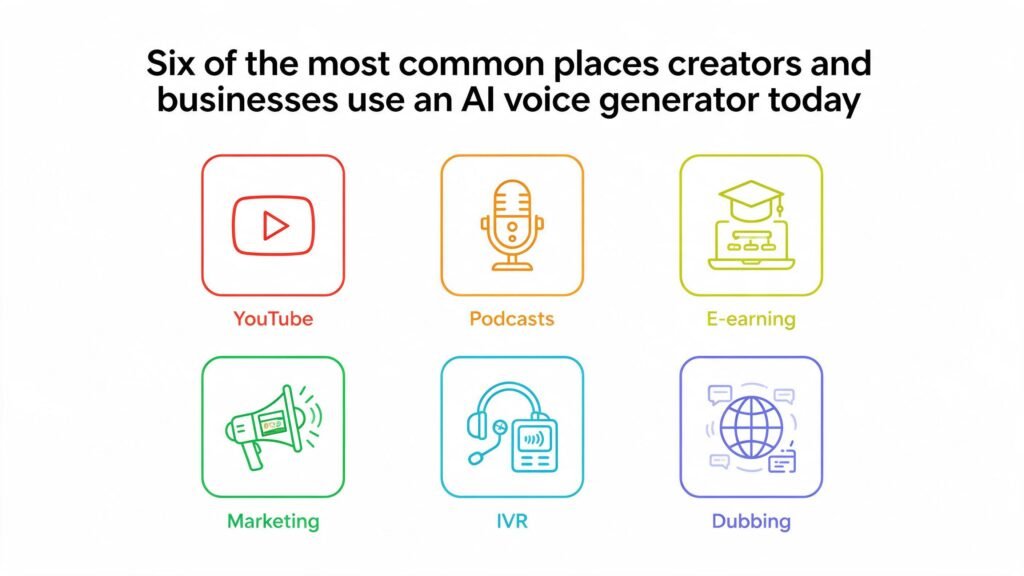
This kind of technology isn’t a single-purpose tool. It shows up across almost every format that involves spoken audio.
YouTube Voiceovers
Faceless channels, explainers, and documentary-style videos all rely on consistent narration without appearing on camera. Searches for AI voice for YouTube have grown fast for exactly this reason. Pairing your voiceover with a solid YouTube script keeps the whole video tight from hook to CTA.
For the full walkthrough, see our step-by-step guide on how to add an AI voiceover to a YouTube video.
Podcasts and Audiobooks
Whether you need an AI voice for podcasts or an AI voice for audiobooks, the workflow barely changes — just longer scripts and steadier pacing across chapters. Intro segments, ad reads, or entire AI-narrated audiobooks can be produced without booking studio time.
E-Learning
Course creators use AI narration to keep training modules consistent, and to update a single slide’s audio without re-recording an entire module.
Marketing Videos
Product demos and ad voiceovers scale across campaigns without a new voice actor fee for every version. Marketers specifically searching for AI voice for ads usually want exactly this: fast, cheap, repeatable takes.
IVR and Apps
Businesses use synthetic voices for onboarding flows, in-app guidance, and automated phone systems.
Dubbing
Translating a video into another language uses the same underlying speech-synthesis technology as a standard voice generator AI, layered with translation and timing. Our AI dubbing software guide breaks that process down in more depth.
Who Uses an AI Voice Generator?
Short answer: almost anyone who needs spoken audio without hiring a studio. Here’s who shows up most often.
YouTubers and faceless-channel creators. Narrating explainers, documentaries, or story-format videos without ever appearing on camera.
Podcasters. Producing intro/outro segments, ad reads, or even entire AI-hosted episodes.
Course and audiobook creators. Turning long-form written material into narrated audio at scale, without re-recording every time a slide changes.
Marketing teams and agencies. Producing ad voiceovers and product-demo narration across multiple campaigns and languages.
Game developers. Voicing NPCs and dynamic dialogue that would be impractical to record with human actors line by line.
Businesses and app teams. Powering onboarding flows, in-app guidance, and IVR-style voice prompts.
Accessibility teams. Converting written content into audio for visually impaired or reading-disabled audiences.
If your work involves any spoken content — video, audio, or app — a voice tool like this has a use case for you.
AI Voice Generator vs. Hiring a Voice Actor
The AI audio vs human voice debate isn’t as one-sided as either camp claims. Neither option wins every time — here’s an honest breakdown.
Cost. A human voice actor for a single video can run anywhere from $50 to several hundred dollars. A synthetic voice tool produces a finished take for a fraction of that, and re-recording a changed line costs almost nothing.
Speed. Studio bookings take days, sometimes weeks with revisions. This kind of speech synthesis is done in seconds.
Consistency. A channel publishing multiple videos a week benefits from a voice that sounds identical every time — something even a skilled voice actor can struggle with across different recording sessions.
When a human is still better. Deeply emotional performances, dramatic acting, and high-stakes brand campaigns still often benefit from a trained voice actor’s range and improvisation.
For most routine content — explainers, tutorials, product narration — a good synthetic voice tool gets you 90% of the quality at a fraction of the cost and time.
Free vs. Paid AI Voice Generators — What’s the Difference?
A free-tier option is a good way to test whether a tool’s voices fit your project before you commit.
But free tiers usually come with real limits worth knowing upfront:
- Watermarks on the exported audio
- Character or word caps per month
- Voice limits, with premium voices locked behind a paywall
- No commercial rights, meaning the audio can’t legally go on a monetized channel
If you’re testing a workflow or producing a personal, non-monetized project, a free plan is genuinely useful. If your content is going on a monetized YouTube channel or a client’s marketing video, budget for a paid tier from the start.
How to Choose the Right Voice Generator AI
Run through this checklist before you commit to a subscription:
- [ ] Does it support the languages and accents your audience needs?
- [ ] Are commercial usage rights included on the plan you can actually afford?
- [ ] Can you preview a voice using your real script, not just a demo?
- [ ] Does it offer emotion, speed, and pitch controls — or just a flat read?
- [ ] Is voice cloning available, and does the platform require documented consent?
- [ ] Does it fit into the rest of your workflow, or does it mean exporting to yet another tool for titles, thumbnails, and SEO?
- [ ] What’s the realistic cost per finished minute at your actual production volume?
That last question matters more than most people expect. A tool that looks cheap for one short video can get expensive fast at higher volume.
For a deeper side-by-side across more platforms, our best AI voice generator comparison — a full text to speech guide in its own right — tests realism, pricing, and licensing across nine tools.
If you’re assembling a full production stack, our roundup of the best AI tools for YouTube creators covers voice generation alongside scripting and SEO tools worth pairing with it.
How to Generate an AI Voice with ytZolo
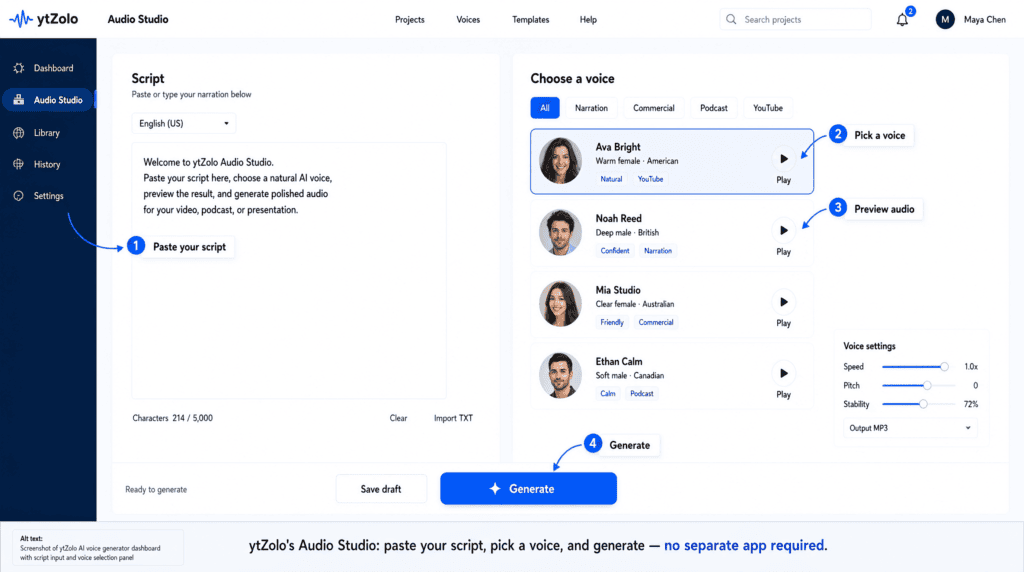
Here’s the actual workflow inside ytZolo’s Audio Studio.
Step 1 — Open the Audio Studio. Head to ytzolo.com and open the voice generation tool from your dashboard.
Step 2 — Paste or write your script. Drop in your video script, ad copy, or narration text directly.
Step 3 — Pick a voice. Choose a voice from ytZolo’s library that matches the tone of your content.
Step 4 — Adjust and preview. Fine-tune pacing and tone, then preview the line before committing to a full generation.
Step 5 — Generate and download. Export your finished audio and drop it straight into your video editor.
Because voice generation lives inside the same dashboard as ytZolo’s script writer, title generator, and thumbnail tools, your narration, title, and thumbnail can come from one consistent workflow instead of four separate logins.
FAQ
Is AI voice generation free? Most platforms, including ytZolo, offer a free tier with limited credits so you can test voice quality before upgrading. Free tiers typically restrict commercial use.
Can I use AI generated voices commercially? Yes, as long as your plan includes commercial licensing. Always check the terms for your specific tier before publishing to a monetized channel.
Do AI voices sound robotic? Not on modern, premium tiers. Neural text-to-speech has closed most of the realism gap that made older TTS sound mechanical, though free-tier voices are sometimes noticeably flatter than paid ones.
Can I clone my own voice with AI? Many platforms support voice cloning from a short audio sample. Only clone a voice you own or have explicit, documented consent to use.
Is AI voice generator content detectable or penalized on YouTube? YouTube doesn’t penalize AI narration on its own. It does require disclosure for certain types of realistic, AI-altered content — see our breakdown of YouTube’s AI-generated content disclosure requirements for specifics.
What is the difference between an AI voice generator and text-to-speech (TTS)? An AI voice generator uses advanced neural networks to create speech that sounds natural, with realistic tone, emotion, and pacing. Traditional text-to-speech (TTS) systems often sound robotic because they rely on simpler speech synthesis methods. Modern AI voice generators are a newer generation of TTS technology.
If you’re trying to decide between a generator and a voice changer instead, see AI Voice Changer vs. AI Voice Generator.
How accurate are AI voice generators? Most modern AI voice generators produce highly accurate pronunciation and natural speech, especially for common languages like English. Accuracy depends on the quality of the AI model, the selected voice, and how clearly the input text is written.
Can AI voice generators create different emotions?Yes. Many AI voice generators allow you to adjust emotional tone, including happy, excited, calm, serious, sad, or energetic voices. Premium tools generally offer more expressive voice controls than free versions.
Which file formats do AI voice generators support? Most AI voice generators let you download audio as MP3 or WAV files. Some platforms also support OGG, AAC, or API-based audio streaming for developers.
Can I generate AI voices in multiple languages? Yes. Many AI voice generators support dozens of languages and regional accents. Depending on the platform, you may also find localized pronunciation and multilingual voice cloning features.
How long does it take to generate an AI voice? Most AI voice generators create speech within a few seconds. Longer scripts, higher-quality voice models, or complex emotional settings may take slightly longer to process.
Are AI-generated voices legal to use? Yes, AI-generated voices are legal when you follow the platform’s licensing terms. If you use voice cloning, always obtain the original speaker’s explicit permission before creating or publishing cloned voices.
Can AI voice generators replace professional voice actors? AI voice generators are excellent for tutorials, YouTube videos, podcasts, e-learning, and marketing content. However, professional voice actors remain the better choice for highly emotional storytelling, character acting, films, and premium advertising campaigns.
Do AI voice generators work on mobile devices? Yes. Many AI voice generators are browser-based or offer mobile apps, allowing users to generate voiceovers directly from smartphones or tablets.
Can AI voice generators pronounce names correctly? Most AI voice generators handle common names accurately. For uncommon names, technical terms, or brand names, pronunciation can often be improved by adjusting spelling, adding phonetic hints, or using SSML if the platform supports it.
How do AI voice generators learn to sound human? AI voice generators are trained on large datasets of human speech. Deep learning models analyze pronunciation, rhythm, pauses, emphasis, and intonation to generate speech that closely resembles natural human voices.
Generate Your First AI Voice Free
You don’t need editing skills or recording equipment to get a natural-sounding voiceover.
Try ytZolo’s AI voice generator free →
About the Author
Anshika Verma Email: anshika@ytzolo.com
Anshika Verma researches AI creator tools, voice synthesis, and YouTube production workflows. MY work focuses on testing AI voice and audio platforms against real production use cases, translating that testing into practical guidance for creators, agencies, and marketing teams.

