
Last updated: July 2026 · 22-minute read
Quick answer: AI dubbing software replaces or adds a translated voice track to a video using speech recognition, machine translation, and voice synthesis, often with lip sync and voice cloning layered on top. The right pick depends on what you’re dubbing. Creators publishing to YouTube usually want a fast, affordable, workflow-connected option such as ytZolo, while studios and broadcasters need frame-accurate lip sync and human review. Enterprises often prioritize API access, security guarantees, and volume pricing. This guide explains how AI dubbing works, compares the 10 tools people ask about most, including ytZolo, and gives you a practical checklist so you don’t have to test every platform yourself.
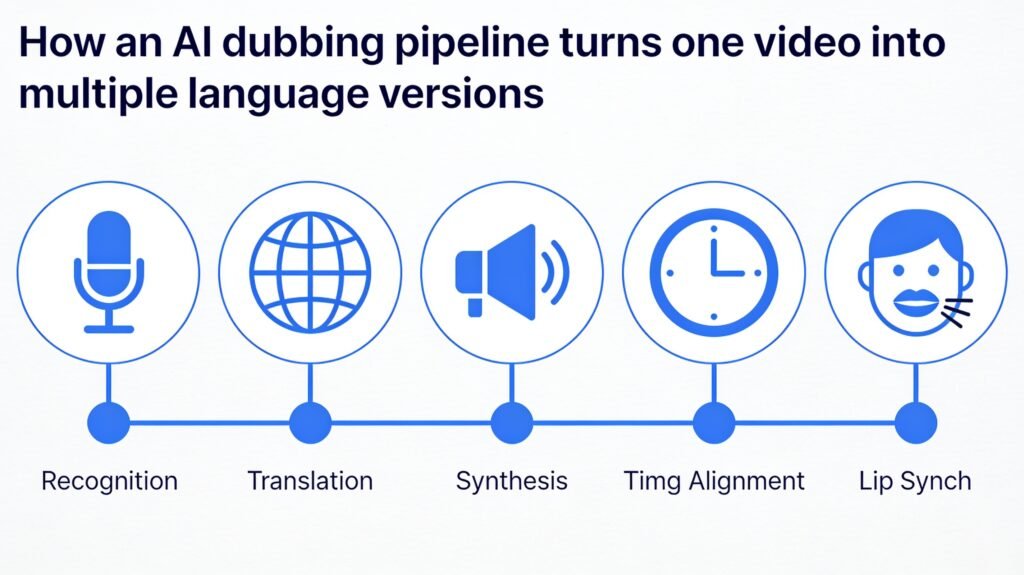
Table of Contents
Why This Guide Exists
Most “best AI dubbing tools” articles are a list of five logos and a paragraph each. That’s not enough anymore.
Dubbing AI has moved from a novelty into a real production step for creators, course builders, marketing teams, and studios. The decisions involved — voice cloning consent, lip sync quality, data privacy, cost per minute — deserve more than a surface-level comparison.
This guide covers the full picture: how AI dubbing actually works under the hood, ten tools compared side by side, pricing, security, YouTube-specific strategy, a step-by-step workflow, mistakes to avoid, and where the technology is headed next.
What Is AI Dubbing Software?
AI dubbing software is a category of tools that automatically replaces the spoken audio in a video with a version in a different language, using artificial intelligence instead of a human translator, voice actor, and sound engineer.
A basic AI dubbing pipeline does four things:
- Transcribes the original audio into text
- Translates that text into the target language
- Synthesizes a new voice track using text to speech or speech synthesis
- Aligns the new audio with the original video’s timing
More advanced tools add voice cloning (so the dubbed voice sounds like the original speaker) and lip sync AI (so the speaker’s mouth movements match the new language).
This is different from a plain AI voice generator, which just converts text into speech without any translation or video alignment step, and different from subtitles, which display translated text instead of replacing the audio.
Why AI Dubbing Matters Right Now
Video is the default format for the internet, and most video is still trapped in one language.
A few numbers explain the shift:
- YouTube itself has been rolling out native multi-language audio tracks and auto-dubbing at the platform level, a strong signal that multilingual audio is now core infrastructure, not a nice-to-have.
- Course platforms, SaaS companies, and agencies are under constant pressure to localize training and marketing videos for new markets without re-filming.
- Accessibility expectations have risen — viewers increasingly expect content in their own language rather than relying on subtitles.
For YouTube specifically, dubbing a video isn’t just about reach. YouTube can serve the correct audio track based on a viewer’s language settings, which means one upload can rank and get recommended in multiple language markets instead of just one. That’s a meaningful, and often overlooked, YouTube SEO play.
How AI Dubbing Actually Works
Understanding the pipeline helps you evaluate tools intelligently instead of judging them on marketing copy alone.
1. Speech Recognition
The tool first converts spoken audio into text using automatic speech recognition (ASR). Accuracy here matters enormously — every downstream step inherits any transcription errors. Background noise, overlapping speakers, and accents are the usual failure points.
2. Translation Pipeline
The transcript is translated into the target language, usually with a large language model rather than old-school phrase-based machine translation. Good tools localize meaning and idiom rather than translating word for word, and they adjust sentence length so the translated line fits roughly the same amount of speaking time as the original.
3. Voice Synthesis
The translated text is converted back into audio using speech synthesis. Two options exist here:
- Stock AI voices — a library of pre-built voices you pick from
- Voice cloning — a synthetic version of the original speaker’s voice, trained from a short sample of their real audio
Voice cloning is what makes a dub feel like the same person is speaking a new language, rather than a narrator reading over them.
4. Timing and Alignment
The new audio track needs to match the pacing of the video. This is where forced alignment comes in — a technique that maps translated text to precise timestamps in the audio so pauses, emphasis, and sentence breaks line up naturally instead of feeling rushed or dragging.
5. Lip Sync (Optional Layer)
Lip sync AI goes a step further and reshapes the speaker’s mouth movements in the video itself so their lips visually match the new language. This is a separate, harder problem from audio dubbing — it requires video generation, not just audio generation, and quality varies a lot between tools. Some platforms only do audio dubbing (leaving lips as they were), which is often the better choice for faceless or B-roll-heavy content.
6. Human Review (For High-Stakes Content)
For broadcast, film, or brand-critical marketing, a human reviewer typically checks the translation for tone and cultural accuracy, and a producer reviews the final mix. Fully automated dubbing is good enough for most creator and internal-training use cases; it’s not yet a full replacement for professional review on premium content.
Traditional Dubbing vs. AI Dubbing
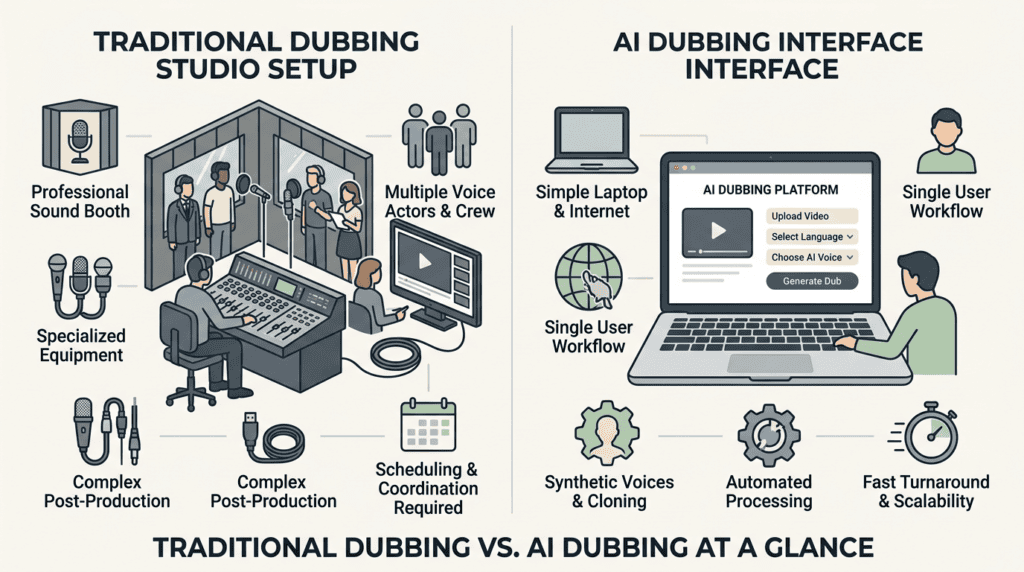
| Factor | Traditional Dubbing | AI Dubbing |
|---|---|---|
| Turnaround time | Days to weeks | Minutes to hours |
| Cost | High — studio, engineers, voice actors per language | Low to moderate — usually priced per minute or by subscription |
| Languages per project | Limited by actor availability | Dozens, often simultaneously |
| Voice consistency | Depends on actor casting | Can preserve the original speaker’s voice via cloning |
| Emotional nuance | Best-in-class when done by skilled actors | Improving fast, still occasionally flat on complex emotion |
| Scalability | Difficult — doesn’t scale linearly | Scales well across large video libraries |
| Best for | Feature films, prestige TV, flagship brand campaigns | YouTube content, courses, marketing videos, internal training, high-volume localization |
Neither approach is universally “better.” The right choice depends on budget, timeline, and how much emotional precision the content demands.
Benefits of AI Dubbing Software
- Speed. A video that used to take weeks to localize can be dubbed in minutes to hours.
- Cost. No studio booking, no per-language voice actor fees.
- Scale. One video can become 10, 20, or 50 language versions without proportional cost increases.
- Consistency. Voice cloning keeps a creator or brand’s voice recognizable across every language.
- Accessibility. Viewers who don’t read subtitles well, or who prefer listening over reading, get full access to the content.
- Editability. Made a mistake in the script? Regenerate the line instead of re-booking a studio session.
Limitations of AI Dubbing (Be Honest About These)
- Emotional range in AI voices is good but not always as nuanced as a trained voice actor performing a dramatic scene.
- Lip sync quality varies significantly between tools, and even the best still shows minor artifacts on close-up, high-motion shots.
- Idiom and cultural translation can go wrong without a human review step, especially for humor, slang, or culturally specific references.
- Multi-speaker, overlapping dialogue (interviews, panel discussions) is still the hardest case for automatic speaker separation.
- Consent and rights for cloning a real person’s voice need to be handled properly — this isn’t optional, legally or ethically.
For a deeper breakdown of where AI dubbing sounds real vs. robotic, see our AI dubbing accuracy guide.
When NOT to Use AI Dubbing
- A feature film or prestige series where budget supports professional dubbing studios and the emotional stakes are highest.
- Legal, medical, or safety-critical content where a mistranslation carries real consequences and can’t be caught by casual review.
- Content featuring a real person’s voice being cloned without their explicit consent — regardless of the tool’s capability, this is a hard no.
Best AI Dubbing Software in 2026: Full Comparison
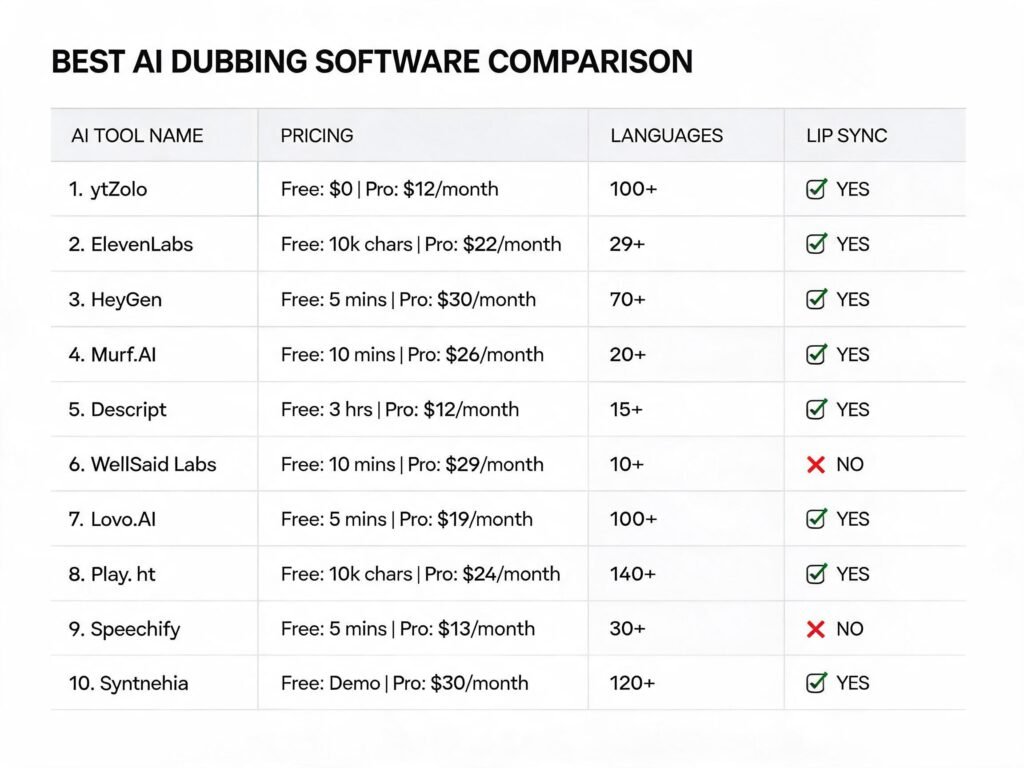
The table below compares the ten tools people most often ask about when researching AI dubbing software, including ytZolo, ElevenLabs, HeyGen, Dubverse, Rask AI, Papercup, Maestra, Speechify, Deepdub, and Wavel AI.
| Tool | Pricing | Languages | Voice Cloning | Lip Sync | Translation | Editing | API | Enterprise | Best For |
|---|---|---|---|---|---|---|---|---|---|
| ytZolo | Free tier + paid plans | Multiple, growing | Yes | Not the primary focus | Yes | In-platform | Not the primary focus | Growing creator/SMB focus | YouTubers who want dubbing inside a full content workflow (scripts, SEO, thumbnails, voice) |
| ElevenLabs | Free tier; paid from ~$5–11+/mo | 29+ | Yes, strong | No native lip sync | Yes, works from original audio performance | Dubbing Studio for fine-tuning | Yes, robust | Yes | Voice quality-first projects: podcasts, audiobooks, voice-heavy video |
| HeyGen | Free tier (limited); paid from ~$24/mo | 175+ | Yes | Yes | Yes | Yes | Limited | Yes | Marketing and training videos where visible lip sync matters |
| Dubverse | Free trial; paid plans vary | 20+ (strong Indian language support) | Yes | Limited | Yes | Yes | Yes | Yes | Indian-language localization, team collaboration |
| Rask AI | Free plan (limited); paid from ~$50/mo | 130+ | Yes (not on free) | Yes | Yes | Yes | Yes | Yes | Long-form content, documentaries, high-volume creators |
| Papercup | Custom/enterprise pricing | Dozens | Yes | No | Yes, with human-in-the-loop option | Yes, professional workflow | Yes | Strong enterprise focus | Broadcasters, publishers needing human-reviewed AI dubbing |
| Maestra | Free trial; paid plans | 125+ | Yes | Limited | Yes | Yes, transcript-based editor | Yes | Yes | Teams that want a transcript-first editing workflow |
| Speechify | Free tier; paid subscription | 60+ | Yes | No | Yes | Basic | Limited | Limited | Individual creators, e-learning, quick voiceovers plus dubbing |
| Deepdub | Custom/enterprise pricing | Dozens | Yes, emotion-aware | Limited | Yes | Studio-grade | Yes | Strong enterprise focus | Film, TV, and streaming media needing emotion-consistent dubs |
| Wavel AI | Free trial credits; paid from ~$18/mo | 55+ | Yes | Limited | Yes | Yes | Limited | Growing | Budget-conscious teams needing broad language coverage |
Pricing changes frequently across this category — always confirm current numbers on each provider’s pricing page before buying.
Reading the Table: What Actually Matters
Three columns decide most buying decisions in practice:
- Lip sync — skip it entirely for faceless or voiceover-style content; prioritize it heavily for on-camera marketing and film.
- API access — irrelevant for a solo creator, essential for an agency or SaaS company building dubbing into a pipeline.
- Enterprise readiness — data retention policy, SSO, and volume pricing matter far more than raw voice quality once you’re localizing hundreds of videos.
Tool-by-Tool Breakdown
ElevenLabs
ElevenLabs is widely regarded as a voice-quality leader. Its Dubbing Studio conditions on the original speaker’s performance — not just the transcript — so tone and delivery carry across languages rather than sounding like a flat read. It doesn’t include native lip sync, so video creators who need visible mouth-movement matching will need a second tool for that layer. Strongest for anyone who wants the audio to sound as close to human performance as possible.
HeyGen
HeyGen pairs voice dubbing with AI-driven lip sync and offers a large language library. It runs two dubbing engines — a faster one for scale and a more context-aware one for higher-fidelity translation and better speaker-gender detection. It’s a strong choice when the visual mouth-sync actually matters to your audience, such as talking-head marketing or training videos.
Dubverse
Dubverse focuses heavily on Indian and global-language coverage with a team-friendly, cloud-based workflow. It’s a solid pick for agencies localizing content for Indian markets specifically, with batch processing for scaling across many videos at once.
Rask AI
Rask supports over 100 languages and handles long-form content well, including documentaries and multi-hour videos. Voice cloning isn’t available on the free tier, and pricing sits higher than several competitors, but the language breadth and multi-speaker handling are genuine strengths for high-volume creators.
Papercup
Papercup leans into a human-in-the-loop model, combining AI-generated dubs with professional review for broadcasters and publishers who can’t risk an unreviewed AI translation going to air. It’s built for enterprise and media companies rather than individual creators.
Maestra
Maestra offers a transcript-first editing experience, which makes fixing translation or timing errors more intuitive for teams that prefer editing text over fiddling with an audio timeline.
Speechify
Speechify started in text-to-speech and extended into AI dubbing, supporting 60+ languages. It’s approachable for individual creators and e-learning teams who want dubbing without a steep learning curve, though it’s lighter on advanced editing controls than studio-focused competitors.
Deepdub
Deepdub positions itself around emotion-consistent, broadcast-quality dubbing for film, TV, and streaming — a narrower but deeper focus than the creator-first tools on this list.
Wavel AI
Wavel AI covers 55+ languages at a lower price point, making it a reasonable option for budget-conscious teams that need broad language coverage without enterprise-level spend.
ytZolo: An Honest Look at Its AI Dubbing and Audio Tools
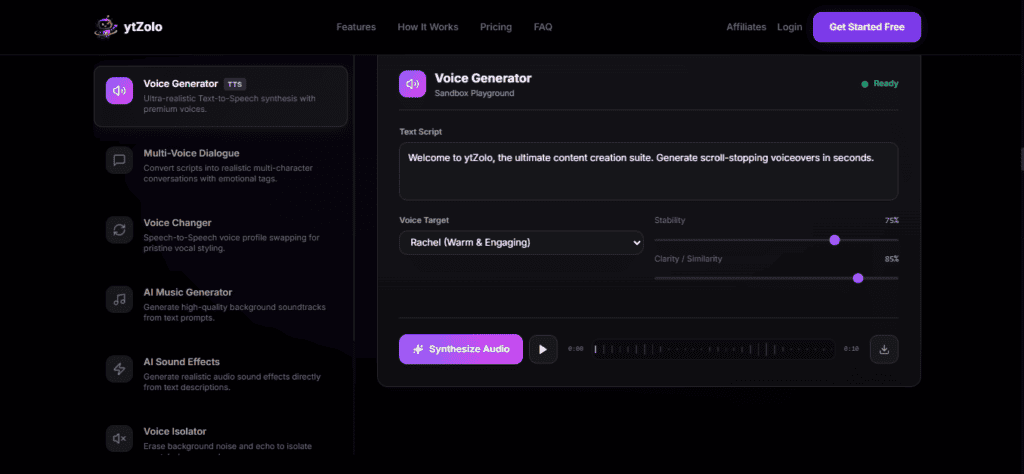
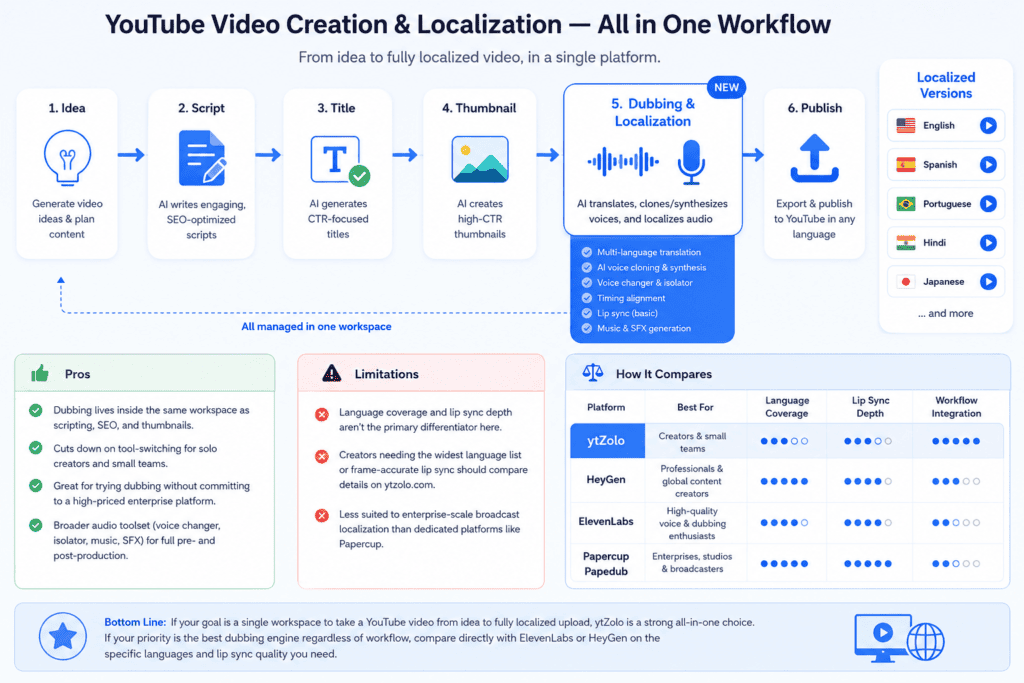
ytZolo takes a different approach from most names on this list: instead of being a single-purpose dubbing tool, it’s built as an all-in-one AI platform for YouTube creators, with dubbing sitting alongside script writing, YouTube SEO optimization, AI thumbnail generation, voice generation, and music and sound creation.
What It Covers
- AI Dubbing — translating video audio into other languages as part of a broader localization and publishing workflow, rather than a standalone upload-and-download tool.
- AI Voice Generator — text-to-speech and speech synthesis for narration, voiceover, and video audio, covered in more depth in ytZolo’s best AI voice generator comparison.
- AI Audio Generator / AI Music Generator — generating background music, ambience, and audio elements for videos without licensing stock tracks.
- Voice Changer — real-time or file-based voice transformation, discussed in ytZolo’s AI voice changer roundup.
- Voice Isolator — separating clean speech from background noise or music, a common pre-processing step before dubbing or transcription.
- Forced Alignment and Text to Dialogue — the underlying timing and multi-speaker dialogue capabilities that make dubbed and generated audio line up naturally with video, similar in concept to the same-named capabilities offered by dedicated audio API providers.
Who It’s Best For
ytZolo is most useful for YouTubers, educators, and small teams who want dubbing to plug directly into the rest of their publishing workflow — the same platform that writes the script, generates the title, and builds the thumbnail can also produce the localized audio, rather than exporting a video into a fourth or fifth separate app.
It’s a weaker fit for enterprise localization teams managing hundreds of hours of broadcast content, or film and TV studios that need frame-accurate lip sync with a dedicated human review pipeline — that’s squarely Papercup and Deepdub territory.
Pros
- Dubbing lives inside the same workspace as scripting, SEO, and thumbnails, which cuts down on tool-switching for solo creators and small teams.
- Useful for creators who want to try dubbing without committing to a dedicated, higher-priced enterprise dubbing platform first.
- Broader toolset (voice changer, voice isolator, music generation) covers pre- and post-production audio needs beyond just translation.
Limitations
- Language coverage and lip sync depth are not positioned as the primary differentiator the way they are for HeyGen or Deepdub — creators needing the widest language list or the most precise visual lip sync should compare feature specifics directly on ytzolo.com before committing.
- Less suited to enterprise-scale broadcast localization than dedicated players like Papercup.
If your priority is a single workspace that gets a YouTube video from idea to fully localized upload, ytZolo is worth evaluating. If your priority is the single best dubbing engine on the market regardless of workflow, it’s worth comparing against ElevenLabs or HeyGen directly on the specific languages and lip sync quality you need.
Pricing: What You’re Actually Paying For
AI dubbing tools price themselves in a few different ways, and it’s easy to compare the wrong number.
- Per-minute or per-character pricing — common on API-first tools; costs scale directly with content volume.
- Credit-based plans — a monthly credit allowance that gets consumed per generation; watch how many credits a single dub actually costs.
- Flat subscription tiers — a fixed monthly price for a usage cap, common on creator-focused platforms.
- Custom enterprise pricing — negotiated based on volume, security requirements, and support level.
For a full per-platform cost breakdown, see our AI dubbing cost guide.
Free AI Dubbing Software: What to Expect
Most tools on this list offer some kind of free tier — but “free” usually means one or more of the following limits:
- Watermarks on the output video
- A cap on video length or number of generations per month
- No voice cloning (only stock voices)
- No lip sync
- Limited language selection
Free tiers are genuinely useful for testing quality and workflow fit before paying — just don’t expect a free plan to carry a real production workload.
Enterprise AI Dubbing
Enterprise buyers should evaluate:
- Volume pricing and whether it scales predictably as your library grows
- API and SDK access for pipeline integration
- SSO and role-based access control for teams
- SLA commitments on uptime and turnaround time
- Custom voice licensing for brand-consistent narration across markets
Data Privacy and Security in AI Dubbing
Uploading video and voice data to a third-party platform is not a trivial decision, especially for brand or client content.
Questions worth asking any vendor before you commit:
- Is uploaded audio and video used to train the underlying models, or is it processed and discarded?
- How long is content retained after processing, and can you request deletion?
- What encryption is used in transit and at rest?
- Does the platform offer a written data processing agreement for enterprise or agency use?
If a vendor can’t answer these clearly, treat that as a red flag — not a minor gap.
Voice Cloning Ethics: The Part Most Guides Skip
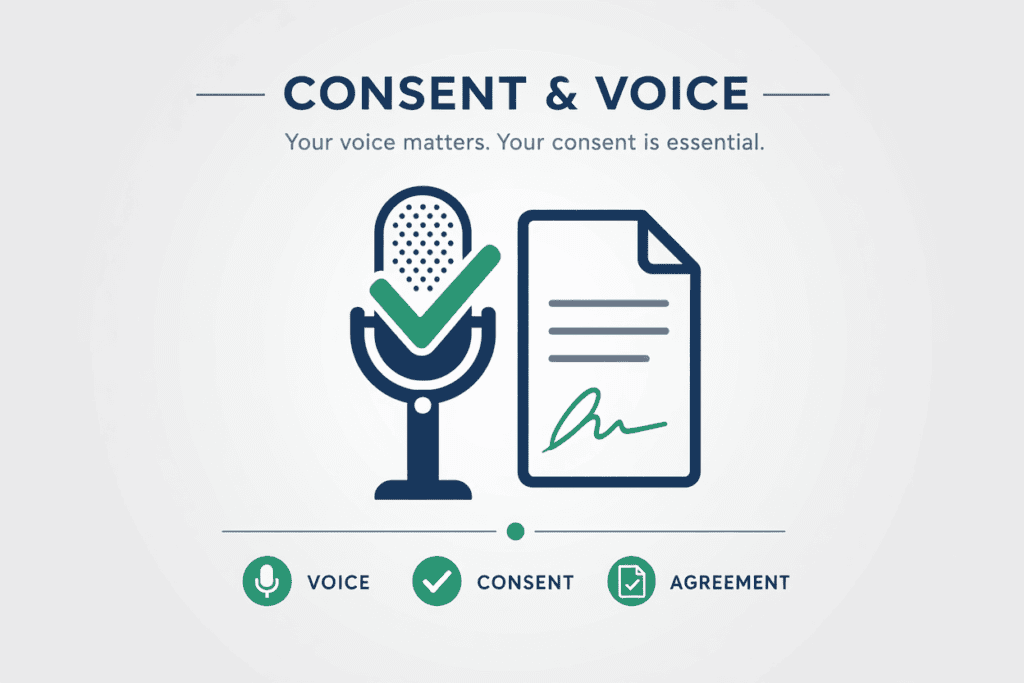
Voice cloning is the single most powerful — and most easily misused — feature in this category.
A few principles should guide any responsible use of it:
- Only clone a voice with the explicit, informed consent of the speaker. This applies even if you technically have access to enough audio to do it.
- Disclose synthetic or cloned voice content where required. YouTube’s policies increasingly require labeling for AI-generated or altered content that could be mistaken for something real, particularly when it involves a real, identifiable person’s voice or likeness.
- Avoid cloning public figures or celebrities without explicit rights — this is both a legal risk and, in most jurisdictions, moving toward being explicitly regulated.
- Keep records of consent for any voice you clone commercially, the same way you’d keep a model release for on-camera talent.
For a deeper look at what YouTube specifically requires around disclosure, see this breakdown of YouTube’s AI-generated content disclosure requirements.
AI Dubbing and YouTube: A Practical Localization Strategy
Dubbing a YouTube video isn’t just a translation exercise — it’s a distribution strategy.
How YouTube Handles Multi-Language Audio
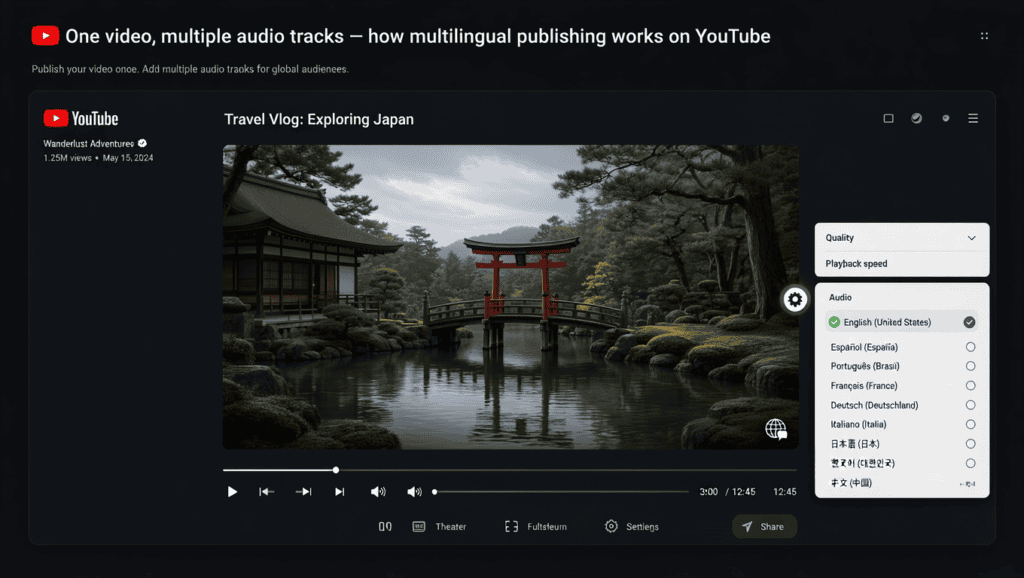
YouTube supports uploading multiple audio tracks to a single video. When a viewer’s app or browser language matches one of your dubbed tracks, YouTube can automatically play that track instead of the original — meaning one video listing can serve multiple language audiences without duplicate uploads.
For the complete playbook, see our guide to YouTube video localization.
SEO Impact of Translated Videos
Dubbing affects discoverability in a few concrete ways:
- Search visibility in new markets. A dubbed audio track alone doesn’t translate your title, description, or tags — pair dubbing with localized YouTube SEO metadata for the video to actually surface in that language’s search results.
- Watch time signals. Viewers who understand the audio watch longer, and watch time remains one of YouTube’s strongest ranking signals.
- Broader top-of-funnel reach. More language versions mean more potential entry points into your content from search and suggested feeds.
A Simple YouTube Multilingual Workflow
- Identify your highest-performing existing videos — dub proven winners before untested new uploads.
- Dub the audio track and generate captions in the target language.
- Translate the title, description, and tags separately — don’t skip this step.
- Upload the additional audio track through YouTube Studio’s language settings.
- Track watch time and click-through rate by language/region in YouTube Analytics to see which markets respond.
Accessibility Benefits of AI Dubbing
Beyond global reach, dubbing genuinely improves access for real people:
- Viewers with reading difficulties or low literacy in the caption language can follow spoken audio instead.
- Audiences who prefer audio-first consumption (driving, multitasking) get full content access instead of a subtitle-only experience.
- Screen-based caption fatigue is real — dubbed audio removes the need to split attention between reading and watching.
Step-by-Step: How to Dub a Video With AI
- Prepare a clean source file. Remove background music bleed where possible, or use a voice isolator first if the dialogue is buried in noise.
- Upload your video or paste a link to the source platform (most tools accept direct video upload or a YouTube/Vimeo/Drive link).
- Confirm the auto-detected source language and speaker count. Fix this manually if the tool gets it wrong — it affects everything downstream.
- Select your target language(s). Most tools let you dub into several languages from one source video in a single batch.
- Choose stock voice or voice cloning. Only clone a voice you have explicit rights to use.
- Decide on lip sync. Skip it for faceless/voiceover content; enable it for on-camera talking-head content if the tool supports it well.
- Review the translated script before final generation. This is the single highest-leverage step for catching mistranslations or awkward phrasing.
- Generate and preview. Check timing, pacing, and whether the translated line matches the emotional tone of the original.
- Add or translate subtitles as a backup for viewers who prefer reading along.
- Export and publish, pairing the dub with localized title, description, and tags for full SEO benefit.
For the full click-by-click walkthrough, see our complete guide on how to dub a YouTube video.
Common Mistakes to Avoid
- Skipping script review. Publishing the raw machine translation without a native-speaker check is the most common quality failure in this category.
- Ignoring pacing mismatches. A translated line that runs longer than the original creates awkward silence or rushed delivery — good tools flag this, but it’s worth checking manually.
- Cloning a voice without consent. Covered above, but worth repeating: this is a hard line, not a gray area.
- Dubbing without updating metadata. A translated audio track with an English-only title and description leaves most of the SEO value on the table.
- Choosing lip sync when it isn’t needed. It adds processing time and cost for content where viewers never really needed it — faceless videos, screen recordings, and B-roll-heavy edits don’t benefit from it.
- Not testing on a short clip first. Dub a 60-second segment before committing an entire back catalog to one tool.
Real-World Use Cases
YouTubers and creators dub back-catalog videos into two or three new languages to unlock new subscriber bases without filming anything new.
Course creators localize training modules for international students, often prioritizing clear speech synthesis over lip sync since most course video is talking-head or slide-based.
Marketing teams dub product demo and ad videos for regional campaigns, reusing one hero video across five or six markets instead of reshooting.
Agencies manage dubbing across multiple client channels, leaning on API access and batch processing to keep turnaround fast.
Podcasters and audiobook producers use AI dubbing and voice generation together to release the same episode in multiple languages without re-recording.
Enterprises localize internal training and compliance videos at scale, prioritizing security and volume pricing over creative flexibility.
Evaluation Checklist: How to Choose
Before you commit to a tool, confirm:
- [ ] Does it support the specific languages you need — including accent/dialect variants where relevant?
- [ ] Is voice cloning available, and does the pricing tier you’ll actually use include it?
- [ ] Do you need lip sync, or is audio-only dubbing sufficient for your content type?
- [ ] What’s the actual cost per minute of finished video at your expected volume?
- [ ] Does the platform have a clear data privacy and retention policy?
- [ ] Is there an editing step for the translated script before final generation?
- [ ] Does it fit into your existing workflow, or does it require exporting to other tools for titles, thumbnails, and SEO?
- [ ] Is API access available if you’ll need to scale or integrate later?
Unsure which languages to prioritize? See our data-backed ranking of the best languages to dub into.
Quick Decision Guide
- You’re a YouTuber who wants dubbing alongside scripts, SEO, and thumbnails in one place → Look at ytZolo.
- Voice quality is your top priority, and you’ll handle lip sync separately (or don’t need it) → ElevenLabs.
- You need strong lip sync for on-camera marketing or training video → HeyGen.
- You’re localizing for Indian-language markets specifically → Dubverse.
- You produce long-form or documentary content at high volume → Rask AI.
- You need broadcast-grade, human-reviewed dubbing → Papercup or Deepdub.
- You’re on a tight budget but need broad language coverage → Wavel AI.
The Future of AI Dubbing
A few directions are already visible heading into the next few years:
- Real-time dubbing for live streams and video calls is moving from experimental to genuinely usable, driven by falling latency in speech synthesis pipelines.
- Emotion-aware synthesis is improving fast — conditioning on the original performance rather than just the transcript, similar to what ElevenLabs’ Dubbing v2 and Deepdub already do, is likely to become the standard approach rather than the premium one.
- Regulation and disclosure requirements are tightening, particularly around voice cloning of real people and platform-level labeling requirements like YouTube’s.
- Consolidation into full content platforms is already happening — dubbing increasingly ships as one feature inside a broader AI content suite rather than a single-purpose tool, which is the direction ytZolo, HeyGen, and others are all moving.
Google Search and Indexing Considerations for Dubbed Video Content
Publishing localized video content has a few technical SEO implications worth knowing, based on Google’s own Search Essentials and Helpful Content guidance:
- Translate the surrounding page and metadata, not just the audio. Google indexes text — titles, descriptions, and transcripts — far more directly than audio tracks themselves.
- Add localized captions and transcripts wherever you publish the dubbed video off-platform (blog embeds, landing pages), since transcripts give search engines crawlable text tied to the video.
- Avoid publishing thin, auto-translated pages with no original value beyond the swapped audio — Google’s Helpful Content system is built to deprioritize content that exists mainly to capture search traffic rather than serve users, so pair dubbed video with genuinely localized page content.
- Use hreflang tags if you’re publishing language-specific pages on your own site, so search engines serve the right version to the right audience.
Expert Tips From Testing These Tools
- Always test with a short, dialogue-heavy clip before committing a full video — pacing and translation issues show up fast in a 60-second sample.
- If your content has multiple speakers, check a tool’s speaker-separation quality specifically; this is where most “decent” tools quietly fall apart.
- Keep your original, un-dubbed master file archived — you’ll want it if you switch tools later or need to re-dub with an improved model.
- Budget time for script review even with the best tools. Treat the AI’s first pass as a draft translation, not a final one.
Final Verdict
There is no single best AI dubbing software for everyone — the right answer depends entirely on what you’re producing and at what scale.
For YouTube creators who want dubbing built into a broader content workflow with scripting, SEO, and thumbnails, ytZolo is a practical, workflow-first option worth trying, especially through its free tier before committing to a paid plan.
For voice quality above everything else, ElevenLabs remains a strong pick, provided you’re comfortable handling lip sync separately or don’t need it.
For visible lip sync on marketing and training video, HeyGen is the more complete offering.
For enterprise, broadcast, and film-grade localization, Papercup and Deepdub are built for that tier of stakes and budget.
Test the specific languages and content type you actually work with before committing — every tool in this comparison performs differently depending on the source language, speaker count, and content style.
Frequently Asked Questions
What is AI dubbing software? It’s software that automatically replaces or adds a translated voice track to a video using speech recognition, machine translation, and AI voice synthesis, often with optional voice cloning and lip sync.
Is AI dubbing better than traditional dubbing? Not universally. AI dubbing is faster and cheaper and scales well; traditional dubbing with professional voice actors still generally wins on emotional nuance for high-stakes, prestige content like film and flagship TV.
Can AI dubbing clone my own voice for different languages? Yes, most tools listed here support voice cloning from a short sample of your own voice, letting your translated dub sound like you rather than a generic narrator.
Is AI dubbing legal? Dubbing your own content is legal. Cloning someone else’s voice without their consent raises legal and ethical issues in most jurisdictions and should always be avoided.
Does AI dubbing work for multi-speaker videos? Most tools support automatic speaker detection and separate voice cloning per speaker, though accuracy drops with heavy cross-talk or overlapping dialogue.
What’s the difference between AI dubbing and an AI voice generator? An AI voice generator converts text to speech without translation or video alignment. AI dubbing specifically translates and re-times audio to replace an existing video’s spoken track.
Do I need lip sync for YouTube dubbing? Usually not. Most YouTube content — talking-head, screen recording, B-roll-heavy edits — works fine with audio-only dubbing. Lip sync matters more for close-up, on-camera marketing and film content.
How much does AI dubbing cost? Pricing ranges from free tiers with watermarks and limited minutes, up to $50+/month for creator plans, up to custom enterprise pricing for high-volume or broadcast use. Cost is usually driven by minutes processed and whether voice cloning or lip sync is included.
Can I use AI dubbing for free? Yes, most platforms on this list offer a free tier, though expect watermarks, limited video length, or no voice cloning at that level.
How accurate is AI translation for dubbing? Modern LLM-based translation is generally strong for straightforward spoken content, but idiom, humor, and cultural references still benefit from a human review pass before publishing.
Does AI dubbing help YouTube SEO? Indirectly, yes. The audio track itself isn’t indexed the way text is, but dubbing supports longer watch time from non-native audiences and — when paired with translated titles, descriptions, and tags — opens up visibility in new-language search results.
What languages does AI dubbing support? It varies significantly by tool, from around 20–30 languages on quality-first platforms like ElevenLabs up to 130–175+ on breadth-first platforms like Rask AI and HeyGen.
Is voice cloning safe to use? It’s safe when used with explicit consent from the person whose voice is being cloned, and when the platform has clear data handling and deletion policies.
Can AI dubbing handle background music and sound effects? Better tools detect and preserve background music/ambience separately from dialogue during the dubbing process, rather than replacing the entire audio track and losing it.
What’s the best free AI dubbing software? Most major platforms — including ytZolo, ElevenLabs, and Wavel AI — offer usable free tiers for testing quality before you commit to a paid plan; “best” really depends on which tool’s free-tier limits fit your project size.
Should agencies use API access for dubbing? Yes, if managing multiple client channels or high video volume — API access removes manual upload/download steps and enables batch processing.
How long does AI dubbing take? Typically minutes to a couple of hours depending on video length and processing queue, versus days to weeks for traditional studio dubbing.
Can I edit the translated script before the voice is generated? On most quality tools, yes — and you should. Reviewing and editing the translated transcript before final voice generation is the single best way to catch translation errors early.
About the Author
Anshika Verma Email: anshika@ytzolo.com
Anshika Verma researches AI creator tools, multilingual video production, and YouTube growth workflows. Her work focuses on testing AI voice, dubbing, and localization platforms against real production use cases — not just feature lists — and translating that testing into practical guidance for creators, agencies, and marketing teams navigating an increasingly AI-assisted content pipeline.

