
📋 Quick Summary: An AI voice generator for audiobooks turns a finished manuscript into narrated audio without a studio booking, a narrator’s calendar, or a per-finished-hour invoice. This guide covers how the narration workflow actually works, what separates a listenable AI audiobook from a flat one, where AI-narrated titles can be published in 2026, and how to produce a full audiobook using ytZolo‘s Audio Studio.
A finished manuscript used to sit for months waiting on a narrator. Studio time gets booked weeks out, a full-length book can take a narrator 40+ hours to record and direct, and if you need a correction after mastering, you’re back in the queue.
That bottleneck is why so many independent authors and creators have moved audiobook narration into the same AI workflow they already use for scripts, voiceovers, and video production. An AI voice generator that once produced a two-minute YouTube voiceover can now hold pacing, tone, and pronunciation steady across a dozen chapters — and that shift is what’s letting creators publish audiobooks on a timeline that used to be reserved for blog posts.
This piece looks specifically at the audiobook use case: what the narration workflow looks like in practice, what actually makes an AI-narrated book sound listenable instead of flat, and where you can publish once the file is done.
Table of Contents
What Is AI Audiobook Narration?
AI audiobook narration is the process of converting a written manuscript into a full-length spoken audio file using neural text-to-speech technology, instead of recording a human narrator in a studio.
The underlying engine is the same voice generator AI technology behind YouTube voiceovers and e-learning narration — the difference with audiobooks is scale and consistency. A five-minute video script needs one good take. A 60,000-word novel needs a voice that sounds identical in chapter one and chapter twenty-two, with the same pacing, breath pattern, and emotional register throughout.
Older, robotic TTS engines couldn’t hold that consistency without sounding mechanical over a long runtime. Modern neural voice models are trained on far larger, more varied speech datasets, which is why platform comparisons like ytZolo’s best AI voice generator roundup now test realism specifically over long-form scripts, not just short demo lines.
How Creators Are Actually Using an AI Voice Generator for Audiobooks
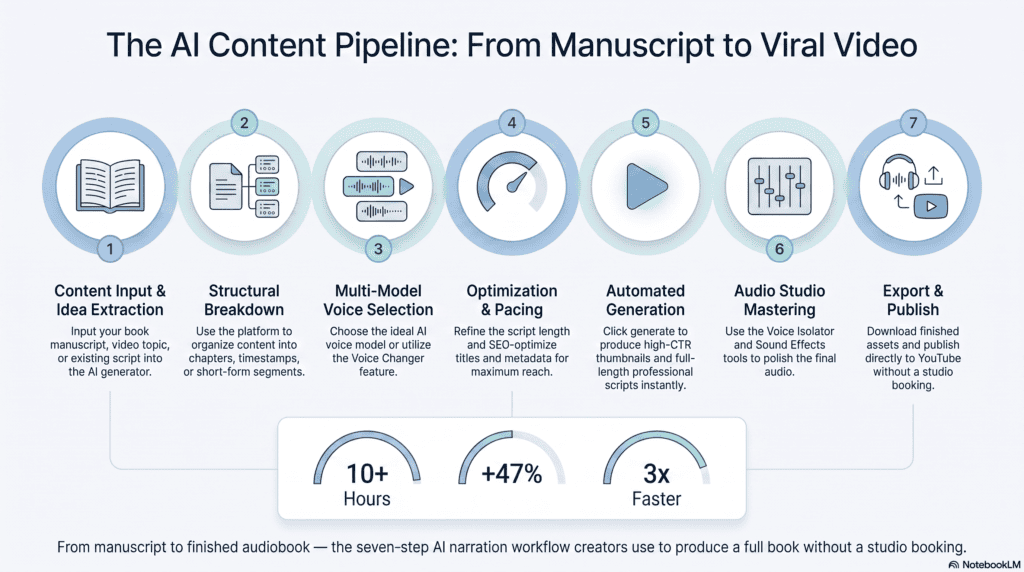
The workflow looks less like “generate audio” and more like a light production pipeline, run entirely from a written manuscript.
1. Break the manuscript into chapters. Most tools process text in chunks rather than one giant file, both for editing convenience and because very long single-generation requests are harder to correct if one paragraph mispronounces a name.
2. Choose and lock a narrator voice. Authors typically preview a handful of voices against their actual opening chapter — not a generic demo line — since tone that works for a thriller often falls flat for a light romance or a business book.
3. Set pacing and tone for the genre. A meditative memoir and a fast-paced thriller shouldn’t be narrated at the same speed. Most platforms let you adjust delivery speed and emotional tone before committing to a full-book generation.
4. Generate chapter by chapter. This makes quality control manageable — if chapter 9 has an odd pause or a mispronounced character name, you regenerate that section instead of the whole book.
5. Review for pronunciation and pacing errors. Character names, invented fantasy terms, and technical jargon are the most common trip points. Spelling adjustments or phonetic hints usually fix this without re-recording anything.
6. Master and export the finished files. Audiobook platforms have specific technical specs for loudness, room tone, and file naming — more on that below — so this step matters as much as the narration itself.
7. Publish or distribute. Depending on the platform, this means uploading directly, going through a distribution aggregator, or using a publisher-specific AI narration program.
Why Creators Are Switching to AI Audiobook Narration
The appeal isn’t just cost — though cost is a real factor. A few reasons show up consistently in why authors and publishers are testing this workflow.
Speed to publish. A human narrator can take weeks to record and direct a full novel. AI narration compresses that into days, which matters most for authors with an existing backlist who want audio editions live without a year-long production queue.
Cost per finished hour. Professional narrators are typically paid per finished hour of audio, and a full-length book runs 8–12 finished hours or more. AI narration doesn’t eliminate the value of a skilled human performance, but it makes producing audio for a midlist or backlist title financially viable when it wouldn’t have been otherwise.
Painless revisions. Fixing a typo, a factual correction, or a renamed character after mastering means re-booking a narrator for a pickup session with traditional production. With AI narration, it’s a text edit and a re-generation of that section.
Consistency across a long runtime. A single AI voice model doesn’t get vocal fatigue on day three of a recording session, which keeps energy and pacing level from the first chapter to the last.
Multi-language editions from one script. Once a book is translated, the same narration workflow — paired with ytZolo’s AI dubbing tools — can produce narrated editions in additional languages without booking a separate narrator per market.
Single-Voice vs. Multi-Voice Audiobook Narration
Not every book needs the same narration approach. This is where creators most often get the format wrong.
Single-voice narration works well for most nonfiction, memoirs, and single-POV fiction. One consistent voice carries the whole book, which is also the simplest and fastest production path.
Multi-voice narration — a distinct voice for each major character, sometimes with a separate narrator voice for prose — suits dialogue-heavy fiction, YA, and scripted nonfiction with interviews or quoted material. This is essentially the same underlying capability covered in ytZolo’s dialogue generator for YouTube guide, applied to book-length content instead of a short video script. The distinction between reading a script aloud as one voice versus assigning it across multiple speaking parts is explained in more depth in Text to Dialogue vs. Text to Speech.
The tradeoff is production complexity: multi-voice narration takes longer to set up and review, since every character needs a consistent voice assignment maintained across the entire manuscript, not just a chapter.
What Makes AI Audiobook Narration Sound Natural (Not Robotic)
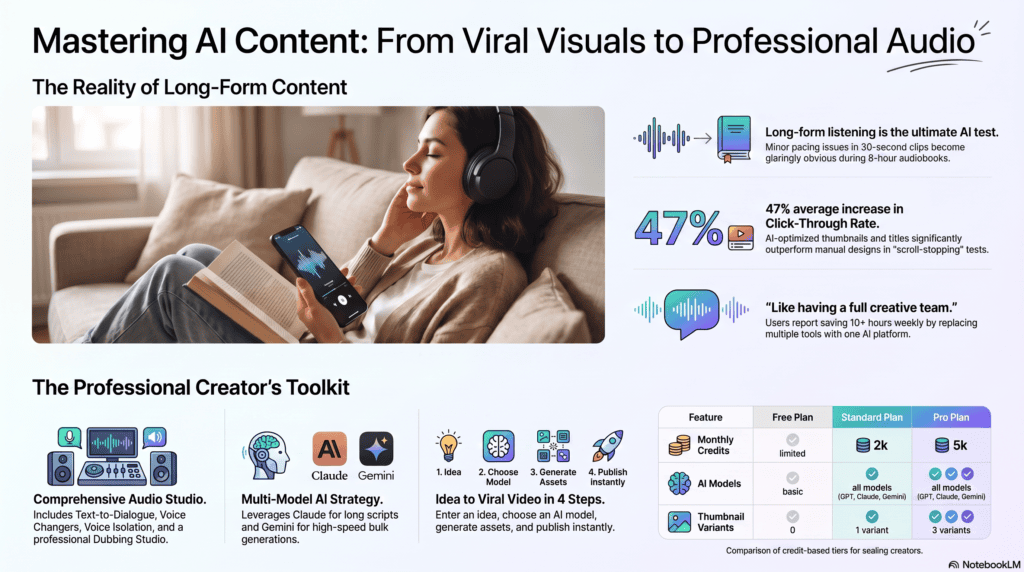
Long-form narration is the hardest test for any voice model, because small issues that go unnoticed in a 30-second voiceover compound over eight hours of listening.
Sentence-level formatting matters more than people expect. Long, unpunctuated sentences give a voice model fewer natural places to breathe. Breaking dense paragraphs into shorter sentences, and adding commas where a narrator would naturally pause, noticeably improves output — the same underlying fix covered in Why Does My AI Voice Sound Robotic?, which applies just as directly to a manuscript as it does to a video script.
Chapter transitions need deliberate pacing. A brief pause at chapter breaks, rather than the model reading straight through, keeps a book from feeling like one continuous run-on.
Names and invented words need a pass before final generation. Fantasy and sci-fi titles especially benefit from a pronunciation check early, since fixing this after generating twenty chapters is far more tedious than catching it in chapter one.
Emotional tone should shift with the scene. A flat, uniform delivery across an entire book is the fastest way for a listener to disengage — look for a platform with adjustable delivery tone, not just a single default read.
AI Voice Generator vs. AI Voice Changer: Which One Narrates a Book?
This trips up a lot of first-time audiobook producers. An AI voice generator creates speech directly from typed text — no original recording required — which is exactly the audiobook use case, since you’re starting from a manuscript, not an existing recording.
A voice changer works differently: it reshapes an existing audio recording into a different voice, which is a post-production tool for podcasters or streamers converting a voice they already recorded, not a text-to-speech engine. The AI Voice Changer vs. AI Voice Generator breakdown covers exactly where that line sits if you’re deciding between the two for a specific project.
For a book that only exists as a manuscript, the voice generator path is almost always the right one.
Publishing AI-Narrated Audiobooks: Platform Rules to Know in 2026
This is the part most creators skip until after the audio is already finished — and it’s the part that determines where you can actually sell the book.
Platform policy on AI narration is still genuinely uneven across the industry, and it has been shifting through 2025 and 2026, so treat the following as a starting point rather than a final answer:
- Audible / ACX has historically required human-narrated submissions through its standard production pipeline, though Amazon has separately opened AI-narration pathways for eligible titles, including a distinct “Virtual Voice” program for qualifying Kindle eBooks. These programs have their own eligibility rules and disclosure requirements that are still evolving.
- Spotify, Kobo, and Google Play Books have generally been more open to disclosed AI narration than Audible’s core pipeline, though each has its own submission and labeling expectations.
- Disclosure is increasingly the norm, not the exception. Even on platforms without a strict prohibition, labeling an audiobook as AI-narrated in the description protects you from takedown risk and tends to set listener expectations more fairly.
Because this landscape moves quickly, always confirm current terms directly on Amazon’s Kindle Direct Publishing platform and whichever distributor or storefront you’re targeting before you finalize a release plan — don’t rely on a single blog post, including this one, as your final source.
Whichever platform you’re publishing to, make sure your production plan includes commercial licensing for published audio before you release anything for sale. Free-tier voice generation almost always excludes commercial use, and an audiobook sold on any storefront counts as commercial distribution.
Multilingual Audiobook Editions
Once a manuscript has been translated, producing a narrated edition in a second or third language no longer requires booking a bilingual narrator or a separate voice actor per market.
The same speech-synthesis technology behind English narration extends to other languages, and when paired with translation and timing tools, it becomes a full localization workflow — this is covered in more depth in ytZolo’s AI dubbing software guide, which walks through how translated narration stays aligned with the original book’s structure and pacing.
For authors weighing whether a foreign-language edition is worth producing, the cost math changes significantly when narration doesn’t require a new studio booking per language.
Narrating an Audiobook with ytZolo: Step by Step
Here’s the practical workflow inside ytZolo’s Audio Studio, from manuscript to finished chapter files.
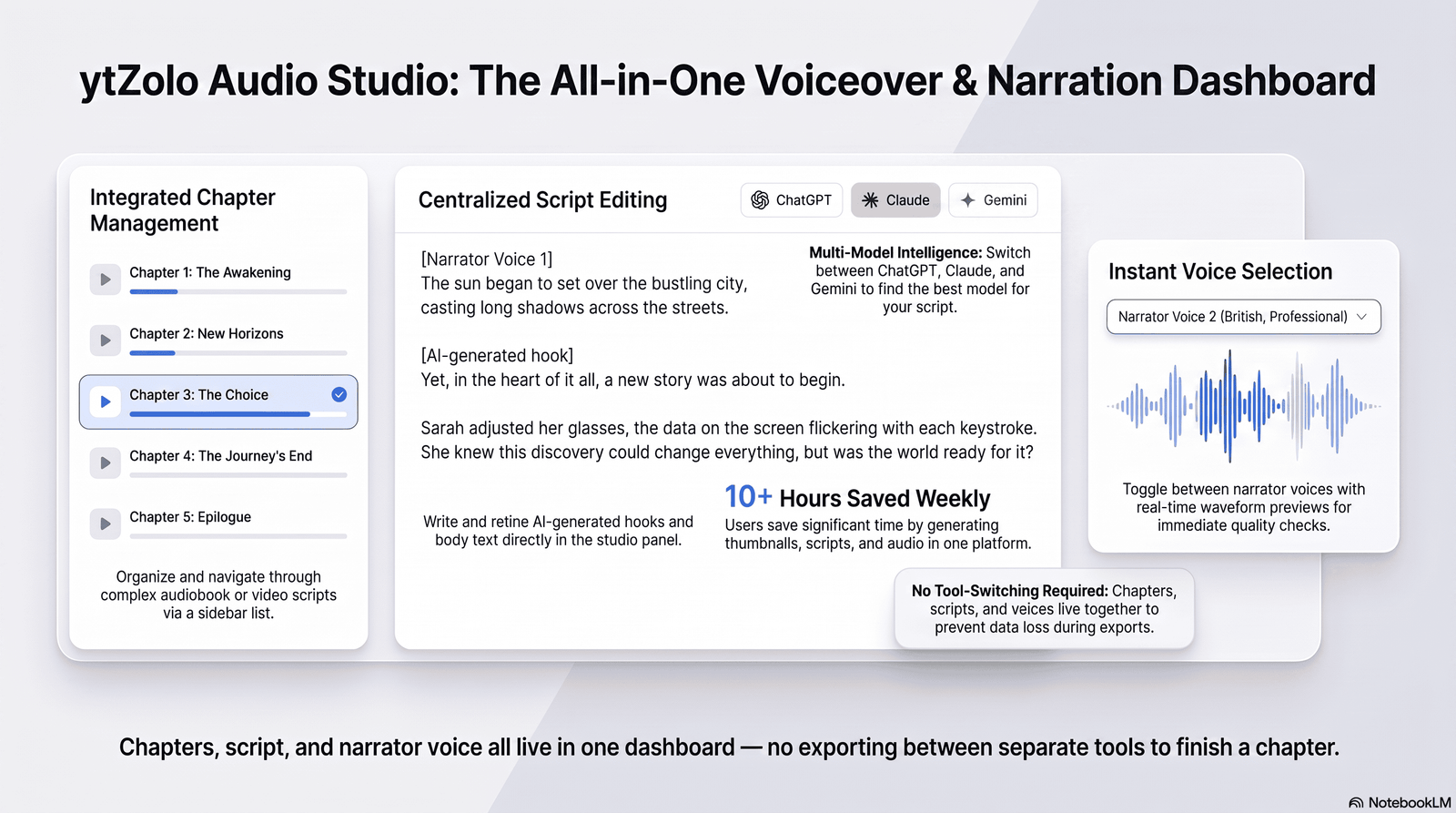
Step 1 — Open the Audio Studio. Head to ytzolo.com and open the voice generation tool from your dashboard.
Step 2 — Import your manuscript by chapter. Paste or upload chapter text so each section generates and can be reviewed independently.
Step 3 — Choose your narration voice. Preview a few candidate voices against your actual opening chapter, not a generic sample line, and lock the one that fits your book’s tone.
Step 4 — Set pacing and tone for your genre. Adjust delivery speed and emotional tone before running a full chapter, since these settings are far easier to fix before generation than after.
Step 5 — Generate, review, and regenerate as needed. Listen for mispronounced names or awkward pacing, adjust the text, and regenerate only the affected section.
Step 6 — Export your finished audio files. Download chapter files ready for mastering and platform-specific formatting requirements.
Because narration lives in the same dashboard as ytZolo’s script and SEO tools, authors producing companion YouTube content — book trailers, chapter readings, or promotional clips — can pull from one consistent voice and workflow instead of exporting between separate platforms.
Common Mistakes to Avoid
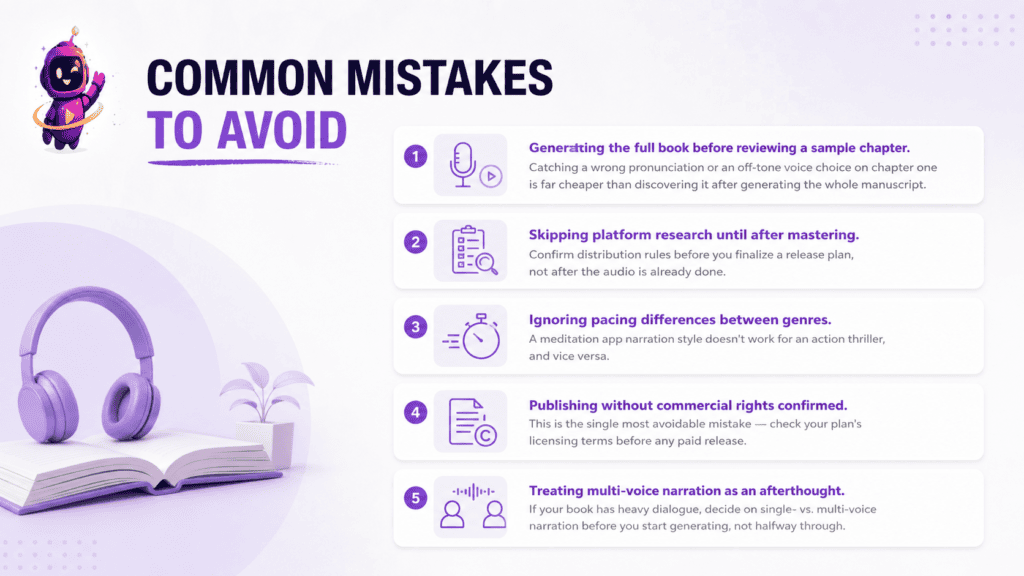
Generating the full book before reviewing a sample chapter. Catching a wrong pronunciation or an off-tone voice choice on chapter one is far cheaper than discovering it after generating the whole manuscript.
Skipping platform research until after mastering. Confirm distribution rules before you finalize a release plan, not after the audio is already done.
Ignoring pacing differences between genres. A meditation app narration style doesn’t work for an action thriller, and vice versa.
Publishing without commercial rights confirmed. This is the single most avoidable mistake — check your plan’s licensing terms before any paid release.
Treating multi-voice narration as an afterthought. If your book has heavy dialogue, decide on single- vs. multi-voice narration before you start generating, not halfway through.
If You’re Producing a Podcast Instead
Audiobooks and podcasts share almost the same narration pipeline — text in, voice out — but the production rhythm is different. A podcast is typically episodic, shorter per session, and often benefits from a more conversational, less formally paced read than a full-length book. If that’s closer to what you’re building, the podcast-specific narration approach covered in ytZolo’s Podcasts and Audiobooks section is worth reviewing before you commit to a voice and workflow.
FAQ
Can AI-narrated audiobooks be sold commercially? Yes, as long as your voice generation plan includes commercial licensing and you follow the disclosure and submission rules of the platform you’re publishing to.
Do AI audiobooks sound robotic? Not on modern neural voice models, especially when scripts are formatted with natural pauses and pacing is adjusted for genre. Flat delivery is usually a formatting or settings issue, not a hard limitation of the technology.
How long does it take to narrate a full book with AI? Generation itself typically takes a fraction of the book’s runtime, but realistic production time — including voice selection, review, and corrections — usually runs a few days for a full-length manuscript.
Can I use a different voice for each character? Yes, many platforms support multi-voice narration for dialogue-heavy books, though it requires more setup than single-voice narration.
Is disclosure required for AI-narrated audiobooks? Requirements vary by platform, and the trend across the industry is toward more disclosure, not less. Always check current terms for your specific distributor.
Can I produce an audiobook in multiple languages from one AI narration? Yes, once your manuscript is translated, the same narration workflow paired with AI dubbing tools can produce additional-language editions without a new studio session per market.
Publish Your Audiobook Faster
A finished manuscript doesn’t need to wait months for studio time anymore. With the right voice, pacing, and review process, a full audiobook can go from text file to finished chapters in days.
Try ytZolo’s AI voice generator free →
About the Author
Anshika Verma Email: anshika@ytzolo.com
Anshika Verma researches AI creator tools, voice synthesis, and long-form audio production workflows. Her work focuses on testing AI narration and audio platforms against real publishing use cases — from single YouTube voiceovers to full-length audiobook production — and translating that testing into practical guidance for authors, creators, and publishing teams.

