

Introduction: The Thumbnail That Changed Everything
It was a Tuesday afternoon. A creator named Jake uploaded what he was sure was his best video ever — 47 minutes of research, three hours of editing, and a thumbnail he spent 20 minutes on in Canva.
He hit publish. Then waited.
48 hours later? 214 views.
His friend uploaded a similar video the same day. Less research. Shorter edit. But a thumbnail that stopped you mid-scroll — bold colors, a shocked expression, huge text. That video? 180,000 views in 72 hours.
The difference wasn’t talent. It wasn’t luck. It was the thumbnail.
If you’ve ever felt frustrated watching your videos underperform despite the hard work you put in, this post is for you. We’re diving deep into what makes a viral YouTube thumbnail maker so powerful — and why AI tools like ytZolo are quickly becoming the secret weapon smart creators use to grow faster.
Let’s get into it.
Table of Contents
Why Thumbnails Are the #1 Growth Lever on YouTube
Here’s something YouTube doesn’t say loudly enough: your thumbnail decides your video’s fate before a single person watches it.
According to YouTube’s own Creator Academy, over 90% of the best-performing videos on the platform use custom thumbnails. That’s not a coincidence — that’s a signal.
YouTube’s algorithm is powered by one key metric: click-through rate (CTR). When your thumbnail gets people to click, YouTube pushes your video to more people. More people click. More reach. It’s a snowball. And it all starts with that tiny little image.
Most creators obsess over content quality, upload consistency, or SEO tags. All of that matters. But your viral youtube thumbnail maker thumbnail is the very first impression — the billboard that either stops the scroll or gets ignored completely.
Think about it this way: even the best video in the world won’t grow if nobody clicks on it.

What Makes a Thumbnail Go Viral?
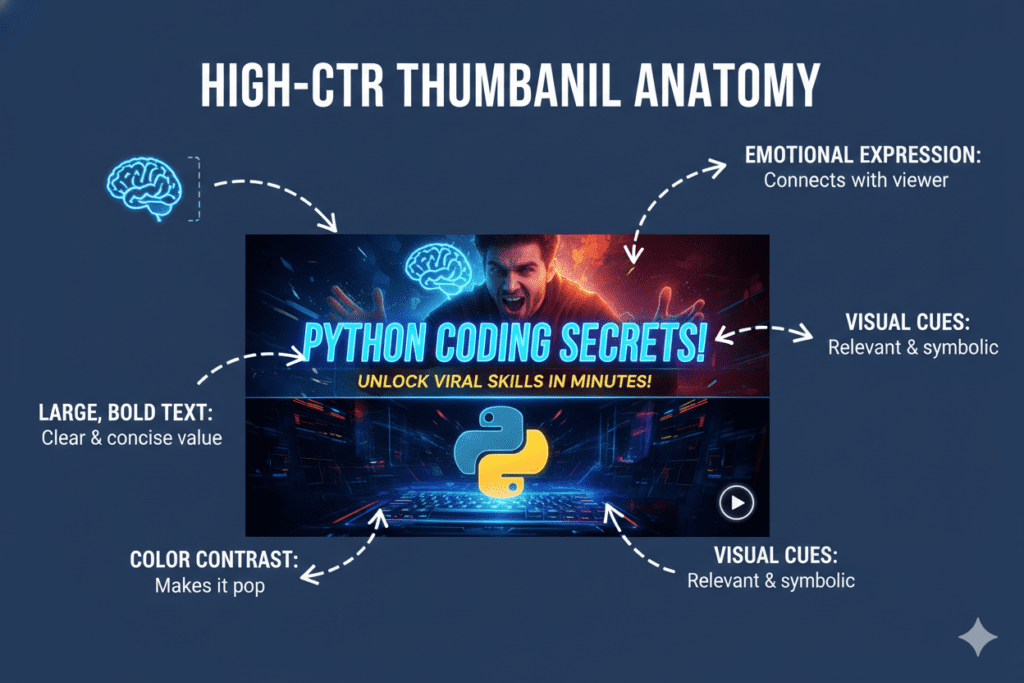
Not all thumbnails are created equal. The ones that drive clicks share a handful of specific traits.
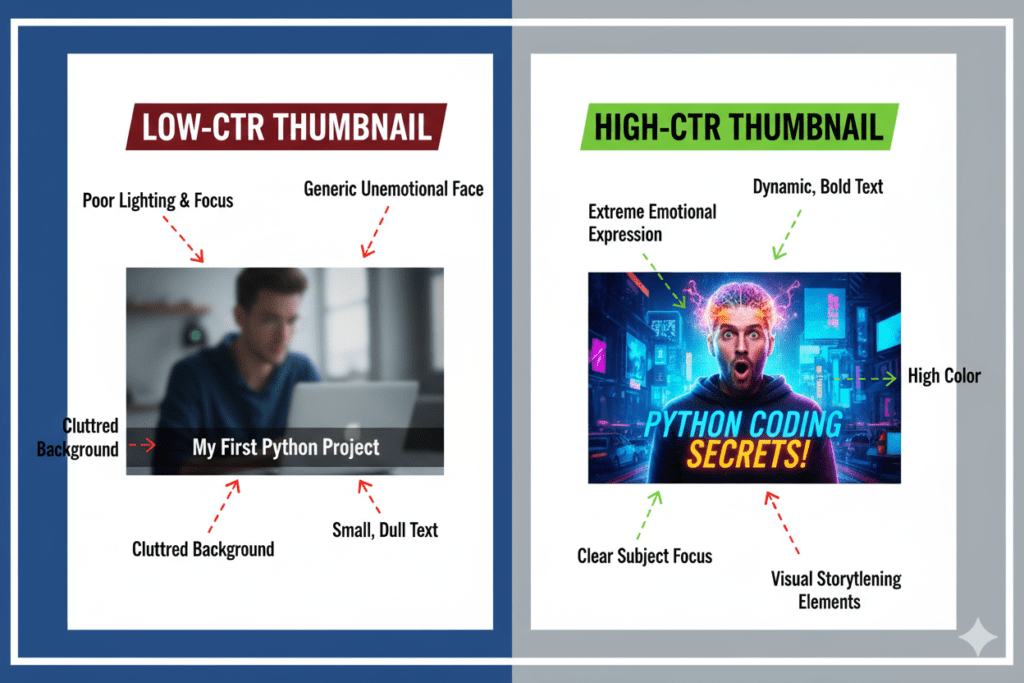
The core ingredients of a high-CTR thumbnail include:
- Bold, contrasting colors — They pop against YouTube’s white/dark background and demand attention instantly.
- A clear focal point — One subject. One message. No visual clutter.
- Expressive human faces — Emotion is contagious. Shock, joy, and curiosity trigger clicks.
- Large, readable text — Even on mobile (where most YouTube views happen), your text needs to be legible at thumbnail size.
- Curiosity gap — The thumbnail teases something without giving it all away. Viewers feel compelled to click to find out.
The tricky part? Nailing all of these elements consistently is genuinely hard. Design experience helps, but it’s not enough on its own. You need to understand what works in your niche, what colors pop in YouTube’s interface, and what kind of emotional triggers your audience responds to.
That’s where data-driven AI tools change everything.
The Problem with Manual Thumbnail Design
Let’s be real — creating thumbnails manually is a grind.
this is my paragraph please add keyword “viral youtube thumbnail maker” in this naturally without increase words
And here’s the kicker: all that time could have gone into your next video.
Beyond the time drain, there’s another problem: guesswork. Manual design is based on gut feeling. You think the bright red background will pop. You assume the impact font looks professional. But you have no real data telling you whether this specific combination will actually drive clicks in your niche.
According to HubSpot’s marketing research, visual content creators who rely on data-backed design decisions consistently outperform those working from intuition alone. The creators growing the fastest on YouTube aren’t necessarily the best designers — they’re the ones using the right tools.
Manual methods are outdated. The game has changed. And creators who haven’t adapted yet are leaving massive growth on the table.

What Is a Viral YouTube Thumbnail Maker?
A viral YouTube thumbnail maker is an AI-powered design tool specifically built to create scroll-stopping, high-CTR thumbnails — fast, without design skills, and backed by data from top-performing YouTube videos.
Unlike generic graphic design tools, a true thumbnail maker for YouTube understands the platform’s visual language. It knows what works in gaming, what pops in finance content, what expression triggers clicks in lifestyle niches.
The best AI thumbnail makers can:
- Automatically remove backgrounds with precision-level accuracy
- Generate bold text overlays placed to maximize readability
- Apply proven color palettes that stand out in YouTube’s feed
- Produce multiple variations so you can A/B test and find the highest performer
- Adapt to your niche using AI trained on millions of high-performing thumbnails
This isn’t just about saving time (though you’ll save hours every week). It’s about making smarter viral youtube thumbnail maker creative decisions — decisions backed by what actually drives clicks on YouTube.
How ytZolo Works as Your AI Thumbnail Powerhouse
Here’s where things get exciting.
ytZolo isn’t just another thumbnail tool. It’s a full AI YouTube growth platform built specifically for creators who want to stop guessing and start growing.
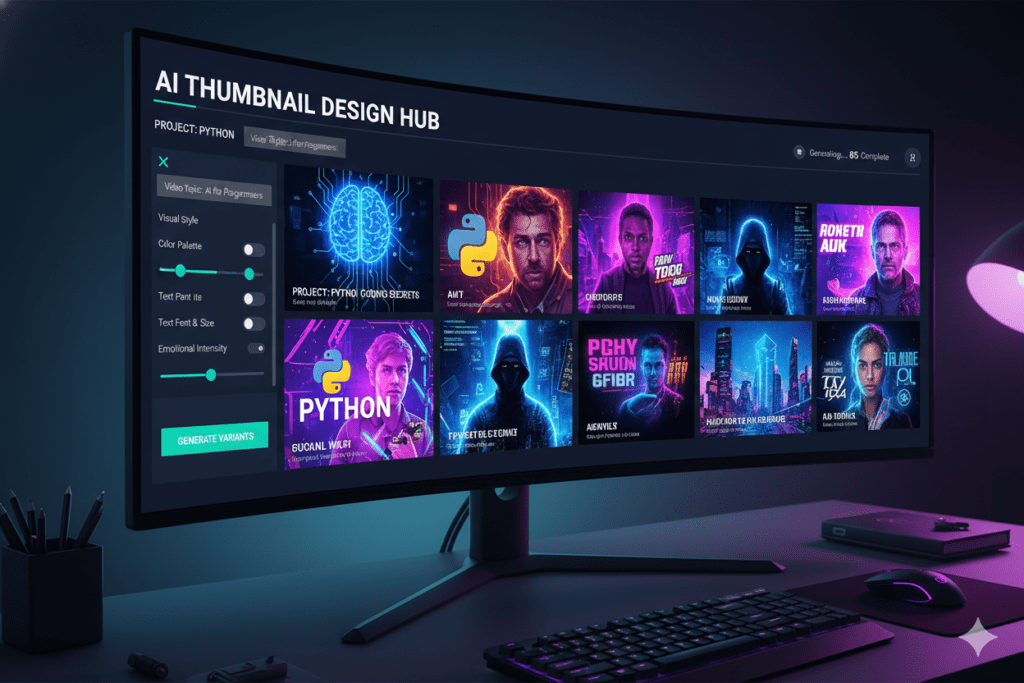
When it comes to thumbnails, ytZolo’s AI is trained on what actually drives clicks on YouTube — color psychology, text placement, emotional triggers, and niche-specific trends. It doesn’t just make pretty images. It makes images that convert.
Here’s what sets ytZolo apart as a viral YouTube thumbnail maker:
- Niche-aware design intelligence — ytZolo understands your content category and applies the visual patterns that actually work in your space.
- AI-driven color selection — Colors aren’t chosen randomly. ytZolo picks dominant tones that contrast with YouTube’s interface to maximize visual pop.
- Smart text overlay placement — Text is automatically positioned where it doesn’t obscure key visuals like faces or products, yet stays readable on any screen size.
- Instant multiple variations — Generate several high-quality thumbnail options in seconds so you can test and optimize.
- Seamless integration with ytZolo’s full content suite — Generate your title, script, description, and tags all in one place. No switching between five different tools.
The result? You go from “I spent 45 minutes on this thumbnail and it still looks amateur” to “I had three viral-ready options in under 5 minutes.”
For creators publishing regularly — whether that’s twice a week or every day — that time savings alone is transformative.

Step-by-Step: How to Create Viral Thumbnails with ytZolo
Ready to start creating thumbnails that actually get clicked? Here’s how to do it with ytZolo.
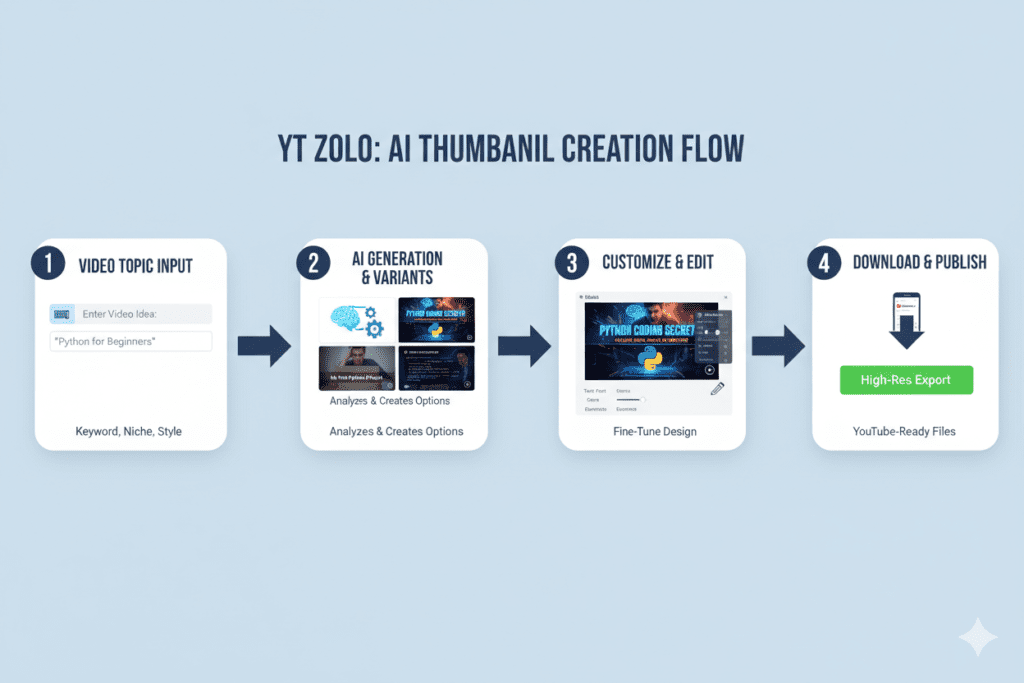
Step 1: Sign Up for ytZolo (Free)
Head to ytzolo.com and create your free account. No credit card required to get started.
Step 2: Enter Your Video Details
Type in your video title or topic. The more specific you are, the better viral youtube thumbnail maker ytZolo’s AI can tailor the thumbnail to your content. For example: “10 Money Mistakes Destroying Your 20s” gives the AI clear direction on tone, style, and emotional hooks.
Step 3: Let the AI Generate Options
Within seconds, ytZolo produces multiple high-quality thumbnail designs — each optimized for CTR with niche-appropriate colors, text, and composition. No blank canvas. No design paralysis. Just options.
Step 4: Customize If Needed
Like a design but want to tweak the text or swap the background? ytZolo’s editing tools are intuitive and creator-friendly. You don’t need Photoshop skills — just drag, drop, and adjust.
Step 5: Download and Upload to YouTube
Export your thumbnail in YouTube’s recommended resolution (1280×720 px) and upload it directly. That’s it. Done.
Bonus Step: Use ytZolo for Your Title, Script & Tags Too
While you’re in the platform, take advantage of ytZolo’s full content suite. Generate a click-worthy title, a video script outline, an SEO description, and trending tags — all in one viral youtube thumbnail maker workflow. This is what creators mean when they say ytZolo is an all-in-one YouTube growth tool.
Explore more tips on creating viral content on the ytZolo blog.
Why ytZolo Is Better Than Other Tools
There’s no shortage of thumbnail tools out there. So why does ytZolo stand above the rest?
Let’s break it down honestly.
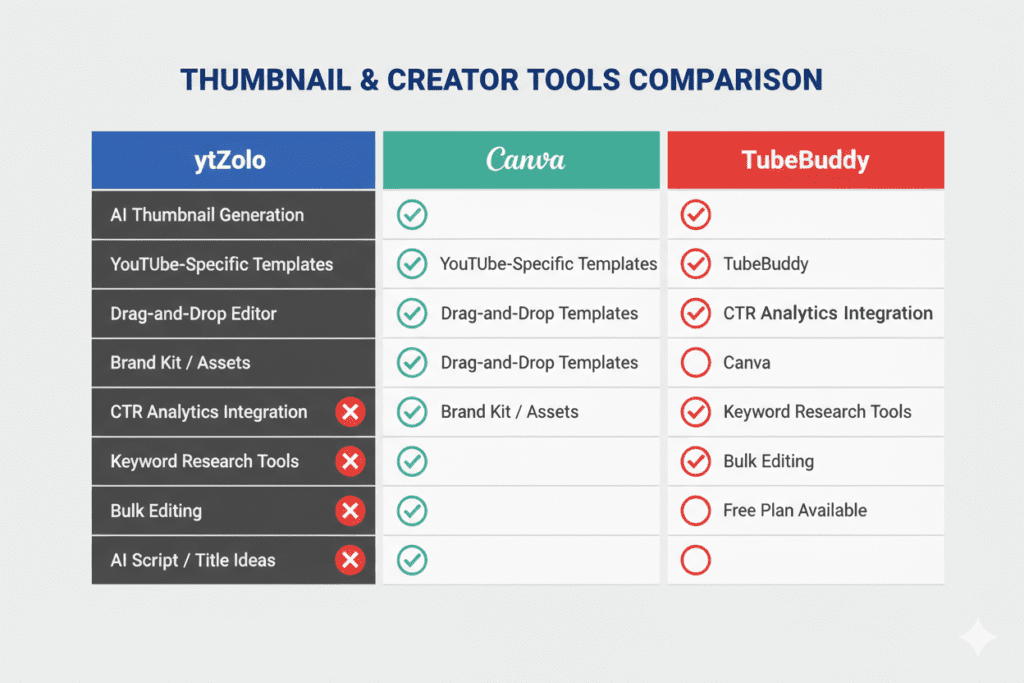
ytZolo vs. Canva
Canva is a great general design tool. But it’s built for everyone — not specifically for YouTube creators. It doesn’t understand your niche, doesn’t know YouTube’s algorithm, and won’t tell you which thumbnail variation is likely to perform better. You’re still designing by instinct, which means you’re still guessing.
ytZolo is built from the ground up for YouTube. Every design decision is informed by what works on the platform.
ytZolo vs. Generic AI Image Generators (Mid journey, DALL-E)
These tools create stunning images — but they ks the purpose.
These tools create stunning images — but they know nothing about YouTube CTR, thumbnail specs, or creator workflow. After generating an image, you’d still need to add text, format it correctly, and manually ensure it meets viral youtube thumbnail maker dimensions. It’s a multi-step process that defeats the purpose.
ytZolo vs. TubeBuddy / VidIQ
TubeBuddy and VidIQ are powerhouse SEO tools. They’re excellent for keyword research and analytics. But neither has AI thumbnail generation as a core feature. You’d need to pay for ytZolo separately anyway — except ytZolo also handles your titles, scripts, descriptions, and tags.
One tool. Everything you need. That’s the ytZolo difference.
| Feature | ytZolo | Canva | TubeBuddy | Generic AI |
|---|---|---|---|---|
| YouTube-specific AI | ✅ | ❌ | ❌ | ❌ |
| Thumbnail generation | ✅ | Templates only | ❌ | ✅ |
| Title & script AI | ✅ | ❌ | Partial | ❌ |
| Niche-aware design | ✅ | ❌ | ❌ | ❌ |
| All-in-one creator suite | ✅ | ❌ | Partial | ❌ |
| Free plan available | ✅ | ✅ | ✅ | Varies |
The verdict is clear. If you’re serious about growing on YouTube, ytZolo gives you the most complete, data-driven toolkit available.
Real-World Results: What Happens When You Use AI Thumbnails
The numbers don’t lie.
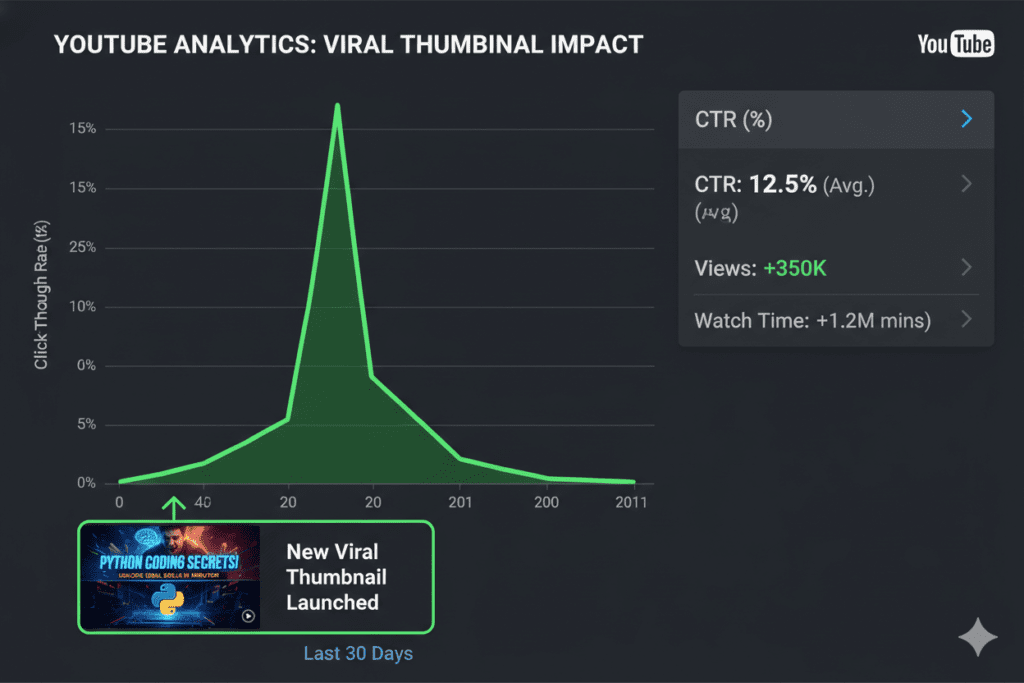
YouTube’s own data suggests that the average click-through rate across the platform sits between 2% and 10%, with top-performing creators regularly achieving 8–15% CTR or higher. The difference between a 3% CTR and a 10% CTR isn’t a better camera or more subscribers — it’s almost always a better thumbnail.
When creators switch from manual design to a data-driven viral YouTube thumbnail maker like ytZolo, the results compound quickly:
- Higher CTR means YouTube’s algorithm serves your video to more people organically.
- More views means more watch time, which further boosts algorithmic distribution.
- Consistent visual branding across thumbnails builds channel recognition, which increases subscriber loyalty.
- Less time on design means more time creating content — which means more videos, more chances to go viral.
This isn’t a “nice to have” upgrade. For creators who are serious about building a channel that lasts, it’s essential.
Pro Tips to Maximize Your Thumbnail CTR
Even with the best viral youtube thumbnail maker AI tools working for you, a few strategic habits will push your results even further.
1. Test two thumbnail versions whenever possible
A/B testing is one of the most underutilized growth strategies on YouTube. Upload two different thumbnails and let data tell you which one drives more clicks. ytZolo makes this easy by generating multiple variations from a single prompt.
2. Prioritize faces with strong expressions
Human brains are wired to respond to faces. Thumbnails featuring expressive human emotions — surprise, excitement, determination — consistently outperform those without. The more exaggerated the expression, the better.
3. Keep text under 6 words
Thumbnails viewed on mobile at small size can only display so much. If your text takes more than a glance to read, it’s too long. Punchy, curiosity-triggering phrases like viral youtube thumbnail maker “I Was WRONG” or “Don’t Do This” work much better than complete sentences.
4. Match your thumbnail to your title — but don’t duplicate it
Your thumbnail and title work together as a team. The thumbnail should raise the question; the title should hint at the answer. Together they create an irresistible loop that pulls the viewer in.
5. Stay consistent with your visual brand
Top creators have a recognizable thumbnail style — specific fonts, colors, or layouts that make their content instantly identifiable. Use ytZolo to build that consistency at scale without spending hours on each video.
6. Think mobile-first
this is my paragraph please add keyword “viral youtube thumbnail maker” in this naturally without increase words
FAQ
What is a viral YouTube thumbnail maker?
A viral YouTube thumbnail maker is an AI-powered tool that automatically designs high-CTR thumbnails for YouTube videos. These tools use data from millions of top-performing thumbnails to create scroll-stopping designs with optimized colors, text placement, and emotional triggers — without requiring any design skills.
How does AI create better thumbnails than manual design?
AI thumbnail tools are trained on vast datasets of high-performing YouTube content. They understand what color combinations attract clicks in specific niches, where to position text for maximum readability, and which visual patterns trigger curiosity in viewers. This data-driven approach consistently outperforms guesswork-based manual design.
Is ytZolo free to use for YouTube thumbnails?
Yes, ytZolo offers a free plan to get started with AI thumbnail creation. You can generate and export thumbnails without needing a credit card. Premium plans unlock higher output volumes, more advanced features, and additional AI tools for scripts, titles, descriptions, and tags. Visit ytzolo.com for current pricing.
How many thumbnail variations can I create with ytZolo?
ytZolo generates multiple viral youtube thumbnail maker thumbnail options per prompt, allowing you to A/B test different designs and find the highest-performing version for your video. The number of generations depends on your plan tier.
Can a good thumbnail really make a video go viral?
Absolutely. While content quality matters, your thumbnail is the first thing a viewer sees. According to YouTube, over 90% of top-performing videos use viral youtube thumbnail maker custom thumbnails. A strong thumbnail increases CTR, which signals the algorithm to push your video to wider audiences — creating a viral snowball effect.
Conclusion: Stop Leaving Views on the Table
Here’s the truth every growing creator eventually learns: you can’t out-publish the algorithm. But you can out-click it.
A viral YouTube thumbnail maker isn’t a shortcut. It’s a smarter strategy. It means every video you publish gets the best possible first impression — one designed with data, psychology, and platform-specific intelligence baked in.
You’ve already put in the work to create great content. Don’t let a weak thumbnail bury it.
Tools like ytZolo exist precisely because creators deserve better than spending an hour on a thumbnail only to watch it underperform. With ytZolo’s AI, you get viral-ready thumbnails in minutes — plus everything else you need to grow: compelling titles, video scripts, SEO descriptions, and tags, all in one place.
The creators growing the fastest right now aren’t necessarily the most talented. They’re the ones working smarter with the right tools. And the right tool, right now, is ytZolo.
👉 Start creating smarter, faster, and more viral YouTube content with ytZolo today.
Visit ytzolo.com and launch your free account — no credit card needed.
Have questions about thumbnail strategy or ytZolo? Browse more creator tips on the ytZolo blog — it’s packed with actionable guides for every stage of your YouTube journey.
External Authority Links:

