Viral YouTube Thumbnail Maker: How AI Thumbnail Tools Actually Improve CTR
July 3, 2026
Table of Contents
Why the Thumbnail Matters More Than People Think
Two creators can post the same video idea, the same day, with similar effort — and get wildly different results. It happens more often than most new creators expect, and the usual culprit isn’t the script or the edit. It’s the thumbnail.
YouTube’s recommendation system leans heavily on click-through rate (CTR): the percentage of people who see your thumbnail in their feed and actually click it. A higher CTR signals the algorithm to show your video to more people, which drives more clicks, which drives more distribution.
Thumbnails are the entry point to that loop — before watch time, retention, or engagement even come into play, someone has to click first.
Think about your own YouTube homepage: in a single scroll, you see fifteen to twenty thumbnails competing for a fraction of a second of attention. The video doesn’t get judged on its merits until after the click — the thumbnail does all the persuading up front.
That’s why even experienced creators who invest heavily in scripting and editing still lose views if the thumbnail doesn’t do its job.
A viral YouTube thumbnail maker exists to solve exactly this problem: getting a scroll-stopping thumbnail without needing to be a graphic designer or spend an hour in Photoshop for every upload.
The Secret Weapon Behind Every Viral YouTube Thumbnail Maker (And How AI Is Changing the Game Forever)
What Makes a Thumbnail Get Clicked
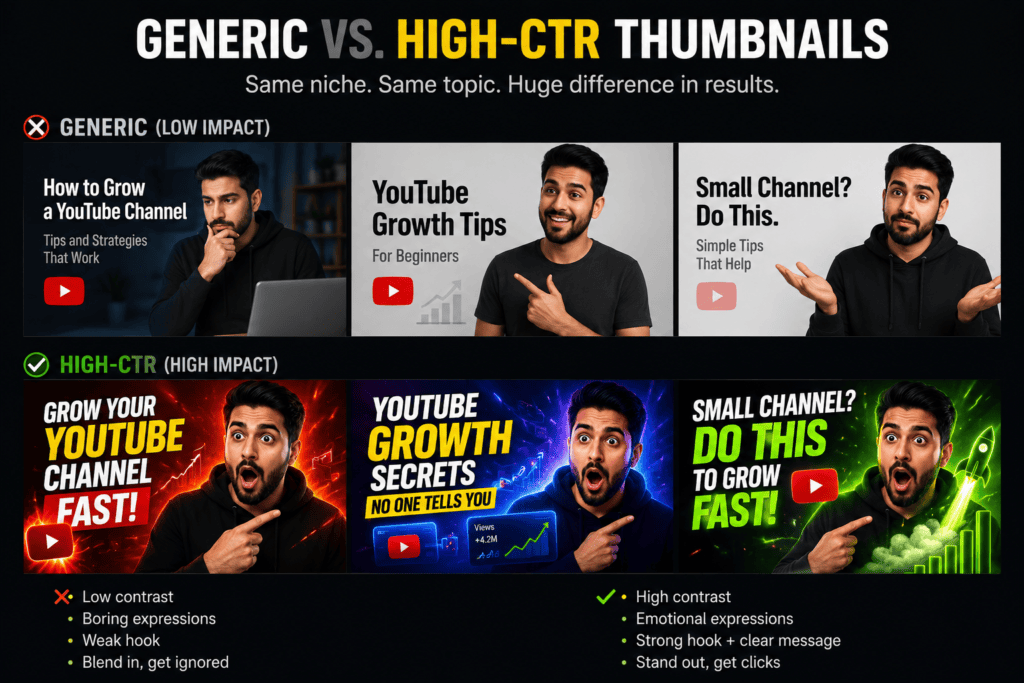
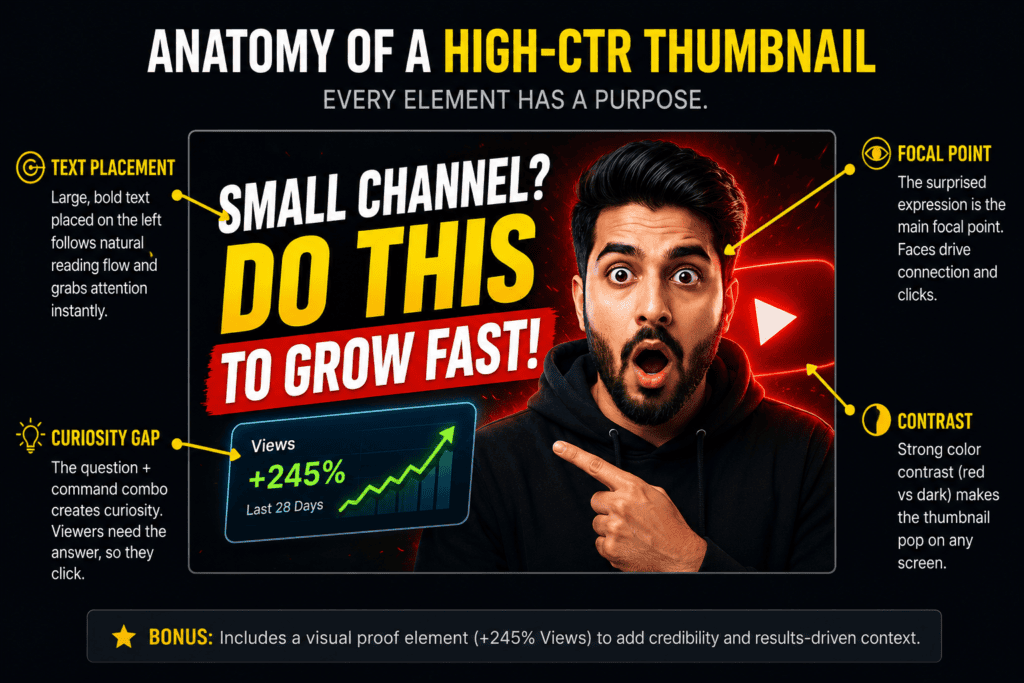
High-CTR thumbnails tend to share a few consistent traits, regardless of niche:
Bold, contrasting colors that stand out against YouTube’s white or dark interface, rather than blending into it
One clear focal point — a single subject or idea, not a cluttered collage of five different elements fighting for attention
Expressive faces — shock, curiosity, and excitement tend to draw the eye faster than a neutral expression, since humans are wired to check other humans’ faces for emotional cues
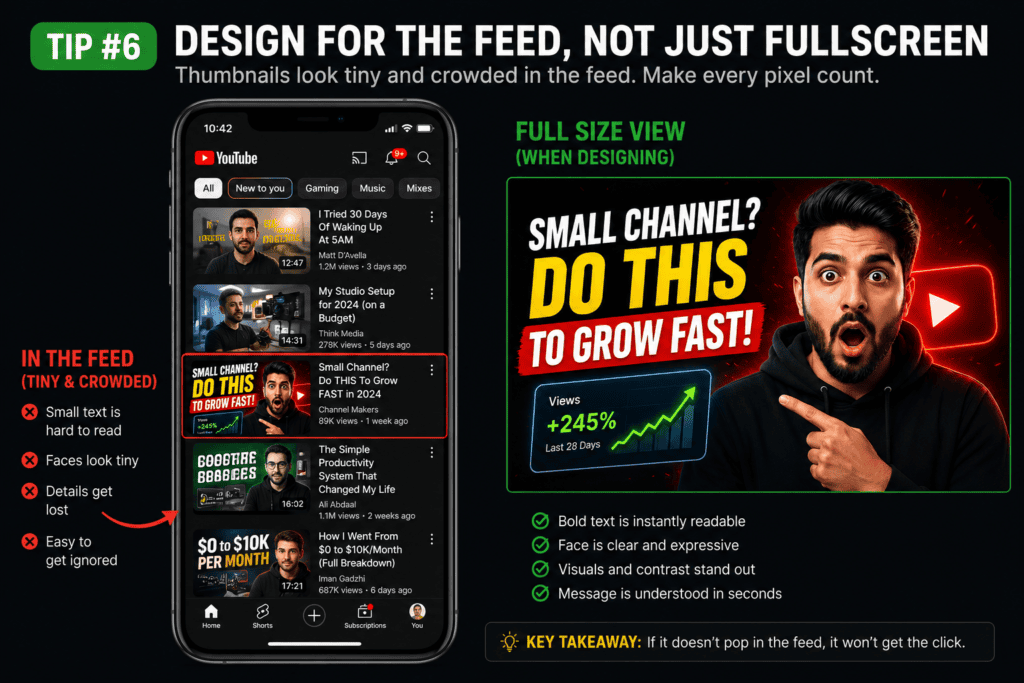
Large, legible text — most YouTube traffic is mobile, so text needs to read clearly at a small size, often glanced at for under a second
A curiosity gap — enough information to spark interest, without giving away the payoff or answering the question the video is meant to answer
None of this is secret information — most of it has been public knowledge among creators for years. The harder part is applying it consistently, video after video, without it turning into visual noise or drifting into misrepresenting your content, which carries its own risk (more on that in the limitations section below).
best ai youtube thumbnail generator free
Why Manual Design Is Hard to Do Consistently
Designing a thumbnail from scratch in Canva or Photoshop isn’t hard for a single video. The problem shows up at scale: doing it well, every time, while also writing, filming, and editing the video itself.
A creator posting three times a week is effectively running a mini design studio on the side — sourcing images, cutting out backgrounds, testing fonts, and resizing everything to fit YouTube’s exact dimensions.
Research on visual content from HubSpot points to a consistent pattern: creators who make design decisions based on data and testing tend to outperform those relying purely on instinct.
That doesn’t mean instinct is worthless — it means testing beats guessing over time, and manual testing (making multiple versions by hand, uploading, comparing) is slow enough that most solo creators skip it and just ship their first draft.
This is the gap AI thumbnail tools are built to close: not replacing design judgment, but speeding up option-generation so testing becomes realistic for a one-person channel.
What a Viral YouTube Thumbnail Maker Actually Does
An AI thumbnail maker for YouTube typically handles several steps that would otherwise require separate software or manual effort:
Background removal so subjects can be isolated cleanly from a busy or low-quality source photo
Text overlay generation with placement that avoids covering faces or key visuals, and sizing that stays legible on mobile
Color and contrast suggestions based on patterns that tend to stand out in YouTube’s mostly white or dark feed
Multiple variations per prompt, so you can A/B test instead of shipping your first draft
Niche-aware styling — a finance video and a gaming video don’t perform well with the same visual language, so the tool adjusts tone, color palette, and typography accordingly
The value isn’t that the AI “knows” your thumbnail will go viral — nothing guarantees that, and any tool claiming otherwise should be treated with some skepticism. The real value is that you go from a blank canvas to several reasonable, on-brand options in minutes instead of an hour, and you can actually afford to test between them instead of guessing once and moving on.
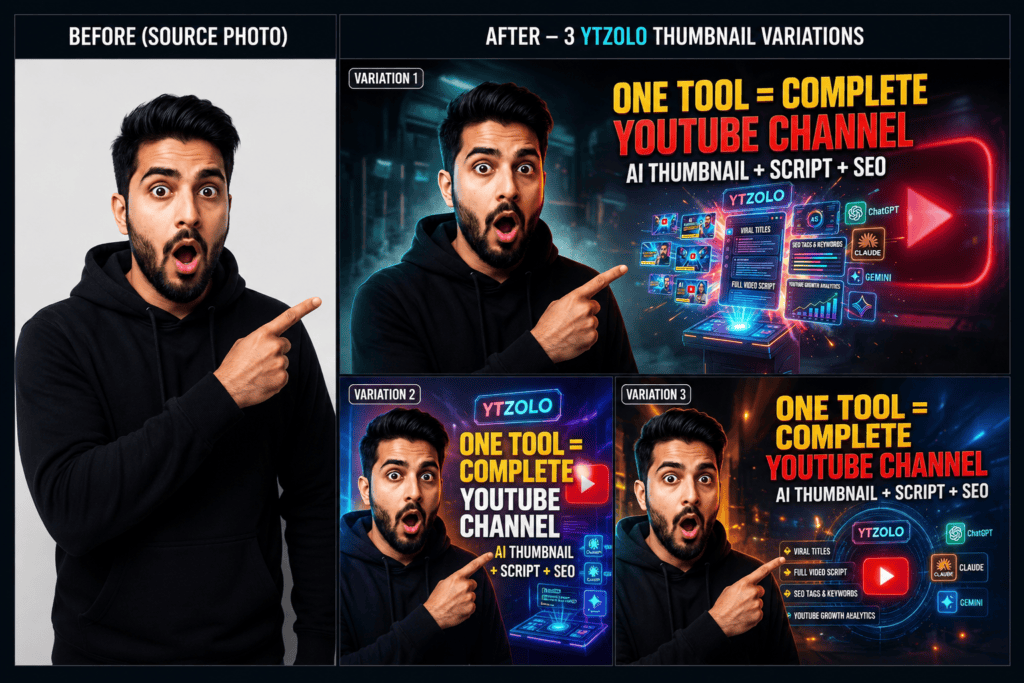
ytZolo thumbnail generation interface
YouTube’s Actual Thumbnail Requirements
Whatever tool you use, YouTube has fixed technical requirements worth knowing before you export anything:
Custom thumbnails require a verified YouTube account
One detail creators often miss: YouTube crops thumbnails differently across devices and layouts — sometimes shaving pixels off the edges in search results, playlists, or the mobile app’s compact view.
Keeping key text and faces within the center 90% of the frame, rather than right at the edges, protects your design from awkward crops you won’t see until after upload.
Any thumbnail maker worth using should export directly to these specs so you’re not resizing manually afterward.
Where AI Thumbnail Tools Fall Short
It’s worth being upfront about this, because no tool solves everything, and a guide that only lists benefits isn’t giving you the full picture:
They can’t read your specific video’s content the way you can — you still need to give clear direction so the design matches the video, not just a generic version of the topic.
Overused AI-style faces or effects can start to look generic across a niche if everyone types similar prompts into similar tools. A distinctive style still requires some manual tweaking.
Misleading thumbnails carry real risk. YouTube can reduce distribution or remove thumbnails that significantly misrepresent a video. Faster generation doesn’t mean the rules on honesty go away — a curiosity gap should tease the content, not lie about it.
Speed isn’t the same as strategy. A tool can produce five options quickly, but knowing which one fits your audience still benefits from reviewing your own channel’s analytics rather than trusting the AI’s first suggestion.
Consistency requires a human decision. If every thumbnail looks different in font, color, and layout, viewers won’t build the pattern-recognition that makes a channel feel familiar. That’s a brand decision the AI won’t make for you.
Tools like ytZolo are built to reduce the time and design-skill barrier — not to remove the judgment part of the process. Treating any thumbnail maker as a fully hands-off solution tends to produce forgettable, samey results.
How ytZolo Approaches This
ytZolo is an AI YouTube growth platform that includes thumbnail generation alongside titles, scripts, descriptions, and tags — built on the idea that thumbnail and title should be designed together rather than as separate afterthoughts, since they work as a pair to earn the click.
A thumbnail that promises shock and a title that undersells it (or vice versa) creates a mismatch that hurts CTR even when each piece is well made individually.
For thumbnails specifically, it aims to:
Apply niche-appropriate color and layout patterns rather than generic templates
Position text so it doesn’t obscure faces or key visual elements
Generate several variations per prompt for A/B testing
Export directly at YouTube’s required 1280×720 resolution, so there’s no manual resizing step afterward
how to make a viral thumbnail for youtube
Step-by-Step: Making a Thumbnail with ytZolo
Sign up free at ytzolo.com — no credit card required.
Enter your video title or topic. The more specific the input (e.g., “10 Money Mistakes Destroying Your 20s” rather than just “finance tips”), the better the AI can match tone and emotional hooks.
Review the generated options. You’ll typically get several variations to compare rather than one fixed result.
Customize as needed — swap text, adjust the background, or tweak layout without needing separate design software.
Export at 1280×720 and upload directly to YouTube.
While you’re in the platform, the same workflow can generate a title, script outline, description, and tags — useful if you’d rather not switch between four different tools for a single upload.
ytZolo vs. Canva vs. TubeBuddy vs. Generic AI Generators
Each of these tools is genuinely good at what it’s built for. Canva is a strong general design tool with a huge template library. TubeBuddy is strong for keyword research and channel analytics rather than design.
Generic AI image generators can produce striking visuals but usually aren’t aware of YouTube’s dimensions or safe zones — you’d still need to crop, resize, and add text manually.
The practical distinction with ytZolo is that it bundles thumbnail generation with the rest of the upload workflow, so you’re not stitching together three or four separate tools for one video.
Practical Tips to Raise Your CTR
Always A/B test two thumbnails when you can. Let click data decide, not your own preference — creators are often surprised by which version wins.
Use expressive faces where relevant — but keep the expression honest to what’s actually in the video.
Keep text under 6 words. At mobile size, anything longer gets skipped over before it’s read.
Make the thumbnail and title complement, not duplicate, each other. One raises the question, the other hints at the answer.
Stay visually consistent across uploads — a recognizable font, color, or layout builds recognition over time.
Check your thumbnail at actual size, not zoomed in. What looks great full-screen can be unreadable small.
Revisit older thumbnails periodically. YouTube allows updating thumbnails on existing videos, so a stale one is an easy fix.
high ctr youtube thumbnail maker online
Common Mistakes That Kill CTR
Even with a good tool, a few habits consistently undercut thumbnail performance:
Too much text — a full sentence instead of a short, punchy phrase
Low contrast, especially white text on light backgrounds or dark text on dark backgrounds
A template that doesn’t match your niche — what works for gaming rarely works for a calm, educational finance channel
Only checking desktop preview, never mobile
Never checking performance data. Impressions vs. clicks in YouTube Studio tells you clearly whether a thumbnail is working — many creators never look.
FAQ
What is a viral YouTube thumbnail maker? It’s an AI-powered design tool built specifically for YouTube thumbnails — generating high-contrast, mobile-legible designs with text and color choices based on what tends to perform well on the platform, without requiring manual design skills.
Does a good thumbnail guarantee a video goes viral? No. Content quality, watch time, and audience retention all matter for sustained growth. A strong thumbnail improves the odds of getting the click in the first place — it’s one input among several, not a guarantee.
Can an eye-catching thumbnail get flagged as clickbait? Yes, if it meaningfully misrepresents the video’s content. YouTube can reduce distribution or remove thumbnails that mislead viewers. A curiosity-driven thumbnail is fine as long as it’s honest about what the video delivers.
Is ytZolo free to use? ytZolo offers a free plan for generating and exporting thumbnails without a credit card. Paid tiers unlock higher generation volume and additional tools. Current pricing is listed at ytzolo.
How many thumbnail variations does ytZolo generate per prompt? Multiple variations per prompt, so you can compare and A/B test rather than committing to a single design. Exact limits depend on your plan.
Can I use an AI thumbnail maker for an existing video? Yes — YouTube allows creators to update the thumbnail on an already-published video at any time, so a low-performing thumbnail can be swapped out without re-uploading the video itself.
Conclusion
A viral YouTube thumbnail maker isn’t a shortcut around good content — it’s a way to remove the time and design-skill bottleneck between finishing a video and giving it a fair shot at being seen.
The fundamentals (a clear focal point, legible text, an honest curiosity gap) don’t change; AI tools just make it faster to generate options and actually test them, instead of shipping the first draft and hoping.
If you’re spending an hour per thumbnail and still not happy with the result, tools like ytZolo are worth trying — generate a few options, compare them against your own channel’s data, and keep what actually performs.
About the Author
Anshika Verma is a content researcher at ytZolo, specializing in YouTube SEO, AI creator tools, and content growth strategies. She researches official product documentation, industry resources, and creator insights to produce accurate, evidence-based comparisons that help creators make informed decisions.




Pingback: Free AI Thumbnail Maker: Boost YouTube CTR Fast (2026)
Pingback: Best YouTube Shorts Thumbnail Generator – AI Tools 2026
Pingback: 7 YouTube Thumbnail Generator AI Free Without Login | ytZolo
Pingback: Best Free AI Thumbnail Generator for YouTube (2026)