
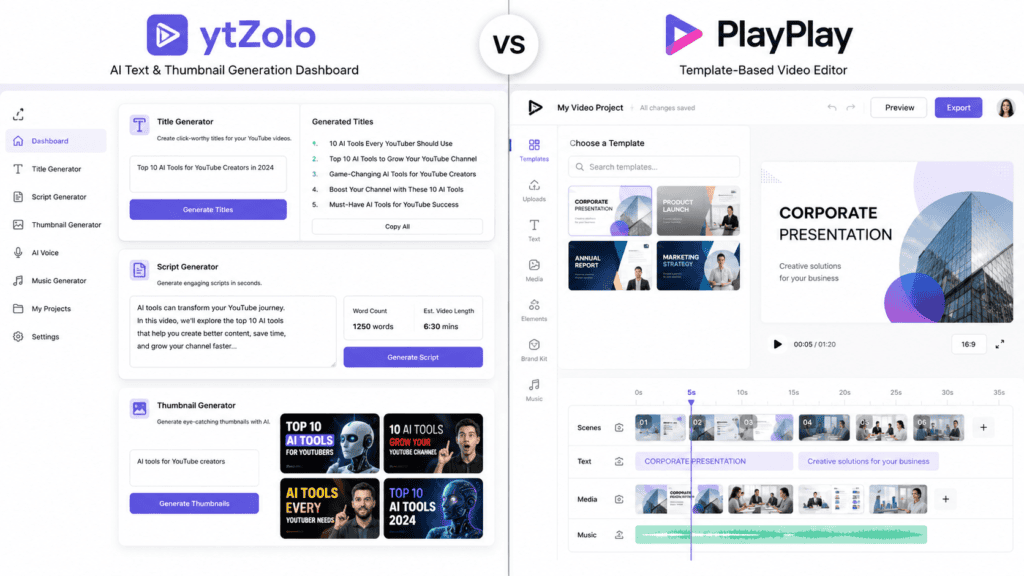
If you searched “ytZolo vs PlayPlay,” you probably expected a straightforward feature-by-feature showdown. We’re not going to give you that, because it wouldn’t be true to what these two tools actually are.
ytZolo is an AI pre-production studio built for YouTube creators. It generates titles, scripts, thumbnails, descriptions, and tags. PlayPlay is a full video creation and editing platform built for marketing and communications teams. It generates the actual finished video.
That difference matters more than any feature table. This guide explains what each tool does well, where they genuinely overlap, and who should pick which one — without pretending they’re interchangeable.
Quick Answer: Which Should You Choose?
If you’re a solo YouTuber, faceless channel operator, or small content team who needs help writing titles, scripts, descriptions, and thumbnail concepts fast, ytZolo fits that job.
If you’re a marketing, HR, or communications team that needs to actually produce and edit branded videos — with templates, voiceover, subtitles, and brand controls — PlayPlay fits that job.
Many teams could reasonably use both: ytZolo to plan and script YouTube content, PlayPlay to produce polished internal or social video. That’s the honest starting point for this comparison.
Table of Contents
What Is ytZolo?
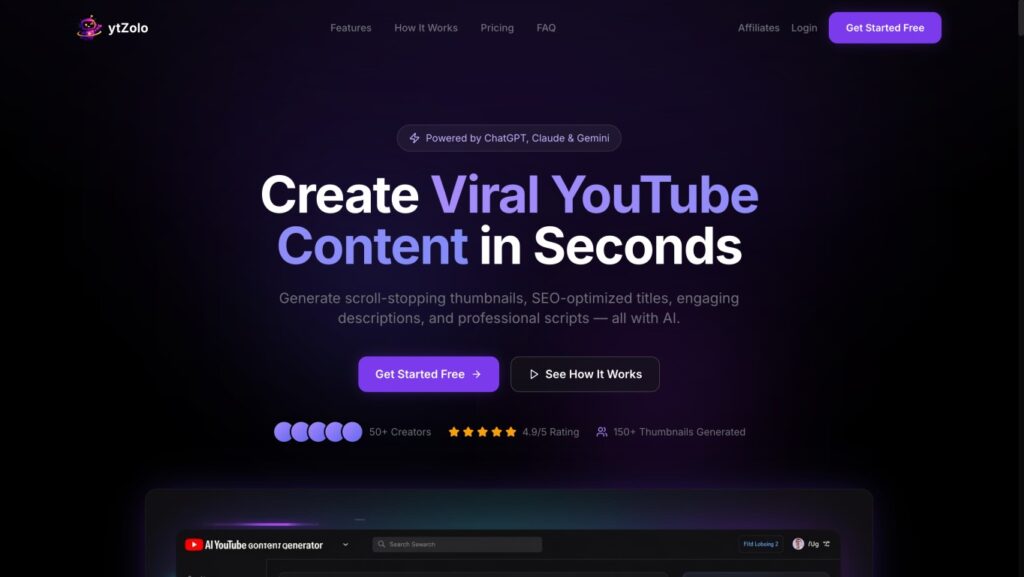
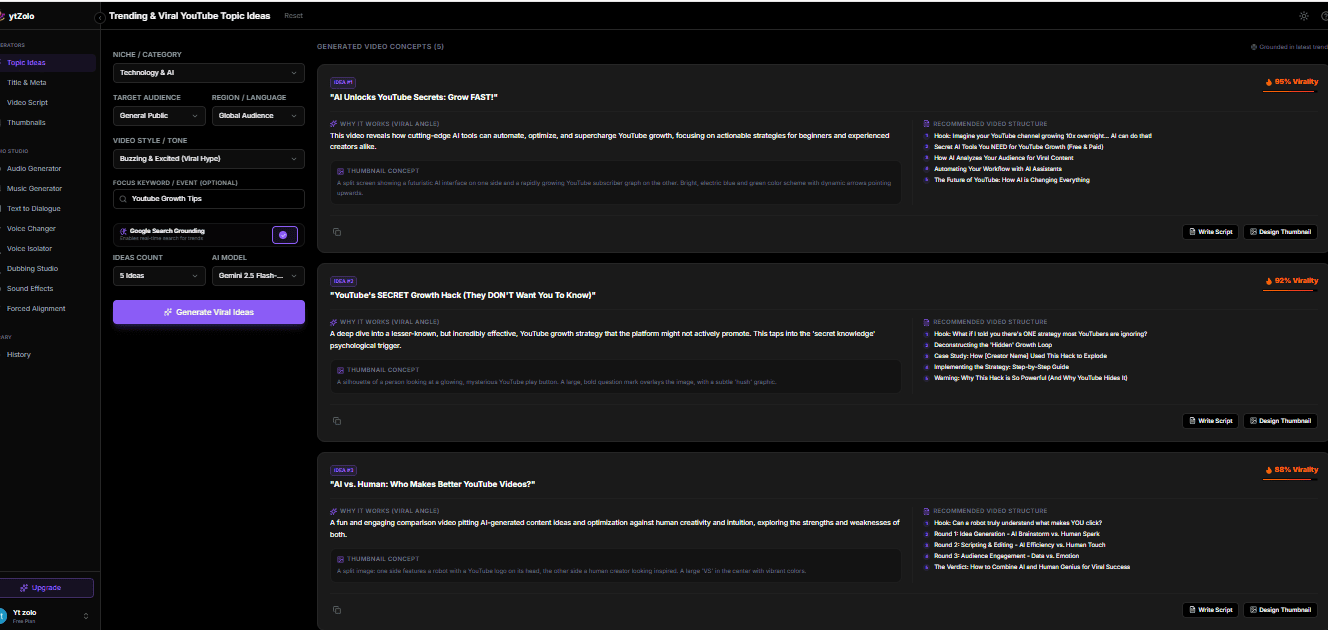
ytZolo is an all-in-one AI content studio built specifically for YouTube creators. Rather than editing video, it focuses on the pre-production layer: the title, script, thumbnail concept, description, and tags that determine whether a video gets clicked and watched.
It runs on multiple large language models — ChatGPT, Claude, and Gemini — letting creators pick a model per task, plus an image engine for thumbnail generation. Everything is organized around a single dashboard with a history library so past generations can be reused or refined.
At the time of writing, ytZolo offers capabilities that extend beyond content ideation and YouTube SEO. In addition to AI-powered script, thumbnail, and metadata generation, the platform now includes tools for AI audio generation, music creation, text-to-dialogue conversion, voice transformation, voice isolation, dubbing, sound effects generation, and forced alignment, providing a broader creator workflow within a single platform.
What Is PlayPlay?
PlayPlay is a cloud-based video creation and editing platform founded in 2017 by Thibaut Machet, built to let non-editors on marketing and communications teams produce professional branded video without an agency or specialist editor.
It combines a slide-style drag-and-drop editor with over 300 templates, AI tools (text-to-video, auto-subtitles, translation, AI voiceover, avatars, background removal, image generation), Getty Images stock integration, and brand governance controls for logos, fonts, and colors across a whole organization.
PlayPlay is positioned for teams, not individual solo creators — its own marketing and third-party reviews consistently describe it as built for mid-market and enterprise marketing, HR, and comms departments.
ytZolo vs PlayPlay: Company Background
| ytZolo | PlayPlay | |
|---|---|---|
| Category | AI pre-production studio for YouTube | Video creation & editing platform |
| Founded | Not publicly documented at the time of writing | 2017, Paris |
| Primary buyer | Individual creators, faceless channels, small agencies | Marketing, HR, and comms teams |
| Funding | Not publicly documented at the time of writing | $65.8M raised across three rounds, including a $55M Series B (2022) |
| Notable customers | Not publicly documented at the time of writing | Novo Nordisk, Extreme Networks, Flywire, and others |
Target Audience
ytZolo’s own marketing repeatedly names four audiences: Shorts creators who need vertical thumbnails and fast scripts, long-form YouTubers who need chapter timestamps and SEO descriptions, faceless channel owners who bulk-generate across multiple channels, and agencies managing several client channels at once.
PlayPlay’s audience skews organizational. Third-party analysis of its review base found small businesses make up 55% of reviewers, with enterprise accounts at 34% and midsize businesses at 10%, concentrated in marketing, banking, and software industries — using it for product launches, executive announcements, and employee communications.
ytZolo vs PlayPlay: Core Feature Comparison
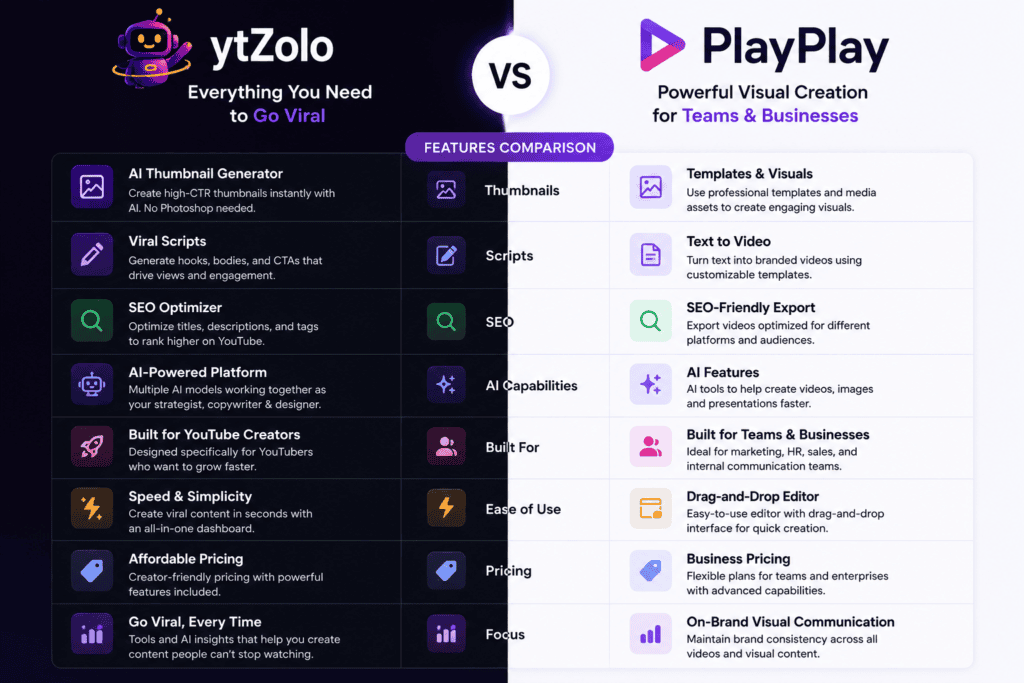
This is where most “vs” articles fabricate parity that doesn’t exist. Here’s the honest breakdown by function, not by marketing category.
| Function | ytZolo | PlayPlay |
|---|---|---|
| Title generation | Yes — multiple CTR-oriented variants per topic | Not documented as a standalone feature |
| Script writing | Yes — hook, body, CTA structure for long-form videos and Shorts | Not documented; PlayPlay’s AI is copywriting-oriented for video/social captions, not full scripts |
| Thumbnail generation | Yes — multiple AI-generated thumbnail variants depending on plan | Not applicable; PlayPlay generates full videos and images, not YouTube-specific thumbnails |
| SEO descriptions & tags | Yes | Not applicable |
| AI Audio Generator | Yes — generate AI audio from text prompts | Not documented as a dedicated feature |
| AI Music Generator | Yes — create royalty-free AI-generated background music | Limited music library; no dedicated AI music generator documented |
| Text to Dialogue | Yes — convert written text into natural AI dialogue | Not documented |
| AI Voice Changer | Yes — transform voices with AI | Not documented as a standalone feature |
| Voice Isolator | Yes — isolate vocals/speech from background audio | Not documented |
| Dubbing Studio | Yes — AI-powered multilingual dubbing and localization | Yes — AI dubbing and translation features available |
| Sound Effects Generator | Yes — generate AI sound effects from prompts | Not documented as an AI sound effect generator |
| Forced Alignment | Yes — synchronize transcripts, subtitles, and speech timing | Not documented |
| Video editing / timeline | No dedicated timeline editor publicly documented | Yes — drag-and-drop, slide-style editor with 300+ templates |
| AI voiceover | Yes — AI-generated voices available through the Audio Generator and Text-to-Dialogue features | Yes |
| Auto-subtitles & translation | Supports dubbing and audio localization; subtitle capabilities may vary by workflow | Yes — supports English, German, and French for AI-generated video, according to user reviews |
| AI avatars | Not publicly documented | Yes |
| Stock footage/image library | Not publicly documented | Yes — Getty Images integration |
| Brand governance (logos, fonts, colors) | Not publicly documented | Yes, especially on the Enterprise plan |
| Multi-model AI (ChatGPT/Claude/Gemini) | Yes | Not documented in this form; PlayPlay markets its own AI suite rather than model choice |
Notice how few rows have a genuine head-to-head answer. That’s the core truth this comparison needs to be honest about: these products barely overlap in function.
ytZolo vs PlayPlay: AI Features Compared
| AI Capability | ytZolo | PlayPlay |
|---|---|---|
| Text generation models | ChatGPT, Claude, Gemini (user-selectable) | Uses in-house AI copywriting for social captions and video assistant prompts |
| Text-to-video | Not offered | Yes — AI Video Assistant converts text or a URL into a video |
| Image generation | Yes, for thumbnails | Yes, within PlayPlay Design, including tools described as using Google’s Veo 3 model for some visual generation |
| Voice tools (voiceover, dubbing) | Not publicly documented | Yes — voiceover and translation are part of the AI video suite |
| Trend/keyword intelligence | Yes — described as “Trend Intelligence” for topic ideas | Not applicable in the same YouTube-SEO sense |
If you’re specifically evaluating AI voice, dubbing, or audio tools, PlayPlay is the one of these two that documents them. ytZolo does not currently publish that capability, so we won’t claim it does.
Video Editing and Production
This is the category where the two products diverge most sharply, and where an inflated comparison would do readers a disservice.
PlayPlay’s editor works like a slide builder: users assemble scenes, drop in templates, adjust timing, add branding, and export a finished MP4 — reviewers on G2 and Capterra consistently describe the process as fast for non-editors, typically citing around 20 minutes per video.
ytZolo does not include a video editor, timeline, or export-to-video feature. Its outputs are text and static images meant to feed into whatever editor or camera workflow the creator already uses.
If your search intent is “I need something to edit and produce my video,” PlayPlay is the relevant tool here — ytZolo isn’t built to do that job at all, and no amount of comparison framing changes that.
Templates and Branding
PlayPlay offers over 300 templates targeted at specific use cases: internal communications, employer branding, product launches, and sales enablement, alongside brand controls for logos, colors, and fonts that can be locked at an account level — a feature aimed squarely at enterprise brand consistency.
ytZolo does not offer video templates in this sense, since it isn’t producing video. Its “templates” are closer to prompt structures for scripts and titles, which isn’t the same category of feature.
Collaboration
PlayPlay includes shared workspaces, commenting, user management, and approval-style workflows aimed at teams — some G2 reviewers do note that certain screen layouts feel more geared toward specific business types, which is worth factoring in if your use case is unusual.
Public documentation for ytZolo does not describe multi-seat team collaboration features beyond a shared history library; it’s built around a single creator or a small agency workflow rather than departmental sign-off processes.
Ease of Use
Both tools are marketed as requiring no specialized skill — no video editing background for PlayPlay, no copywriting or design background for ytZolo.
Independent reviews are consistent on both counts: PlayPlay users on G2 and Capterra repeatedly cite an intuitive interface and quick onboarding, while also flagging limited customization for advanced editing and occasionally awkward subtitle editing. ytZolo’s own listing describes onboarding as sign-up to first generation in under two minutes, though this is the company’s own claim rather than independently verified.
ytZolo vs PlayPlay: Pricing Comparison
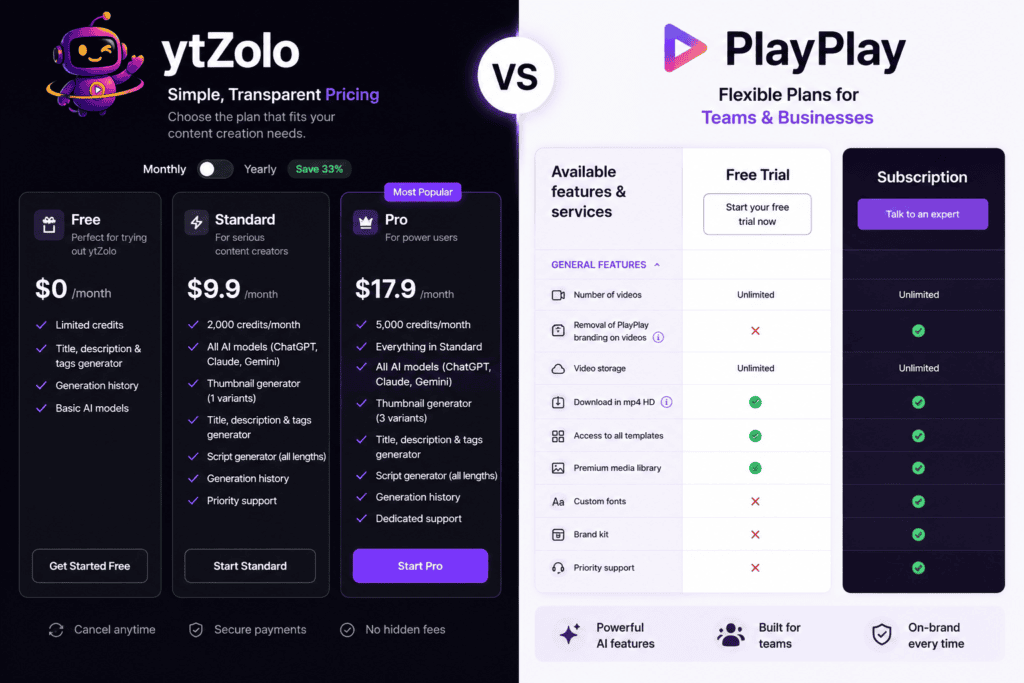
Pricing details for both platforms change often, so treat the figures below as a snapshot rather than a guarantee — always confirm current pricing on each company’s official pricing page before purchasing.
| Plan Type | ytZolo | PlayPlay |
|---|---|---|
| Free tier | Yes — limited credits | No free tier, but a 7-day free trial with full feature access and unlimited videos |
| Entry paid plan | Reported around $19/month for roughly 2,000 monthly credits | Not publicly listed; PlayPlay uses demo-based, quote pricing for its core plans |
| Higher tier | Reported around 5,000 monthly credits on a “Pro” tier (third-party estimate) | Enterprise plan, priced case-by-case based on users and customization |
| Billing model | Credit-based; different actions (e.g. thumbnails) cost more credits than others | Seat- and feature-based, sold through sales conversations |
| Trial | Free plan available | 7-day free trial, no credit card required |
Because PlayPlay doesn’t publish self-serve pricing, budget-sensitive solo creators may find ytZolo’s transparent, credit-based model easier to evaluate without a sales call.
ytZolo vs PlayPlay:Pros and Cons
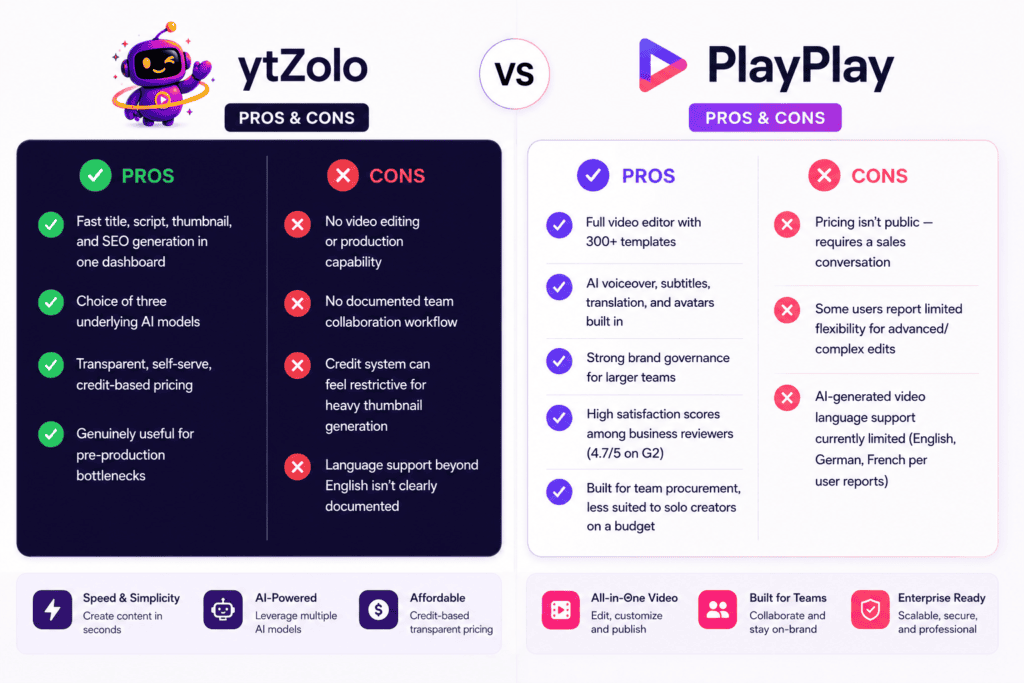
ytZolo
| Pros | Cons |
|---|---|
| Complete AI creator suite for scripts, thumbnails, SEO, audio, dubbing, music, and voice tools | No full-featured drag-and-drop video timeline editor like traditional video editing platforms |
| Fast title, script, thumbnail, and SEO generation in one dashboard | No publicly documented team collaboration or workspace features |
| AI Audio Generator, Music Generator, Voice Changer, Dubbing Studio, and Voice Isolator included | Credit-based pricing may be limiting for high-volume creators |
| Choice of multiple underlying AI models (ChatGPT, Claude, Gemini) | Enterprise features and advanced workflow automation are not extensively documented |
| Transparent, self-serve pricing with free trial available | Brand management features (shared brand kits, approvals, etc.) are not publicly documented |
| Designed specifically for YouTube creators, reducing the need to switch between multiple AI tools | Some newer audio features have limited public documentation compared with more established competitors |
PlayPlay
| Pros | Cons |
|---|---|
| Full video editor with 300+ templates | Pricing isn’t public — requires a sales conversation |
| AI voiceover, subtitles, translation, and avatars built in | Some users report limited flexibility for advanced/complex edits |
| Strong brand governance for larger teams | AI-generated video language support currently limited (English, German, French per user reports) |
| High satisfaction scores among business reviewers (4.7/5 on G2) | Built for team procurement, less suited to solo creators on a budget |
When to Choose ytZolo
Choose ytZolo if your bottleneck is writing — you already film or have someone who edits, but titles, scripts, thumbnails, and descriptions eat up hours per video. It’s also a reasonable fit for faceless-channel operators and small agencies juggling multiple channels who need to standardize pre-production without hiring writers.
When to Choose PlayPlay
Choose PlayPlay if your team needs to produce the actual video — internal comms, employer branding, product marketing — without hiring editors, and you need brand consistency enforced across many contributors. It’s the stronger fit for organizations with a budget for team-level software and a genuine need for finished video output.
Final Verdict
When looking at ytZolo vs PlayPlay, the two platforms aren’t really competing for the same purchase decision. ytZolo solves the pre-production writing problem for YouTube creators, while PlayPlay solves the video production problem for business teams.
If you came here trying to decide between them because you assumed they did the same thing, the more useful decision might be: do you need help writing content, or help producing video? Answer that first, and the choice mostly makes itself. Some creators and creator-adjacent teams will genuinely benefit from using both, in sequence.
FAQ
Is ytZolo a video editor? No. At the time of writing, ytZolo does not publicly document a video editing or timeline feature. It generates text and image assets — titles, scripts, descriptions, tags, and thumbnails.
Is PlayPlay good for YouTube creators specifically? PlayPlay is built primarily for business marketing and communications teams rather than individual YouTube channels, though its templates and export options can be used for YouTube content if a team already has a PlayPlay subscription.
Does ytZolo replace PlayPlay, or vice versa? No. They serve different steps in a content workflow — pre-production content for ytZolo, video production for PlayPlay — so one doesn’t functionally replace the other.
When comparing ytZolo vs PlayPlay pricing, which is cheaper? ytZolo publishes a free tier and credit-based paid plans, which third-party sources report starting around $19/month. PlayPlay does not publish self-serve pricing for its core plans, so a direct price comparison isn’t possible without contacting PlayPlay’s sales team.
Does ytZolo support multiple languages? Yes. ytZolo now supports multilingual content creation through its Dubbing Studio. That said, unlike some competitors that publish detailed language support tables, ytZolo does not currently provide a publicly available list of all supported languages or regional voice options.
Does PlayPlay support multiple languages for AI-generated video? User reviews indicate PlayPlay’s AI video generation currently supports English, German, and French, though the company’s own AI translation features may cover additional output languages — check PlayPlay’s documentation for current details.
Can I use ytZolo for YouTube Shorts? Yes. ytZolo’s own marketing specifically describes vertical thumbnail generation and short-form scripts for Shorts as a supported use case.
Does PlayPlay offer a free plan? PlayPlay offers a 7-day free trial with full feature access rather than an ongoing free plan.
Is PlayPlay suitable for solo creators or freelancers? It’s possible, but PlayPlay’s own market positioning and reviewer base lean heavily toward organizational buyers, so solo creators on a tight budget may find the lack of published self-serve pricing a barrier.
What AI models does ytZolo use? ytZolo lets users choose between ChatGPT, Claude, and Gemini for content generation, according to the platform’s own documentation.
Does PlayPlay use AI models like GPT or Gemini? PlayPlay’s own marketing references using models including Google’s Veo 3 for some visual generation; it does not document offering user-selectable models the way ytZolo does.
Which tool is easier to learn? Both are marketed as requiring no specialized background. Independent reviews describe PlayPlay’s editor as quick to learn for non-editors; ytZolo’s workflow is a text-generation dashboard rather than a design tool, which some users may find faster to pick up.
Can I cancel ytZolo or PlayPlay at any time? ytZolo’s FAQ states subscriptions can be canceled at any time. PlayPlay’s cancellation terms depend on the specific contract, since core plans are sold through sales conversations rather than self-serve checkout.
Does either tool help with YouTube SEO specifically? ytZolo is built around YouTube SEO directly — titles, descriptions, and tags optimized for search and CTR. PlayPlay doesn’t document YouTube-specific SEO features; its optimization focus is video production and cross-platform resizing rather than search ranking.
Is this comparison biased toward ytZolo? This comparison is published by ytZolo, so readers should keep that context in mind. The goal is to provide an accurate, feature-based comparison using publicly available information and official product documentation at the time of writing.
Where either platform lacks a documented capability—or where information couldn’t be independently verified—that has been noted rather than assumed. As both products continue to evolve, readers should consult each platform’s official website for the latest features and pricing.
Key Takeaways
- ytZolo vs PlayPlay highlights a matchup between two entirely different categories of tools: pre-production content generation versus full video production.
- ytZolo’s strengths are titles, scripts, thumbnails, descriptions, and tags — not video editing.
- PlayPlay’s strengths are templates, AI voiceover/subtitles, and brand governance for teams — not YouTube-specific SEO metadata.
- ytZolo has transparent, published pricing; PlayPlay’s core plans require a sales conversation.
- The right choice depends on whether your bottleneck is writing content or producing finished video — not on which tool is objectively “better.”
Conclusion
Neither tool is universally better — they solve different problems for different people. ytZolo earns its place for creators drowning in the pre-production grind of titles, scripts, and thumbnails. PlayPlay earns its place for teams that need to turn messages into finished, on-brand video without an editing team.
If your actual need spans both — planning and writing YouTube content, and producing polished video for other channels — it’s worth evaluating each on its own merits rather than picking one as a universal replacement for the other.
Author
Anshika Verma Email: anshika@ytzolo.com
Anshika Verma researches and writes SaaS comparison content with a focus on AI creator tools, YouTube growth strategy, and SEO. Her work is grounded in direct product research, official documentation, and verified third-party reviews rather than vendor marketing claims alone, in line with a transparent, evidence-first approach to comparison content.
Disclosure: This article is published by ytZolo. Every effort has been made to represent both products accurately and to clearly flag information that could not be publicly verified at the time of writing. Pricing and features for both platforms may change — always confirm current details on each company’s official site before making a purchase decision.

