
If you’ve been researching AI tools for YouTube, you’ve probably landed on this exact question: ytZolo vs Thumbmagic — which one actually fits your workflow?
It’s a fair question, and it deserves a fair answer.
These two tools aren’t built to do the same job. One is a thumbnail specialist. The other is a full pre-production studio. That distinction matters more than any feature checklist, and it’s the thread we’ll pull on throughout this guide.
We researched both platforms directly — their websites, their pricing pages, and their publicly documented feature sets — to write this.
By the end, you’ll know exactly which tool (or combination of tools) makes sense for your channel.
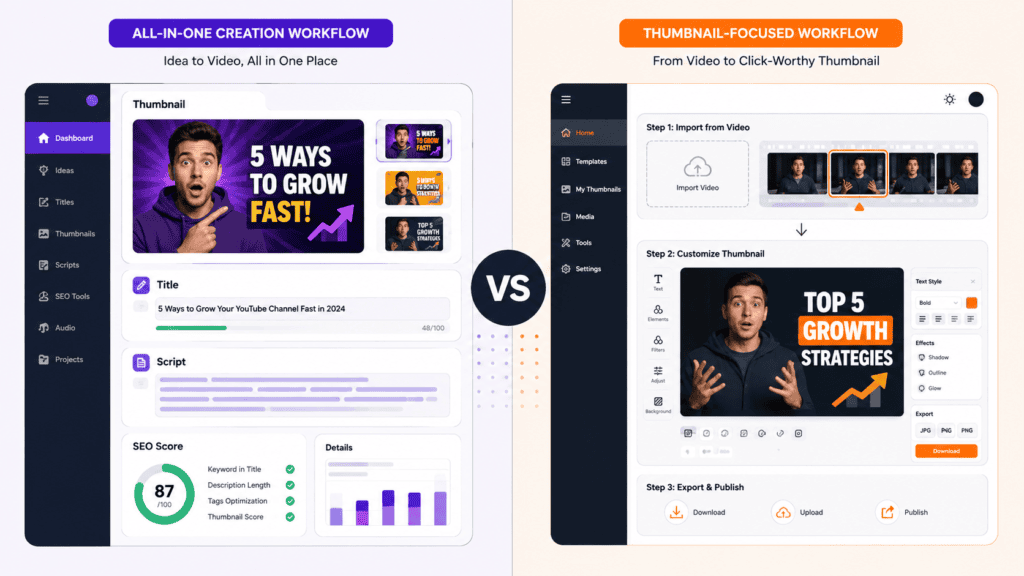
Table of Contents
Quick Comparison Table
| ytZolo | Thumbmagic | |
|---|---|---|
| Core focus | Full YouTube pre-production suite (thumbnails, titles, scripts, descriptions, tags, audio) | Dedicated AI thumbnail generator |
| Thumbnail generation | Text-to-thumbnail concepts, multiple variants by plan | Text-to-thumbnail, video-to-thumbnail, expression changer |
| Script writing | Yes — hook, body, CTA structure | Not available |
| Title / description / tag generation | Yes — built-in SEO optimizer | Not available (separate free tools on their site) |
| Audio tools | Audio Generator, Music Generator, Voice Changer, Voice Isolator, Dubbing, Voiceover, Podcast & Audiobook Generator, Text-to-Speech | Not available |
| AI models used | Multiple (ChatGPT, Claude, Gemini) | Not publicly documented |
| Video-to-thumbnail import | Not publicly documented as a feature | Yes — paste a YouTube URL or upload a video |
| Expression / face changer | Not publicly documented | Yes — dedicated Expression Changer feature |
| Free plan | Yes, no credit card required | Yes — 3 free thumbnails, no credit card |
| Entry paid tier | Standard plan, low monthly cost, credit-based | Starter plan, $17/month billed yearly |
| Top tier | Pro plan, higher credit allowance | Business plan, $59/month billed yearly, unlimited thumbnails |
| Export quality | Full HD (1280×720), no watermark | 4K, no watermark |
| Team / agency features | Not publicly documented | Unlimited avatars and priority support on Business plan |
| Gaming-niche templates | Not publicly documented | Yes — Fortnite, Minecraft, Valorant, GTA, and more |
| Best for | Creators who want one tool for the entire pre-production pipeline | Creators who want the deepest possible thumbnail tool |
This table already tells you most of what you need to know. If you’re only trying to solve thumbnails, that’s where Thumbmagic puts all its effort. If you’re trying to solve everything that happens before you hit “record,” that’s the gap ytZolo is built to close.
Who Should Choose Which Tool?
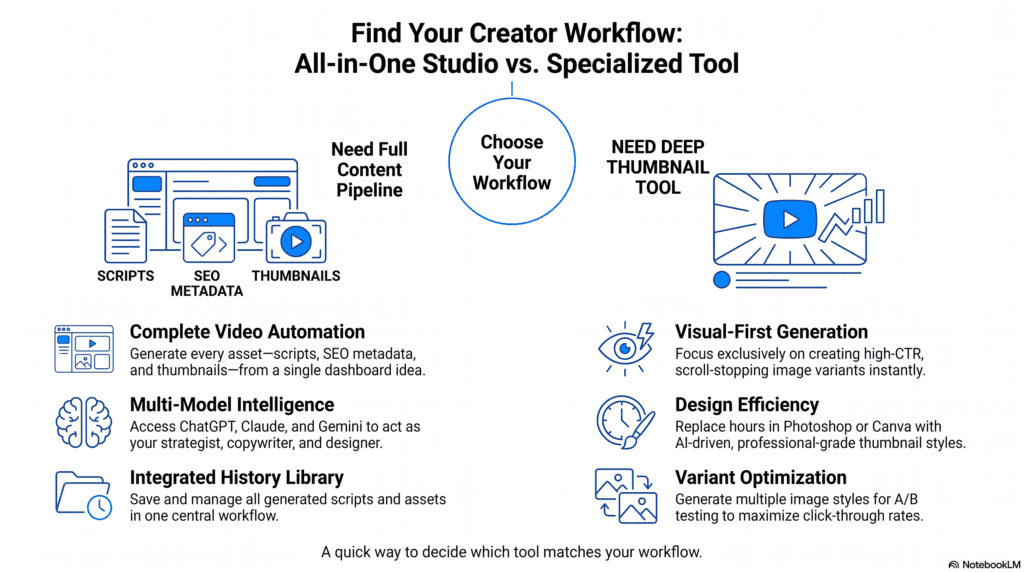
Choose ytZolo if:
- You want title, descriptions, tags, scripts, and thumbnails from a single dashboard
- You publish regularly and want to cut down on tool-switching
- You also need audio production tools — voiceovers, dubbing, or podcast/audiobook narration
- You’re a solo creator or small team trying to consolidate your stack
Choose Thumbmagic if:
- Thumbnails are your single biggest bottleneck, and you want the deepest tool for that one job
- You want to turn an existing YouTube video directly into a thumbnail using its video-to-thumbnail import
- You need an expression changer to test different facial expressions on the same thumbnail
- You’re a gaming creator who wants ready-made templates for specific titles like Fortnite or Valorant
- You need 4K exports for cross-platform use on Shorts, TikTok, or Instagram Reels
Choose both if: you want Thumbmagic’s specialized thumbnail depth alongside ytZolo for everything else in your pipeline — many creators aren’t running a single-tool workflow anyway.
ytZolo vs Thumbmagic: Feature Comparison
Thumbnail Generation
Thumbnails are the one category where both tools compete directly, so it’s worth the most detail.
Thumbmagic lets creators paste a YouTube URL, upload a video, or transcribe a file, and its AI extracts key moments and visual hooks from that footage to build thumbnail concepts.
That video-to-thumbnail workflow is a genuine differentiator — it’s built specifically around pulling frames and moments from content you’ve already filmed. From there, creators pick from template layouts and adjust text, colors, backgrounds, or expressions before exporting in 4K.
ytZolo’s thumbnail generator works from a text description rather than an existing video, producing high-resolution variants without requiring design skills, and exports at full 1280×720 HD resolution with no watermark on any plan. The number of variants you get scales with your plan tier.
The honest difference: Thumbmagic’s video-to-thumbnail import and Expression Changer are more specialized than anything ytZolo publicly documents for thumbnails. If your workflow starts with “I already have the video, now I need the thumbnail,” Thumbmagic’s approach is more direct. If your workflow starts with “I have an idea and need everything, including the thumbnail,” ytZolo’s text-first approach fits better because it’s already sitting next to your title and script generation.
For more on getting thumbnails right in general, see our AI thumbnail tips guide.
Script Writing
This category isn’t close, because Thumbmagic doesn’t offer it.ytZolo’s Viral Scripts feature creates hooks, body content, and calls to action for any video length, structured for retention and algorithm performance rather than just readability.
If scripting is part of your pre-production process at all, this is a category where you’d need a separate tool alongside Thumbmagic — whereas it’s native to ytZolo.
Title Generator
ytZolo’s title tool factors in competition level, emotional triggers, keyword placement, and title length optimized for both desktop and mobile display. Thumbmagic does offer a separate, free-standing YouTube Title Generator tool on its website, but it isn’t part of the core thumbnail-app workflow the way it is in ytZolo’s dashboard.
Description Generator
ytZolo generates descriptions with your target keyword worked into the opening lines and natural keyword variations throughout, aimed at both search ranking and viewer clarity. Thumbmagic offers a standalone free description generator tool as well, separate from its main thumbnail product.
Tag Generator
ytZolo’s tag generator is built to surface tags that competitor videos in your niche may be missing, giving new uploads a discoverability edge from day one. Thumbmagic does not include a tag generator inside its core app.
SEO Workflow
The bigger picture here is workflow continuity. When script keywords, title keywords, description keywords, and tags all align, YouTube’s algorithm receives a more coherent signal about what a video actually covers. That’s the argument for doing SEO and content creation in the same platform rather than across separate tools — and it’s the lane ytZolo is built for.
Thumbmagic doesn’t position itself as an SEO tool; its free-standing title and description tools exist, but they sit outside its main thumbnail product rather than inside one connected pipeline.
If you want a deeper breakdown of this approach, our guide on AI tools to boost YouTube SEO covers it in more detail.
Image Generation
Both products generate images, but for different purposes. ytZolo’s image generation is scoped to thumbnails as part of its broader content package. Thumbmagic’s image generation is purpose-built around thumbnail templates, face and style detection, and A/B-testable variations. Neither platform publicly documents general-purpose image generation beyond thumbnails (for example, custom channel art or blog graphics) — so if that’s what you need, plan on a separate tool either way.
Audio Generation, Music Generator, Text to Dialogue, Voice Changer, Voice Isolator, Forced Alignment, Dubbing Studio, Sound Effects
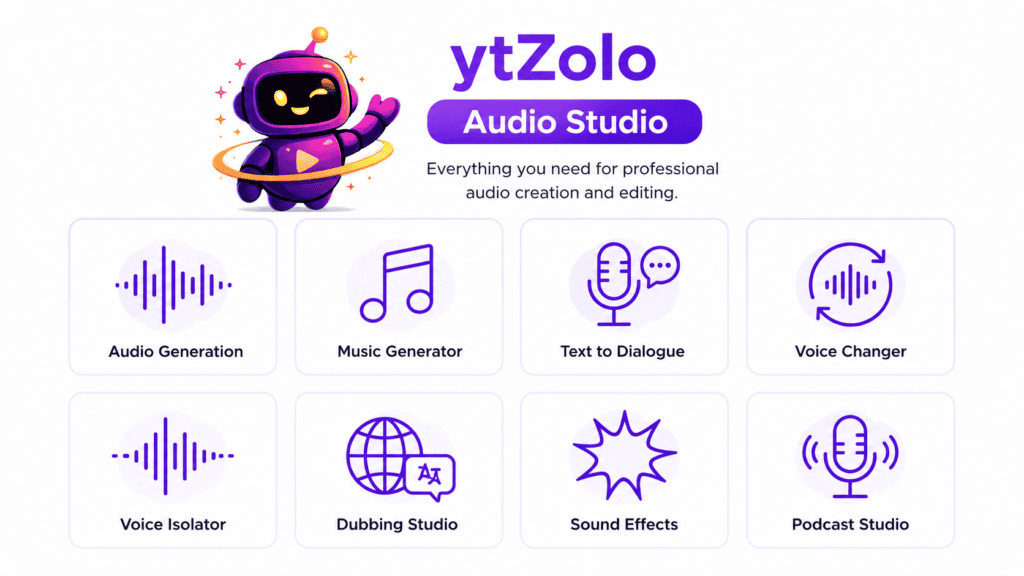
This entire category is unique to ytZolo. Thumbmagic is a thumbnail-only product and doesn’t offer any audio tooling — that’s simply outside its scope, and its website doesn’t claim otherwise.
ytZolo’s Audio Studio includes an AI Audio Generator, Music Generator, Text to Dialogue, Voice Changer, and Voice Isolator as part of its core suite. Building on that, ytZolo has added AI Dubbing, an AI Sound Effects Generator, a Forced Alignment Tool for syncing transcripts to audio, an AI Voiceover Generator, an AI Podcast Generator, an AI Audiobook Generator, and AI Text-to-Speech.
If audio production — narration, dubbing into other languages, or podcast-style content — is anywhere in your workflow, this is a category where ytZolo has no direct comparison point in Thumbmagic at all.
Content Planning
ytZolo’s positioning is built around covering the full YouTube automation pipeline — titles, scripts, thumbnails, descriptions, and tags — in one place, rather than requiring a stack of separate tools.That consolidation is itself a form of content planning support: keeping every asset for a video in one history log makes it easier to plan and iterate across an upload schedule.
Thumbmagic doesn’t offer content planning or calendar features — its plans are structured entirely around thumbnail volume (100, 500, or unlimited thumbnails per month) rather than planning tools.
Ease of Use
Both tools are designed for non-designers. Thumbmagic’s stated workflow is three steps: import your video, select a template and customize it, then export in 4K. ytZolo’s thumbnail workflow is similarly simple — enter a topic, and the platform generates thumbnail concepts tailored to your niche without requiring design software.
Where they diverge is scope, not simplicity. Thumbmagic’s onboarding is faster because it does one thing. ytZolo’s dashboard has more surface area because it’s doing five or six things — titles, scripts, descriptions, tags, thumbnails, and audio — but each individual generator follows the same “describe it, generate it” pattern.
Pricing
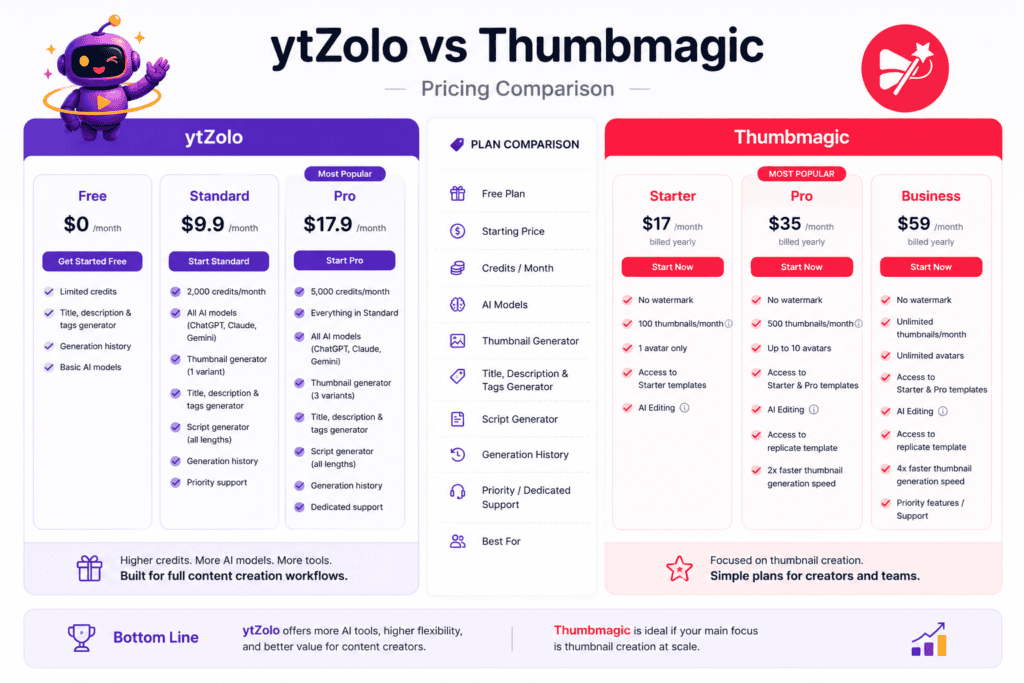
Pricing structures aren’t built the same way, so a direct dollar-for-dollar comparison is misleading. Here’s what’s publicly documented for each.
| Plan | Thumbmagic | ytZolo |
|---|---|---|
| Free | 3 free thumbnails, no credit card | Free plan available, no credit card, includes title/description/tag generation and generation history |
| Entry tier | Starter — $17/month billed yearly: 100 thumbnails/month, 1 avatar, no watermark | Standard tier: credit-based (reported figures vary by source), includes all AI models and a thumbnail generator |
| Mid tier | Pro — $35/month billed yearly: 500 thumbnails/month, up to 10 avatars, 2x generation speed | Not publicly segmented as a separate mid-tier |
| Top tier | Business — $59/month billed yearly: unlimited thumbnails, unlimited avatars, 4x speed, AI filters, priority support | Pro tier: higher credit allowance, more thumbnail variants per generation, dedicated support |
A note on transparency: Thumbmagic’s pricing page clearly lists monthly costs, billing terms, and a 30-day money-back guarantee. ytZolo’s exact Standard and Pro pricing is reported inconsistently across third-party sources at the time of writing — we’d recommend checking ytzolo.com directly for current numbers rather than relying on any single figure here.
What we can say with confidence: both platforms let you start for free without a credit card, which makes a real side-by-side trial low-risk regardless of which one you’re leaning toward.
Templates
Thumbmagic offers tiered template access — Starter templates on the entry plan, and both Starter and Pro templates on higher tiers — along with niche-specific layouts for gaming titles like Fortnite, Minecraft, Roblox, Call of Duty, Valorant, Apex Legends, and GTA. That kind of granular, game-specific template library isn’t something ytZolo publicly documents.
ytZolo’s approach leans more on niche-aware generation from a text prompt— its thumbnail tool draws from a niche library spanning gaming, travel, finance, fitness, education, lifestyle, tech, food, beauty, and business — rather than a browsable template gallery.
Performance
Independent, third-party benchmark data comparing generation speed or output quality between these two specific tools isn’t publicly available, so we won’t manufacture a number here. What is documented: Thumbmagic advertises measurably faster generation on higher tiers (2x on Pro, 4x on Business) relative to its own Starter plan. ytZolo doesn’t publish comparable generation-speed multipliers.
If speed at high volume is your priority, that’s a question worth testing directly on both free tiers before committing to a paid plan.
ytZolo vs Thumbmagic: Pros & Cons
ytZolo
Pros:
- One dashboard for titles, descriptions, tags, scripts, thumbnails, and audio
- Multiple underlying AI models (ChatGPT, Claude, Gemini) rather than a single engine
- Full HD, watermark-free thumbnail exports on all plans
- Audio Studio covers voice, music, dubbing, and long-form narration — a category Thumbmagic doesn’t touch
Cons:
- Thumbnail-specific features (video-to-thumbnail import, expression changer) aren’t part of the documented feature set
- Publicly reported pricing figures are inconsistent across third-party sources
- No dedicated gaming-title template library like Thumbmagic’s
Thumbmagic
Pros:
- Deep, specialized thumbnail tooling: video-to-thumbnail import, expression changer, A/B-testable variants
- 4K exports and multi-platform templates (YouTube, Shorts, TikTok, Instagram)
- Transparent, clearly published pricing with a money-back guarantee
- Strong third-party review scores on Trustpilot and G2
Cons:
- No script, title (inside the core app), description, or tag generation built into the main product
- No audio tools of any kind
- Monthly cost climbs quickly if you need more than 100 thumbnails at the entry tier
ytZolo vs Thumbmagic: Real Workflow Comparison
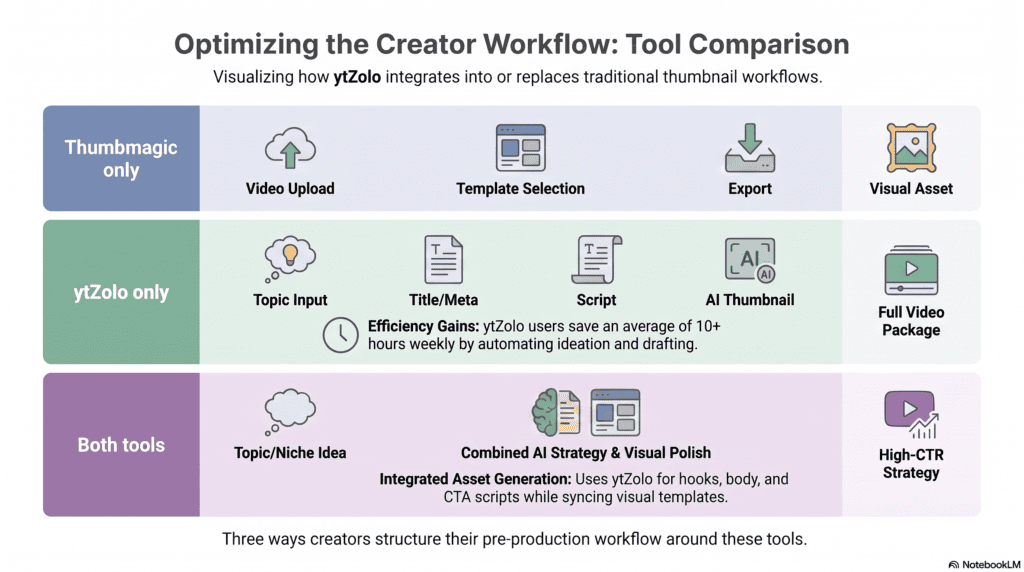
Picture a mid-size gaming channel publishing three videos a week.
With Thumbmagic alone: the creator uploads or links each finished video, lets the AI extract key moments, picks a game-specific template, tweaks the expression and text, and exports in 4K. Thumbnails are fast and specialized. But the creator still needs a separate tool for the title, description, tags, and script — meaning three or four browser tabs open per video.
With ytZolo alone: the creator enters the video topic once and gets a title, description, tags, script outline, and thumbnail concept from the same generation. Fewer tabs, one history log, one keyword thread running through every asset. If that channel also runs a podcast spin-off or needs dubbed versions for another language, the Audio Studio covers that without adding a fifth tool.
With both: some creators use ytZolo for the full pipeline and swap in Thumbmagic specifically when they want to generate a thumbnail directly from raw footage or test facial expressions — using each tool where its documented strength actually lies.
Best Use Cases
- Solo creators publishing weekly who want to reduce tool-switching → ytZolo
- Gaming channels wanting genre-specific thumbnail templates and expression testing → Thumbmagic
- Agencies managing multiple channels who need standardized pre-production with distinct tones per client → ytZolo
- Creators repurposing existing footage into thumbnails without writing a new prompt each time → Thumbmagic
- Podcasters, audiobook narrators, or creators dubbing content into other languages → ytZolo (Thumbmagic has no equivalent)
- Teams that need unlimited thumbnail volume with priority support → Thumbmagic’s Business plan
Which Tool Offers Better Value: ytZolo vs Thumbmagic?
Value depends entirely on what you’re solving for.
If thumbnails are your only bottleneck and you’re generating high volume, Thumbmagic’s Business plan offers unlimited thumbnails, unlimited avatars, and priority support for a flat monthly rate — which can be a strong deal if you’d otherwise be paying per-thumbnail elsewhere.
If your bottleneck spans the entire pre-production process — title, description, tags, script, thumbnail, and potentially audio — consolidating into one platform avoids paying for five or six separate subscriptions and losing keyword consistency between tools. That’s the value case for ytZolo, and it becomes stronger the more of those categories you actually use.
Neither claim is universally “better.” A creator who only needs thumbnails and never touches scripts is overpaying for ytZolo’s broader suite. A creator who needs the full pipeline is underserved by a thumbnail-only tool no matter how good its thumbnails are.
Final Verdict
ytZolo vs Thumbmagic isn’t a case of two rivals fighting for the exact same job — they’re simply built for different scopes of the same overall problem.
Thumbmagic wins if thumbnail depth is what you need: video-to-thumbnail import, expression changing, gaming-specific templates, and 4K export, backed by transparent pricing and strong review scores.
ytZolo wins if you want the pre-production pipeline handled in one place: titles, descriptions, tags, scripts, thumbnails, and now a full audio suite covering everything from voice changing to dubbing and podcast generation — without switching between five different logins.
The keyword “ytZolo vs Thumbmagic” implies a single winner, but the honest answer is that your workflow should decide this one, not a marketing claim. Try the free tier of whichever matches your actual bottleneck first.
Frequently Asked Questions
Is ytZolo a replacement for Thumbmagic? Not entirely. ytZolo includes thumbnail generation as one part of a broader content suite, but it doesn’t publicly document Thumbmagic-specific features like video-to-thumbnail import or an expression changer. If those specific capabilities matter to you, ytZolo isn’t a direct substitute.
Is Thumbmagic a replacement for ytZolo? No. Thumbmagic is purpose-built for thumbnails only. It doesn’t offer script writing, title/description/tag generation inside its core app, or any audio tools, all of which are part of ytZolo’s suite.
Which tool has a better free plan? Thumbmagic’s free tier gives you 3 thumbnails with no credit card required. ytZolo’s free plan includes ongoing (credit-limited) access to title, description, and tag generation plus generation history, also without a credit card. They’re free in different ways — one is a limited trial, the other is an ongoing lighter-weight plan.
Can I use both tools together? Yes. Many creators use ytZolo for the full pre-production pipeline and bring in Thumbmagic specifically when they want to generate a thumbnail directly from existing footage or test facial expressions on the same base image.
Does either tool support languages other than English? Thumbmagic’s language support isn’t publicly documented on its marketing pages. ytZolo’s interface is primarily English, though the underlying AI models it uses are capable of multilingual output — exact language coverage isn’t explicitly listed by ytZolo either.
Which tool is better for gaming channels: ytZolo vs Thumbmagic? Thumbmagic has a documented advantage here, with dedicated templates for specific games including Fortnite, Minecraft, Roblox, Call of Duty, Valorant, Apex Legends, and GTA. ytZolo supports gaming as one of several niche categories in its thumbnail generation but doesn’t offer per-title templates.
Does ytZolo offer audio or voice tools? Yes. ytZolo’s Audio Studio includes an Audio Generator, Music Generator, Text to Dialogue, Voice Changer, Voice Isolator, AI Dubbing, Sound Effects Generator, Forced Alignment Tool, Voiceover Generator, Podcast Generator, Audiobook Generator, and Text-to-Speech. Thumbmagic has no audio features.
Which tool is cheaper? Thumbmagic’s entry-level Starter plan is $17/month when billed yearly.ytZolo’s exact pricing is reported inconsistently across third-party sources, so we recommend checking ytzolo.com/pricing directly for current, accurate figures before comparing dollar amounts.
Do either of these tools guarantee more views or subscribers? No legitimate tool can guarantee that — views and subscriber growth depend on many factors beyond thumbnails or titles, including content quality, audience retention, and upload consistency. Both tools are aids to that process, not guarantees of outcome.
Is my content or footage used to train either company’s AI models? Neither company’s public marketing pages spell out detailed data-training policies in a way we can confidently summarize here. If this matters to you, check each platform’s privacy policy directly before uploading footage or content.
Conclusion
Choosing between ytZolo vs Thumbmagic comes down to one honest question: are you solving for thumbnails specifically, or for your entire pre-production workflow?
If it’s thumbnails — and especially if you’re working from existing footage or need genre-specific templates — Thumbmagic’s specialized tooling is worth testing.
If it’s everything that happens before you hit publish — title, description, tags, script, thumbnail, and increasingly audio — ytZolo is built to keep that in one place.
Start with whichever tool matches the actual bottleneck in your workflow today. You can always add the other later. For more comparisons and creator workflow breakdowns, browse the ytZolo blog.
Author
Anshika Verma anshika@ytzolo.com
Anshika Verma researches and writes about YouTube growth, SEO, and AI-powered creator tools for the ytZolo blog. Her work focuses on evidence-based comparisons of the platforms creators actually use in production — pulling directly from official product documentation, pricing pages, and public feature listings rather than secondhand claims. She covers the intersection of content strategy, SaaS tooling, and search visibility for YouTube creators building sustainable channels in 2026.
External resources referenced: YouTube Creator Academy, Google Search Central, YouTube Help.

