How to Make a Media Kit for YouTube Sponsorships: A Step-by-Step Guide
September 23, 2026
Learn how to create a YouTube media kit that helps brands quickly understand your audience, performance, content, and sponsorship options.
This guide covers the essential sections, metrics, design tips, pricing decisions, and customization strategies. It also explains how tools like ytZolo can support the content workflow behind stronger creator partnerships.
Table of Contents
A sponsor should not sift through your YouTube data, analytics, emails, and portfolio looking for relevant information to cooperate with you. That’s why learning how to make a media kit for YouTube sponsorships is an important step for creators who want to work with brands.
A good media kit puts the information a potential sponsor needs in one place. It should quickly explain who you are, who watches your channel, how your channel performs, which content gets the strongest response, what sponsorship opportunities you offer, and why you’re a credible partner.
It should also make it easy for a brand to contact you.
YouTube now provides a first-party Media Kit for creators in the YouTube Partner Program. It includes audience information and channel metrics, along with details such as top videos and audience categories, giving eligible creators a useful starting point for building their sponsorship materials.
The goal is simple: give brands enough relevant information to understand your channel without making them search for it.
What is a YouTube media kit?
What is a YouTube media kit?
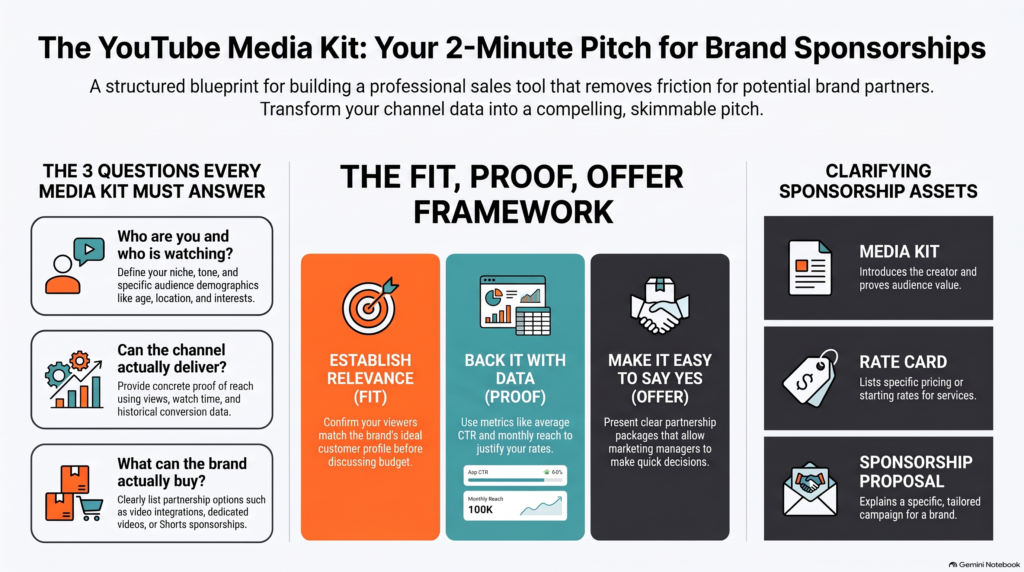
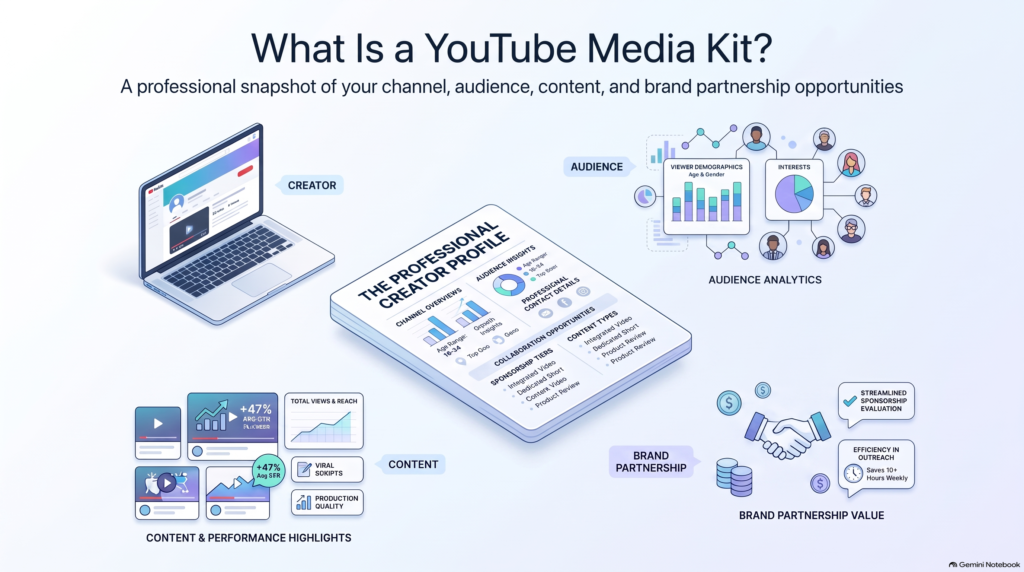
A YouTube media kit is a short, self-contained document or shareable page that introduces your channel to potential sponsors. Think of it as a one-stop summary of who you are, who watches you, and what a brand can buy — packaged so a busy marketing manager can skim it in two minutes and decide whether to reply.
Most media kits live as a PDF, a Notion page, or a simple landing page. The format matters less than the contents: a clear positioning statement, audience demographics, performance numbers, past brand work, and the partnership options you offer.
What is the purpose of a YouTube media kit?
The core purpose is to remove friction. Without a media kit, a brand has to dig through your channel, guess at your audience, and estimate your reach before they can even start a conversation. A good kit does that research for them.
Every media kit should answer four questions:
Who is this creator? Your niche, tone, and content format.
Who is the audience? Age, location, gender split, and interests.
What evidence shows the channel can deliver? Views, watch time, engagement, conversion data, past campaign results.
What can the brand actually buy? Integrations, dedicated videos, Shorts, series sponsorships.
Media kit vs. rate card vs. sponsorship proposal
These get used interchangeably, but they do different jobs — and bundling them can weaken your negotiating position. vidIQ makes a similar point: a media kit and a rate card don’t have to be the same document.
Asset
Purpose
Media kit
Introduces the creator and proves audience value
Rate card
Lists pricing or starting rates
Sponsorship proposal
Explains a specific campaign for a specific brand
Portfolio
Shows examples of past creative work
A practical approach: lead with the media kit, share rates once you know the scope, and send a tailored proposal when the deal gets serious.
What do brands look for in a YouTube media kit?
What do brands look for in a YouTube media kit?
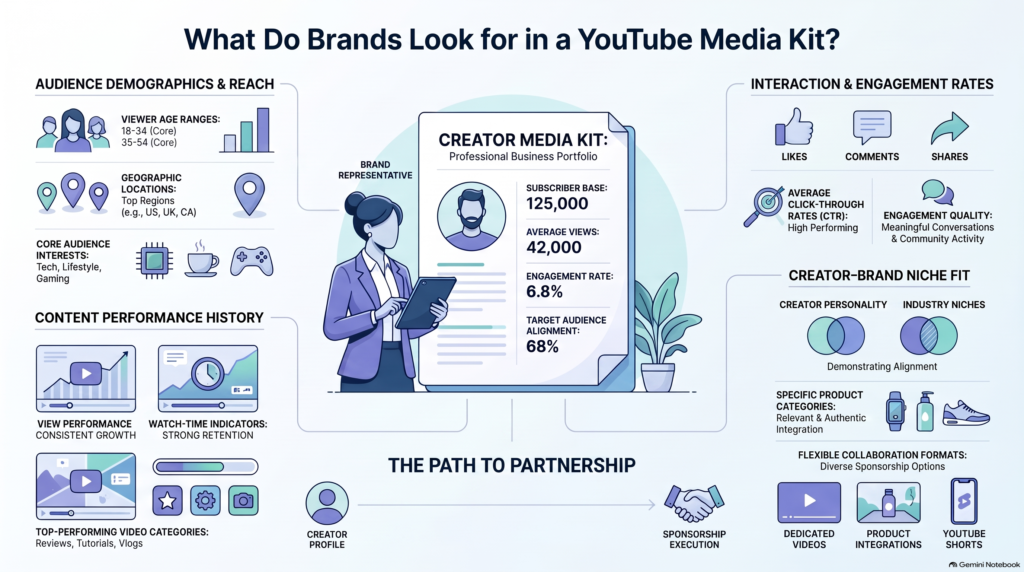
The former buys audiences of engaged users, not subscribers. Your media kit serves as a professional sales tool, demonstrating to potential partners that your channel is capable of delivering valuable traffic and has a track record of performance.
Audience fit
Audience relevance consistently outweighs raw subscriber counts. Brands need to confirm that your viewers match their ideal customer profile before investing marketing budget.
Your media kit should also contain information about the key demographics, such as age, gender, and region, with their approximate ratio. Mention the main interests and audience categories. For instance, a YouTube channel with tech reviews attracts buyers searching for tech product comparisons and opinions.
Highlight that your channel’s viewers are highly motivated to make a purchase based on their interests and demographics. The official Media Kit of YouTube provides you with the necessary export of the channel’s analytics data.
Performance proof
To justify your rates, provide concrete proof of your content’s reach and depth of engagement across formats:
Typical views & Monthly reach: Baseline expectations per video alongside total monthly impression volume.
Format-specific metrics: Distinct performance metrics for Shorts (virality, quick reach) versus long-form content (deep engagement, brand integration potential).
Engagement & Watch time: High retention rates and active comment sections signal an attentive community rather than passive passive scrollers.
Conversion data: Historical click-through rates (CTR), link clicks, or referral conversions from previous brand deals.
Professionalism
Apart from the quantitative criteria, companies evaluate the qualitative aspect of a creator. It is essential to manage expectations by demonstrating to brands that you are organized and easy to collaborate with.
To do that, mention the channels where you allow the company to reach out to you, provide a transparent overview of your previous performance, specify the ways of cooperation (sponsorships, product reviews, dedicated shorts, etc.), and indicate your contact information in your media kit.
In this way, you will show the potential partner that you are a professional who can meet their expectations.
What to include in a YouTube sponsorship media kit
What to include in a YouTube sponsorship media kit
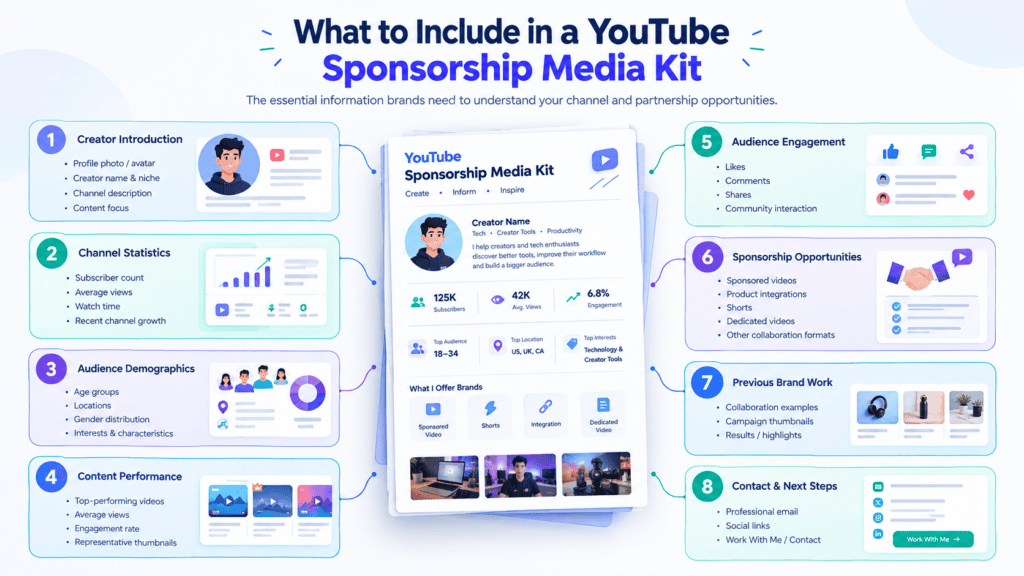
A YouTube sponsorship media kit should give a potential brand enough information to understand your channel, audience, performance, and partnership opportunities without making them search through your videos or analytics. The strongest kits focus on relevant evidence rather than filling every page with statistics.
YouTube’s own Media Kit can provide eligible creators in the YouTube Partner Program with channel statistics, demographics, audience categories, branded content campaign videos, and top videos. It can also be customized before being downloaded as a PDF.
If you’re building a custom kit, use the following sections as a practical structure.
1. Cover page
The cover page should orient the sponsor, not overwhelm them.
Include:
Creator name or channel name
Creator handle
Niche or content category
Professional image or relevant channel visual
“Media Kit” or “Partnerships”
Business contact information
Keep this page uncluttered. Don’t lead with a wall of statistics or a long personal biography. vidIQ’s current guidance similarly recommends treating the cover as a simple introduction and moving detailed proof further into the document.
2. Channel overview and positioning
The next question a sponsor needs answered is simple:
What does this channel create, and who watches it?
Use a one-sentence positioning statement such as:
I create [content type] for [specific audience] interested in [topic or outcome].
Then briefly explain:
Your niche
Main content formats
Core topics
Audience promise
Why the channel is relevant to potential sponsors
Specific positioning is especially useful for niche and faceless channels. A statement like “I make videos about technology” says very little. A more precise description can show the subject, audience, and commercial context at once.
3. Audience demographics
Your media kit should show who actually watches your content, not who you assume watches it.
Useful information can include:
Age range
Gender distribution, when relevant
Top countries
Top cities, when commercially useful
Audience interests or categories
Other audience characteristics supported by your analytics
Use first-party data whenever possible. YouTube’s Media Kit can include channel statistics, demographics, and audience categories, with audience segments based on Google’s estimates of interests, intent, and demographic information.
Don’t invent detailed audience personas simply because they sound impressive. If your analytics show that a large share of viewers comes from particular countries or audience categories, those are much more useful than unsupported claims about what your viewers “love.”
4. Channel performance metrics
A media kit is not an analytics report. The numbers that help a sponsor evaluate your current and typical reach are essential, but so are other figures that may seem less relevant at first but can provide valuable benchmarks later.
Useful metrics might include:
Subscriber count
Typical recent views
Monthly views
Long-form views
Shorts views
Engagement
Watch time when commercially relevant
Retention when it provides useful context
Clicks or conversions from previous campaigns, when available
Not every metric reported should be used for evaluating typical performance, and a single viral hit can make an otherwise mediocre channel appear much more attractive than it typically is.
OverseerOS does something similar by focusing on recent typical performance rather than total lifetime figures or a breakout hit.
Average views vs. subscriber count
Subscriber count provides useful context, but it doesn’t tell a sponsor how many people are currently watching each upload.
For example, a channel with 100,000 subscribers might regularly receive 10,000 views, while another channel with the same subscriber count might consistently reach 50,000 viewers.
For sponsorship planning, recent video performance can therefore provide more useful context than subscriber count alone.
Average vs. median views
Median views are an optional metric worth considering when your channel has significant outliers.
Suppose your recent videos receive 40K, 45K, 48K, 52K, and 500K views. The average will be heavily influenced by the 500K video. The median gives you the middle value and can provide a clearer picture of typical performance.
Recent research from OverseerOS also argues that median views can be useful for understanding normal long-form performance without allowing viral outliers to distort the picture.
5. Top-performing YouTube videos
Show three to five strong examples rather than filling the media kit with every successful upload.
For each video, include:
Thumbnail
Video title
Views
A relevant engagement or performance metric
A short explanation of its commercial relevance
Link to the video
Don’t automatically choose your biggest videos. Select examples that demonstrate the type of content a potential sponsor would actually want to appear alongside.
For example, an AI software company may care more about a creator’s successful AI-tool tutorial than a completely unrelated viral entertainment video.
You can also use YouTube’s first-party Media Kit as a starting point because it can include top overall videos and lets eligible creators customize which videos appear in certain cards.
6. Previous sponsorships and case studies
If you’ve worked with brands before, case studies can provide some of the strongest evidence in the entire media kit.
For each campaign, show:
Brand
Campaign objective
Deliverable
Content format
Creative approach
Results
Relevant metrics
Optional testimonial
The metric should be relevant to the campaign objective. A conversion campaign may focus on clicks or conversions, whereas an awareness campaign could value reach, views, or watch time. The current guidance from vidIQ prioritizes case studies since they demonstrate what the creator has already delivered for the brand.
What can someone do if they have had no past sponsors?
Don’t fabricate sponsorship experience.
Instead, use evidence you genuinely have:
High-performing organic videos
Relevant product mentions
Audience response
Affiliate results, where disclosure and sharing are permitted
Strong content examples
Proposed sponsorship concepts
An organic video showcasing the product is a great way to show how your audience would react to a branded content piece without lying about the sponsorship. This is what vidIQ recommends for those who are new to case studies.
7. Testimonials and social proof
If previous clients, agencies, brands, or partners have given you permission to share testimonials, include a few short ones.
Focus on comments about:
Communication
Reliability
Content quality
Professionalism
Campaign results
Place a testimonial near the campaign or case study it relates to. This gives the quote useful context instead of presenting it as an isolated statement.
8. Sponsorship opportunities and deliverables
Make it immediately clear what a brand can hire you to create.
Possible options include:
Dedicated YouTube video
Integrated sponsorship
Product integration
YouTube Shorts
Livestream sponsorship
Product tutorial or review
Multi-video campaign
Affiliate campaign
UGC or content creation
Cross-platform package
Keep each description short and specific.
For example:
Integrated YouTube sponsorship: A natural product segment incorporated into a relevant long-form video.
If your workflow involves planning titles, scripts, thumbnails, descriptions, and other creator assets, tools such as ytZolo can also fit into the production workflow, but the media kit itself should stay focused on what the sponsor receives.
9. Brands and categories you fit
Avoid saying you’re “open to all brands.”
Instead, identify categories that naturally fit your audience.
For example:
SaaS
AI tools
Creator software
Gaming
Productivity
Education
Finance
Travel
This makes sponsor fit easier to understand and can also help you tailor the media kit for different outreach campaigns.
10. Creator bio
Keep your bio short and commercially relevant.
Include:
Who you are
Your niche
Your expertise
What your audience cares about
Relevant credentials
A long personal story can distract from the information brands need first. vidIQ’s current recommendation is to move the bio later in the kit, after the stronger commercial proof has been established.
Aim for a few sentences rather than a full autobiography.
11. Contact information
End with a clear next step.
Include:
Business email
Website
Social links
Optional booking link
Your contact information should be easy to find without requiring a sponsor to search through your YouTube channel or previous pages.
The overall goal is simple: make the sponsor’s evaluation easier. Your media kit should quickly establish audience fit, provide credible performance evidence, show relevant content, explain available sponsorship formats, and make contact straightforward.
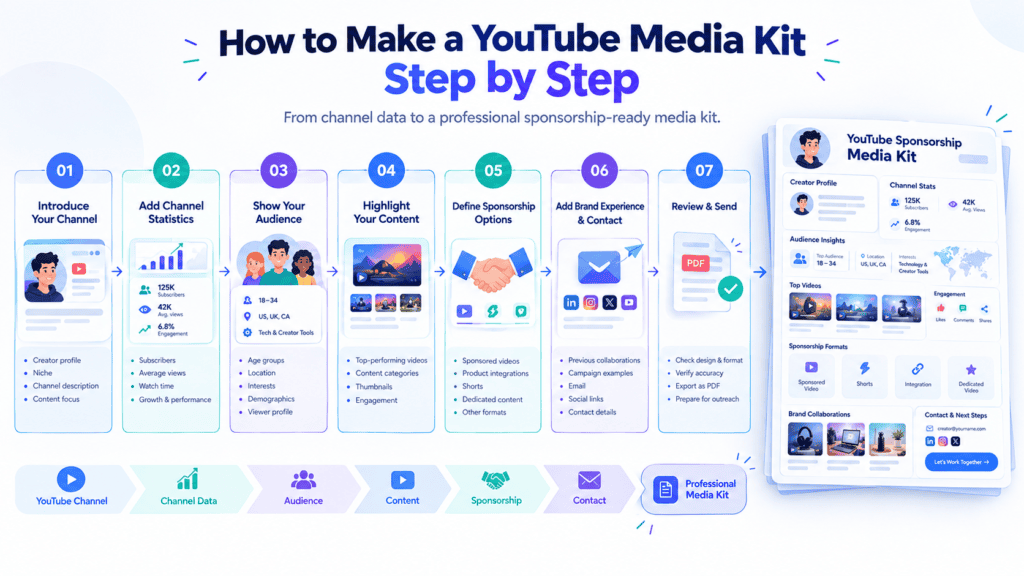
How to make a media kit for YouTube sponsorships step by step
How to make a media kit for YouTube sponsorships step by step
Step 1: Collect your latest YouTube analytics
Start with evidence, not design. Launching a presentation with a pre-set template and no real data to back it up is asking for filler slides.
Get your subscriber count, the number of views for the past 28 and 90-day periods, audience composition, top geographical regions, and overall performance. Gather information on your best-performing content pieces, as well as the outcomes of any past campaigns – clicks, promo code usage, comments.
If you’re in the YouTube Partner Program, YouTube also generates a native Media Kit for you. You’ll find it in YouTube Studio under the Earn section on desktop. It’s a solid starting point for verified numbers, though most creators still build a custom version on top of it for positioning and offers.
Use a YouTube workflow tool alongside your analytics
Your media kit should be based on today’s channel statistics, but the content quality you produce will impact the performance metrics that the brand will see later. A YouTube workflow management tool as ytZolo can assist with video ideas, scripts, titles, descriptions, tags, thumbnails, and overall preparation and publishing of the content in a more organized manner.
Step 2: Define your creator positioning
Sponsors need to place you in about five seconds. Write one sentence that covers content, audience, and value:
A technology channel creating practical AI tutorials for professionals who want to use new tools in their daily workflows.
That single line tells a brand the topic, the viewer, and the reason someone watches. Put it near the top of the kit, above the metrics. If you can’t write it cleanly, the rest of the kit will feel unfocused too.
Step 3: Choose the metrics that actually matter
Don’t include every metric available. A wall of numbers doesn’t read as thorough — it reads as unedited, and it forces the sponsor to do the interpretation you were supposed to do for them.
Pick roughly 5–7 metrics, grouped so each section answers a different question:
Long-form performance — average views per video, average view duration, engagement rate
Shorts performance — views, viewed vs. swiped-away, subscriber conversion
Audience demographics — age bands, gender split, top three countries
Campaign results — CTR, conversions, or code redemptions from past deals
ytZolo’s guide specifically warns against pasting an entire analytics dashboard into the kit. Curate. Every number should earn its place by supporting the case that you can deliver.
Step 4: Select your strongest content
Feature 3–5 videos, not twenty. Choose based on:
Relevance — does it match the kind of brand you’re pitching?
Consistent performance — a repeatable result beats one viral outlier
Audience intent — tutorials and reviews signal purchase intent; entertainment signals reach
Sponsor compatibility — the video should have natural room for an integration
Include the thumbnail, title, view count, and a one-line note on why it performed. Link each one so the sponsor can watch immediately.
Step 5: Add sponsorship opportunities
Be specific about what you’re selling. Vagueness will kill your deal. Make sure to outline what formats you offer:
30–60 sec integrated mention
Dedicated video
Shorts package
Multi-video series or ongoing ambassadorship
Cross platform add-ons (newsletter, community post, podcast read)
Make sure to note turnaround, usage rights, and exclusivity. You don’t have to publish prices here — many creators keep rates on a separate card — but the menu should be unambiguous.
Step 6: Add campaign proof
If you’ve worked with brands before, show the outcome: who the partner was, what you produced, and what it delivered. A short case study with one real number is worth more than a row of logos.
No sponsors yet? Use organic proof instead. Audience comments asking where to buy something, a product mention that drove a spike in views, affiliate conversion data, or strong watch-through on a tutorial all demonstrate the same thing — that your viewers act on your recommendations.
Step 7: Design the media kit
Design should enable the information. Here are some tips:
Use fonts that are easy to read, just two at most
Make sure the branding is consistent across all channels
Leave enough space so that numbers don’t feel crowded
Display figures prominently and clearly, with large type and labels to help skim
Make heavy use of visuals, including thumbnails and stills (not stock images)
Lots of clickable links
Don’t use unnecessary decorative elements.
If a sponsor has to hunt for your view count, the design has failed regardless of how good it looks.
Step 8: Export and test
Export a PDF and check it properly before sending:
Every link opens and points to the right place
Images are sharp, not compressed into mush
File size is reasonable — under 10MB so it doesn’t bounce from inboxes
It reads cleanly on both mobile and desktop
Contact information is obvious and appears on the first and last page
Then run the 30-second test. Hand it to someone unfamiliar with your channel and ask them to name your audience, your performance, what a brand could buy, and how to reach you. If they can do all four inside 30 seconds, the kit works. ytZolo uses this as its practical quality check — and it catches more problems than any amount of redesigning.
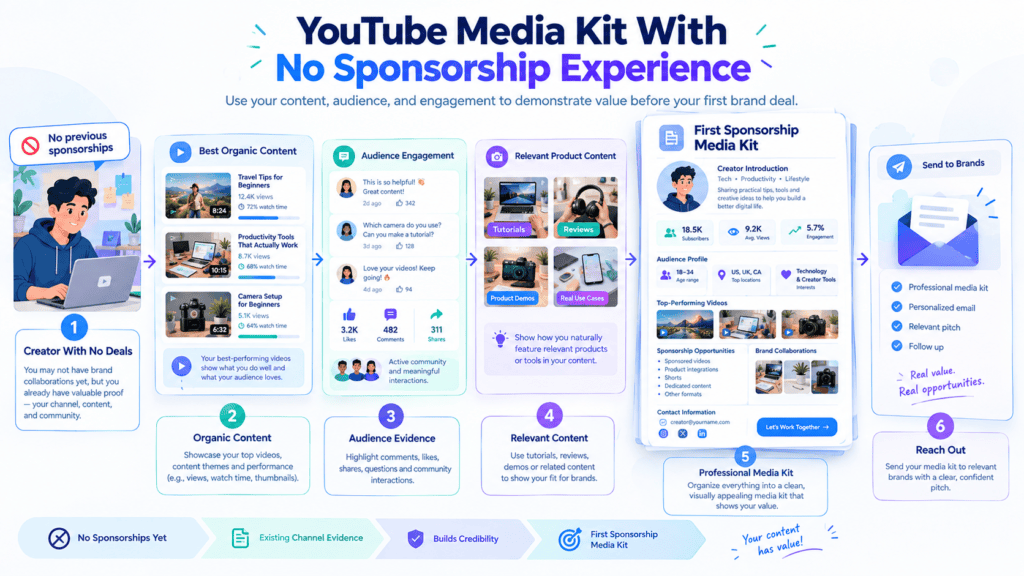
How to make a YouTube media kit with no sponsorship experience
How to make a YouTube media kit with no sponsorship experience
You don’t need a list of brand deals to create a credible YouTube sponsorship media kit. If you are approaching sponsors for the first time, replace sponsorship history with evidence that shows your content can attract and engage the audience a brand wants to reach.
Use your best organic content
Start with three to five organic videos that represent your strongest work.
Choose videos based on more than views. Look for content that demonstrates audience retention, engagement, consistent performance, or relevance to the type of brands you want to work with.
A successful tutorial, review, comparison, or educational video can show a potential sponsor what their product could look like in your content.
Show audience engagement
Views provide reach, but engagement can show how actively viewers respond to your content.
Depending on what is available, include examples of:
Comments
Community responses
Shares
Audience questions
Useful viewer feedback
You don’t need to include dozens of screenshots. Select a few examples that show genuine interest in the topic or content format.
Use relevant product content
If you’ve previously mentioned, reviewed, showed, or recommended a product organically, it can provide useful evidence of category fit.
For example, a creator who regularly reviews AI software can show relevant software content when approaching an AI company.
Be transparent that the content was not a paid partnership. Organic product coverage should demonstrate your existing content style and audience interest, not be presented as previous sponsorship experience.
Show what a future campaign could look like
You can also demonstrate your understanding of sponsored content by presenting a hypothetical campaign concept.
Include:
Product integration idea
Potential video concept
Why the product fits the audience
Possible deliverables
For example, a productivity creator could propose a tutorial showing how a specific tool fits into a real workflow, rather than simply promising to mention the product.
The key principle is simple:
Don’t pretend you have sponsorship proof. Replace missing sponsor proof with real audience and content proof.
That gives potential sponsors something concrete to evaluate while keeping your media kit accurate and credible.
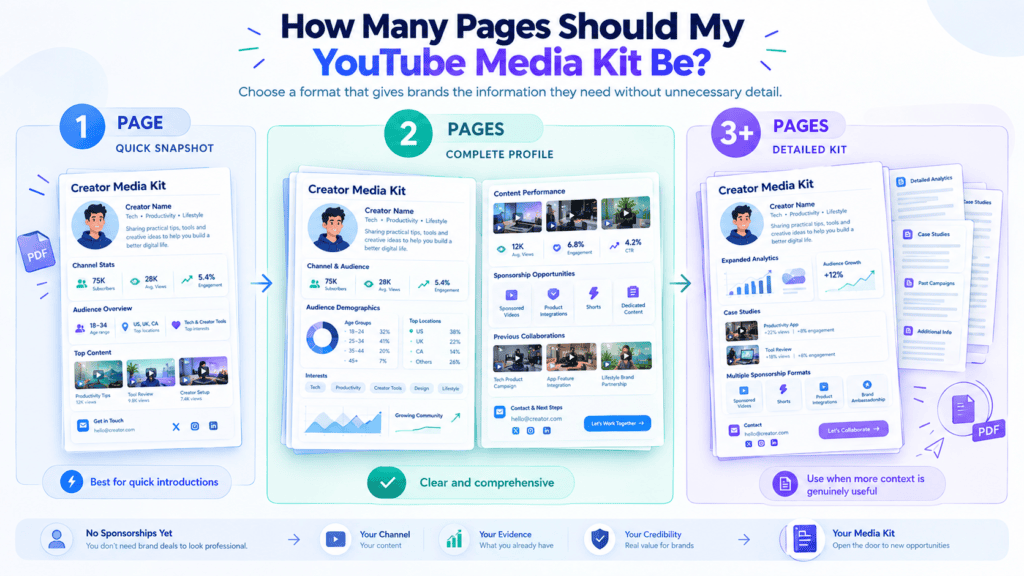
How Many Pages Should My YouTube Media Kit Be?
How Many Pages Should My YouTube Media Kit Be
A good YouTube media kit should be between 1-3 pages, with some reaching 4-8 pages for established YouTubers.
The number of pages will depend on how intricate the channel is and what the potential partner is looking for in the brief.
A single-page document will allow the brand manager to get a snapshot of the channel and its USP (unique selling point).
Ideal for: New channels and small creators.
As most brand managers don’t have a lot of time, the one-page media kit will give them enough information to decide if they need to ask for more. It will include general info about the channel and stats, the primary categories of the YouTube channel, the creator’s contact information, and a few high-level partnership suggestions.
A Multi-page document is better when it comes to bigger creators with an extended history of sponsorship, using different types of content, targeting various markets, and having multiple cases of successful partnerships.
Such a media kit will have an extended list of successful partnerships and use cases on the channel, multiple pages of stats, audience insights, and campaign specifics.
It will also have a breakdown of what the channel has to offer and how it can be leveraged in unique cases per brand.
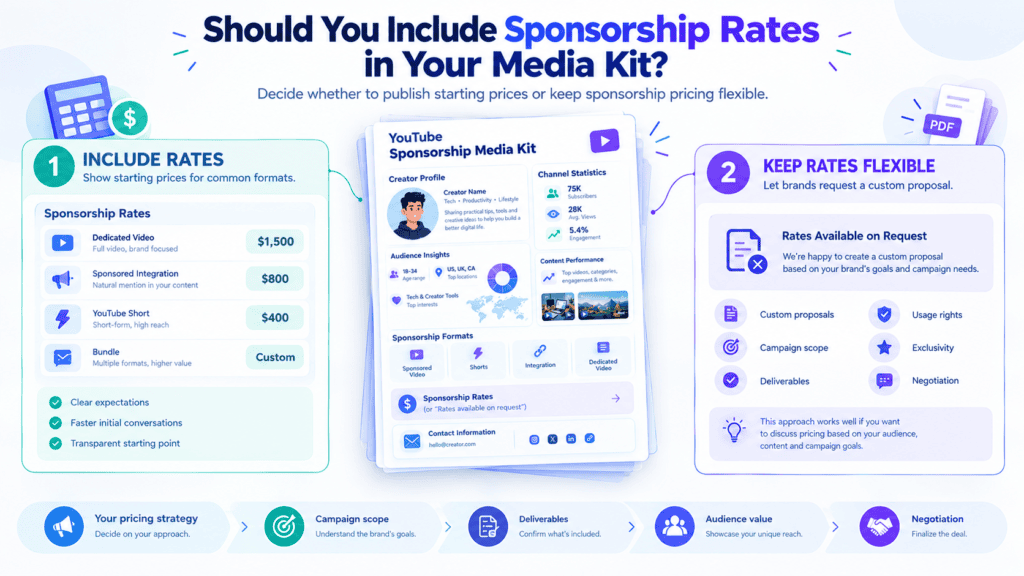
Should you include sponsorship rates in your media kit?
Should you include sponsorship rates in your media kit
This is not a binary choice. It depends largely on how much you standardize and how much control you want to exert over the process
When to include starting at rates or ranges:
It makes sense to define ranges for sponsorship packages that are relatively standardized (such as a 30-sec mid-roll ad or 4 x UGC videos) or if you know your pricing rarely fluctuates. You should always publish starting rates if you want to qualify and weed out budget-constrained brands early on from the discovery phase, as that will save both parties from wasted time
When not to include them:
For most YouTubers, it’s best to keep specific figures out of their media kit and only discuss detailed budgeting with interested brands.
Rates are often dictated by multiple fluctuating factors unique to each brief (exclusivity, length of campaign, ad placement and specifications, production costs, use of paid media for amplification, etc.), so a static figure might limit you unnecessarily.
The general advice across the board is to leave pricing out of the media kit and determine it after discussing a brief’s scope with the brand. vidIQ goes as far as suggesting that creators avoid mentioning pricing altogether until the scope is clear.
A good alternative is to specify deliverables and indicate that rates are scoped to the brief or are available upon request, while also including a couple of past projects with indicative figures (“example project” or “budget range available”).
PDF vs. live YouTube media kit: Which should you use?
PDF vs. live YouTube media kit Which should you use
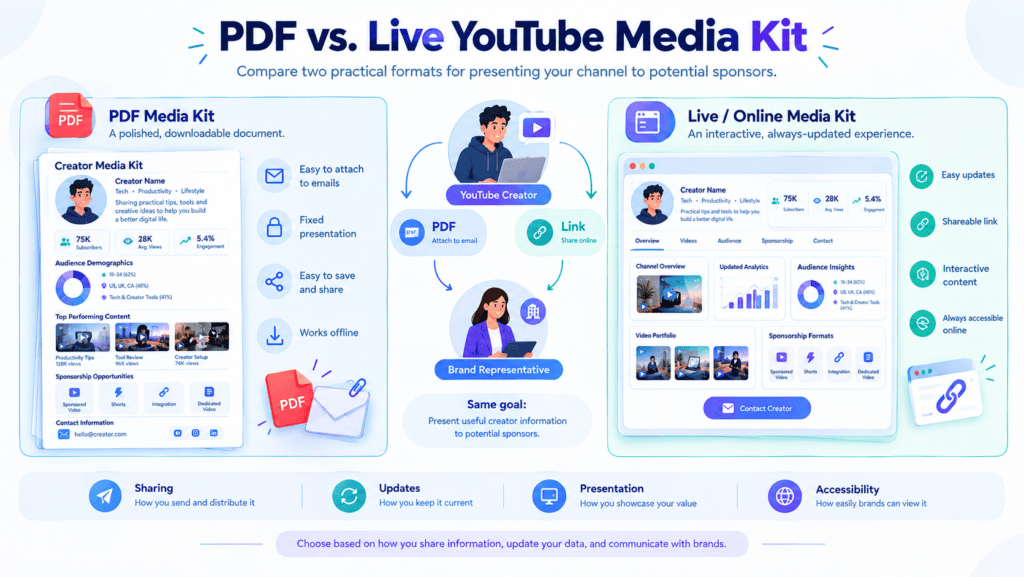
When deciding how to create a media kit for YouTube sponsorships, you can use either a downloadable PDF or a live web-based version. Each format works well in different situations.
PDF media kit
A PDF is useful when you need something a sponsor can quickly open, download, attach to an email, or forward internally.
Advantages:
Easy to attach to outreach emails
Simple for brands and agencies to forward
Provides a fixed snapshot of your channel
Easy to customize for a specific sponsor or campaign
You can create one with tools such as Canva, Google Slides, Adobe Express, or other document and design platforms. YouTube Studio can provide the underlying channel and audience data you need, while creator workflows such as ytZolo can help with the broader content planning and optimization process.
Live media kit
A live media kit works more like a creator profile or partnership page.
Advantages:
Easy to update when metrics change
Gives you one permanent URL to share
Can include interactive elements
Can connect to updated statistics or portfolio content
Platforms such as Beacons, Passionfroot, and CreataKit can be used for web-based creator profiles and partnership information.
For most creators, there doesn’t have to be an either-or decision. Keep a master live version with your latest information, then create customized PDFs when pitching high-value or highly targeted sponsors. This gives you the convenience of a permanent link while still allowing each pitch to feel relevant.
How to customize a media kit for different sponsors
Sending the exact same media kit to every prospective brand limits conversion rates. Sponsors have a relevant audience, so by customizing your presentation, you show how your audience fits their product.
Keep the Core Information Consistent Maintain a standardized baseline for foundational metrics across all versions.
Channel Positioning: The core channel mission and primary content pillars.
Core Audience: Key demographic statistic (age, gender, top regions).
Current Metrics: Recent view counts, engagement rates, and subscriber counts.
Basic Sponsorship Formats: Standard integrated slots, dedicated videos, and YouTube Shorts offerings.
Tailor the Proof Points Swap out case studies, highlight reels, and deep-dive analytics to reflect the specific sponsor’s industry:
Gaming Brands: Showcase gameplay clips, top gaming video performance, and platform-specific viewer engagement data.
AI & Software Brands: Highlight software reviews, tech tutorials, workflow integration videos, and high-intent tech demographics.
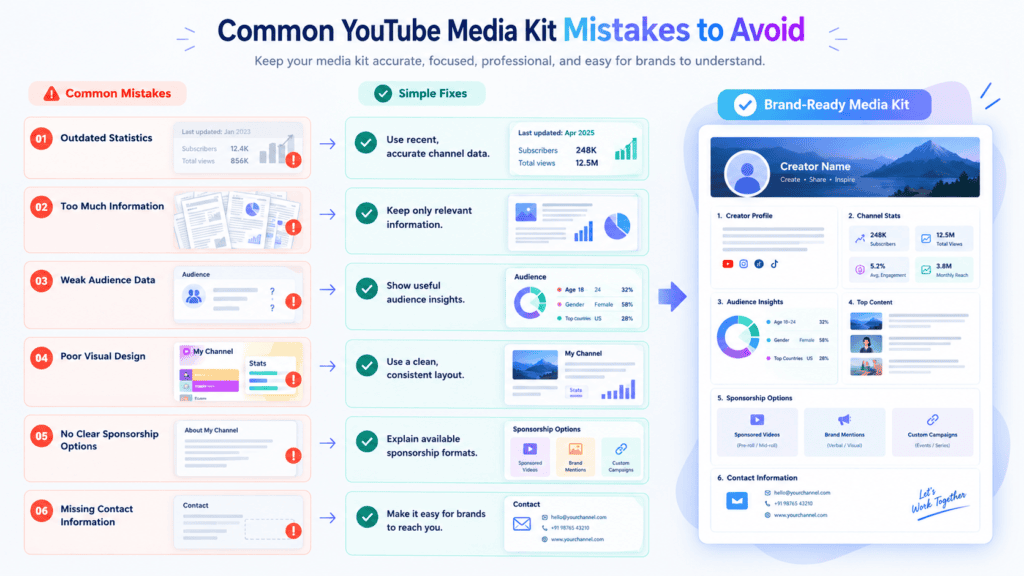
Subscriber count is the easiest metric to inflate and the hardest to trust. Brands know follower numbers can be bought, bots-inflated, or leftover from a channel that pivoted niches. Without the context of views, engagement rate, or the relevance to the audience, a large number at the top might just make people skeptical instead of inspiring confidence.
Including too many metrics
It’s tempting to list every stat you have, but a wall of numbers dilutes your strongest points. Sponsors skim media kits; if they have to hunt for what matters, they’ll move on. Pick the 3-4 metrics that actually predict campaign success and let those lead.
Using one viral video as your normal performance
A single breakout hit isn’t your baseline — it’s an outlier. If a brand books based on your viral video and your sponsored content performs at your typical average, that’s a trust problem. Show a range or a median, not your ceiling.
Using outdated analytics
A media kit with six-month-old screenshots signals neglect. Channels grow, shrink, or shift audiences fast, and brands want to know who they’re reaching right now. Refresh your numbers before every pitch cycle, not just when you remember to.
Making the design more important than the evidence
A polished template won’t rescue thin proof. Brands care about results, not presentation: attractive interfaces hiding unsubstantiated assertions have no value. Your designs should enhance information accessibility and prioritize content.
Hiding sponsorship options
If a brand has to email you just to find out what’s available, you’ve added friction that costs you deals. Specify your available formats, methods of integration, and general price range to let the brands assess the cooperativeness of your offer on their own.
Making exaggerated claims
Using such labels as highly engaging audience or tremendous audience coverage doesn’t mean much to the brands, as they usually have a rough idea of what they signify. Use specific statistics to back up your claims, e.g., engagement rate or watch time instead of abstract assertions.
Sending the same proof to every sponsor
A generic media kit misses the chance to show relevance. Swap in videos and case studies that match each brand’s category or campaign type — it shows you understand their goals, not just your own metrics.
How often should you update your YouTube media kit?
How often should you update your YouTube media kit
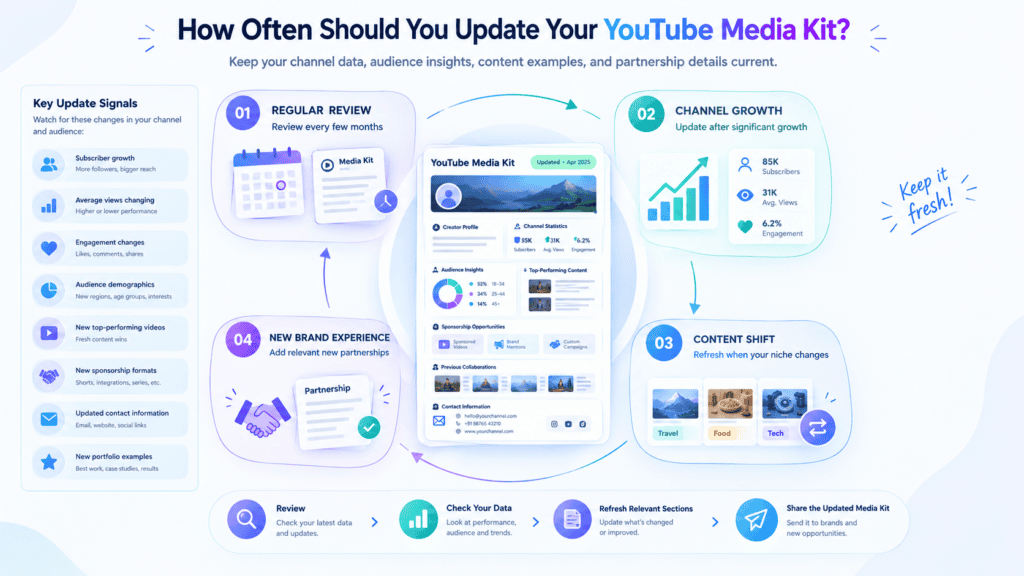
How often you should update your YouTube media kit depends heavily on your channel’s growth velocity. Fixed calendars matter less than key channel milestones.
Update your media kit immediately after:
Major subscriber milestones or sudden audience expansion
A breakout video that drives a surge in views and engagement
Significant demographic shifts in your audience analytics
New, impressive sponsorship results and case studies
New services or packages added to your offerings
Major channel repositioning or changes in content focus
Keep improving what your media kit represents
Your media kit should change as your channel develops. Alongside updating your audience and performance data, maintaining a consistent YouTube content workflow can help you build stronger examples over time. Tools such as ytZolocan support recurring tasks including idea generation, scripting, SEO metadata, and thumbnail development.
YouTube sponsorship media kit checklist
Before sending a media kit to a potential sponsor, double-check this guide of necessary points to cover. Not each section has to be on a separate page, yet the document should give an accurate representation of your channel to a brand, which will consider the given data and choose the most suitable type of sponsorship.
Your media kit should contain:
☐ Creator or channel name ☐ Clear niche and positioning ☐ Audience demographics ☐ Current subscriber count ☐ Typical recent views ☐ Relevant performance metrics ☐ 3–5 strong video examples ☐ Previous brand campaigns, if available ☐ Testimonials, if available ☐ Sponsorship formats and deliverables ☐ Relevant sponsor categories ☐ Short creator bio ☐ Business contact information ☐ Working video, website, and social links ☐ Current and accurate statistics
Before sending the final version of your media kit as a PDF or a link to its online version, make sure to check all the links for dead URLs and update the numbers to the most recent statistics. The document should help a brand find the necessary info about your channel quickly and without confusion.
Frequently Asked Questions About YouTube Media Kits
What should a YouTube media kit include? A well-developed media kit should contain information about your channel, such as its description, the audience’s statistics, engagement rates, views, subscribers’ growth, past brand collaborations, content examples, and other relevant information. It should also include all the necessary contact or booking details to help the advertiser take action.
How do I make a media kit for YouTube sponsorships? Start with importing your YouTube Analytics information. Then, group the data based on the information that brands would be interested in, such as the characteristics of your audience, their level of engagement, and the type of content that you provide. Make sure to include screenshots, past results, and contact information.
Do small YouTubers need a media kit? Yes. Because brands are now looking to connect with niche audiences and a media kit can demonstrate to them the kind of audience one can reach even with a small subscriber base.
Can I make a YouTube media kit without brand deals? Sure. Use audience insights, content quality, and engagement to this end. In addition, include a few examples of great videos and explain what kind of collaboration you want to establish, even if you have none yet.
Should I put my rates in my YouTube media kit? It’s completely up to you. Some creators will list what your starting price or packages are for transparency; others may want to go over the budgeting with each brand they work with. Either way you choose to do it, it’s perfectly fine!
How many pages should a YouTube media kit be? One to two pages is ideal. Keep it scannable: brands review dozens of these, so a tight, visual layout beats a long document every time.
How often should I update my media kit? Update it every 1–3 months, or after achieving a meaningful milestone (subscriber growth, a viral video, new collaboration). Statistics that have not been updated for a long time may confuse the audience.
What metrics should I show brands? It should include views, engagement, audience demographics (age, location, gender), watch time, and other campaign statistics. This data will provide a more accurate picture of the channel’s commercial performance than subscriber counts.
Conclusion
A media kit doesn’t need to prove you’re the biggest creator in your niche. It needs to make your audience, performance, sponsor fit, and collaboration options easy to understand.
A smaller creator who provides information about the target audience and high-quality, engaging content will be able to offer a more compelling commercial proposition than a bigger creator whose media kit lacks specifics and has a generic bio. This is the case because relevance and quality are more important than quantity.
Author Bio
Anshika Verma is a content researcher and writer at ytZolo, focused on AI, YouTube, creator tools, and digital marketing. She researches products, tools, and industry trends to create practical, evidence-based content for creators and businesses.