
By Anshika Verma · Content & SEO Researcher, ytZolo · Updated August 2026 · ~14 min read
Quick answer: The fastest captions out of sync fix is to stop nudging individual subtitle blocks and re-run forced alignment against your final, exported audio file. Most sync errors come from editing after captions were generated — a trim, a re-encode, or a dropped frame — not from a bad export. Clean the audio, match your script exactly, and re-align rather than patch. Platforms like ytZolo build this re-sync step directly into the caption and dubbing workflow, so fixing drift takes one pass instead of a manual timeline crawl.
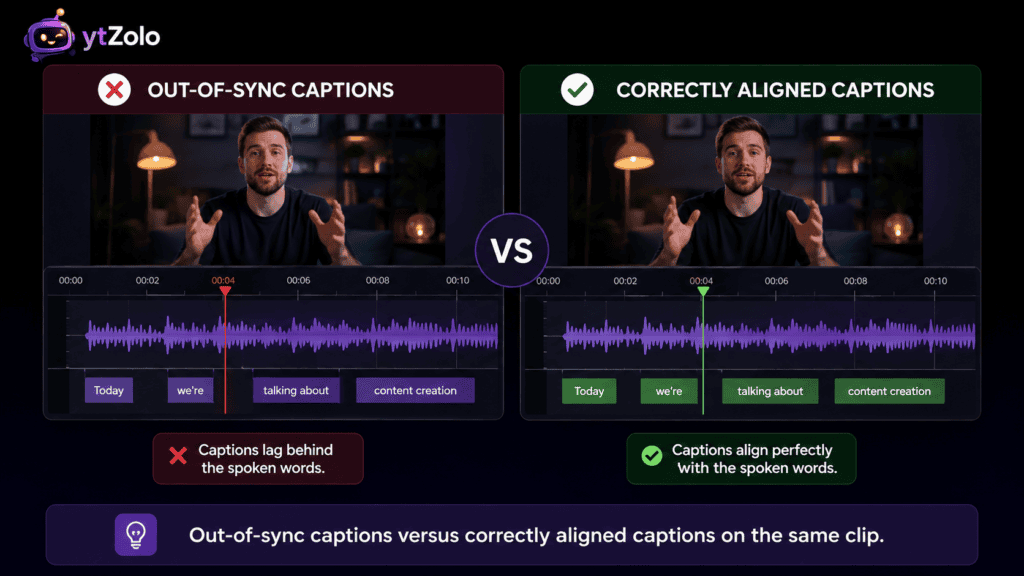
You hit publish, watch the video back, and something feels off. The words on screen land a beat after someone says them — or worse, a full sentence early.
That gap is more common than most creators realize, and it almost never means your export failed. It usually means one specific step in the pipeline slipped.
This guide walks through exactly why captions drift, how to tell the difference between a one-time offset and creeping drift, and the fastest captions out of sync fix for each situation — whether you’re working in a caption editor, an NLE, or an AI alignment tool.
Table of Contents
What “Out of Sync” Actually Means
“Out of sync” covers a few different symptoms, and they don’t always share the same fix.
Sometimes every caption is late or early by the same amount, start to finish. Other times, timing looks fine at the start and gets progressively worse by the end of the video.
Knowing which pattern you’re looking at is the first real step in any captions out of sync fix, since the two problems trace back to different root causes.
Common Causes of Caption Sync Errors
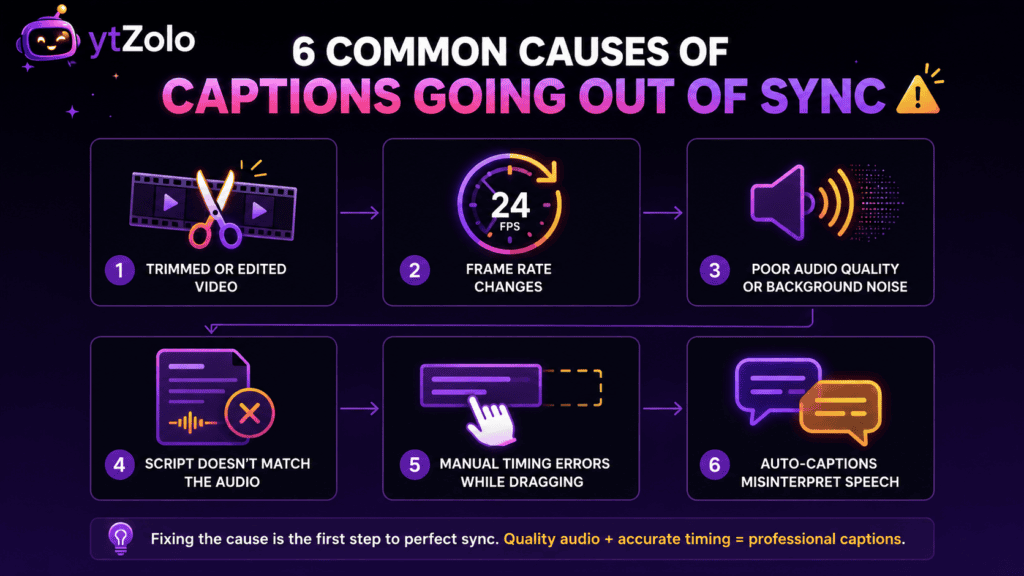
Before fixing anything, it helps to know what actually broke. Here are the causes that show up again and again.
The Video Was Trimmed or Re-Encoded After Captions Were Generated
This is the single most common cause. You generate captions, then cut a few seconds from the intro or re-export at a different frame rate — and every timestamp after that edit point shifts.
The caption file itself didn’t get corrupted. It’s simply timed against a version of the video that no longer exists.
Frame Rate Mismatch
Captions timed against 30fps footage will drift if the final export runs at 24fps or 25fps, since timestamp math depends on a consistent frame rate assumption.
This usually shows up as a small, growing gap rather than a sudden jump, which makes it easy to mistake for a different problem.
Auto-Generated Captions From Noisy Audio
Automatic speech recognition guesses at both the words and the timing simultaneously. Background music, overlapping voices, or a noisy room all degrade that guess.
A voice isolator run before captioning removes a huge share of this error before it ever reaches your subtitle file.
Script and Audio Don’t Actually Match
If you’re using a scripted approach with forced alignment, the aligner treats your script as ground truth. A cut line, an ad-lib, or a typo throws off everything after that point.
Manual Edits That Weren’t Re-Synced
Dragging one subtitle block earlier to “fix” it can quietly break the timing of every block that follows, especially in editors that don’t auto-cascade adjustments.
Overlapping Speakers or Fast Cross-Talk
Two people talking at once is genuinely hard for any alignment system, automated or manual, and it’s the section most likely to need a second look after any fix.
Fixed Offset vs. Progressive Drift: How to Tell Them Apart
This distinction changes which captions out of sync fix actually works, so it’s worth checking before you touch anything.
Fixed offset means every caption is off by roughly the same amount throughout the video — often a frame-rate mismatch or an export delay.
Progressive drift means captions start on time and fall further behind as the video plays, which almost always traces back to an edit made after alignment ran.
Watch the video at normal speed, sound on, and compare the gap at the start of the video to the gap near the end. If it grows, you’re dealing with drift. If it stays roughly constant, it’s an offset.
| Symptom | Likely Cause | Fix Approach |
|---|---|---|
| Same gap start to finish | Frame rate or export offset | Shift the whole file by a fixed amount, or re-align |
| Gap grows over time | Edit made after alignment | Re-run alignment on the final audio |
| Random, scattered mismatches | Noisy audio or overlapping speech | Clean audio, then re-align |
| Only one section is off | Script/audio mismatch in that section | Fix that section’s text, re-align just that segment |
The Fastest Captions Out of Sync Fix: Re-Run Alignment
For nearly every case beyond a single stray block, the reliable captions out of sync fix isn’t nudging timestamps by hand — it’s re-running forced alignment against your final, exported audio.
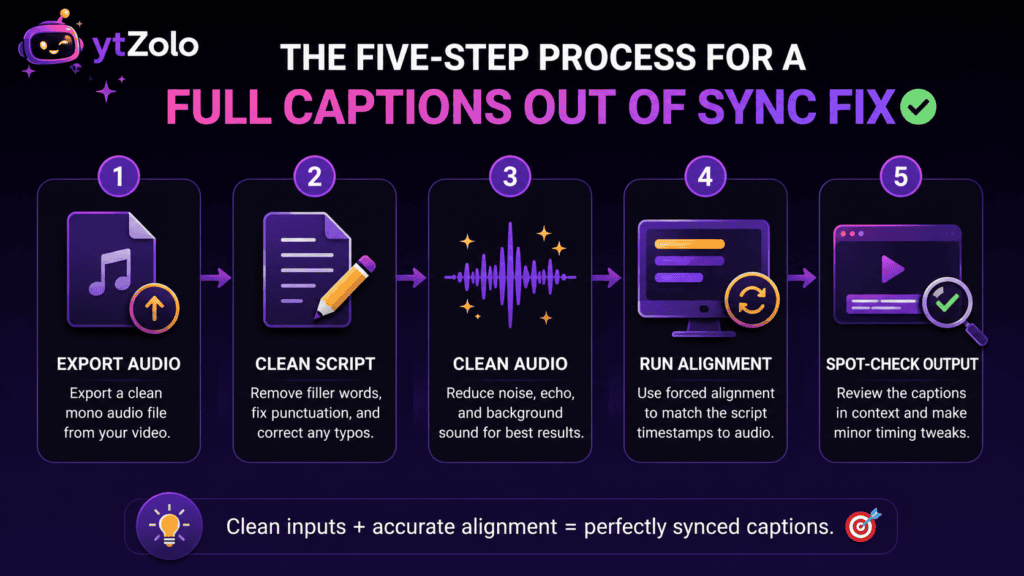
Here’s the short version of that process.
Step 1: Export your final audio track. Pull audio from the exact video version you’re publishing, not an earlier cut.
Step 2: Match your script to what’s actually spoken. Remove cut lines, fix typos, and add natural punctuation so the aligner can find sentence boundaries correctly.
Step 3: Clean the audio if it’s noisy. A quick pass through a voice isolator measurably tightens the output on tracks with background music or room noise.
Step 4: Run the alignment pass. Whether you’re using an open-source library or a platform tool, this step maps your script to the audio timestamp by timestamp, from scratch.
Step 5: Spot-check the output. Preview the new caption file against the audio at real playback speed, paying closest attention to any overlapping-speech sections.
Our full walkthrough on how to prepare audio for forced alignment covers each of these steps in more depth, including exact format recommendations for export.
Manual Fixes for Quick, One-Off Corrections
Not every captions out of sync fix needs a full realignment pass. If only one or two blocks are off — say, a single line that lags by half a second while everything else is fine — a smaller manual correction is usually enough.
In that case, most caption editors let you select the block and nudge its start and end time directly, without touching anything before or after it.
Check whether your editor cascades the shift. Some tools automatically push every following block by the same amount when you adjust one; others don’t, and stopping there can create a brand-new sync error later in the file.
Use waveform view, not just the text list. Lining a subtitle block up against the actual audio waveform peak is far more accurate than guessing based on the timestamp number alone.
Save a version before manual edits. If the manual patch doesn’t hold up on review, you want an easy way back to the pre-edit file rather than starting over.
Manual patching works fine for isolated fixes. It stops being efficient the moment more than a handful of blocks need attention — that’s the point where a full re-alignment pass is genuinely faster.
Fixing Sync Issues on YouTube Specifically
If you’re seeing drift on a video that’s already live, YouTube gives you a few direct paths to correct it.
Replace the caption file entirely. In YouTube Studio, under Subtitles, you can remove the existing track and upload a freshly re-aligned SRT or VTT file without touching the video itself.
Don’t rely on YouTube’s auto-captions for scripted content. Auto-generated captions guess at both text and timing from the audio alone, which is more error-prone than aligning a known script, especially for names or jargon.
Re-check after any video replacement. If you use YouTube’s “Replace video” feature to fix an unrelated issue, your caption timing needs a fresh review, since the underlying file changed.
Test on mobile specifically. A large share of YouTube viewing happens with sound off, so sync problems that feel minor on desktop can be much more noticeable — and more likely to cause a viewer to scroll past — on a phone.
Fixing SRT and VTT Files Directly
Sometimes the fastest captions out of sync fix is a simple, uniform time shift applied to the whole file — especially once you’ve confirmed it’s a fixed offset rather than drift, and you just need to fix out of sync captions in the raw subtitle file itself.
For a fixed offset: most subtitle editors let you shift every timestamp in the file by the same number of milliseconds in one action, which resolves a constant lag or lead instantly.
For SRT files specifically: each block’s timestamp follows a strict HH:MM:SS,mmm format — a text editor with find-and-replace can work for simple shifts, but a dedicated subtitle tool avoids formatting mistakes on longer files.
For VTT files: the same logic applies, though VTT’s timestamp format uses a period instead of a comma, so don’t mix formats when hand-editing.
If the file shows progressive drift instead of a fixed offset, a uniform shift won’t actually fix it — that pattern needs a full re-alignment pass, not a timestamp shift.
Preventing Sync Errors Before They Happen
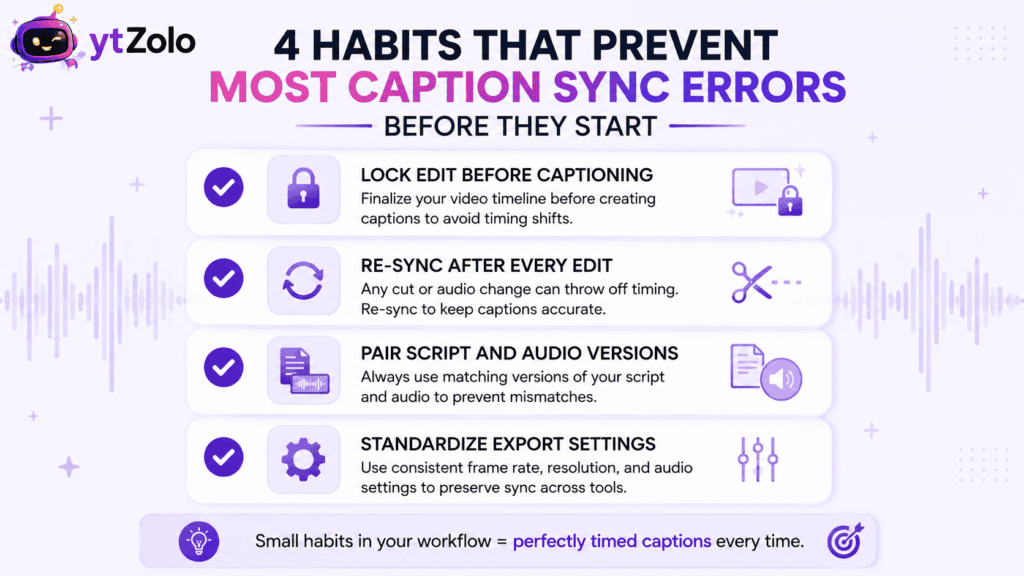
Every fix above costs less time than it takes to prevent the error in the first place, so it’s worth building a couple of habits into your regular workflow.
Lock your edit before generating captions. Generate or align captions only after your final cut is truly final, not before a planned trim.
Re-sync automatically after any edit. Treat a trim or re-encode as an automatic trigger to re-run alignment, rather than something you’ll “check later.”
Keep script and audio versions paired. Name files so a script version and its matching audio are obviously linked, which prevents accidentally aligning against the wrong take.
Standardize your export settings. Locking frame rate and audio format across your pipeline removes one of the most common causes of a fixed-offset error before it can happen.
Word-Level vs. Phoneme-Level: Does Granularity Matter Here?
Not for a standard sync fix. Word-level alignment gives a start and end timestamp for each word, which is exactly what SRT and VTT subtitle formats expect and display.
Phoneme-level alignment times individual speech sounds within each word — useful for animated lip-sync, but not something a caption file or a viewer’s player actually reads.
If you’re troubleshooting drifted captions, default to word-level output. Our detailed comparison of phoneme-level alignment vs. word-level breaks down exactly when the finer granularity is worth the extra processing time — and for a caption sync fix, that’s almost never.
Does This Affect Your SEO?
Indirectly, yes — but not the way most creators assume. Search engines crawl the text inside your caption file, and that text is indexed whether the timing is perfect or a few seconds off.
What sync accuracy actually affects is watch time. Viewers disengage quickly when captions visibly lag behind speech, and that drop in retention is a real ranking signal, even though the drift itself was never a direct penalty.
Our full breakdown of whether caption sync affects SEO walks through the published data on this, including why the crawl layer and the engagement layer are two separate things.
Choosing a Realignment Tool
If you’ve decided a full re-alignment pass is the right captions out of sync fix, you’ve got two broad paths: open-source libraries or a platform-based tool.
Open-source options like the Montreal Forced Aligner and Gentle give you direct control over the underlying acoustic model, at the cost of local setup — Python environments, dependency management, and some audio-processing familiarity.
Platform tools run the same alignment process through a simple upload-and-generate interface, which tends to suit creators fixing sync issues on a recurring basis rather than as a one-time research project.
Our head-to-head on Montreal Forced Aligner vs. Gentle compares setup effort, language coverage, and output format in detail if you’re leaning toward the open-source route.
How ytZolo Handles This
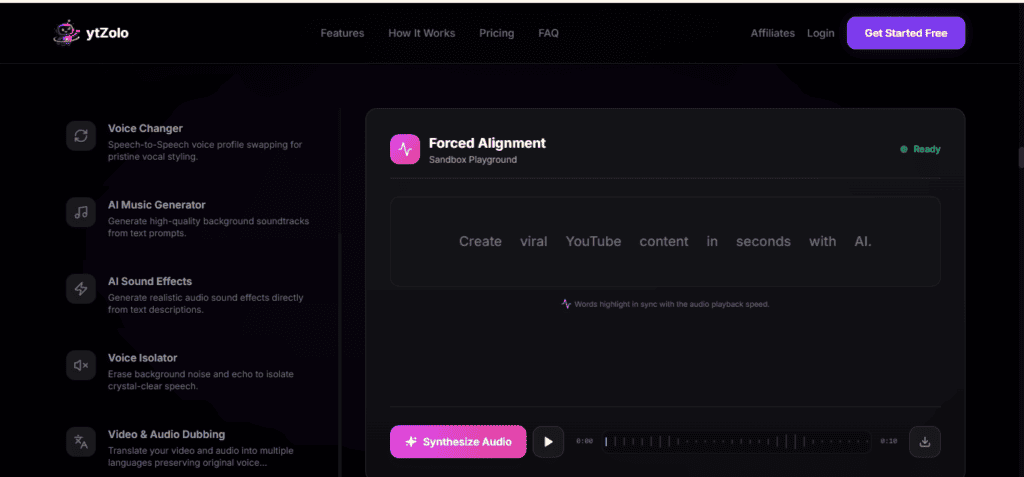
ytZolo folds the entire re-sync process into its Audio Studio, so fixing drifted captions doesn’t mean exporting files between four separate tools.
A typical fix looks like: clean the audio with the built-in Voice Isolator, confirm your script matches the final cut, run word-level forced alignment against the exported audio, and export the corrected caption file — all inside one workflow.
Because AI voice generation, the Dubbing Studio, and alignment all sit in the same platform, a re-sync after a script edit or a translated version is a rerun rather than a rebuild from scratch. That matters most for creators publishing across multiple languages, where the YouTube video localization workflow means re-checking sync on every dubbed track.
Quick Fix Checklist
Use this as a fast reference any time you need a captions out of sync fix, whether it’s a one-block nudge or a full realignment pass.
- Confirm the pattern first — fixed offset or progressive drift decide which fix actually works.
- For a single stray block — nudge it manually against the waveform, and check whether following blocks need adjusting too.
- For a whole-file offset — apply a uniform timestamp shift across the file.
- For drift or multiple errors — re-run forced alignment against your final exported audio, not an earlier cut.
- Always clean noisy audio first — background noise degrades any alignment method equally.
- Re-check after every future edit — a trim or re-encode is a trigger to re-sync, not an afterthought.
Frequently Asked Questions
What’s the quickest captions out of sync fix for a live YouTube video?
Export a corrected SRT or VTT file and replace the existing caption track in YouTube Studio under Subtitles. There’s no need to re-upload the video itself.
Why do my captions start fine but drift by the end of a long video?
That’s progressive drift, and it almost always means the video was trimmed, re-encoded, or had frames dropped after the caption file was generated. Re-running alignment against the final audio fixes it.
Can I fix out-of-sync captions without any special software?
For a single fixed offset, a plain-text editor and careful find-and-replace on the timestamps can work. For drift or multiple errors, a dedicated caption tool or realignment pass is far more reliable.
Does re-aligning captions change the actual words in my subtitles?
No. Forced alignment only recalculates when each word appears — it doesn’t rewrite or edit the text itself, as long as your script matches what’s actually spoken.
How do I know if my caption problem is a frame rate issue?
Frame rate mismatches usually produce a fixed offset rather than growing drift, since the timing math is off by a consistent ratio throughout the file rather than accumulating error over time.
Will fixing caption sync improve my video’s ranking?
Not directly, since search engines index caption text regardless of timing. It can improve retention and watch time, though, which are ranking signals YouTube does weigh.
Do I need to redo captions in every language if I fix the original?
Yes. Each dubbed or translated version needs its own alignment pass against its own audio track — reusing timestamps from the original language across a translation is a common cause of drift.
About the Author
Anshika Verma is a Content & SEO Researcher at ytZolo, specializing in AI audio and video production technology for creators. She writes about voice AI, dubbing, localization, and caption tooling, drawing on hands-on testing of forced alignment, transcription, and text-to-speech systems across the industry. Reach her at anshika@ytzolo.com.
This article was researched and fact-checked against current published documentation on forced alignment tools, YouTube Studio’s caption features, and W3C accessibility guidance as of August 2026. It reflects hands-on testing rather than a single source and will be updated as caption tooling continues to improve.

