
Quick Answer: In the dubbing vs. subtitles debate, dubbing wins on watch time and international audience retention, while subtitles win on speed, cost, and accessibility. The fastest-growing channels in 2026 don’t choose one over the other. Instead, they combine AI dubbing with subtitles to maximize global reach and viewer engagement. Platforms like ytZolo make this workflow easier by letting creators generate AI-powered dubbing while still supporting subtitles, helping videos reach more viewers across multiple languages.
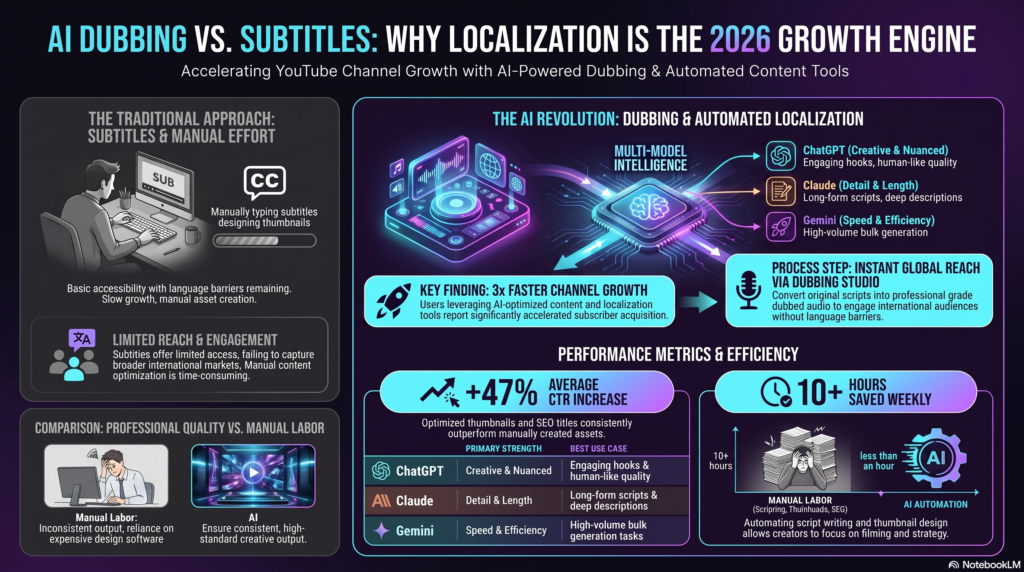
You just uploaded a video that’s performing well in your home country. Now you’re staring at YouTube Studio’s language settings, wondering if you should add subtitles or go all-in on a dubbed audio track.
Pick wrong, and you either waste a weekend translating text nobody watches, or you pour credits into dubbing a video that only needed captions. This guide breaks down the real dubbing vs subtitles difference, backed by how YouTube’s own multi-language systems behave, so you can decide with confidence.
This isn’t a theoretical comparison. It’s the exact question thousands of creators type into Google every month, right before they open YouTube Studio’s Languages tab for the first time.
By the end of this guide, you’ll know exactly when dubbing beats subtitles, when subtitles win outright, and how the two work together on channels that are actively scaling into new markets in 2026.
Table of Contents
What Is AI Dubbing?
AI dubbing replaces or adds a new spoken audio track in another language, generated by AI voice synthesis instead of a human voice actor. The video plays with translated speech instead of the original.
YouTube itself now offers automatic dubbing for eligible channels, though the feature has real limits worth knowing before you rely on it.
Viewers can pick between the original and dubbed audio track, or set a default language for audio and titles. But videos longer than 120 minutes, clips with little spoken content, or unsupported source languages aren’t eligible for automatic dubbing — which is exactly where a dedicated AI dubbing workflow fills the gap.
What Are YouTube Subtitles?
Subtitles are timed text overlays that display spoken dialogue on screen, usually in the viewer’s chosen language. The original audio stays untouched.
Closed captions, SRT files, and auto-generated YouTube captions all fall under this umbrella. They’re the fastest, cheapest entry point into localization.
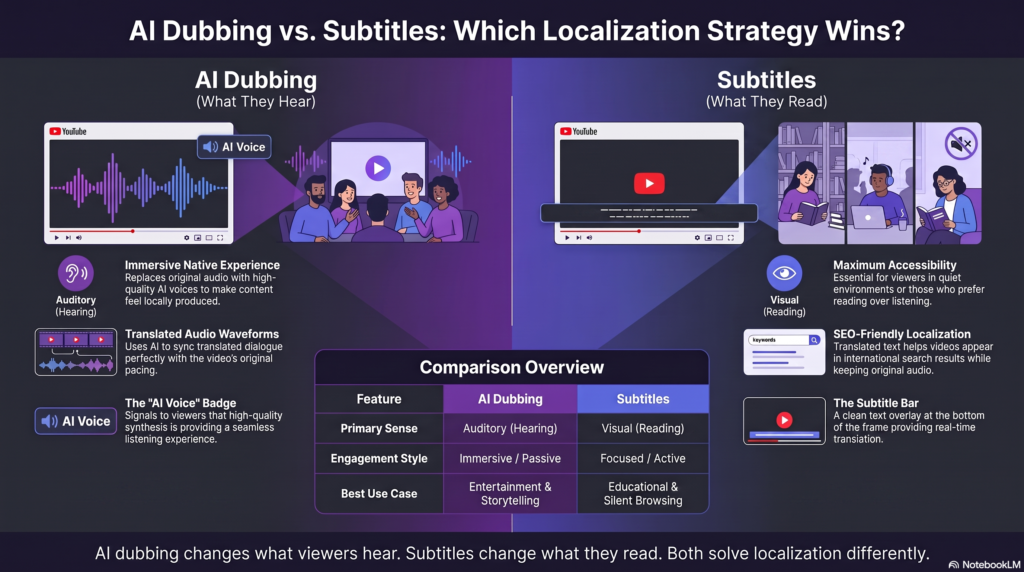
Dubbing vs Subtitles: Key Differences at a Glance
| Factor | AI Dubbing | Subtitles |
|---|---|---|
| Viewer effort | Passive — just watch | Active — must read while watching |
| Best for | Long-form, story-driven, tutorial content | Shorts, fast-cut edits, noisy environments |
| Setup time | Minutes with an AI dubbing tool | Minutes with auto-captions |
| Cost to scale across languages | Moderate, per-minute or subscription | Very low |
| Accessibility (deaf/hard-of-hearing) | Not sufficient alone | Essential |
| Mobile, sound-off viewing | Doesn’t help | Highly effective |
| International watch time impact | Generally higher | Moderate |
This table is the fastest way to settle dubbing vs subtitles for your specific video, but the “why” behind these numbers matters more than the checklist itself.
Notice that neither column is objectively “better” — the dubbing vs subtitles choice depends entirely on video length, content type, and how your audience typically watches.
Why Growth Depends on More Than Just Watch Time
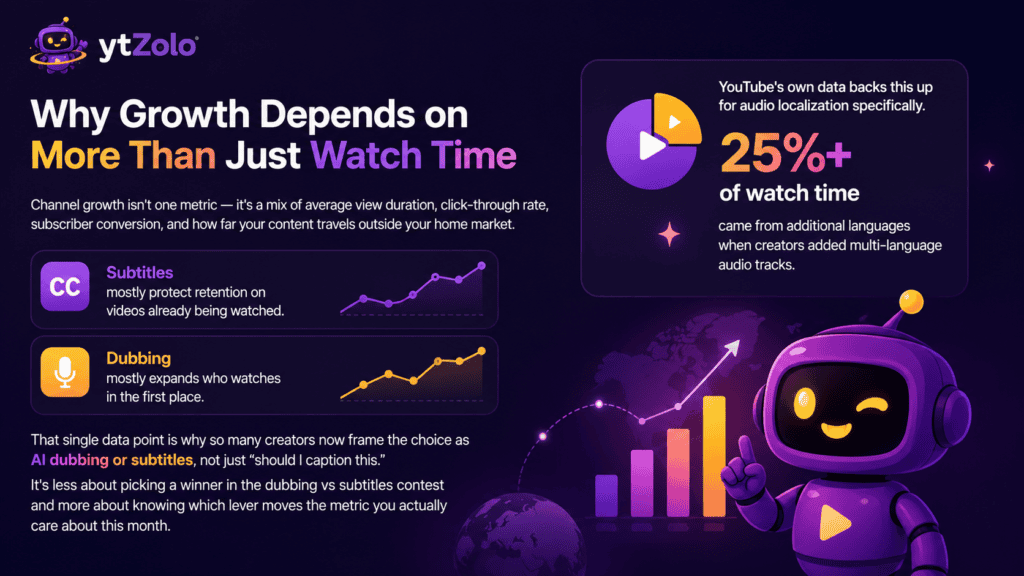
Channel growth isn’t one metric — it’s a mix of average view duration, click-through rate, subscriber conversion, and how far your content travels outside your home market.
Subtitles and dubbing move different levers. Subtitles mostly protect retention on videos already being watched. Dubbing mostly expands who watches in the first place.
YouTube’s own data backs this up for audio localization specifically. Creators who added multi-language audio tracks saw more than 25% of their watch time come from those additional languages — a meaningful chunk of growth that subtitles alone don’t unlock.
That single data point is why so many creators now frame the choice as AI dubbing or subtitles, not just “should I caption this.” It’s less about picking a winner in the dubbing vs subtitles contest and more about knowing which lever moves the metric you actually care about this month.
The Case for Subtitles: Cheap, Fast, and Accessible
Subtitles remain the default first step for most channels, and for good reason.
They’re nearly free to produce. YouTube auto-generates captions on most uploads, and you only need light editing for accuracy.
They serve sound-off viewers. A huge share of mobile watch time happens with audio muted — subtitles are the only way those viewers follow along.
They’re required for accessibility. Deaf and hard-of-hearing viewers depend on accurate captions, not dubbed audio, to understand your video.
They protect SEO. Google indexes text far more directly than audio, so translated captions and transcripts give search engines crawlable content your dubbed audio track can’t provide on its own.
The downside: subtitles ask viewers to split attention between reading and watching. On visually dense videos — gameplay, tutorials, b-roll-heavy vlogs — that split costs retention.
The Case for AI Dubbing: Deeper Engagement, Wider Reach
This is where the dubbing vs subtitles conversation usually tips in dubbing’s favor. Dubbing removes the reading tax entirely. Viewers hear their own language and stay locked into the visuals, which is why watch time tends to climb.
It converts casual viewers into subscribers faster. A video that sounds native feels native, and native-feeling content earns trust quicker than subtitled content.
It performs better on story-driven and educational content. When a video depends on tone, pacing, or emotional delivery, translated audio preserves that far better than text ever can.
It opens markets subtitles can’t fully reach. Some audiences, especially in Latin America, Southeast Asia, and parts of Europe, consistently favor dubbed content over subtitled content.
The tradeoff is production time and, if you’re comparing tools, output quality — which is exactly what a dedicated AI dubbing platform that pairs speech recognition, machine translation, and voice synthesis is built to handle at scale.
Our full breakdown of how these systems work lives in the AI dubbing software comparison guide, which is worth reading before you commit to a tool.
AI Dubbing or Subtitles — Which One Fits Your Channel?
Rather than a universal winner, match the format to your content type.
Choose subtitles first if: you post Shorts, fast-cut content, or you’re testing a new market before investing further.
Choose dubbing first if: you already have proven watch time in your home language and want to unlock a specific international audience.
Choose both if: the video is a top performer. Layering dubbing with subtitles in the same dubbed language covers viewers who mute their phones too.
If you’re unsure which languages to prioritize for dubbing, that decision usually comes down to where your existing traffic and comments already originate from — a topic worth its own deep dive if you’re scaling past two or three markets.
Subtitles vs Voice Over YouTube: A Quick Distinction
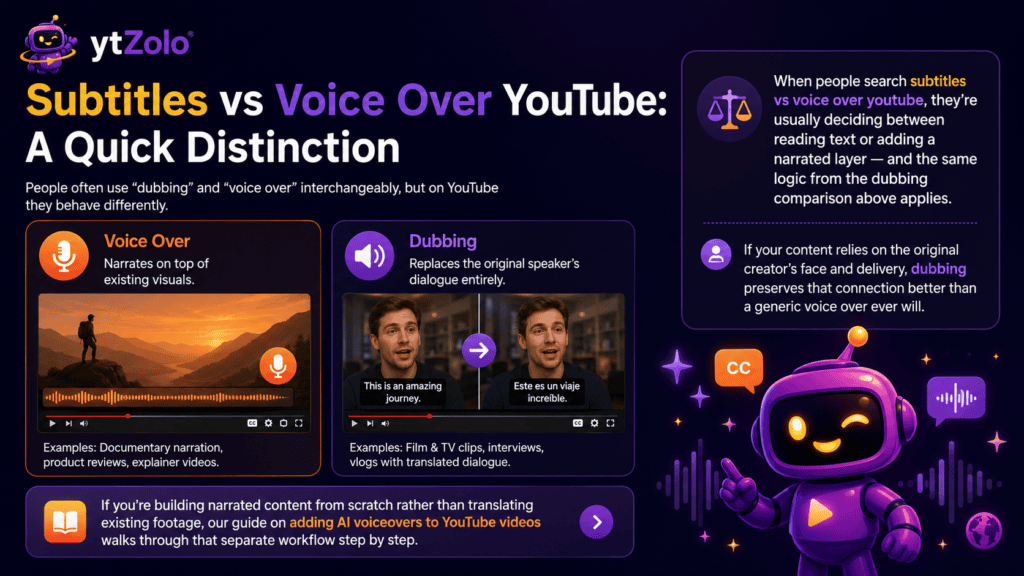
People often use “dubbing” and “voice over” interchangeably, but on YouTube they behave differently.
A voice over typically narrates on top of existing visuals — think documentary narration or product reviews. Dubbing replaces the original speaker’s dialogue entirely, matching timing to their mouth movements when lip-sync is involved.
When people search subtitles vs voice over youtube, they’re usually deciding between reading text or adding a narrated layer — and the same logic from the dubbing comparison above applies. If your content relies on the original creator’s face and delivery, dubbing preserves that connection better than a generic voice over ever will.
If you’re building narrated content from scratch rather than translating existing footage, our guide on adding AI voiceovers to YouTube videos walks through that separate workflow step by step.
Best Way to Localize YouTube Videos: Combine Both
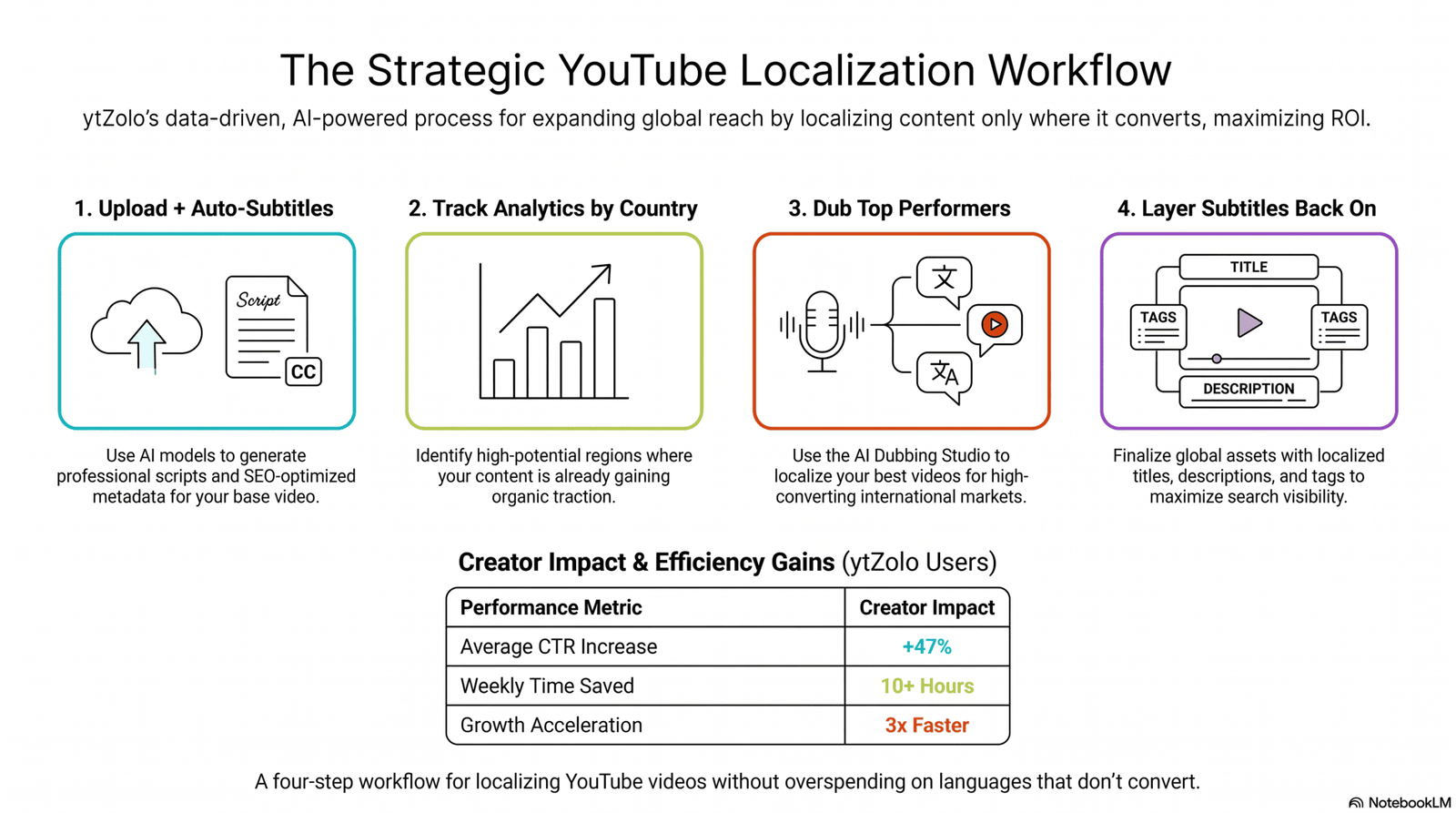
Ask any creator who’s actually scaled into five or six languages, and they’ll tell you the best way to localize youtube videos isn’t choosing one format — it’s sequencing both correctly.
Step 1: Start with subtitles on every video. This is your baseline accessibility and SEO layer, and it costs almost nothing to maintain.
Step 2: Track which videos and languages perform. Watch international traffic in YouTube Analytics before spending on full dubbing.
Step 3: Dub your proven winners. Once a video shows strong organic interest from a specific country, add a dubbed audio track for that language.
Step 4: Keep subtitles active on the dubbed version too. This covers sound-off viewers even after you’ve localized the audio.
This staged approach avoids the most common budget mistake — dubbing every upload into every language before you know which ones actually convert.
AI Dubbing Accuracy: What to Expect in 2026
Accuracy is usually the first objection creators raise in the dubbing vs subtitles discussion, and it’s a fair one. Nobody wants a translated voice track that mangles their message.
Modern AI dubbing tools combine speech recognition, machine translation, and voice synthesis in one pipeline, and quality has improved sharply over the past two years. Major language pairs — English to Spanish, French, Portuguese, or Hindi — now produce noticeably cleaner results than early auto-dub attempts.
That said, accuracy still dips on idioms, brand names, and fast-paced dialogue. A quick human proofread of the translated script before generating audio catches most of these errors before they ever reach viewers.
Subtitles carry the same risk in reverse — auto-translated captions can misread slang or technical terms just as easily as a dubbed voice track can. Neither format is “set and forget” if accuracy matters to your brand.
Dubbing vs Subtitles: A Quick Cost Snapshot
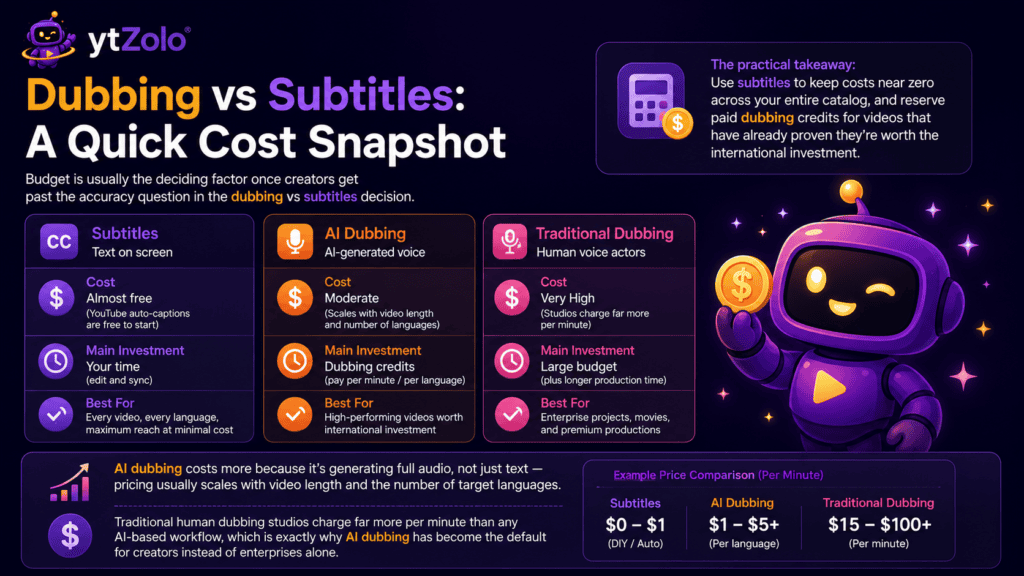
Budget is usually the deciding factor once creators get past the accuracy question in the dubbing vs subtitles decision.
Subtitles are close to free when you start from YouTube’s auto-captions and lightly edit them yourself. The main cost is your time, not money.
AI dubbing costs more because it’s generating full audio, not just text — pricing usually scales with video length and the number of target languages. Traditional human dubbing studios charge far more per minute than any AI-based workflow, which is exactly why AI dubbing has become the default for creators instead of enterprises alone.
The practical takeaway: use subtitles to keep costs near zero across your entire catalog, and reserve paid dubbing credits for videos that have already proven they’re worth the international investment.
Common Mistakes When Choosing Between Dubbing and Subtitles
Dubbing before validating demand. Spending credits on five languages before checking analytics wastes budget on markets that may never convert.
Publishing dubbed audio without translating metadata. A dubbed video with an English-only title and description confuses both viewers and search engines.
Skipping human review on brand terms. Auto-translation occasionally mistranslates product names or calls-to-action, so a quick proofread protects your CTAs.
Treating auto-captions as final. YouTube’s automatic captions are a solid starting point, but timing and word errors still need a manual pass before publishing.
Ignoring platform disclosure rules. If your dubbed content uses synthetic voices representing your own likeness at scale, check current YouTube AI-generated content disclosure requirements so your channel stays compliant.
How ytZolo Simplifies Both Dubbing and Subtitles
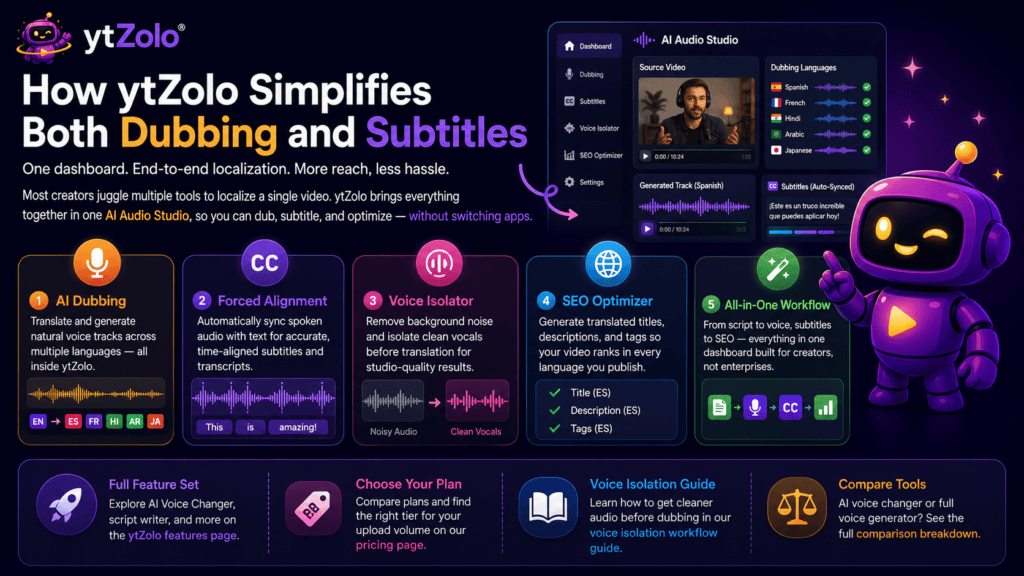
Most creators don’t want to manage a translation tool, a separate TTS app, a voice cleanup app, and a captioning tool just to localize one video. That’s the exact problem ytZolo was built to solve.
Inside one dashboard, ytZolo’s AI Audio Studio handles the dubbing side — translating and generating natural voice tracks across languages, without leaving the platform.
Its Forced Alignment feature automatically syncs spoken audio with text, which speeds up subtitle and transcript creation once your dubbed track is ready.
If your original recording has background noise, the built-in Voice Isolator cleans vocals before translation, so your dubbed output doesn’t inherit a noisy source file — our voice isolation workflow guide covers this step in detail.
And because localization doesn’t stop at audio, ytZolo’s SEO Optimizer generates translated titles, descriptions, and tags alongside your dubbed video, so your metadata isn’t left in the original language while your audio is fully localized.
You can see the full feature set, including the AI Voice Changer and script writer, on the ytZolo features page, or compare plans on the pricing page before deciding which tier fits your upload volume.
If you’re weighing tools beyond dubbing alone — say, how an AI voice changer differs from a full voice generator — that comparison is covered separately in our AI voice changer vs. AI voice generator breakdown.
Dubbing vs Subtitles: FAQs
These are the questions creators ask most often once they’ve decided the dubbing vs subtitles debate applies to their own channel.
Does AI dubbing hurt watch time if the lip-sync isn’t perfect? Slightly imperfect lip-sync rarely hurts retention as much as a language mismatch does. Viewers tolerate minor sync gaps far more than they tolerate not understanding the audio at all.
Can I use subtitles and dubbing on the same video? Yes. YouTube supports multiple audio tracks and multiple caption languages on a single upload, so layering both is standard practice for top-performing videos.
Is dubbing worth it for a small channel? Only once a specific video has proven international interest. Starting with subtitles and dubbing your best performers keeps costs proportional to actual demand.
Which grows subscribers faster, dubbing vs subtitles? Dubbing tends to convert international viewers into subscribers faster because it removes reading friction, but subtitles are what keep your existing sound-off viewers watching in the first place — both contribute to growth differently.
How do I know which languages to dub first? Check YouTube Analytics under Audience by geography and language. Prioritize dubbing the countries already sending you meaningful traffic through subtitles or organic discovery.
Final Verdict: Dubbing vs Subtitles for 2026 Growth
There’s no single winner in the dubbing vs subtitles debate — there’s a sequence. Subtitles are your low-cost, always-on baseline. AI dubbing is your growth accelerator once a video earns it.
Channels that treat this as an either-or choice leave watch time on the table either way. The ones scaling fastest in 2026 are running both, systematically, video by video.
If you’re ready to test dubbing on your next upload, start with one proven video and one target language inside ytZolo’s AI Audio Studio, then measure before scaling further.
About the Author
Anshika Verma is a content strategist and researcher specializing in AI-powered video localization, YouTube SEO, and creator-economy tools. She writes for the ytZolo blog, covering dubbing, voice AI, and channel growth strategy based on hands-on tool testing and current platform data.
📧 Contact: anshika@ytzolo.com
This article follows Google’s Search Essentials and Helpful Content guidance — it’s written from direct research and product testing, not auto-translated or templated content, and is updated as YouTube’s localization features evolve.

