
Feature Release Date: July 2026
Introduction
Creating professional audio used to require multiple tools, expensive software, and hours of editing. A creator might use one platform for text-to-speech, another for AI music, another for dubbing, and yet another to remove background noise. Managing these tools increases cost, slows production, and makes collaboration difficult.
To simplify this workflow, ytZolo officially launched its AI Audio Studio on July, 2026.
The new Audio Studio brings together intelligent voice generation, AI-powered music creation, multilingual dubbing, voice enhancement, sound effects, transcript synchronization, and more in a single workspace. Instead of switching between several applications, creators can produce high-quality audio from start to finish inside one platform.
Whether you’re a YouTuber, educator, marketer, podcaster, agency, or business expanding into global markets, ytZolo’s Audio Studio helps you create professional audio content faster while maintaining consistent quality.
Table of Contents
What is ytZolo AI Audio Studio?
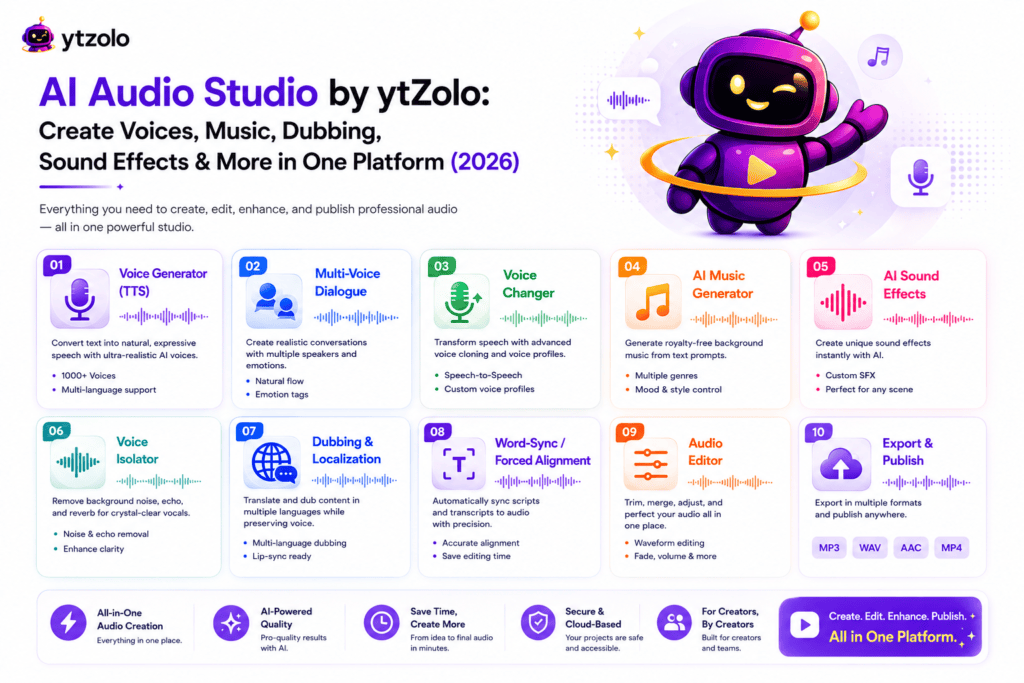
ytZolo AI Audio Studio is an integrated suite of AI-powered audio creation tools designed to help creators produce professional-quality audio without requiring advanced editing skills or multiple software subscriptions.
Instead of relying on separate tools for narration, dubbing, music generation, voice cleanup, and transcript alignment, users can complete their entire audio workflow from one dashboard.
The Audio Studio is built for:
- YouTube creators
- Podcasters
- Course creators
- Marketing teams
- Agencies
- Businesses
- Social media creators
- Video editors
- Localization teams
By combining multiple AI technologies into one platform, ytZolo reduces production time while helping creators maintain consistent audio quality across projects.
Why Audio Matters More Than Ever
Great visuals attract viewers, but clear and engaging audio keeps them watching.
Poor narration, distracting background noise, inconsistent voice quality, or weak localization can reduce viewer retention and make even high-quality videos feel less professional.
Today’s creators also publish content across multiple platforms and in multiple languages. This makes scalable audio production more important than ever.
Modern AI tools can automate many repetitive tasks, allowing creators to spend more time on storytelling instead of technical editing.
The launch of ytZolo AI Audio Studio reflects this shift by bringing AI-assisted audio production into a single workflow.
What’s New in ytZolo AI Audio Studio (Released July, 2026)
The July 2026 update introduces eight new AI-powered audio capabilities:
| Feature | Purpose |
|---|---|
| Voice Generator | Convert text into natural-sounding speech |
| Multi-Voice Dialogue | Create realistic conversations using multiple AI voices |
| Voice Changer | Transform recorded voices into different voice styles |
| AI Music Generator | Generate original background music from prompts |
| AI Sound Effects | Create sound effects using text descriptions |
| Voice Isolator | Remove background noise and improve speech clarity |
| Video & Audio Dubbing | Translate audio while preserving voice characteristics |
| Forced Alignment | Match transcripts with spoken audio using precise timestamps |
Together, these features turn ytZolo into a complete AI-powered audio production workspace.
Feature 1: Voice Generator
What Is the Voice Generator?
The Voice Generator is an AI-powered text-to-speech (TTS) tool that converts written text into realistic spoken audio using advanced neural speech synthesis.
Instead of recording your own narration, you can type your script and let AI generate a natural-sounding voice within minutes.
This feature is useful for videos, podcasts, online courses, presentations, product demos, advertisements, explainers, and social media content.
How It Works
The workflow is simple:
- Open the Voice Generator.
- Paste or type your script.
- Select your preferred AI voice.
- Adjust speaking style if available.
- Preview the output.
- Generate the final audio.
- Download or continue editing inside ytZolo.
This process eliminates the need for expensive microphones or professional recording setups for many common use cases.
Key Benefits
- Produce voiceovers in minutes.
- Maintain consistent narration across videos.
- Reduce recording and editing time.
- Update scripts without re-recording.
- Create professional voiceovers from any device.
- Scale content production efficiently.
Best Use Cases
The Voice Generator works well for:
- YouTube narration
- Product demonstrations
- Educational courses
- Business presentations
- Explainer videos
- Training materials
- Marketing campaigns
- Social media videos
Example Workflow
Imagine you’re publishing a YouTube tutorial.
Instead of recording multiple takes every time you revise your script, you simply update the text and generate a fresh narration. This speeds up editing and keeps your production process flexible.
Pro Tips
- Write conversational scripts rather than overly formal text.
- Use punctuation to guide pauses and pacing.
- Break long paragraphs into shorter sections for more natural delivery.
- Preview your narration before exporting the final version.
Feature 2: Multi-Voice Dialogue
What Is Multi-Voice Dialogue?
Multi-Voice Dialogue transforms a written script into a conversation between multiple AI-generated speakers.
Rather than relying on a single narrator, creators can assign different voices to different characters, making conversations feel more dynamic and engaging.
This is particularly valuable for storytelling, educational scenarios, interviews, podcasts, customer service simulations, and role-playing content.
How It Works
The process typically includes:
- Write your dialogue script.
- Assign a unique AI voice to each character.
- Add emotional cues where supported.
- Preview the conversation.
- Make adjustments to pacing or dialogue.
- Generate the final audio.
Each speaker maintains a consistent voice throughout the conversation, making it easier for listeners to follow along.
Benefits
Multi-Voice Dialogue offers several advantages:
- Creates more engaging audio experiences.
- Eliminates the need to record multiple voice actors.
- Speeds up podcast and dialogue production.
- Improves storytelling with distinct characters.
- Makes educational content easier to understand.
- Supports scalable content creation.
Common Use Cases
Creators can use Multi-Voice Dialogue for:
- Fictional stories
- Podcast episodes
- Educational lessons
- Language-learning content
- Customer support training
- Corporate learning modules
- YouTube skits
- Marketing videos
Example
Host: Welcome to today’s episode about AI audio production.
Guest: Thanks for inviting me. Let’s explore how creators can save time using AI.
Host: Great! We’ll start with voice generation before moving on to multilingual dubbing.
In just a few lines of text, creators can generate a natural conversation without recording multiple speakers.
Best Practices
- Give each speaker a clear role.
- Keep dialogue concise and conversational.
- Use punctuation to improve rhythm.
- Review the generated conversation before publishing.
- Match voice style to your audience and content type.
Feature 3: Voice Changer
What Is the AI Voice Changer?
The AI Voice Changer is a speech-to-speech tool that transforms an existing recording into a different voice while preserving the original message. Instead of generating speech from text, it starts with your recorded audio and applies a new voice profile.
This feature is useful when you want to change the tone, style, or identity of a voice without recording the script again.
Whether you’re creating YouTube videos, podcasts, audiobooks, gaming content, or marketing campaigns, the AI Voice Changer makes it easy to produce professional voiceovers in minutes.
How the AI Voice Changer Works
The workflow is simple:
- Upload your recorded speech.
- Choose an AI voice profile.
- Preview the transformed audio.
- Make adjustments if needed.
- Generate the final output.
- Export the new voice or continue editing within ytZolo.
Since the speech content remains the same, you don’t need to rewrite or re-record your script.
Key Benefits
The AI Voice Changer offers several advantages for creators and businesses:
- Save hours of re-recording voiceovers.
- Maintain consistent narration across projects.
- Experiment with different voice styles.
- Improve production speed.
- Create localized or branded audio experiences.
- Refresh older content with updated narration.
Best Use Cases
The Voice Changer can be used for:
- YouTube narration
- Gaming videos
- Character voices
- Podcasts
- Audiobooks
- Marketing campaigns
- Product demos
- Online courses
- Social media videos
Example Workflow
Imagine you’ve recorded a 20-minute tutorial but later decide the narration should sound more energetic.
Instead of recording everything again, upload the original audio, choose a different voice profile, preview the result, and generate the updated narration.
This saves time while keeping your production schedule on track.
Best Practices
- Start with a clear recording for the best results.
- Minimize background noise before processing.
- Match the voice style to your audience.
- Listen to the full output before publishing.
- Keep a backup of the original recording.
Feature 4: AI Music Generator
What Is the AI Music Generator?
Background music helps create emotion, improve pacing, and keep viewers engaged. Finding the right soundtrack, however, often means browsing large music libraries or paying recurring licensing fees.
The AI Music Generator solves this by creating original background music from simple text prompts.
Describe the mood, genre, tempo, or atmosphere you want, and AI generates a soundtrack that matches your creative vision.
How It Works
Creating music takes only a few steps:
- Open AI Music Generator.
- Enter a descriptive prompt.
- Choose the preferred music style or duration if available.
- Generate the soundtrack.
- Preview the result.
- Download or use it directly in your project.
Example Prompts
- Cinematic background music for a travel vlog.
- Upbeat electronic music for a product launch.
- Calm piano soundtrack for educational videos.
- Motivational corporate background music.
- Relaxing lo-fi beats for study content.
- Suspenseful orchestral music for documentaries.
The more descriptive your prompt, the more accurately the generated music can reflect your intended mood.
Benefits
Using AI-generated music can help you:
- Reduce production time.
- Create unique soundtracks.
- Match music to your content style.
- Generate multiple variations quickly.
- Maintain consistent branding across videos.
- Produce music without advanced composition skills.
Popular Use Cases
Creators can use AI-generated music for:
- YouTube videos
- Shorts and Reels
- Podcasts
- Advertisements
- Corporate presentations
- Product launches
- Online courses
- Social media campaigns
- Documentary projects
Example Workflow
A travel creator uploads drone footage from Iceland.
Instead of searching through stock music libraries, they enter the prompt:
“Epic cinematic orchestral music with emotional piano and uplifting strings.”
Within minutes, they have a custom soundtrack that complements the visuals.
Best Practices
- Be specific when writing prompts.
- Mention mood, instruments, and tempo.
- Generate multiple versions before choosing one.
- Keep background music balanced with narration.
- Test the soundtrack across different devices.
Feature 5: AI Sound Effects
What Is AI Sound Effects?
Sound effects bring videos to life by adding realism and impact.
The AI Sound Effects Generator creates audio effects directly from written descriptions, eliminating the need to search large sound libraries.
Whether you need footsteps, explosions, keyboard typing, rain, applause, or futuristic sci-fi sounds, you can generate them using text prompts.
How It Works
The workflow includes:
- Open AI Sound Effects.
- Describe the sound you need.
- Generate the effect.
- Preview the audio.
- Regenerate if necessary.
- Download or place it directly into your project.
Example Prompts
- Heavy rain on a rooftop.
- Thunderstorm with distant lightning.
- Office keyboard typing.
- Busy coffee shop ambience.
- Robot activation sound.
- Laser blast.
- Football stadium crowd cheering.
- Door opening in an old castle.
- Fire crackling in a fireplace.
- Ocean waves hitting rocks.
Benefits
AI-generated sound effects help creators:
- Save time searching audio libraries.
- Produce custom sounds on demand.
- Improve storytelling.
- Enhance immersion.
- Reduce production costs.
- Maintain creative flexibility.
Ideal Use Cases
This feature is useful for:
- YouTube creators
- Short films
- Animations
- Gaming videos
- Podcasts
- Educational content
- Product advertisements
- Explainer videos
- Motion graphics
Example Workflow
Suppose you’re editing a historical documentary.
Instead of downloading multiple stock effects, you generate:
- Medieval marketplace ambience
- Horse footsteps
- Sword clash
- Castle door opening
Within minutes, your scene feels more immersive without manually searching for individual audio clips.
Pro Tips
- Use descriptive prompts.
- Specify distance, intensity, or environment.
- Layer multiple effects for richer scenes.
- Balance sound effects with dialogue and music.
- Keep effects consistent throughout your project.
Why These Three Features Matter Together
Voice, music, and sound effects form the foundation of professional audio production.
A creator can:
- Narrate a video using the Voice Changer.
- Add custom background music with the AI Music Generator.
- Enhance scenes using AI Sound Effects.
Instead of switching between different software, ytZolo allows these creative tasks to happen within one unified Audio Studio.
This integrated workflow helps creators produce polished content faster while maintaining consistency across every project.
Feature 6: Voice Isolator
What Is the AI Voice Isolator?
Recording in a perfect studio isn’t always possible. Traffic noise, air conditioners, keyboard clicks, echo, fans, or conversations in the background can reduce the quality of your content.
The ytZolo AI Voice Isolator intelligently separates speech from unwanted background sounds, delivering cleaner and more professional audio in just a few clicks.
Whether you’re recording a YouTube tutorial at home, interviewing someone outdoors, or capturing a podcast remotely, Voice Isolator helps ensure your audience hears every word clearly.
How the AI Voice Isolator Works
The process is designed to be simple:
- Upload your audio or video file.
- The AI analyzes the recording.
- It detects speech and identifies unwanted background sounds.
- Noise, echo, and ambient distractions are reduced while preserving vocal clarity.
- Preview the cleaned audio.
- Export the enhanced version or continue editing within ytZolo.
Instead of manually applying multiple audio filters, creators can improve recording quality in a matter of minutes.
Key Benefits
Using the AI Voice Isolator can help you:
- Remove distracting background noise.
- Reduce room echo and reverb.
- Improve speech intelligibility.
- Deliver more professional content.
- Save hours of manual audio editing.
- Improve listener experience across all platforms.
Best Use Cases
The Voice Isolator is ideal for:
- YouTube videos
- Podcasts
- Interviews
- Webinars
- Online courses
- Client presentations
- Voiceovers
- Remote meetings
- Documentary production
- Social media content
Example Workflow
Imagine you’ve recorded a product review in a busy café. While your presentation is excellent, background conversations and coffee machine noise make the audio distracting.
Upload the recording to Voice Isolator, let the AI enhance the speech, preview the result, and export a cleaner version that sounds significantly more professional.
Best Practices
- Record as close to the microphone as possible.
- Avoid clipping or distorted recordings.
- Use the original file instead of compressed versions when possible.
- Review the cleaned audio before publishing.
- Combine Voice Isolator with the Voice Generator or Voice Changer for an even more polished production.
Feature 7: Video & Audio Dubbing
What Is AI Video & Audio Dubbing?
Reaching a global audience often requires translating content into multiple languages. Traditionally, this involved hiring translators, voice actors, audio engineers, and editors—a process that could take days or even weeks.
The ytZolo Video & Audio Dubbing feature automates much of this workflow by translating spoken content into multiple languages while preserving the characteristics of the original speaker’s voice.
Instead of creating separate recordings for every language, creators can localize content quickly and efficiently.
How AI Dubbing Works
The typical workflow includes:
- Upload your video or audio.
- Select the source language.
- Choose one or more target languages.
- The AI transcribes the original speech.
- The script is translated.
- New speech is generated while maintaining the original speaker’s vocal characteristics.
- Review the dubbed version.
- Export the localized content.
This process significantly reduces the time required to prepare multilingual content.
Key Benefits
Video & Audio Dubbing helps creators:
- Reach international audiences.
- Publish multilingual content faster.
- Reduce localization costs.
- Maintain a consistent voice across languages.
- Improve accessibility for global viewers.
- Expand into new markets without re-recording.
Best Use Cases
AI Dubbing is valuable for:
- YouTube creators
- Online educators
- Marketing teams
- SaaS companies
- Agencies
- Product demonstrations
- Corporate training
- Podcasts
- Audiobooks
- International businesses
Example Workflow
A creator uploads a 15-minute English tutorial.
Using AI Dubbing, they generate versions in Spanish, French, German, Hindi, and Japanese.
Instead of recording the tutorial five more times, they produce multilingual versions from the original project, allowing them to publish to different audiences much faster.
Why AI Dubbing Matters in 2026
The creator economy is becoming increasingly global. Audiences expect content in their native language, and businesses are expanding into international markets faster than ever.
AI dubbing enables creators to:
- Increase global reach.
- Improve audience engagement.
- Repurpose existing videos.
- Build multilingual YouTube channels.
- Support international customers with localized training and product videos.
For many creators, localization is no longer optional—it’s a competitive advantage.
Best Practices
- Start with a high-quality original recording.
- Use clear pronunciation for better transcription.
- Review translated scripts before publishing.
- Check pronunciation of names and brand terms.
- Test dubbed videos with native speakers when possible.
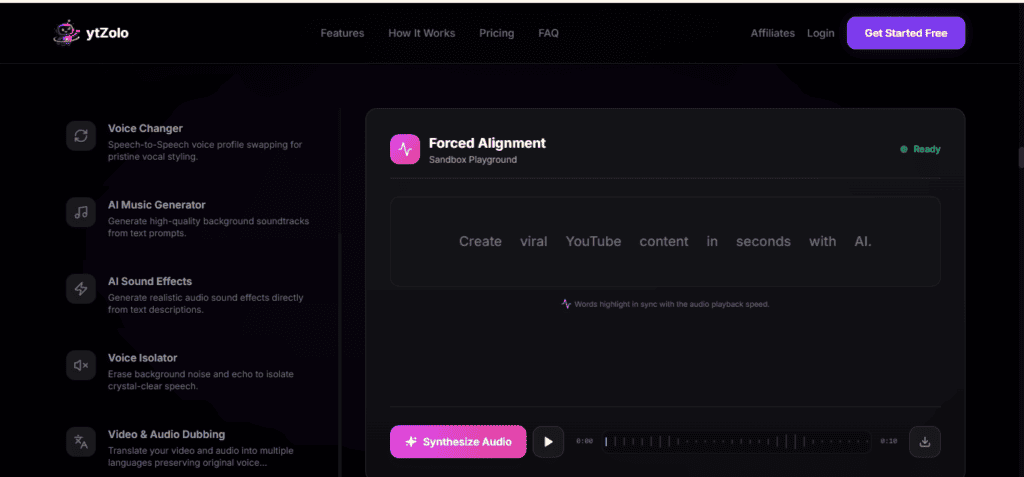
Feature 8: Forced Alignment
What Is Forced Alignment?
Accurate subtitles, captions, transcripts, and searchable media all depend on one essential process: matching spoken words with precise timestamps.
Forced Alignment automatically synchronizes text with speech down to the millisecond, making it easier to generate accurate subtitles and time-coded transcripts.
Instead of manually adjusting every caption, creators can automate the synchronization process.
How Forced Alignment Works
The workflow is straightforward:
- Upload an audio or video file.
- Upload the corresponding transcript or script.
- The AI analyzes the speech.
- Every word is matched to its spoken position.
- Timestamped output is generated.
- Export subtitle or transcript files for editing or publishing.
Benefits
Forced Alignment offers several advantages:
- Faster subtitle creation.
- Accurate transcript synchronization.
- Better accessibility.
- Improved searchability.
- Simplified editing workflows.
- Reduced manual correction.
Best Use Cases
Forced Alignment is commonly used for:
- YouTube captions
- Podcast transcripts
- Audiobooks
- E-learning content
- Corporate training
- Documentary production
- Speech research
- Video localization
- Media archiving
Example Workflow
An educator uploads a one-hour training session along with the presentation script.
Forced Alignment automatically matches every spoken word with precise timestamps, allowing subtitles to be generated quickly and reducing hours of manual editing.
Best Practices
- Use the final version of your transcript.
- Remove major script differences before alignment.
- Record clear speech for improved accuracy.
- Review timestamps before publishing.
- Combine Forced Alignment with AI Dubbing for multilingual subtitle workflows.
Bringing It All Together: One Complete AI Audio Workflow
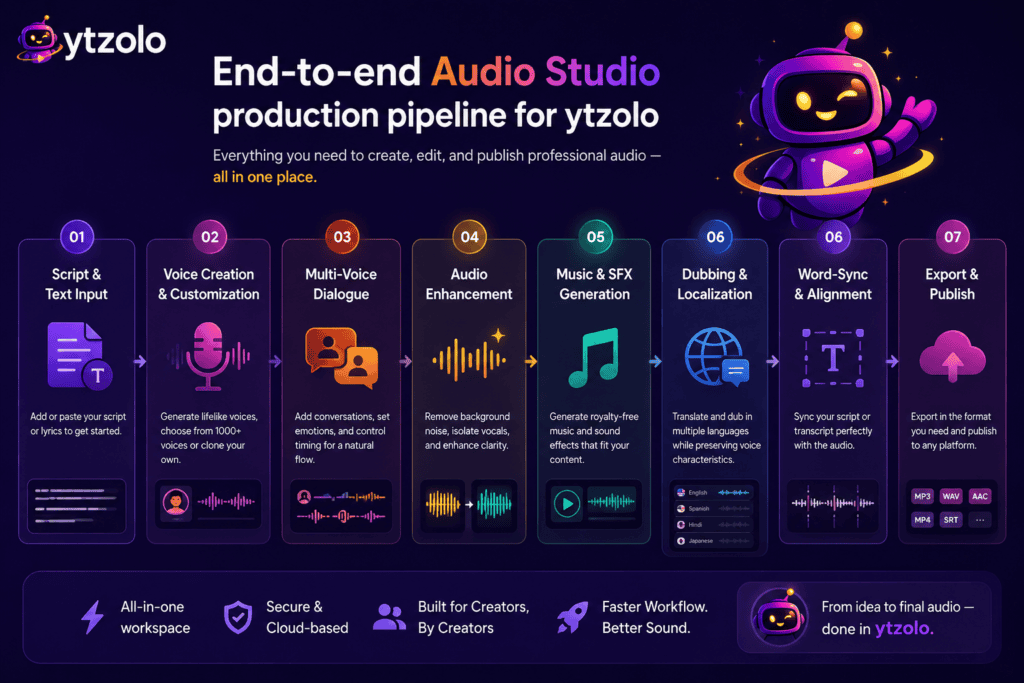
While each feature is powerful on its own, the real strength of ytZolo AI Audio Studio lies in how they work together.
A complete production workflow might look like this:
- Write your script.
- Generate narration with Voice Generator.
- Create conversations using Multi-Voice Dialogue.
- Transform recorded speech with Voice Changer.
- Generate original background music using AI Music Generator.
- Add immersive audio with AI Sound Effects.
- Clean recordings using Voice Isolator.
- Translate content using Video & Audio Dubbing.
- Synchronize transcripts with Forced Alignment.
- Export your finished project for YouTube, podcasts, courses, or social media.
Instead of managing multiple subscriptions and moving files between different applications, creators can complete their audio production workflow inside one integrated platform.
Real-World Use Cases for ytZolo AI Audio Studio
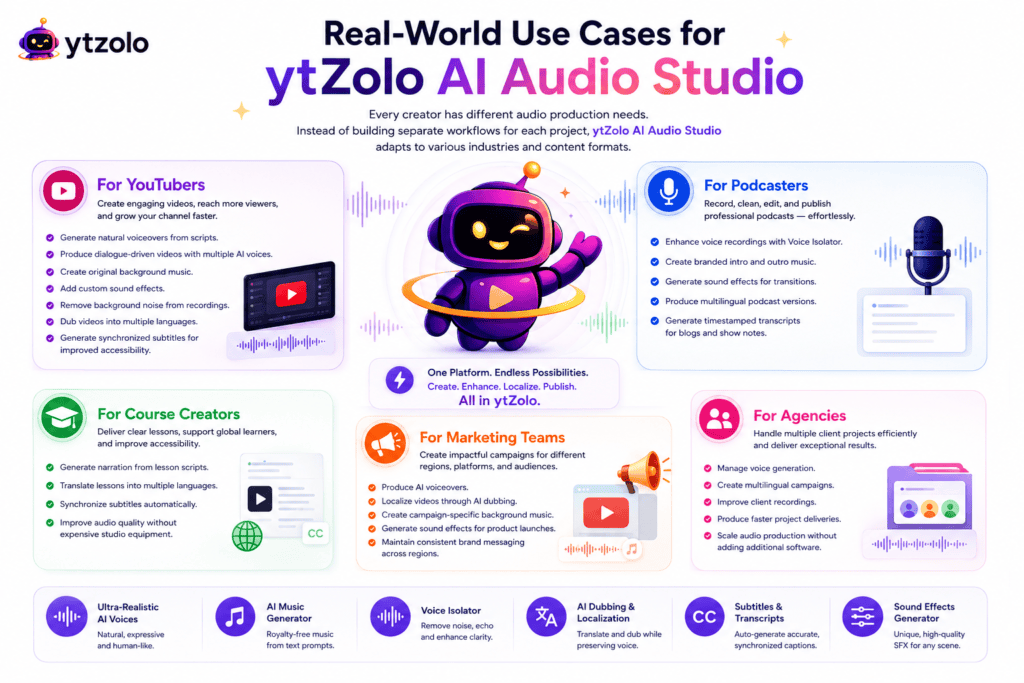
Every creator has different audio production needs. Instead of building separate workflows for each project, ytZolo AI Audio Studio adapts to various industries and content formats.
For YouTubers
Creating YouTube videos involves much more than recording a voiceover. Successful creators need engaging narration, clean audio, background music, captions, and increasingly, multilingual versions of their content.
With ytZolo AI Audio Studio, YouTubers can:
- Generate natural voiceovers from scripts.
- Produce dialogue-driven videos with multiple AI voices.
- Create original background music.
- Add custom sound effects.
- Remove background noise from recordings.
- Dub videos into multiple languages.
- Generate synchronized subtitles for improved accessibility.
This end-to-end workflow helps creators publish consistently while spending less time editing.
For Podcasters
Podcast production often includes recording, cleaning audio, adding intro music, editing conversations, and preparing transcripts.
Using ytZolo, podcasters can:
- Enhance voice recordings with Voice Isolator.
- Create branded intro and outro music.
- Generate sound effects for transitions.
- Produce multilingual podcast versions.
- Generate timestamped transcripts for blogs and show notes.
For Course Creators
Online learning platforms require clear narration, multilingual support, and accurate subtitles.
ytZolo simplifies course production by allowing educators to:
- Generate narration from lesson scripts.
- Translate lessons into multiple languages.
- Synchronize subtitles automatically.
- Improve audio quality without expensive studio equipment.
For Marketing Teams
Marketing campaigns often require videos for different countries, platforms, and audiences.
Instead of recreating every advertisement from scratch, teams can:
- Produce AI voiceovers.
- Localize videos through AI dubbing.
- Create campaign-specific background music.
- Generate sound effects for product launches.
- Maintain consistent brand messaging across regions.
For Agencies
Creative agencies handle multiple client projects every week.
An integrated workflow reduces production time while helping teams maintain consistent quality.
ytZolo enables agencies to:
- Manage voice generation.
- Create multilingual campaigns.
- Improve client recordings.
- Produce faster project deliveries.
- Scale audio production without adding additional software.
Why Choose One Platform Instead of Multiple Tools?
Many creators currently use separate applications for every stage of production.
A typical workflow may look like this:
- Tool A for text-to-speech.
- Tool B for voice enhancement.
- Tool C for AI music.
- Tool D for sound effects.
- Tool E for dubbing.
- Tool F for subtitle synchronization.
Besides increasing costs, switching between platforms slows production and creates unnecessary complexity.
ytZolo brings these capabilities together in one AI-powered Audio Studio, helping creators manage their workflow from a single dashboard.
Traditional Workflow vs ytZolo AI Audio Studio
| Traditional Workflow | ytZolo AI Audio Studio |
|---|---|
| Multiple subscriptions | One integrated workspace |
| Constant file transfers | Unified workflow |
| Different interfaces | Consistent user experience |
| Manual production pipeline | AI-assisted automation |
| Longer production time | Faster content creation |
| Higher overall costs | Simplified workflow |
| Multiple exports and imports | Centralized project management |
Benefits of Using ytZolo AI Audio Studio
Save Production Time
Automating repetitive audio tasks allows creators to focus more on planning, storytelling, and audience engagement.
Improve Content Quality
Cleaner speech, better music, immersive sound effects, and accurate subtitles contribute to a more professional viewing experience.
Scale Content Creation
Whether publishing one video each week or dozens every month, creators can maintain quality while increasing output.
Reach Global Audiences
AI dubbing and transcript synchronization make multilingual publishing far more accessible than traditional localization workflows.
Reduce Tool Overload
Instead of managing multiple software subscriptions, creators can complete more of their audio workflow within one platform.
Frequently Asked Questions
What is ytZolo AI Audio Studio?
ytZolo AI Audio Studio is an integrated collection of AI-powered tools for voice generation, dialogue creation, music generation, sound effects, voice enhancement, dubbing, and transcript synchronization.
When was AI Audio Studio released?
The Audio Studio features were introduced on July, 2026.
Who can use these tools?
The platform is suitable for YouTubers, podcasters, educators, businesses, marketers, agencies, video editors, and content creators.
Can I generate AI voiceovers from text?
Yes. The Voice Generator converts written scripts into natural-sounding speech.
Can I create conversations with multiple speakers?
Yes. Multi-Voice Dialogue allows you to assign different AI voices to different characters.
Does ytZolo generate background music?
Yes. AI Music Generator creates original music from text prompts.
Can I generate custom sound effects?
Yes. AI Sound Effects creates audio effects from written descriptions.
Can I remove background noise?
Yes. Voice Isolator helps improve recording quality by reducing unwanted background sounds.
Can I translate videos into different languages?
Yes. Video & Audio Dubbing supports multilingual localization while preserving the original speaker’s voice characteristics.
What is Forced Alignment used for?
Forced Alignment synchronizes transcripts with speech to create accurate subtitles and timestamped transcripts.
Final Thoughts
Audio has become one of the most important elements of digital content. Viewers expect clear narration, immersive sound design, accurate captions, and localized experiences across platforms.
Meeting these expectations with traditional production methods often requires multiple tools, lengthy editing workflows, and significant technical expertise.
The release of ytZolo AI Audio Studio on July, 2026 introduces a more streamlined approach.
By combining Voice Generator, Multi-Voice Dialogue, Voice Changer, AI Music Generator, AI Sound Effects, Voice Isolator, Video & Audio Dubbing, and Forced Alignment into a single platform, ytZolo simplifies audio production from script to final export.
Whether you’re launching a YouTube channel, producing an online course, recording a podcast, or expanding into international markets, an integrated AI audio workflow can help you create content more efficiently while maintaining professional quality.
As AI-powered content creation continues to evolve, having connected tools in one workspace can reduce production complexity and support more scalable creative workflows.
Ready to Explore ytZolo AI Audio Studio?
Discover how AI-powered voice generation, music creation, dubbing, sound effects, voice enhancement, and transcript synchronization can simplify your production process.
Start creating professional audio content with ytZolo AI Audio Studio and bring every stage of your audio workflow together in one place.
Key Takeaway
The launch of ytZolo AI Audio Studio marks an important step toward unified AI-powered audio creation. Instead of relying on multiple disconnected applications, creators can manage voice generation, dialogue, music, sound effects, audio cleanup, dubbing, and transcript alignment from a single workspace—making it easier to produce high-quality content for audiences around the world.

