

Introduction
You uploaded the video. You spent hours editing it. The audio is crisp. The content is fire.
Then you slapped on a random screenshot as a thumbnail — and watched your video flatline.
Sound familiar?
Here’s the brutal truth most creators learn the hard way: your thumbnail is the #1 reason people click — or scroll past. YouTube’s own data confirms that 90% of top-performing videos use custom thumbnails. Not screenshots. Not auto-frames. Custom, strategically designed thumbnails.
You can explore more about how thumbnails impact performance inside the YouTube Creator Academy, where YouTube itself emphasizes custom thumbnails as a core growth factor. If you’re still relying on default frames, you’re already behind creators using tools like this AI YouTube thumbnail generator guide to optimize every upload.
But great thumbnails used to take hours. Or hundreds of dollars paid to a designer.
That’s exactly why searching for the best free AI thumbnail generator for YouTube 2026 has exploded in popularity. Creators are done guessing. They’re done wasting time in Photoshop. And they’re done leaving views on the table.
In this guide, you’ll discover what makes a thumbnail actually convert in 2026, which free AI thumbnail tools are worth your time, and why ytZolo is quickly becoming the go-to platform for creators who are serious about growth.
Let’s get into it.
Table of Contents
Why Your Thumbnail Is Your Most Important Growth Lever
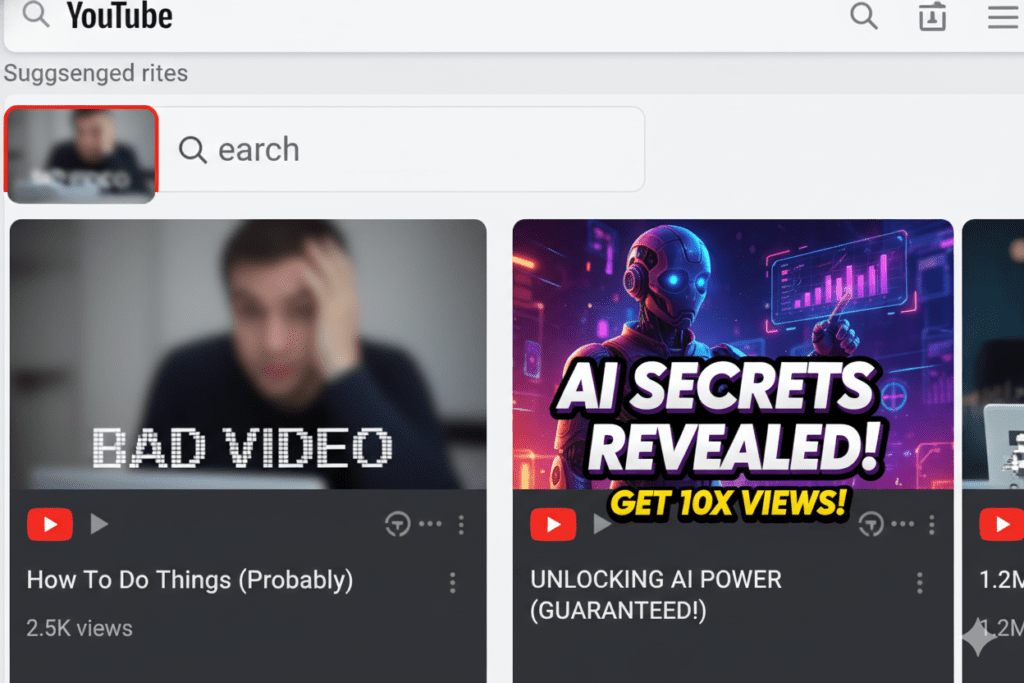
Think about the last time you decided to watch a YouTube video.
You didn’t read the description first. You didn’t check the upload date. You saw a thumbnail — often created with a thumbnail generator for YouTube — and you either clicked or you didn’t. That split-second decision happens before your title even registers.
That’s the power of a great thumbnail. It’s your billboard on the world’s busiest highway.
YouTube processes over 500 hours of video every single minute. Your video is competing with thousands of others for that one click. When your thumbnail is weak, it doesn’t matter how great your content is — nobody ever sees it.
A high-CTR (click-through rate) thumbnail tells YouTube’s algorithm that viewers want your content. More clicks = more impressions = more reach. It’s a compounding effect that separates growing channels from stagnant ones.
This aligns directly with how the Google ranking systems work—engagement signals like CTR heavily influence content distribution across platforms, including YouTube. If you want a deeper breakdown of optimization tactics, check this YouTube thumbnail best practices guide for actionable strategies.
That’s why finding the best free AI thumbnail generator for YouTube 2026 isn’t just a nice-to-have. It’s a survival strategy in today’s crowded creator economy.
What Makes a High-CTR Thumbnail in 2026?
Before you can use any AI tool effectively, you need to understand what actually works. The best free AI thumbnail generator for YouTube 2026 uses this data automatically — but knowing the principles makes you a smarter creator.
Here’s what the data tells us:
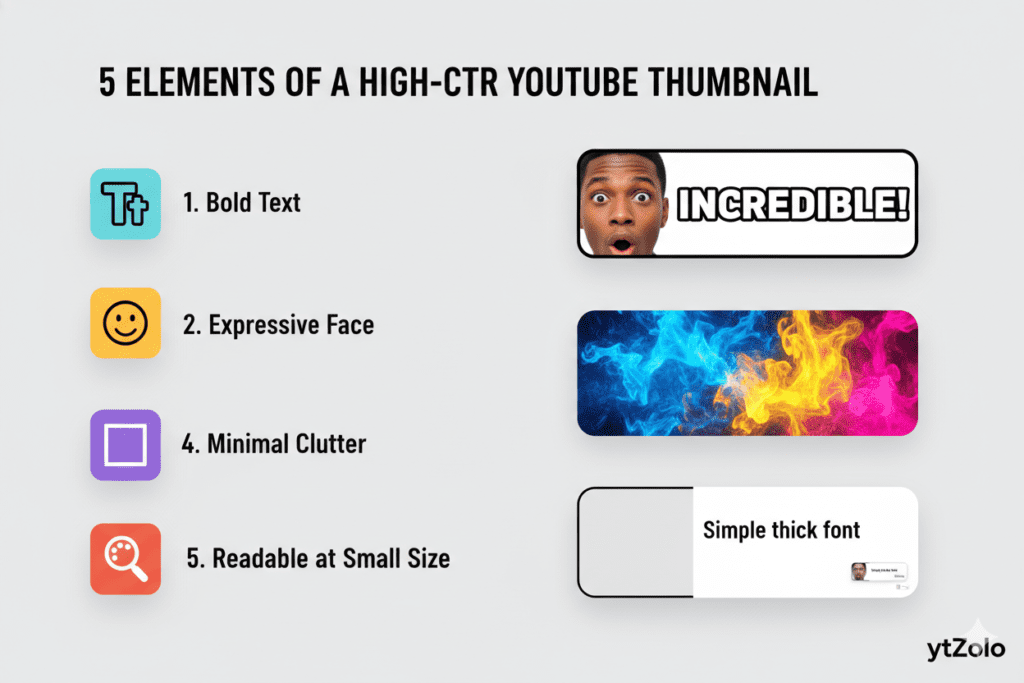
Color & Contrast Bright, contrasting colors — yellows, oranges, electric blues — consistently outperform muted designs. High-contrast thumbnails can increase CTR by 20–30%, according to vidIQ’s 2025 design research. Your thumbnail needs to pop against YouTube’s white and dark backgrounds.
Human Faces & Emotions Thumbnails featuring expressive human faces — surprise, excitement, shock, curiosity — often created using a thumbnail generator for YouTube see significantly higher CTR than those without. Viewers are wired to respond to human emotion. It’s not vanity. It’s psychology.
This is rooted in basic human psychology—our brains are naturally drawn to faces and expressions, a concept well explained in Wikipedia under visual perception and emotional recognition. If you’re struggling to apply this practically, this AI YouTube script writing guide also shows how emotional hooks translate into higher engagement across both thumbnails and content.
Text That Hooks Three to five words maximum. Use power words that trigger curiosity or urgency: “Secret,” “Finally,” “Warning,” “Biggest Mistake,” “You Won’t Believe.” The text is a hook, not a summary. It should make viewers feel like they must click to find out more.
Thumbnail Size & Quality The ideal YouTube thumbnail size in 2026 is 1280×720 pixels with a 16:9 aspect ratio. Your thumbnail must be readable at small preview sizes — especially on mobile, where most views now come from.
Niche-Specific Visual Patterns Each YouTube niche has its own visual language. Gaming thumbnails look different from finance thumbnails. Travel looks different from tech. The best free AI thumbnail generator for YouTube 2026 understands these patterns — and builds them into every design it produces.
Why Manual Thumbnail Design Is Holding You Back
Let’s be real about something most creators don’t want to admit.
Manual thumbnail creation in 2026 is like doing keyword research with a dictionary. It takes too long, relies too much on guesswork, and almost always produces worse results than a thumbnail generator for YouTube.
The average creator used to spend one to two hours per thumbnail in the manual design era. That’s hours spent in Photoshop or Canva, second-guessing color choices, struggling with fonts, and hoping the final result actually gets clicks.
Here’s the real cost of manual thumbnail design:
- Time you can never get back — 2 hours per thumbnail × 3 uploads per week = 6 hours wasted every single week
- Designs based on gut feeling, not data — when you design manually, you’re guessing what works. AI analyzes thousands of high-performing thumbnails in your niche to build what’s actually proven to convert
- Inconsistent branding — manual designs vary wildly in quality. AI tools maintain consistent visual standards across every single upload
- Zero competitor intelligence — manual designers don’t know what’s working for channels growing 10x faster than yours. AI tools do
Professional thumbnail designers charge $10 to $50 per thumbnail. For creators uploading three times a week, that’s $120–$600 every single month just on thumbnail design — making a thumbnail generator for YouTube a far more cost-effective alternative.
There’s a smarter way. And the creators using it are pulling ahead fast.

The Best Free AI Thumbnail Generator for YouTube 2026: Top Tools Compared
You’ve got options when it comes to AI thumbnail tools. Let’s look at the most popular ones — and then explain why one stands far above the rest.
1. ytZolo — Best Overall Free AI Thumbnail Generator for YouTube 2026
ytZolo is purpose-built for YouTube creators who want to grow faster. Unlike generic design tools, ytZolo uses CTR-optimization data, niche-aware AI, and performance-backed design principles to create thumbnails that actually drive clicks.
It’s not just a thumbnail maker or a thumbnail generator for YouTube. It’s a complete AI YouTube growth platform — which we’ll break down in detail in the next section.
Best for: Creators who want thumbnails and a full content workflow (titles, scripts, descriptions, tags) in one place Free plan: Yes — no credit card required Watermarks: No watermarks, even on the free plan
2. Canva Magic Media
Canva’s AI thumbnail maker (powered by Magic Media and Dream Lab) is a solid entry point for new creators. It lets you describe your thumbnail in text, then generates visual options in various art styles.
Pros: Easy to use, good template library, familiar interface Cons: Limited free credits, not specifically optimized for YouTube CTR, requires manual design work after generation Best for: Beginners who already use Canva for other design work
3. vidIQ AI Thumbnail Maker
vidIQ’s thumbnail tool is built into its broader YouTube analytics platform. You can upload a video or enter a prompt, and it generates thumbnail options based on key frames.
Pros: Free with a vidIQ account, good for content analysis Cons: Primarily an analytics tool — thumbnail features are secondary, not built around CTR optimization Best for: Creators already using vidIQ for channel analytics
4. Pixelbin AI Thumbnail Generator
Pixelbin lets you upload an image and add a simple prompt to generate HD thumbnails automatically using a thumbnail generator for YouTube. The free plan allows up to three thumbnails per month.
Pros: Simple interface, no complex prompts needed, HD output Cons: Very limited on the free plan (3/month), not YouTube-specific Best for: Casual creators with low upload frequency
5. Sivi AI
Sivi generates template-free thumbnails from text prompts and supports over 72 languages. You can download thumbnails without watermarks even on the free plan.
Pros: No-watermark free plan, multilingual support, fast generation Cons: Not specifically trained on YouTube performance data, requires more manual prompting Best for: International creators who need multilingual thumbnails
Bottom line: Most of these tools create pretty thumbnails. Only ytZolo creates thumbnails specifically engineered to get clicked on YouTube — going beyond a basic thumbnail generator for YouTube by working within a complete growth ecosystem, not just a standalone image generator.
Even YouTube itself highlights CTR and watch-time as key ranking factors in its creator documentation—meaning tools that optimize for clicks (not just aesthetics) have a direct impact on visibility.

Why ytZolo Is Better Than Other Tools
Here’s the question every smart creator is asking: “Why should I use ytZolo when there are so many other free AI thumbnail generators?”
Fair question. Here’s the honest answer.
It’s Built Specifically for YouTube
Most design tools — Canva, Adobe Express, even some AI image generators — are built for general marketing, not as a dedicated thumbnail generator for YouTube.
They weren’t designed with YouTube’s algorithm in mind. They don’t know that gaming thumbnails need high-energy compositions, or that finance thumbnails convert better with clean minimalist designs and bold numbers.
ytZolo is YouTube-native. Every feature was built from the ground up for one purpose: helping your YouTube channel grow. That specialization shows in the quality of every thumbnail it produces.
It’s Powered by Real Performance Data
When ytZolo generates a thumbnail, it’s not guessing what looks good. It’s analyzing patterns from thousands of high-performing videos in your specific niche. It knows which color combinations drive the highest CTR. It knows which text placements get ignored at small sizes. It knows which emotional expressions make viewers stop scrolling.
That’s not something Canva can offer. That’s not something Photoshop can offer. That’s something only a purpose-built YouTube AI can deliver.
It Goes Way Beyond Thumbnails
This is where ytZolo truly separates itself from every other best free AI thumbnail generator for YouTube 2026.
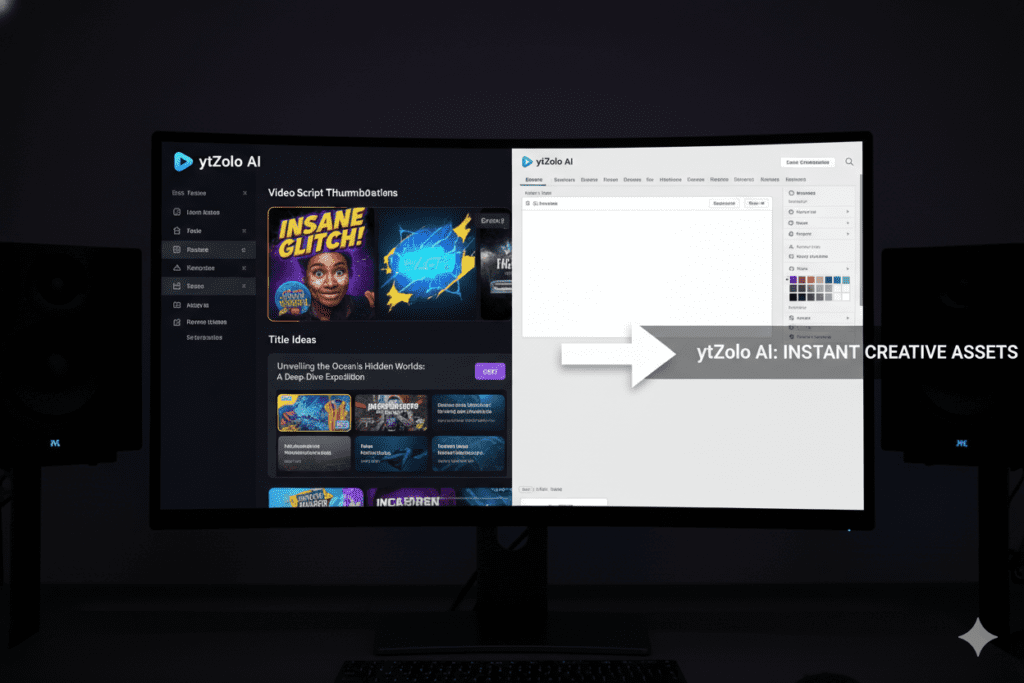
Most tools stop at thumbnails. ytZolo gives you your entire content workflow:
- AI Thumbnail Generator — Scroll-stopping visuals optimized for maximum CTR
- Viral Title Generator — Emotion-driven, keyword-rich titles that rank and get clicked
- AI Script Writer — Go from idea to full video script in minutes, structured for watch time
- AI Description Generator — SEO-optimized descriptions that help YouTube’s algorithm surface your content
- AI Tag Generator — Contextually relevant tags that expand your video’s discoverability
When your title, thumbnail, description, and tags all work together — especially when powered by a thumbnail generator for YouTube — that’s when channels explode. ytZolo is the only platform that connects all of these in one unified growth engine.
If you want to understand how this ecosystem works in detail, this complete YouTube AI workflow guide breaks down how thumbnails, titles, and scripts combine to boost rankings.
No Watermarks. No Design Skills Needed. Free to Start.
ytZolo exports thumbnails in full HD with zero watermarks. You get a clean, professional image ready to upload directly to YouTube.
And you don’t need to be a designer. You don’t need to write complex prompts. You simply enter your video topic, and ytZolo’s AI handles the rest.
The Comparison That Matters
| Feature | ytZolo | Canva | vidIQ | Pixelbin |
|---|---|---|---|---|
| YouTube-specific AI training | ✅ | ❌ | Partial | ❌ |
| CTR-optimized thumbnails | ✅ | ❌ | Partial | ❌ |
| No watermarks on free plan | ✅ | ❌ | ✅ | ✅ |
| Viral title generator | ✅ | ❌ | Partial | ❌ |
| AI script writer | ✅ | ❌ | ❌ | ❌ |
| SEO descriptions & tags | ✅ | ❌ | Partial | ❌ |
| All-in-one YouTube platform | ✅ | ❌ | ❌ | ❌ |
There’s simply no comparison when it comes to YouTube-specific growth. ytZolo wins — and it’s not close.
Check out the ytZolo blog for in-depth case studies of creators who’ve transformed their channels using AI-powered workflows.
How to Create a Viral Thumbnail with ytZolo
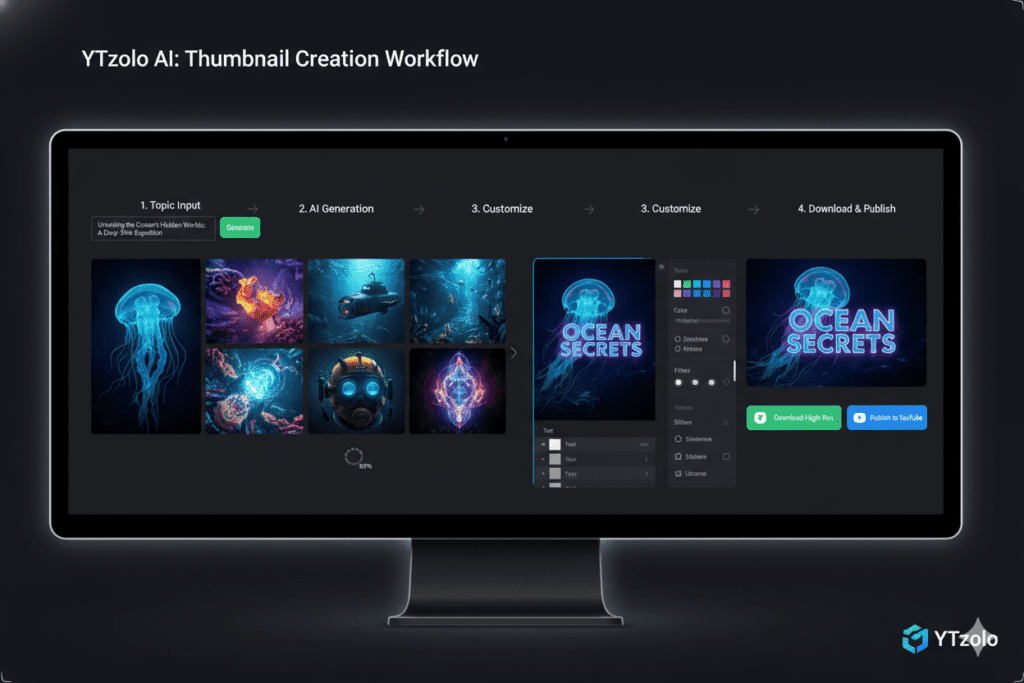
Getting started with the best free AI thumbnail generator for YouTube 2026 is faster than you think. Here’s exactly how to go from zero to a click-worthy thumbnail in under five minutes.
Step 1: Create Your Free Account Head to ytzolo.com and sign up for free. No credit card required. You get immediate access to the core tools.
Step 2: Enter Your Video Topic or Title Type in your video title or a brief description of your content. The more specific you are, the better your thumbnail will be. ytZolo’s AI immediately starts pulling relevant keyword data and niche-specific visual trends.
This mirrors how Google processes search intent—aligning your visuals and metadata with what users are actively looking for. For deeper keyword + title optimization, read this YouTube title strategy guide.
Step 3: Generate Your Thumbnail Options Hit generate. ytZolo’s AI engine analyzes your input against thousands of high-performing thumbnails in your niche and produces multiple click-optimized design options for you to choose from.
Step 4: Customize (Optional) You can tweak colors, text, layout, or composition directly within the platform. Light customization on top of AI generation produces the best-performing thumbnails.
Step 5: Download & Upload Download your thumbnail in full HD with no watermarks. Upload directly to YouTube Studio. Done.
That’s it. What used to take two hours now takes five minutes — and the output is better because it’s backed by real performance data, not guesswork.
While you’re in ytZolo, take advantage of the full workflow: generate your title, script, description, and tags — along with a thumbnail generator for YouTube — in the same session. Everything works together as a unified system, maximizing your video’s chances of getting discovered and going viral.
Pro Tips: Thumbnail Strategies That Top Creators Use
Using the best free AI thumbnail generator for YouTube 2026 is a massive advantage. Pairing it with smart strategy is how you dominate.
Here are the thumbnail strategies that top-growing channels are using right now:
A/B Test Your Thumbnails YouTube Studio’s “Test & Compare” feature lets you upload multiple thumbnail options and see which one gets the highest CTR from your real audience. Generate two or three variations with ytZolo, test them, and let data — not gut feeling — make the final call.
Data-driven decision-making is a core principle in digital marketing, widely documented across sources like Wikipedia under A/B testing methodologies. Creators who rely on testing consistently outperform those who rely on intuition alone.
Match Your Thumbnail to Your Title The most clickable combinations work when your thumbnail and title tell complementary stories — not the same story twice. Your thumbnail creates intrigue. Your title adds context. Together, they make clicking irresistible.
Study What’s Working in Your Niche Before generating, scroll through the top 10 videos in your niche. Note the color palette, text style, and emotional tone. Then use ytZolo to generate thumbnails that compete at that level — or beat them.
Be Consistent With Your Brand Top channels have a recognizable thumbnail style. Consistent fonts, colors, and composition build brand recognition over time. Use ytZolo’s settings to align your generated thumbnails with your channel’s visual identity.
Think Mobile First More than 70% of YouTube watch time comes from mobile devices. Your thumbnail needs to be punchy and readable at the size of a phone screen. Test your thumbnail at 25% size before uploading — if you can still read the text and see the emotion clearly, you’re good.
Refresh Old Thumbnails While you’re in ytZolo, take advantage of the full workflow: generate your title, script, description, and tags — along with a thumbnail generator for YouTube — in the same session, maximizing your video’s chances of getting discovered and going vi
FAQ: Best Free AI Thumbnail Generator for YouTube 2026
Q1: What is the best free AI thumbnail generator for YouTube 2026?
The best free AI thumbnail generator for YouTube 2026 is ytZolo. Unlike general design tools, ytZolo is purpose-built for YouTube creators and uses niche-specific CTR performance data to generate thumbnails that are engineered to get clicks — not just look nice.
It also offers a complete YouTube growth suite including viral title generation, AI script writing, SEO descriptions, and tag optimization, all in one free platform.
Q2: Can AI really make better thumbnails than a human designer?
Yes — and often significantly better, especially for YouTube. Human designers have great creative instincts, but they can’t analyze thousands of high-performing thumbnails across hundreds of niches the way AI can.
Tools like ytZolo are trained on real YouTube performance data: color contrast, emotional triggers, text hierarchy, and niche visual patterns. Creators using AI thumbnail tools frequently report CTR improvements of 50–200% within their first month.
Q3: Are AI-generated thumbnails free to use on YouTube?
Yes. Thumbnails generated with ytZolo are original outputs based on your input — not copies of existing images created by a thumbnail generator for YouTube. They are completely free to use on commercial channels, including YouTube Partner Program channels. ytZolo exports thumbnails in full HD without watermarks, even on the free plan.
Q4: What size should a YouTube thumbnail be in 2026?
The ideal YouTube thumbnail size in 2026 is 1280×720 pixels with a 16:9 aspect ratio. The file should be saved as a JPG or PNG. YouTube supports up to 50MB per thumbnail. Your thumbnail must be clearly readable at small sizes (especially on mobile), so prioritize bold text and high-contrast colors over fine details.
Q5: How many thumbnail variations should I test per video?
Most YouTube growth experts recommend testing two to three thumbnail variations per video. Use YouTube Studio’s “Test & Compare” feature to upload multiple options. After gathering around 1,000 impressions, YouTube shows you which thumbnail is winning based on CTR and watch time. Always let data make the final decision — never gut feeling alone.
This feature is part of YouTube Studio, where creators can directly test performance variations and optimize for higher CTR without guesswork.
Conclusion: Stop Leaving Views on the Table
Every video you upload is a chance to grow. Every impression YouTube serves is an opportunity to earn a click. And every click is a viewer who could become a subscriber, a fan, a customer.
The best free AI thumbnail generator for YouTube 2026 isn’t a luxury for big channels. It’s a competitive necessity for every creator — because the YouTube feed has never been more crowded, and attention spans have never been shorter.
You’re competing in a micro-second battle for the click. The thumbnail wins or loses that battle before your title is even read.
Manual thumbnail design is slow, expensive, and data-blind. Generic AI tools are built for marketing, not for YouTube growth specifically.
ytZolo is different. It’s purpose-built for YouTube. It’s powered by real CTR performance data. It generates thumbnails that are proven to get clicks in your specific niche. And it gives you the complete workflow — titles, scripts, descriptions, tags, and thumbnails — all in one place, all working together as a unified growth engine.
The creators who are winning right now in 2026 aren’t more talented. They’re following the same data-backed strategies promoted across platforms like YouTube Creator Academy—but executing faster using AI. If you’re serious about growth, start with this AI YouTube growth blueprint and apply it consistently.
You can do the same — starting today, for free.
🚀 Start creating smarter, faster, and more viral YouTube content with ytZolo today. No credit card needed. No design skills required. Just results.
Want more strategies for growing your YouTube channel with AI? Check out the ytZolo blog for in-depth guides on titles, scripts, SEO, and everything else you need to grow faster in 2026.
External Resources:

