
Table of Contents
Learning how to build an email list from your YouTube channel gives you a way to turn interested viewers into direct subscribers. A YouTube subscriber is connected to your channel within YouTube, while an email subscriber has voluntarily shared their email address so you can communicate with them directly.
The two audiences may overlap, but each provides a different value proposition. YouTube is an avenue for videos, recommendations, and subscriptions. An email list is a channel for distributing a regular stream of content, resources, and offers.
A basic example of leverage would be as follows:
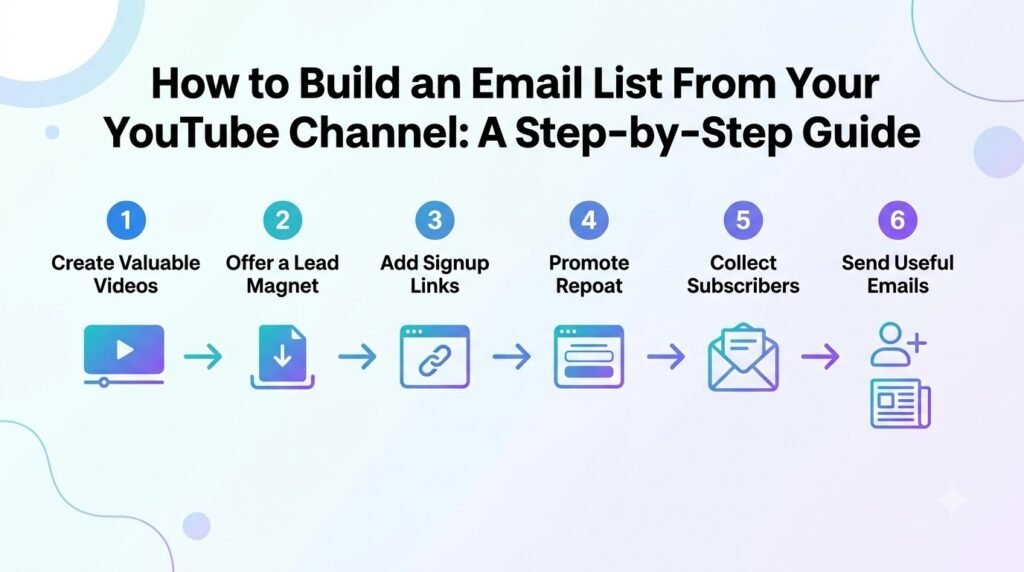
YouTube video → useful offer → landing page → email signup → welcome sequence → ongoing relationship
The offer should be something relevant to what was presented in the video. If it was a tutorial, a checklist, a resource, or a downloadable may be appropriate.
Effective email list building for YouTubers isn’t about collecting as many addresses as possible. It’s about attracting relevant viewers who actually want more of what your channel provides.
In this article, you will learn how to design an offer, organically promote it in your videos, turn that into a signup page, and then nurture those new email subscribers.
Why Build an Email List From YouTube?
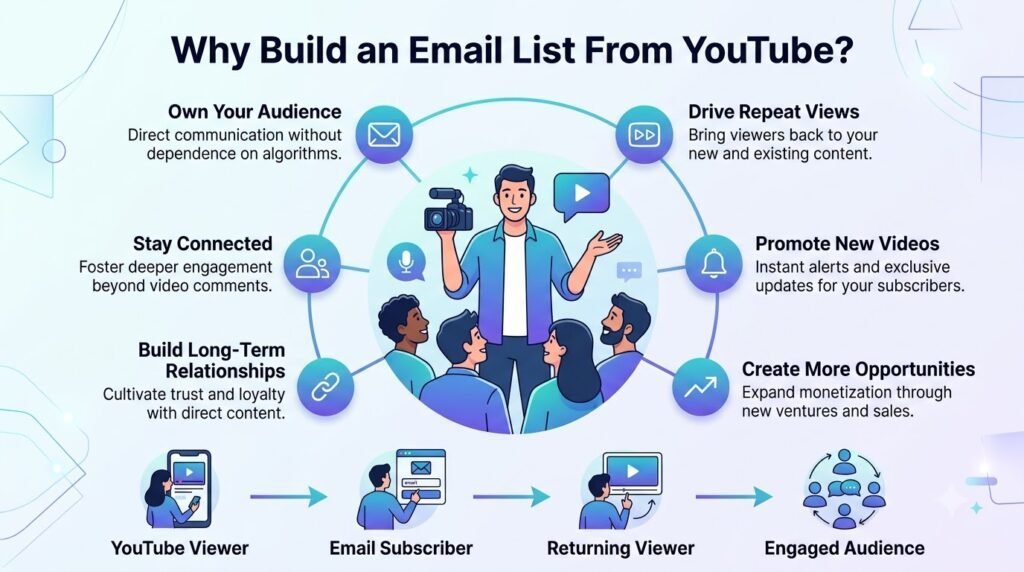
YouTube is exceptional at generating attention, but that attention is fleeting unless you have a way to hold onto it. Your channel can bring in thousands of new viewers a month, yet without a direct line back to them, most of that traffic passes through and disappears.
Email marketing for YouTubers solves this by giving you a second, more durable channel to maintain the relationship you’ve already worked hard to build.
YouTube subscribers and email subscribers are different
A YouTube subscribe click isn’t the same as permission to email someone — it’s a platform-level signal, not direct contact information, and YouTube itself decides which subscribers ever see your next upload.
As such, an email signup is an intentional act — somebody is handing over their email in order to receive more from you. These are two separate audiences who overlap a little, but act differently.
Your subscriber count reflects casual interest; your email list reflects viewers who’ve raised their hand.
Email gives you another way to reach viewers
Once someone joins your YouTube email list, you have a direct channel that isn’t subject to algorithmic distribution.
You can notify them of new videos (outside of YouTube’s suggestions), share educational content that builds on a recent video, share product launches, send out newsletters, share community updates, or offer secret resources that aren’t shared elsewhere.
This doesn’t replace YouTube or make you independent of it — think of it as an owned communication channel that complements your channel rather than competing with it.
Your email list can support multiple creator goals
A YouTube email list isn’t just for staying in touch — it’s infrastructure for growth. You can use it to sell digital products, launch courses, fill memberships, book services, or recommend affiliate offers to an audience that already trusts you.
It also strengthens the value of sponsorships and brands, since advertisers care about creators with engaged and addressable audiences, beyond just views.
It works both ways; emails can drive people back to YouTube just as much as YouTube can drive subscriptions to your email list, creating a virtuous cycle of growth between the two audiences.
Choose the Right Lead Magnet for Your YouTube Audience
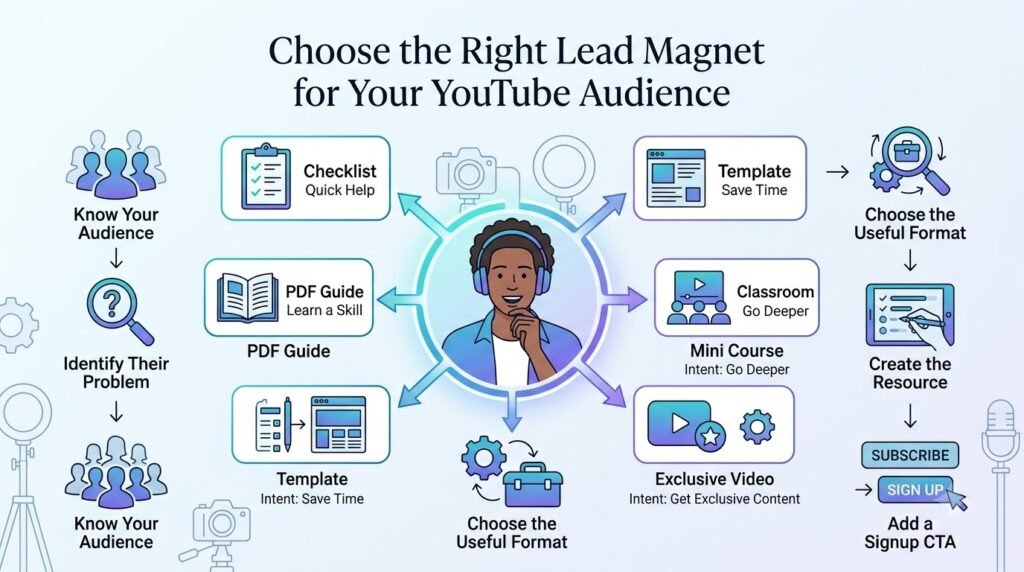
A YouTube lead magnet is a useful resource you offer viewers in exchange for their email address. It gives someone a clear reason to become one of your YouTube email subscribers instead of simply watching a video and leaving.
Podia describes a lead magnet as a useful resource, often a digital download, offered in exchange for an email address.
What is a YouTube lead magnet?
The best lead magnet solves a problem that is closely connected to the video a viewer is watching. It could take the form of a checklist, template, guide, spreadsheet, or something else that will help them get to the next step.
It’s important that your magnets are relevant to the audience they’re given to, rather than being too complex. OptinMonster also suggests making your lead magnets valuable, simple, and related to the needs of your audience.
Use your YouTube content to find lead magnet ideas
Your existing videos can tell you what your audience wants. Start by looking at some high-performing videos and see what they’re talking about. Podia suggests looking at the views, likes, comments, and any other YouTube Analytics that you might have.
Then read the comments carefully. Pay attention to questions, requests for more information, poorly-explained processes, and topics that people want you to talk about in more detail. You can also directly ask viewers what they would like to learn next.
For example, if a video about YouTube thumbnails receives repeated questions about thumbnail design, a downloadable thumbnail checklist or template could become a natural lead magnet.
10 lead magnet ideas for YouTubers
You don’t need to create something complicated. Consider:
- Checklist — A step-by-step list viewers can follow.
- PDF guide — A deeper version of the video’s topic.
- Cheat sheet — A concise reference viewers can save.
- Template — A ready-to-use design, document, or workflow.
- Workbook — Exercises that help viewers apply what they learned.
- Resource list — Recommended tools, websites, books, or references.
- Spreadsheet — A tracker, calculator, planner, or database.
- Mini-course — A short sequence that expands on the video.
- Bonus tutorial — An additional lesson covering a related problem.
- Exclusive video or resource — Content available after signup.
Podia points out there are a variety of ways to do lead magnets. You can do guides, checklists, cheat sheets, templates, ebooks, and exclusive content.
Match the lead magnet to the video
One of the strongest approaches to how to get email subscribers from YouTube is to build the video and free resource around the same problem.
Stephanie Kase provides a useful example. She created a YouTube tutorial about Instagram Reel cover photos and offered viewers the Canva template needed to follow along.
She reports that the video generated more than 3,000 email subscribers within a few months, while the broader strategy brought in 400+ new subscribers per month. These are her reported gains, not a baseline for other creators.
The takeaway is clear: no random freebie attached to a video. Create a resource that makes the video’s advice easier to apply. When the connection is obvious, the signup feels like a natural next step rather than an interruption.
Create a Simple Landing Page That Converts YouTube Viewers
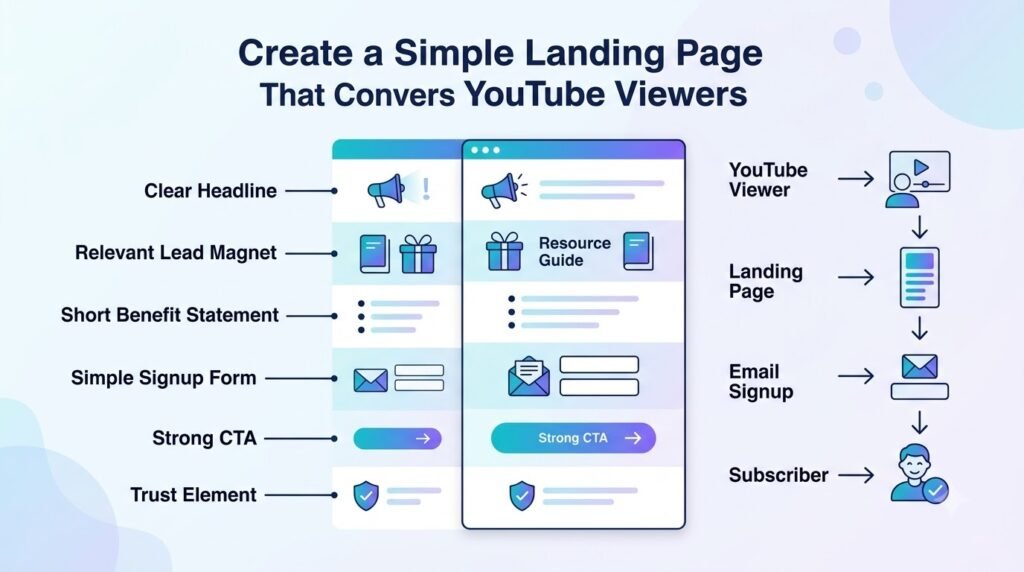
Turning passive YouTube viewers into loyal email subscribers is all about building a seamless bridge. When you use a YouTube lead magnet landing page, you capture interest right at its peak—immediately after someone watches your video.
Keep the Landing Page Focused
Your landing page must be ruthlessly simple and distraction-free. A confused visitor will simply close the tab. To prevent this, your page should instantly answer five core questions:
- What is the free resource?
- Who is it specifically for?
- What exact outcome will the viewer get?
- Why should they sign up right now?
- What is the exact next step they need to take?
Write a Clear Headline and CTA
Clarity always beats cleverness when building an email list on YouTube. Follow a proven conversion structure that tells the user exactly what to expect.
Start with a punchy headline:
Get [specific result] with this free [resource].
Follow this exact layout to keep momentum going:
- Short explanation: A 2-sentence breakdown of the value.
- Visual preview: A mockup of the guide, checklist, or template.
- Email field: A clean, single-input form field.
- CTA button: Action-oriented text (e.g., “Send Me the Free Guide!”).
- Privacy note: A quick reassurance against spam.
Don’t Send Viewers to a Generic Homepage
Never send your YouTube traffic to a cluttered home page or an “About Me” tab. A generic landing page creates more work for the user, who has to seek out the resource you promised them.
Instead, OptinMonster recommends creating a page with a simple opt-in form and then sharing this page across your YouTube network (video description, comments, pinned comments, and banner).
Make the Signup Experience Mobile-Friendly
Many YouTube viewers consume content on smartphones and tablets. If your page requires pinching for zooming or filling out a long form, your conversion rates will drop. Make sure that your landing page is responsive to all devices, loads quickly, and has an easy to tap large CTA button.
Are you currently using lead magnets in your video descriptions, and what kind of free resource are you planning to offer your viewers?
Add a Clear CTA to Your YouTube Videos
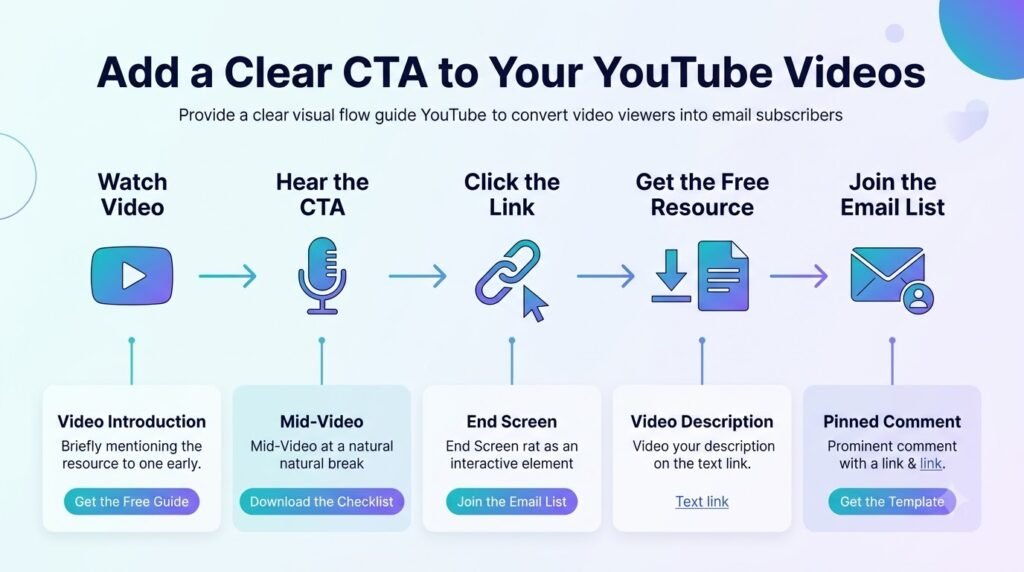
Once you have a useful lead magnet, viewers need a clear path to find it. A YouTube CTA connects the content someone is watching with the next step you want them to take.
Podia recommends including the lead-magnet CTA directly in the video script and asking the viewer to take action when they see instructions on screen.
Mention your free resource naturally in the video
You don’t have to wait until the final seconds to mention your free resource. If the resource directly supports what you teach, include it in the video at the point where you begin discussing that topic.
For example:
“I’ve put the checklist I’m using for this process below. You can grab the free version from the first link in the description.”
This works because the CTA appears as part of the lesson rather than as a separate sales pitch. The resource should feel like a useful next step for viewers who want to apply what you’ve explained.
Put the CTA where viewers are most likely to act
Don’t rely on a single CTA placement. You can use several touchpoints throughout the viewer’s journey:
- Early contextual mention: Introduce the resource when you first explain the problem it solves.
- Middle-of-video reminder: Mention it again when viewers reach a step where the resource becomes useful.
- Final CTA: Give viewers a clear reminder before the video ends.
- Description: Place the signup link where viewers can easily find it.
- Pinned comment: Repeat the resource and link in a prominent comment.
- End screen: Where appropriate, use the available end-screen options to direct viewers toward the next step.
Podia specifically recommends placing CTAs in the video description, end screen, channel banner, and other available YouTube placements, alongside the CTA spoken within the video itself.
The important part is consistency. If you are mentioning a free checklist in your video, both the description and the pinned comment need to have the link to this checklist (not some other link).
Make the CTA specific
A clear YouTube call to action tells viewers both what they will get and what they should do.
Weak:
“Check out my website.”
Better:
“Download the free YouTube content planning checklist from the link below.”
The second version gives the viewer a specific action and explains the immediate benefit. That clarity can make the difference between someone ignoring a CTA and taking the next step.
Create videos that naturally lead to the freebie
The strongest opportunity can come before you even record the video. Instead of creating a video first and attaching a random freebie afterward, think about how the video and resource can work together.
Stephanie Kase describes this strategy in her YouTube list-building approach. In one example, she created a tutorial about making Instagram Reel cover photos in Canva and offered a template viewers could download to follow along.
She reports that the video generated more than 3,000 email subscribers over several months. She also has 400+ email leads per month, from the general strategy. They are her results, not a guarantee for you.
The principle is simple: create a useful video that will interest people in the free guide.
When viewers need the template, checklist, worksheet, or additional resource to take the next step, the CTA becomes a natural part of the content rather than an interruption.
Put Your Email Signup Link in the Right YouTube Locations
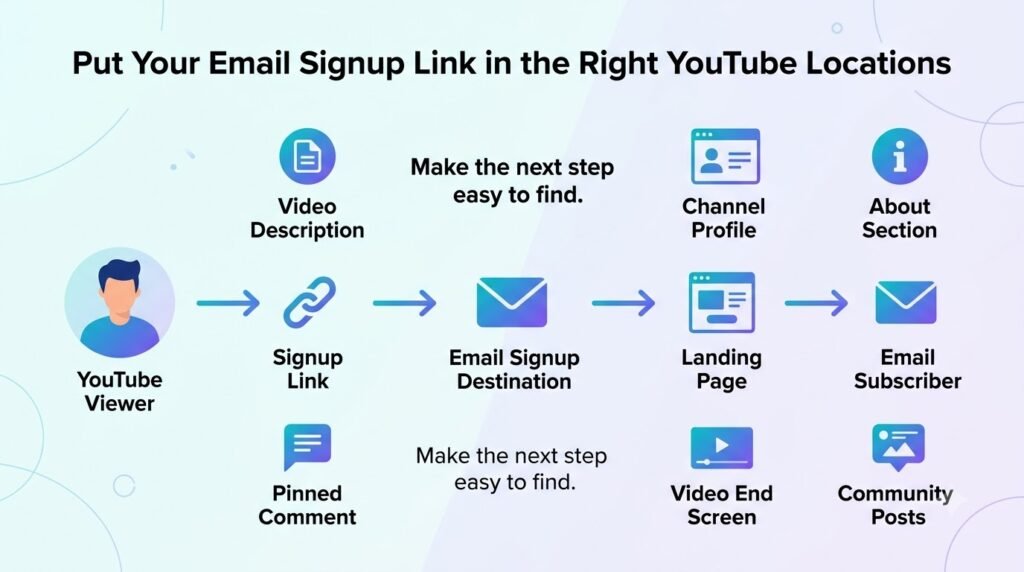
Add the link to long-form video descriptions
YouTube currently allows clickable URLs in long-form video descriptions, provided the channel meets YouTube’s link eligibility requirements and the content complies with its policies.
Because the service only provides an expansion on the description when a user selects “Show More,” it’s recommended to put the bulk of your information in the first few lines of your description, where it will be seen by default.
A simple, repeatable structure works well:
Free resource:
Download [resource name] → [link]
[Normal video description continues here…]
Leading with the offer means even viewers who never expand the description still see it, and viewers who do expand it get the full context afterward.
Use your YouTube channel profile links
YouTube currently allows creators to display up to 14 links on their channel’s Home tab, positioned prominently near the Subscribe button. The first link in the list gets the most prominent placement and, on many layouts, appears alongside a small preview icon.
If growing your email list is a priority for your channel, your signup page or lead magnet should be one of the first links in this section — not buried at position 10.
Use an appealing title instead of ‘Newsletter’ (e. g. “Free YouTube Growth Checklist”) because the title is what makes people want to open it instead of deleting it as junk mail.
Use pinned comments strategically
A pinned comment sits at the top of the comment section regardless of how many replies accumulate underneath it, making it one of the few CTA placements a viewer sees without needing to open the description at all.
Reinforcing your email offer here — especially with a slightly different angle or a direct question (“Want the free template mentioned at 4:32? Link below.”) — catches viewers who scroll straight to the comments to gauge a video’s reception before watching.
Use end screens where appropriate
YouTube supports end screens on videos that meet its eligibility requirements (minimum length, no restricted content, and channel standing in good order). End screens let you point viewers to relevant calls to action in the final 5–20 seconds of a video, including a link element that can drive to an external site.
This is a natural moment to reinforce your list once someone has already watched to the end and is primed to take another action.
Understand YouTube’s current link restrictions
Link behavior isn’t uniform across YouTube’s formats, and this matters for planning where your signup CTA actually goes:
- Long-form video descriptions — support clickable URLs, subject to channel eligibility and policy compliance.
- Channel profile links — clickable, with up to 14 allowed and the first receiving prominent placement.
- Shorts descriptions and Shorts comments — URLs display as plain text and are not clickable, a restriction YouTube introduced specifically to reduce spam and scam links.
- External linking features generally — availability may be subject to channel eligibility and YouTube’s changing policies, so it’s a good idea to frequently consult YouTube Studio and YouTube’s official Help documentation to stay up-to-date rather than relying on outdated information.
In practice, this means if Shorts are a major part of your strategy, your signup link needs to live in the description of a related long-form video, your channel profile, or a pinned comment on a long-form upload — not in the Short itself.
Build an Email Welcome Sequence for New YouTube Subscribers
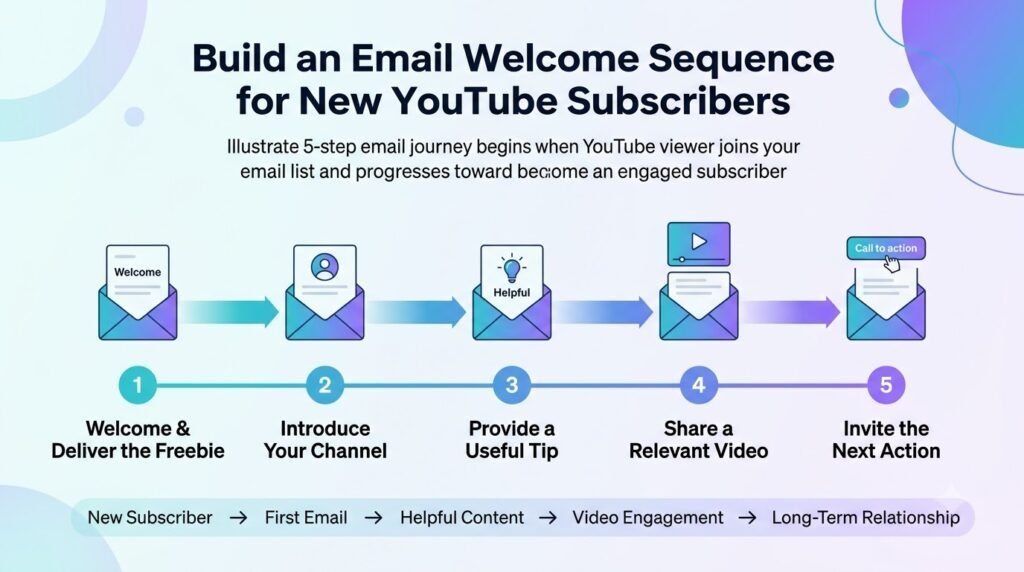
Transitioning your audience from a casual observer to a devoted member requires a well-considered YouTube welcome email. Of course, getting people on your list is only half the battle. The other, more important half, is retaining them.
The best email marketing practices for YouTubers involve providing value to your audience right after they subscribe to your channel.
Send the lead magnet immediately
Your absolute priority is delivering on your promise. The first email should instantly provide the freebie, checklist, or resource they requested. Keep the friction low and the link prominent so they experience immediate gratification upon subscribing.
Introduce yourself and your channel
Keep this section brief, warm, and focused on value:
- Who you are: A quick personal introduction to build trust.
- What your channel covers: The core theme of your content.
- What subscribers can expect: The frequency and type of emails coming their way.
Give subscribers more useful content
Showcase your best work early on to keep them engaged. Direct them toward:
- Relevant YouTube videos and binge-worthy playlists
- Step-by-step tutorials and downloadable guides
- Extra resources or related products if appropriate
Create a simple 3–5 email welcome sequence
A structured YouTube email marketing strategy relies on automated sequences to guide new subscribers seamlessly. Consider this proven 5-part framework:
- Email 1: Deliver the free resource and set expectations.
- Email 2: Provide a quick win directly related to that resource.
- Email 3: Share your best-performing YouTube content.
- Email 4: Address a common problem your audience faces and offer a solution.
- Email 5: Guide them to the next step, resource, or product.
Pro Tip: EmailAudience advises automation, segmentation, and frequent emails as a winning combination for YouTubers and their email marketing. The list should be segmented depending on what lead magnet the person downloaded, so the follow-up emails are relevant.
What lead magnet are you currently using to grow your subscriber list?
Segment Your YouTube Email List by Viewer Interest
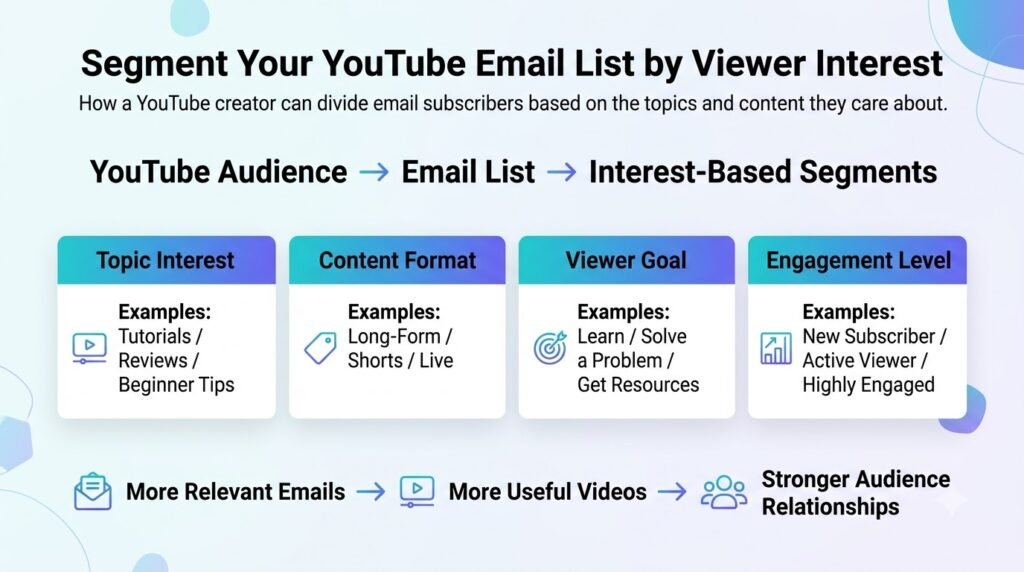
Many basic YouTube list-building guides end at the point of gathering emails, but the process involves more once one possesses the lists. A targeted email marketing strategy for YouTubers can help get better engagement and more clicks by providing tailored information to the target audience.
Segment subscribers by video topic
Not all subscribers care about the exact same content. Using YouTube audience segmentation you can segment your audience based on topics they are interested in.
- tutorials and education
- reviews and gaming
- business and productivity
Segment subscribers by lead magnet
Your opt-in incentives are direct indicators of intent. If someone downloads a YouTube SEO checklist, that tells you something completely different from someone downloading a thumbnail template.
Grouping your email subscribers into segments based on what asset they signed up with will ensure you are targeting their immediate needs
Use audience behavior to improve future videos
Email list segmentation isn’t just for higher open rates; it is a powerful research loop. EmailAudience suggests tagging and segmenting your subscribers based on their actions, the source of their signup, and their interest in your lead magnets.
This data creates a continuous growth cycle:
- Email: Track which segmented links get the most clicks.
- Audience insight: discover what your audience is struggling with or what you can teach them next.
- Video idea: Produce a high-performing YouTube video directly addressing that demand.
- Lead magnet: Create a matching freebie for that video to capture more targeted leads.
- Email: Feed those new subscribers back into your automated welcome sequences.
Pro tip: start by making two or three general segments based on the most popular categories of your videos and then narrow down to the micro-segments.
What is the primary lead magnet you are currently using to grow your channel’s email list?
Send Emails That Bring Viewers Back to Your YouTube Channel
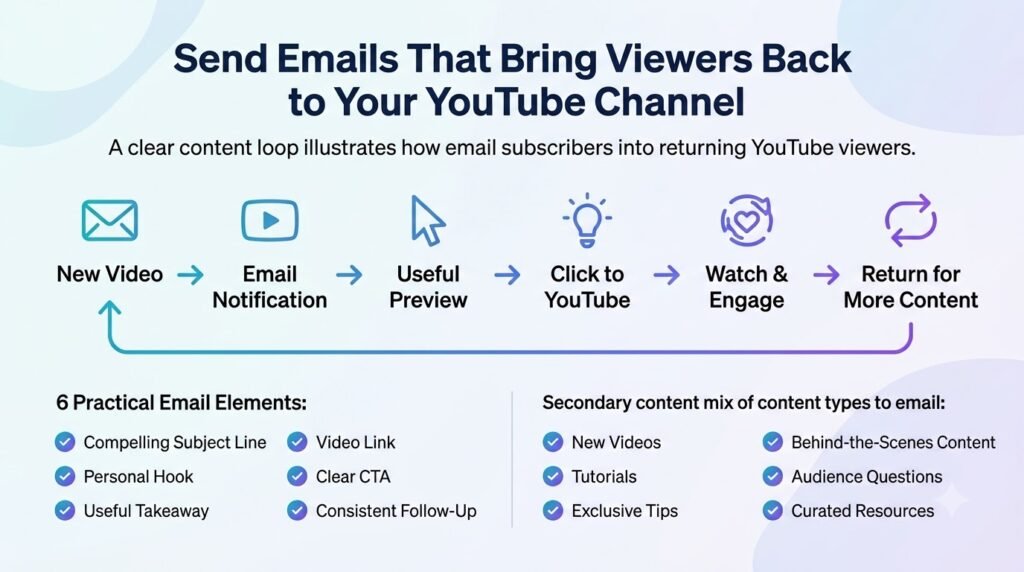
Building an email list is only the first step. The next is giving subscribers a reason to keep opening your emails. YouTube email marketing works best when the inbox becomes an extension of your channel rather than a stream of promotional messages.
EmailAudience suggests offering valuable and relevant information rather than making each e-mail self-promoting, while also taking advantage of YouTube’s analytics to understand topics of interest to the audience.
Turn every new video into an email opportunity
When you publish a new video, don’t simply send an email that says, “New video is live.” Give subscribers a reason to click.
A simple structure is:
Hook → useful takeaway → video → CTA
Start with a problem, question, observation, or useful tip. Give the readers enough of a teaser that they will be interested in checking out the full version on your channel, but don’t make the e-mail all about selling your product or service.
For instance, a photography creator might give a tip in their e-mail newsletter about lighting, and then direct their audience to a new tutorial on the same topic, while also providing new information about another technique.
Don’t make every email promotional
Your subscribers joined because they found your content useful. Keep this in mind when creating your e-mailing strategy.
Your newsletter mix could include:
- New videos with a valuable takeaway or reason to watch
- Tutorials building upon a certain topic
- Behind-the-scenes content about your creative process
- Valuable resources, such as checklists and templates
- Exclusive tips not shared on other platforms, such as YouTube
- Answers to audience questions in greater detail
- Curated recommendations related to your niche
EmailAudience specifically recommends useful, relevant content focused on the reader rather than relying on self-promotion.
Use YouTube analytics to guide email topics
Your YouTube Analytics can also help decide what to write about next. If one video significantly outperforms similar uploads, treat that performance as a signal to investigate the topic further.
You could respond by:
- Sending a deeper email about the same subject
- Creating a related lead magnet
- Publishing a follow-up video
- Turning the topic into a short email or video series
Podia similarly recommends using views, likes, comments, and other audience signals to identify subjects that resonate with viewers.
In turn, that means YouTube is going to show you related videos, emails will help you discover more stuff, and then subscribers will respond to that, giving you even more ideas.
Use ytZolo to Support the YouTube Content Workflow
A good email-list building strategy requires constantly generated content. With regular content which resonates with your audience, each of your videos can be used for creating a piece of content that will help you get more sign-ups or get someone to reply to your call-to-action email.
With a tool such as ytZolo, you can focus on the YouTube part of the equation, getting your script, title, description, thumbnails, and tags just right.
Then, your email service can take over and do the other half of the job, handling the forms, subscriptions, and emails necessary to turn your YouTube viewers into customers without feeling like you’re annoying them with every second email.
Measure Your YouTube Email List Growth
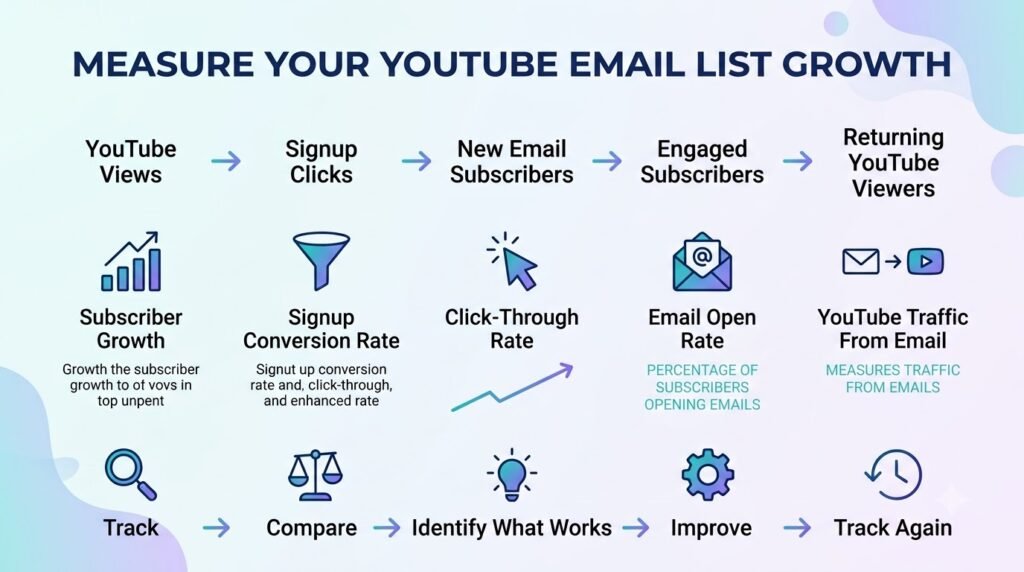
When assessing the effectiveness of your channel’s marketing efforts, consider not just the quantity of your subscribers but rather their activity.
A great amount of inactive users is significantly less valuable than an engaged few. The key to success lies in the development of a system that will help you track the former and the ways to increase the latter.
Track YouTube-to-email conversion rate
To see how effectively your channel turns viewers into subscribers, use this basic formula:
EmailsignupsrelevantYouTubeviewersorlanding-pagevisitors100
When evaluating this metric across time, make sure that when comparing against a previous campaign, you are using the same denominator.
If you change what you are measuring, say, from video views to landing page visits, midway through your efforts, your data will be skewed and you will not be able to make meaningful comparisons between months.
Track lead magnet performance
Not all freebies pull their weight. To discover what is working best, it is important to compare your metrics against each other closely:
- clicks from your end screens and description links
- landing-page visits to your opt-in pages
- signups collected from each specific form
- conversion rate to see which lead magnet turns casual viewers into subscribers most efficiently
Track email engagement
Once subscribers are on your list, monitor their ongoing activity to gauge health and interest. Keep a close eye on your opens, clicks, unsubscribes, conversions, and the video traffic generated when you drop a new link in your newsletter.
Identify your highest-converting videos
Connect the dots between your content and your growth by asking yourself a few critical questions:
- Which videos generate the most clicks?
- Which topics generate the most signups?
- Which lead magnets convert best?
- Which email topics drive viewers back to YouTube?
Answering these questions can provide you with valuable feedback to improve your content strategy.
Pro Tip: Keep track of these metrics on a monthly basis to see patterns emerge and to focus on your most popular and valuable videos that attract the most high-quality subscribers.
Which metric do you currently find the hardest to track accurately?
Common Mistakes When Building an Email List From YouTube
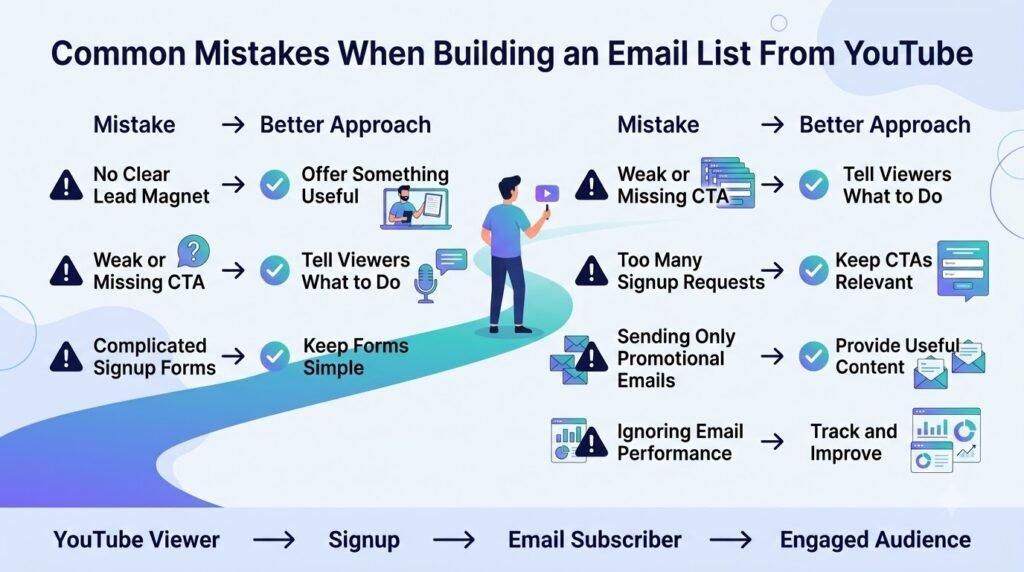
Building an email list from YouTube is not just about adding a signup link. A few mistakes can turn off viewers to the point of not returning or subscribing to a channel.
Asking viewers to “join my email list” without a reason: Give people a clear reason to sign up. A checklist, template, guide, discount, or exclusive resource is something viewers would reward the creator with their email for.
Using the same generic lead magnet for every video: A resource that matches the video topic will usually feel more relevant than one generic freebie. For example, a video about YouTube thumbnails should direct people to a thumbnail checklist instead of an unrelated ebook.
Hiding the signup link: Make the next step obvious. Mention the resource naturally in the video and place the relevant link where viewers can easily find it.
Sending emails only when you want to sell: Subscribers won’t feel like they’re missing out if they don’t purchase something right away. Try to intersperse selling messages with helpful tips, new videos, resources, or articles.
Ignoring YouTube’s current link rules: Link placement and clickable-link availability can differ across long-form video descriptions, Shorts, and channel profile areas. Check what YouTube’s current policies are before sending your viewers elsewhere.
Collecting emails without a follow-up plan: Getting the signup is only the beginning. A nice welcome series and a few helpful emails are all it takes to turn a list of addresses into an engaged audience instead of an inert database.
A Simple YouTube-to-Email List Building System
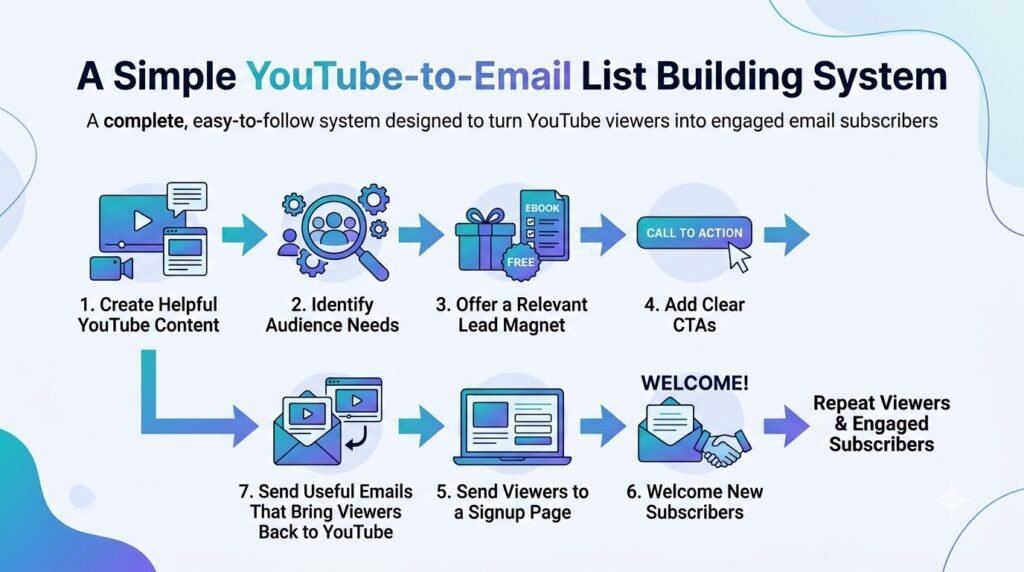
Growing an email list from YouTube works best as a repeatable process rather than a one-off effort. Here’s a simple framework you can run for every upload.
Before publishing
Start by choosing a video topic tied to a real audience problem — the more specific the problem, the more relevant your lead magnet can be. Create a lead magnet that solves a narrow piece of that problem (a checklist, template, or short guide works well), then build a simple landing page for it.
Finally, prepare the CTA you’ll use in the video itself, so it feels like a natural extension of the content rather than an afterthought.
While publishing
Write the CTA directly into your script so it’s delivered naturally rather than tacked on. Add the landing-page link to the top of your video description, update your channel profile link if this offer is now your priority, and post a pinned comment reinforcing the same CTA.
Where the video qualifies, add an end-screen CTA as one more touchpoint for viewers who watch to the end.
After publishing
Send the video to your existing email list to give it an early engagement boost. Track link clicks and signups so that you know if the offer is actually converting, and review YouTube Analytics to see how viewers behaved around your CTA moments.
Use what you learn to improve the CTA’s wording or placement, and plan follow-up content that keeps building on the same topic and offer.
FAQs: How to Build an Email List From Your YouTube Channel
Can you build an email list from YouTube without a large following?
Yes. You don’t need a huge subscriber count to start building an email list. A smaller audience can be beneficial to you if they have a specific need or interest.
It is more important to make something that has a purpose for someone to subscribe to, rather than thinking about how many people will watch it.
What is the best lead magnet for a YouTube channel?
The best lead magnet is usually one that directly extends the value of the video. This could be a checklist, template, resource list, worksheet, mini-guide, or downloadable version of something demonstrated in the video. The closer the connection between the video and the resource, the more natural the signup feels.
Where should I put my email signup link on YouTube?
For long videos, you may want to consider adding clickable URLs to their description if your channel is eligible (has access to the advanced feature). You can also add up to 14 links to your channel’s description (the first one would be placed in a prominent location).
Should I mention my lead magnet in every YouTube video?
Not necessarily. Mention it when it genuinely relates to the video’s topic. Repeating the same CTA in every video can make it feel automatic. A better approach is to match the resource to the content whenever possible and make the invitation part of the video’s natural flow.
How do I get email subscribers from YouTube Shorts?
Shorts require a different approach because URLs in Shorts descriptions and comments are currently not clickable. Instead, creators can direct viewers toward their channel profile, where clickable links are available, or use a related video to move viewers from a Short to longer content.
For example, a Short can introduce a quick tip, then tell viewers where to find the full tutorial or resource through the channel profile. Avoid relying on older advice that suggests simply putting a clickable signup URL in the Shorts description.
What email platform should YouTubers use?
There isn’t one platform that fits every creator. Look at the features you’ll actually need, including landing pages and forms, automation, segmentation, analytics, deliverability, pricing, and room to scale.
Creator-focused options include tools such as Kit, Beehiiv, MailerLite, Brevo, and GetResponse, but the right choice depends on the size and complexity of your email strategy.
How often should YouTubers email their subscribers?
It’s important to be consistent rather than strict about a schedule. Some people can manage a weekly post while others can only spare a biweekly or monthly update. It’s best do stick to a schedule that you could maintain and still deliver something worthwhile to your subscribers every time.
How do I turn YouTube viewers into email subscribers?
Think of the process as a simple path:
Relevant video → relevant lead magnet → clear CTA → focused landing page → welcome sequence
The video hooks the right viewer, the lead magnet encourages subscription, and the welcome email gets them on board. Useful emails over time can keep them coming back for your new videos and content.
Final Takeaway: Turn YouTube Viewers Into a Long-Term Audience
Asking someone to subscribe on YouTube is easy. Giving them a reason to remain engaged beyond the link is how you build a lasting audience. That’s the value proposition email marketing has for YouTubers, in being able to extend beyond one’s channel’s algorithm.
A few principles carry the whole approach:
- Understand what your viewers actually want, not only what works well.
- Create a lead magnet that solves a specific piece of that problem.
- Attach it to the videos where it makes the most sense, not every single upload randomly.
- Make your CTA clear so it doesn’t feel hidden or forced.
- Put your signup link everywhere: in description, profile links, pinned comments and end screens.
- Make sure your emails offer value so they keep signing up, not get tired of waiting between your uploads.
- Let what your audience wants influence what you create, based on what they click, reply and sign up for.
You don’t need to have some complicated setup to get this done. If you’re already spending time scripting, editing and optimizing your videos in ytZolo, adding an extra step of adding a lead magnet and landing page to your editing process will turn those casual viewers into a long term audience.
Author Bio
Anshika Verma is a content researcher and writer at ytZolo, focused on YouTube growth, creator workflows, AI tools, and practical strategies for building and growing online audiences.

