
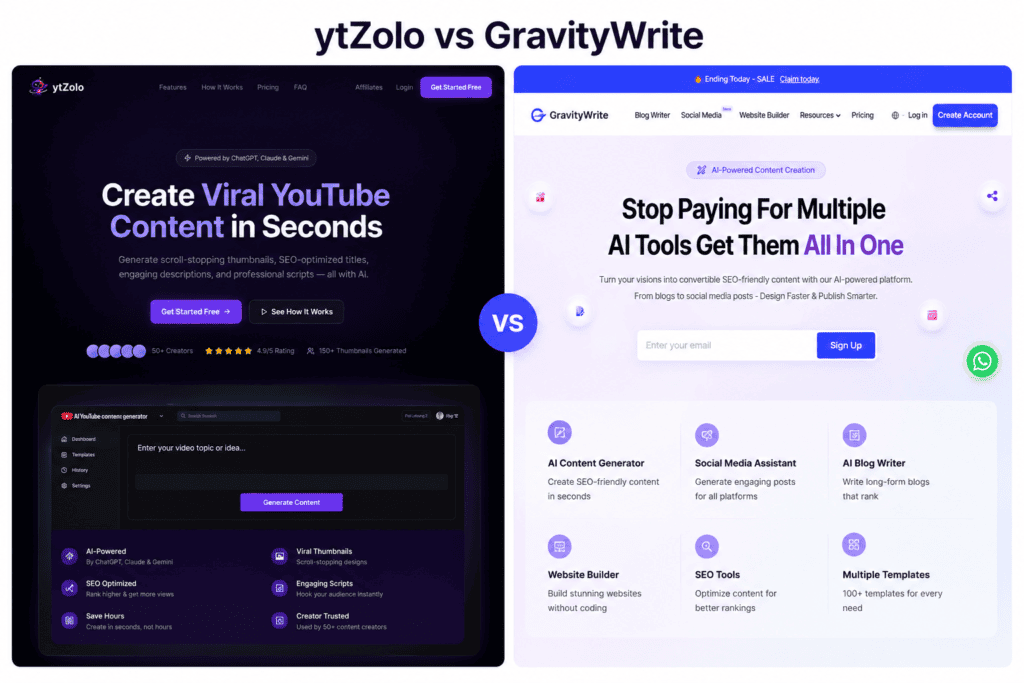
Searching “ytZolo vs GravityWrite” usually means one of two things: you want AI help writing YouTube scripts and titles, or you’re comparing every AI content tool you’ve bookmarked to figure out which one to actually pay for. This comparison is built for both readers.
ytZolo is a YouTube-only AI content platform. Its entire product — scripts, titles, descriptions, tags, thumbnail concepts — is built around one job: getting a video from idea to publish-ready faster.
GravityWrite is a much broader AI content suite. It has a dedicated YouTube tools category (script creator, title and thumbnail ideas, description and tags, a content planner, and a Shorts/Reels repurposing tool), but that sits alongside blog writing, an AI image generator, a video generator, a website builder, a social media scheduler, and a text humanizer — all under one subscription.
That difference in scope is the whole story here, and it’s more useful to understand upfront than to discover three paragraphs into a feature table. If you only create YouTube content and never touch a blog, GravityWrite’s non-YouTube tools are dead weight you’re paying for.
If your content operation spans YouTube plus blogging, social posts, and on-site content, ytZolo only solves one piece of that puzzle and you’d need separate tools for the rest anyway.
This guide compares both tools honestly — including where GravityWrite’s YouTube toolkit genuinely goes further than ytZolo’s, and where ytZolo’s YouTube-only focus produces a cleaner, more purpose-built result.
You’ll get a full feature comparison, real pricing (pulled directly from both companies’ current pricing pages), pros and cons, use-case recommendations, and a decision framework — not a verdict that pretends one tool is objectively better at everything.
Table of Contents
What ytZolo and GravityWrite Actually Are
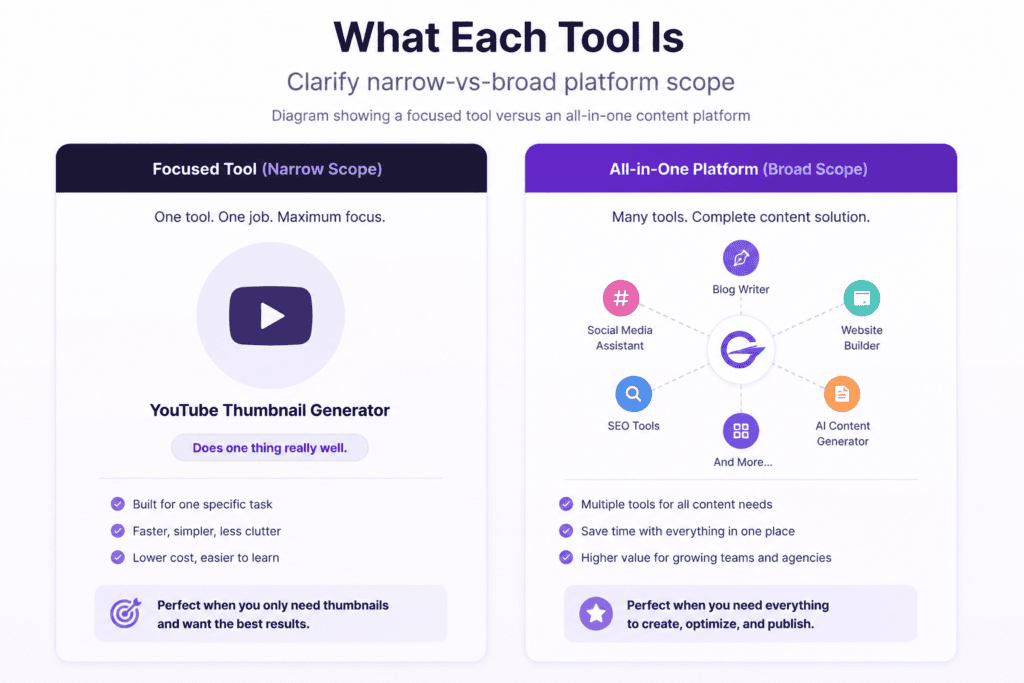
ytZolo describes itself as purpose-built for YouTube — its own marketing is explicit that it “doesn’t try to be everything for everyone.” The product generates full scripts (hook, body, transitions, CTA), SEO titles, descriptions, tags, and thumbnail concepts, drawing on multiple underlying AI models.
There’s no blog writer, no image generator for general use, no website builder, and no social scheduler. Everything is scoped to YouTube.
GravityWrite is a general AI content platform with more than 250 templates spanning blogs, ad copy, emails, social posts, images, short-form video, and websites — YouTube is one use case among several, not the whole product.
Inside its dedicated YouTube tools category, GravityWrite offers a YouTube Script Creator, a Title & Thumbnail Ideas generator, a Description & Tags tool, a YouTube Idea & Content Planner (built to plan a month or more of videos at once), a Shorts & Reels Creator that repurposes long-form scripts into short-form cuts, and a YouTube Summariser.
Outside of YouTube, the same subscription also includes an AI Blog Writer with competitor-outline generation, an AI Image Generator, a Video Generator, a Text Humanizer, a Book & Course Creator, an AI Website Builder, and a social media scheduler with auto-posting.
What this means practically: GravityWrite’s YouTube toolkit is a genuine, feature-for-feature competitor to ytZolo — arguably a slightly more complete one on paper, since it adds a dedicated content-planning tool and a script-to-Shorts repurposing tool that ytZolo doesn’t clearly publish as a feature.
But GravityWrite is not a YouTube-first product, and its interface, credit system, and upsells are built around the full content suite, not just video. ytZolo, by contrast, is narrower but more singularly focused — every part of its dashboard exists because it relates directly to a YouTube video.
Quick Comparison Table
| Category | ytZolo | GravityWrite |
|---|---|---|
| Primary purpose | AI script and content generation, YouTube only | Broad AI content platform (blogs, images, video, YouTube, social, websites) |
| Best for | Creators who want a YouTube-only tool with no unrelated features | Creators/agencies who want YouTube tools bundled with blog, social, and image generation |
| Script generation | Yes — full scripts with hooks, body, CTA | Yes — YouTube Script Creator, plus intro/hook-specific and Shorts script tools |
| Video ideas | Not a dedicated core feature | Yes — YT Idea & Content Planner, designed for planning a month+ of videos |
| Research/competitor analysis | Not published as a feature | Yes, for blogs — “generate outline from competitors” pulls top-ranking articles (not YouTube-specific) |
| Thumbnail features | Yes — AI thumbnail concepts generated directly (1–3 variants by plan) | Yes — Title & Thumbnail Ideas tool generates concepts/text; a separate general AI Image Generator can produce the visual |
| Titles/descriptions/tags | Yes — generated as part of one content package | Yes — dedicated Description & Tags and Title & Thumbnail Ideas tools |
| Content planning | Not a dedicated feature | Yes — dedicated YouTube Idea & Content Planner |
| Shorts/Reels repurposing | Shorts-specific scripts supported | Dedicated Shorts & Reels Creator that repurposes long-form scripts |
| Non-YouTube content tools | None | Blog writer, image generator, video generator, website builder, social scheduler, text humanizer, book/course creator |
| Workflow automation | Bulk generation, history library | Bulk generation via templates; social scheduler automates posting (not video production) |
| Collaboration | Not published as a feature | Not published as a dedicated feature (mobile app access included on paid plans) |
| Learning curve | Low — single-purpose dashboard | Low-to-moderate — larger toolset with 250+ templates to navigate |
| Free plan | Yes, limited credits | Yes — reported around 1,000 words/month with template access (verify current cap on-site) |
| Starting price | ~$6.7/month billed annually (Standard) | $8/month billed annually at $97/year (Plus) |
| Overall strength | Depth and simplicity within YouTube alone | Breadth — one subscription covers YouTube plus other content channels |
ytZolo vs Gravitywrite: Feature-by-Feature Comparison
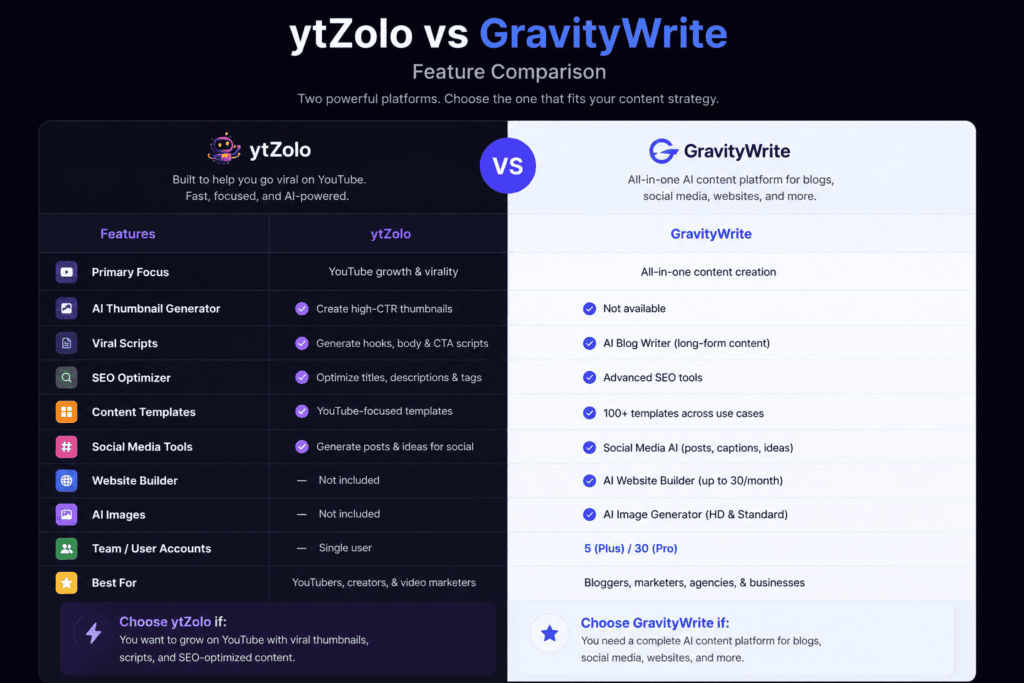
AI Scripting
ytZolo: Generates a complete script — hook, body sections, transitions, CTA — from a topic, audience, and tone input, using multiple underlying AI models (the site lists ChatGPT, Claude, and Gemini as available). Because scripting is the product’s core purpose, the interface and prompt structure are built entirely around it.
GravityWrite: Its YouTube Script Creator works similarly — you provide a title and key talking points and get a structured script back — and it’s supplemented by separate tools for intro/hook writing and suspenseful openings specifically.
GravityWrite also documents that scripts are generated from a title plus talking points rather than a single freeform prompt, which can produce more consistent structure but requires a bit more upfront input than a one-line ytZolo prompt.
Who benefits most: Creators who want the absolute simplest scripting flow will likely prefer ytZolo’s single-prompt approach. Creators who want more granular control over hooks, intros, and talking points — or who want scripting bundled with a much larger content operation — will likely prefer GravityWrite.
Shared limitation: Neither company’s AI script output should be treated as camera-ready. Both require a human editing pass for voice, factual accuracy, and pacing, and neither publishes independently verified data on how much editing time their scripts actually save.
Video Ideas and Content Planning
GravityWrite has a clear edge here. Its YT Idea & Content Planner is built specifically to plan video ideas and outlines for a niche over an extended period (GravityWrite’s own marketing describes planning “a month or more” of content), which ytZolo does not offer as a published feature.
ytZolo doesn’t market a dedicated idea-generation or planning tool; its workflow assumes you already have a topic or title before you start.
If content planning and idea generation are a real bottleneck for you — not just scripting — this is a meaningful point in GravityWrite’s favor.
Thumbnails
ytZolo: Generates AI thumbnail concepts directly as part of its content package — one variant on the Standard plan, three variants on Pro, according to its pricing page.
GravityWrite: Its dedicated Title & Thumbnail Ideas tool generates thumbnail concepts and text ideas based on your video’s themes. To turn those ideas into an actual finished visual, GravityWrite’s marketing describes pairing this with its general-purpose AI Image Generator, which is a separate tool in the platform rather than a single unified “generate my thumbnail” button.
Practical difference: ytZolo’s thumbnail output appears to be a more direct, single-step process. GravityWrite’s is more of a two-tool workflow (concept, then image), which offers more creative flexibility if you’re comfortable with an extra step, but less immediate simplicity if you just want a finished thumbnail fast.
SEO Titles, Descriptions, and Tags
Both tools handle this competently, and it’s the area with the most direct overlap.
ytZolo: Titles, descriptions, and tags are generated from the same script pass, keeping the whole content package aligned by design.
GravityWrite: Uses separate, purpose-built tools — a Description & Tags generator and a Title & Thumbnail Ideas generator — that can be run independently of the Script Creator, which is useful if you’re optimizing metadata for a video you already scripted elsewhere.
Shorts and Repurposing
GravityWrite has a specific advantage: its Shorts & Reels Creator is designed to take a long-form script and extract the most compelling moments into short-form cuts formatted for YouTube Shorts, TikTok, and Instagram Reels — a genuine repurposing workflow, not just a separate short-form script generator.
ytZolo supports generating Shorts-specific scripts from scratch (short, punchy, vertical-format scripts), but doesn’t publish a dedicated long-form-to-Shorts repurposing feature the way GravityWrite does.
Beyond YouTube: Blogs, Images, Video, Websites, and Social
This is the single biggest structural difference between the two tools, and it’s worth stating plainly: ytZolo has none of this, and doesn’t claim to.
GravityWrite’s subscription also includes an AI Blog Writer (with a “generate outline from competitors” feature that studies top-ranking articles), a general AI Image Generator, an AI Video Generator for short-form social video, an AI Website Builder, a Text Humanizer aimed at helping AI content pass detection tools, a Book & Course Creator, and a social media scheduler with auto-posting across platforms.
If your content operation is YouTube-only, none of this matters to your decision. If it spans multiple channels, this is where GravityWrite’s value proposition changes shape — you’re not just comparing “which YouTube tool is better,” you’re comparing “one narrow tool” against “one broad tool that happens to include YouTube.”
Workflow, Bulk Generation, and History
ytZolo supports bulk generation and a history library for storing past outputs — useful for agencies or multi-channel operators.
GravityWrite doesn’t publish a YouTube-specific bulk-generation feature, but its broader platform includes a social media scheduler that automates posting (not content generation) across up to 30 accounts on the Pro plan, which is a different kind of workflow automation entirely — post-production distribution rather than pre-production content batching.
Collaboration
Neither platform publishes dedicated team-collaboration features such as shared workspaces, role permissions, or approval chains on their public pages. GravityWrite’s paid plans do include mobile app access, which supports working across devices but isn’t the same as multi-user collaboration. Teams with a hard collaboration requirement should treat this as a gap in both tools.
User Experience
Dashboard and navigation: ytZolo’s dashboard is built around a single, linear workflow: prompt in, content package out. There’s little to navigate because there’s little outside of YouTube content generation.
GravityWrite’s dashboard is organized by tool category, since it’s serving many more use cases — YouTube tools sit in their own section alongside blog, image, video, and website tools.
This gives more flexibility but also more surface area to learn; several third-party reviews note the platform’s 250+ templates can take some initial exploration to navigate efficiently, even though the interface itself is generally described as clean and beginner-friendly.
Learning curve: Both tools are described as approachable for beginners in independent reviews. ytZolo’s narrower scope likely means a shorter path to your first useful output, purely because there are fewer menus to explore. GravityWrite’s breadth means more initial setup time if you want to use more than just the YouTube tools, but a shorter learning curve than juggling several separate single-purpose apps if you do need blog, image, and social tools too.
Onboarding: GravityWrite documents a simple four-step flow (sign up, choose your tool, answer a few input questions, generate). ytZolo’s onboarding isn’t independently documented in the same detail, but its pricing FAQ confirms a free plan exists specifically to let new users try the platform before paying.
Performance: Neither company publishes independent, third-party-verified benchmarks for generation speed or reliability. Treat any specific speed claims from either company’s own marketing as unverified until tested against your own workflow.
ytZolo vs Gravitywrite: Pricing Compared
| Plan | ytZolo | GravityWrite |
|---|---|---|
| Free | Free plan with limited credits (per ytZolo’s site FAQ) | Free plan, reported around 1,000 words/month with 50+ templates (sources vary between 50+ and 80+ templates — verify current limits on-site) |
| Entry paid tier | Standard: ~$6.7/month billed at $79.9/year — 2,000 credits/month, all AI models, 1 thumbnail variant, script/title/description/tag generation | Plus: $8/month billed at $97/year (list price $49/month) — 500 AI credits/month, ~15 blogs/month equivalent, ~83 images/month equivalent, ~25 videos/month equivalent, AI Website Builder, social scheduler (5 accounts/50 posts) |
| Higher tier | Pro: ~$12/month billed at $143.9/year — 5,000 credits/month, 3 thumbnail variants, dedicated support | Pro: $49/month billed at $599/year (list price $79/month) — 2,500 AI credits/month, ~70 blogs/month equivalent, ~416 images/month equivalent, ~125 videos/month equivalent, social scheduler (30 accounts/150 posts), premium support |
| Bundle option | Not offered | Bundle Plan: $139/year one-time setup — GravityWrite Plus plan plus WordPress hosting and n8n workflow automation |
| Billing note | Credits consumed per generation; thumbnails cost more credits than text | Credits are shared across all features (text, image, video); GravityWrite’s own pricing page notes usage estimates are conservative and assume all credits spent on one feature alone |
| Refund policy | Not clearly documented publicly | 7-day refund policy per GravityWrite’s pricing page |
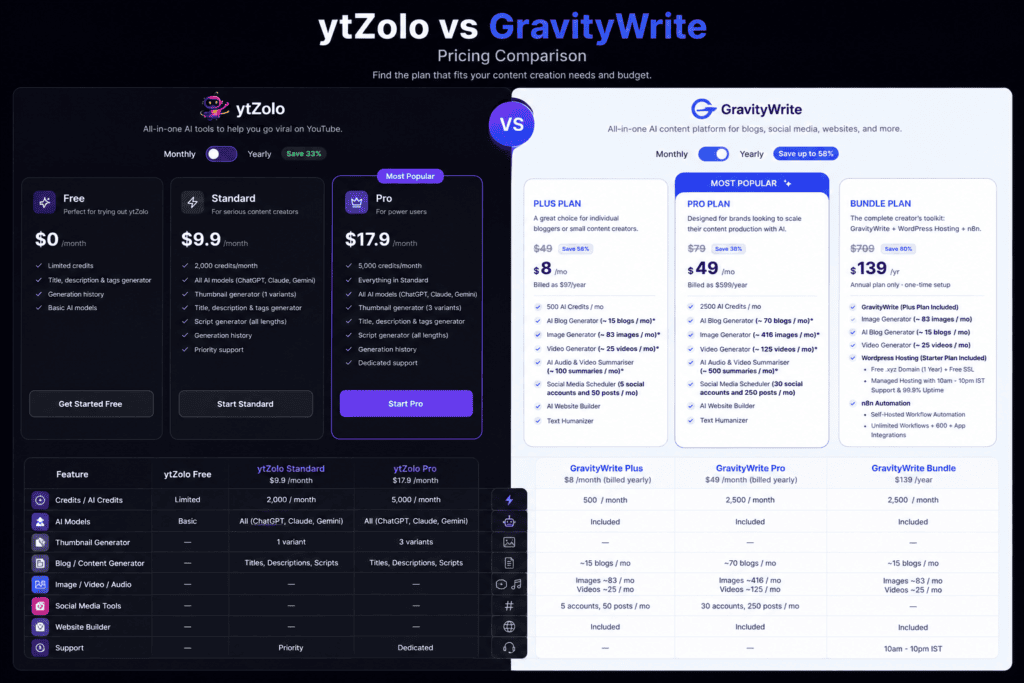
Value take: At entry level, the two tools are priced within about a dollar of each other per month, but you’re getting very different amounts of scope for that money — ytZolo’s Standard tier is 100% YouTube-focused credits, while GravityWrite’s Plus tier spreads 500 credits across blog posts, images, videos, and website generation, of which only a portion will typically go toward YouTube content if that’s your main use case.
At the higher tier, GravityWrite’s Pro plan (~$49/month) costs roughly four times ytZolo’s Pro plan (~$12/month) — but it’s also replacing several other subscriptions (image generator, video generator, website builder, social scheduler) that you’d otherwise pay for separately. Whether that’s a good deal depends entirely on whether you’d actually use those extra tools.
Both companies’ pricing structures are credit-based and both note that current published prices and credit allowances can change — confirm current numbers on ytzolo.com/pricing and gravitywrite.com/pricing before subscribing, since the figures gathered for this comparison reflect a snapshot at the time of research.
Pros & Cons
ytZolo
| Pros | Cons |
|---|---|
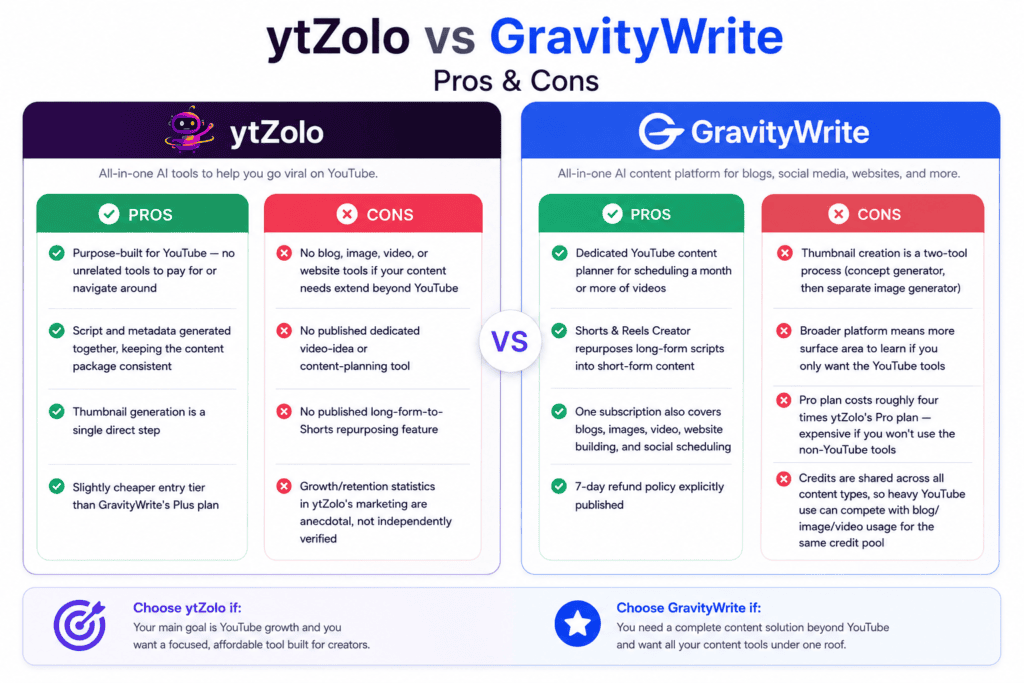
| Purpose-built for YouTube — no unrelated tools to pay for or navigate around | No blog, image, video, or website tools if your content needs extend beyond YouTube |
| Script and metadata generated together, keeping the content package consistent | No published dedicated video-idea or content-planning tool |
| Thumbnail generation is a single direct step | No published long-form-to-Shorts repurposing feature |
| Slightly cheaper entry tier than GravityWrite’s Plus plan | Growth/retention statistics in ytZolo’s marketing are anecdotal, not independently verified |
GravityWrite
| Pros | Cons |
|---|---|
| Dedicated YouTube content planner for scheduling a month or more of videos | Thumbnail creation is a two-tool process (concept generator, then separate image generator) |
| Shorts & Reels Creator repurposes long-form scripts into short-form content | Broader platform means more surface area to learn if you only want the YouTube tools |
| One subscription also covers blogs, images, video, website building, and social scheduling | Pro plan costs roughly four times ytZolo’s Pro plan — expensive if you won’t use the non-YouTube tools |
| 7-day refund policy explicitly published | Credits are shared across all content types, so heavy YouTube use can compete with blog/image/video usage for the same credit pool |
Use Cases
- Beginners writing their first scripts: ytZolo’s single-prompt workflow has the shortest path to a first usable script; GravityWrite’s title-plus-talking-points input requires a bit more upfront thought but can produce more structured output.
- Professionals refining an established voice: Either tool works as a first-draft generator; both will need real editing to match a voice already developed over time.
- Agencies producing for multiple clients: GravityWrite’s broader toolset (blog, social, images, website) may reduce the number of separate subscriptions an agency needs across different client deliverables; ytZolo’s bulk generation and history library are more narrowly focused on scaling YouTube output specifically.
- Solo creators on a budget: At entry-level pricing, the two are close in cost; the deciding factor is whether you’ll actually use GravityWrite’s non-YouTube tools or whether ytZolo’s narrower, cheaper-at-scale credit allocation suits you better.
- Brands and businesses: GravityWrite’s website builder and social scheduler make it more of a one-stop content operations tool for a brand managing multiple channels; ytZolo doesn’t extend beyond video content.
- Educational creators: GravityWrite’s Book & Course Creator may appeal to educational creators repurposing video content into written courses; ytZolo doesn’t offer an equivalent.
- Faceless channel owners: ytZolo explicitly markets to this use case with bulk multi-channel generation; GravityWrite’s content planner is also relevant here for keeping multiple channels’ idea pipelines full.
- Teams needing collaboration features: Neither tool publishes dedicated collaboration functionality — look elsewhere if this is a hard requirement for either platform.
- Long-form creators: Both tools structure long-form scripts with hooks, body sections, and CTAs; GravityWrite’s talking-points input may suit creators who already outline before scripting.
- Short-form creators: GravityWrite’s Shorts & Reels Creator (repurposing long-form scripts) is a distinct advantage over ytZolo’s from-scratch Shorts scripting if your workflow starts with long-form content.
Decision Matrix
| If your priority is… | Choose… |
|---|---|
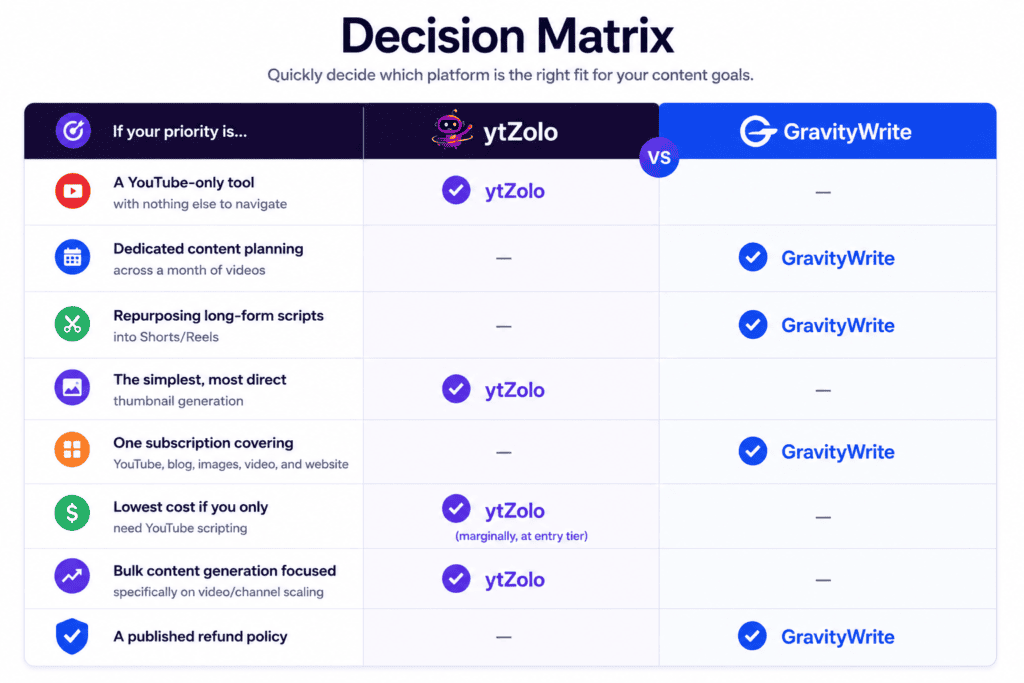
| A YouTube-only tool with nothing else to navigate | ytZolo |
| Dedicated content planning across a month of videos | GravityWrite |
| Repurposing long-form scripts into Shorts/Reels | GravityWrite |
| The simplest, most direct thumbnail generation | ytZolo |
| One subscription covering YouTube, blog, images, video, and website | GravityWrite |
| Lowest cost if you only need YouTube scripting | ytZolo (marginally, at entry tier) |
| Bulk content generation focused specifically on video/channel scaling | ytZolo |
| A published refund policy | GravityWrite |
Final Verdict
Neither tool is a universal winner, because they’re not really solving the same-sized problem.
Choose ytZolo if your content operation is YouTube and only YouTube, and you want a tool with no unrelated features competing for attention or credits — just scripts, titles, descriptions, tags, and thumbnails, generated together and kept simple.
Choose GravityWrite if you want your YouTube scripting and metadata tools bundled with a broader content operation — blog posts, social scheduling, images, and even a website builder — under one subscription, and you’re specifically interested in its content-planning and Shorts-repurposing tools, which go a step further than what ytZolo publishes.
A practical way to decide: list every content type your channel or business actually produces in a given month. If YouTube video is the only line on that list, ytZolo’s focus is an advantage, not a limitation.
If your list includes blog posts, social captions, or on-site content alongside video, GravityWrite’s broader credit pool may replace two or three separate subscriptions — provided you actually use those other tools regularly enough to justify the higher Pro-tier price.
Before committing to either, run a handful of real scripts through each tool’s free plan using your own topics, and judge the output against your channel’s actual voice rather than either company’s marketing claims.
FAQ

1. Is ytZolo the same kind of tool as GravityWrite? Not exactly. ytZolo is a YouTube-only AI content platform. GravityWrite is a broader AI content suite that includes a dedicated YouTube tools category alongside blog, image, video, website, and social media tools.
2. Does GravityWrite have a YouTube script generator? Yes. Its YouTube Script Creator generates a script from a video title and key talking points, and it’s supplemented by separate tools for intros, hooks, and Shorts-specific scripts.
3. Which is cheaper, ytZolo or GravityWrite? At entry-level tiers they’re close: ytZolo’s Standard plan runs about $6.7/month billed annually, and GravityWrite’s Plus plan runs about $8/month billed annually. At the higher tier, GravityWrite’s Pro plan (~$49/month) costs substantially more than ytZolo’s Pro plan (~$12/month), but it also includes non-YouTube tools ytZolo doesn’t offer.
4. Does ytZolo offer blog writing or image generation? No. ytZolo’s published features are scoped entirely to YouTube — scripts, titles, descriptions, tags, and thumbnail concepts.
5. Does GravityWrite have a content-planning tool for YouTube? Yes — its YT Idea & Content Planner is built specifically to generate video ideas and outlines for a niche, designed to help plan a month or more of content at once. ytZolo doesn’t publish an equivalent dedicated planning tool.
6. Which tool is better for repurposing long videos into Shorts? GravityWrite’s Shorts & Reels Creator is specifically built to extract key moments from a long-form script into short-form cuts. ytZolo supports generating Shorts scripts from scratch but doesn’t publish a dedicated repurposing feature for existing long-form content.
7. Do both tools have free plans? Yes. ytZolo offers a free plan with limited credits per its site FAQ. GravityWrite’s free plan is reported at around 1,000 words per month with template access, though exact template counts vary slightly across third-party sources — check GravityWrite’s current pricing page for the up-to-date figure.
8. Does GravityWrite’s thumbnail tool create a finished image? GravityWrite’s Title & Thumbnail Ideas tool generates concepts and text ideas; producing the actual finished visual is described as pairing this with GravityWrite’s separate general-purpose AI Image Generator. ytZolo’s thumbnail feature generates the visual concept more directly as part of its core workflow.
9. Is GravityWrite good for content beyond YouTube? Yes — that’s its core design. The same subscription includes an AI Blog Writer with competitor-based outline generation, an image generator, a video generator, a website builder, a social media scheduler, and a text humanizer.
10. Which tool has a shorter learning curve? ytZolo’s narrower scope likely means a shorter path to your first output, since there’s less to navigate. GravityWrite’s larger toolset (250+ templates) has more initial surface area but is generally described in independent reviews as clean and beginner-friendly once you know where to look.
11. Does GravityWrite offer a refund policy? Yes — a 7-day refund policy is published on GravityWrite’s pricing page. ytZolo does not clearly document a refund policy on its public pages at the time of this comparison; confirm directly with ytZolo before purchasing if this matters to you.
12. Can agencies use either tool for multiple clients? ytZolo’s bulk generation and history library are built with multi-channel, multi-client YouTube production in mind. GravityWrite’s breadth (blog, social, images, website) may reduce the number of separate tools an agency needs across different client deliverables, not just YouTube ones.
13. Are the growth or performance claims from either company verified? No. Specific figures such as subscriber growth or watch-time increases mentioned in either company’s own marketing content are presented as anecdotes or illustrative estimates, not independently audited data.
14. Do I need both tools? Only if you specifically want ytZolo’s more direct, single-step YouTube workflow for scripting and thumbnails while also using GravityWrite (or a similar tool) for blog and social content. Most creators focused solely on YouTube will only need one.
15. Where can I check current pricing for either tool? Always confirm on ytzolo.com/pricing and gravitywrite.com/pricing directly, since both platforms use credit-based systems that can change allowances or prices over time.
About the Author
Anshika Verma specializes in YouTube growth research, AI creator tools, search optimization, and the creator economy. This comparison was developed through research across official product documentation, pricing pages, feature pages, and publicly available resources. Where information was incomplete or differed between sources, those differences are noted rather than assumed, following an evidence-based, creator-first approach.

