

Let me paint a picture you’ll probably recognize.
You’ve just finished editing a video. It took hours. The content is solid — you’re actually proud of it. Then you hit the last step: the thumbnail.
All that momentum dies. You open Canva, stare at generic templates for twenty minutes, throw together something “good enough,” and hit publish. Deep down, you already know it won’t perform the way it should.
Three days later you check your analytics. Low impressions. Low CTR. That familiar, creeping doubt: Was the video just not good enough?
Here’s the truth: the video was fine. The thumbnail wasn’t.
In 2026, a free AI thumbnail generator isn’t a luxury — it’s the fastest, most affordable way to fix the one problem that’s quietly limiting every video you’ve ever uploaded. While you’re still wrestling with Canva templates, the fastest-growing channels are using AI to generate scroll-stopping thumbnails in under 60 seconds.
This guide covers 9 tools tested in 2026, the data behind why thumbnails matter more than most creators realize, and why ytZolo is the one platform that goes further than all of them.
What is the best free AI thumbnail generator for YouTube in 2026?
A free AI thumbnail generator uses artificial intelligence to automatically create professional, click-optimized thumbnail images for YouTube videos — no design skills required.
The best options in 2026 are: ytZolo (all-in-one platform — free thumbnail generation plus AI titles, scripts, descriptions & tags, no credit card), Canva Magic Media (templates + AI generation, most popular free tier), vidIQ (trained on YouTube performance data, free with account), Adobe Express (free AI image generation, no watermark), Thumbmagic (video-first AI, built for YouTubers), and Hooksnap (learns your channel’s visual style from past uploads).
The clear standout is ytZolo — it’s the only free AI thumbnail generator built exclusively for YouTube that also generates your title, script, description, and tags from the same prompt. Unlike standalone design tools, ytZolo connects every element of your upload strategy in one place.
Table of Contents
Why Your Thumbnail Controls Everything
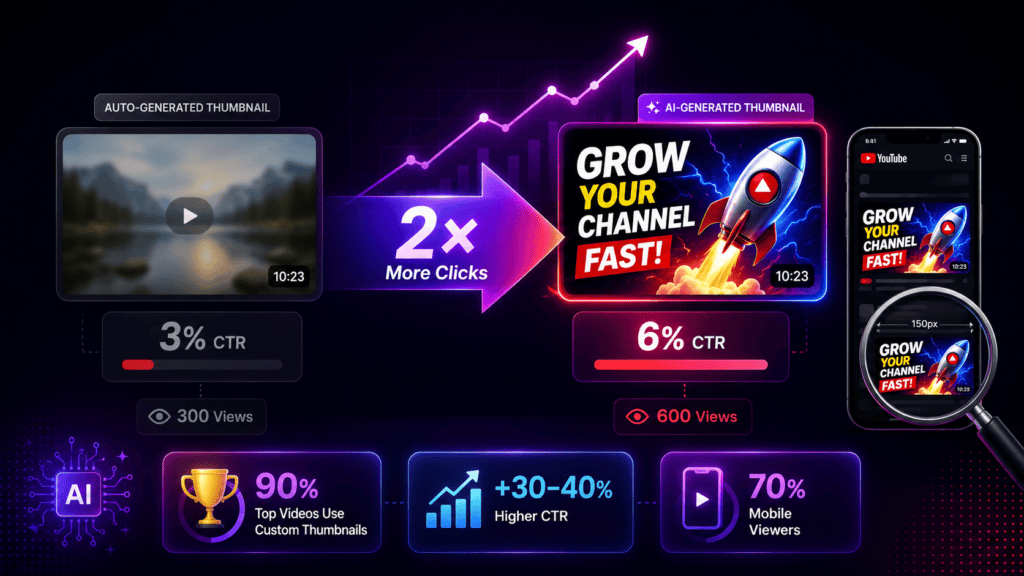
Here’s a number that should change how you think about your entire YouTube strategy.
YouTube’s own data confirms that 90% of the best-performing videos on the platform use custom thumbnails. That’s not a trend — that’s the algorithm telling you directly where it allocates impressions.
And CTR compounds. A video earning a 6% CTR on 10,000 impressions gets 600 views. The same impressions at 3% CTR gets 300. Same video. Same content. Same upload time. Double the views — just from the thumbnail.
According to a 2026 benchmark by VidIQ, expressive, high-contrast thumbnails consistently outperform bland auto-generated frames by 30–40% in click-through rate. And that gap widens at scale — more impressions means the CTR difference compounds into a dramatically larger view count gap over time.
Over 70% of YouTube traffic in 2026 comes from mobile devices, where thumbnails display at roughly 150px wide. If your thumbnail doesn’t communicate its core message at that size — instantly, in one glance — you’ve already lost the click.
The fastest fix? A free AI thumbnail generator built on real YouTube performance data.
Show Image
What Is a Free AI Thumbnail Generator?
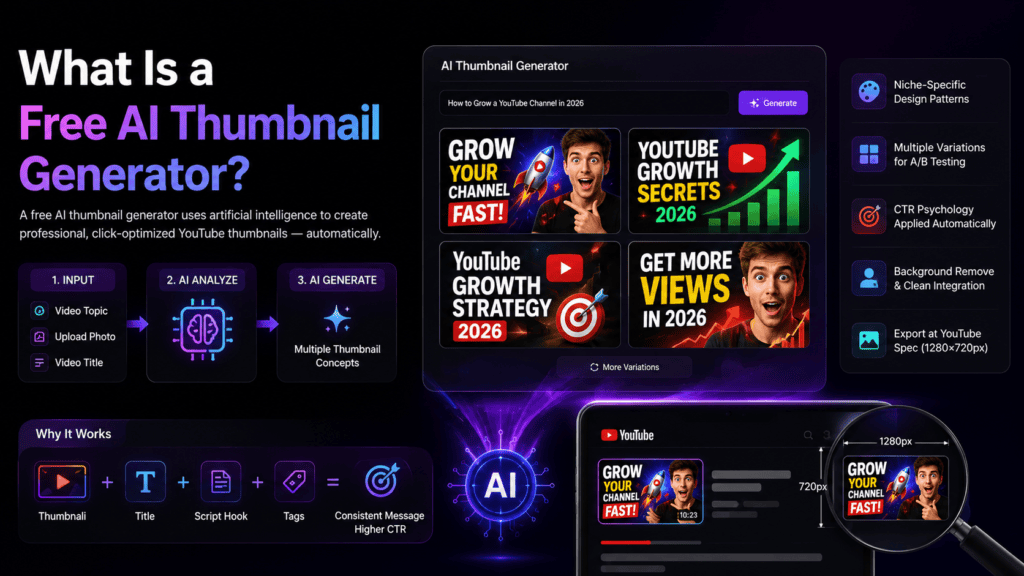
A free AI thumbnail generator is a tool powered by artificial intelligence that creates professional, click-optimized thumbnail images for your YouTube videos — automatically, without design experience.
You describe your video topic, upload a photo, or enter a title. The AI analyzes your niche and generates thumbnail concepts built on visual psychology principles proven to drive CTR.
The best free AI thumbnail generators in 2026 do more than generate images. They:
- Apply niche-specific design patterns — what works in gaming looks completely different from finance or fitness
- Generate multiple variations across different layouts, colors, and emotional hooks for A/B testing
- Apply CTR psychology automatically — high-contrast colors, readable mobile-first fonts, emotional face framing
- Remove backgrounds and integrate your face or product photo cleanly
- Export at YouTube’s exact spec — 1280×720px, 16:9 — without manual resizing
- In advanced tools like ytZolo: connect the thumbnail to your title, script, and tags so every element reinforces the same message
That last point matters more than most creators realize. A thumbnail that visually contradicts your title creates viewer confusion. A thumbnail aligned with your title, your script’s hook, and your SEO keyword creates a cohesive first impression — and the algorithm rewards that coherence.
Why Manual Thumbnail Design Is Holding You Back
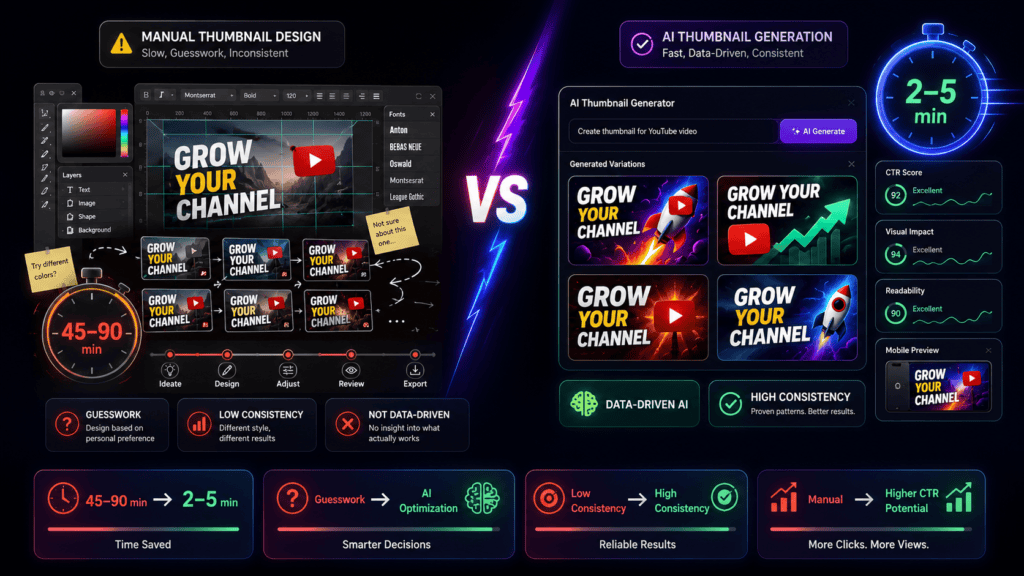
Manual thumbnail creation costs more than most creators calculate.
There’s the obvious time cost: 30–60 minutes per thumbnail in Canva or Photoshop. For a creator publishing twice weekly, that’s 4–8 hours per month on thumbnails alone.
But the hidden cost is accuracy. You’re designing based on personal taste — what you find visually interesting — instead of what your audience’s psychology responds to. You’re guessing color palettes, guessing text placement, guessing which emotional expression triggers a click.
AI doesn’t guess. It applies patterns from millions of analyzed thumbnails.
| Method | Time Spent | Data-Driven? | Consistency | Cost |
|---|---|---|---|---|
| Manual Photoshop | 45–90 min | ❌ No | Low | Paid software |
| Canva templates | 20–40 min | ❌ No | Medium | Free / Paid |
| Generic AI tools | 10–15 min | Partial | Medium | Varies |
| ytZolo AI | 2–5 min | ✅ Yes | ✅ High | ✅ Free |
According to Ahrefs’ YouTube SEO research, CTR optimization through consistent thumbnail quality is one of the highest-impact activities for channel growth — yet it’s consistently the most under-invested step in most creators’ workflows.
The math isn’t close. Manual methods made sense when AI tools didn’t exist. In 2026, they’re simply outdated.
What Makes a Thumbnail Actually Work in 2026?
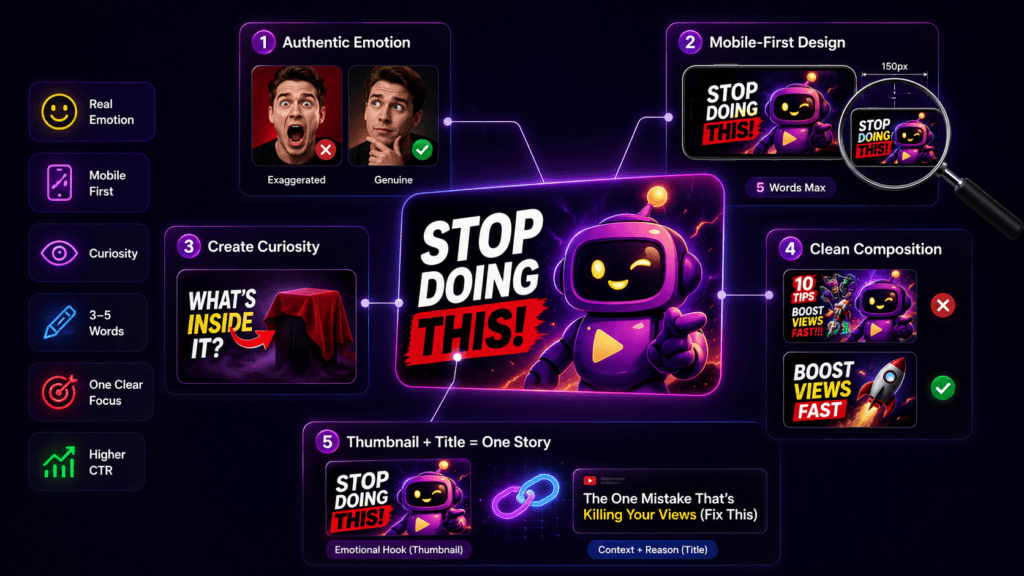
Before choosing tools, understand the principles. A great free AI thumbnail generator applies these automatically — but knowing them helps you brief the AI more effectively.
Genuine Emotion — Not Exaggerated YouTube Face
The human brain is hardwired to respond to faces. But 2026 viewer psychology has evolved. The exaggerated “YouTube face” — mouth wide open, eyebrows impossibly raised — is increasingly recognized and ignored.
What drives clicks now: genuine micro-expressions. Curiosity. Quiet disbelief. Real excitement. VidIQ research confirms expressive faces boost CTR by 20–30% — but only when the emotion matches the video’s actual content.
The Mobile-First Rule
Over 70% of YouTube traffic is mobile. Your thumbnail must communicate its full message at roughly 150px wide — approximately the size displayed on a phone screen.
The rules:
- Maximum 5 words of text — large, bold, high-contrast
- One dominant focal point — your face, a product, or a single dramatic visual
- High contrast combinations — bright on dark, or dark on bright. No mid-tones
- Nothing important in the bottom-right — YouTube’s timestamp sits there
The Visual Curiosity Gap
The best thumbnails don’t explain the video. They tease it. They create a visual question that can only be answered by clicking.
A shocked face with the single word “MISTAKE” hints at something valuable without revealing it. That visual tension — the curiosity gap — is the most powerful click driver on YouTube.
Three Words or Fewer of Text
Recent benchmark data from across the YouTube creator tool landscape is consistent: thumbnails with fewer than 3–5 words of text significantly outperform text-heavy designs. One focal point beats three. Clean beats cluttered.
Thumbnail + Title = One Story
Your thumbnail handles the emotional hook. Your title provides the context and keyword. They should complete each other — not repeat the same message. If your viewer gets everything from the thumbnail alone, there’s no reason to click.
9 Best Free AI Thumbnail Generator Tools (2026)
The market has expanded significantly. Here’s an honest breakdown of the tools worth your time — reviewed based on free-tier capability, YouTube-specific performance value, and 2026 output quality.
1. ytZolo — Best Overall Free AI Thumbnail Generator ⭐

ytZolo is the only free AI thumbnail generator on this list that treats the thumbnail as one element of a complete YouTube growth strategy — not a standalone product.
When you generate a thumbnail with ytZolo, you simultaneously get AI-generated titles, a full video script, an SEO-optimized description, and a targeted tag cluster — all from one prompt, all aligned with each other.
Its AI is trained specifically on YouTube performance data, calibrating every design for niche-specific CTR patterns rather than generic aesthetic quality. Free plan, no credit card, no watermark, full HD export.
Best for: Any creator who wants thumbnails connected to a complete content strategy. Free plan: ✅ Full — no credit card, no watermark Unique edge: Only tool that generates thumbnail + title + script + description + tags together
2. Canva Magic Media — Most Popular Free Option
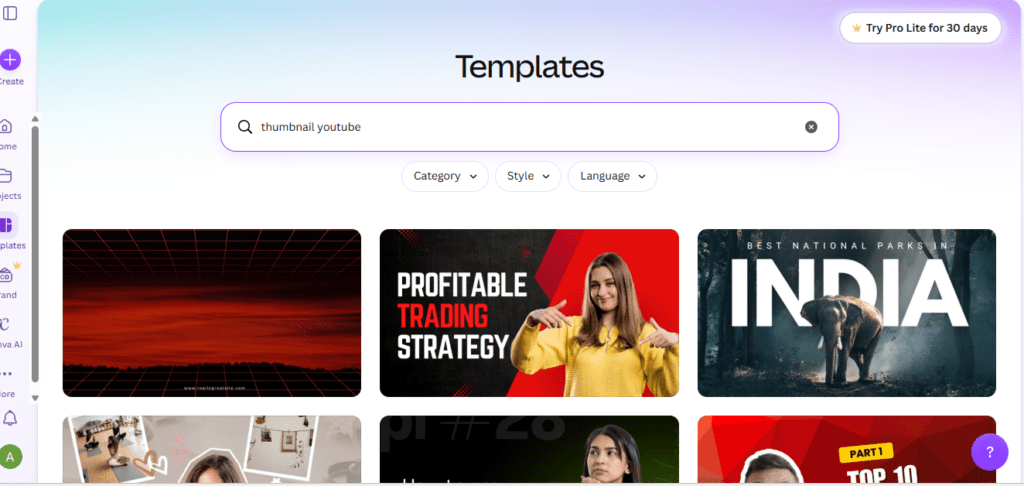
Canva remains the most recognized design tool for non-designers. The Magic Media AI generates thumbnails from text prompts across multiple style presets. Its template library is enormous and the drag-and-drop editor is genuinely beginner-friendly.
The honest limitation: Canva is a general-purpose design tool. It doesn’t understand YouTube’s algorithm, your niche’s click psychology, or what drives CTR specifically. You’re still making instinct-based decisions.
Best for: Beginners who want template flexibility with manual control. Free plan: ✅ Yes, but premium AI features require Canva Pro ($15/month) Limitation: Not YouTube-native; no CTR scoring; no metadata integration
3. vidIQ AI Thumbnail Maker — YouTube-Native, Free with Account
vidIQ’s thumbnail maker is trained on YouTube performance data, which gives it a genuine edge over general design tools. It applies high-contrast color logic, mobile-readable font sizing, and face detection for emotional framing automatically.
Strong for creators already in the vidIQ ecosystem. The thumbnail tool works well — but it’s a secondary feature, not the platform’s core focus.
Best for: Creators using vidIQ for analytics who want a connected thumbnail tool. Free plan: ✅ Yes, with vidIQ account Limitation: Thumbnail generation is peripheral; no script or full metadata workflow
4. Adobe Express — Free AI Generation, No Watermark
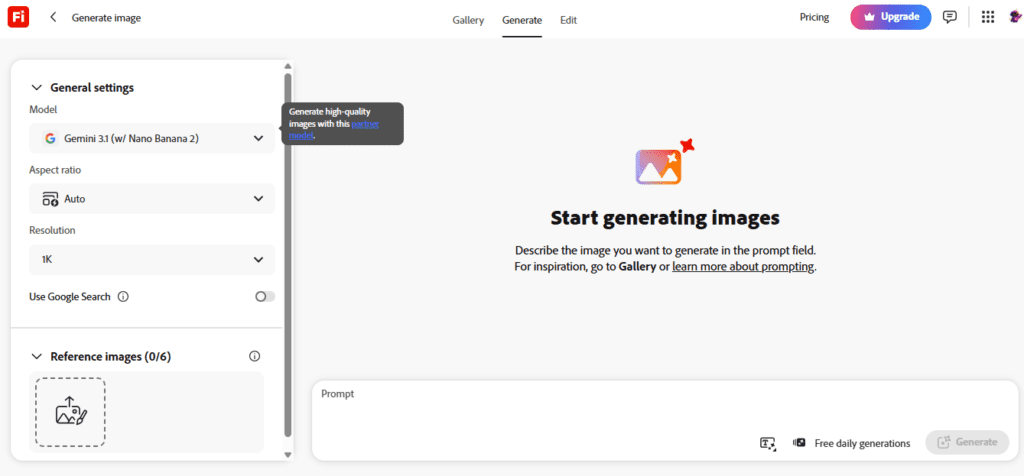
Adobe Express includes a free AI thumbnail generator powered by Adobe Firefly, with professional typography, AI background removal, and unlimited designs on the free plan. Output quality is strong and exports are clean without watermarks.
Strong for creators in the Adobe ecosystem or those who want fine-grained design control alongside AI generation. Not YouTube-native — no CTR optimization or niche-specific intelligence.
Best for: Creators who want high-quality AI image generation with manual design control. Free plan: ✅ Yes — unlimited designs, no watermark Limitation: No YouTube-specific optimization; no metadata integration
5. Thumbmagic — Video-First AI, Built for YouTubers
Thumbmagic analyzes your uploaded video or script to automatically extract key visual moments and generate thumbnail variations. It applies viral design frameworks used by top creators, enhances facial expressions for emotional impact, and adapts to your brand identity.
A/B variant generation is built in. Strong YouTube-native focus with genuine niche-pattern intelligence. Free tier is limited (trial only) — ongoing use requires a paid plan starting at $17/month.
Best for: Creators who want AI thumbnails generated directly from their video content. Free plan: ✅ Trial only; paid from $17/month Limitation: No script, title, description, or tag generation
6. Hooksnap — Learns Your Channel’s Visual Style
Hooksnap stands out for one specific capability: it learns your channel’s visual style from your existing uploads and applies it to new thumbnails. New thumbnails match your existing aesthetic without manual prompt engineering every time.
The free tier offers 10 credits per month with no time limit — genuinely usable for creators publishing 1–2 videos weekly. Strong for channels that have published 5+ videos and want visual consistency without repetitive prompting.
Best for: Established creators who want new thumbnails to match their existing channel aesthetic automatically. Free plan: ✅ 10 credits/month, no time limit Limitation: Brand-new channels get less personalized output; less manual layout control than Canva
7. WayinVideo — Promptless, Paste-URL Generation
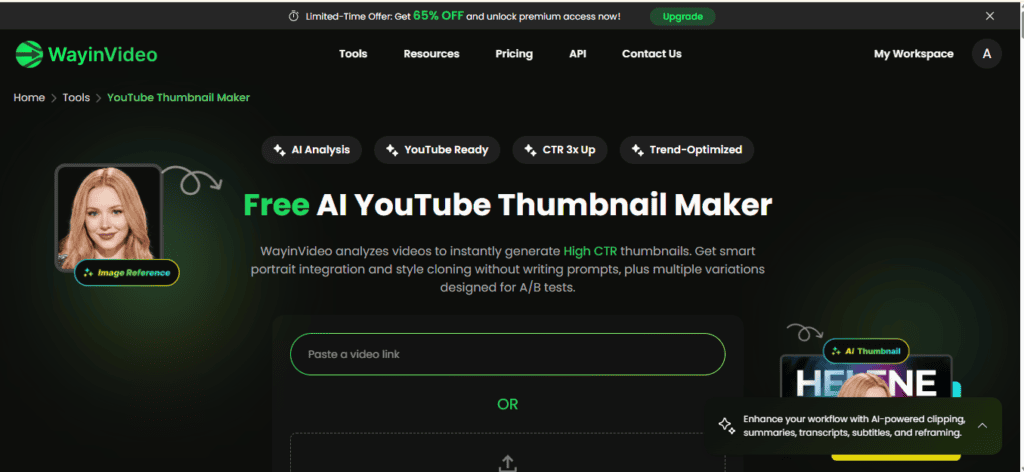
WayinVideo generates thumbnails from an existing YouTube URL — paste your video link and it analyzes the content, extracts emotional highlights, and generates multiple thumbnail options without any design input from you.
The video-first approach is genuinely useful: thumbnails reflect what the video actually delivers, reducing the risk of title-thumbnail mismatch. Limited free generations and no pre-upload creation are the main constraints.
Best for: Creators who want thumbnails derived from their actual uploaded video. Free plan: ✅ Limited free generations, no signup required Limitation: Only works post-upload; no metadata integration
8. CapCut AI Design Agent — Conversational AI, Generous Free Tier
CapCut’s AI Design Agent generates thumbnails through natural language conversation — you can refine outputs with instructions like “make the text bolder” or “change the background to dark blue.” The free tier is genuinely powerful with no watermark.
Strong for creators who want maximum creative control through conversational refinement. Not YouTube-native — no niche-specific CTR optimization or metadata connection.
Best for: Creators who want conversational AI iteration on thumbnail designs. Free plan: ✅ Full, no watermark Limitation: Not YouTube-specific; no metadata workflow integration
9. Fliki — Fast, No Forced Login
Fliki’s free tier generates AI thumbnails without a forced login — useful for creators who want to test a tool before creating an account. Clean output, beginner-friendly interface, decent quality for text-based video niches.
Best for: Creators who want zero-friction thumbnail generation to test before committing. Free plan: ✅ Yes, no forced login Limitation: Not YouTube-native; no CTR intelligence; no metadata integration
Quick Comparison Table
| Tool | Free Plan | No Watermark | YouTube-Native | CTR Optimized | Full Metadata |
|---|---|---|---|---|---|
| ytZolo | ✅ Full | ✅ Yes | ✅ Yes | ✅ Yes | ✅ Complete |
| Canva Magic Media | ✅ Limited AI | ❌ Paid | ❌ No | ❌ No | ❌ No |
| vidIQ | ✅ With account | ✅ Yes | ✅ Yes | ✅ Partial | 🔶 Partial |
| Adobe Express | ✅ Unlimited | ✅ Yes | ❌ No | ❌ No | ❌ No |
| Thumbmagic | ✅ Trial only | ✅ Yes | ✅ Yes | ✅ Yes | ❌ No |
| Hooksnap | ✅ 10/month | ✅ Yes | ✅ Yes | ✅ Partial | ❌ No |
| WayinVideo | ✅ Limited | ✅ Yes | ✅ Partial | ✅ Partial | ❌ No |
| CapCut | ✅ Full | ✅ Yes | ❌ No | 🔶 Partial | ❌ No |
| Fliki | ✅ No login | ✅ Yes | ❌ No | ❌ No | ❌ No |
Why ytZolo Is the Best Free AI Thumbnail Generator
Here’s what most free AI thumbnail generator reviews miss entirely.
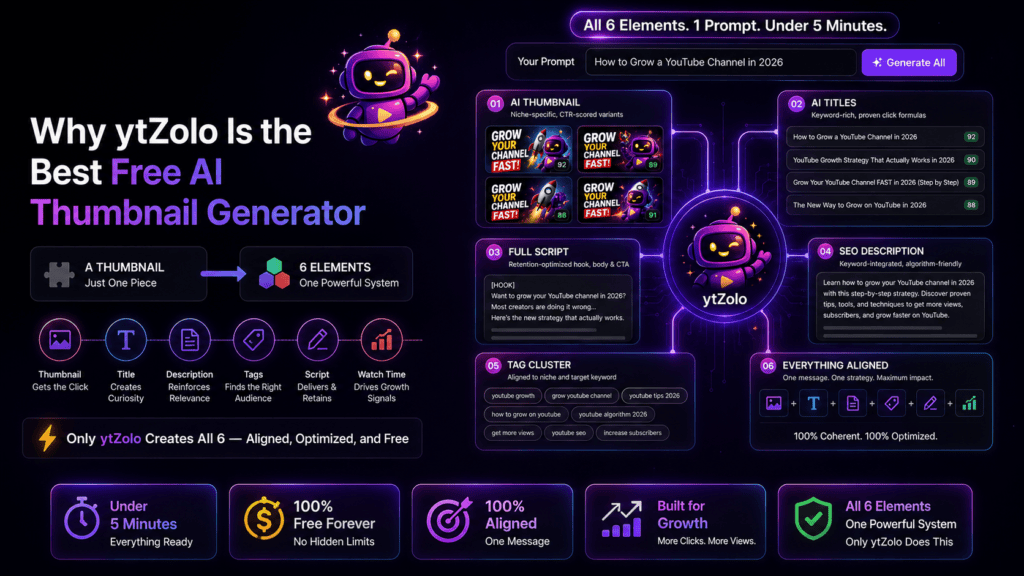
A thumbnail is one element in a six-element system. Your title creates the curiosity gap the thumbnail sets up. Your description reinforces keyword relevance. Your tags define which audience cluster YouTube puts your video in front of. Your script delivers on what the thumbnail promises — or your watch time tanks and the algorithm buries you.
Every other tool on this list gives you the thumbnail. ytZolo gives you all six — in one session, from one prompt, all aligned with each other.
What ytZolo Generates — All Free, All at Once
- 🖼️ AI thumbnail — niche-specific, multiple CTR-scored variants
- 🎯 AI video titles — keyword-rich, built on proven click formulas
- 📝 Full video script — retention-optimized hook, body, and call-to-action
- 📋 SEO description — keyword-integrated, algorithm-friendly
- 🏷️ Tag cluster — aligned to your niche and target keyword
Everything in under five minutes. Everything coherent. Everything free.
Why Manual Methods Are Officially Outdated
Most creators spend 30–60 minutes per thumbnail. At two uploads per week, that’s 4–8 hours per month on one metadata element alone.
AI doesn’t just cut that time by 90%. It replaces instinct-based decision-making with pattern recognition trained on millions of real YouTube thumbnails. You don’t just save time — you make better decisions because you’re no longer guessing.
ytZolo vs. Every Other Free Tool
| Feature | ytZolo | vidIQ | Thumbmagic | Canva | All Others |
|---|---|---|---|---|---|
| Built exclusively for YouTube | ✅ Yes | ✅ Yes | ✅ Yes | ❌ No | ❌ Varies |
| All-in-one content package | ✅ Complete | ❌ No | ❌ No | ❌ No | ❌ No |
| Script generation | ✅ Yes | ❌ No | ❌ No | ❌ No | ❌ No |
| CTR prediction per design | ✅ Yes | ❌ No | ❌ No | ❌ No | ❌ No |
| Niche-aware AI design | ✅ Yes | ✅ Partial | ✅ Yes | ❌ No | ❌ Varies |
| Free with no watermark | ✅ Yes | ✅ Yes | ❌ Trial only | ❌ Paid | ✅ Varies |
| Integrated upload workflow | ✅ Yes | 🔶 Partial | ❌ No | ❌ No | ❌ No |
For real creator growth strategies, thumbnail psychology breakdowns, and tool comparisons updated weekly, the ytZolo blog is the best ongoing resource for YouTube creators at every stage.
How to Create High-CTR Thumbnails with ytZolo (Step-by-Step)
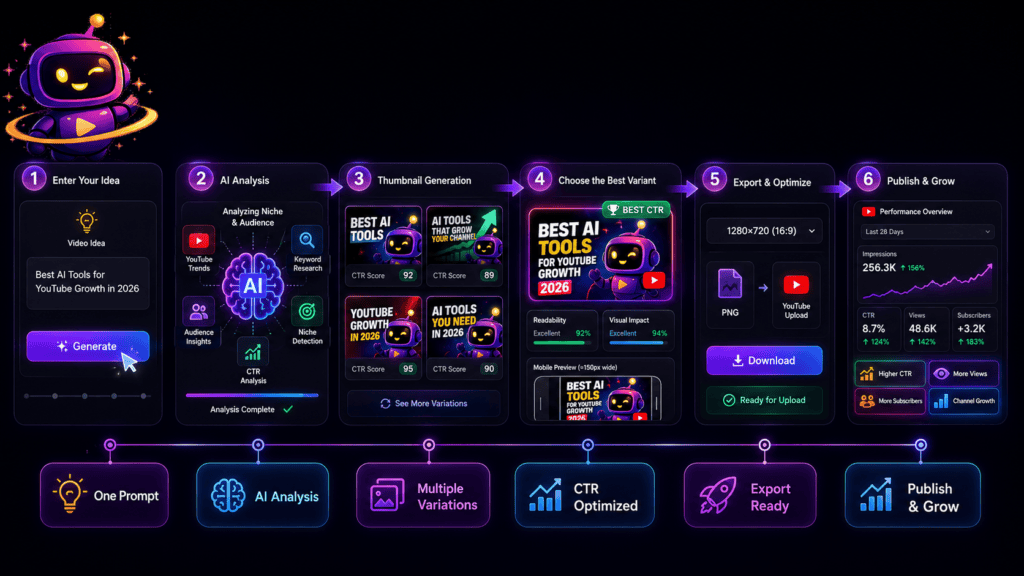
Step 1: Create Your Free Account Go to ytZolo.com and sign up free. Under 60 seconds. No credit card. No lengthy onboarding.
Step 2: Open the AI Thumbnail Generator From your dashboard, navigate to the Thumbnail tool. Clean interface, beginner-friendly, no overwhelming settings.
Step 3: Enter Your Video Details Type your video title, topic, or a brief description. Include your niche, target audience, and the emotional hook. The more context you give, the more targeted the output.
Step 4: Upload a Photo (Optional) Want your face in the thumbnail? Upload a photo and ytZolo integrates it cleanly — background removed, lighting adjusted, placement optimized for attention.
Step 5: Generate and Review Your Options ytZolo produces multiple thumbnail variations with different layouts, colors, text placements, and emotional hooks. You’ll see approaches you wouldn’t have thought of independently.
Step 6: Customize Your Favorite Select the strongest design and fine-tune it. Adjust text, swap colors, refine composition. The editor is fast and designed for creators, not professional designers.
Step 7: Download and Upload to YouTube Studio Export at 1280×720px (YouTube’s exact spec) and upload directly in YouTube Studio. Done.
Power Move: A/B Test Your Top Two Generate two strong thumbnail variations and use YouTube Studio’s built-in Test & Compare feature. Even small CTR improvements compound enormously across your video library over time.
Bonus: Build Your Full Content Package While you’re in ytZolo, generate your title, description, and tags. You’ve already defined your topic — let AI optimize everything else in under two minutes.
Pro Tips to Maximize Your Free AI Thumbnail Generator Results
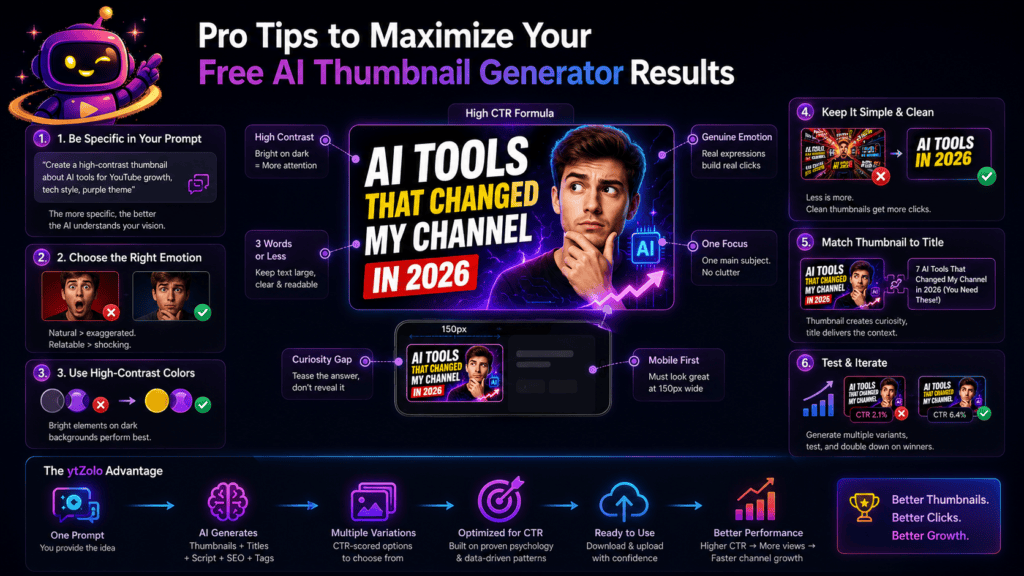
Brief the AI with emotion, not just topic. Don’t type “cooking video.” Type “healthy pasta recipe that shocked my family — surprise reaction in the kitchen.” The more emotional context you give, the more emotionally engaging the output.
Apply the squint test. Before publishing, shrink your thumbnail to roughly 150px wide (mobile scale). Can you read the text? Is the focal point obvious? If not, simplify before uploading.
Keep text to 3–5 words maximum. Your title handles context and keywords. Your thumbnail handles the hook. If viewers can understand everything from the thumbnail alone, there’s no reason to click.
Match thumbnail energy to your content. Your thumbnail sets an expectation. Overdeliver on production quality, underdeliver on energy — viewers bounce. In 2026, YouTube’s algorithm tracks early bounce rates as a quality signal. Accurate thumbnails that match the video consistently outperform clickbait over time.
Refresh your worst-performing videos. Uploading a new, optimized thumbnail to a low-CTR existing video can revive its recommendation cycle significantly — often within 48 hours. Use ytZolo’s free AI thumbnail generator to regenerate thumbnails for your top evergreen videos quarterly.
Audit your channel’s thumbnail consistency. Open your YouTube channel page as a non-subscriber would see it. Do your thumbnails look like they belong to the same creator? Visual consistency builds the brand recognition that makes subscribers click your content immediately in their feed.
FAQ
What is the best free AI thumbnail generator for YouTube in 2026?
The best free AI thumbnail generator for YouTube in 2026 is ytZolo. Unlike standalone design tools, ytZolo generates CTR-optimized thumbnails alongside AI titles, scripts, descriptions, and tags — all from one prompt, all free, no credit card required. For creators who only need thumbnails without the full content workflow, Canva (template-first), vidIQ (YouTube-native data), and Adobe Express (free AI generation, no watermark) are the strongest standalone alternatives.
Do AI-generated thumbnails actually improve YouTube CTR?
Yes — significantly. According to VidIQ’s benchmark data, expressive, high-contrast thumbnails improve CTR by 20–30% over bland designs. Custom thumbnails consistently outperform auto-generated YouTube frames by 30–40% on average. And since CTR is one of the primary signals YouTube uses to decide how widely to recommend a video, even a modest CTR improvement compounds into substantially more views over time.
Can I use a free AI thumbnail generator without design skills?
Absolutely. That’s exactly what these tools are built for. With ytZolo’s free AI thumbnail generator, you enter your video topic, the AI generates multiple professional options, you pick and customize your favorite. No Photoshop, no design experience, no templates to wrestle with. If you can type a sentence, you can create a high-quality thumbnail in under five minutes.
What size should YouTube thumbnails be in 2026?
YouTube’s recommended thumbnail size is 1280×720 pixels at a 16:9 aspect ratio. Files should be under 2MB in JPG, PNG, BMP, or GIF format. The best free AI thumbnail generators — including ytZolo — automatically export at the correct specification, so you never need to resize before uploading to YouTube Studio.
Is ytZolo only a free AI thumbnail generator, or does it do more?
ytZolo is a full-stack AI YouTube growth platform — not just a thumbnail generator. It generates AI titles, scripts, SEO descriptions, and tags alongside the thumbnail — covering every step of the publishing workflow in one place. The thumbnail generator is one of six core tools, all free to start.
Conclusion: Stop Letting Your Thumbnails Hold Your Best Videos Back
Your content deserves better than a rushed template at midnight.
The data is clear: custom thumbnails outperform auto-generated frames by 30–40% on average. Optimized thumbnails improve CTR by 20–30% with even basic improvements to contrast and emotional expression. And in 2026, with over 500 hours of content uploaded to YouTube every minute, your thumbnail is the primary factor determining whether your video ever finds its audience.
A free AI thumbnail generator isn’t a shortcut. It’s what happens when you stop relying on design instinct and start using performance intelligence — the same way the top creators on the platform have been doing quietly for the past year.
ytZolo is the all-in-one AI YouTube growth platform that gives you the most complete free AI thumbnail generator available — plus AI tools for titles, scripts, descriptions, and tags, all under one roof.
Stop guessing. Stop settling for “good enough.” Start using data to drive every upload decision.
🚀 Start creating smarter, faster, and more viral YouTube content with ytZolo today. 👉 Visit ytZolo.com — Free to Start, No Credit Card Needed
Resources & Further Reading
- 📖 ytZolo Blog — YouTube Growth Strategies for Creators
- 🎬 YouTube Creator Academy — Official Thumbnail Best Practices
- 📊 VidIQ — YouTube Thumbnail Research & CTR Data
- 🔍 Ahrefs Blog — YouTube SEO: The Complete Guide
Published: April 2026 | Revised: July 2026 | Written for YouTube creators, content strategists, and digital entrepreneurs

