
Introduction
If you typed “ytZolo vs Pictory” into Google, you’re probably staring at two product names that sound like they should compete head-to-head — and most comparison articles will happily tell you they do, complete with a winner crowned in the first paragraph. We’re not going to do that here, because based on publicly available product information, these two tools were not built to solve the same problem.
This guide is written for working YouTube creators — people who actually upload videos, not people researching tools for a living.
We looked at what each platform claims to do, cross-referenced it with how creators describe using them in practice, and mapped both into a real YouTube production pipeline: idea, keyword research, script, thumbnail, SEO, recording, editing, publishing, analytics.
The goal isn’t to declare a “best” tool. It’s to show you exactly where each one fits — and where neither one helps at all.
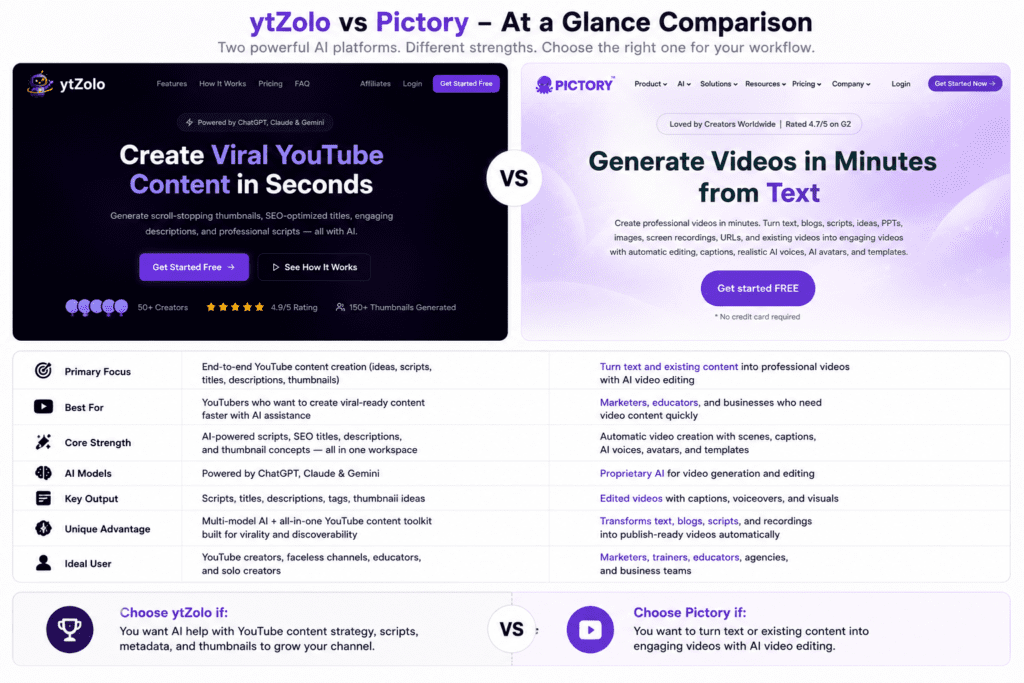
One thing worth flagging immediately: ytZolo and Pictory solve different parts of the pipeline. ytZolo is built around generating the text and creative direction layer of a video — titles, scripts, descriptions, tags, and thumbnail concepts.
Pictory is built around producing the video file itself — turning a script or blog post into an edited video using stock footage, AI voiceover, and captions. If your workflow needs both layers, you may end up using something from each category rather than picking one over the other. That distinction shapes everything else in this article, so keep it in mind as you read.
Quick Verdict
Neither tool is “better” in a vacuum — they answer different questions.
- Choose ytZolo if your bottleneck is the blank page: you need help generating titles, scripts, descriptions, tags, and thumbnail concepts fast, and you already have a way to record or produce video (yourself, an editor, or another tool).
- Choose Pictory if your bottleneck is video production itself: you have written content (a script, a blog post, a webinar recording) and need it turned into an edited video with stock footage, AI voiceover, and captions, without touching a timeline editor.
- Consider using both if your workflow spans the full pipeline from idea to upload and you don’t already have a separate editing solution. As of writing, there’s no indication either platform fully replaces the other.
What Each Tool Actually Is (Read This First)
Most comparison content treats “AI YouTube tool” as a single category, which causes confusion in articles like this one. Based on publicly available product information:
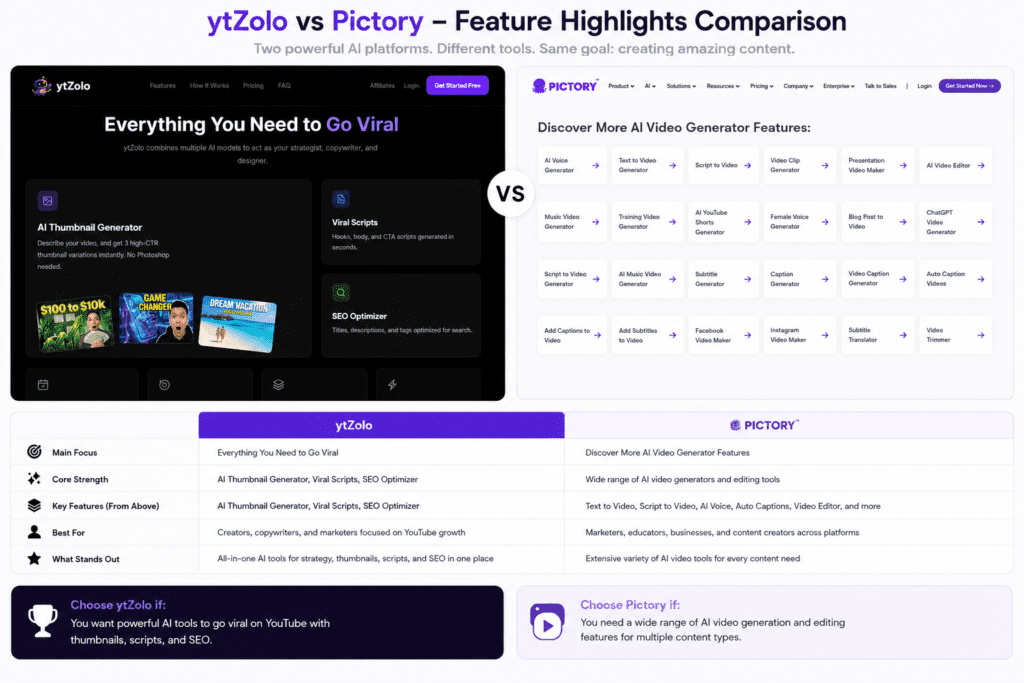
ytZolo describes itself as an AI-powered YouTube content studio. Its core functions, per its own marketing and product pages, are generating titles, descriptions, tags, scripts, and thumbnail concepts (text-based creative direction and design ideas, not rendered video).
It reportedly draws on multiple underlying AI language models for text generation and offers a credit-based subscription system. It does not appear to include a video timeline editor, stock footage library, or AI voiceover/rendering engine as of writing.
Pictory is a text-to-video platform. It converts scripts, blog posts, URLs, slideshows, or screen recordings into an edited video using a library of stock footage and images, AI voiceover, automatic captions, and basic timeline editing tools.
It does not generate YouTube titles, tags, or SEO metadata as a core function — its job starts after you already have a script or written content.
In short: ytZolo lives in the “what do I say and how do I package it” stage. Pictory lives in the “now turn this into an actual video file” stage. Comparing them as direct competitors without that context would be misleading — so the rest of this article compares them honestly within their respective lanes, and tells you which lane you actually need.
Feature Comparison Table
| Capability | ytZolo | Pictory |
|---|---|---|
| Title generation | Yes | No (not a core feature) |
| Description & tag generation | Yes | No (not a core feature) |
| AI script writing | Yes | Partial — accepts scripts as input rather than originating them |
| Thumbnail design concepts | Yes (concepts/text direction; reported as image variants on paid tiers) | No |
| Script-to-video rendering | No | Yes |
| Stock footage library | No | Yes (millions of clips, varies by tier) |
| AI voiceover | No | Yes |
| Auto captions | No | Yes |
| Timeline-style video editing | No | Yes (template-guided, not frame-by-frame) |
| Brand kit (logo, fonts, colors) | Not confirmed | Yes, on higher tiers |
| Long-form video support | Script/metadata only | Yes, minutes-based quota |
| Shorts/vertical format support | Yes (scripts, tags) | Yes (video repurposing/highlight clipping on higher tiers) |
| Multi-language output | English-first; underlying AI models may support more | Yes, 7–29 languages depending on tier |
| Team/agency features | Not confirmed in public materials | Yes, Teams plan with shared assets |
As of writing, always confirm current feature availability directly on each provider’s pricing page, since SaaS feature sets change frequently.
Pricing Comparison
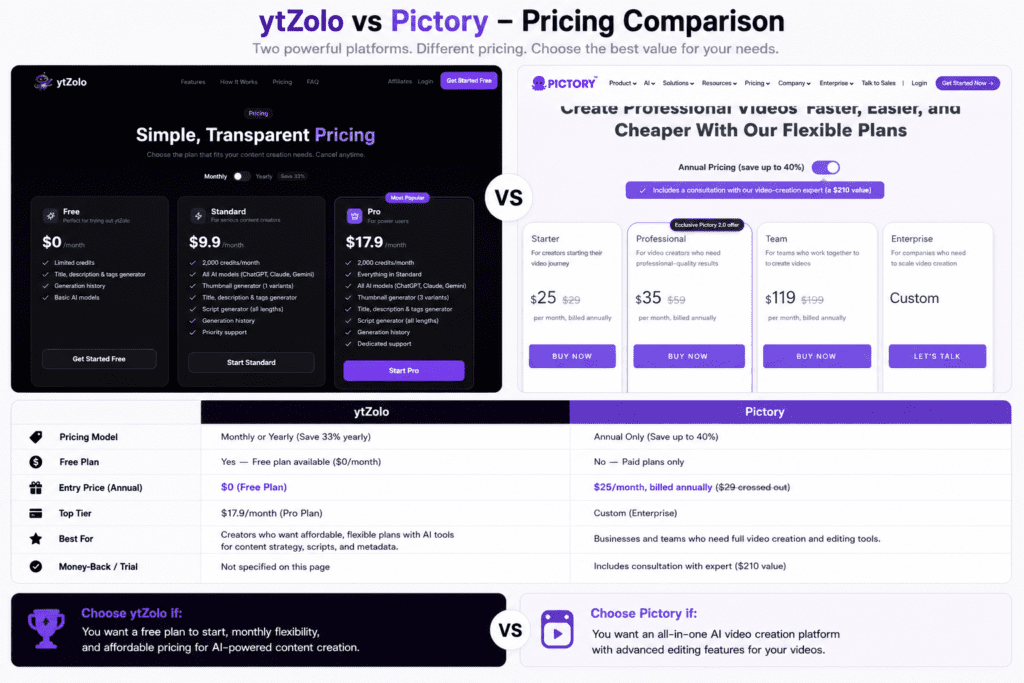
Pricing for both tools is structured around credits or quotas rather than flat unlimited access, and published figures vary slightly across sources, so treat the numbers below as a directional snapshot rather than a final quote — verify against the official pricing pages before purchasing.
| Plan tier | ytZolo (reported) | Pictory (reported) |
|---|---|---|
| Free | Available, limited credits | Limited free trial (a small number of video projects, not an ongoing free tier) |
| Entry paid | Roughly $6–7/month billed annually, ~2,000 credits/month | Roughly $19–25/month billed monthly, lower with annual billing |
| Mid tier | Roughly $12/month billed annually, ~5,000 credits/month | Roughly $35–39/month, expanded video minutes and generative AI credits |
| Team/Agency | Not clearly documented publicly | Roughly $99–119/month, multi-seat, shared assets |
| Enterprise | Not confirmed | Custom pricing |
A few honest notes on pricing, based on what’s publicly documented:
- ytZolo’s plans are credit-based for text and thumbnail-concept generation, which is a fundamentally different cost structure than Pictory’s video-minute-based quotas.
- Pictory’s published pricing varies meaningfully between monthly and annual billing — annual commitment is effectively required to get the advertised entry-level rate.
- Neither company publishes a single, universally consistent price across all of its own marketing pages and third-party listings as of writing, so it’s worth double-checking the live pricing page before you commit a card.
Workflow Comparison
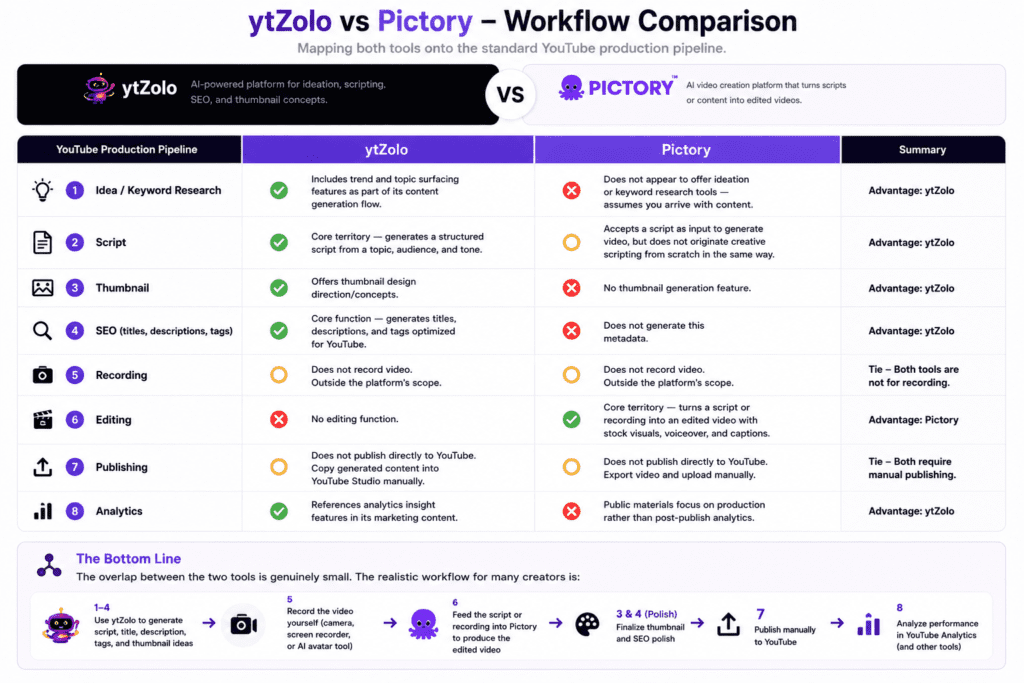
Mapping both tools onto a standard YouTube production pipeline makes the distinction concrete:
Idea → Keyword Research → Script → Thumbnail → SEO → Recording → Editing → Publishing → Analytics
- Idea / Keyword Research: The platform reportedly includes trend and topic surfacing features as part of its content generation flow. Pictory does not appear to offer ideation or keyword research tools — it assumes you arrive with content already chosen.
- Script: This is ytZolo’s core territory — generating a structured script from a topic, audience, and tone. Pictory accepts a script as an input to generate video, but does not originate creative scripting from scratch in the same way.
- Thumbnail: The platform offers thumbnail design direction/concepts. Pictory has no thumbnail generation feature.
- SEO (titles, descriptions, tags): ytZolo’s core function. Pictory does not generate this metadata.
- Recording: Neither tool records video. This remains entirely outside both platforms’ scope — you still need a camera, screen recorder, or AI avatar tool for that step.
- Editing: Pictory’s core territory — turning a script or recording into an edited video with stock visuals, voiceover, and captions. The tool has no editing function.
- Publishing: Neither tool publishes directly to YouTube as a core advertised feature, based on publicly available information — you export from Pictory and upload manually, and you copy ytZolo’s generated text into YouTube Studio.
- Analytics: The software references analytics insight features in its marketing content; Pictory’s public materials focus on production rather than post-publish analytics.
The overlap between the two tools is genuinely small. The realistic workflow for many creators is: generate the script, title, description, and tags in ytZolo, then either record the video yourself or feed the script into Pictory (or a similar tool) to produce the visual file, then handle thumbnail design and final SEO polish, then publish manually.
Ease of Use
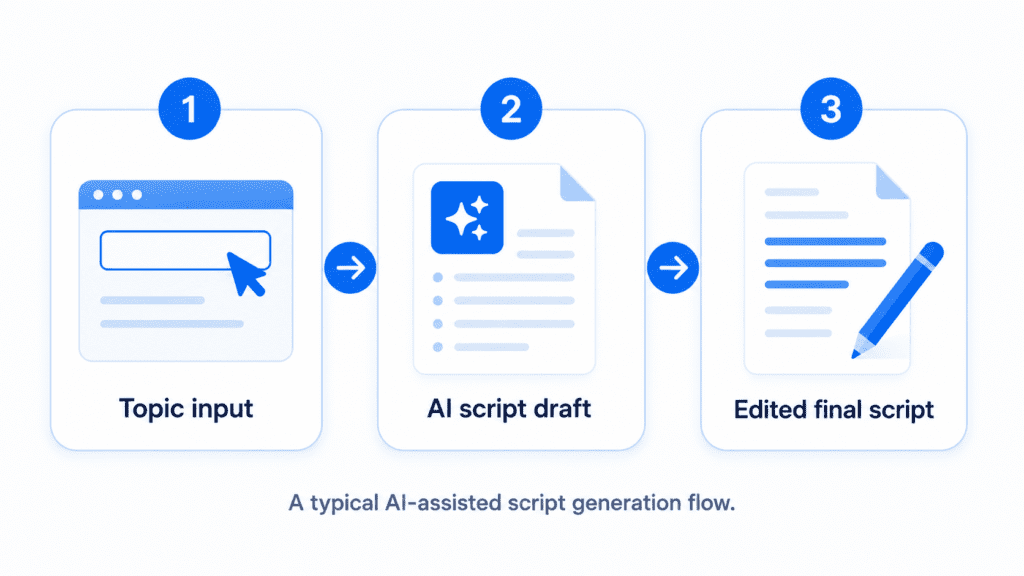
ytZolo’s interface, based on available product descriptions, centers on a single dashboard where you input a topic and receive generated text outputs (titles, scripts, descriptions, tags) plus thumbnail concepts.
This is a relatively low-friction workflow because there’s no timeline, no asset library to browse, and no rendering wait time — you’re working with text generation, which is inherently faster to iterate on.
Pictory’s interface involves more steps: importing or pasting a script, letting the AI select matching stock clips, adjusting scene-by-scene visuals, choosing a voice, and rendering the final video.
It’s still significantly simpler than a traditional NLE (non-linear editor) like Premiere Pro or DaVinci Resolve, but it carries more inherent complexity than a pure text-generation tool because you’re assembling an actual video timeline.
Neither tool requires technical or editing skill to get started. The learning curve difference comes down to output type: text generation is forgiving and fast to redo; video generation involves more decisions per project (footage selection, pacing, voice, captions) and a render step that adds time to each iteration.
AI Capabilities
ytZolo reportedly routes requests across multiple underlying large language models (the kind of models used for general-purpose text generation) rather than relying on a single proprietary model, which can be useful for varying output style.
Its AI focus is narrow and deep: titles, scripts, descriptions, tags, and thumbnail direction, all tuned toward YouTube-specific outputs like hooks, retention pacing, and click-through-oriented phrasing.
Pictory’s AI focus is also narrow but in a different direction: matching script content to relevant stock footage, generating natural-sounding AI voiceover, and identifying highlight segments in longer videos for repurposing into Shorts-style clips. This is closer to computer-vision-assisted video assembly than to creative writing AI.
Neither platform claims to generate fully original AI video scenes (as opposed to stock footage) or AI avatars as of writing — if avatar-based or fully generative video is what you need, that falls outside both tools’ current scope and is worth researching separately.
Script Generation
This is one of ytZolo’s stated core strengths. You provide a topic, audience, and tone, and it returns a structured script — typically a hook, body content, and a closing call-to-action — aimed at retention rather than generic copy. For Shorts-focused creators, it reportedly also generates short-form, hook-first scripts under 60 seconds.
Pictory does not generate scripts from a blank topic in the same sense. It expects you to bring a script, blog post, or other written source material, which it then converts into video. If you need both — original script writing and video assembly — you’d realistically write or generate the script elsewhere (in ytZolo or another writing tool) and then feed it into Pictory.
Thumbnail Generation
ytZolo offers thumbnail-related features described as design direction or concept generation — guidance on colors, expressions, text placement, and image styles based on what’s reportedly performing well in a given niche, with image variant generation available on paid tiers.
It’s worth being precise here: this functions more as creative direction and (on paid plans) generated image variants than as a full-fidelity, publish-ready thumbnail designer with layered editing controls, based on publicly available information. Many creators reportedly still take the AI’s direction into a dedicated design tool for final polish.
Pictory does not include thumbnail generation as a feature. If thumbnails are a priority, that need sits outside Pictory’s scope entirely.
Video Creation
This is the clearest dividing line between the two platforms. Pictory creates actual video files — combining stock footage, AI voiceover, and captions into an exportable, publishable video. The software does not render video; its outputs are text and thumbnail concepts, not a video file.
If “video creation” is the specific need that brought you to this comparison, Pictory is the tool built for that job, not ytZolo. It’s a common point of confusion in search results for “ytZolo vs Pictory,” because the query implies direct overlap that, based on current publicly available information, doesn’t actually exist.
Video Editing
Pictory’s editing tools are template- and AI-guided rather than frame-by-frame. You can swap stock clips, adjust pacing, edit captions, and apply a brand kit (on supported tiers), but it’s not designed for precise manual cuts, multi-track audio mixing, or advanced color grading the way a traditional editor is. Reviewers commonly describe it as fast and accessible rather than cinematically flexible.
The software has no video editing capability of any kind, since it does not produce video output.
Branding Features
Pictory’s branding tools — logo placement, brand colors, fonts, and saved brand kits — are reportedly available on its Professional and Teams tiers, gating consistent on-brand styling behind paid plans. Starter-tier users can remove Pictory’s own watermark but may not get full brand kit control.
Branding features for ytZolo are not clearly documented in public materials as of writing. If brand consistency in thumbnails or generated assets matters to you, verify current capabilities directly with tool before assuming feature parity with Pictory.
SEO Features
ytZolo’s primary value proposition is SEO-adjacent: AI-generated titles, descriptions, and tags intended to improve discoverability, plus reported keyword and trend surfacing. This is squarely aimed at the metadata layer of YouTube SEO.
Pictory does not generate YouTube SEO metadata as a core function. Its “SEO” relevance is indirect — faster video production can mean more consistent publishing, which is itself a known factor in channel growth, but that’s a byproduct of speed, not a built-in optimization feature.
Templates
Pictory provides video templates as a starting structure for different content types (social clips, blog-to-video, slideshow-to-video), which several third-party reviews describe as somewhat limited compared to more design-focused competitors. Template variety and visual creativity are commonly cited as a weaker point in independent reviews.
Public information on the platform does not clearly describe a “template library” in the same sense — its output is generated fresh per topic rather than pulled from a visual template system, since it isn’t producing visual video content.
Learning Curve
Both tools are designed for non-technical users, and neither requires prior video editing or copywriting experience. ytZolo’s learning curve is shallower simply because text generation has fewer variables to manage than video assembly.
Pictory requires slightly more orientation time — understanding video minute quotas, stock footage selection, voice options, and export settings — but remains far more approachable than traditional editing software.
Team Collaboration
Pictory has a documented Teams plan supporting multiple seats, shared asset libraries, and (per some third-party sources) multiple brand kits per user, aimed at agencies and content teams managing client work.
Team or agency-specific features for ytZolo are not clearly documented in public-facing materials as of writing. If you’re evaluating either tool for a team rather than solo use, confirm current collaboration features directly with each vendor.
Export Quality
Pictory’s export resolution and quality vary by plan tier, with lower tiers reportedly capped at a lower resolution (such as 720p) and higher tiers supporting higher resolution output; exact current specifications should be confirmed on Pictory’s official pricing or features page rather than assumed, since plan details change over time.
Export quality is not a relevant comparison point for ytZolo, since it does not produce a renderable video file — its outputs are text and image-concept based.
Supported Platforms
Both tools are web-based platforms accessed through a browser rather than desktop or mobile applications, based on publicly available information.
Outputs from either tool — generated text from ytZolo, or rendered video files from Pictory — are platform-agnostic once exported or copied, meaning they can be used on YouTube, Shorts, TikTok, Instagram, or anywhere else, even though neither tool publishes content automatically to those platforms.
Performance
Performance characteristics differ by output type. Text generation (ytZolo’s core function) is typically fast, often returning results in seconds, since it doesn’t involve rendering.
Video generation (Pictory’s core function) involves a render step that takes longer, particularly for longer videos or higher resolution exports, and several third-party reviews mention occasional bugs or inconsistent AI footage matching as a known limitation.
Neither company publishes detailed, verifiable uptime or speed benchmarks publicly, so any specific performance claims beyond general usability should be treated as anecdotal rather than guaranteed.
Integrations
Pictory’s primary “integrations” are its built-in stock asset partnerships (such as third-party stock footage and AI voice providers, depending on plan), rather than integrations with external creator tools like YouTube Studio, Notion, or scheduling platforms, based on publicly available product information.
ytZolo’s reported “integration” is its use of multiple underlying AI language models for generation rather than third-party software integrations. Neither tool appears to offer a direct YouTube Studio publishing integration as of writing — both currently require manual export/copy-paste into YouTube’s own upload flow.
Pros & Cons
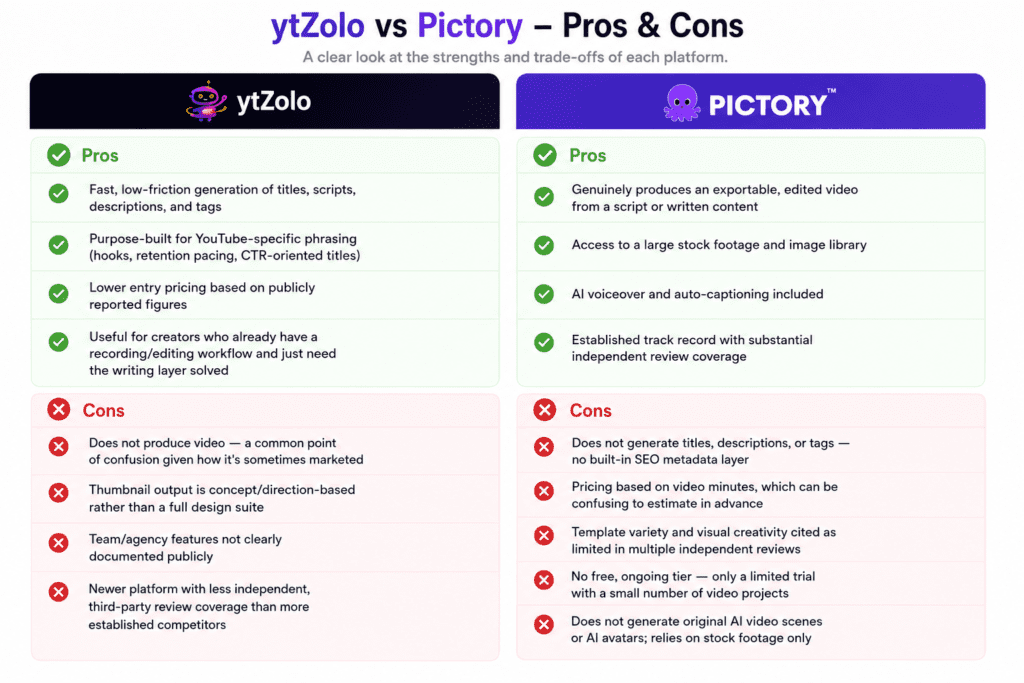
ytZolo
Pros:
- Fast, low-friction generation of titles, scripts, descriptions, and tags
- Purpose-built for YouTube-specific phrasing (hooks, retention pacing, CTR-oriented titles)
- Lower entry pricing based on publicly reported figures
- Useful for creators who already have a recording/editing workflow and just need the writing layer solved
Cons:
- Does not produce video — a common point of confusion given how it’s sometimes marketed
- Thumbnail output is concept/direction-based rather than a full design suite
- Team/agency features not clearly documented publicly
- Newer platform with less independent, third-party review coverage than more established competitors
Pictory
Pros:
- Genuinely produces an exportable, edited video from a script or written content
- Access to a large stock footage and image library
- AI voiceover and auto-captioning included
- Established track record with substantial independent review coverage
Cons:
- Does not generate titles, descriptions, or tags — no built-in SEO metadata layer
- Pricing based on video minutes, which can be confusing to estimate in advance
- Template variety and visual creativity cited as limited in multiple independent reviews
- No free, ongoing tier — only a limited trial with a small number of video projects
- Does not generate original AI video scenes or AI avatars; relies on stock footage only
Who Should Use ytZolo
ytZolo is a reasonable fit if you already have a way to produce the actual video — whether that’s recording yourself on camera, using a screen recorder, working with an editor, or using a separate AI video tool — and your real bottleneck is the writing and packaging layer.
Solo creators who freeze up at a blank script document, channel owners managing several videos a week who need faster title and tag turnaround, and faceless-channel operators who need scripts and metadata at volume are the clearest use cases described in ytZolo’s own positioning.
It’s a weaker fit if you’re starting from zero with no recording setup and were hoping a single tool would also produce the finished video — that expectation isn’t supported by what the product currently does.
Who Should Use Pictory
Pictory makes the most sense for creators and marketers who already have written content — blog posts, scripts, webinar recordings, training material — and need it converted into a watchable video without learning a full editing suite.
It’s also commonly used for repurposing long-form content (like podcasts or webinars) into shorter clips for Shorts or social platforms, based on its highlight-extraction feature.
It’s a weaker fit if you need help generating the original script, title, or SEO metadata from scratch, or if you need precise, frame-by-frame creative control over the final cut — both of those needs sit outside Pictory’s core design.
Real Creator Scenarios
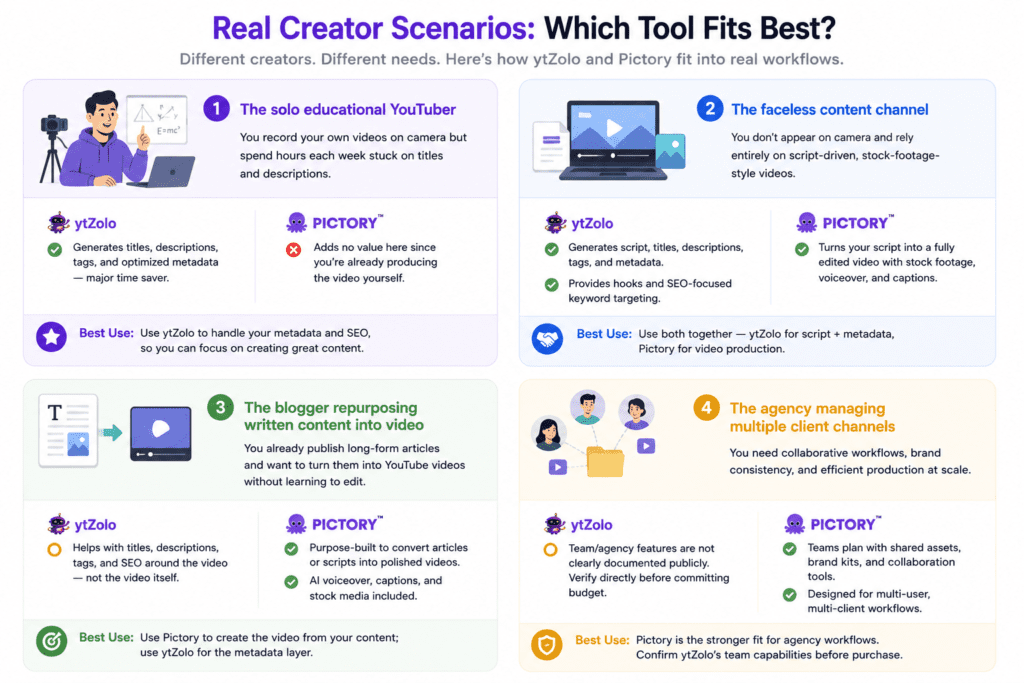
Scenario 1: The solo educational YouTuber. You record your own videos on camera but spend hours each week stuck on titles and descriptions. ytZolo’s metadata generation directly addresses this bottleneck; Pictory would add no value here since you’re already producing video yourself.
Scenario 2: The faceless content channel. You don’t appear on camera and rely entirely on script-driven, stock-footage-style videos. This is where the two tools could realistically work together: generate the script and metadata in ytZolo, then feed that script into Pictory to produce the visual video file.
Scenario 3: The blogger repurposing written content into video. You already publish long-form articles and want to turn them into YouTube videos without learning to edit. Pictory is purpose-built for exactly this; ytZolo would only help with the surrounding metadata, not the conversion itself.
Scenario 4: The agency managing multiple client channels. Pictory’s Teams plan with shared assets and brand kits is designed for this kind of collaborative, multi-client workflow.
What Neither Tool Does
To keep this comparison honest, it’s worth being explicit about the gaps that exist regardless of which tool — or both — you choose:
- Neither tool records video. You still need a camera, microphone, screen recorder, or separate AI avatar platform to capture original footage or a presenter-style video.
- Neither tool publishes directly to YouTube. Both require manual export or copy-paste into YouTube Studio as of writing; there’s no confirmed one-click publishing integration.
- Neither tool replaces real audience research or strategy. AI-generated titles and trend surfacing can inform decisions, but they don’t substitute for understanding your specific audience, watching your own analytics, or testing what resonates with your viewers over time.
- Neither tool guarantees views, subscribers, or revenue. Any claims of guaranteed growth from either platform or from third-party marketing content about them should be treated with healthy skepticism — content quality, consistency, and audience fit remain the deciding factors.
- Neither tool offers fully generative AI video scenes or AI avatars. Pictory relies on stock footage rather than generating original video; the tool doesn’t produce video at all.
- Neither tool provides advanced, professional-grade editing control — color grading, multi-track audio mixing, or precise frame-level cuts are outside both platforms’ scope.
Frequently Asked Questions
1. Is ytZolo a video editor? No. Based on publicly available product information, ytZolo generates text-based outputs (titles, scripts, descriptions, tags) and thumbnail concepts. It does not render or edit video.
2. Does Pictory write YouTube titles and descriptions? No, not as a core feature. Pictory’s focus is converting existing written content into video; SEO metadata generation is not a primary advertised function.
3. Can I use ytZolo and Pictory together? Yes, and for script-driven or faceless-channel workflows, this combination is one of the more practical setups: generate the script and metadata in the software, then use Pictory (or a similar tool) to produce the video file.
4. Which tool is cheaper? Based on publicly reported pricing as of writing, ytZolo’s entry-level plans are generally lower cost than Pictory’s, but the two use different pricing models (credits vs. video minutes), so a direct dollar-for-dollar comparison can be misleading. Compare based on what you’ll actually use, not just sticker price.
5. Does either tool have a free plan? ytZolo reportedly offers an ongoing free tier with limited credits. Pictory offers a limited free trial (a small number of video projects) rather than an ongoing free plan, based on publicly available information.
6. Is Pictory good for long-form YouTube videos? Pictory supports longer videos, but availability is governed by monthly video-minute quotas that vary by plan, so heavy long-form publishers may need to budget for a higher tier.
7. Does ytZolo generate finished, publish-ready thumbnails? Based on available information, ytZolo provides thumbnail design direction and, on paid tiers, generated image variants — but it functions more as creative guidance than a full-featured thumbnail design suite with layered editing.
8. Can Pictory generate AI avatars or fully AI-generated video scenes? Not based on publicly available information as of writing. Pictory’s video creation relies on stock footage rather than generative AI scenes or avatars.
9. Which tool is better for Shorts? ytZolo reportedly generates short-form, hook-first scripts for Shorts. Pictory supports repurposing longer videos into short clips via highlight extraction on higher tiers. They address different parts of the Shorts workflow rather than competing directly.
10. Do either of these tools publish directly to YouTube? Not based on currently available public information. Both require manual export or copy-paste into YouTube Studio.
11. Is ytZolo suitable for agencies managing multiple channels? The platform’s marketing references use cases for agencies and faceless-channel operators managing multiple channels, but specific team/collaboration features are not clearly documented publicly — verify directly before committing to agency use.
12. Does Pictory support multiple languages? Yes. Reported language support varies by plan tier (commonly cited as around 7 languages on Standard plans and up to 29 on Professional/Teams plans), so confirm current language coverage on Pictory’s official site if this matters for your audience.
13. Which tool has a steeper learning curve? Pictory generally requires slightly more orientation time due to video assembly decisions (footage, voice, pacing, export settings). ytZolo’s text-generation workflow is typically faster to pick up.
14. Are there hidden costs with either platform? Both platforms’ published pricing can vary between monthly and annual billing, and some premium add-ons (such as premium stock or voice options on Pictory) may cost extra depending on tier. Always check the live pricing page rather than relying on third-party estimates, including this one.
15. Is one of these tools a replacement for a human editor or scriptwriter? Both can significantly reduce production time, but neither is positioned — by the companies themselves or by independent reviewers — as a full replacement for human creative judgment, especially for channels with a distinct on-camera personality or complex editing needs.
Final Verdict
There isn’t a single winner here, and any article that tells you otherwise is oversimplifying two genuinely different products.
The tool is a reasonable choice if your real problem is generating titles, scripts, descriptions, tags, and thumbnail direction quickly, and you already have video production handled elsewhere. Pictory is a reasonable choice if your real problem is turning written content into an actual edited video without learning traditional editing software.
For many creators — particularly faceless-channel operators and high-volume publishers — the realistic answer is a workflow that uses both: ytZolo (or a comparable writing-focused tool) for the script and metadata layer, and Pictory (or a comparable video-assembly tool) for the production layer. If your channel only needs one of those two layers solved, pick based on which bottleneck is actually slowing you down — not based on which tool’s marketing sounds more comprehensive.
As with any SaaS decision, verify current pricing, plan limits, and feature availability directly on each company’s official site before subscribing, since these details change more frequently than review articles get updated.
About the Author
Anshika Verma Researcher and SEO Content Strategist
Anshika specializes in YouTube growth, AI creator tools, and search optimization. This comparison is based on publicly available product documentation, pricing pages, and reputable third-party reviews, with all findings cross-checked for accuracy. Where information was unclear or inconsistent, it is clearly noted rather than assumed.
Email: anshika@ytzolo.com


May I simply say what a relief to discover someone who truly knows what they’re talking about on the internet.
You actually realize how to bring a problem to light and make it important.
More and more people really need to read this and understand this
side of the story. I can’t believe you aren’t more popular given that you most certainly have the gift.
Appreciate this post. Will try it out.