
Creators researching ytZolo vs VEED are usually trying to solve two very different problems that happen to sit next to each other in a Google search. Some are looking for AI YouTube software that can write a script, generate a thumbnail concept, and optimize a title before a single frame of video exists. Others are looking for an AI video editor that can cut footage, add subtitles, and export a polished file ready to upload. This guide treats both groups fairly.
YouTube production has splintered into distinct stages — ideation, scripting, filming or recording, editing, and optimization — and the tools built for each stage rarely overlap completely.
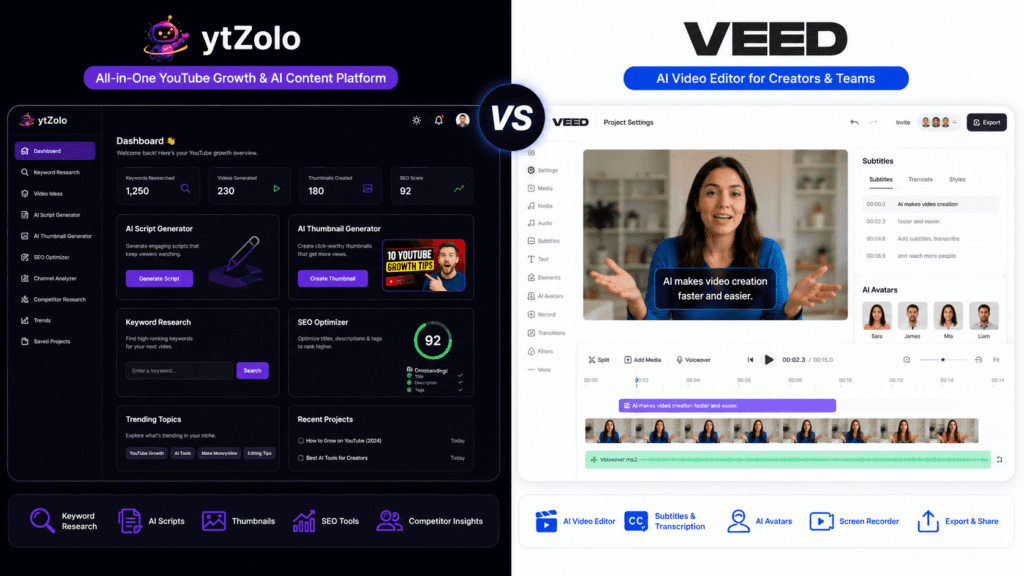
That’s the core tension behind this comparison: ytZolo positions itself as YouTube workflow software focused on the pre-production and optimization side (scripts, titles, descriptions, tags, and thumbnail concepts), while VEED is a browser-based AI video editing platform built around the timeline, subtitles, AI avatars, and export pipeline.
Understanding that distinction early will save you from comparing apples to oranges later in this article.
In the sections below, you’ll find a transparent, evidence-based breakdown of what each platform actually does, how their AI capabilities compare, what they cost as of mid-2026, and — most importantly — which type of creator each one is actually built for.
Where public information was inconsistent or unavailable (which happens often with pricing, since both companies update tiers periodically), that’s stated plainly rather than guessed at.
Table of Contents
Quick Verdict
If you only have thirty seconds, here’s the short version of this ytZolo vs VEED comparison:
| Category | Winner | Why |
|---|---|---|
| Best Overall for Pre-Production | ytZolo | Purpose-built AI script generator, title/description/tag automation, and thumbnail concepting for YouTube SEO |
| Best Overall for Editing | VEED | Timeline-based editor, auto-subtitles, AI avatars, and multi-platform export |
| Best for Beginners | Tie | ytZolo removes the blank-page problem before filming; VEED removes the technical-editing learning curve after filming |
| Best for Video Editing | VEED | Full timeline editor, screen/webcam recording, background removal, and translation |
| Best for YouTube Optimization | ytZolo | Keyword-informed titles, descriptions, tags, and SEO-oriented metadata generation |
| Best Value (Entry Tier) | ytZolo | Lower entry-level pricing for creators who mainly need metadata and scripting help |
| Best AI Features (Editing) | VEED | AI avatars, voice cloning, dubbing, and translation into 50+ languages |
Neither platform is a complete replacement for the other — they largely sit on different ends of the same YouTube automation tools pipeline, which is why many creators researching a VEED alternative end up pairing a scripting/SEO tool with an editing tool rather than picking just one.
Platform Overview
ytZolo
ytZolo is an AI YouTube automation tool built around the front end of content creation: coming up with what to make, writing it, and preparing the metadata that helps it get found. According to information published on ytZolo’s own site, the platform generates <cite index=”2-1″>scripts, titles, thumbnails, descriptions, and tags automatically</cite>, and is aimed at <cite index=”2-1″>creators, influencers, marketers, and businesses</cite> who want to speed up YouTube content production.
Core capabilities described on ytZolo’s website and product pages include:
- AI script generator — full-length scripts for long-form video and short-form Shorts, based on topic, audience, and tone inputs
- Title generation — multiple SEO-oriented, CTR-focused title options per topic
- Description and tag generation — automated, YouTube SEO-oriented copy
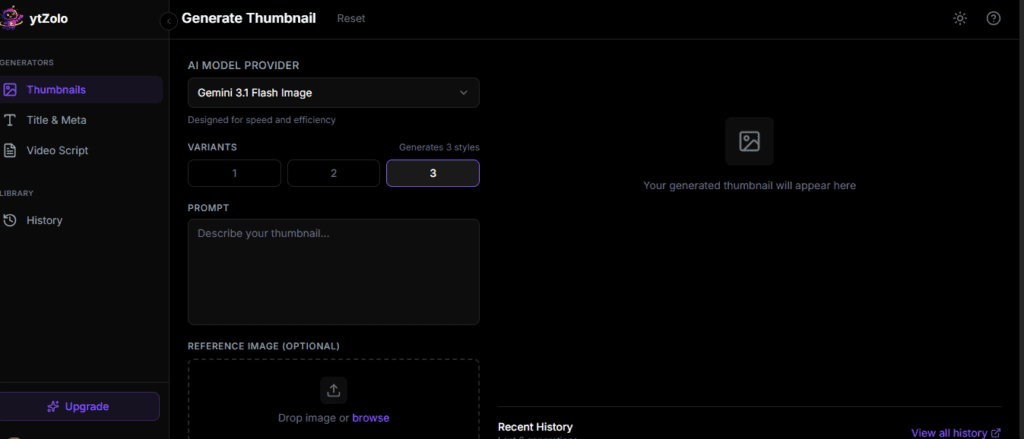
- Thumbnail concepting — AI-generated thumbnail direction and, on paid tiers, visual thumbnail variants
- Multi-model AI access — according to third-party tool directories, ytZolo gives users <cite index=”3-1″>access to ChatGPT, Claude, Gemini, and more models for diverse content needs</cite>, along with bulk generation and a history library for saved outputs
ytZolo is squarely a YouTube workflow software play — it does not include a timeline video editor, and it is not positioned as one. Its strength, based on available documentation, is compressing the ideation-to-metadata pipeline that would otherwise involve separate keyword research, scriptwriting, and copywriting tools.
VEED
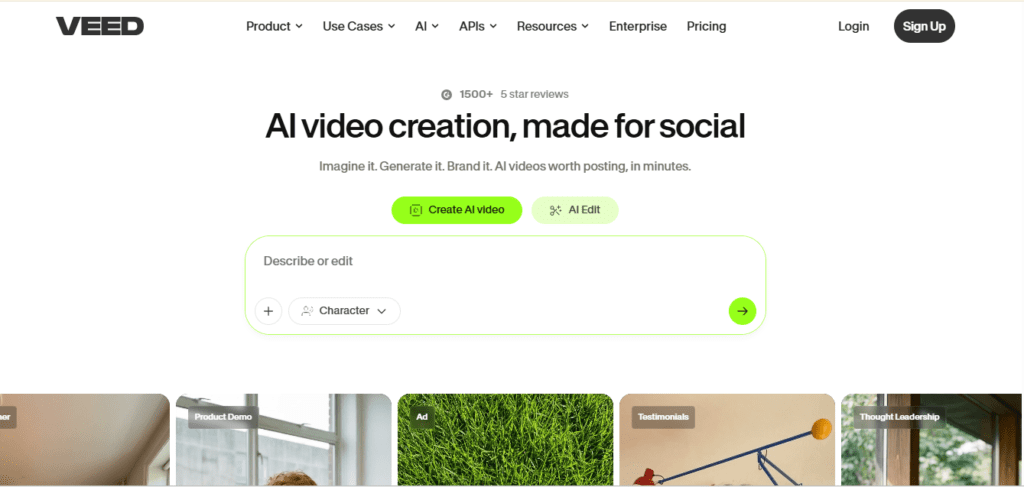
VEED is a browser-based AI video editing platform. Unlike ytZolo, VEED operates after footage exists — it’s where you cut, caption, translate, and export. Based on VEED’s own site and third-party product overviews, the platform’s core toolset includes:
- Timeline video editing — trimming, cutting, layering, and standard non-linear editing in the browser
- Auto-subtitle generation — automatic transcription and captioning, described by reviewers as one of the platform’s strongest features, though accuracy has been reported as inconsistent in some independent testing
- AI avatars and voice tools — talking-head avatar generation, voice cloning, and AI dubbing
- Screen and webcam recording — built-in recording tools for tutorials and presentations
- Translation — subtitle and dubbing translation, with VEED advertising <cite index=”16-1″>support for more than 50 languages</cite> as one of its differentiators
- Collaboration and publishing — brand kits, multi-seat team access on higher tiers, and export/resize tools for multiple platforms
VEED has expanded well beyond its original subtitle-editor roots. As one 2026 pricing analysis put it, <cite index=”16-1″>VEED.io started as a simple browser-based video editor, but in 2026 it’s positioning itself as an all-in-one AI content creation platform</cite>, adding AI video generation, voiceovers, and localization tools alongside traditional editing.
Independent buyer reviews on G2 back up the collaborative and enterprise angle, noting that <cite index=”19-1″>reviews from mid-market companies highlight the Studio plan’s team collaboration and analytics features</cite>.
How We Evaluated Both Platforms
Before comparing features, it’s worth being transparent about methodology — a core part of E-E-A-T for any AI content creation review.
This comparison is based on:
- Publicly available information from ytZolo’s official website and blog
- Publicly available information from VEED’s official website
- Third-party pricing trackers, SaaS directories, and review aggregators (used to cross-check figures, since vendor pricing pages change and third-party trackers sometimes lag behind or capture regional variants)
- Independent user reviews on platforms such as G2 and Trustpilot, cited where they add verifiable, attributed context
- Direct product documentation and feature pages where accessible
Evaluation criteria across both platforms:
- AI capabilities (scripting, editing, avatars, voice)
- Usability and learning curve
- Creator workflow fit (pre-production vs. post-production)
- YouTube SEO tools and optimization depth
- Thumbnail generation quality and flexibility
- Pricing and value at each tier
- Team collaboration and scalability
- Customer support and platform reliability, based on independent review signals
Where pricing or feature details differed between sources — which happened frequently for VEED’s tier names and limits, as plan structures have been revised multiple times in 2026 — this article notes the discrepancy rather than presenting a single number as fact. Readers making a purchase decision should always confirm current pricing on each platform’s official pricing page before subscribing.
Feature-by-Feature Comparison
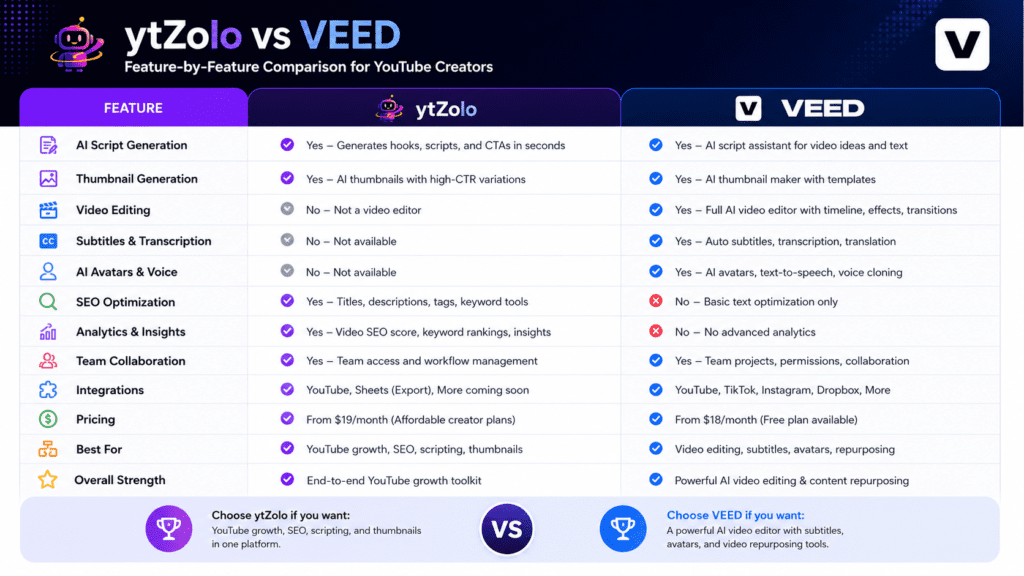
| Feature | ytZolo | VEED |
|---|---|---|
| AI Script Generation | Yes — long-form and Shorts scripts | Not a core feature; VEED is footage-first |
| Thumbnail Generation | Yes — AI-generated concepts and variants on paid tiers | Not a dedicated feature; static image tools are limited |
| Video Editing (Timeline) | No | Yes — full browser-based timeline editor |
| Subtitle Generation | Not applicable (no video editor) | Yes — auto-subtitles with customizable styling |
| AI Avatars | No | Yes, on Pro/Studio tiers depending on plan |
| Voiceovers / Voice Cloning | No | Yes — AI voice and dubbing tools |
| SEO Optimization (Titles/Tags/Descriptions) | Core strength — this is the primary use case | Not a focus area |
| Keyword Research | Yes, described as part of ytZolo’s “trend detection” and idea-generation tooling | No dedicated keyword research tool |
| Title Generation | Yes — multiple CTR-scored options | No |
| Description Generation | Yes | No |
| Analytics | Limited; primarily content-performance insight tied to generated metadata | Yes, particularly on team/business tiers, per G2 reviewer feedback |
| Team Collaboration | Limited compared to VEED | Strong — brand kits, multi-seat access, shared projects |
| Export Options | Text and image export (scripts, thumbnails, copy) | Full video export up to 4K depending on tier |
| Ease of Use | Straightforward for non-technical creators; input topic, get metadata | Drag-and-drop editor, generally rated beginner-friendly |
| Learning Curve | Low | Low to moderate, depending on how deep you go into AI avatar/dubbing tools |
| Integrations | Multi-model AI access reported (ChatGPT, Claude, Gemini) | Primarily self-contained; export-focused rather than integration-focused |
| Performance | Not independently benchmarked at scale in available sources | Some independent reviewers report <cite index=”20-1″>timeline lag, unresponsive tools, and occasional layout glitches</cite> on longer or high-resolution files |
| Workflow Efficiency | Efficient for pre-production; doesn’t touch editing | Efficient for post-production; doesn’t touch scripting/SEO |
A few things stand out from this table. First, there’s almost no functional overlap — this isn’t really a competitive “vs” in the traditional sense, more a comparison of two different rungs on the same YouTube automation tools ladder.
Second, where independent reviewers have flagged limitations (like VEED’s editing performance on longer files, per Sonix’s review), it’s worth weighing that against your own footage length and resolution needs rather than assuming it applies universally.
Pricing Comparison
Pricing is where this comparison requires the most caution. Both companies adjust tiers and naming periodically, and third-party trackers don’t always agree with each other or with the vendor’s current live page — one 2026 pricing guide for VEED explicitly noted that <cite index=”21-1″>VEED revises pricing approximately quarterly</cite>, and a separate source stated VEED’s tier names were changed from the legacy Lite/Pro/Business structure to <cite index=”17-1″>Free, Creator, Pro, Studio, and Enterprise</cite>.
Given that, treat the figures below as a snapshot for directional comparison, not a locked-in quote — always verify on each platform’s official pricing page before subscribing.
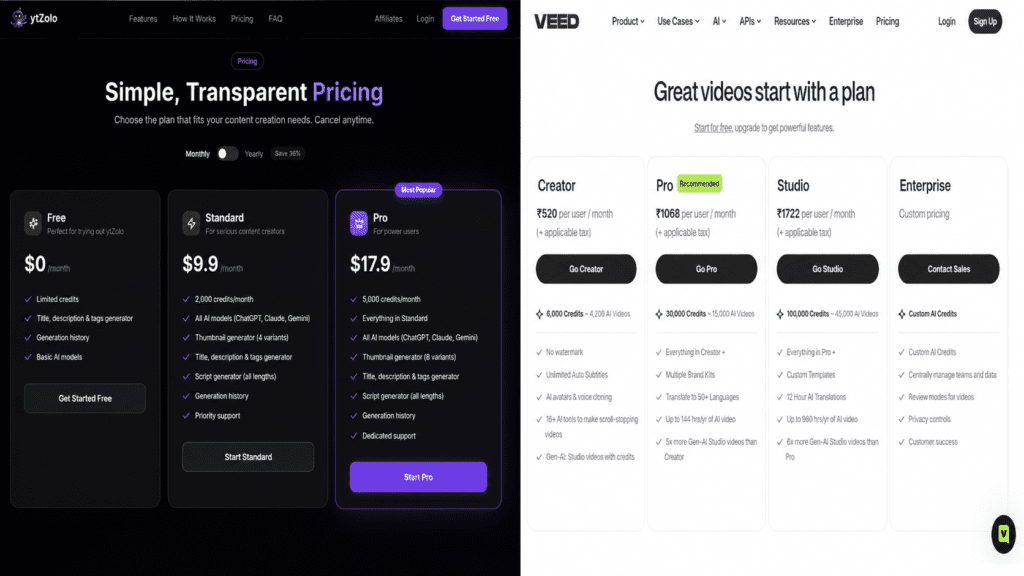
ytZolo Pricing (as reported by third-party tool directories)
| Plan | Price | Includes |
|---|---|---|
| Free | $0/month | Limited credits, title/description/tag generator, generation history, basic AI models |
| Standard | Reported around $6.7/month (billed annually) | 2,000 credits/month, all AI models, single-variant thumbnail generator, script generator, priority support |
| Pro | Reported around $12/month (billed annually) | 5,000 credits/month, three-variant thumbnail generator, dedicated support |
These figures come from a third-party AI tools directory rather than ytZolo’s own pricing page directly, so they should be treated as approximate. ytZolo does <cite index=”3-1″>offer a free plan available with limited credits to try out ytZolo</cite>, which is consistent across sources.
VEED Pricing (as reported across multiple third-party trackers)
| Plan | Price Range Reported | Includes |
|---|---|---|
| Free | $0/month | Watermarked exports, 720p, limited subtitle minutes, small storage cap |
| Basic / Creator / Lite (naming varies by source) | Reported between $12–$24/month | No watermark, 1080p export, higher subtitle minute limits, brand kit basics |
| Pro | Reported between $19.99–$55/month depending on source and billing cycle | Full AI toolset, AI avatars (with annual hour caps on some tiers), translation, 4K export on some plans |
| Business / Studio / Enterprise | Reported from $59–$70+ per seat/month | Team collaboration, multiple editors, advanced brand controls, custom/negotiated pricing at the top tier |
The spread in reported numbers is wide enough that it’s worth flagging directly: one source cited VEED’s <cite index=”15-1″>pricing starts at $12/month for online video editing</cite>, another reported a Pro tier at <cite index=”16-1″>the best balance of AI credits, translation tools, and branding features</cite> around $19.99–$25/month, and a G2-sourced pricing summary stated <cite index=”19-1″>VEED pricing in 2026 starts at $20.00 and can reach $70.00 depending on the selected plan</cite>.
This kind of variance is common with SaaS tools that bill per seat, offer regional pricing, or run frequent promotions — one tracker even noted that <cite index=”21-1″>VEED regularly distributes promotional coupon codes</cite> through community channels, which further complicates any “official” number.
One consistent, independently corroborated limitation: VEED’s AI-heavy features (avatars, dubbing) are often gated by annual hour allowances rather than unlimited access, even on paid tiers.
As one analysis put it, <cite index=”17-1″>Pro tier’s 6 hours/year of avatar and dubbing time may sound adequate, but a team producing weekly videos will exhaust that by mid-year</cite>.
If AI avatars are your primary reason for considering VEED, factor usage caps into your decision, not just the sticker price.
Bottom line on pricing: ytZolo’s entry tiers are generally reported as less expensive because it’s a text/image metadata tool rather than a video rendering platform (video processing is inherently more resource-intensive to deliver, which tends to be reflected in editing-tool pricing across the industry, not just at VEED). Neither platform’s numbers should be taken as final — confirm current pricing directly before purchasing either plan.
User Experience Comparison
Interface: ytZolo’s interface centers on a single input-to-output flow — enter a topic or niche, receive generated titles, scripts, descriptions, tags, and thumbnail concepts. Third-party tool reviews describe it as an <cite index=”3-1″>all-in-one dashboard with a centralized interface for all content creation tasks</cite>.
VEED’s interface is a more traditional timeline editor, which independent reviewers generally describe as accessible: VEED’s own positioning emphasizes an <cite index=”18-1″>intuitive drag-and-drop interface that requires no prior editing experience</cite>.
Speed: ytZolo’s outputs (text and thumbnail concepts) generate quickly since there’s no video rendering involved. VEED’s rendering speed has drawn mixed feedback — some G2 reviewers report being able to <cite index=”19-1″>publish up to 3 videos per day without unnecessary waiting</cite>, while other independent testing found <cite index=”20-1″>timeline lag, unresponsive tools, and occasional layout glitches</cite> on longer files, and one pricing tracker noted that <cite index=”17-1″>during peak usage, even priority rendering can take longer than expected</cite>.
Learning curve: Both platforms are broadly beginner-friendly by design, but for different reasons. ytZolo requires almost no learning curve because the interface is prompt-based. VEED requires a modest learning curve typical of any timeline editor, though it’s considerably shallower than desktop software like Premiere Pro or DaVinci Resolve.
Mobile experience: Available public information does not provide enough detail to make a confident, verified claim about either platform’s mobile app experience — this is an area where we’d recommend checking each platform’s current app store listings directly rather than relying on secondhand claims.
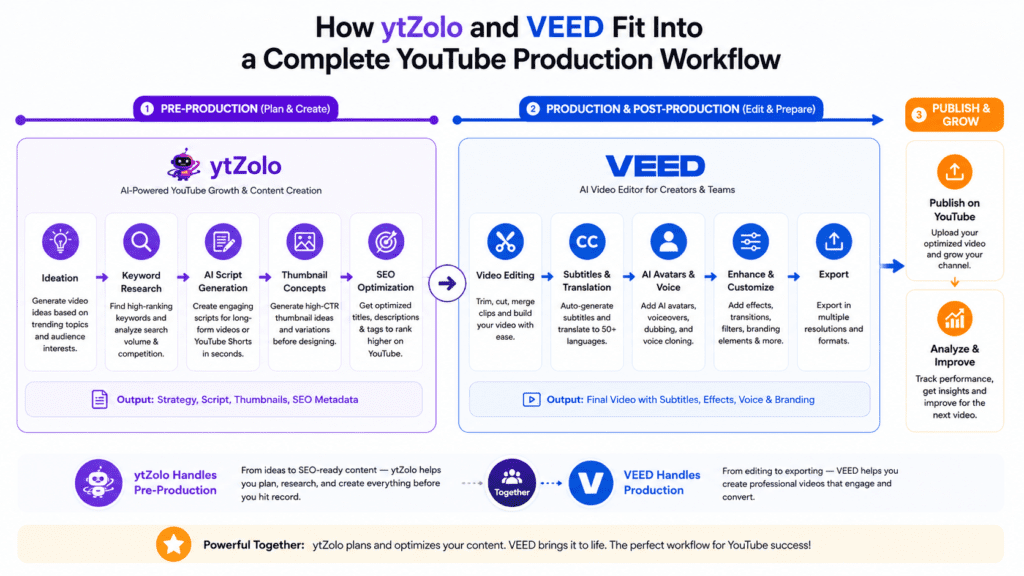
Creator workflow fit: This is really the deciding factor. If your bottleneck is “I don’t know what to make or how to title it,” ytZolo addresses that directly. If your bottleneck is “I have footage and need it edited, captioned, and exported,” VEED addresses that. Many efficient YouTube automation tools workflows in 2026 actually chain both types of tools together rather than choosing one exclusively.
Pros & Cons
ytZolo
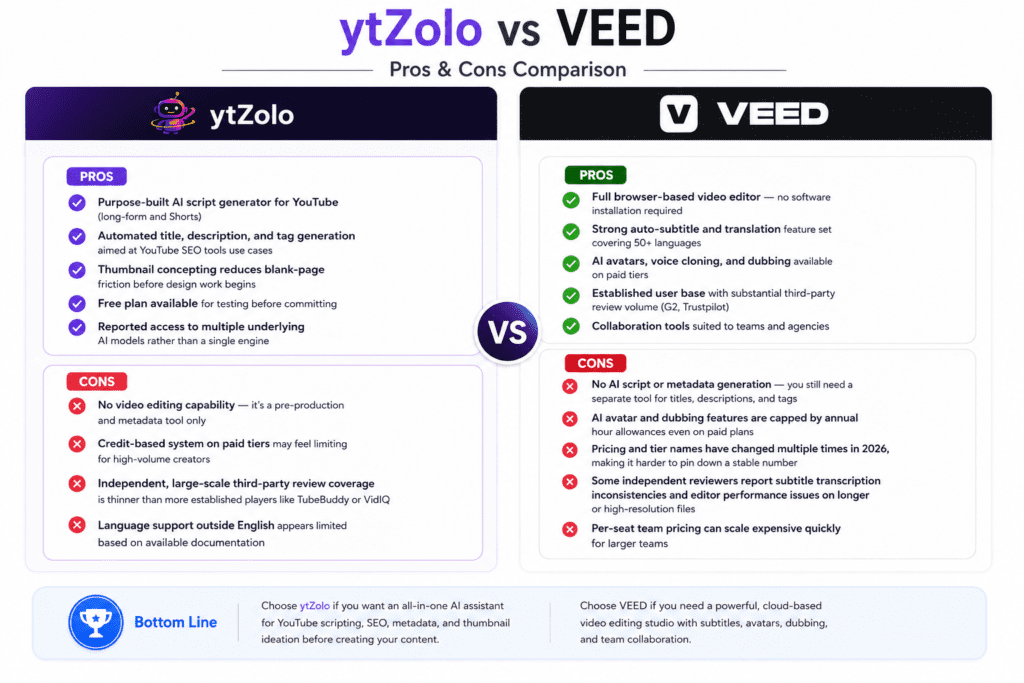
Pros
| Pros |
|---|
| Purpose-built AI script generator for YouTube (long-form and Shorts) |
| Automated title, description, and tag generation aimed at YouTube SEO tools use cases |
| Thumbnail concepting reduces blank-page friction before design work begins |
| Free plan available for testing before committing |
| Reported access to multiple underlying AI models rather than a single engine |
Cons
| Cons |
|---|
| No video editing capability — it’s a pre-production and metadata tool only |
| Credit-based system on paid tiers may feel limiting for high-volume creators |
| Independent, large-scale third-party review coverage is thinner than more established players like TubeBuddy or VidIQ |
| Language support outside English appears limited based on available documentation |
VEED
Pros
| Pros |
|---|
| Full browser-based video editor — no software installation required |
| Strong auto-subtitle and translation feature set covering 50+ languages |
| AI avatars, voice cloning, and dubbing available on paid tiers |
| Established user base with substantial third-party review volume (G2, Trustpilot) |
| Collaboration tools suited to teams and agencies |
Cons
| Cons |
|---|
| No AI script or metadata generation — you still need a separate tool for titles, descriptions, and tags |
| AI avatar and dubbing features are capped by annual hour allowances even on paid plans |
| Pricing and tier names have changed multiple times in 2026, making it harder to pin down a stable number |
| Some independent reviewers report subtitle transcription inconsistencies and editor performance issues on longer or high-resolution files |
| Per-seat team pricing can scale expensive quickly for larger teams |
Best Use Cases
Beginner creators: ytZolo lowers the barrier to starting — you don’t need a keyword research background to get an SEO-informed title. VEED lowers the barrier to finishing — you don’t need editing software experience to produce a clean, captioned video. Many beginners will eventually want both types of AI YouTube software tools in their stack.
Professional YouTubers: Established creators publishing consistently often use planning/optimization tools like ytZolo for metadata efficiency while relying on VEED (or a comparable AI video editor) for the technical polish that keeps production quality consistent across uploads.
Agencies: Agencies managing multiple client channels benefit most from VEED’s collaboration and brand-kit features on team tiers, paired with ytZolo-style AI content creation tools to scale metadata production for several channels at once without duplicating research effort per client.
Businesses using YouTube: Marketing teams that need consistent brand messaging across video content may lean more heavily on VEED’s brand kit and multi-editor access, using ytZolo-style tools mainly for description and tag consistency across campaign videos.
Educators: Educational creators benefit from VEED’s subtitle accuracy for accessibility compliance and from ytZolo-style script structuring for lesson pacing and clarity.
Gaming channels: Gaming creators publishing frequently may prioritize ytZolo for rapid title/thumbnail testing (a major CTR lever in gaming content) alongside VEED or a similar editor for clip-based, fast-turnaround editing.
Shorts creators: ytZolo’s short-form scripting and vertical thumbnail support are directly relevant here. VEED’s auto-resize and captioning tools for short-form platforms complement that workflow on the editing side.
Faceless channels: Faceless creators depend heavily on scripting quality (ytZolo’s core strength) and on editing tools that don’t require an on-camera presenter — VEED’s stock media library and AI voice tools are relevant, though note that VEED does not generate full AI narration from a blank script the way some dedicated AI video generator platforms do.
Where Each Platform Falls Short
ytZolo’s limitations: Because it doesn’t touch video editing at all, ytZolo can’t be a standalone solution for anyone whose bottleneck is post-production rather than planning. Its credit-based pricing model on paid tiers means heavy users could burn through allowances faster than expected, similar to credit-based limitations reported on other AI content creation platforms.
Independent, large-sample third-party reviews (the kind available for more established tools like TubeBuddy or VidIQ) are comparatively limited for ytZolo at this stage, which makes some claims harder to independently verify beyond the company’s own materials.
VEED’s limitations: VEED’s biggest documented gap for YouTube-specific creators is the absence of AI script and metadata generation — it edits and exports video, but it won’t help you decide what to title it or what tags to use.
Independent reviewers have also flagged reliability concerns; one detailed review noted <cite index=”20-1″>frequent misheard words</cite> in auto-subtitle transcription even with clean audio, and unreliable <cite index=”20-1″>speaker identification, especially during crosstalk or fast exchanges</cite>.
Pricing transparency is another recurring complaint — the same review noted <cite index=”20-1″>confusion regarding watermarks on exported videos, even after upgrading to a paid plan</cite>, and AI feature usage caps (like avatar/dubbing hour limits) aren’t always obvious from the main pricing page.
Being transparent about these limitations matters more than declaring a winner — a tool that’s a poor fit for your specific workflow isn’t “bad,” it’s just not built for your use case.
Alternatives Worth Considering
Neither ytZolo nor VEED covers the entire YouTube production pipeline alone, so it’s worth knowing where other tools fit in:
- TubeBuddy and VidIQ — browser extensions focused primarily on keyword research, SEO analytics, and A/B thumbnail testing rather than content generation. Useful if you want data-driven optimization without full script/metadata automation. See our TubeBuddy vs ytZolo and VidIQ vs ytZolo comparisons for a deeper breakdown.
- CapCut and Descript — alternative video editors; CapCut leans toward beginner-friendly mobile-first editing, while Descript’s text-based editing approach suits talking-head and podcast-style content.
- Pictory and Invideo AI — AI tools that turn scripts or blog posts into full videos with stock footage, positioned closer to VEED’s territory but with a stronger auto-assembly focus. See our Pictory vs ytZolo comparison for how these compare on the scripting side.
- Subscribr — another AI scripting-focused tool worth evaluating if you’re specifically comparing YouTube script generators; see Subscribr vs ytZolo.
- Jasper AI and ChatGPT — general-purpose AI writing tools that can produce YouTube scripts but, as several YouTube-specific guides note, lack native optimization for YouTube’s algorithm and require more manual prompt engineering to get YouTube-ready output.
If you’re specifically looking for a VEED alternative for editing, Descript and CapCut are the most commonly cited options in independent comparisons. If you’re looking for a broader AI YouTube software stack, pairing a scripting/SEO tool with a dedicated editor (rather than expecting one platform to do everything) remains the most common approach among creators publishing consistently in 2026.
Frequently Asked Questions
1. Is ytZolo better than VEED? Neither is universally “better” — they serve different stages of YouTube production. ytZolo focuses on AI script generation, titles, descriptions, tags, and thumbnails. VEED focuses on video editing, subtitles, AI avatars, and export. Your answer depends on where your workflow bottleneck actually is.
2. Can I use ytZolo and VEED together? Yes. Many creators use ytZolo-style AI YouTube software for scripting and metadata, then move footage into VEED (or a comparable AI video editor) for editing, captioning, and export. They’re complementary rather than competing tools.
3. Does ytZolo edit video? No. Based on available documentation, ytZolo generates scripts, titles, descriptions, tags, and thumbnail concepts, but does not include a timeline video editor.
4. Does VEED write scripts or generate titles? No. VEED is focused on editing existing footage and AI-assisted post-production (subtitles, avatars, dubbing, translation) rather than scripting or SEO metadata generation.
5. Which platform is cheaper? Reported entry-level pricing for ytZolo is generally lower than VEED’s paid tiers, though this is partly because ytZolo doesn’t handle video rendering, which is inherently more resource-intensive. Always check both platforms’ current official pricing pages, since both have adjusted tiers during 2026.
6. Does either platform have a free plan? Yes, both platforms offer free tiers with limited features — ytZolo’s free plan includes limited generation credits, while VEED’s free plan includes basic editing with export limitations like watermarks and resolution caps.
7. Is VEED good for YouTube SEO? VEED is not built for keyword research, title optimization, or metadata generation. If YouTube SEO tools are your primary need, a scripting/optimization platform like ytZolo or a dedicated SEO extension like TubeBuddy or VidIQ is more directly relevant.
8. Does ytZolo support multiple languages? Based on available documentation, ytZolo’s interface and generation are primarily optimized for English, though the underlying AI models it accesses may support other languages with varying quality.
9. Does VEED support AI voiceovers? VEED supports AI voice cloning and dubbing on paid tiers, but independent pricing analysis notes it does not generate original AI narration from a blank script the way some all-in-one AI video generator platforms do — you generally need existing audio or a recorded voice to work from, or its avatar-based text-to-speech tools.
10. What’s the best AI YouTube tool overall? There isn’t a single universal answer — it depends on whether your priority is content planning and SEO (favoring ytZolo-style tools) or video editing and post-production (favoring VEED-style tools). This is exactly why understanding your workflow gap matters more than picking a single “best” tool.
11. Are ytZolo and VEED suitable for agencies? VEED has more mature team collaboration features (brand kits, multi-seat access) that suit agency workflows. ytZolo’s fit for agencies depends more on how much of your bottleneck is scripting/metadata production across multiple client channels.
12. How accurate are VEED’s auto-subtitles? Independent reviews report generally strong subtitle functionality but note inconsistencies, particularly with accents, crosstalk, and niche terminology. Manual review of auto-generated subtitles is still recommended.
13. Does ytZolo generate thumbnails or just thumbnail ideas? Based on third-party tool directory listings, ytZolo generates thumbnail concepts and, on paid tiers, actual thumbnail variants — though the number of variants is tied to your plan tier.
14. Is there a risk of pricing changing after I subscribe? Both platforms have adjusted pricing and tier structures during 2026 according to multiple independent trackers. It’s worth checking official pricing pages immediately before purchase and periodically after, particularly for annual plans.
15. Which tool is better for Shorts creators? ytZolo’s short-form scripting and vertical thumbnail support address the planning side of Shorts production, while VEED’s auto-resize and captioning tools support the editing side. Shorts-focused creators often benefit from both.
Conclusion
The honest answer to “ytZolo vs VEED, which one should I use?” is that the question itself assumes more overlap between the two platforms than currently exists. ytZolo is AI YouTube software built for the planning and optimization stage — scripts, titles, descriptions, tags, and thumbnail direction. VEED is an AI video editor built for the production and post-production stage — timeline editing, subtitles, AI avatars, and export.
If your channel’s biggest bottleneck is staring at a blank page or guessing at titles and tags, ytZolo directly addresses that gap in your YouTube creator tools stack. If your bottleneck is turning raw footage into a polished, captioned, multi-platform-ready video, VEED is the more relevant AI video editing platform.
Agencies and businesses producing at scale will likely need both — used as complementary tools rather than as competitors for the same job.
Whichever direction you lean, verify current pricing and feature availability directly on each platform’s official site before subscribing, since both have updated their tiers multiple times in 2026.
About the Author
Anshika Verma
Anshika Verma specializes in YouTube growth research, AI creator tools, search optimization, and creator economy trends. This comparison was developed through extensive research across official product documentation, pricing pages, product feature pages, independent software reviews, and publicly available creator resources. Where information differed between sources or was incomplete, those differences are explicitly noted rather than filled with assumptions, reflecting an evidence-based, creator-first approach to SaaS comparison content.
📧 anshika@ytzolo.com

