
Table of Contents
Introduction
If you’ve ever wondered why some YouTube channels grow fast while yours plateaus, the answer almost always comes down to data — and what you do with it. Today, the smartest creators don’t guess. They use AI to analyze their YouTube channels, and the best part? You can do it completely free.
When you analyze YouTube channel AI free tools give you the kind of competitive intelligence that used to take hours of manual spreadsheet work — condensed into seconds. In this guide, you’ll learn exactly how AI-powered channel analysis works, which free tools are worth your time, step-by-step methods to audit your own channel, and a 30-day action plan to put your findings into practice.
Whether you’re a new creator with 200 subscribers or an established channel chasing 100K, this guide will help you make smarter content decisions backed by real data.
What Does It Mean to Analyze a YouTube Channel with AI?
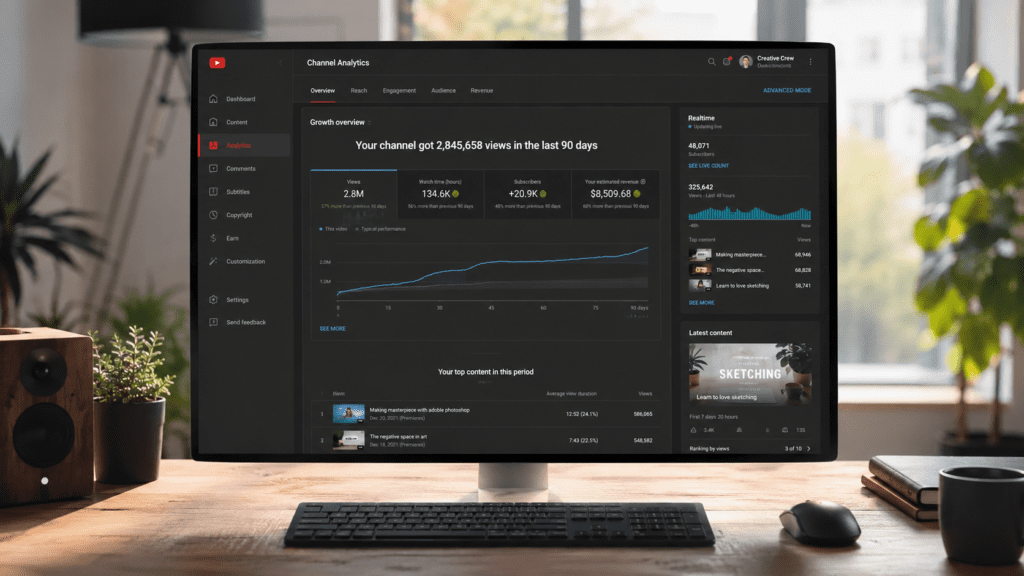
Traditional YouTube analytics gives you raw numbers — views, watch time, click-through rate. What AI adds is interpretation. It looks at patterns across thousands of data points and translates them into clear, actionable signals.
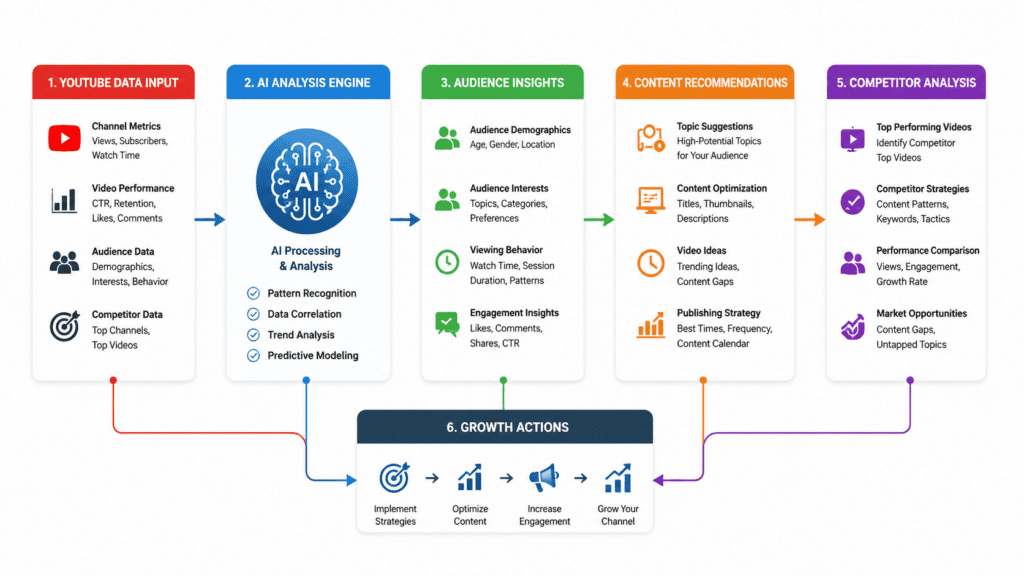
Here’s what AI actually does when you feed it your channel data:
Pattern Recognition
AI identifies which video formats, topics, lengths, and posting times consistently outperform others on your specific channel — not based on generic advice, but your own historical data.
Audience Behavior Analysis
It maps when viewers drop off, what keeps them watching, which thumbnails they click, and what drives comments versus passive views. This behavioral layer is something spreadsheets simply can’t surface efficiently.
Video Performance Evaluation
Rather than looking at each video in isolation, AI compares performance across your entire catalog and flags outliers — both overperformers worth doubling down on and underperformers dragging your average down.
Competitor Benchmarking
Good AI tools don’t just look inward. They pull in data from competing channels in your niche, compare posting frequency, average views, subscriber growth rates, and content themes — revealing the gaps you can exploit.
Growth Forecasting
Based on your current trajectory and content patterns, AI tools can project subscriber milestones, estimate what consistent publishing could yield, and model the impact of optimization changes before you make them.
Practical example: A cooking channel with 8,000 subscribers fed their data into an AI analyzer and discovered their recipe videos under 9 minutes had 2.3x better retention than their longer how-to content. They shifted their format, and average views per video jumped 67% in 60 days. That insight was buried in the data — AI surfaced it in minutes.
Why Creators Are Using AI for YouTube Analysis
The shift toward AI-assisted channel management isn’t hype — it’s a response to a very real problem. YouTube’s algorithm has become dramatically more competitive. According to YouTube’s own data, creators upload over 500 hours of video every minute. Standing out without data is basically impossible.
Here’s why AI analysis has become the tool serious creators swear by:
Faster Audits
A manual channel audit — reviewing each video’s performance, comparing trends, identifying patterns — can take 8 to 10 hours. AI tools compress that into 5 minutes. That time savings compounds across every quarter you’re running a channel.
Better Decision-Making
Gut feel isn’t a content strategy. AI gives creators specific, data-backed recommendations: “Your videos posted on Tuesday at 3 PM receive 41% more first-hour views than other days.” That’s actionable.
Content Gap Discovery
AI tools analyze what’s performing well in your niche but missing from your channel. These content gaps represent low-competition opportunities where demand already exists but supply is thin.
Thumbnail Optimization
AI can now analyze thumbnail composition, color contrast, emotional expression, and text density — comparing yours against high-performing competitors. Some tools even predict CTR before you publish.
Retention Improvement
Average view duration is one of YouTube’s most heavily weighted ranking signals. AI identifies exactly where viewers drop off across your videos, allowing you to restructure your content and hook viewers earlier.
Competitor Tracking
Understanding what your top five competitors are publishing, how often, and what’s working for them is no longer a manual research job. AI distills their performance data into a competitive brief you can act on.
Best Free AI Tools to Analyze YouTube Channels
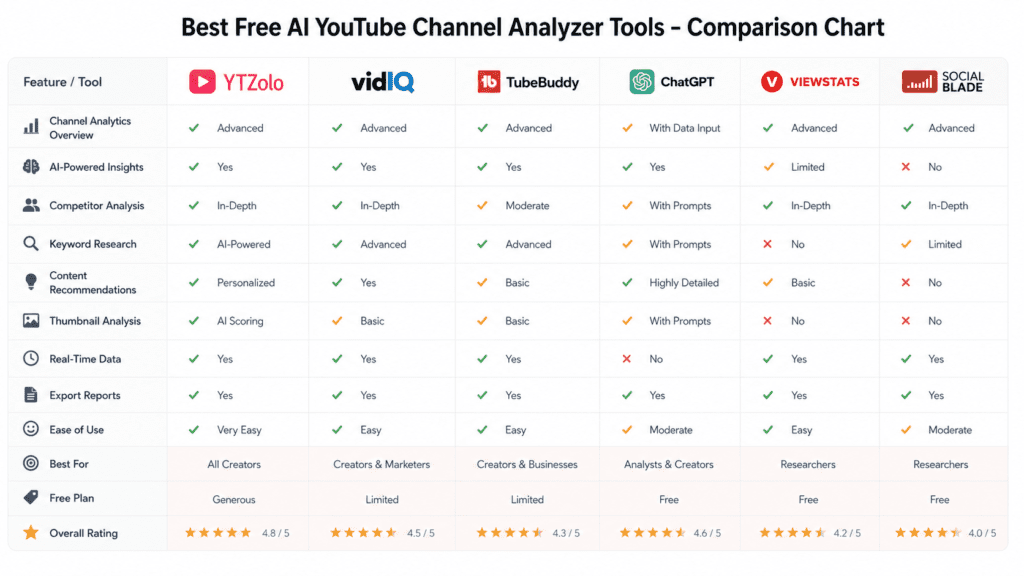
The free AI YouTube channel analyzer market has expanded significantly. Here’s an honest breakdown of the tools worth knowing.
1. YTZolo
Overview
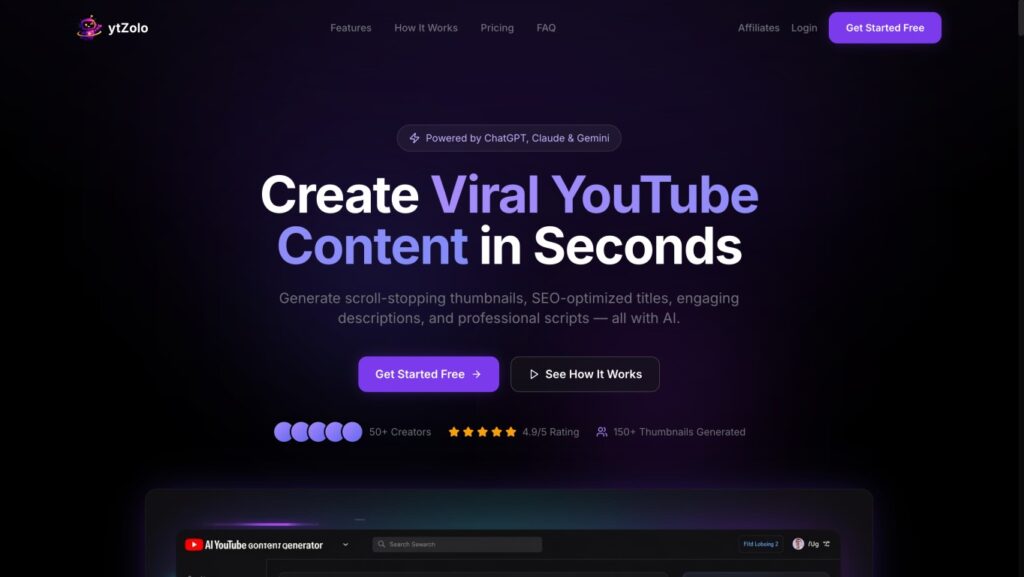
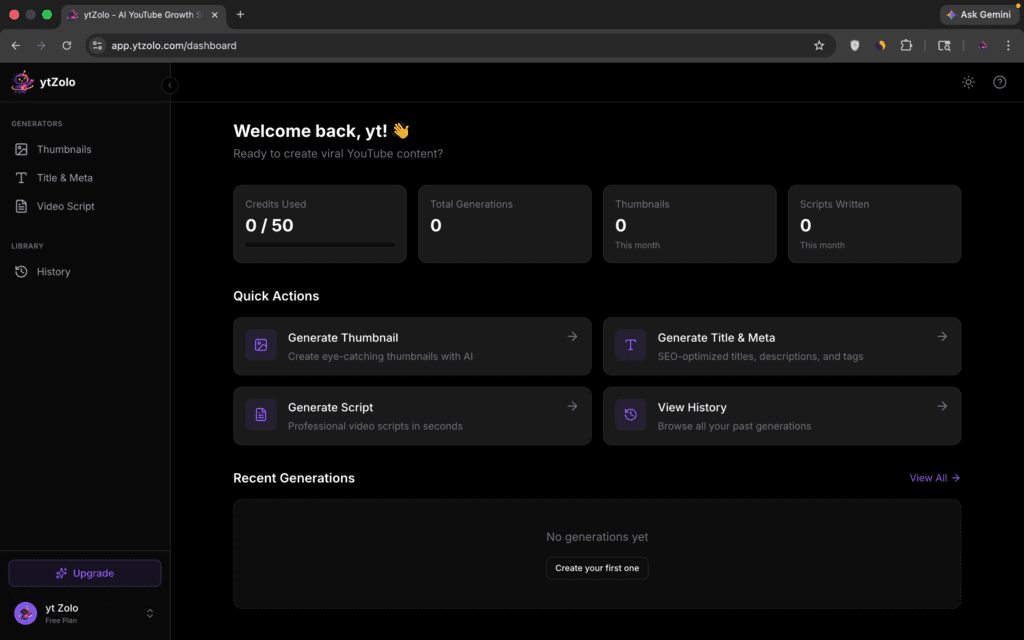
YTZolo is purpose-built for YouTube creators who want AI-driven growth insights without the complexity of enterprise analytics platforms. It’s designed around the actual workflow of content creation — from ideation through publication and analysis — making it one of the most creator-friendly options in this space.
Key Features
- AI-powered channel audit with growth gap identification
- Content performance scoring across your video catalog
- Competitor research with niche-level benchmarking
- Thumbnail analysis with AI-generated improvement suggestions
- Script optimization recommendations tied to retention patterns
- Topic discovery engine surfacing trending ideas in your niche
Pros
- Designed specifically for creators, not marketers or agencies
- AI insights framed as concrete next steps rather than raw data dumps
- Combines competitive analysis and your own channel data in one view
- Lightweight interface that doesn’t require a data science degree to use
Cons
- Newer platform, so historical dataset breadth is still growing
- Some advanced features are being rolled out progressively
Free Plan Details
YTZolo offers a free tier that includes channel audits, basic competitor analysis, and content recommendations — enough to run a full diagnostic on your channel without entering a credit card.
Best Use Case
Creators who want a single AI-powered hub that covers everything from channel analysis to content planning and script refinement. Especially valuable if you’re managing 1–3 channels and need consolidated insights.
2. ChatGPT
Overview
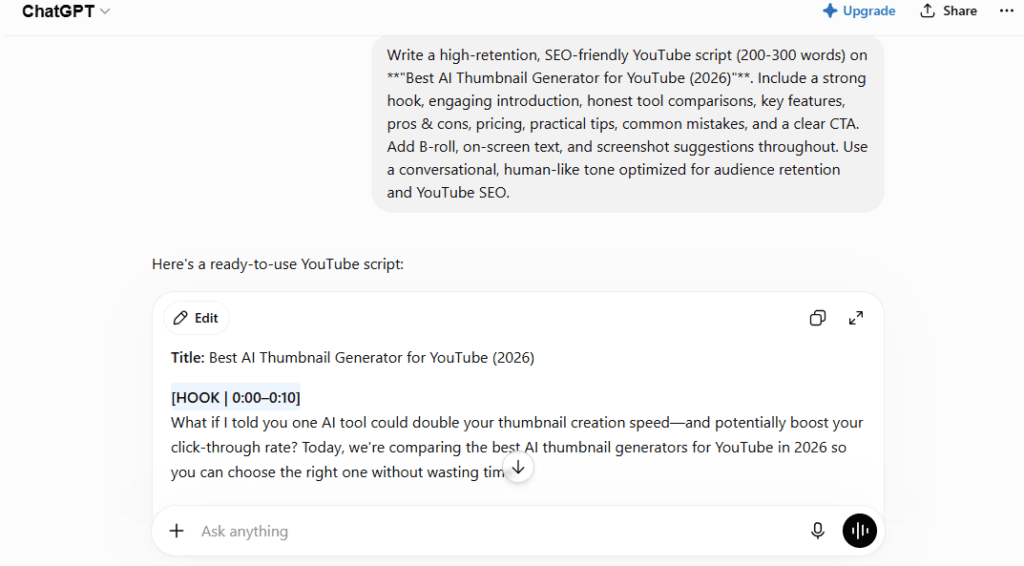
ChatGPT isn’t a YouTube-specific tool, but with the right prompts it functions as a capable free AI YouTube channel analyzer — particularly for qualitative analysis, content strategy, and competitor research using publicly available data.
Key Features
- Channel audit via manually pasted data
- Script feedback and retention optimization suggestions
- Topic brainstorming and SEO title generation
- Competitor analysis when given specific data to work with
Pros
- Completely free at the base tier
- Flexible — you can customize prompts for your specific situation
- Surprisingly effective for qualitative content strategy
Cons
- No direct YouTube API integration — you must feed it data manually
- Can’t pull real-time analytics, subscriber counts, or live competitor data
- Quality of output depends heavily on how well you prompt it
Free Plan Details
ChatGPT 4o is available free with usage limits. No YouTube-specific features out of the box.
Best Use Case
Creators comfortable with prompting who want qualitative content strategy help and can export or paste their own analytics data.
3. VidIQ
Overview
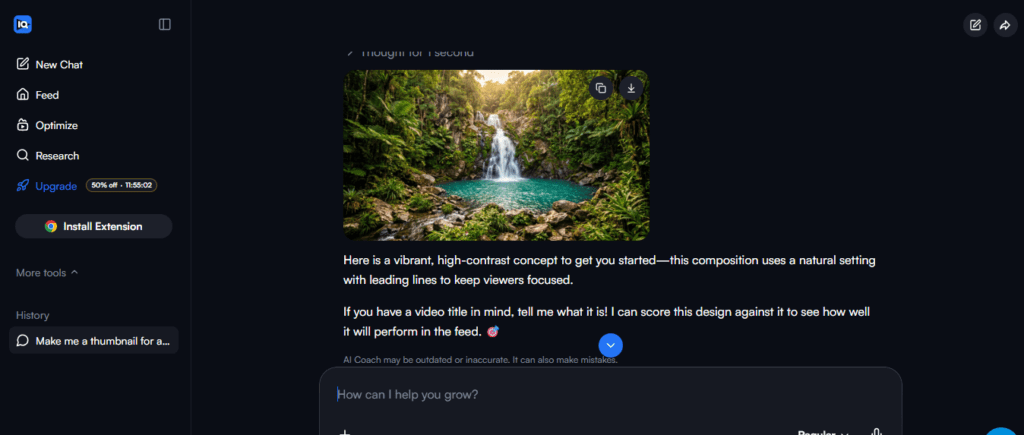
VidIQ is one of the most established YouTube growth platforms, integrating directly with the YouTube API to pull live channel data. Its AI features have expanded in recent years with tools like an AI coach and daily video ideas.
Key Features
- Real-time keyword research and SEO scoring
- Channel audit with subscriber and view trend data
- AI video idea generator based on your niche
- Competitor channel tracking
- Thumbnail A/B testing (paid)
Pros
- Deep YouTube API integration for accurate, live data
- Strong SEO toolset with keyword scores and search volume
- Large user base means a mature, stable platform
Cons
- The best AI features are behind the paid tier ($10–$49/month)
- Free plan is limited — mainly keyword lookups and basic analytics
- Interface can feel busy for creators focused on execution rather than SEO
Free Plan Details
Free plan includes limited keyword searches, basic channel analytics, and the browser extension. AI coaching features require a paid subscription.
Best Use Case
Creators heavily focused on SEO optimization and keyword strategy who also want live competitor data.
4. TubeBuddy
Overview
TubeBuddy is a browser extension that overlays performance data directly onto the YouTube interface. It’s been around since 2014 and offers a broad feature set for optimization-minded creators.
Key Features
- SEO Studio for title, tag, and description optimization
- A/B testing for thumbnails and titles
- Channel health report
- Best time to publish recommendations
- Competitor scorecards
Pros
- Seamless browser extension integration with YouTube
- Solid A/B testing functionality for data-driven thumbnails
- Established platform with strong creator community
Cons
- Free plan is very limited — most useful features require Pro ($4.99–$19.99/month)
- AI features are less developed compared to newer entrants
- Better for optimization than deep channel analysis
Free Plan Details
Free plan includes basic SEO suggestions, limited keyword explorer, and some channel health metrics.
Best Use Case
Creators who want to optimize individual videos at publication time and run structured A/B tests on thumbnails and titles.
5. Viewstats
Overview
Viewstats is a YouTube analytics and research platform that provides public channel performance data, making it particularly useful for competitor research and benchmarking within your niche.
Key Features
- Public channel performance tracking
- View velocity analysis (how fast videos gain traction)
- Channel comparison across multiple creators
- Historical performance trends
Pros
- Good for competitive research without needing competitor access
- Clean interface focused on performance metrics
- Free access to substantial channel data
Cons
- Limited AI analysis features — more data aggregation than AI interpretation
- Doesn’t integrate with your own YouTube Studio analytics
- No content recommendation or optimization tools
Free Plan Details
Free tier provides access to public channel analytics and comparison tools.
Best Use Case
Creators who want to benchmark performance against specific competitors and track view velocity in their niche.
6. Social Blade
Overview
Social Blade is one of the oldest YouTube analytics aggregators, providing historical subscriber and view count data for public channels. It’s a starting point for competitive research rather than a deep analysis tool.
Key Features
- Historical subscriber and view count graphs
- Channel grade based on engagement benchmarks
- Multi-platform tracking (YouTube, Twitch, Instagram)
- Future subscriber projections based on current trajectory
Pros
- Completely free
- Simple to use — paste any channel URL and get immediate data
- Good for quick competitive snapshots
Cons
- No AI features — purely a data aggregator
- Data is publicly available, so you won’t find anything competitors can’t see
- Limited depth — great for trends, not for actionable strategy
Free Plan Details
Fully free with optional Pro upgrade for more granular data.
Best Use Case
Quick competitive benchmarking and historical trend research, especially when exploring a new niche.
Tool Comparison Table
| Feature | YTZolo | ChatGPT | VidIQ | TubeBuddy | Viewstats | Social Blade |
|---|---|---|---|---|---|---|
| AI Channel Audit | ✅ | ✅ (manual) | Paid | Limited | ❌ | ❌ |
| Competitor Analysis | ✅ | ✅ (manual) | ✅ | ✅ | ✅ | ✅ |
| Thumbnail Insights | ✅ | ✅ (manual) | Paid | Paid | ❌ | ❌ |
| Script Optimization | ✅ | ✅ | ❌ | ❌ | ❌ | ❌ |
| Keyword Research | ✅ | Limited | ✅ | ✅ | ❌ | ❌ |
| Content Gap Analysis | ✅ | ✅ (manual) | Paid | ❌ | ❌ | ❌ |
| Real-Time Data | ✅ | ❌ | ✅ | ✅ | ✅ | ✅ |
| Free Plan Available | ✅ | ✅ | ✅ | ✅ | ✅ | ✅ |
| Creator-Focused Design | ✅ | ❌ | Partial | Partial | ❌ | ❌ |
How to Analyze a YouTube Channel Using AI for Free
Here’s a practical, step-by-step workflow you can run today using free tools.
Step 1: Collect Your Channel Data
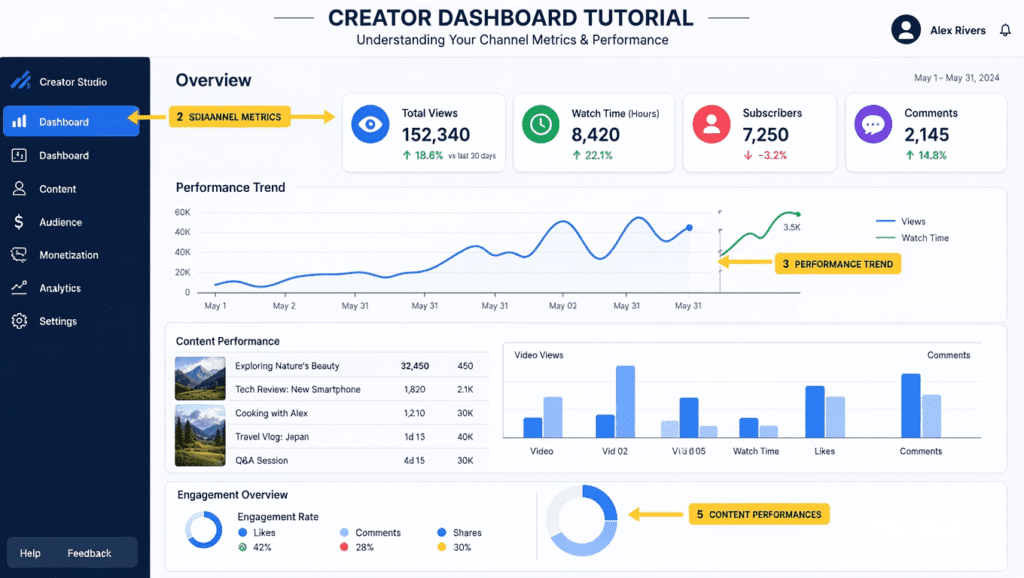
Before any AI tool can help you, you need to gather your core data. Start with YouTube Studio:
- Navigate to YouTube Studio → Analytics
- Export the last 90 days of data (Overview, Reach, Engagement, Audience tabs)
- Note your top 10 performing videos and your 5 worst-performing videos
- Record your average CTR, average view duration, and subscriber growth rate
If using a tool like Chatgpt or VidIQ, connect your channel directly via their API integration to pull this data automatically.
Screenshot recommendation: Capture your YouTube Studio Analytics Overview page showing the 90-day trend line, total views, watch hours, and subscriber change.
Step 2: Analyze Your Core Metrics
Feed your data into your chosen AI tool and look for these specific signals:
- Below 2%: Your thumbnails or titles aren’t compelling enough
- 2–5%: Room for improvement
- 5–10%: Strong performance
- Above 10%: Excellent — study what’s working
Average View Duration (AVD)
- Below 30%: Hook and intro need significant work
- 30–50%: Average — structure and pacing need attention
- Above 50%: Good — focus on expanding your best-performing formats
Subscriber Conversion Rate
Track what percentage of viewers subscribe after watching a video. If your best-performing views don’t convert, you’re attracting the wrong audience or missing a clear call-to-action.
Run these numbers through an AI tool. Note which videos are outliers in each direction.
Step 3: Find Content Gaps
Content gaps are topics your target audience actively searches for that you haven’t covered — or that competitors cover poorly.
Use YTZolo’s topic discovery tool or paste this prompt into ChatGPT:
“I run a YouTube channel about [your niche]. Based on the topics I’ve already covered [list them], what high-search, low-competition video ideas am I missing? Focus on evergreen topics that would still be relevant in 12 months.”
Also run a competitor’s channel through a tool like Viewstats or VidIQ’s competitor research to identify which of their videos are gaining momentum that you could approach from a fresh angle.
Step 4: Study Your Competitors
Pick your top 3–5 competitors in your niche — channels roughly in your size range plus one or two larger aspirational channels.
For each competitor, identify:
- Their 5 most-viewed videos in the last 6 months
- Average video length and format
- Posting frequency
- Thumbnail style (face vs. no face, bold text, color palette)
- Titles — are they question-based, list-based, or story-driven?
Run a competitor analysis prompt in ChatGPT or use YTZolo’s competitive benchmarking feature. Look for patterns across competitors that you’re not currently doing.
Step 5: Create Your Action Plan
Consolidate your findings into three categories:
Quick Wins (implement this week)
- Update thumbnails on your top 3 underperforming videos
- Rewrite titles using keyword insights
- Add CTAs in videos with high views but low subscriber conversion
Medium-Term Improvements (next 30 days)
- Create 2–3 videos targeting identified content gaps
- Test a new format based on what’s working for competitors
- Improve your video hook based on retention drop-off data
Long-Term Strategy (90 days)
- Shift your posting schedule based on peak audience activity
- Build a content calendar aligned with seasonal search trends
- Develop a consistent thumbnail template based on your highest-CTR designs
How YTZolo Simplifies AI-Powered YouTube Analysis
Most YouTube analysis tools were built for marketers who speak in impressions and CPMs. YTZolo was built for creators who think in views, retention, and subscriber count.
Here’s what that difference looks like in practice:
AI Channel Audit
Connect your channel and the platform runs a diagnostic across your entire video catalog. Rather than handing you a spreadsheet, it identifies your channel’s specific strengths, weaknesses, and the three most impactful things you could change right now.
Content Gap Analysis
The software maps your existing content against search demand in your niche and surfaces topics where demand is high but you haven’t published. These aren’t generic suggestions — they’re filtered through your channel’s specific audience profile.
Script Optimization
Paste your script into YTZolo and it analyzes your hook strength, identifies where energy dips mid-video (based on retention patterns from similar content), and suggests structural improvements — before you ever press record.
Thumbnail Suggestions
Upload your thumbnail and get AI-powered feedback on composition, text legibility, emotional hook, and how it compares to top performers in your niche. This replaces the guesswork of the thumbnail design process with data-backed guidance.
Competitor Research
Enter any competitor’s channel URL and get a breakdown of their top-performing content themes, growth velocity, and the strategies that appear to be working for them — formatted as insights you can actually act on.
Growth Recommendations
The tool doesn’t just show you data. It prioritizes what to focus on. If your CTR is fine but your retention is tanking at the 2-minute mark, it tells you that — and suggests how to fix it — instead of leaving you to draw your own conclusions from a dashboard.
The result is that a creator running the platform for the first time often walks away with a clearer picture of their channel’s potential than they’ve had after years of manually reviewing YouTube Studio.
AI Prompts to Analyze a YouTube Channel for Free
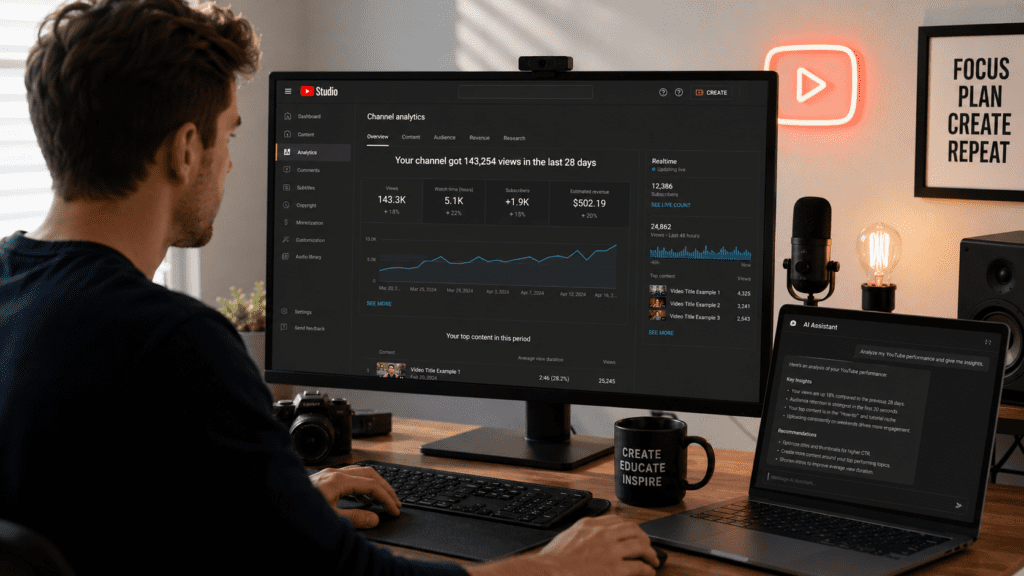
Copy and paste these prompts directly into ChatGPT, Claude, or any capable AI assistant. For best results, include actual data from your YouTube Studio analytics.
Channel Audit Prompt
Act as a YouTube growth strategist. I'm going to share my channel's performance data and I want a complete audit.

Channel niche: [your niche]
Subscribers: [number]
Average views per video (last 90 days): [number]
Average CTR: [percentage]
Average view duration: [percentage or minutes]
Top 5 videos by views: [list titles and view counts]
Bottom 5 videos by views: [list titles and view counts]
Posting frequency: [how often you publish]

Based on this data:
1. Identify my channel's top 3 performance strengths
2. Identify my top 3 performance weaknesses
3. Give me 5 specific, actionable improvements ranked by expected impact
4. Tell me what type of content I should create more of and why
5. Identify any patterns in what's working vs. what isn't
Competitor Analysis Prompt
I want to analyze my YouTube competitors. Here is data on my top 3 competitors in the [your niche] niche:

Competitor 1: [channel name] — [subscriber count], [average views], [posting frequency], [their top 3 video titles]
Competitor 2: [channel name] — [subscriber count], [average views], [posting frequency], [their top 3 video titles]
Competitor 3: [channel name] — [subscriber count], [average views], [posting frequency], [their top 3 video titles]

Based on this:
1. What content themes are clearly working across these channels?
2. What format patterns do I see (video length, style, titles)?
3. What are these channels NOT covering that represents an opportunity?
4. How should I differentiate my channel from these competitors?
5. Give me 5 video ideas I could create that would compete directly with their best-performing content but with a fresh angle.
Thumbnail Review Prompt
I want to improve my YouTube thumbnail strategy. Here is a description of my current thumbnails:

[Describe your thumbnail style, colors, fonts, whether you use your face, text overlays, etc.]

My current average CTR is: [percentage]
My best-performing thumbnail by CTR: [describe it]
My worst-performing thumbnail by CTR: [describe it]

Top competitors' thumbnail styles in my niche: [describe what you observe]

Based on this:
1. What is my thumbnail strategy missing?
2. What changes would likely improve my CTR most?
3. Give me 5 thumbnail concepts for my next video on [topic]
4. What colors, compositions, and text patterns tend to outperform in [your niche]?
Content Strategy Prompt
I need a 90-day content strategy for my YouTube channel.

Channel niche: [your niche]
Target audience: [describe your ideal viewer — age, interests, pain points]
Current subscriber count: [number]
Growth goal (3 months): [target subscriber count]
Posting capacity: [how many videos per week]
Best-performing content types so far: [describe]
Content I haven't tried yet: [describe]

Create:
1. A content pillar strategy (3–4 evergreen topic categories I should own)
2. A 12-week posting calendar with specific video ideas
3. 5 "potential viral" video concepts with titles and brief outlines
4. Recommendations on video length, format, and structure for my niche
5. Metrics I should track weekly to measure progress
Viral Topic Discovery Prompt
I want to find high-potential video topics in the [your niche] niche that could go viral or reach a large audience.

My channel currently covers: [list your main topics]
My audience demographics: [age range, interests, knowledge level]
My competitors are covering: [briefly describe what others in your niche are making]

Find me:
1. 10 trending or underserved topics in my niche right now
2. 5 "timeless" high-search topics I should have already covered but haven't
3. 3 "contrarian angle" video ideas that would stand out from typical content in my niche
4. Specific title formats that tend to perform best for these types of topics
Common Mistakes When Using AI for YouTube Analysis
AI tools are powerful — but they’re not infallible. Here are the mistakes that lead creators to make bad decisions even when using good tools.
Blindly Trusting AI Recommendations
AI identifies patterns, but it doesn’t understand your audience relationship, your personal brand voice, or the nuanced reasons behind your channel’s identity. Use AI as an advisor, not a director. If a recommendation feels off for your audience, dig deeper before acting on it.
Ignoring Audience Signals
Your comments section and community posts tell you things analytics never will. A video might underperform on views but generate enormous engagement and loyalty. AI tools that focus only on view counts and CTR can miss this qualitative layer entirely. Always read the room.
Overlooking Retention Data
CTR gets a lot of attention, but average view duration is arguably more predictive of long-term growth. Many creators run AI audits and focus on titles and thumbnails while never addressing the fact that viewers are leaving their videos at the 90-second mark. Fix retention first.
Copying Competitors Without Strategy
Competitor analysis is valuable, but copying their format, topics, or thumbnail style without understanding why it works for them is a shortcut to mediocrity. A fitness channel with 500K subscribers earned that audience over years. A new channel replicating their style won’t inherit their audience — it needs to find its own.
Not Testing Recommendations
AI gives you hypotheses, not certainties. The right approach is to test one change at a time — a new thumbnail style, a different video length, a revised hook structure — and measure the impact before committing to a full strategy shift. Without testing, you’re flying blind again.
Treating a Single Audit as a One-Time Event
Channel analysis isn’t a once-a-quarter activity. Your niche evolves, your audience shifts, and algorithm signals change. Run a lightweight audit monthly and a full audit quarterly. AI tools make this fast enough to be sustainable.
Action Plan After Your AI Channel Audit
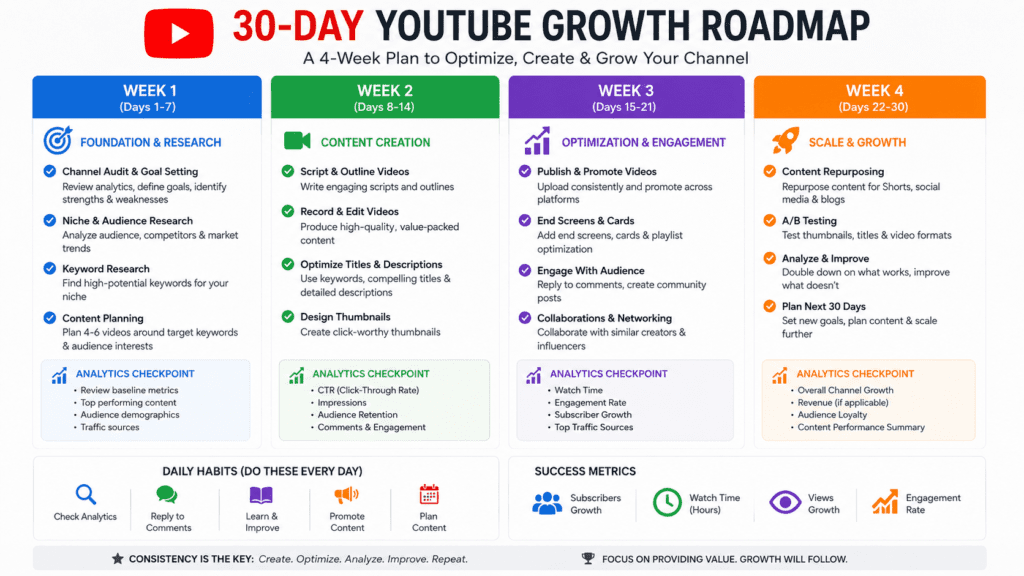
Running a channel audit is only valuable if it leads to action. Here’s a structured 30-day plan to turn your AI insights into real growth.
Week 1: Foundation and Quick Wins
Days 1–2: Audit Review
Complete your AI channel audit using the audit tool or the manual method outlined above. Document your three biggest weaknesses and your three strongest content patterns.
Days 3–4: Thumbnail Refresh
Using your AI thumbnail analysis, redesign thumbnails for your three worst-performing videos. Apply insights from your best-converting thumbnails. Even small improvements to existing videos compound over time as YouTube redistributes impressions.
Days 5–7: Title Optimization
Review your top 20 videos and rewrite titles for the five with below-average CTR. Use keyword data from VidIQ or YTZolo to incorporate search terms without making titles feel robotic.
Week 2: Content Planning and Creation
Days 8–10: Content Gap Execution
Take the top two content gap opportunities identified in your audit and create a full outline for each. Use the viral topic discovery prompt above to sharpen your angles.
Days 11–14: First New Video
Script, film, and publish the first content-gap video. Apply your AI script optimization — particularly the hook. Your first 30 seconds should directly address a pain point your target viewer has right now.
Week 3: Competitor and Audience Insights
Days 15–17: Deep Competitor Research
Using the competitor analysis prompt or YTZolo’s competitive benchmarking, study your top five competitors. Document two things each competitor does well that you don’t currently do.
Days 18–21: Audience Engagement Sprint
Reply to every comment on your last 10 videos. Ask a question in your community tab. This signals engagement to the algorithm and surfaces audience feedback that your AI tool can’t see.
Week 4: Measure, Adjust, Scale
Days 22–25: Performance Review
Pull your updated analytics. Compare CTR and view duration on refreshed thumbnails and new content. Note what moved and what didn’t.
Days 26–28: Strategy Refinement
Feed your updated data back into your AI tool. Identify which action items from Week 1 produced measurable results and which didn’t. Adjust your content calendar accordingly.
Days 29–30: 90-Day Plan Creation
Using everything learned in the past 30 days, build your next 90-day content calendar. By now you should have real data — not just AI projections — on what’s working for your specific channel and audience.
Frequently Asked Questions
Is there a free AI YouTube channel analyzer?
Yes. Several tools offer free AI-powered channel analysis including YTZolo, VidIQ (with a free tier), and TubeBuddy. For more comprehensive AI analysis, tools like ChatGPT can process manually exported data with the right prompts. YTZolo’s free plan includes a full channel audit and basic competitor research without a credit card.
Can AI predict YouTube channel growth?
AI can model growth trajectories based on current metrics — subscriber velocity, view consistency, and content frequency — but predictions are probabilistic, not guaranteed. Treat AI growth forecasts as directional benchmarks rather than hard targets. The accuracy improves significantly when you’re feeding it 90+ days of your actual channel data.
How accurate are AI channel audits?
Accuracy depends on data quality and the tool you’re using. AI audits that pull directly from the YouTube API (like Viewstats and VidIQ) are highly accurate for quantitative metrics. Qualitative recommendations — what content to make next, which topics to pursue — are pattern-based and should be validated against your own audience knowledge before acting on them.
Can ChatGPT analyze a YouTube channel?
Yes, with limitations. ChatGPT doesn’t have direct access to YouTube analytics, so you need to paste or describe your data. For qualitative analysis — content strategy, script feedback, competitor positioning — it’s surprisingly capable. For quantitative channel analysis with live data, purpose-built tools like YTZolo are more effective.
What metrics matter most for YouTube channel growth?
The four most predictive metrics are: Click-Through Rate (CTR), Average View Duration (AVD), Subscriber conversion rate (what percentage of viewers subscribe), and impressions growth. CTR and AVD together tell YouTube whether your content deserves to be recommended. Focus on these before optimizing secondary metrics like total views or likes.
How often should I run a channel audit?
Run a lightweight review monthly (15–20 minutes reviewing your core metrics) and a full AI audit quarterly. If you’ve just made significant changes to your content strategy, check in after 30 days to measure impact rather than waiting for your quarterly review.
What is a YouTube channel audit?
A YouTube channel audit is a structured review of your channel’s performance data — video metrics, audience behavior, SEO health, and competitive positioning — designed to identify what’s working, what isn’t, and where your biggest growth opportunities are. AI tools have made comprehensive audits significantly faster and more accessible for independent creators.
Can AI tools tell me why my YouTube channel isn’t growing?
They can surface likely culprits — low CTR, poor retention, inconsistent publishing, wrong keywords — but they can’t tell you the full story on their own. Combine AI audit data with your own qualitative read of your content and audience. The combination of data and creator intuition is more powerful than either alone.
Are AI YouTube analysis tools safe to use?
Reputable tools that access your YouTube data via the official YouTube API (OAuth authentication) are safe. Never give third-party tools your YouTube password directly. Check that any tool you use requires Google OAuth login — that’s the secure, approved method.
What’s the best free AI tool for a YouTube channel audit?
For creators who want a purpose-built, creator-focused AI audit without manual data entry, YTZolo’s free plan is the strongest starting point. For creators comfortable with prompting and manual data export, ChatGPT provides significant analytical value at no cost. VidIQ and TubeBuddy are strong additions for SEO-specific analysis.
How does AI find content gaps on YouTube?
AI content gap analysis works by comparing what topics your channel covers against what’s being searched in your niche. It uses data from YouTube search trends, competitor channel analysis, and your own content catalog to surface topics with strong demand but limited supply — either on your channel specifically or in your niche broadly.
Can I use AI to analyze a competitor’s YouTube channel?
Yes. Tools like YTZolo, VidIQ, and Viewstats allow you to input any public channel’s URL and analyze their performance metrics, top content themes, and growth trajectory. ChatGPT can assist with qualitative competitor analysis when you provide it with manually gathered data on competitor channels.
Conclusion
The days of building a YouTube channel on instinct alone are over — not because intuition doesn’t matter, but because the competition is too data-savvy to win without it. Whether you’re running your first audit or your fifteenth, AI tools give you a faster, clearer picture of your channel’s performance than any manual spreadsheet ever could.
What you’ve learned in this guide:
- What AI-powered channel analysis actually does and how it differs from standard analytics
- Why creators are making better decisions faster by using AI for audits, competitor research, and content planning
- The best free tools available today — from YTZolo to ChatGPT to Social Blade — and what each one is actually good for
- A step-by-step method to run your own free AI channel audit right now
- Copy-paste prompts you can use immediately for channel audits, competitor research, thumbnail analysis, and viral topic discovery
- The most common mistakes creators make with AI tools and how to avoid them
- A concrete 30-day action plan to turn your audit findings into channel growth
The most important step is the first one: actually running the audit. Data sitting in a dashboard does nothing. Insights turned into decisions build channels.
External references: YouTube Creator Academy | VidIQ | TubeBuddy | Social Blade
Author: Anshika Verma
Anshika Verma is an SEO content writer and AI tools researcher who specializes in YouTube growth, content creation, and generative AI. She creates evidence-based, reader-first content that helps creators compare AI tools, improve workflows, and make informed decisions through practical testing and in-depth research.


Pingback: Best YouTube Shorts Thumbnail Generator – AI Tools 2026