
Quick Summary
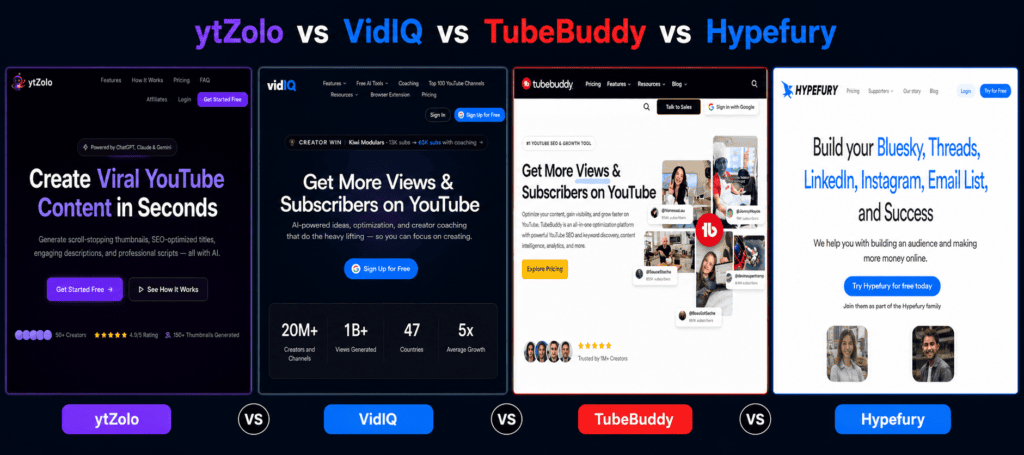
Short on time? Here’s the whole comparison in three sentences. TubeBuddy is the cheapest, most YouTube-native optimization toolkit, built around A/B testing and bulk video management.VidIQ leans into analytics and AI-driven ideation, at a higher price, with no native A/B testing. Hypefury isn’t actually a YouTube tool at all — it’s an X/LinkedIn scheduling and automation platform with no AI writing built in. ytZolo takes a different approach entirely: instead of optimizing videos you’ve already made, it sits earlier in the pipeline, using multiple AI models (ChatGPT, Claude, and Gemini) to generate titles, descriptions, tags, scripts, and thumbnails from one dashboard — replacing several disconnected tools with a single AI content studio. The right pick depends on whether you need YouTube analytics and testing (TubeBuddy or VidIQ), X growth automation (Hypefury), or an AI-first content creation engine (ytZolo). We break down exactly why below.
Table of Contents
Introduction
You’ve probably tried at least one of these tools already. Maybe you installed TubeBuddy years ago and forgot why. Maybe VidIQ’s dashboard is still open in another tab right now. Maybe someone told you Hypefury would “blow up your channel,” only for you to discover it doesn’t touch YouTube at all.
Here’s the real problem. Most creators don’t fail because they lack tools. They fail because they’re using the wrong combination of tools, paying for overlapping features, and still doing the slowest, most repetitive parts of content creation by hand — titles, descriptions, tags, thumbnails, and scripts.
Picking the wrong platform doesn’t just waste a subscription fee. It wastes hours every week on manual keyword research, thumbnail design, and script drafting that a properly integrated AI workflow could hand back to you. Over a year, that’s the difference between 40 uploads and 90.
This ytZolo vs TubeBuddy vs VidIQ vs Hypefury guide compares them head-to-head using official pricing, product documentation, and independent reviews as of mid-2026. We’ll show you exactly where each tool wins, where it falls short, and—because no unbiased article should hide tradeoffs—where the honest answer is “it depends on your workflow.”
For general background on video discoverability, YouTube’s own Creator Academy and Google Search Central are worth bookmarking alongside this comparison.
Quick Comparison Table
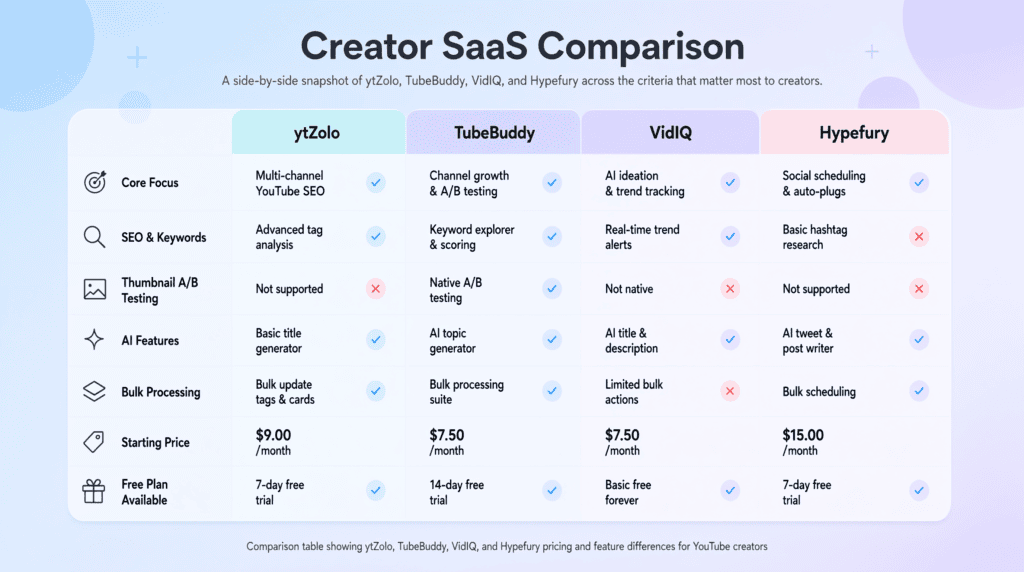
| Criteria | ytZolo | TubeBuddy | VidIQ | Hypefury |
|---|---|---|---|---|
| Overall Rating | 4.4/5 | 4.3/5 | 4.1/5 | 4.0/5 (for X, not YouTube) |
| Best For | AI-first content creation | Video optimization & bulk workflow | Analytics & keyword research | X/Twitter scheduling & automation |
| Starting Price | Free / $6.7 mo (annual) | Free / ~$2.25–4.50 mo (annual) | Free / ~$7.50–19 mo | No free plan / $29 mo |
| Free Plan | Yes, generous | Yes, very limited | Yes, basic | No (7-day trial only) |
| AI Content Features | Multi-model (ChatGPT, Claude, Gemini) | Limited/none native | AI Coach, Daily Ideas | None native |
| SEO Tools | Built-in SEO optimizer | Keyword Explorer, SEO Scorecard | Keyword research, trend alerts | Not applicable |
| Thumbnail Tools | AI thumbnail generator (1–3 variants) | Thumbnail Generator + A/B testing | Thumbnail analysis, limited generation | None |
| Title Generator | Yes, AI-powered, bulk | Click Magnet AI suggestions | AI title suggestions | None |
| Script Generator | Yes, hook/body/CTA | No | No | No |
| Voice/Audio AI | Positioned within suite roadmap | No | No | No |
| Scheduling | Not a core focus | Best time to publish | Limited | Core strength |
| Analytics | Generation history, credits usage | Deep video-level analytics | Deep channel & competitor analytics | Post-level engagement analytics |
| Automation | Bulk multi-asset generation | Bulk metadata editing | Limited bulk tools | Autoplugs, evergreen reposting |
| Platform Support | YouTube-focused | YouTube only | YouTube only | X, LinkedIn, Instagram, Threads, TikTok, Facebook |
| Ease of Use | Beginner-friendly, single dashboard | Moderate (extension-based) | Moderate, data-dense | Simple for scheduling only |
| Customer Support | Priority/dedicated by tier | Community + docs | Coaching on top tiers | Chat support |
| Learning Curve | Low | Medium | Medium-High | Low |
| Value for Money | Strong at entry tiers | Strong for optimization-first creators | Strong for analytics-first creators | Fair, but X-only |
Pricing figures reflect publicly listed rates at the time of writing and are subject to change; always confirm current pricing on each provider’s official site.
Evaluation Methodology
Before ranking anything, we researched each platform’s official website, pricing page, published feature list, and blog. We also cross-referenced independent, third-party reviews and existing TubeBuddy vs VidIQ comparisons.
Our evaluation criteria covered ten dimensions: AI capability depth, YouTube SEO tooling, thumbnail and creative tools, pricing transparency, ease of use, automation depth, platform breadth, support quality, free-tier generosity, and integration with a creator’s broader content pipeline.
We did not accept marketing claims at face value — where a platform reported a specific statistic (like a CTR uplift percentage), we’ve labeled it as self-reported rather than independently verified.
We also want to be transparent about a category difference that most comparison articles gloss over: Hypefury is not a YouTube tool. It’s an X (Twitter) and LinkedIn scheduling platform. Including it in a “YouTube creator tools” comparison only makes sense if you’re evaluating a full cross-platform stack, not a single YouTube-specific decision.
We’ve kept it in this guide because many YouTubers also run an X presence, but we won’t force an apples-to-apples score where the categories genuinely differ.
Where information wasn’t publicly available — such as Hypefury’s exact uptime SLA or ytZolo’s enterprise-tier roadmap — we’ve said so rather than guessing.
Product Overview: ytZolo
Who built it: ytZolo is an independent SaaS platform built specifically for YouTube creators, positioned as an AI content studio rather than a browser-extension optimization tool.
Purpose: Instead of analyzing videos after upload, the tool focuses on pre-production — the part of the workflow where creators lose the most time. It generates titles, descriptions, tags, scripts, and thumbnails from a single input (your topic and niche), using multiple large language models rather than one.
Strengths:
- Multi-model generation lets you compare outputs from ChatGPT, Claude, and Gemini instead of being locked into a single AI engine’s style or blind spots.
- Everything — thumbnail, title, script, description, tags — is generated from the same context, so assets stay thematically consistent instead of feeling stitched together from five different tools.
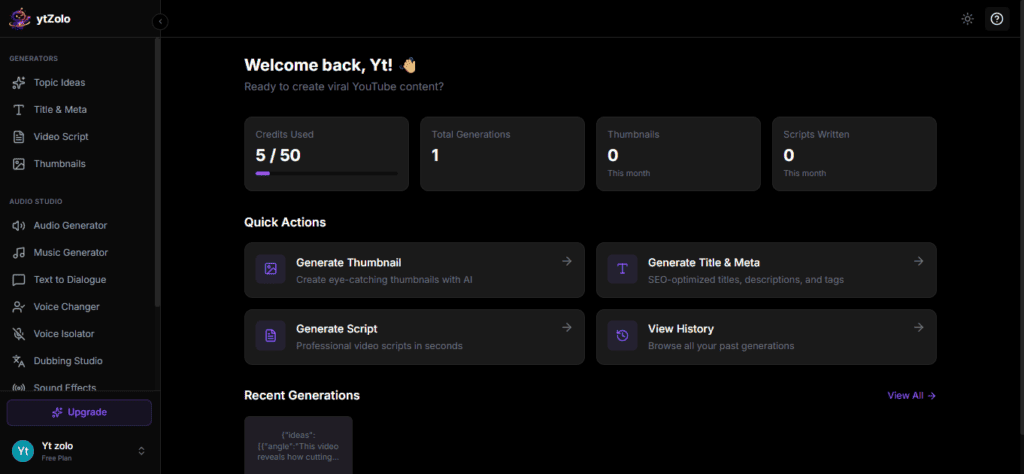
- A genuinely usable free tier (no credit card required) that includes title, description, and tag generation plus generation history.
- As part of a broader creator suite, ytZolo’s roadmap extends toward AI voice and text-to-speech, AI music and sound effects, voice changing, AI dubbing for multilingual localization, and podcast/audiobook generation — aimed at consolidating tools creators currently pay for separately.
- Credit-based pricing makes cost predictable rather than tiered around vague “seats” or “channels.”
Weaknesses:
- It does not replicate TubeBuddy’s A/B testing or VidIQ’s competitor-tracking analytics — it’s not trying to be an analytics platform.
- Thumbnail variant count is capped by plan (1 variant on Standard, 3 on Pro), which is lower than dedicated design tools.
- As a newer entrant compared to TubeBuddy (over a decade old) and VidIQ, its long-term track record and third-party review volume are still building.
Ideal users: Solo creators, faceless-channel operators, agencies managing multiple client channels, and any creator who currently juggles ChatGPT, Canva, and a keyword tool separately and wants one dashboard instead.
Latest notable features: Batch/bulk generation mode for producing multiple video packages in one session, and a generation history library that lets creators reuse or remix previous high-performing hooks. For workflow inspiration, see ytZolo’s guide on AI tools for YouTube growth.
Product Overview: TubeBuddy
Who built it: TubeBuddy is a long-standing, YouTube-certified browser extension built specifically for channel optimization, first launched over a decade ago.
Purpose: TubeBuddy sits directly inside YouTube Studio and helps creators optimize videos they’ve already produced — better tags, better titles, better thumbnails, tested with real data.
Strengths: TubeBuddy has over 50 tools for creators in its suite, and being YouTube Certified, it integrates directly into YouTube and YouTube Studio. It’s the only one of these four platforms with native A/B testing for thumbnails, titles, and descriptions, and its bulk-processing tools remain a standout for channels with large back catalogs.
Weaknesses: TubeBuddy advocates a different approach to AI in creator workflows rather than building in-tool AI ideation features, so VidIQ currently wins on in-tool AI. The free tier is thin — most meaningful tools sit behind a paid license, and unlike VidIQ, there’s no free trial of the paid tiers.
Ideal users: Established creators with sizable back catalogs who want to test and optimize what they’ve already published, and who prioritize affordability.
Latest notable features: Bulk Delete Comments for managing comment sections at scale, and Scheduled Publish for queuing videos to go live at a specific time without staying at your desk.
Product Overview: VidIQ
Who built it: VidIQ is a YouTube-focused analytics and SEO platform, also delivered primarily as a browser extension plus web dashboard.
Purpose: VidIQ leans into data — competitor tracking, keyword scoring, and AI-assisted ideation — to help creators decide what to make next, not just how to optimize what’s already made.
Strengths: VidIQ’s “Daily Ideas” feature uses AI to generate video topic ideas tailored to a creator’s channel, which TubeBuddy lacks, and its browser extension shows detailed stats on any YouTube video, including competitor view-per-hour and engagement data. Its keyword and trend research tools are genuinely strong for channels prioritizing search-driven growth.
Weaknesses: VidIQ offers no native A/B testing feature, meaning creators can’t compare different versions of the same video’s title or thumbnail to see how they perform. Its pricing is also generally higher than TubeBuddy’s, and its pricing structure is complex to understand.
Ideal users: Data-driven creators and channels that want structured coaching alongside software, since VidIQ’s higher-tier plans include direct coaching that TubeBuddy does not offer.
Latest notable features: AI Coach for personalized channel guidance, and real-time views-per-hour tracking for competitor benchmarking.
Product Overview: Hypefury
Who built it: Hypefury is a social scheduling and automation platform built primarily for X (Twitter), with secondary support for LinkedIn, Instagram, Threads, TikTok, and Facebook.
Purpose: Hypefury helps creators, personal brands, and small businesses amplify their online presence and generate income by scheduling and automating content across multiple platforms, eliminating manual cross-posting.
Strengths: For X power users, Hypefury’s evergreen recycling, auto-plugs, and thread scheduling genuinely save time and extend the life of high-performing content.
Weaknesses: Hypefury does not offer built-in AI writing — no post generation, no idea generation — so creators must write everything themselves, which independent analyses confirm is its most cited limitation in 2025 and 2026. It also has no YouTube-specific tooling at all, and there is no free plan; all four tiers only include a 7-day free trial.
Ideal users: Creators whose primary growth channel is X or LinkedIn and who already have a separate content-writing workflow.
Latest notable features: One-click repurposing of content into other formats, such as turning tweets into Instagram Reels or LinkedIn carousels.
Important context: Because Hypefury doesn’t touch YouTube SEO, thumbnails, or scripts, most of the feature-by-feature sections below will note “Not applicable” for Hypefury rather than force a false comparison.
ytZolo vs TubeBuddy vs VidIQ vs Hypefury: Deep Feature Comparison
Content Planning & Ideation
VidIQ’s Daily Ideas and ytZolo’s multi-model topic generation both aim to solve “what do I make next,” approaching it from different angles — VidIQ from trend/competitor data, ytZolo from generative AI trained on topic and niche input. TubeBuddy intentionally stays out of ideation. Hypefury has no ideation tools; it schedules what you’ve already written.
YouTube SEO & Keyword Research
TubeBuddy shows keyword trend direction (gaining or losing traction) and lets users explore related searches and tags, while VidIQ displays overall keyword score alongside search volume, related score, and competition. ytZolo’s SEO optimizer generates titles, descriptions, and tags together rather than as a separate keyword lookup step. Hypefury: not applicable.
Title Generation
TubeBuddy’s Click Magnet uses AI-driven recommendations for titles, thumbnails, and descriptions. VidIQ offers AI title suggestions tied to its data. The tool generates bulk title variants across multiple AI models for direct comparison — useful for creators who want several genuinely different angles rather than one AI’s single best guess. See ytZolo’s guide on how to generate viral video titles with AI.
Thumbnail Generation
TubeBuddy includes a built-in Thumbnail Generator that lets creators design custom thumbnails by taking a video frame or uploading an image, then adding text overlays and graphics. VidIQ offers thumbnail analysis bolted onto its analytics suite rather than a dedicated generator.
The Platform generates thumbnail concepts directly from text input with no design skill required, exporting multiple HD variants for testing — see the free AI thumbnail generator guide for a walkthrough.
Script Writing
This is a clear differentiator: neither TubeBuddy, VidIQ, nor Hypefury includes a script generator. ytZolo does, structuring scripts around hook, body, and CTA. If script writing is a bottleneck for you, this alone may decide the comparison — see best AI tools for a YouTube script idea generator.
AI Audio (Voice, Music, Dubbing, Sound Effects)
None of TubeBuddy, VidIQ, or Hypefury currently offer voice generation, AI music, or dubbing tools — creators typically pair them with a separate tool like a dedicated text-to-speech or dubbing platform.
Consolidating pre-production writing, thumbnails, and voice/audio tools into a single subscription is part of ytZolo’s broader positioning as an end-to-end creator suite, distinct from these three optimization- and scheduling-focused platforms.
Social Scheduling
Hypefury offers scheduling across X, LinkedIn, and Instagram, though it is primarily focused on X. TubeBuddy offers a “best time to publish” recommendation for YouTube. VidIQ’s scheduling is limited. ytZolo does not position itself as a scheduling tool.
Analytics & Competitor Tracking
VidIQ’s competitor analysis tools allow creators to monitor rival channels’ uploads, track title and thumbnail changes, and analyze view velocity patterns, while TubeBuddy’s competitor scorecards lack the same depth. This is VidIQ’s clearest category win.
TubeBuddy instead offers in-built retention analysis, with granular stats about how many viewers watch and where they drop off, whereas vidIQ directs users back to YouTube Studio for retention stats.
Automation & Bulk Processing
TubeBuddy offers several bulk-processing tools such as bulk deleting comments and making changes to multiple videos in one operation, while VidIQ’s bulk tools are limited to Bulk Copy/Edit Cards and Endscreens, comment templates, and bulk metadata downloads.
Hypefury’s automation (autoplugs, evergreen reposting) operates on the social side rather than the YouTube-catalog side. ytZolo’s batch mode generates multiple content packages (title + thumbnail + script + tags) in one session rather than editing existing videos in bulk.
Team Collaboration
Hypefury lets creators invite a ghostwriter or virtual assistant to write posts and manage accounts. TubeBuddy and VidIQ support limited team access on higher tiers. the platform’s collaboration depth is best suited to agencies managing several channels through separate credit pools per client.
Pricing & Plans
Covered in full detail in the Pricing Comparison section below.
ytZolo vs TubeBuddy vs VidIQ vs Hypefury: Real Creator Workflow Comparison
A beginner (0–1,000 subscribers): Needs low-cost, low-complexity tools. the platform’s free plan removes the biggest early bottleneck — not knowing how to write a title or design a thumbnail. TubeBuddy’s free tier offers less, and VidIQ’s paid tiers are hard to justify pre-monetization. Hypefury isn’t relevant unless the beginner’s primary platform is X.
A YouTuber with an established back catalog: TubeBuddy’s bulk tools and A/B testing shine here — updating affiliate links or sponsor mentions across 200 videos in a few clicks is a real time-saver that neither VidIQ nor ytZolo currently replicates at the same depth.
A podcaster: Podcast creators need audio production support more than thumbnail or title tools. None of TubeBuddy, VidIQ, or Hypefury address audio production. This is where a broader creator suite with podcast and voice tooling becomes relevant, alongside a YouTube-specific tool for the video-upload side of a podcast.
A Shorts creator: High upload frequency rewards speed. ytZolo’s bulk generation mode and VidIQ’s Daily Ideas both help maintain a fast content cadence; TubeBuddy’s optimization tools matter less when videos are short-lived and algorithmically driven rather than search-driven.
A marketer running a brand channel: Needs consistency across many videos and stakeholders. TubeBuddy’s bulk editing and VidIQ’s analytics both help maintain brand standards at scale; ytZolo’s multi-model generation gives marketing teams several tone options per asset for internal approval.
A freelancer producing content for clients: Needs to move fast across different niches. ytZolo’s niche-flexible generation and credit-based pricing scale predictably per client. TubeBuddy’s per-channel licensing model can get expensive across multiple client channels.
An agency managing multiple channels: Needs separation between clients, bulk capability, and predictable costs. A combination — VidIQ or TubeBuddy for optimization, the tool for content generation at scale — is common in practice, since no single tool in this comparison covers every stage for a multi-channel agency.
Real World Scenarios: Who Wins
| Creator Type | Recommended Tool | Why |
|---|---|---|
| Beginners | ytZolo | Generous free plan removes the biggest early bottleneck: not knowing what to write or design |
| Professional creators (established catalog) | TubeBuddy | Bulk editing and A/B testing pay off once you have volume to optimize |
| Businesses/brand channels | VidIQ | Deeper analytics support brand reporting and stakeholder buy-in |
| YouTubers focused on search discovery | VidIQ or TubeBuddy | Both offer solid keyword research; TubeBuddy edges out on tag depth |
| Social media managers (X-first) | Hypefury | Purpose-built for X scheduling and engagement automation |
| Faceless channels | ytZolo | Script and thumbnail generation reduce reliance on on-camera talent or a design team |
| Educational creators | ytZolo + TubeBuddy | ytZolo for structured scripts, TubeBuddy for retention analysis |
| Podcast creators | A dedicated audio-first suite alongside a YouTube tool | Podcasting needs voice/audio tooling none of these four fully cover today |
| Short-form creators | ytZolo | Fast, bulk-friendly generation suits high posting frequency |
| AI-first creators | ytZolo | Built natively around multi-model AI generation |
| Budget users | TubeBuddy | Lowest verified entry price with meaningful features unlocked |
| Agencies | ytZolo + VidIQ/TubeBuddy combo | Content generation at scale plus per-channel optimization |
ytZolo vs TubeBuddy vs VidIQ vs Hypefury: Full Feature Matrix
| # | Feature | ytZolo | TubeBuddy | VidIQ | Hypefury |
|---|---|---|---|---|---|
| 1 | Free plan | Yes | Yes (limited) | Yes (basic) | No |
| 2 | Free trial of paid tier | N/A (free tier instead) | No | Yes | Yes (7 days) |
| 3 | AI title generator | Yes | Partial (Click Magnet) | Yes | No |
| 4 | AI description generator | Yes | No | Partial | No |
| 5 | AI tag generator | Yes | Tag suggestions | Tag suggestions | No |
| 6 | AI script generator | Yes | No | No | No |
| 7 | AI thumbnail generator | Yes | Manual thumbnail tool | Thumbnail analysis only | No |
| 8 | Multi-model AI (ChatGPT/Claude/Gemini) | Yes | No | No | No |
| 9 | Keyword research | Yes (built into SEO optimizer) | Yes (Keyword Explorer) | Yes | No |
| 10 | Competitor tracking | No | Basic scorecards | Yes, detailed | No |
| 11 | A/B testing | No | Yes | No | No |
| 12 | Retention analysis | No | Yes, in-built | Redirects to YouTube Studio | No |
| 13 | Bulk video metadata editing | No | Yes | Limited | N/A |
| 14 | Bulk comment management | No | Yes | Limited | N/A |
| 15 | Scheduled publishing (YouTube) | No | Yes | Limited | N/A |
| 16 | Social scheduling (X/LinkedIn/etc.) | No | No | No | Yes |
| 17 | Auto cross-posting | No | No | No | Yes |
| 18 | Evergreen content recycling | No | No | No | Yes |
| 19 | Engagement automation | No | No | No | Yes |
| 20 | Sales/monetization automation | No | No | No | Yes (Gumroad) |
| 21 | Trend alerts | No | Yes | Yes | No |
| 22 | Channel audit | No | Yes | Yes | No |
| 23 | Views-per-hour tracking | No | No | Yes | N/A |
| 24 | Generation history/library | Yes | N/A | N/A | N/A |
| 25 | Batch/bulk AI generation | Yes | Bulk editing (not AI) | No | Bulk scheduling |
| 26 | Credit-based pricing | Yes | No (license-based) | No (tier-based) | No (tier-based) |
| 27 | Coaching/expert consultation | No | No | Yes (top tiers) | No |
| 28 | Mobile app | Web-responsive | Limited | Limited | Web-responsive |
| 29 | Browser extension | No | Yes | Yes | No |
| 30 | Chrome/Firefox/Safari support | N/A | Chrome, Firefox, Safari | Chrome | N/A |
| 31 | Translation of metadata | No | Yes | No | No |
| 32 | Transcripts | No | Yes | No | No |
| 33 | Comment filtering/canned responses | No | Yes | Limited | N/A |
| 34 | API access | Not publicly documented | Not publicly documented | Not publicly documented | Not publicly documented |
| 35 | Team/multi-user access | Per-plan | Per-license | Per-plan | Per-plan |
| 36 | Priority/dedicated support | Yes (Pro tier) | Community-based | Coaching add-on | Chat support |
| 37 | Onboarding required | Minimal | Moderate | Moderate | Minimal |
| 38 | Niche-specific templates | Yes | No | No | Templates for posts |
| 39 | Export options | HD image/text export | In-platform only | In-platform only | Cross-platform publish |
| 40 | Designed specifically for YouTube | Yes | Yes | Yes | No |
| 41 | Refund policy published | Not publicly detailed | Not publicly detailed | Not publicly detailed | Not publicly detailed |
Where a refund policy or API access wasn’t publicly documented at the time of research, we’ve marked it as such rather than guessing — always confirm directly with the provider before purchasing.
Pricing Comparison
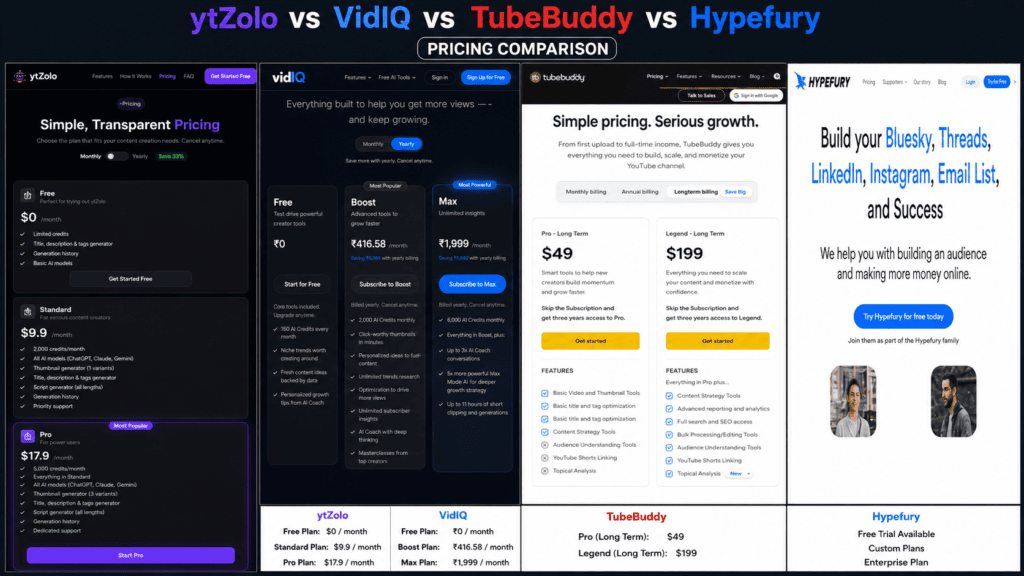
| Plan Tier | ytZolo | TubeBuddy | VidIQ | Hypefury |
|---|---|---|---|---|
| Free | Yes — limited credits, title/description/tag generator, generation history | Yes — very limited (e.g., 3 tags/video) | Yes — basic keyword research, 5 related keywords per search | No |
| Entry paid (monthly) | ~$19/mo (uncommitted) | ~$4.50–9/mo | ~$7.50–19/mo | $29/mo |
| Entry paid (annual, per month) | ~$6.7/mo ($79.9/yr) | ~$2.25–3.50/mo | ~$16.58/mo | ~$20.80/mo ($250/yr) |
| Top individual tier | ~$12/mo ($143.9/yr), 5,000 credits | ~$9–14.50/mo (Legend) | $49–79/mo (Max) | $65/mo (Creator) |
| Coaching/agency tier | N/A publicly listed | N/A | $99/yr–$199/mo (Coaching add-on) | Up to $199/mo (Agency) |
| Hidden limitations | Credits shared across all generation types, including thumbnails | Bulk tools require ~200+ videos to be worthwhile | Complex tier structure; some features locked behind Max | Starter plan limited to 1-month scheduling window and 1 X account |
| Best value | Standard plan for solo creators | Pro plan under 1,000 subscribers (discount-eligible) | Boost plan for AI Daily Ideas | Creator plan if X is primary channel |
| Refund policy | Not publicly detailed — confirm at checkout | Not publicly detailed — confirm at checkout | Not publicly detailed — confirm at checkout | Not publicly detailed — confirm at checkout |
TubeBuddy’s most advanced plan, the Legend plan, costs around $14.50 per month, while VidIQ’s Boost plan runs about $19 per month, or roughly $16.58 monthly on annual billing.
Hypefury has no free plan, and all four tiers include only a 7-day free trial, with annual billing saving up to roughly 28% over monthly. For the tool, publicly listed pricing shows a free tier plus Standard and Pro annual plans priced near $6.7 and $12 per month respectively, with credits covering all generation types including thumbnails.
Because pricing changes frequently across all four platforms, always verify current numbers on each provider’s official pricing page before subscribing.
ytZolo vs TubeBuddy vs VidIQ vs Hypefury: Pros and Cons
ytZolo
Pros: Genuinely useful free tier; multi-model AI output; script and thumbnail generation in one place; predictable credit-based pricing; consolidates pre-production tools into a single subscription. Cons: No A/B testing or deep analytics; thumbnail variant count is plan-limited; newer platform with a smaller independent review base than TubeBuddy or VidIQ.
TubeBuddy
Pros: Over 50 tools, deep YouTube Studio integration, strongest bulk workflow tools, and the lowest entry price of the optimization-focused platforms.
Cons: The free plan doesn’t include keyword research, bulk card/end-screen updates are capped even on the top plan, and each license only covers a single channel.
VidIQ
Pros: Strong real-time analytics, views-per-hour tracking, and AI-driven content ideas that most competitors lack.
Cons: No native A/B testing, and limited bulk-processing and productivity tools compared to TubeBuddy.
Hypefury
Pros: Excellent X automation — evergreen recycling, auto-plugs, and thread scheduling genuinely save time for X power users.
Cons: No built-in AI writing at all, and no free plan. Zero YouTube functionality.
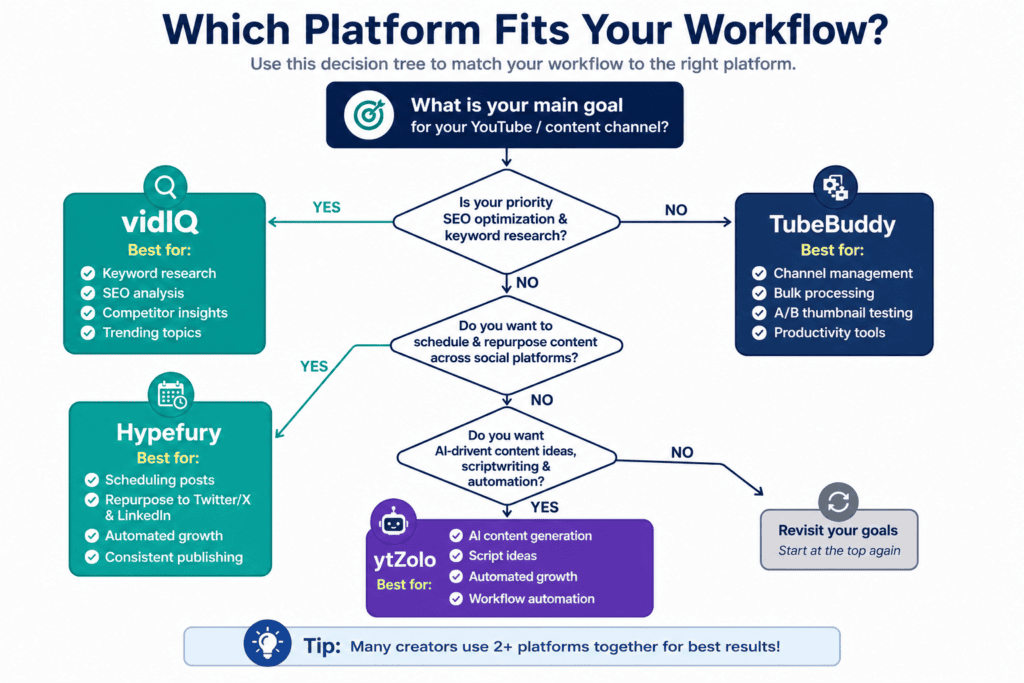
Decision Tree
Are you optimizing YouTube videos, or scheduling social posts?
│
├── I need YOUTUBE tools
│   │
│   ├── Do you already have titles/thumbnails/scripts written and just need to optimize + test them?
│   │   ├── YES → Do you have a large back catalog (100+ videos)?
│   │   │           ├── YES → TubeBuddy (bulk tools + A/B testing)
│   │   │           └── NO  → VidIQ (analytics + keyword research)
│   │   └── NO → Do you need AI to generate titles, thumbnails, scripts, and tags from scratch?
│   │               └── YES → ytZolo (multi-model AI content studio)
│   │
│   └── Do you want deep competitor and channel analytics?
│       └── YES → VidIQ
│
└── I need X/LINKEDIN/SOCIAL scheduling
    └── YES → Hypefury (if X is your primary channel)
              → otherwise, consider a broader multi-platform scheduler
Which Tool Should You Choose?
There isn’t a single universal winner here, and any article that tells you otherwise is oversimplifying. Each platform optimizes for a different point in the creator workflow.
If your bottleneck is starting from a blank page — no title, no script, no thumbnail concept — ytZolo’s multi-model generation directly addresses that, and its free tier means you can test it without financial commitment. The tradeoff is that it won’t give you TubeBuddy’s A/B testing or VidIQ’s competitor analytics, because that’s simply not what it’s built for.
If your bottleneck is testing and optimizing videos you’ve already made, especially across a large back catalog, TubeBuddy remains the most complete and affordable option, particularly for bulk metadata and comment management.
If your bottleneck is understanding your data and competitors, VidIQ’s analytics depth is hard to match, though you’ll pay more for it and won’t get native A/B testing.
If your channel strategy depends on X/Twitter growth alongside YouTube, Hypefury is worth adding to your stack — but budget for it as a separate line item, since it does nothing for your YouTube workflow.
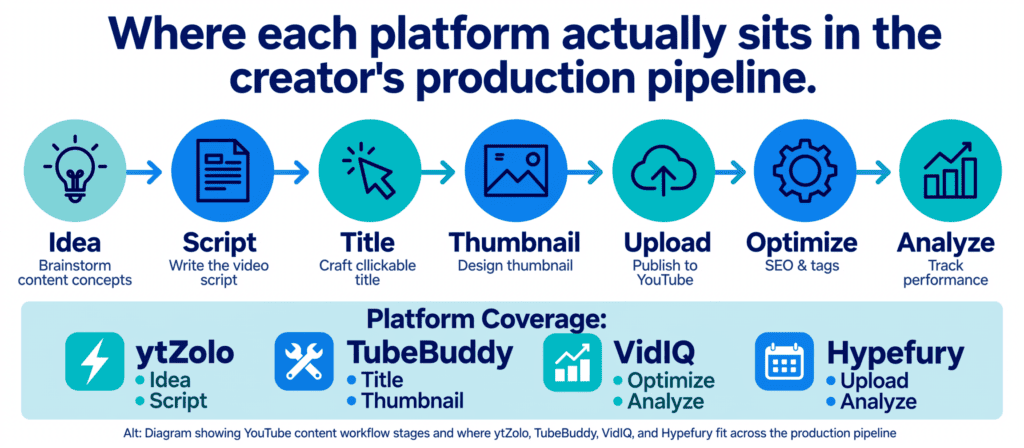
Many established creators end up running two tools simultaneously: one AI content generator for pre-production (ytZolo), and one optimization/analytics tool for post-upload testing (TubeBuddy or VidIQ). That combination, while it means two subscriptions, covers more of the pipeline than any single tool in this comparison does alone.
FAQs
1. Is ytZolo better than TubeBuddy? They solve different problems. the platfrom focuses on AI-generating titles, thumbnails, scripts, and tags before you upload. TubeBuddy focuses on testing and bulk-optimizing videos after you upload. If your bottleneck is content creation, ytZolo is the stronger fit; if it’s optimization of an existing catalog, TubeBuddy wins.
2. Is VidIQ worth it over TubeBuddy in 2026? It depends on what you need: VidIQ’s Daily Ideas feature is genuinely useful for early-stage strategy, while TubeBuddy is the stronger value if you want to optimize content you’re already making and spend less money doing it.
3. Does Hypefury work for YouTube creators? Not directly. Hypefury doesn’t offer YouTube-specific tools like tags, thumbnails, or video SEO. It’s useful only if you also publish on X, LinkedIn, or similar platforms and want to automate that side of your presence.
4. Can I use ytZolo, TubeBuddy, and VidIQ at the same time? Yes. TubeBuddy and VidIQ are both browser extensions and can run simultaneously, and some creators use both, though most settle on one for day-to-day workflow. Adding ytZolo for pre-production doesn’t conflict with either, since it isn’t a browser extension.
5. Which tool has the best free plan? ytZolo’s free plan includes AI title, description, and tag generation with no credit card required. TubeBuddy’s free plan does not include keyword research. VidIQ’s free plan offers basic keyword research with limited related keywords per search.
6. Does TubeBuddy or VidIQ have AI script writing? Neither does. This is a functional gap both platforms currently leave open, which is one reason creators pair them with a separate AI writing tool.
7. Is Hypefury expensive compared to alternatives? Hypefury costs $19–$49 per month depending on the source and plan, with no free plan — only a 7-day trial across all tiers. Whether that’s expensive depends on how much value you get from its X-specific automation.
8. What’s the real difference between VidIQ and TubeBuddy on keyword research? TubeBuddy offers more keyword data, while VidIQ offers more keyword suggestions — it’s essentially a tie, with each tool taking a different approach.
9. Does ytZolo replace a video editor? No. The AI tool handles pre-production content (titles, scripts, descriptions, tags, thumbnails), not video editing. You’ll still need a dedicated editor like CapCut or Premiere Pro for cutting footage.
10. Which tool is best for a channel with zero subscribers? ytZolo’s free tier removes the two biggest early barriers — not knowing how to write a compelling title and not having thumbnail design skills. Paid tools like TubeBuddy’s advanced features generally need an established catalog of 200+ videos to be worthwhile.
11. Does TubeBuddy offer A/B testing on its free plan? No.A/B testing comes with TubeBuddy’s Legend plan, which is the most expensive tier.
12. What is VidIQ’s AI Coach? It’s a feature on VidIQ’s higher tiers that pairs AI-driven suggestions with structured guidance, and on the top tier includes live coaching sessions and expert consultations.
13. Can Hypefury post to YouTube? Hypefury’s platform support centers on X, LinkedIn, Instagram, Threads, TikTok, and Facebook. It is not built for YouTube publishing or optimization.
14. Which platform is easiest for a complete beginner? ytZolo and Hypefury both have relatively low learning curves for their respective purposes. TubeBuddy and VidIQ have more data-dense interfaces that take longer to fully understand.
15. Does ytZolo support multiple languages? The underlying AI models (ChatGPT, Claude, Gemini) can generate content in multiple languages, though English is the default and most optimized experience on the platform today.
16. Is there a TubeBuddy vs VidIQ vs ytZolo pricing winner? TubeBuddy’s Pro plan costs around $2.25 monthly when billed annually, making it the cheapest optimization-focused entry point, while ytZolo’s free tier is the cheapest way to access AI content generation specifically.
17. Do these tools guarantee more views or subscribers? No legitimate tool can guarantee growth. All four platforms remove friction and improve inputs (titles, thumbnails, scheduling, scripts), but actual growth still depends on content quality, consistency, and audience fit.
18. What happens if I cancel a paid plan? Each platform’s cancellation and downgrade process differs, and specific refund terms weren’t publicly detailed for any of the four platforms at the time of writing — check each provider’s terms page directly before subscribing.
19. Which tool is best for agencies managing multiple client channels? No single platform here is purpose-built for full agency management. In practice, agencies often combine ytZolo (content generation, separated by client credit pools) with TubeBuddy or VidIQ (per-channel optimization and analytics).
20. Should I switch from VidIQ or TubeBuddy to ytZolo? Not necessarily a switch — many creators add ytZolo as a pre-production layer while keeping TubeBuddy or VidIQ for post-upload optimization and analytics, since the two categories of tools solve different problems rather than directly competing.
Final Verdict
No single platform in this comparison wins every category, and that’s the honest takeaway. TubeBuddy remains the most affordable, deeply YouTube-integrated optimization tool, especially for creators with a large back catalog who value A/B testing and bulk editing. VidIQ pulls ahead on analytics depth and AI-assisted ideation, at a higher price point, for creators who want to make decisions backed by competitor data. Hypefury is a strong, purpose-built choice — but only for creators whose growth strategy includes X or LinkedIn, since it offers nothing YouTube-specific.
The Platform occupies a different lane entirely: it’s the only one of the four built around multi-model AI generation for the pre-production stage — titles, descriptions, tags, scripts, and thumbnails — with a free tier that lowers the barrier for creators just starting out, and a broader roadmap toward voice, music, and dubbing tools that could further consolidate a creator’s toolkit.
The right choice comes down to where your actual bottleneck sits in the content pipeline. If you’re staring at a blank page, ytZolo addresses that directly. If you already have content and need to optimize or test it, TubeBuddy or VidIQ are the stronger fits. And if your growth depends partly on X, Hypefury covers ground none of the other three touch. For many serious creators, the realistic answer isn’t “pick one” — it’s pairing an AI content tool with a YouTube optimization tool for full pipeline coverage.
About the Author
Anshika Verma Email: anshika@ytzolo.com
Anshika Verma researches and writes about AI-powered creator tools, YouTube growth strategy, and SaaS product comparisons, with a focus on helping creators evaluate software based on actual workflow fit rather than marketing claims. Her work draws on hands-on testing of creator platforms, ongoing analysis of YouTube’s evolving algorithm and Creator Academy guidance, and SEO-driven content strategy built around genuine information gain rather than keyword repetition. She writes to help creators — from first upload to established channel — make evidence-based decisions about the tools they invest in.

