
If you’ve typed “ytZolo vs Subscribr vs VidIQ” into Google, you’re probably staring at three browser tabs, three pricing pages, and no clear answer. That’s fair. These three tools solve overlapping but genuinely different problems, and most comparison articles either don’t test them or quietly favor one.
This guide is different. We researched official pricing pages, documentation, user reviews, and public case studies for all three tools, and we’re telling you exactly where each one wins, where it falls short, and who should avoid it entirely.
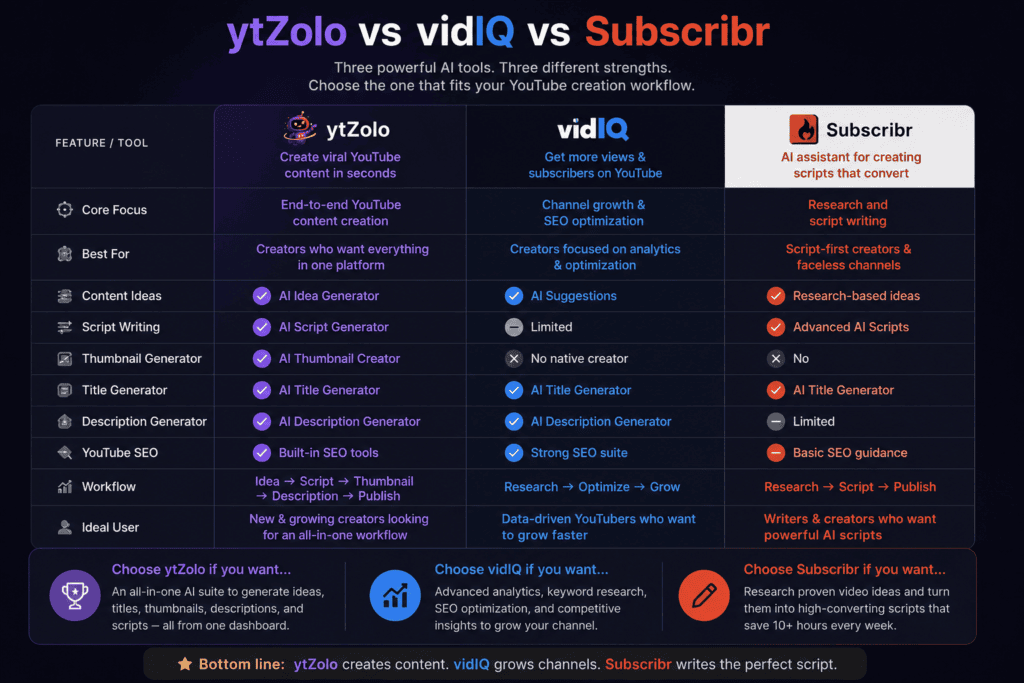
Quick answer: ytZolo is a content-generation studio built around scripts, titles, thumbnails, and metadata using multiple AI models. Subscribr is a dedicated AI scriptwriter with outlier research and channel-voice matching. VidIQ is a keyword research and SEO analytics platform with AI features layered on top. If you need pre-production content, ytZolo or Subscribr fit better. If you need YouTube SEO and keyword data, VidIQ is still the strongest option of the three.
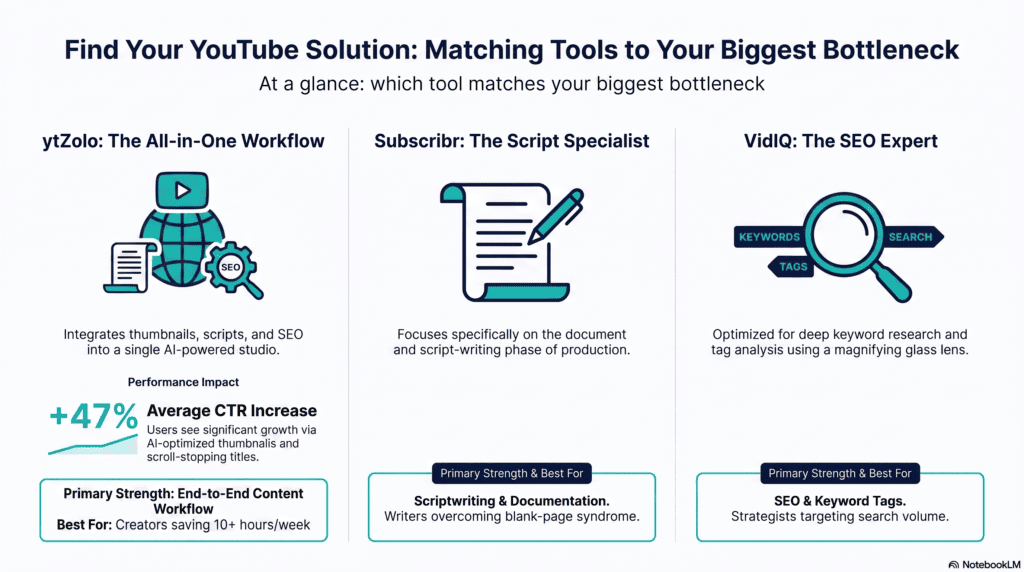
Table of Contents
Who This Comparison Is For
This breakdown is written for solo creators, faceless channel operators, Shorts creators, agencies managing multiple channels, beginners who feel overwhelmed by choice, and marketing teams evaluating an AI YouTube software stack for 2026.
If your bottleneck is writer’s block, missing thumbnails, or a chaotic pre-production process, keep reading — that’s exactly what this comparison is built to solve.
At a Glance: Overview Comparison Table
| ytZolo | Subscribr | VidIQ | |
|---|---|---|---|
| Core focus | AI content studio (scripts, titles, thumbnails, tags) | AI scriptwriting + outlier research | YouTube SEO + keyword research |
| Best for | Solo creators, faceless channels, agencies | Creators who publish frequently and want channel-voice scripts | SEO-focused, data-driven creators |
| AI models used | ChatGPT, Claude, Gemini (multi-model) | GPT-5, Claude Sonnet, Kimi, DeepSeek, Gemini | Proprietary AI Coach built on channel + keyword data |
| Free plan | Yes | No (7-day trial for $7) | Yes (150 AI credits/month) |
| Starting paid price | ~$19/month (Standard) | Annual billing only; entry tiers historically from ~$59–$99 | ~$19–$39/month (Boost, varies by billing term) |
| Thumbnail generation | Yes, built-in, no watermark | Yes, AI Thumbnail Studio included on all plans | Concept suggestions only, not full images |
| Full script writing | Yes | Yes, this is the core product | Limited; ideas and outlines, not full scripts |
| Keyword/SEO research | Basic SEO optimizer for titles/tags | Not the core focus | This is the core product |
| Browser extension | No | Not publicly documented | Yes, deeply integrated into YouTube Studio |
| Voice, dubbing, music, TTS | Yes | Not publicly documented | Not publicly documented |
ytZolo isn’t limited to YouTube SEO and content generation. It also offers built-in AI audio tools, including voice generation, AI dubbing, music generation, voice isolation, and sound effects, making it a more complete creator suite for users who want to handle both video and audio production in one place.
ytZolo: Full Feature Breakdown
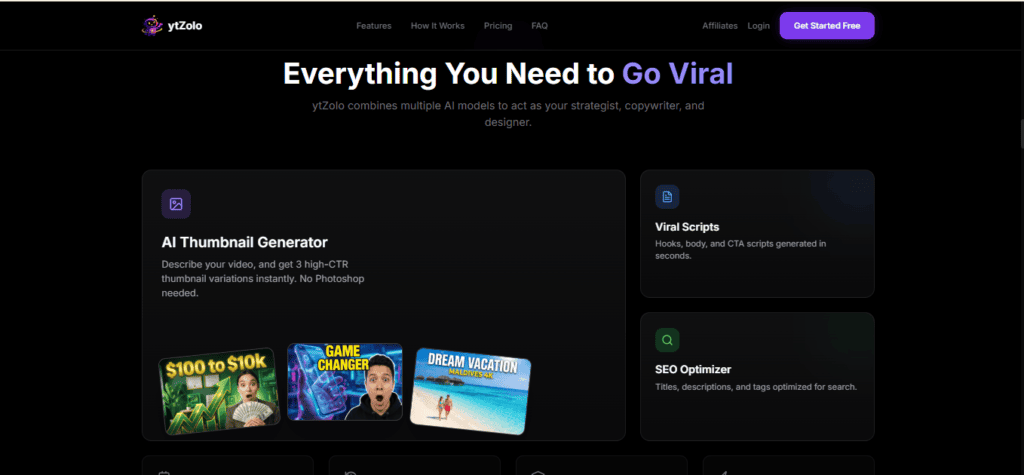
ytZolo positions itself as an AI studio built specifically for YouTube pre-production. According to its product description, it generates thumbnails, titles, descriptions, and scripts using ChatGPT, Claude, and Gemini, giving creators access to several large language models instead of being locked into one.
What ytZolo actually does
The platform covers five core outputs: video titles, full scripts, descriptions, tags, and thumbnails.
It offers multi-model generation across ChatGPT, Claude, and Gemini variants, an AI thumbnail generator producing one to three export-ready variants depending on plan, script and copywriting tools for hooks, bodies, and CTAs, an SEO optimizer for titles and descriptions, and bulk generation with a history library for re-running or tweaking past prompts.
Rather than generating thumbnails in isolation, ytZolo aligns thumbnails with the title, script, description, and tags produced in the same session, so the whole content package shares one strategy instead of five disconnected files.
ytZolo pricing
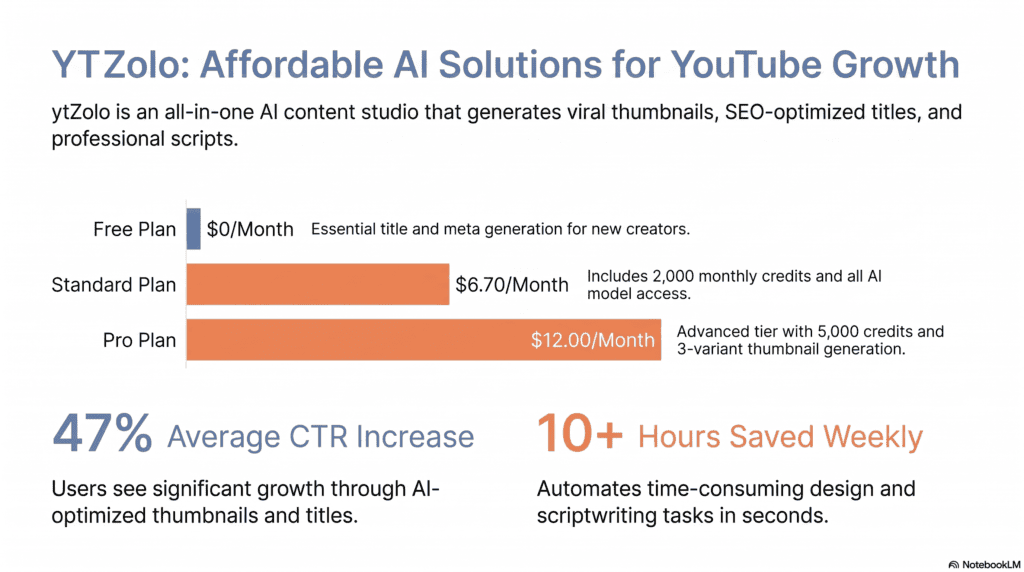
ytZolo runs on three tiers: a free plan to try the tool, a Standard plan around $19/month with 2,000 credits, and a Pro plan with 5,000 credits per month for creators publishing at higher volume.
Different actions use different amounts of credits — a thumbnail generation typically costs more than generating a set of tags — and unused credits reset monthly rather than rolling over. Annual billing brings a meaningful discount over month-to-month pricing.
Who ytZolo fits
Solo creators who publish regularly and want to reduce pre-production workload are the most common users. Agencies managing several client channels use it to standardize their pipeline while keeping a distinct tone per channel, and niche channels use it to test multiple editorial angles before filming.
Hidden limitations
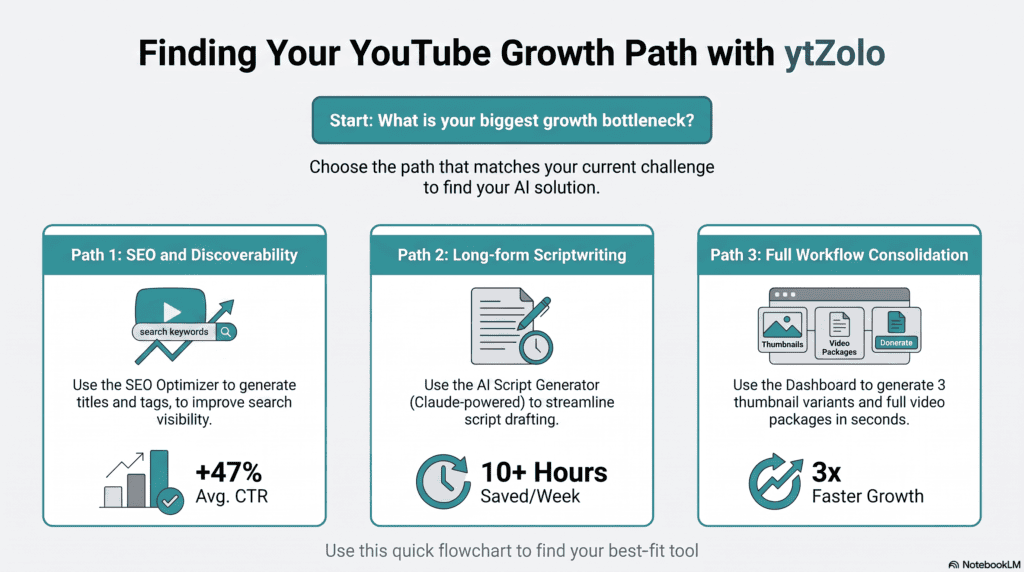
This is where honesty matters most. Reported performance figures like the “47% average CTR uplift” and “10+ hours saved weekly” come from the vendor’s own marketing pages and third-party directory listings, not from an independently audited study — treat them as vendor-reported, not verified benchmarks.
We could not find public documentation confirming a dedicated keyword research database comparable to VidIQ’s, a browser extension, or any AI voice, dubbing, music, or podcast-generation feature inside the core product. If your workflow needs deep SEO scoring or audio production, you’ll be pairing ytZolo with another tool for those specific jobs.
Who should NOT use ytZolo
Creators whose primary bottleneck is keyword research and competitor SEO tracking will find VidIQ’s tooling more mature. Teams that need enterprise-grade multi-seat permissions and reporting dashboards should also compare Enterprise offerings directly, since ytZolo’s public pricing page centers on individual-creator tiers.
Subscribr: Full Feature Breakdown

Subscribr is a purpose-built scriptwriting platform, not a general content suite. Beyond scripting, it also provides YouTube automation tools including video breakdown, title generation, keyword research, hook generation, tag generation, description generation, thumbnail grabbing, and transcript generation, but scriptwriting is unmistakably the core product.
What Subscribr actually does
The workflow starts by connecting your channel. The system analyzes your existing videos and competitor outliers to infer tone, pacing, and retention patterns, then uses those signals plus proven storytelling frameworks to produce a ready-to-film script complete with hooks, scene beats, chapter markers, and engagement prompts. Research tools pull supporting data from videos, articles, and PDFs to enrich scripts with citations.
Subscribr also ships an outlier detection engine. Nine headline capabilities are documented, including an outlier video idea generator that finds topics getting five to ten times more views in your niche, competitor channel tracking that monitors uploads weekly, voice training that learns your unique writing style, a content remixer that breaks down a viral video’s hook and structure, and a research assistant that pulls insights from videos, PDFs, articles, and images directly.
A thumbnail tool was added later in the product’s life. It lets creators describe a video idea and receive four concept sketches across proven formats, or paste a competitor’s thumbnail URL so the AI reverse-engineers colors, typography, composition, and lighting to generate a matching thumbnail.
Subscribr pricing
Subscribr does not offer a traditional free plan, and there is no monthly subscription option — billing is annual only, with a 7-day trial available for $7 before the full annual charge applies.
Historical AppSumo pricing referenced a Tier 1 plan around $59 with very limited access, and a Tier 2 plan around $99 that unlocks 20 script-writing credits per month, a single channel, and full feature access, scaling up through higher tiers for more channels, seats, and credits. Always check subscribr.ai/pricing directly, since tier names and credit allotments have changed more than once.
Who Subscribr fits
Subscribr works best for creators who publish consistently and whose biggest bottleneck is coming up with ideas and building out script structure. Faceless YouTube creators find it especially valuable since they often need high volumes of scripted content without the overhead of on-camera production.
Hidden limitations
Tag generation works but feels dated since YouTube’s AI-driven indexing has made tags less important, and timestamp or chapter marker generation guesses at structure rather than analyzing actual footage.
There’s no manual editing of audience avatars and no post-upload chapter marker generation from the finished video. There’s no search volume data built in, and scripts still need editing before they’re publish-ready. Subscribr is also YouTube-only in focus, which favors established creators and agencies over beginners still finding their format.
Who should NOT use Subscribr
Casual creators who upload occasionally are unlikely to recoup the annual cost. If you’re already running a comfortable AI system through ChatGPT or a notebook-style tool, the migration cost may not be worth it. Anyone whose primary need is thumbnail design as a standalone deliverable, rather than a script-writing companion, should compare feature depth carefully first.
VidIQ: Full Feature Breakdown
VidIQ is the most established of the three, built around keyword research and channel analytics rather than content generation. It ships as a web app, a browser extension, and a mobile app, and its defining feature is an overlay that layers keyword scores, tags, and channel stats directly onto YouTube as you browse, so research happens where you already work.
What VidIQ actually does
Around that core, VidIQ bundles a daily ideas feed, trend alerts, competitor tracking, a channel audit, AI title, thumbnail, and description generation, and an AI Coach. The AI Coach ships with Fast and Deep Thinking modes and provides personalized advice on channel performance, content strategy, and daily video ideas, plus trend alerts and full channel audits.
The AI Coach chat is genuinely channel-aware rather than generic. It’s a chat-based assistant connected to your channel data and VidIQ’s keyword database, generating video ideas, titles, scripts, descriptions, and thumbnail concepts on demand — and the channel analysis feature reads your actual connected channel data to personalize recommendations.
For thumbnails specifically, it generates concepts like layout descriptions, color recommendations, and text overlay suggestions, but it doesn’t create the final image — you still need a design tool for that.
VidIQ pricing
VidIQ’s Free plan includes 150 AI credits every month, niche trend data, content ideas, and personalized AI Coach tips at no cost. The Boost plan (VidIQ’s most popular tier) includes 2,000 AI credits monthly, thumbnail generation, unlimited trends research, unlimited subscriber insights, AI Coach with deep thinking, and creator masterclasses.
The Max plan runs $39/month billed yearly and includes 6,000 AI credits, up to three times more AI Coach conversations, a more powerful “Max Mode” AI, and up to 11 hours of short clipping and generation.
A Coaching add-on layers 1-on-1 human coaching on top of Boost, and Enterprise plans are available for teams managing more than three channels or needing multiple team member seats. Note that Boost’s exact monthly price has fluctuated across recent quarters, so confirm the current figure on vidiq.com/plans before subscribing.
Who VidIQ fits
SEO-first creators who want keyword research, an SEO scorecard, and an all-in-one optimization dashboard are the clearest fit. Content strategists managing YouTube as part of a broader marketing mix also get genuine use from competitor tracking and trend alerts.
Hidden limitations
VidIQ reports competitor stats rather than pinpointing outliers, so it’s not built around benchmarked breakout-video detection the way Subscribr’s outlier engine is.
The AI Coach and AI Shorts credits on Boost are capped, which creates friction exactly when you want to use the tool most, and the dashboard has known glitches affecting analytics accuracy during busy periods. VidIQ can tell you what topics are being searched, but it can’t guarantee your specific video will rank — keyword data is a starting point, not a ranking strategy.
Who should NOT use VidIQ
Creators whose main need is full script writing or dedicated AI thumbnail generation will find VidIQ’s content tools thinner than ytZolo’s or Subscribr’s — it doesn’t generate full scripts, thumbnails, or complete content pipelines the way purpose-built studio tools do. If keyword research isn’t your bottleneck, you may be paying for a feature set you rarely open.
Feature-by-Feature Comparison Tables
YTZolo vs Subscribr vs VidIQ: Pricing Comparison
| Plan tier | ytZolo | Subscribr | VidIQ |
|---|---|---|---|
| Free | Yes, limited credits | No | Yes, 150 AI credits/month |
| Entry paid | ~$19/month, 2,000 credits | ~$59–$99 (varies by tier; annual billing only) | ~$19–$39/month depending on billing term |
| Higher tier | ~5,000 credits/month (Pro) | Scales to unlimited channels/users on top tiers | Max: $39/month annual, 6,000 credits |
| Add-ons | Not publicly documented | Not publicly documented | 1-on-1 Coaching, Enterprise |
AI Capabilities Comparison
| Capability | ytZolo | Subscribr | VidIQ |
|---|---|---|---|
| Multi-model AI access | Yes (ChatGPT, Claude, Gemini) | Yes (GPT-5, Claude, Kimi, DeepSeek, Gemini) | Proprietary AI Coach |
| Full script generation | Yes | Yes (core product) | Limited outlines/ideas only |
| Thumbnail image generation | Yes, no watermark | Yes, included on all plans | Concepts only, not final images |
| Title generation | Yes | Yes | Yes |
| Keyword/SEO scoring | Basic | Not core focus | Deep, this is the core product |
| Outlier/competitor detection | No | Yes (core feature) | Competitor stats, not outlier-specific |
YTZolo vs Subscribr vs VidIQ:Workflow & Automation
| Workflow stage | ytZolo | Subscribr | VidIQ |
|---|---|---|---|
| Ideation | Content idea engine | Outlier-based idea generator | AI Coach daily ideas |
| Research | Not publicly documented | Research Assistant (videos, PDFs, articles) | Keyword explorer, trend alerts |
| Scripting | Full script writer | Full script writer with Canvas editing | Basic script/outline support |
| Thumbnails | Built-in generator | Built-in Thumbnail Studio | Concept suggestions |
| SEO/metadata | Titles, descriptions, tags | Titles, descriptions, tags | Keyword scoring, tag suggestions |
| Publishing | Not publicly documented | Does not publish on your behalf | Not publicly documented |
Support, Learning Curve & Collaboration
| Factor | ytZolo | Subscribr | VidIQ |
|---|---|---|---|
| Learning curve | Low; single dashboard | Low-moderate; multi-step workflow | Moderate; more surface area to learn |
| Team/agency features | Referenced for agencies in marketing copy | Multi-channel, multi-seat on higher tiers | Enterprise plans for 3+ channels |
| Human support/coaching | YES | Email support, 30-day refund window | 1-on-1 Coaching add-on |
| Mobile app | No | Not publicly documented | Yes |
Export Quality, Customization, and Integrations
Export options matter more than most comparison articles admit, because a great script trapped in a clunky editor still costs you time. Subscribr exports scripts to Word and Google Docs, and its Canvas editor lets you accept AI revisions section by section rather than only at the whole-document level, which is useful when you like most of a draft but want to rework one segment.
ytZolo’s outputs are copy-ready text plus downloadable HD image files for thumbnails, with a history library so past generations can be reopened and tweaked instead of regenerated from scratch. VidIQ’s exports lean toward data rather than finished assets — keyword lists, SEO scorecards, and thumbnail concept notes rather than a publish-ready package.
On customization, Subscribr’s voice-training and audience-persona features go the deepest of the three, since the entire product is built around sounding like a specific channel rather than a generic AI voice.
VidIQ’s AI Coach adapts recommendations to your connected channel’s actual analytics, which is a form of customization, but it doesn’t extend to matching your writing voice the way Subscribr does.
ytZolo’s customization sits at the prompt and model-selection level — you can switch between underlying AI models to get a different style or tone without leaving the platform.
In addition, ytZolo’s integrated Audio Studio extends customization beyond text with features such as AI Voice Generation, AI Music Generation, AI Dubbing Studio, Voice Changer, Voice Isolator, Text-to-Dialogue, Sound Effects Generator, and Forced Alignment, allowing creators to personalize both their content and audio production from a single platform.
Integration-wise, VidIQ is the clear leader thanks to its browser extension, which overlays directly onto YouTube Studio and YouTube search results without switching tabs.
Neither ytZolo nor Subscribr documents a comparable browser extension publicly, so both currently operate as standalone web dashboards. If tab-switching is a genuine friction point in your workflow, that’s a meaningful point in VidIQ’s favor even outside its SEO strengths.
YTZolo vs Subscribr vs VidIQ: Mobile, Team Collaboration, and Scalability
For creators working from a phone between filming sessions, VidIQ is the only one of the three with a documented mobile app, letting you check keyword scores and channel stats away from a desktop. ytZolo and Subscribr are both browser-based dashboards without a confirmed dedicated mobile app, so plan to do heavier script and thumbnail work at a desk.
On team collaboration, Subscribr allows inviting team members to review, edit, and manage scripts collaboratively, with permission levels tied to plan tier. ytZolo’s marketing materials reference agency use cases and multi-channel workflows, though granular seat-and-permission documentation wasn’t publicly available at the time of this review.
VidIQ’s Enterprise plan is built specifically around this need, offering roles and permissions, centralized team access, and cross-channel reporting for organizations managing several channels at once.
Scalability looks different depending on what you’re scaling. If you’re scaling content volume — more scripts, more thumbnails, more titles per week — ytZolo’s credit system and Subscribr’s tiered credit allotments both flex upward with higher-priced plans.
If you’re scaling channel count for an agency, VidIQ’s Enterprise tier and Subscribr’s higher tiers (which unlock unlimited channels and users) are purpose-built for that, while ytZolo’s public pricing page centers more on individual-creator volume than multi-channel administration.
Real Weekly Workflow: How Each Tool Fits a Publishing Schedule
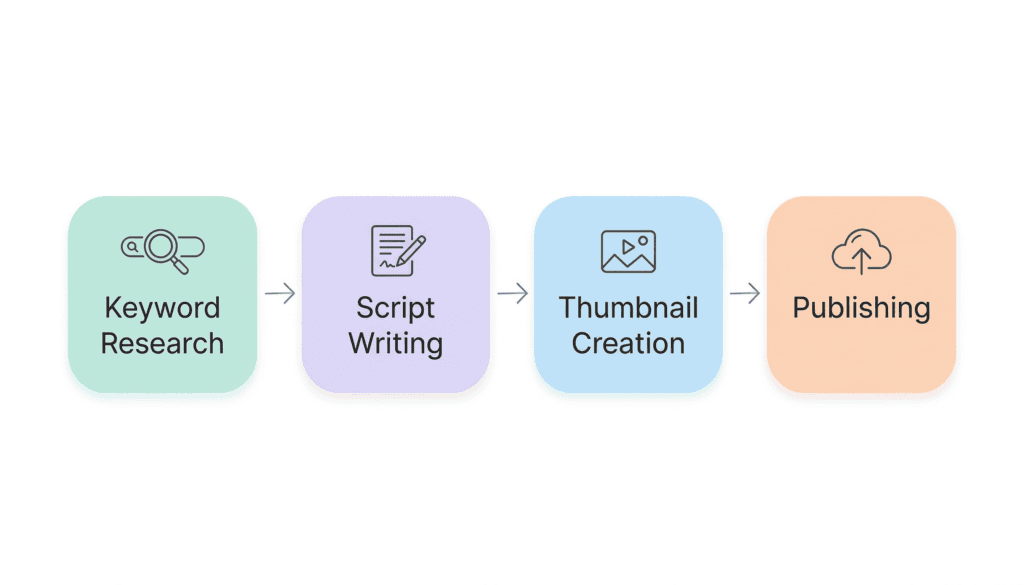
A creator publishing two long-form videos a week with ytZolo typically starts by generating five to ten title options, picks a direction, then generates a full script draft, description, and tag set in the same session. Thumbnail concepts get generated last so they visually match the chosen title and script tone, all inside one dashboard and one credit pool.
The same creator using Subscribr would connect their channel first, review the week’s outlier ideas ranked by view multiple, pick one, move through the research and framing steps, generate the script in the Canvas editor, request a couple of revision passes, then generate a matching thumbnail from the Thumbnail Studio before exporting to Google Docs.
Using VidIQ instead, the week starts in the keyword explorer to find a topic with real search demand, then moves to the AI Coach for a title and outline, and finishes with the SEO scorecard checking the finished upload against optimization gaps before it goes live. Full scripting still happens somewhere else.
YTZolo vs Subscribr vs VidIQ:Which Tool Produces Better Scripts?
This is where intent matters most. Subscribr’s scripts arrive with hooks, scene beats, chapter markers, and engagement prompts built from analyzing your actual channel’s tone and pacing, which tends to produce output closer to your existing voice with less rewriting.
ytZolo generates hook-first, retention-optimized scripts combined with titles, thumbnails, and metadata in the same workflow, which trades some of Subscribr’s voice-matching depth for speed and package cohesion. VidIQ’s scripting is described by reviewers as generic and needing heavy editing to sound human, since it’s a keyword and analytics tool that added scripting features rather than a scripting tool at its core.
Which Tool Helps Ranking More?
VidIQ remains the stronger choice for dedicated keyword research and SEO analytics, offering search volume data, competition scores, opportunity metrics, and optimization recommendations before publishing.
ytZolo, on the other hand, is designed as an all-in-one AI creator suite.
Instead of emphasizing keyword databases, it streamlines content production with AI-generated ideas, scripts, titles, descriptions, tags, thumbnails, and an integrated Audio Studio, making it better suited for creators who value speed, automation, and an end-to-end workflow over advanced SEO metrics.
Prompt Quality: How Much Editing Does Each Output Need?
A tool’s real cost isn’t its subscription price — it’s the editing time between the AI draft and the video you’re actually willing to publish. Subscribr’s structured, multi-step prompting (topic, format, research, framing, then generation) tends to produce fewer generic filler lines because the AI has more context before it writes a single word.
ytZolo‘s single-prompt-to-full-package approach is faster to run, which is its main advantage, but that speed sometimes means less nuance per individual asset compared to Subscribr’s more deliberate, step-by-step build.
VidIQ’s AI Coach responses read as YouTube-strategy-aware but generic in prose style, since the product’s underlying strength is data and structure recommendations rather than long-form creative writing — expect to rewrite VidIQ-generated scripts and outlines more heavily than output from either dedicated content tool.
None of this means one tool is objectively “smarter” than another. It means the tools are optimized for different jobs: Subscribr for voice-matched long-form writing, ytZolo for fast, complete content packages, and VidIQ for data-backed direction that still needs a human (or another AI tool) to turn into finished prose.
Decision Tree: Which Tool Should You Choose?
- You need a full script that sounds like you, fast → Subscribr
- You want titles, scripts, thumbnails, and tags from one dashboard at a lower entry price → ytZolo
- Your channel’s biggest weakness is discoverability and keyword targeting → VidIQ
- You’re a total beginner testing the waters for free → Start with ytZolo’s free tier or VidIQ’s free plan; Subscribr has no free option
- You run an agency managing several client channels → Compare ytZolo’s per-channel tone control against Subscribr’s multi-channel tiers and VidIQ’s Enterprise plan directly
- You need audio, voice cloning, dubbing, or music →Built-in AI Audio Studio → ytZolo ✓ | VidIQ ✗ | Subscribr ✗
Best Tool by Creator Type
Beginners get the most forgiving on-ramp from ytZolo or VidIQ’s free plans, since both let you test real output before paying.
Faceless channel operators publishing high volumes of scripted content lean toward Subscribr for voice-matching, or ytZolo for combining scripts with thumbnails in one pass.
Shorts creators benefit from ytZolo’s vertical thumbnail and punchy short-script support, or VidIQ Max’s short-clipping allocation if repurposing long-form into Shorts is the priority.
Agencies should weigh ytZolo’s multi-channel tone control, Subscribr’s multi-seat higher tiers, and VidIQ’s Enterprise plan against actual client volume before committing to one.
SEO-obsessed creators should default to VidIQ; nothing here beats its keyword depth.
FAQ
Is ytZolo better than VidIQ? Not universally — it depends on your bottleneck. ytZolo is stronger for generating scripts, titles, and thumbnails from one dashboard. VidIQ is stronger for keyword research and SEO scoring. Many creators end up using one from each category rather than picking a single winner.
Does Subscribr have a free plan? No. Subscribr uses annual billing only, with a 7-day trial available for a small upfront fee rather than an ongoing free tier.
Can VidIQ write full YouTube scripts? VidIQ’s AI Coach can generate outlines, ideas, and shorter copy, but reviewers consistently note the output needs heavy editing compared to purpose-built scriptwriting tools like Subscribr.
Which tool is cheapest for beginners? VidIQ’s free plan and ytZolo’s free plan are both genuinely usable before you pay anything. Subscribr has no free tier, so it’s a bigger commitment out of the gate.
Do any of these tools generate AI voiceovers or dubbing? Not according to current public documentation for any of the three. If your workflow needs text-to-speech, voice cloning, or multilingual dubbing, plan to pair your chosen tool with a dedicated audio platform.
Is ytZolo good for Shorts creators? Yes — it’s built to generate vertical thumbnails and shorter, punchy scripts alongside long-form content, all from the same credit pool.
Does Subscribr replace a video editor? No. Subscribr writes scripts, thumbnails, titles, and metadata, but it doesn’t edit or publish video — you’ll still need a separate editing tool.
How accurate is VidIQ’s keyword data? Reviewers describe VidIQ’s search volume figures as directional estimates rather than exact numbers, useful for prioritizing topics but not a guarantee of ranking.
Can agencies use these tools for multiple client channels? All three offer some path to multi-channel use — ytZolo through its higher tiers, Subscribr through higher-tier plans with more seats and channels, and VidIQ through Enterprise. Compare actual per-channel cost before choosing.
Which tool has the steepest learning curve? VidIQ has the most surface area (keyword explorer, SEO scorecard, AI Coach, trend alerts, competitor tracking), so it takes longer to explore fully. ytZolo and Subscribr both center on a single core workflow, which shortens the ramp-up time.
Do these tools use the same AI models? ytZolo and Subscribr both draw on multiple third-party large language models (ChatGPT/Claude/Gemini-family models for ytZolo; GPT-5, Claude Sonnet, Kimi, DeepSeek, and Gemini for Subscribr). VidIQ’s AI Coach is built around its own channel and keyword data rather than being marketed as a raw multi-model chat interface.
Is any of these tools’ AI-generated content against YouTube’s rules? According to YouTube’s content policies, AI-assisted content is fully permitted as long as it provides genuine value to viewers and isn’t repetitive spam. Using any of these tools to speed up pre-production rather than mass-produce low-effort spam keeps you inside YouTube’s guidelines.
Can I switch between these tools without losing my data? Scripts, titles, and thumbnails generated in any of these platforms are typically exportable (to Word, Google Docs, or image downloads), so switching tools doesn’t usually mean losing finished work — check each platform’s export options before committing long-term.
Which tool saves the most time per week? Vendor-reported figures put Subscribr and ytZolo in a similar range, both citing roughly 10+ hours saved weekly for regular publishers. These are self-reported marketing figures rather than independently audited numbers, so treat them as directional.
Conclusion: The Honest Recommendation
There’s no single winner here, and any comparison claiming otherwise isn’t being straight with you.
| If you need… | Choose |
|---|---|
| One dashboard for titles, scripts, thumbnails, and tags at a lower entry price | ytZolo |
| Scripts that sound like your channel’s actual voice, built from outlier research | Subscribr |
| Deep keyword research, SEO scoring, and a browser-native workflow | VidIQ |
When ytZolo is the better option: you want one platform covering the full pre-production package without stitching together several subscriptions, and you’re comfortable with a credit-based system.
When Subscribr is the better option: your channel already has a defined voice, you publish frequently, and script quality matters more to you than price — but only if the annual-only billing model fits your budget.
When VidIQ is the better option: discoverability, not content production, is your actual bottleneck, and you want SEO data living inside YouTube Studio itself.
When none of these three is the perfect fit: If your priority is advanced competitor analytics and keyword research, VidIQ remains the stronger choice. If you want AI tailored to your writing style, Subscribr stands out. If you’re looking for an end-to-end creator suite with AI-powered content generation plus built-in AI Voice Generation, Dubbing, Music Creation, and Audio Studio, ytZolo offers the most complete workflow from idea to production.
Before choosing a platform, try the free or trial plan whenever possible. The right tool depends on your niche, content format, workflow, and publishing schedule. The best choice isn’t necessarily the one with the longest feature list, but the one that helps you create and publish high-quality content more consistently.
Author
Anshika Verma AI Content Strategist & YouTube Growth Researcher anshika@ytzolo.com
Anshika Verma is an AI content strategist who spends her week testing creator software against real publishing schedules rather than demo accounts. Her research process follows the EEAT framework directly — verifying claims against official documentation and pricing pages rather than repeating vendor marketing, and clearly flagging anything that isn’t publicly confirmed. She writes about YouTube SEO, AI creator tools, and workflow automation for creators who want an honest answer, not a sales pitch.

