
Table of Contents
Introduction: Why This Comparison Matters
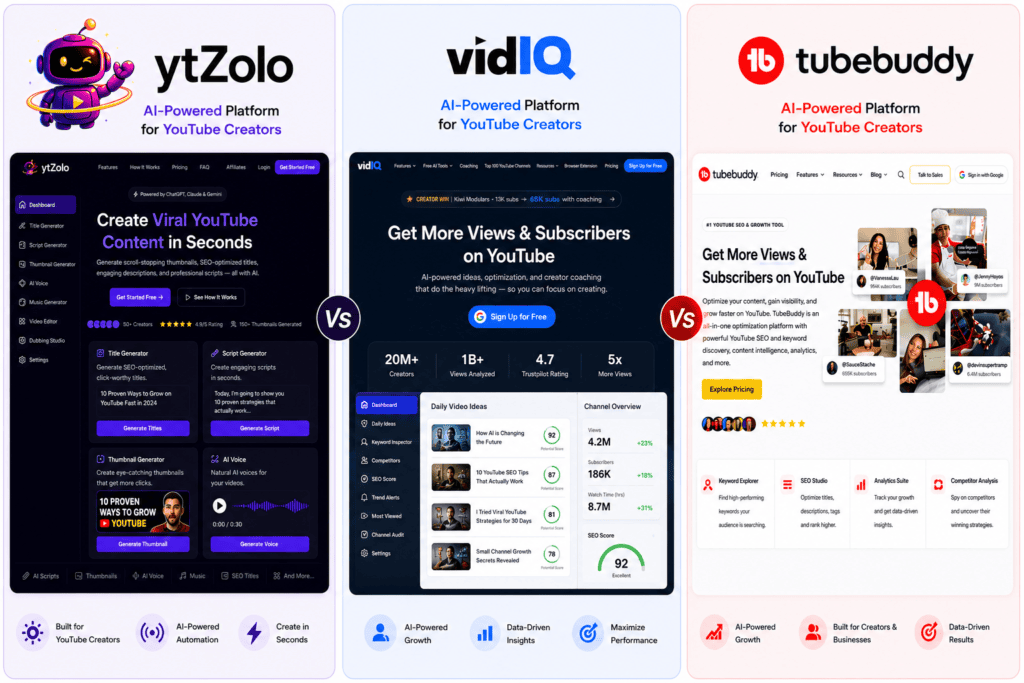
When weighing ytZolo vs VidIQ vs TubeBuddy, it’s clear that the tools YouTube creators need in 2026 look entirely different than they did a few years ago.
If you’ve spent any time searching for the “best YouTube SEO tool,” you’ve probably landed on VidIQ or TubeBuddy. They’ve owned that search result for close to a decade.
But the tools creators actually need in 2026 look different than they did in 2018. Back then, YouTube SEO was mostly about tags and keyword scores.
Today, a single upload involves a title, a thumbnail, a description, tags, a script, and a publishing decision — all before the algorithm even sees your video. That’s a lot more than a browser extension was originally built to handle.
This guide compares three tools that approach that problem differently: ytZolo, a newer AI content studio built around generation; VidIQ, an analytics-and-AI hybrid; and TubeBuddy, the long-standing workflow and optimization extension.
We looked at official pricing pages, documented features, and independent reviews to put together a factual, balanced picture. Nothing here is guesswork, and where pricing or specifics weren’t publicly confirmed, we say so directly.
By the end, you’ll know which tool — or which combination — actually fits how you make videos, not just how the marketing pages describe it.
Who This Comparison Is For
This guide is for creators trying to decide where to spend their tool budget: new YouTubers building their first upload workflow, established channels optimizing an existing library, and agencies managing multiple clients.
It’s also for anyone using an AI YouTube automation approach — faceless channels, content teams, and solo creators trying to publish more without burning out.
If you only have time to read one section, jump to the Quick Verdict below. If you want the full research behind it, keep reading.
Quick Verdict
Here’s the short version before we get into the details.
| Category | Winner |
|---|---|
| Best overall for full content creation | ytZolo |
| Best budget option | TubeBuddy (Pro tier) |
| Best for beginners | ytZolo (no learning curve) or VidIQ Free |
| Best AI content generation | ytZolo |
| Best keyword research & SEO analytics | TubeBuddy and VidIQ (tied, different strengths) |
| Best for agencies managing multiple channels | TubeBuddy (Enterprise) |
| Best for solo creators | ytZolo |
| Best overall value | ytZolo (bundled workflow) or TubeBuddy Pro (lowest entry price) |
The honest takeaway: these tools aren’t perfect substitutes for each other. ytZolo focuses on creating content — scripts, titles, descriptions, tags, and thumbnails. VidIQ and TubeBuddy focus on researching and optimizing content you’ve already planned, using browser extensions tied directly into YouTube Studio.
Many creators end up using ytZolo for content generation alongside VidIQ or TubeBuddy for in-Studio keyword tracking. That combination isn’t unusual, and we’ll explain why later in this guide.
YTZolo vs VidIQ vs TubeBuddy: Comparison Table
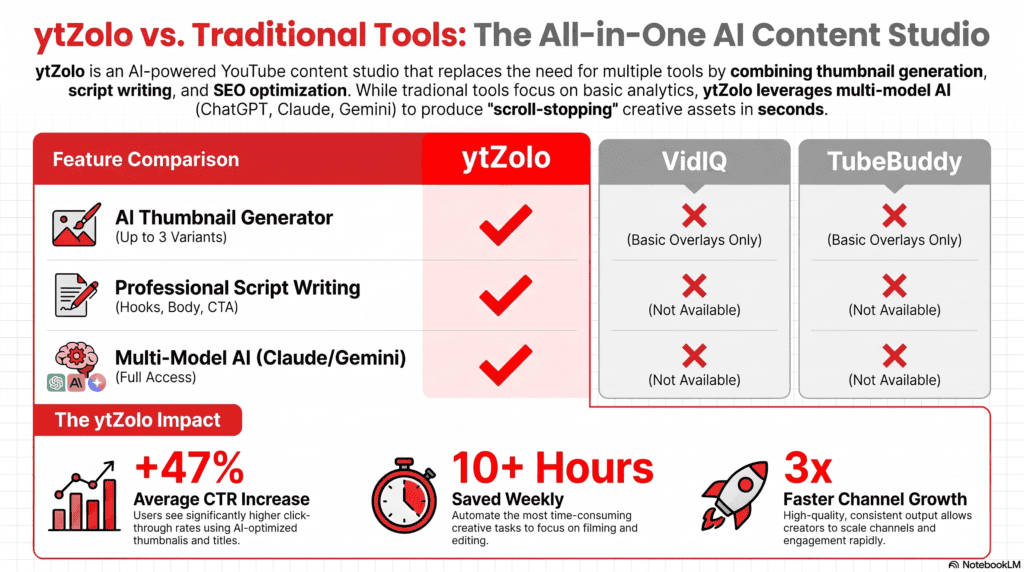
| Feature | ytZolo | VidIQ | TubeBuddy |
|---|---|---|---|
| Primary focus | AI Creator Suite for content & audio creation | YouTube analytics & AI growth coaching | Browser extension for YouTube SEO & workflow |
| AI content generation | ✅ ChatGPT, Claude & Gemini powered | ✅ AI Coach, Title & Description AI | ⚠️ Limited (Title Generator, Thumbnail Generator) |
| AI Script Generator | ✅ Full YouTube & Shorts scripts | ❌ | ❌ |
| AI Thumbnail Generator | ✅ 3 AI variations per generation | ✅ Paid plans | ✅ Thumbnail Generator & Analyzer |
| AI Title Generator | ✅ | ✅ | ✅ |
| AI Description Generator | ✅ | ⚠️ Limited | ❌ |
| AI Tags Generator | ✅ | ✅ | ✅ |
| Keyword Research | ✅ Basic, integrated into content workflow | ✅ Dedicated Keyword Research | ✅ Keyword Explorer |
| YouTube SEO Optimization | ✅ Built into content generation | ✅ Advanced SEO tools | ✅ SEO Studio |
| AI Audio Generator | ✅ | ❌ | ❌ |
| AI Music Generator | ✅ | ❌ | ❌ |
| Text to Dialogue | ✅ | ❌ | ❌ |
| AI Voice Changer | ✅ | ❌ | ❌ |
| AI Voice Isolator | ✅ | ❌ | ❌ |
| AI Dubbing Studio | ✅ | ❌ | ❌ |
| AI Sound Effects Generator | ✅ | ❌ | ❌ |
| Forced Alignment | ✅ | ❌ | ❌ |
| Subtitle & Transcript Alignment | ✅ | ❌ | ❌ |
| Analytics | ⚠️ Basic history & project management | ✅ Deep channel & video analytics | ✅ Channelytics & Videolytics |
| Bulk Processing | ✅ Bulk AI content generation | ⚠️ Limited | ✅ Extensive (Legend plan) |
| Browser Extension | ❌ | ✅ | ✅ |
| Free Plan | ✅ | ✅ | ✅ |
| Ease of Use | ⭐⭐⭐⭐⭐ Very easy | ⭐⭐⭐⭐ Moderate | ⭐⭐⭐ Moderate to advanced |
| Support | Email & Documentation | Email, Discord & Help Center | Email, Discord & Help Center |
| Best For | Creators who want scripts, thumbnails, SEO, AI voiceovers, music, dubbing, and audio tools in one platform | Creators focused on analytics, keyword research, and AI growth insights | Creators and agencies needing advanced SEO workflows, browser tools, and bulk management |
Feature data compiled from official pricing pages and product documentation as of July 2026. Some features change frequently — always verify current specifics on each vendor’s site.
Individual Product Reviews
ytZolo: Overview
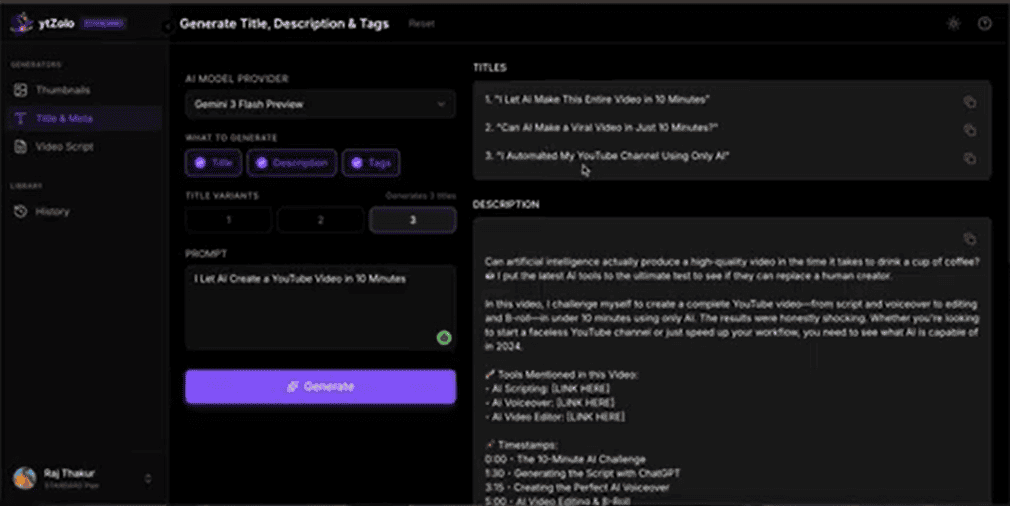
ytZolo is an AI-powered Creator Suite built specifically for YouTube creators and digital content producers. Instead of researching keywords and leaving you to create everything manually, ytZolo generates your content directly—from titles, descriptions, tags, scripts, and thumbnails to AI voiceovers, music, dubbing, and sound effects—using advanced language models such as ChatGPT, Claude, and Gemini.
The goal is simple: replace multiple disconnected tools with one streamlined workflow that helps you plan, create, optimize, and enhance your content from a single dashboard.
Strengths
- Everything lives in one dashboard, reducing the need to switch between separate writing, SEO, and audio tools.
- The AI Thumbnail Generator creates multiple CTR-focused thumbnail concepts from a single prompt, making professional-looking thumbnails easier for creators without design experience.
- The AI Script Generator produces structured video scripts with engaging hooks, main content, and calls to action instead of leaving you with a blank page.
- Content remains connected across titles, descriptions, tags, scripts, and thumbnails, resulting in more consistent and optimized metadata.
- The new AI Audio Studio enables creators to generate AI voiceovers, background music, text-to-dialogue conversations, custom sound effects, and multilingual dubbing without relying on additional software.
- AI Voice Isolator helps clean recordings by reducing background noise and extracting vocals.
- Forced Alignment simplifies subtitle creation by synchronizing spoken audio with transcripts.
- Support for multiple AI models—including ChatGPT, Claude, and Gemini—gives creators flexibility to choose the style and output that best fits their workflow.
Weaknesses
As a newer platform, ytZolo has a smaller public review base and fewer independent case studies than long-established competitors.
ytZolo does not currently offer a browser extension integrated into YouTube Studio like VidIQ or TubeBuddy, so you won’t see live SEO recommendations while uploading videos.
It lacks the advanced channel analytics, historical performance reports, competitor tracking, and A/B testing features available in more analytics-focused platforms.
Who Should Use ytZolo?
ytZolo is ideal for:
- Solo YouTube creators
- Faceless YouTube channel owners
- Content creators
- Influencers
- Podcasters
- Educators
- Digital marketers
- Small businesses
- Agencies focused on content production
- Anyone who wants one platform for AI writing, YouTube SEO, and AI audio creation
It’s especially valuable for creators who want to generate scripts, thumbnails, metadata, voiceovers, music, and dubbing without juggling multiple subscriptions.
Who Shouldn’t Use ytZolo?
Creators or agencies that require:
- Advanced competitor intelligence
- Enterprise-level channel analytics
- Large-scale management of existing YouTube libraries
- Browser-based SEO assistance inside YouTube Studio
- Built-in A/B testing for thumbnails and titles
may still need to pair ytZolo with dedicated analytics platforms.
Unique Features
Unlike traditional YouTube SEO tools, ytZolo combines AI content creation and AI audio production in one platform.
Key features include:
- Multi-model AI (ChatGPT, Claude & Gemini)
- AI Script, Title, Description & Tags Generator
- AI Thumbnail Generator
- AI Audio & Music Generator
- Text to Dialogue
- AI Voice Changer & Voice Isolator
- AI Dubbing Studio
- AI Sound Effects Generator
- Forced Alignment for subtitles and transcripts
With everything in one dashboard, creators can generate content, optimize SEO, and produce professional audio without switching between multiple tools.
Real Workflow
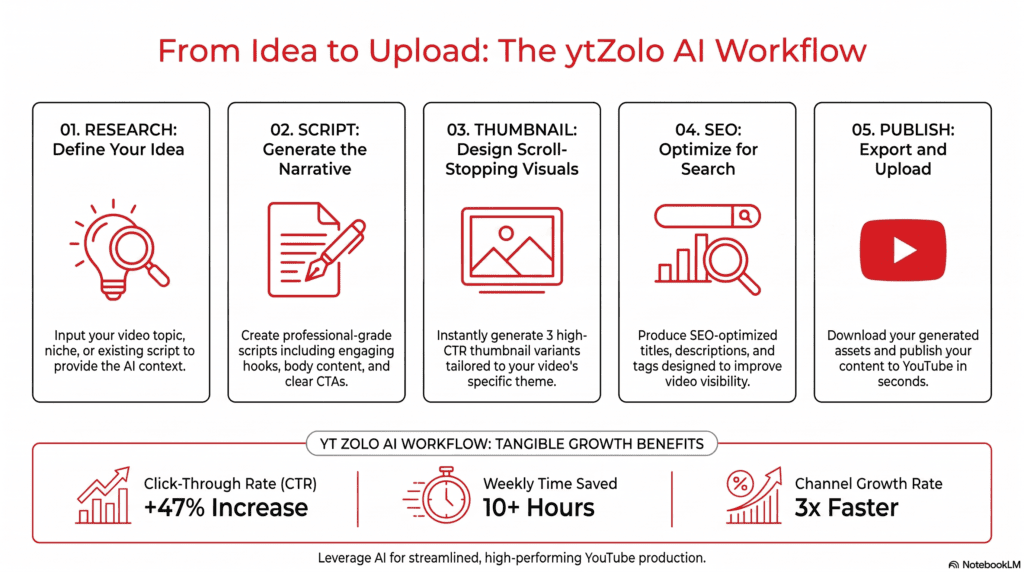
A typical ytZolo workflow looks like this:
- Enter your video topic or niche.
- Generate multiple SEO-friendly title ideas.
- Create a complete script with hooks, body, and call to action.
- Generate matching thumbnail concepts.
- Produce optimized descriptions and tags.
- Create AI voiceovers or multi-speaker dialogue.
- Generate background music and custom sound effects.
- Use AI Dubbing Studio to localize content for different languages.
- Align audio with transcripts using Forced Alignment for accurate captions.
- Export your assets and combine them in your preferred video editing software before publishing.
Learning Curve
Low. The interface is designed around simple prompts instead of complex analytics dashboards, allowing most creators to become productive within their first session. The integrated writing, SEO, and audio tools also reduce the need to learn multiple applications.
Support
Email support and a documentation/FAQ section. As of this writing, there’s no published live chat or phone support.
Pricing
ytZolo uses a credits-based free, Standard, and Pro tier structure, with the free plan offering limited monthly credits and no credit card required to start. Exact current dollar pricing for the Standard and Pro tiers should be confirmed on ytzolo.com, as SaaS pricing changes frequently and we could not verify exact current figures from independent sources.
Limitations
No browser extension, no dedicated competitor-tracking dashboard, and no A/B testing tools at this time.
VidIQ: Overview
VidIQ has spent years positioning itself as the analytics-and-research layer that sits inside YouTube Studio. Its core value is showing you what’s working — trending topics, keyword opportunity, and competitor performance — then, more recently, layering AI coaching on top.
Strengths
The vidIQ Keyword Research Tool is one of the more mature keyword tools in the category, and the browser extension surfaces data directly inside YouTube Studio and search results.
Boost includes over 30+ advanced tools that help you save time researching, ideating, creating, and publishing content on YouTube, including personalized keyword ideas, optimization suggestions, competitive intel, and tools like our AI Coach.
VidIQ’s free plan is genuinely usable. It includes150 AI Credits every month, niche trends worth creating around, fresh content ideas backed by data, and personalized growth tips from AI Coach — enough to evaluate the product before paying anything.
Weaknesses
Independent reviewers note that the paid plans can be expensive, especially for smaller creators, and that some of the AI-generated suggestions and title ideas can feel generic.
Multiple reviewers also mention a learning curve because there are so many features and data points packed into the dashboard.
VidIQ isn’t a script or content writer in the way ytZolo is — it points you toward what to create, but doesn’t generate a full draft.
Who Should Use VidIQ
Analytics-driven creators who want to base decisions on trend data, competitor benchmarking, and keyword scoring before they film anything.
Who Shouldn’t
Creators who want a tool to actually write their titles, descriptions, and scripts for them — VidIQ leans toward research and suggestion, not full content generation.
Unique Features
The AI Coach, which gives personalized growth tips based on your specific channel data, is a differentiator competitors don’t fully match. The optional 1-on-1 human coaching add-on is also unique in this category.
Real Workflow
Install the extension, browse Daily Ideas and Trending topics, run a keyword through Keyword Research, then use the in-Studio score as you draft your title and tags manually.
Learning Curve
Moderate — the free plan is simple, but Boost and Max unlock enough tools and data views that new users report needing time to get comfortable.
Support
Email support, a help center, and a Discord community. Coaching plan subscribers get direct access to a personal coach.
Pricing
According to vidIQ’s official pricing page, the structure is: Free ($0/month, 150 AI credits monthly), Boost (billed yearly, 2,000 AI credits monthly, described as “Most Popular”), Max ($39/month billed yearly with a stated $120 annual savings, 6,000 AI credits monthly), and Enterprise (custom pricing for brands, agencies, and MCNs).
A separate Coaching tier that combines Boost with 1-on-1 coaching has been reported by third-party sources at roughly $99/month, though we recommend confirming current Coaching pricing directly on vidiq.com, since third-party figures on this tier varied across sources we reviewed.
Limitations
VidIQ does not offer a free plan according to one pricing aggregator, which directly contradicts VidIQ’s own site — a reminder that third-party pricing pages are frequently out of date. Always check vidiq.com/plans directly before purchasing.
TubeBuddy: Overview
TubeBuddy is the longest-running tool in this comparison and is built as a browser extension that installs directly into YouTube Studio. Its identity is workflow and bulk optimization — helping established creators manage large video libraries efficiently.
Strengths
TubeBuddy’s SEO, bulk processing, and workflow tools support creators at every stage of their journey, and it publishes data to back up its claim that new creators using TubeBuddy see faster growth.
The tiered feature table on TubeBuddy’s official pricing page shows a genuinely deep toolset once you reach the Legend tier: full SEO Studio, Search Positions, Best Practice Audit, Click Magnet, Opportunity Finder, Tag Translator, Search Rank Tracking, Auto Translator, A/B Testing, Competitor Upload Alerts, and Competitor Scorecard.
Bulk tools are a genuine differentiator — Bulk Find/Replace/Append, Bulk Delete Comments, Bulk Thumbnail Overlays, and Scheduled Publish are all available at the Legend level, which matters enormously if you’re managing a catalog of 100+ existing videos.
Weaknesses
Independent reviewers say the free version is useful, but many advanced features require a paid plan, which some feel is expensive or limited for smaller channels.
Some report that the interface feels old, and some tools don’t always load right.
TubeBuddy, like VidIQ, doesn’t generate a full script or a complete description draft — its Title Generator and Thumbnail Generator help with specific assets, but content creation isn’t the core product.
Who Should Use TubeBuddy
Creators with an existing library who need bulk editing, A/B testing, and SEO tracking. It’s also a strong fit for agencies managing several channels under one login.
Who Shouldn’t
Brand-new creators without an existing catalog may not get full value from TubeBuddy’s flagship bulk tools until they’ve published dozens of videos.
Unique Features
A/B thumbnail and title testing is TubeBuddy’s clearest differentiator in this category — no tool here offers a more mature split-testing workflow for creators who’ve crossed YouTube’s eligibility threshold for testing.
Real Workflow
Install the extension, run Keyword Explorer before filming, use SEO Studio’s checklist while filling out title/description/tags at upload time, then run Best Practice Audit periodically to catch channel-wide issues.
Learning Curve
Moderate to steep. The comprehensive feature table on the pricing page alone lists dozens of individual tools, which can feel overwhelming for a first-time user.
Support
Email support, a help center, and Discord community, per TubeBuddy’s official site.
Pricing
TubeBuddy’s official pricing page currently lists three self-serve-adjacent tiers: Pro (“Smart tools to help new creators build momentum and grow faster”), Legend (“Everything you need to scale your content and monetize with confidence”), and Enterprise (custom pricing “for Creators, brands, and teams managing multiple channels”).
The page notes billing can be monthly or per-year with a stated 20% savings on annual plans. Exact current dollar figures were not visible in the page’s static content (pricing loads dynamically), so we recommend checking tubebuddy.com/pricing directly for today’s numbers.
Third-party sources we reviewed placed Pro in the roughly $3–$9/month range depending on billing cycle and promotions, and Legend in the roughly $19–$49/month range — but these figures varied enough across sources that we treat them as approximate, not confirmed.
Limitations
Pro, Star, and Legend Creator License Packages are not available to businesses meeting certain size criteria — multiple channels, 50,000+ subscribers, 3+ channel managers, or 50+ employees — which pushes larger operations toward Enterprise pricing.
Feature-by-Feature Comparison
AI Capabilities
ytZolo is built AI-first for generation — it produces finished drafts of titles, scripts, descriptions, and tags. VidIQ’s AI Coach analyzes your channel and gives strategic suggestions. TubeBuddy’s AI presence is narrower, focused mainly on its Title Generator and Thumbnail Generator tools.
If you want AI to write for you, ytZolo is built for that job specifically. If you want AI to analyze your channel and coach your strategy, VidIQ is the stronger fit.
SEO and Keyword Research
TubeBuddy’s Keyword Explorer and VidIQ’s Keyword Research tool are both dedicated, mature research products with search volume, competition scoring, and related-keyword suggestions.
ytZolo’s SEO capability is embedded inside its generation tools — it optimizes titles, descriptions, and tags as it writes them, rather than offering a standalone keyword explorer you can search independently.
If deep, standalone keyword research is your priority, TubeBuddy and VidIQ currently offer more depth here.
Thumbnail Generation
All three tools now offer some form of thumbnail generation or analysis. ytZolo generates original AI thumbnail concepts from a text prompt. TubeBuddy offers both a Thumbnail Generator and a separate Thumbnail Analyzer that scores existing thumbnails. VidIQ’s thumbnail tools lean toward analysis and A/B-style testing rather than pure generation.
Script Writing
This is where ytZolo stands alone in this comparison. Neither VidIQ nor TubeBuddy offers a full script-writing tool — both are built around optimization and research rather than first-draft content creation.
Analytics and Competitor Tracking
VidIQ and TubeBuddy both offer significantly deeper analytics than ytZolo, including channel health scoring, competitor benchmarking, and historical performance tracking. TubeBuddy’s Channelytics and Videolytics, plus its Competitor Scorecard, are genuinely comprehensive tools built over years of development.
Browser Extension
VidIQ and TubeBuddy both live inside YouTube Studio via browser extension, surfacing live data as you upload. ytZolo currently operates as a standalone web dashboard without a Studio-integrated extension.
Bulk Processing and Workflow Automation
TubeBuddy’s Legend tier is the clear leader here, with dedicated bulk tools for cards, end screens, comments, thumbnail overlays, and find-and-replace across your entire video catalog — a genuine time-saver for established channels.
Team Collaboration
TubeBuddy explicitly supports multi-seat licenses (Legend includes 2 user seats, Enterprise is negotiated) and has clear rules around channel-manager access. VidIQ’s Enterprise tier offers roles and permissions for your team along with cross-channel insights and reporting. ytZolo’s team/agency tooling is less documented publicly at this time.
YTZolo vs VidIQ vs TubeBuddy: Pricing Comparison
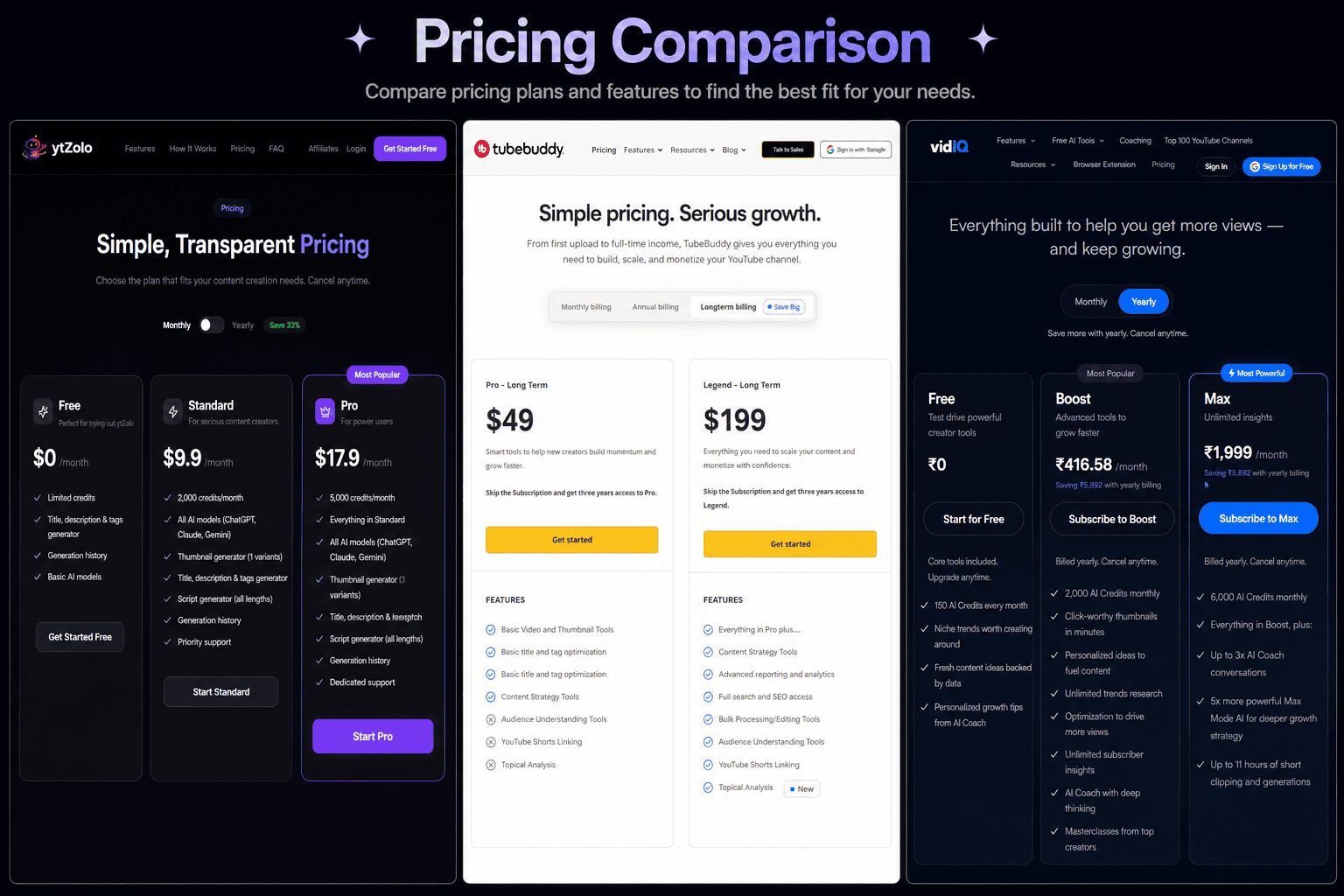
Pricing across all three tools changes often, so treat the figures below as a snapshot, not a guarantee. Always confirm current numbers on each company’s official pricing page before subscribing.
| Tool | Free Plan | Entry Paid Tier | Mid Tier | Top Self-Serve Tier | Enterprise |
|---|---|---|---|---|---|
| ytZolo | Yes, limited monthly credits | Standard (credits-based; confirm current price on ytzolo.com) | — | Pro (higher credit allowance; confirm current price) | Not publicly documented |
| VidIQ | Yes, 150 AI credits/month | Boost (2,000 AI credits/month, billed yearly) | Max ($39/month billed yearly, 6,000 AI credits) | Coaching (Boost + 1-on-1 coaching) | Custom, for brands/agencies/MCNs |
| TubeBuddy | Yes, limited tools | Pro | — | Legend | Custom, for multi-channel teams |
Hidden Costs to Watch
VidIQ’s headline prices are typically annual-equivalent — paying month-to-month costs noticeably more per month than committing annually. This is a common SaaS pattern, and it’s worth doing the annual-vs-monthly math before you subscribe to any of these three tools.
TubeBuddy restricts its Creator License Packages once a channel crosses certain size thresholds (50,000+ subscribers, multiple channels, or a large team), pushing larger creators toward custom Enterprise pricing.
ROI Discussion
The genuine question isn’t “which tool is cheapest” — it’s which tool removes the most friction from your specific bottleneck. If your bottleneck is writing (titles, scripts, descriptions), ytZolo’s single-workflow approach can save real hours per week. If your bottleneck is knowing what to make, VidIQ’s trend and keyword research earns its price. If your bottleneck is managing an existing library at scale, TubeBuddy’s bulk tools pay for themselves quickly.
YTZolo vs VidIQ vs TubeBuddy: Real Use Cases
New Creator (0–1,000 subscribers). Start with free plans across the board to learn the interfaces. ytZolo’s free tier removes the intimidation of writing your first titles and descriptions. VidIQ’s free tier gives you trend context so you’re not guessing at topics.
Gaming Creator. High upload frequency benefits from ytZolo’s fast title and description generation, paired with TubeBuddy’s Keyword Explorer for competitive tag research in a crowded niche.
Education Channel. Long-form, search-driven content benefits most from strong keyword research — TubeBuddy or VidIQ — combined with ytZolo’s script generator to structure explanations clearly.
Agency Managing Multiple Channels. TubeBuddy’s Legend and Enterprise tiers, with bulk processing and multi-seat access, are purpose-built for this. VidIQ Enterprise is a strong alternative if trend research across client channels matters more than bulk editing.
Faceless Channel. ytZolo’s script and description generation directly addresses the biggest bottleneck for faceless formats: producing consistent scripted content without a writer on staff. See our breakdown of AI YouTube automation tools for a deeper look at this workflow.
Automation Business (Multiple Channels, Outsourced Editing). A combination approach works well here — ytZolo for scripting and metadata, TubeBuddy Legend for bulk tag and card updates across channels.
Personal Brand Channel. ytZolo’s alignment between title, thumbnail, and script keeps your messaging consistent, which matters more for personal brands than raw SEO scoring.
Business/Corporate Channel. VidIQ or TubeBuddy Enterprise, for the reporting and multi-user access that internal marketing teams typically require.
Shorts Creator. None of the three tools reviewed here specialize exclusively in Shorts, but ytZolo’s fast title/description generation and TubeBuddy’s Suggested Shorts tool both reduce friction for high-frequency short-form posting.
Long-Form Creator. Deep keyword research (TubeBuddy or VidIQ) matters more for long-form search traffic, while ytZolo’s script structuring helps maintain retention across a longer runtime.
YTZolo vs VidIQ vs TubeBuddy: Pros and Cons
| Tool | Pros | Cons |
|---|---|---|
| ytZolo | All-in-one content generation; multi-model AI (ChatGPT, Claude, Gemini); low learning curve; free plan with no credit card | No browser extension; limited analytics and competitor tracking; smaller public review base; no A/B testing |
| VidIQ | Strong keyword research; AI Coach for strategy; genuinely useful free plan; browser extension inside Studio | Paid plans can feel expensive for smaller creators; AI suggestions can feel generic; steeper learning curve on higher tiers |
| TubeBuddy | Deep bulk processing tools; mature A/B testing; comprehensive SEO Studio; long track record | Interface can feel dated; many essential tools locked behind paid tiers; restricted for larger channels/teams without Enterprise |
Decision Matrix
If you want one tool to write your titles, descriptions, scripts, and thumbnails → Choose ytZolo.
If you want deep keyword and trend research with AI-guided strategy → Choose VidIQ.
If you manage 50+ existing videos and need bulk editing plus A/B testing → Choose TubeBuddy.
If you’re an agency managing 3+ client channels → Choose TubeBuddy Enterprise or VidIQ Enterprise, depending on whether bulk editing or trend research matters more to your workflow.
If you’re a brand-new creator with zero budget → Start with the free plans of all three, then upgrade based on which bottleneck (writing, research, or bulk editing) hits you first.
If you’re a faceless or automation-style channel → Choose ytZolo for scripting and metadata, and consider layering TubeBuddy or VidIQ for keyword validation.
If your biggest challenge is a blank page, not a data problem → Choose ytZolo.
If your biggest challenge is knowing what to make next → Choose VidIQ.
If your biggest challenge is managing a large back catalog → Choose TubeBuddy.
Frequently Asked Questions
Is ytZolo a real VidIQ alternative? Yes, for the content-creation side of the workflow. ytZolo generates titles, scripts, descriptions, tags, and thumbnails, which VidIQ doesn’t fully do. For keyword research and trend data specifically, VidIQ remains the deeper tool.
Is ytZolo a real TubeBuddy alternative? Partially. ytZolo replaces TubeBuddy’s Title Generator and Thumbnail Generator with a more complete content workflow, but it doesn’t currently match TubeBuddy’s bulk processing, A/B testing, or browser-extension integration.
Can I use ytZolo, VidIQ, and TubeBuddy together? Yes, and many creators do. A common workflow when evaluating ytZolo vs VidIQ vs TubeBuddy is researching keywords in VidIQ or TubeBuddy, then generating the actual title, description, and script drafts in ytZolo.
Does ytZolo have a free plan? Yes. ytZolo offers a free plan with limited monthly credits and no credit card required to sign up.
Does VidIQ have a free plan? Yes, according to VidIQ’s official pricing page, the Free plan includes 150 AI credits per month, niche trend data, content ideas, and basic AI Coach tips.
Does TubeBuddy have a free plan? Yes, TubeBuddy offers a free tier with basic tools, though most advanced features require a paid plan.
Which tool has the best keyword research? TubeBuddy’s Keyword Explorer and VidIQ’s Keyword Research tool are both mature, dedicated tools. ytZolo’s keyword capability is built into its content generation rather than offered as a standalone research tool.
Which tool is cheapest? When comparing ytZolo vs VidIQ vs TubeBuddy, TubeBuddy’s entry-level Pro tier tends to be the lowest-cost paid option, though exact current pricing should be verified on each vendor’s site since figures change often.
Does any of these tools guarantee more views or subscribers? No legitimate YouTube tool can guarantee this. All three publish internal performance data or testimonials, but none of it is independently audited, and actual results depend heavily on content quality and consistency.
Which tool is best for a complete beginner? ytZolo’s simple, prompt-based interface has the lowest learning curve for someone who has never used a YouTube optimization tool. VidIQ’s free plan is also beginner-friendly for research.
Do these tools work with YouTube Shorts? Yes, all three support Shorts to varying degrees. TubeBuddy has a dedicated Suggested Shorts tool. ytZolo and VidIQ both support shorter-format title and script generation.
Can agencies manage multiple channels with these tools? Yes. When comparing ytZolo vs VidIQ vs TubeBuddy, both VidIQ and TubeBuddy offer Enterprise plans built for agencies managing several channels, while ytZolo’s multi-channel tooling is less publicly documented.
Do I need a browser extension for these tools to work? VidIQ and TubeBuddy both require their browser extension for full functionality inside YouTube Studio. ytZolo currently operates as a standalone dashboard and does not require an extension.
Is TubeBuddy or VidIQ better for A/B testing thumbnails? TubeBuddy’s A/B testing tools are generally considered more mature and central to its product, based on the depth of testing features listed on its official pricing page.
What’s the biggest mistake creators make when choosing between these tools? Assuming all three do the same thing. They solve different problems — content generation, research, and bulk optimization — so the “best” tool depends entirely on which bottleneck is actually slowing your channel down.
Do these tools help with YouTube algorithm changes? None of them can guarantee alignment with algorithm changes, since YouTube doesn’t publish its full ranking logic. All three aim to follow general best practices outlined in YouTube’s Creator Academy and YouTube Help.
Can I cancel anytime? Based on published FAQs, yes — all three platforms describe no-contract, cancel-anytime billing on their standard consumer plans. Confirm specific terms before subscribing, especially for annual commitments.
Which tool should I try first if I only have time for one? Start with whichever plan solves your current biggest bottleneck: ytZolo if you’re stuck on writing and design, VidIQ if you’re stuck on strategy and trends, or TubeBuddy if you’re stuck managing an existing library.
Final Verdict
There’s no single winner here, and any comparison that tells you otherwise is oversimplifying.
ytZolo is the strongest choice if your bottleneck is content creation itself — writing titles, drafting scripts, designing thumbnails, and keeping your metadata consistent. Its multi-model AI approach and low learning curve make it especially useful for solo creators, faceless channels, and anyone tired of switching between five different apps per upload.
VidIQ earns its reputation as a research and strategy tool. If you need to know what’s trending in your niche, how your channel compares to competitors, and want AI-guided coaching layered on top of real data, it remains one of the more complete options in that category.
TubeBuddy is still the strongest pick for established creators and agencies managing a large video catalog. Its bulk processing and A/B testing tools solve problems the other two don’t fully address, and its pricing tends to be the most accessible at the entry level.
The most honest recommendation: match the tool to the actual bottleneck slowing your channel down, not to which brand has the loudest marketing. For many creators, that means pairing ytZolo’s content generation with either VidIQ or TubeBuddy’s research and optimization tools — rather than picking just one.
About the Author
Anshika Verma Email: anshika@ytzolo.com
Anshika Verma researches and writes about YouTube SEO, AI creator tools, and content automation, with a focus on helping creators evaluate SaaS platforms based on verified features and pricing rather than marketing claims. Her work covers digital marketing strategy, content workflow design, and the evolving landscape of AI-powered creator tools.
Internal Links Used in This Article
- AI YouTube automation tools
- AI thumbnail generator
- Best free AI thumbnail generator
- AI tools to boost YouTube SEO
- vidIQ alternative free tools
- ytZolo blog
External Sources
This comparison was researched using official pricing pages, product documentation, and independent reviews current as of July 2026. SaaS pricing and features change frequently — always confirm current details directly on ytzolo.com, vidiq.com, and tubebuddy.com before making a purchase decision.

