
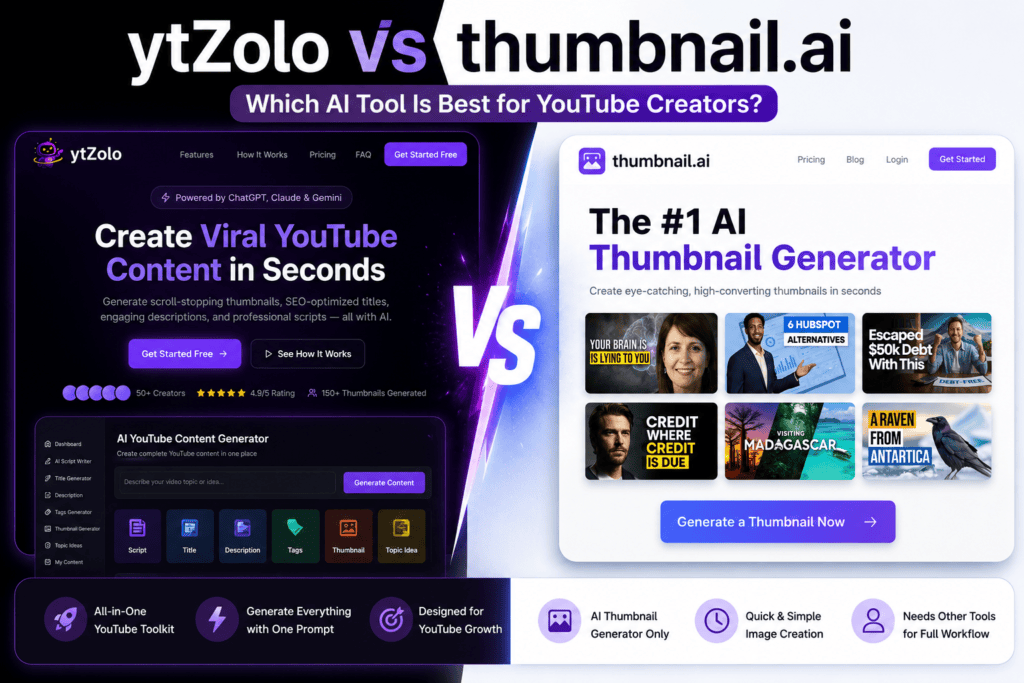
ytZolo is a complete AI YouTube content platform — it covers ideation, scripting, title generation, descriptions, tags, and thumbnails inside a single workflow.
thumbnail.ai is a focused AI thumbnail image generator — it creates visuals from text prompts, supports multiple styles, and handles the design step cleanly.
That difference sounds simple. The workflow implications are not.
Table of Contents
✅ Quick Verdict
Best for creators who only need thumbnails: thumbnail.ai — clean UI, fast generation, no learning curve
Best for creators who want an all-in-one workflow: ytZolo — generates every element of a YouTube video package from one prompt, reducing tool switching and publishing time significantly
Core Features & Workflow Comparison
Every YouTube video needs the same things before it goes live:
- A researched, audience-specific topic
- A hook-first script built for retention
- Titles tested against search intent
- A description with natural keyword integration
- Tags aligned to the video’s niche
- A thumbnail that earns the click
thumbnail.ai handles the last item on that list.
That’s not a criticism. In the debate of ytZolo vs thumbnail.ai, the latter is genuinely good at what it does — generating multiple thumbnail variations from a text prompt, supporting 15+ styles, and offering background removal. For creators who already have a strong design instinct and just need AI to speed up execution, thumbnail.ai is a legitimate time-saver.
But the rest of the list still needs to come from somewhere.
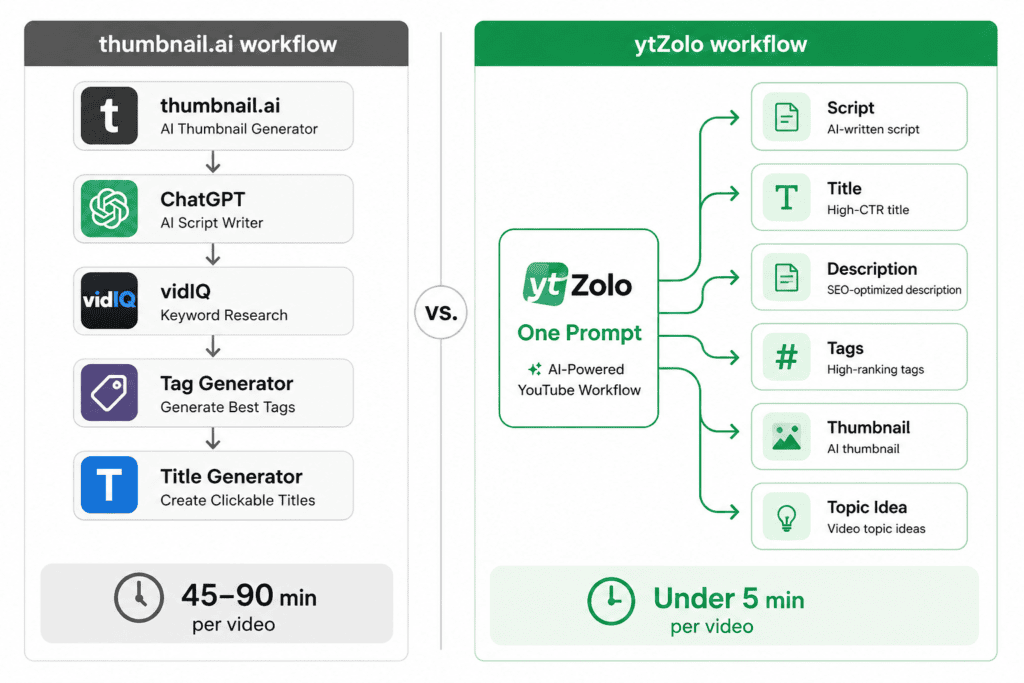
In practice, most thumbnail.ai users are also running:
- ChatGPT or Claude for scripting
- VidIQ or TubeBuddy for keyword research and tags
- A separate headline tool for titles
- Canva or another editor for description layout
That’s four or five tools. Four or five logins. Four or five monthly charges that quietly add up.
ytZolo takes a different position. One prompt generates the full package — video idea, script, titles, descriptions, tags, and thumbnail concepts. The workflow isn’t “generate a thumbnail and then figure out the rest.” It’s “create the entire video asset from one starting point.”
For solo creators publishing two or more videos a week, that consolidation matters enormously. Time spent context-switching between tools is time not spent filming.
For YouTube automation businesses managing multiple channels, the difference is even sharper. Each tool you remove from the stack is one fewer integration point, one fewer API limit, one fewer renewal to track.
For content agencies handling client channels, ytZolo’s integrated output also means consistent metadata quality across every delivery — not just strong thumbnails with inconsistent SEO.
Design Quality vs Click-Through Rate Psychology
A thumbnail can look genuinely impressive and still underperform.
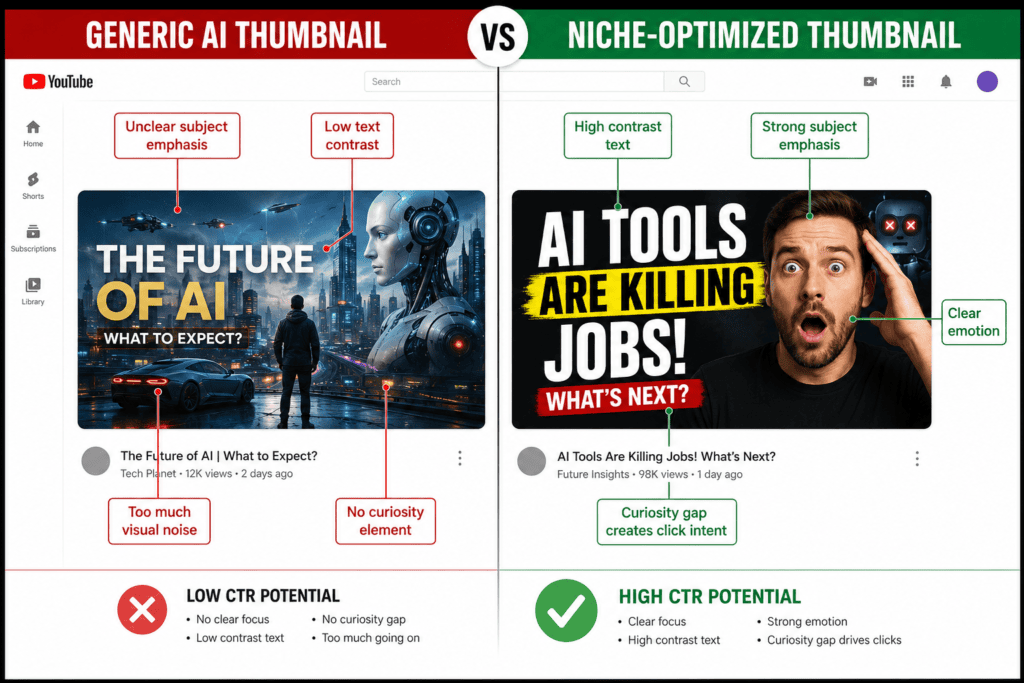
That’s uncomfortable to hear if you’ve spent time crafting something visually beautiful. But YouTube CTR psychology doesn’t reward aesthetic quality. It rewards the right visual signals for the right audience at the right moment.
The elements that actually drive click-through rate are:
- Visual hierarchy — does the eye land immediately on the most important element?
- Color contrast — does the thumbnail stand out against YouTube’s dark and light feed backgrounds?
- Text readability — is the overlay text legible at 150px thumbnail width on mobile?
- Facial focus — if a face is present, is the expression reading clearly at small sizes?
- Information density — too much visual content creates friction; too little loses the hook
- Curiosity gap — does the combination of thumbnail and title create something the viewer needs to resolve by clicking?
thumbnail.ai generates images from text prompts. It offers style presets (photography, digital art, cinematic, etc.) and supports variations. Based on its publicly documented features, thumbnail.ai focuses primarily on visual generation — the optimization of those images for YouTube-specific CTR psychology depends largely on the creator’s own judgment after generation.
ytZolo’s approach — based on its published platform documentation — incorporates niche intelligence into the generation process. Rather than producing a generically attractive image, it generates thumbnail concepts informed by performance patterns within a creator’s content niche. This means the design logic isn’t just “does this look good” but “does this match what drives clicks in this specific category.”
For a finance creator, that’s a different thumbnail formula than for a gaming creator or a travel vlogger. The visual psychology of each niche has measurable patterns. A tool that applies them consistently will outperform one that doesn’t — regardless of raw image quality.
Pricing, Value & Tool Fatigue
There’s a concept worth naming directly: tool fatigue.
It’s what happens when you’re running five separate subscriptions to handle one workflow. The cognitive load of managing multiple tools — separate dashboards, different interfaces, mismatched credit systems — is a real productivity tax that most creators underestimate until they’re deep into it.
A typical creator running thumbnail.ai alongside their other tools might be managing:
- thumbnail.ai for visual generation
- A script AI (ChatGPT Plus, Claude Pro, or a dedicated script tool)
- VidIQ or TubeBuddy for YouTube SEO and tags
- A separate title generator
- Possibly a separate description writer
Each of those has a free tier that runs out quickly at any meaningful publishing frequency. At consistent use, you’re looking at multiple paid subscriptions stacked together.
ytZolo consolidates these into one platform. One login. One workflow. One cost to track.
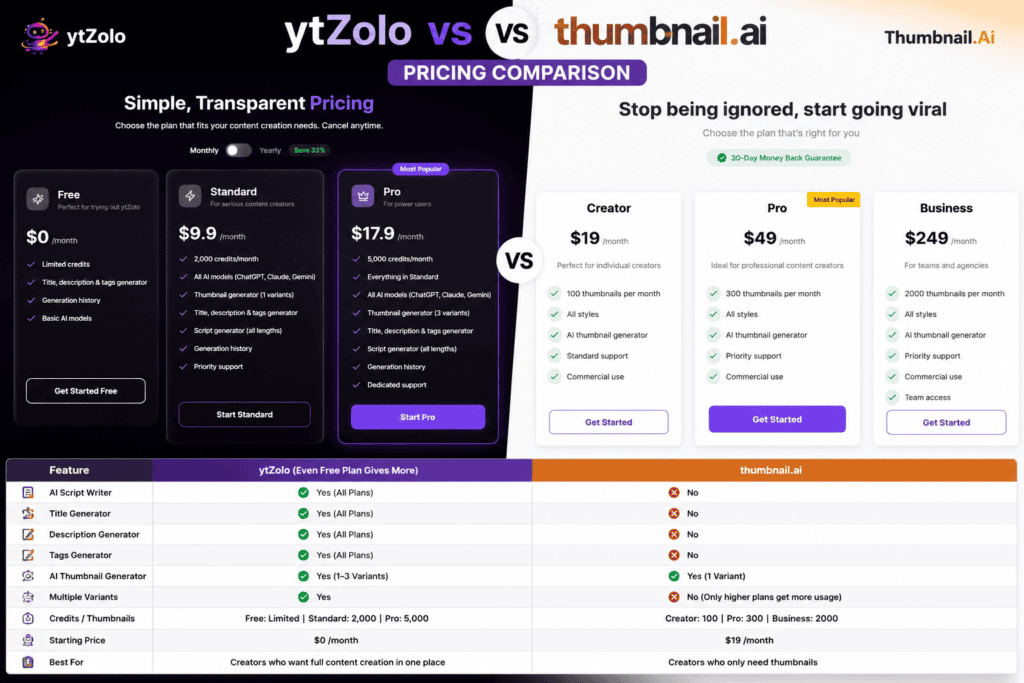
Regarding pricing specifically: thumbnail.ai’s pricing is tiered, with a free generation option available to test the tool. Their paid plans are structured around generation volume. Because pricing pages are updated regularly, we’d encourage you to check the thumbnail.ai pricing page directly for current rates.
ytZolo offers a free plan with thumbnail generation and no watermark — which allows creators to evaluate the full workflow before committing. For current ytZolo pricing details, visit ytzolo.com.
Feature Comparison Table
| Feature | thumbnail.ai | ytZolo |
|---|---|---|
| Primary purpose | AI thumbnail image generator | All-in-one YouTube content platform |
| AI scripts | ❌ Not available | ✅ Full script generation |
| AI titles | ❌ Not available | ✅ Multiple title variations |
| SEO descriptions | ❌ Not available | ✅ Keyword-integrated descriptions |
| Tags | ❌ Not available | ✅ Niche-aligned tag clusters |
| Thumbnail generation | ✅ Core feature | ✅ Included in workflow |
| Workflow automation | ❌ Thumbnail step only | ✅ Full video package from one prompt |
| Niche intelligence | ❓ Not publicly documented | ✅ Niche-specific optimization documented |
| Style variety | ✅ 15+ style presets | ✅ Niche-calibrated generation |
| Free plan | ✅ Free generation available | ✅ Free plan, no watermark |
| Best suited for | Creators needing fast, standalone thumbnail generation | Creators wanting one tool from idea to publish |
Pros & Cons
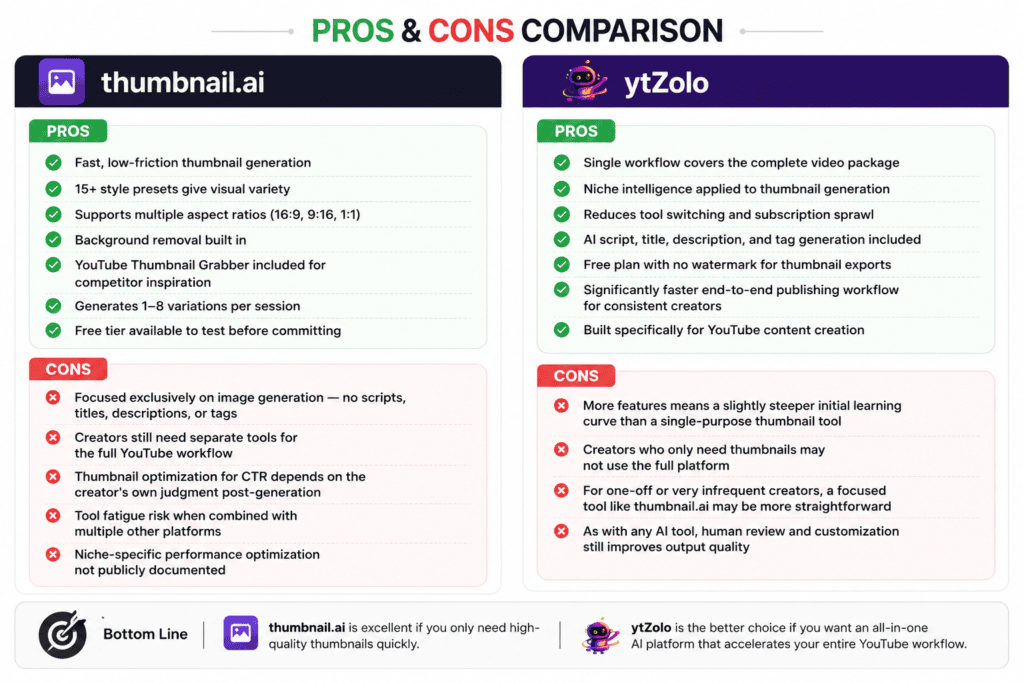
thumbnail.ai
Pros
- Fast, low-friction thumbnail generation
- 15+ style presets give visual variety
- Supports multiple aspect ratios (16:9, 9:16, 1:1)
- Background removal built in
- YouTube Thumbnail Grabber included for competitor inspiration
- Generates 1–8 variations per session
- Free tier available to test before committing
Cons
- Focused exclusively on image generation — no scripts, titles, descriptions, or tags
- Creators still need separate tools for the full YouTube workflow
- Thumbnail optimization for CTR depends on the creator’s own judgment post-generation
- Tool fatigue risk when combined with multiple other platforms
- Niche-specific performance optimization not publicly documented
ytZolo
Pros
- Single workflow covers the complete video package
- Niche intelligence applied to thumbnail generation
- Reduces tool switching and subscription sprawl
- AI script, title, description, and tag generation included
- Free plan with no watermark for thumbnail exports
- Significantly faster end-to-end publishing workflow for consistent creators
- Built specifically for YouTube content creation
Cons
- More features means a slightly steeper initial learning curve than a single-purpose thumbnail tool
- Creators who only need thumbnails may not use the full platform
- For one-off or very infrequent creators, a focused tool like thumbnail.ai may be more straightforward
- As with any AI tool, human review and customization still improves output quality
Final Verdict
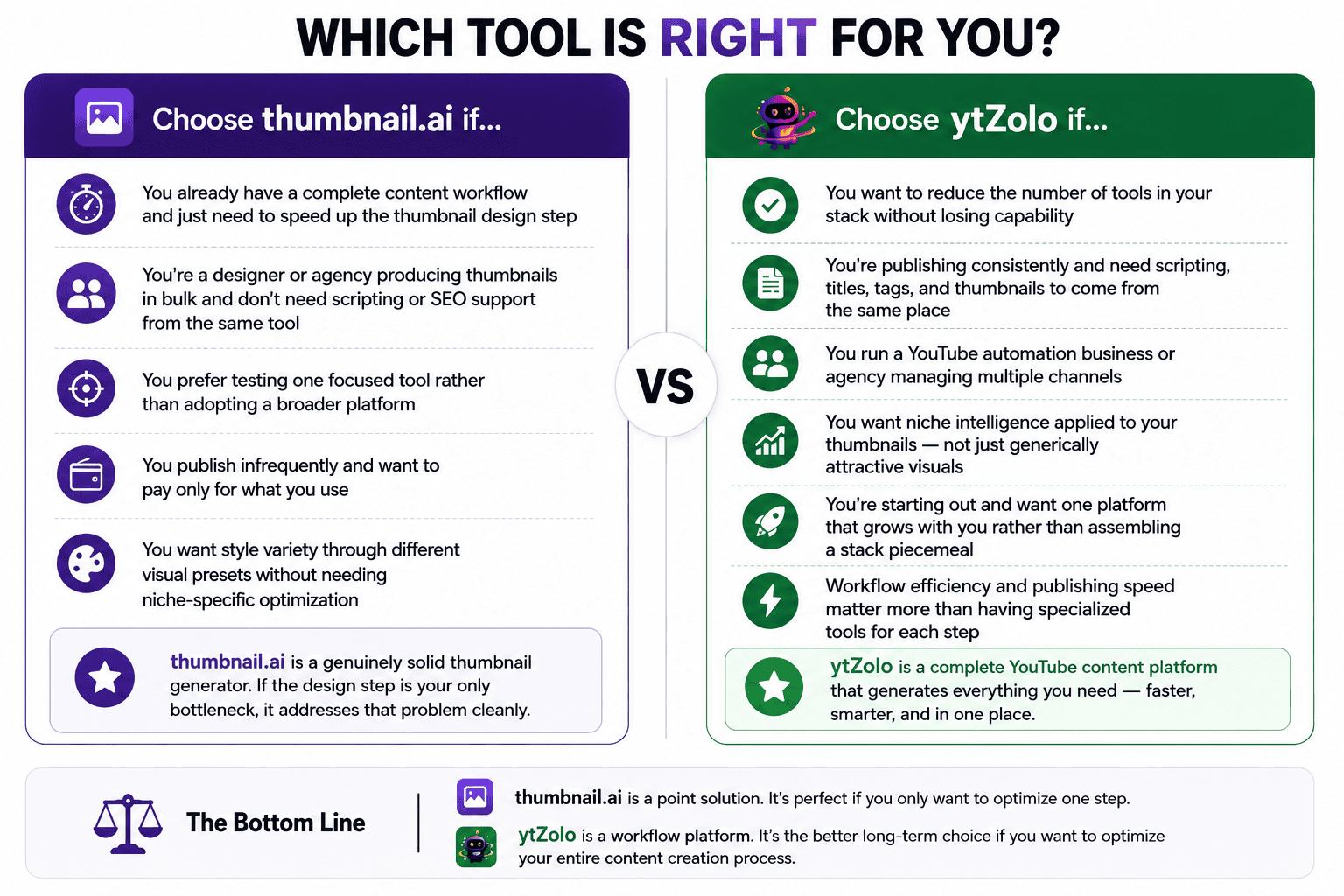
Choose thumbnail.ai if…
- You already have a complete content workflow and just need to speed up the thumbnail design step
- You’re a designer or agency producing thumbnails in bulk and don’t need scripting or SEO support from the same tool
- You prefer testing one focused tool rather than adopting a broader platform
- You publish infrequently and want to pay only for what you use
- You want style variety through different visual presets without needing niche-specific optimization
thumbnail.ai is a genuinely solid thumbnail generator. If the design step is your only bottleneck, it addresses that problem cleanly.
Choose ytZolo if…
- You want to reduce the number of tools in your stack without losing capability
- You’re publishing consistently and need scripting, titles, tags, and thumbnails to come from the same place
- You run a YouTube automation business or agency managing multiple channels
- You want niche intelligence applied to your thumbnails — not just generically attractive visuals
- You’re starting out and want one platform that grows with you rather than assembling a stack piecemeal
- Workflow efficiency and publishing speed matter more than having specialized tools for each step
The decision really comes down to scope. thumbnail.ai is a point solution. ytZolo is a workflow platform. If you’re optimizing one step, thumbnail.ai works. If you’re optimizing the whole process, ytZolo is the more efficient long-term choice.
Try ytZolo Free — No Credit Card Required
If you’re spending time every week juggling multiple tools to put a single video together, that time adds up fast.
ytZolo’s free plan lets you generate thumbnails, titles, scripts, descriptions, and tags in one session — no credit card, no watermark on thumbnail exports. You can evaluate the full workflow before committing to anything.
The fastest-growing channels in 2026 aren’t necessarily the most talented. They’re the most consistent. And consistency is much easier when your content workflow takes five minutes instead of ninety.
Frequently Asked Questions
Is ytZolo better than thumbnail.ai?
It depends on what you need. thumbnail.ai is a strong standalone thumbnail generator. ytZolo is a complete YouTube content platform — thumbnails are one of six core outputs. For creators who need scripts, titles, tags, descriptions, and thumbnails from one tool, ytZolo provides substantially more value. For creators who only need thumbnails and have a separate workflow for everything else, thumbnail.ai is a solid choice.
What is the biggest difference between ytZolo and thumbnail.ai?
thumbnail.ai generates thumbnail images. That’s its core purpose and it does it well. ytZolo generates the full video content package — idea, script, titles, description, tags, and thumbnail — from a single prompt. The practical difference is how many tools you need open at the same time to get a video published.
Can thumbnail.ai generate YouTube scripts?
Based on publicly available documentation, thumbnail.ai does not include an AI script writing feature. Its primary function is thumbnail image generation. Creators using thumbnail.ai for thumbnails typically rely on a separate tool — ChatGPT, Claude, VidIQ, or a dedicated script writer — for scripting.
Does ytZolo include an AI thumbnail generator?
Yes. Thumbnail generation is part of ytZolo’s content package. When you generate a video package in ytZolo, the output includes thumbnail concepts alongside titles, script, description, and tags. The thumbnail generation applies niche-specific optimization rather than generic image generation.
Which tool is better for YouTube automation channels?
For YouTube automation businesses managing multiple channels with high output volume, ytZolo is generally the stronger fit. Automation workflows benefit from consolidated tools — fewer integrations, fewer failure points, faster turnaround per video. thumbnail.ai covers only the thumbnail step, requiring separate tools for scripting, SEO, and metadata.
Which tool offers better value for money?
This depends on what you’re currently spending. If you’re already paying for a script writer, a title generator, an SEO tool, and a thumbnail maker separately, ytZolo’s consolidated pricing likely represents lower total spend. If you only need thumbnails and already have your other workflow covered at no extra cost, thumbnail.ai may be the more economical standalone choice.
Can beginners use ytZolo?
Yes. ytZolo is designed for creators at every experience level. The single-prompt workflow is straightforward — you provide a topic and niche, and the platform generates the full content package. For beginners specifically, having scripts, titles, tags, and descriptions generated together removes several of the most common early stumbling blocks around YouTube SEO and metadata optimization.
Do I need multiple AI tools if I use thumbnail.ai?
In most cases, yes. thumbnail.ai focuses on thumbnail generation. It doesn’t cover scripting, title creation, description writing, or tag research — all of which are necessary for publishing and ranking on YouTube. Most thumbnail.ai users supplement it with at least two or three other tools.
Which platform is better for improving YouTube CTR?
CTR improvement depends on more than just the thumbnail image. The title, thumbnail, and their relationship to each other all drive click-through rate. ytZolo generates titles and thumbnails together, which means the visual and textual elements are optimized as a unit rather than created separately. thumbnail.ai produces strong images, but the CTR impact also depends on how well the creator aligns the thumbnail with the title independently.
Is there a free version of ytZolo?
Yes. ytZolo offers a free plan that includes thumbnail generation without watermarks, along with access to title, script, description, and tag generation. No credit card is required to get started. Visit ytzolo.com for current free plan details.
About the Author
Anshika Verma specializes in YouTube growth, AI creator tools, YouTube SEO, and the creator economy. She researches emerging AI software, YouTube best practices, and workflow optimization to help creators publish faster and grow sustainably.
Her comparisons are based on official product documentation, publicly available feature information, pricing pages, independent software reviews, creator discussions, and industry research. Whenever information is unavailable or unclear, she explicitly notes those limitations instead of making unsupported claims.
📧 anshika@ytzolo.com

