
By Anshika Verma · Content & SEO Researcher, ytZolo · Updated July 2026 · ~13 min read
Quick answer: If you need a specific, brand-distinct, or unusual sound and want full control over duration and tone, an AI sound effects generator wins. If you mainly need polished background music with SFX as a secondary add-on, a stock library subscription still holds its own. Most channels that grow past a few thousand subscribers end up using both — testing a free-tier platform like ytZolo‘s AI Audio Studio alongside a lighter stock catalog is usually the cheapest way to figure out which mix actually fits your workflow.
The Real Question Behind “AI Sound Effects vs Stock Library”
Every editor has hit this wall at 11 p.m.: the video is cut, the pacing works, and one transition still needs a specific whoosh that doesn’t exist in any downloaded pack.
That moment is really what the AI sound effects vs stock library debate comes down to — not which category is “better” in the abstract, but which one gets you unstuck faster for the sound you actually need.
This guide breaks the decision down by cost, licensing, uniqueness, and workflow fit, using the same evaluation criteria covered in ytZolo’s broader AI sound effects generator comparison, but with a sharper focus on the commercial side: what you’ll actually pay, what you’re actually allowed to do with the output, and which option fits your specific channel type.
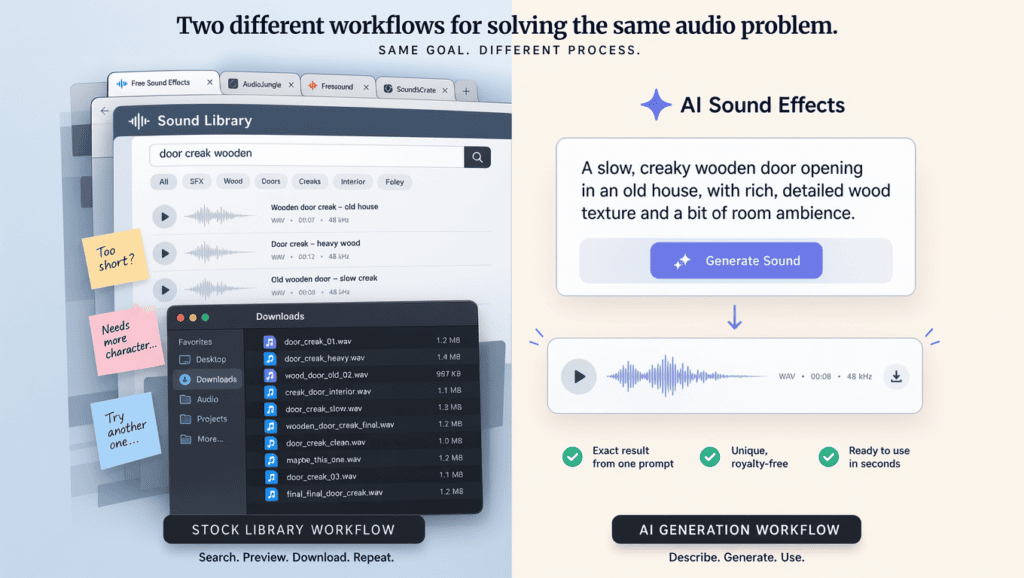
Table of Contents
Quick Definitions, No Jargon
Before comparing costs and licensing, it helps to separate what each option actually is.
Stock sound libraries (Epidemic Sound, Artlist, Pixabay, Freesound) host a fixed catalog of pre-recorded clips. You search, preview, and download.
AI sound effects generators (like the tools compared in ytZolo’s sound effects generator guide) create a new audio clip from a written description. Nothing is downloaded from a catalog — it’s synthesized on the spot.
Neither approach is inherently superior. They solve different problems, and the right pick usually depends on the type of sound you’re chasing, not personal preference.
Cost Breakdown: What You’ll Actually Pay
Pricing is where the ai sound effects vs stock library decision gets concrete fastest, so let’s look at real numbers instead of vague comparisons.
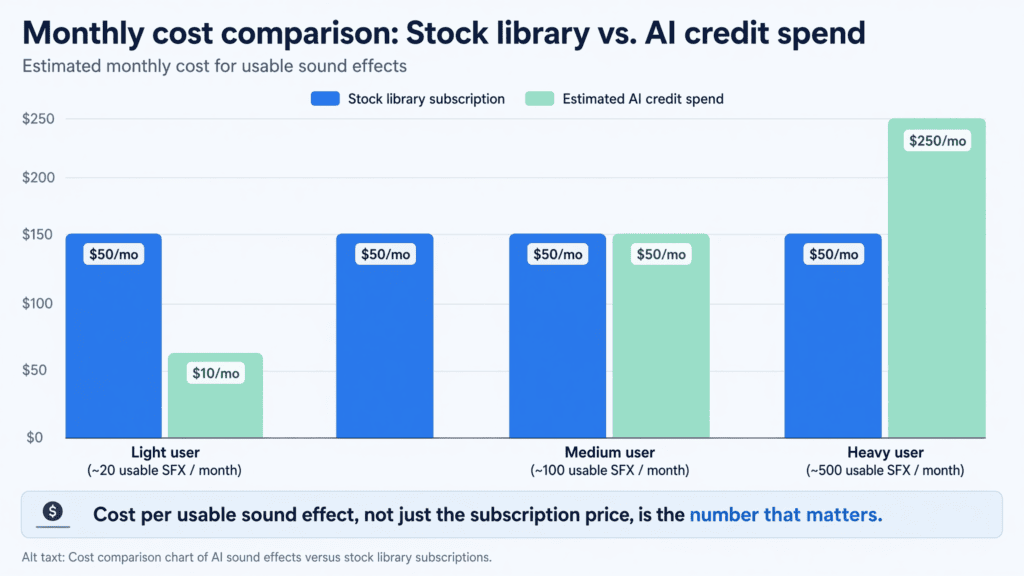
Stock libraries typically charge a flat monthly or annual fee regardless of how many clips you use. Epidemic Sound’s Creator plan runs close to $9.99–$15/month, while Artlist bundles music, SFX, and footage into an annual plan around $199–$299/year.
AI sound effects generators usually run on credit-based pricing. You pay per generation (or per batch of credits), which means a channel that only needs three or four unique effects a month can spend far less than a flat subscription.
Here’s where it gets interesting for budget-conscious creators: a royalty free sfx vs ai generated comparison isn’t just about the sticker price — it’s about cost per usable sound. A stock subscription that sits mostly unused because the catalog rarely has your exact sound is effectively more expensive per clip than it looks.
Licensing and Copyright: The Part Creators Skip
This is the section most creators skim past — and it’s the one that causes the most headaches later.
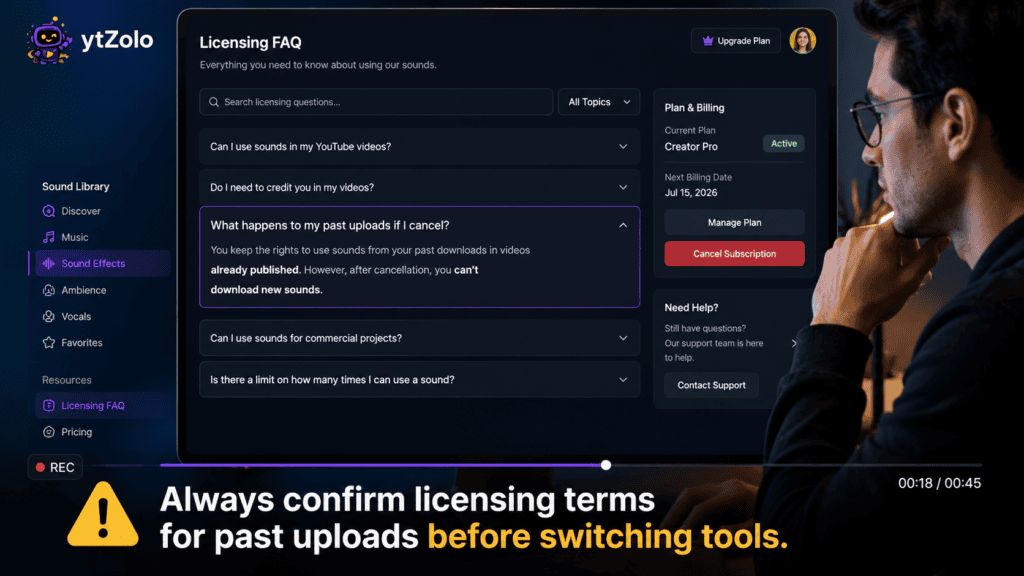
With stock libraries, your license to use a clip is usually tied to an active subscription. Cancel Epidemic Sound, and older videos using its tracks can technically fall out of license coverage, which is a detail many creators don’t discover until a claim shows up.
With AI-generated sound, licensing is governed by the platform’s terms of service rather than a subscription-dependent catalog license. Commercial use is typically tied to being on a paid plan, and free-tier output often carries attribution requirements or non-commercial restrictions.
So when creators ask about royalty free sfx vs ai generated audio in terms of safety, the honest answer is: neither is automatically risk-free. Read the terms either way, and don’t assume “free” means “cleared for monetized YouTube use.”
For a plain-language overview of how licensing categories work in general, Creative Commons is a useful outside reference, especially for community-uploaded libraries like Freesound.
Why Uniqueness Actually Matters for Retention
Here’s something stock libraries can’t really fix: popularity. The most-downloaded whoosh, ding, or impact sound in Epidemic Sound or Artlist’s catalog gets reused across thousands of channels.
Viewers may not consciously register it, but repeated exposure to the same stock cues across different creators can quietly dilute how “produced” or original a channel feels.
Generated audio doesn’t have that problem in the same way — each output is synthesized fresh, so two creators typing similar prompts still get slightly different results. That’s a meaningful edge in the broader ai sound effects vs stock library conversation for channels trying to build a distinct sonic identity.
That said, uniqueness cuts both ways. A generated sound that misses the mark still needs a re-prompt, while a stock clip that fits is already polished and ready to drop in.
Epidemic Sound Alternative: When AI Generation Makes More Sense
Creators searching for an epidemic sound alternative are usually hitting one of three walls: the monthly cost feels hard to justify for a small channel, the catalog doesn’t have a specific sound they need, or they want more control over exact duration and pacing.
An AI sound effects generator addresses two of those three directly. You’re not paying for a sprawling music catalog you may barely touch, and you can describe pacing and tone precisely instead of trimming a clip that’s “close enough.”
Where it doesn’t fully replace Epidemic Sound is background music depth — a curated, professionally composed music catalog is still something generation hasn’t fully matched.
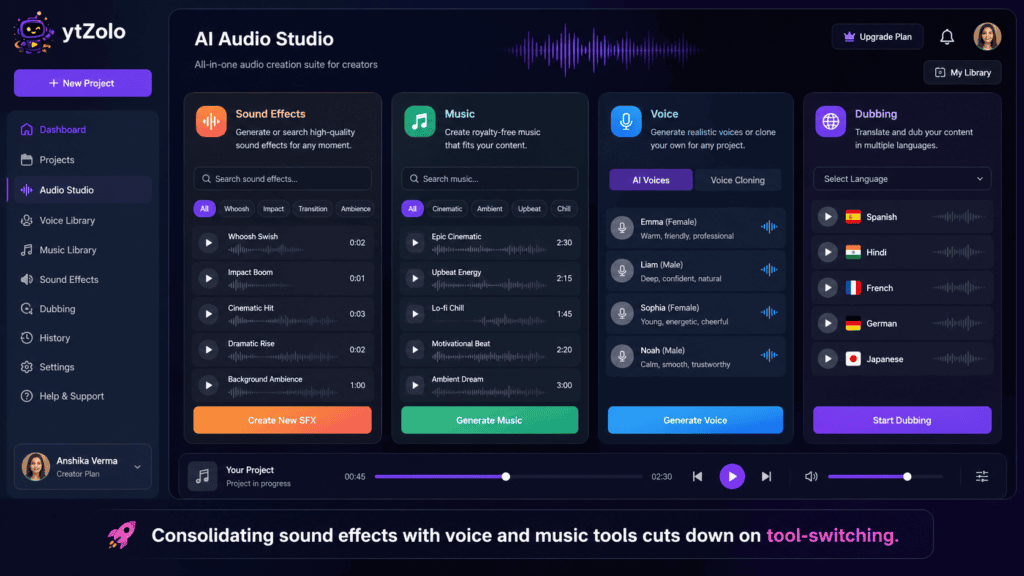
Many creators end up treating AI generation as their effects layer while keeping a lighter-tier music subscription, or consolidating both inside a platform like ytZolo’s AI Audio Studio, which pairs sound effects with AI music generation and voice tools in one dashboard.
Artlist vs AI Sound Effects: A Closer Look
The artlist vs ai sound effects comparison is slightly different from Epidemic Sound, because Artlist bundles SFX with stock footage, templates, and (on higher tiers) some AI tools of its own.
For creators who already rely on Artlist’s footage and templates, sticking with its bundled SFX makes sense — you’re already paying for the subscription, so the marginal cost of using its sound library is close to zero.
For creators who don’t need footage or templates and only want sound effects, paying for Artlist’s full bundle just to access its SFX catalog is a poor cost-per-use trade compared to a lighter, prompt-based generator.
The practical rule of thumb: match the tool to what you’re actually using it for, not what it’s bundled with. A creator who uses ten features from a subscription gets far more value than one who uses one feature from the same plan.
Matching the Tool to Your Content Type
Not every channel has the same sound needs, so the ai sound effects vs stock library decision often comes down to genre.
- Gaming channels frequently need custom UI chimes and impact sounds that don’t overlap with effects every other gaming creator already uses — a strong case for generation. ytZolo’s guide on AI tools for gaming channels covers the broader production stack this fits into.
- Faceless and narration-heavy channels often lean on ambience and Foley layers to compensate for the lack of on-camera presence, where prompt control over pacing helps.
- Podcasts typically need a small set of consistent transition sounds reused across every episode — generate once, reuse indefinitely, no ongoing subscription required for that specific need.
- Vlogs and lifestyle channels with heavier background-music needs often still lean on a stock library’s music depth, using AI generation only for the occasional specific effect.
- Documentary and history channels sometimes need period-accurate or unusual ambience that a general stock catalog doesn’t carry, which is where a specific, descriptive prompt outperforms a search bar.
Switching From a Stock Library Without Losing Coverage on Old Videos
Creators thinking about dropping a stock subscription in favor of generation often worry about one thing: what happens to videos already published with library audio?
The safest approach is to check the specific library’s terms before canceling. Some platforms, including Epidemic Sound, offer a way to keep past videos covered even after a subscription ends, but the details vary by plan type and have changed over the years.
If you’re mid-transition, a reasonable middle step is to stop adding new stock clips to upcoming videos while keeping the subscription active just long enough to confirm your older uploads are properly covered.
This is also a good moment to audit which of your past videos actually used unique library tracks versus commonly available free ones — it clarifies how much licensing risk you’re really carrying before you cancel anything.
Time Cost: The Hidden Factor Most Comparisons Skip
Money isn’t the only budget creators are managing — time matters just as much, especially for channels publishing multiple videos a week.
Searching a stock library for the right clip often means typing several variations of a search term, previewing five or six results, and settling for the closest match. That process can easily eat ten to fifteen minutes per tricky sound.
Generating a sound effect from a written prompt takes a fraction of that time once you know how to describe what you want — object, material, action, and pacing, in that order. A few seconds of generation plus one or two re-prompts is often still faster than an extended library search.
For channels producing high volumes of short-form content, that time savings compounds quickly across dozens of videos a month, which is worth weighing alongside the raw subscription cost when deciding between ai sound effects vs stock library workflows.
The Hybrid Workflow Most Established Channels Use
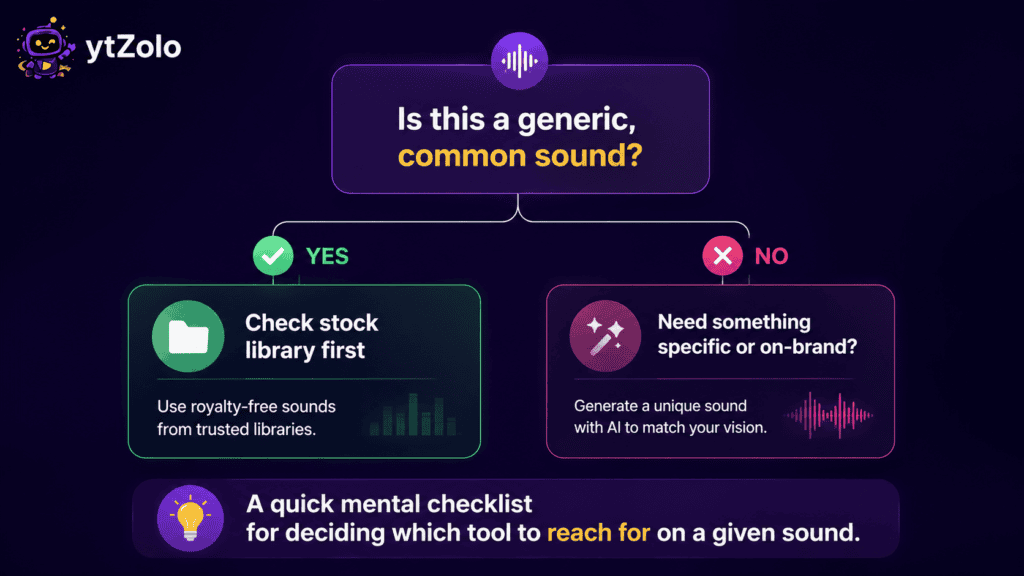
In practice, the sharpest answer to “AI or stock library” is usually “both, for different jobs.”
A common hybrid pattern: use a stock library (or a lighter free tier like Pixabay) for common, generic sounds — footsteps, simple whooshes, ambient room tone — where the catalog already has something usable.
Reserve AI generation for the handful of sounds that are genuinely specific to a video: a signature transition, a unique creature roar, a precisely-timed comedic sting.
This keeps costs predictable while still getting the originality benefit where it matters most — on the sounds viewers are most likely to notice and remember.
A Real-World Cost Example: Two Creators, Two Approaches
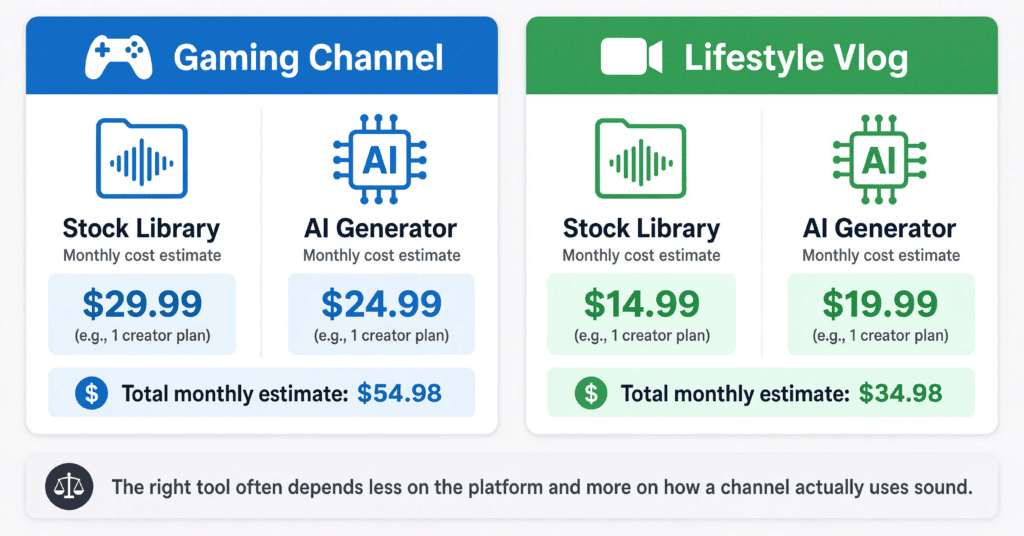
Numbers land better with a concrete scenario, so here’s a simplified comparison between two mid-size creators with different audio habits.
Creator A runs a weekly gaming channel and needs roughly six to eight custom sound effects a month — UI chimes, impact hits, and one or two comedic stings. On a stock library subscription, they’re paying a flat $9.99–$15/month whether they use two clips or twenty.
On a credit-based AI generator, they’re only spending credits on the sounds they actually generate, which for eight effects a month often lands well under a typical library subscription.
Creator B runs a lifestyle vlog and leans heavily on background music, using only the occasional stock sound effect. Here, the flat-fee library subscription makes more sense, since the value comes from the depth of the music catalog, not from a handful of one-off effects.
The pattern holds across most channels: low, specific SFX volume favors credit-based generation; high, ongoing music needs favor a flat-fee library. Tracking your own usage for a month before committing to either plan is the most reliable way to know which side of that line your channel falls on.
Common Mistakes When Choosing Between the Two
- Canceling a stock subscription without checking older video licenses — some libraries tie usage rights to an active plan.
- Assuming AI-generated audio is automatically commercial-safe on a free tier, without reading the platform’s terms.
- Overpaying for a bundled subscription (footage, templates, music) when only the SFX catalog gets used.
- Writing vague AI prompts and blaming the tool for a generic result — specificity in wording drives specificity in output.
- Mixing stock and AI-generated sounds inconsistently across a channel, which can create a slightly mismatched sonic identity over time.
- Not testing free tiers of both before committing — a few minutes of side-by-side testing usually settles the decision faster than reading reviews.
Quick Decision Checklist
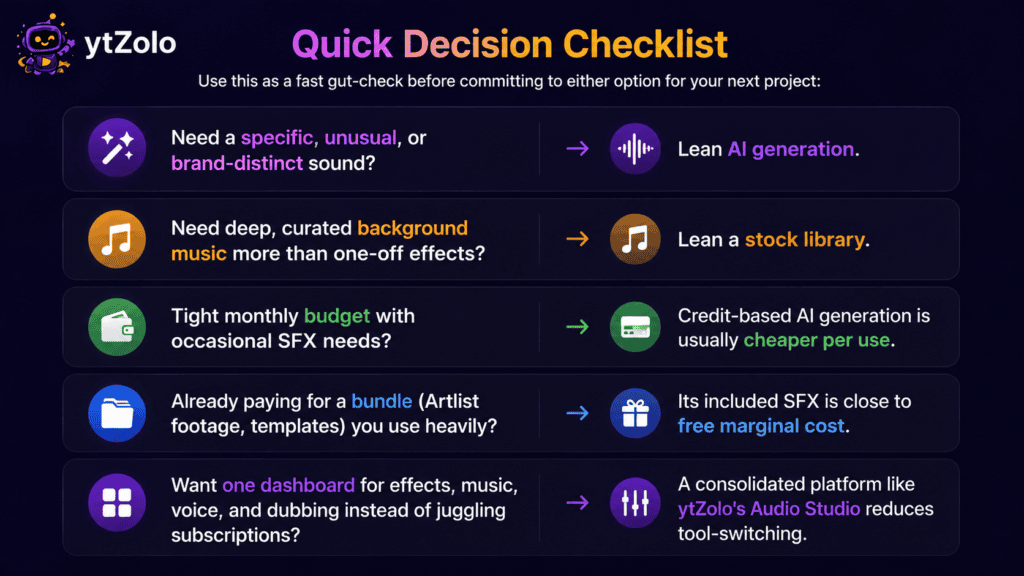
Use this as a fast gut-check before committing to either option for your next project:
- Need a specific, unusual, or brand-distinct sound? Lean AI generation.
- Need deep, curated background music more than one-off effects? Lean a stock library.
- Tight monthly budget with occasional SFX needs? Credit-based AI generation is usually cheaper per use.
- Already paying for a bundle (Artlist footage, templates) you use heavily? Its included SFX is close to free marginal cost.
- Want one dashboard for effects, music, voice, and dubbing instead of juggling subscriptions? A consolidated platform like ytZolo’s Audio Studio reduces tool-switching.
FAQ
Is AI sound effects vs stock library really a fair comparison? Yes, with a caveat — they solve overlapping but not identical problems. Generation wins on specificity and originality; libraries still win on curated music depth.
What’s the best epidemic sound alternative for a small channel on a tight budget? A credit-based AI sound effects generator is often the cheapest starting point, since you’re not committing to a flat monthly catalog fee for sounds you may use rarely.
Is Artlist better than AI sound effects for footage-heavy channels? If you already need Artlist’s stock footage and templates, its bundled SFX library adds minimal extra cost. If you only need sound effects, a standalone generator is usually more cost-efficient.
Are royalty free SFX safer than AI-generated sound effects for monetized videos? Not automatically. Royalty-free doesn’t always mean unrestricted, and AI-generated output still falls under the platform’s commercial-use terms. Check both before publishing.
Can I mix AI-generated and stock sound effects in the same video? Yes, and many editors do. The main thing to watch is consistency in tone and mix level so the audio doesn’t feel disjointed.
Do I need a paid plan to use AI sound effects commercially on YouTube? Typically yes. Most platforms restrict free-tier output to non-commercial use or require attribution, so verify the specific terms before monetizing a video that uses free-tier audio.
Which option is faster for a tight deadline? It depends on whether the exact clip already exists. If a library has it, downloading is instant. If it doesn’t, writing and generating a prompt is usually faster than continuing to search.
How do I know if my channel needs a full stock library subscription or just occasional AI generation? Track your actual sound usage for a month. If most videos need common, easy-to-find clips, a light or free library tier likely covers you. If you’re regularly searching and not finding a match, that’s a signal to test a generator’s free credits instead.
Can a platform like ytZolo replace both a stock library and a standalone AI sound generator? For creators who also need voice, music, and dubbing tools, a consolidated platform reduces the number of subscriptions to manage, though it’s still worth comparing its free-tier sound quality against a dedicated stock catalog for your specific niche before fully switching over.
Final Take
There’s no universal winner in the ai sound effects vs stock library debate — the right choice depends on what you’re actually trying to solve for on a given project: a specific one-off sound, a deep music catalog, or a predictable monthly budget.
For most growing channels, the practical move is a hybrid: keep a light stock library or free catalog for common sounds, and reach for an AI sound effects generator when a video needs something a search bar simply won’t return. Creators who want both under one login can start with the free tier covered in ytZolo’s full AI sound effects generator comparison and test it against their own workflow before committing to a paid plan.
Author
Anshika Verma 📧 anshika@ytzolo.com
Anshika is a Content & SEO Researcher at ytZolo who tests AI creator tools hands-on, comparing pricing, licensing terms, and real production workflows across voice, music, and sound-design platforms. She writes to help YouTube creators cut through marketing claims and make budget-conscious, licensing-safe decisions about the audio tools they add to their workflow.

