
By [Anshika Verma], YouTube growth strategist — [X/LinkedIn link]
Quick Summary
Vlog thumbnails make or break your CTR — viewers decide in under 2 seconds whether to click, and custom thumbnails dominate top-performing videos. An AI thumbnail maker for vlogs (like ytZolo) removes the guesswork by generating niche-aware designs, scoring them for predicted CTR, and pairing them with matching titles and tags — cutting a 3-hour manual process down to minutes. This guide covers how these tools work, YouTube’s actual thumbnail specs, strategy broken down by vlog sub-niche (travel, day-in-the-life, story-time, challenge), how to stay visually consistent across frequent uploads, honest pricing, and a head-to-head comparison against Canva, vidIQ, and generic AI image generators.
I Spent 3 Hours Making One Vlog Thumbnail. Then I Found This AI Tool — and Everything Changed
Picture this.
It’s 11 PM. You’ve just wrapped up editing your best vlog ever. The footage is crisp, the story is tight, and you’re genuinely proud of it.
But now you’re stuck — staring at Photoshop, moving text boxes around, wondering why your thumbnail looks nothing like the ones your favorite travel vloggers use.
Sound familiar?
You’re not alone. Most vloggers don’t lose to the algorithm because of bad content. They lose because of bad thumbnails. Your viewer decides in under 2 seconds whether to click — and if your thumbnail doesn’t grab them, they’re gone for good.
That’s why smart creators in 2026 are switching to an AI thumbnail maker for vlogs — and why ytZolo has become a go-to platform for creators who want to grow without burning out on design work.
This guide covers how AI thumbnail generation actually works, what makes a vlog thumbnail convert by sub-niche, the technical specs YouTube requires, real pricing, and a side-by-side comparison so you can decide for yourself.
Table of Contents
Why Your Vlog Thumbnail Is Make or Break
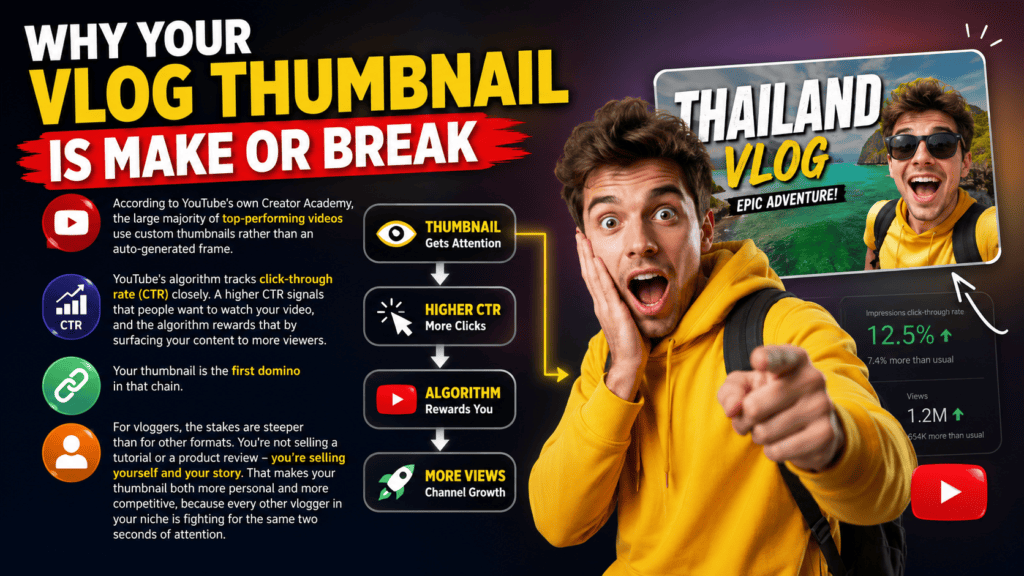
According to YouTube’s own Creator Academy, the large majority of top-performing videos use custom thumbnails rather than an auto-generated frame. That’s not a coincidence — it’s a deliberate strategy.
YouTube’s algorithm tracks click-through rate (CTR) closely. A higher CTR signals that people want to watch your video, and the algorithm rewards that by surfacing your content to more viewers.
Your thumbnail is the first domino in that chain.
For vloggers, the stakes are steeper than for other formats. You’re not selling a tutorial or a product review — you’re selling yourself and your story. That makes your thumbnail both more personal and more competitive, because every other vlogger in your niche is fighting for the same two seconds of attention.
What Is an AI Thumbnail Maker for Vlogs?
An AI thumbnail maker for vlogs is a tool that automatically generates click-optimized thumbnail designs for your YouTube videos. Instead of starting from scratch in Photoshop or a template library, you give the AI a few details — your topic, mood, or title — and it produces professional-grade concepts in seconds.
The better tools are trained on large sets of high-performing YouTube thumbnails, so they understand color psychology, text placement, facial expression cues, and emotional triggers — not just aesthetics.
For vloggers, this matters because your face is your brand. A generic design tool doesn’t know that. A YouTube-trained AI thumbnail maker does.
YouTube Thumbnail Specs You Need to Know
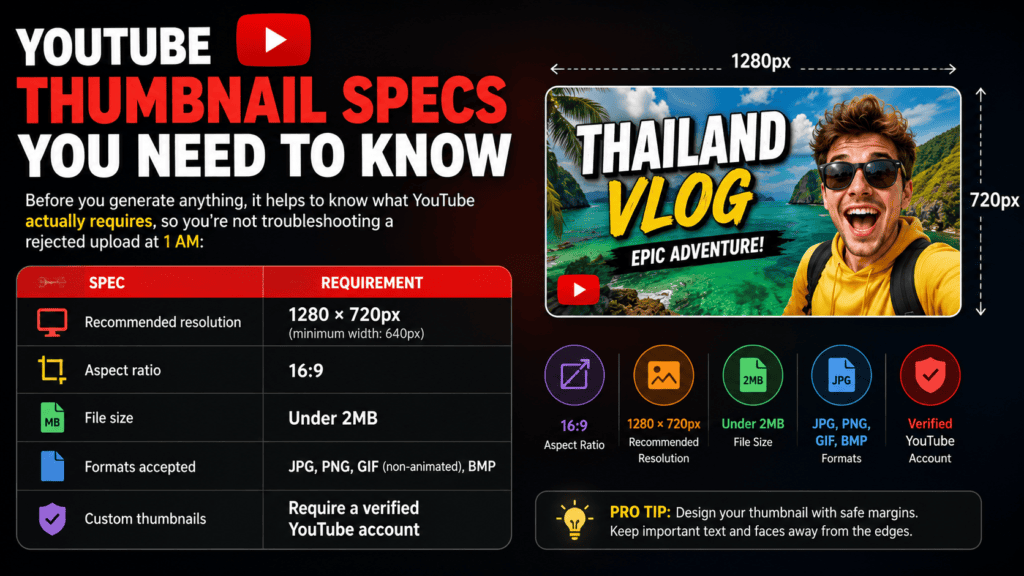
Before you generate anything, it helps to know what YouTube actually requires, so you’re not troubleshooting a rejected upload at 1 AM:
| Spec | Requirement |
|---|---|
| Recommended resolution | 1280 × 720px (minimum width: 640px) |
| Aspect ratio | 16:9 |
| File size | Under 2MB |
| Formats accepted | JPG, PNG, GIF (non-animated), BMP |
| Custom thumbnails | Require a verified YouTube account |
A good AI thumbnail maker exports at the right resolution and aspect ratio by default, so you never have to manually crop or resize before uploading.
The Problem with Making Thumbnails Manually
Let’s be honest about what manual thumbnail creation costs you.
Time is the obvious one. A proper thumbnail in Photoshop or can eat 1–3 hours once you factor in sourcing an image, removing backgrounds, choosing fonts, and testing concepts.
But the hidden cost is guesswork. Most creators pick colors they personally like and text that feels catchy to them — but viewer psychology doesn’t always match creator taste. What compels you isn’t necessarily what makes a stranger click at 1 AM on their phone.
Manual thumbnails are also inconsistent. Without a system, your channel’s thumbnails can end up looking like they belong to three different creators, which confuses both viewers and the algorithm’s pattern recognition.
An AI thumbnail maker trained on real YouTube performance signals removes a lot of that guesswork — it’s working from data, not a hunch.
How AI Thumbnail Makers Actually Work
Step 1 — Content Analysis You input your video title, topic, or description. The AI identifies the emotional core and subject matter of your vlog.
Step 2 — Niche Pattern Recognition The tool has been trained on high-performing thumbnails across niches. It recognizes what visual patterns, color combinations, and text styles work for travel vlogs vs. lifestyle content vs. daily vlogs.
Step 3 — Design Generation The AI generates multiple concepts — dominant colors that pop in the feed, bold readable typography, and framing that triggers an emotional response.
Step 4 — CTR Optimization Stronger tools, like ytZolo, score each design against a predicted click-through likelihood, so you’re choosing based on a signal, not a guess.

Vlog Thumbnail Strategy by Sub-Niche
Not all vlogs work the same way. Here’s how thumbnail strategy shifts by format:
Travel vlogs Lead with landscape or landmark context plus your reaction shot layered in. High saturation works well here — destinations read as more vivid, more “worth watching.”
Day-in-the-life / lifestyle vlogs Close-up, expressive face shots outperform wide shots. Viewers are clicking on you, not the room. Keep backgrounds simple so your expression is the first thing the eye lands on.
Story-time / confession vlogs Tension is the goal, not clarity. A slightly ambiguous expression (shock, hesitation) paired with a short, curiosity-gap text overlay — 3-4 words max — tends to outperform a fully “explained” thumbnail.
Challenge / prank vlogs Action-in-progress framing beats posed shots. Motion blur, mid-reaction faces, and bold arrows or circles directing attention to the “thing that happened” all read well here.
If you’re using an AI thumbnail maker for vlogs, feed it the sub-niche explicitly in your prompt (e.g., “story-time vlog, confessional tone” vs. “travel vlog, first-time destination”) — the more specific the input, the more differentiated the output.
Key Features to Look for in an AI Vlog Thumbnail Tool
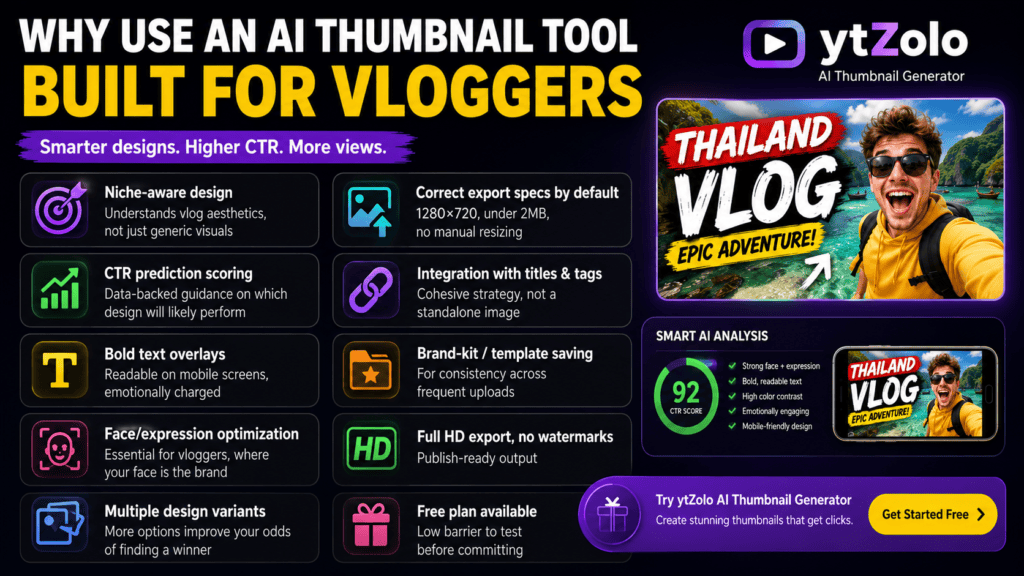
- Niche-aware design — understands vlog aesthetics, not just generic visuals
- CTR prediction scoring — data-backed guidance on which design will likely perform
- Bold text overlays — readable on mobile screens, emotionally charged
- Face/expression optimization — essential for vloggers, where your face is the brand
- Multiple design variants — more options improve your odds of finding a winner
- Correct export specs by default — 1280×720, under 2MB, no manual resizing
- Integration with titles & tags — cohesive strategy, not a standalone image
- Brand-kit / template saving — for consistency across frequent uploads
- Full HD export, no watermarks — publish-ready output
- Free plan available — low barrier to test before committing
How to Create a Viral Vlog Thumbnail with ytZolo
Step 1: Sign Up for Free
Head to ytzolo.com and create a free account. No credit card required.
Step 2: Enter Your Video Details
Add your video title, a short description, your target audience, and your sub-niche.
Example input: “Day in My Life — Tokyo Travel Vlog, first-time experience, excited and overwhelmed.”
Step 3: Let ytZolo Generate Your Thumbnails
The AI analyzes your niche and generates several thumbnail concepts optimized for CTR, varying color palette, text placement, and emotional framing.
Step 4: Review CTR Scores
Each design is scored on predicted click-through performance. Pick the top scorer, or combine elements from a few versions.
Step 5: Pair with AI-Generated Title & Tags
ytZolo generates title, description, tags, and thumbnail together, so your metadata stays aligned with your visual.
Step 6: Export and Publish
Download in the correct resolution — full HD, no watermark — ready for YouTube Studio.
Staying Consistent: Thumbnail Branding for Frequent Uploaders
Vloggers publish more often than most other creator categories — sometimes 2-3x a week. That cadence makes visual consistency a real growth lever, not just an aesthetic preference: a recognizable thumbnail style trains your subscribers to spot your videos in a crowded feed at a glance.
A few practical habits:
- Save a consistent font pairing and color palette as a reusable template rather than starting fresh each time.
- Keep your face position and framing style similar across uploads (e.g., always upper-right, always the same crop ratio).
- Reuse a signature accent — a color block, an icon, a border style — sparingly but consistently.
If your tool supports saving a brand kit or template, reuse it every upload rather than treating each thumbnail as a one-off design exercise.
ytZolo Pricing, Honestly
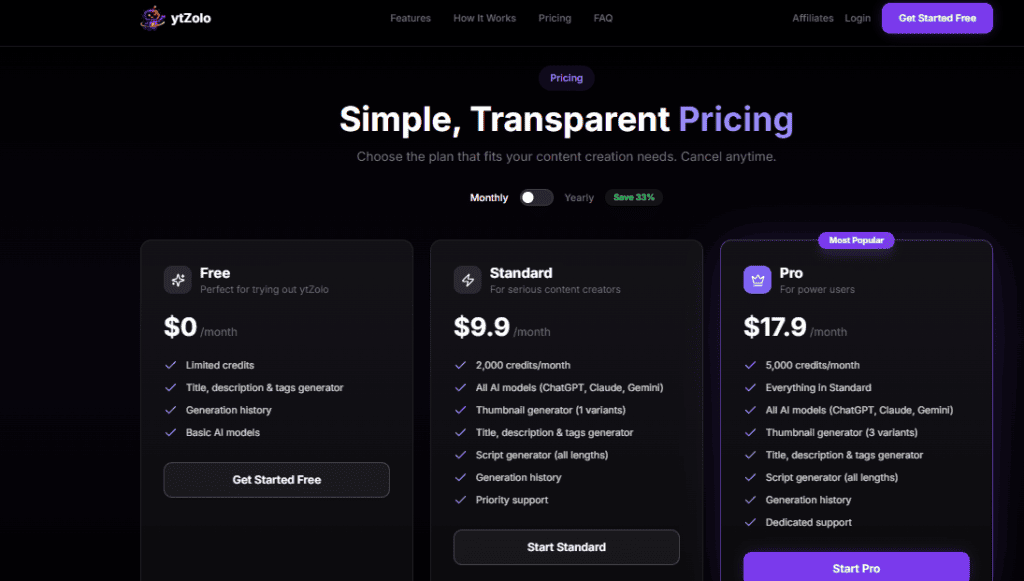
Pricing details change, so always check the current pricing page before committing. As of this writing, third-party reviews report a structure roughly like this:
| Plan | Approx. Price | Credits/Generations | Best For |
|---|---|---|---|
| Free | $0 | Limited monthly credits | Testing the tool before committing |
| Standard | ~$19/mo | ~2,000 credits/mo | Regular vloggers (weekly uploads) |
| Pro | Higher tier | ~5,000 credits/mo | High-volume creators, agencies |
Independent reviews have also reported an average CTR uplift in the ~47% range among users, though as with any self-reported creator metric, treat that as directional rather than guaranteed — your results will depend on your niche, existing baseline CTR, and how much you A/B test.
Why ytZolo Is Better Than Other Tools
ytZolo vs. Canva
Canva is a strong general design tool, but it’s exactly that: a blank canvas and templates. It doesn’t know your niche and doesn’t predict CTR. ytZolo is built around YouTube performance data — it knows what makes a vlog thumbnail click-worthy in your specific niche.
ytZolo vs. Generic AI Image Generators (Midjourney, DALL-E)
These tools produce beautiful images but are disconnected from YouTube strategy. They don’t understand CTR or vlog conventions — you’d still need to manually add text, resize, and format everything.
ytZolo vs. vidIQ & TubeBuddy
Both are strong for keyword research and analytics, but thumbnail generation is an add-on feature for them, not the core product.
| Feature | ytZolo | Canva | vidIQ | Generic AI |
|---|---|---|---|---|
| YouTube-specific AI | ✅ Yes | ❌ No | 🔶 Partial | ❌ No |
| CTR score prediction | ✅ Yes | ❌ No | 🔶 Partial | ❌ No |
| Title + tag integration | ✅ Yes | ❌ No | ✅ Yes | ❌ No |
| Vlog niche optimization | ✅ Yes | ❌ No | ❌ No | ❌ No |
| Correct export specs by default | ✅ Yes | 🔶 Manual | ✅ Yes | 🔶 Manual |
| Brand-kit / template saving | ✅ Yes | ✅ Yes | ❌ No | ❌ No |
| Free plan available | ✅ Yes | ✅ Yes | ✅ Yes | 🔶 Limited |
| No watermark export | ✅ Yes | 🔶 Paid | ✅ Yes | 🔶 Varies |
| Starting paid price | ~$19/mo | ~$15/mo | ~$25/mo | Varies |
If you want to go deeper on YouTube growth strategy beyond thumbnails, the ytZolo blog has more creator-focused guides.
Real Results: What Better Thumbnails Actually Do for Your Channel
Click-through rate is one of the strongest signals YouTube uses to decide whether to promote a video, per research covered by Ahrefs. Even a modest CTR jump — say from 4% to 6% — can meaningfully increase reach over time, since the algorithm treats CTR as a proxy for viewer interest.
Videos with optimized, custom thumbnails often see CTR improvements of roughly 30–150% compared to auto-generated thumbnails — the difference between a video stalling at 200 views and clearing 20,000.
For vloggers, the stakes are higher still: your thumbnail competes against hundreds of similar vlogs in the same niche every day. A repeatable, data-driven system beats a one-off good idea.
Pro Tips for Vlog Thumbnails That Demand Clicks
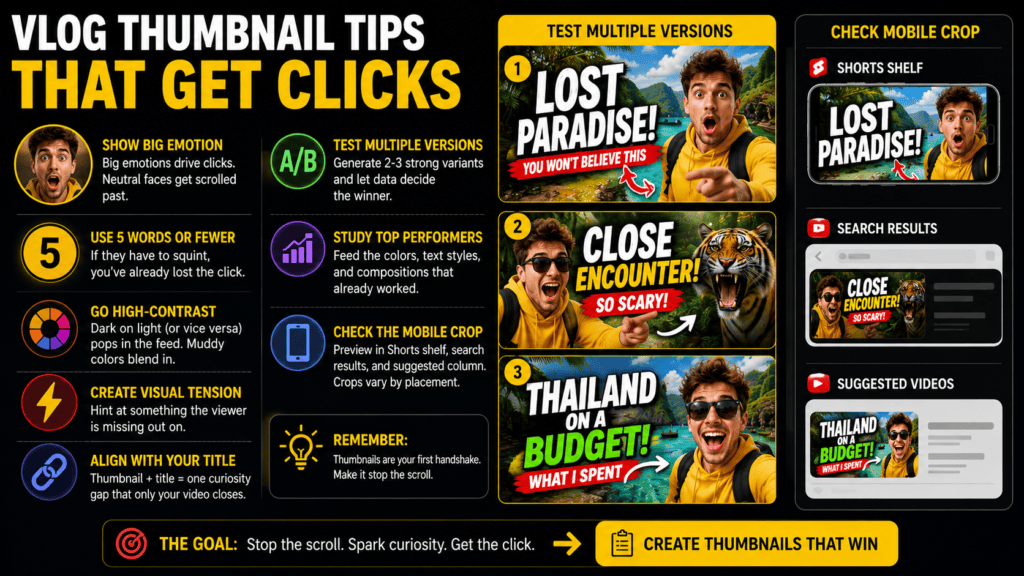
- Show your face with an expressive emotion. Curiosity, shock, excitement, joy — big emotions drive clicks. Neutral faces get scrolled past.
- Use 5 words or fewer for text overlays. Mobile screens are small; if someone has to squint, you’ve already lost the click.
- Go high-contrast. Dark subjects on light backgrounds (or vice versa) pop in the feed. Muddy colors blend in.
- Create visual tension. The thumbnail should hint at something the viewer is missing out on.
- Align your thumbnail with your title. They should work as one curiosity gap that only the video closes.
- Test multiple versions. Generate 2-3 strong variants and let A/B data decide the winner.
- Study your top-performing videos. Feed the colors, text styles, and compositions that already worked back into your prompts.
- Check the mobile crop. Preview how your thumbnail renders in the Shorts shelf, search results, and suggested-videos column — cropping varies by placement, and what reads clearly on desktop can lose detail on mobile.
FAQ
What is an AI thumbnail maker for vlogs? A tool that uses AI to generate click-optimized thumbnail designs for YouTube vlogs. You input your video details, and the AI produces designs trained on real performance data — color psychology, text placement, emotional triggers — in seconds. Tools like ytZolo also connect the thumbnail to AI-generated titles and tags for a cohesive strategy.
Is ytZolo free to use for vlog thumbnails? Yes, there’s a free plan with limited monthly credits and no credit card required. Paid tiers unlock more credits and additional tools for scripts, titles, and SEO. Check the pricing page for current numbers.
Can AI-generated thumbnails actually improve my YouTube views? Custom thumbnails are strongly associated with better-performing videos, and a higher CTR can prompt YouTube to surface your video to more viewers. Reported CTR improvements after switching to AI-generated designs commonly range from roughly 30–150%, though individual results vary by niche and baseline.
How is ytZolo different from using Canva for vlog thumbnails? Canva is general-purpose and doesn’t predict CTR or understand YouTube-specific conventions. ytZolo is built specifically for YouTube creators and integrates thumbnail design with title, tags, and description.
What image size and format does YouTube require for thumbnails? 1280×720px (16:9), under 2MB, in JPG, PNG, or non-animated GIF format. A good AI thumbnail maker exports in these specs automatically.
How many thumbnail variations can ytZolo generate at once? It generates multiple variations per input, with the exact count depending on your plan tier — free tiers are typically limited, paid tiers unlock more variants per generation.
Conclusion: Stop Losing Views to Bad Thumbnails
Your content deserves to be seen. You pour hours into filming, editing, and storytelling — don’t let a weak thumbnail bury that work in the feed.
The smartest vloggers in 2026 aren’t spending 3 hours in Photoshop anymore. They’re using an AI thumbnail maker built for their niche, checking real specs, staying visually consistent across uploads, and letting CTR data — not guesswork — decide the winner.
ytZolo isn’t just a thumbnail tool — it’s a connected system for thumbnails, titles, scripts, descriptions, and tags.
Start creating smarter, faster, and more viral YouTube content with ytZolo today.


Pingback: Best YouTube Thumbnail Maker AI Free Tools 2026
Pingback: Best YouTube AI Thumbnail Creator to Boost Your CTR 2026
Pingback: Free AI YouTube Thumbnail Maker: 11 Best Tools Compared