
Table of Contents
1. Why Your Thumbnail Is the Most Powerful Part of Your Video
Picture this.
You just spent 8 hours filming, editing, and uploading a YouTube video. The content is gold. The audio is crisp. The editing is clean.
You hit publish — and nothing happens.
No clicks. No views. No growth.
Here’s the brutal truth most creators ignore: your thumbnail decides everything before the first second of your video plays.
According to YouTube’s own Creator Academy, 90% of the best-performing videos on YouTube use custom thumbnails. That’s not a coincidence. That’s strategy.
In 2026, a good YouTube click-through rate (CTR) falls between 4% and 6% for most channels — and anything above 7% is considered exceptional. Hitting 10%+ is viral territory. But here’s what most creators don’t realize: the single biggest lever you have to improve CTR is your thumbnail.
Not your content quality. Not your editing. Your thumbnail.
And right now, the fastest and smartest way to create a thumbnail for YouTube AI tools exist to handle it for you — in seconds.
That’s exactly what this guide is about.
2. What It Means to Create a Thumbnail for YouTube AI
When people search for how to create a thumbnail for YouTube AI, they’re looking for one thing: a faster, smarter way to design thumbnails that actually get clicked.
AI thumbnail creation uses machine learning models trained on millions of high-performing YouTube videos. The AI understands what visual patterns, color combinations, text placements, and emotional triggers drive real clicks in specific niches.
It’s not just generating a random image. It’s engineering a click.
The best AI tools for creating YouTube thumbnails analyze things like:
- Color psychology — which colors stop the scroll in your niche
- Facial expressions — high-contrast emotional faces consistently outperform static shots
- Text placement — where bold text lives on screen and how readable it is on mobile
- Niche trends — what’s working right now for channels similar to yours
- CTR data — actual performance patterns from high-ranking videos
If you want to understand how AI is transforming content workflows beyond thumbnails, this guide breaks it down.
When you create a thumbnail for YouTube AI, you’re not guessing. You’re making data-backed design decisions — automatically.

3. Why Creators Struggle Without AI Thumbnail Tools
Let’s be real. Thumbnail design is one of the most frustrating parts of being a YouTuber.
You open Canva. You stare at a blank canvas for 20 minutes. You try six different layouts, none of which feel right. You upload something that looks decent — and your CTR sits at 1.8%.
Sound familiar?
Here’s why so many creators hit this wall:
- Design is a skill. Most creators are video producers, not graphic designers. Expecting yourself to master color theory, typography, and visual hierarchy on top of everything else is unrealistic.
- Manual tools give you templates, not strategy. Canva and similar tools are great for design — but they have zero understanding of what makes a YouTube thumbnail actually perform.
- Guessing costs you growth. Every week you spend uploading poorly optimized thumbnails is a week YouTube is showing your video to people who won’t click.
- 70% of YouTube traffic comes from mobile devices. On a small screen, complex or cluttered thumbnails become unreadable blurs that get scrolled past without a second look.
The creators growing fastest right now aren’t spending hours in design tools. They use AI to create thumbnails for YouTube — and they’re seeing the results.

4. How AI Actually Creates YouTube Thumbnails
Understanding how AI thumbnail creation works helps you use it better.
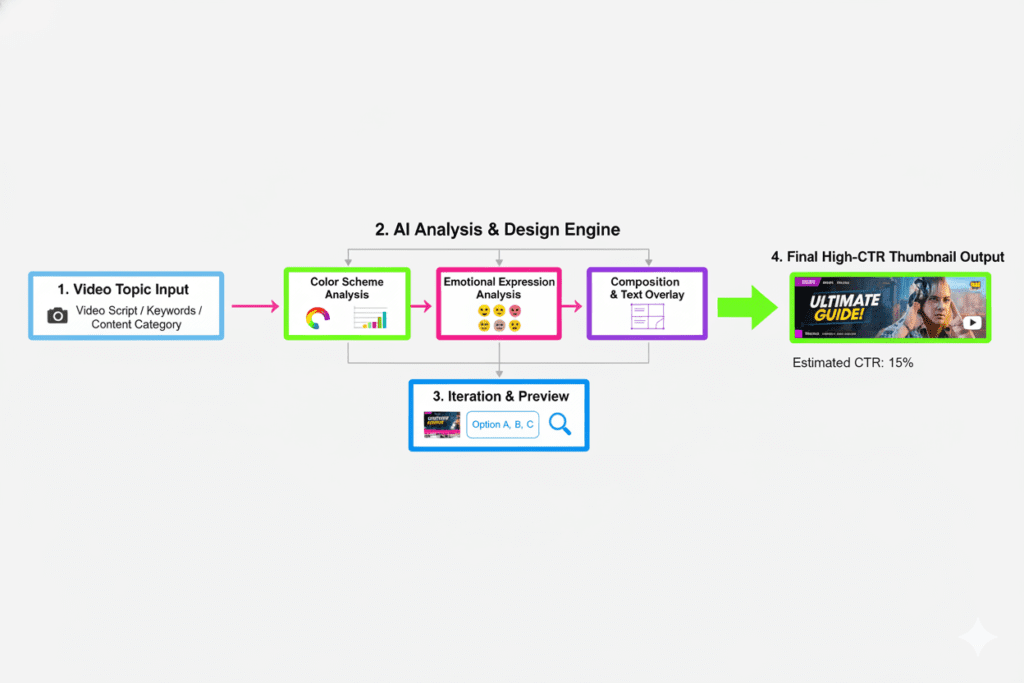
AI thumbnail tools are trained on massive datasets of YouTube thumbnails. The model learns which visual patterns correlate with high CTR, high watch time, and strong engagement — across different content categories. If you want to see how these patterns are applied in real tools, check out this guide on best AI YouTube thumbnail generators in 2026.
When you input your video topic, title, or description, the AI:
- Analyzes your niche — identifies thumbnail styles that perform in your content category
- Selects color schemes — high-contrast combinations proven to stop the scroll
- Generates layout options — placing faces, text, and visual elements for maximum impact
- Applies emotional triggers — surprise, curiosity, urgency, and excitement all increase clicks
- Optimizes for mobile — ensuring the design reads clearly at small sizes
The output isn’t just a pretty image. It’s a click-optimized visual asset built on performance data.
Tools like ytZolo take this even further by integrating thumbnail creation with your video title, tags, description, and script — so every piece of your content package works together as a unified system.
5. Step-by-Step: How to Create a Thumbnail for YouTube AI Using ytZolo
Ready to create a thumbnail for YouTube AI the right way? Here’s the exact process using ytZolo:
Step 1 — Go to ytZolo
Head over to ytzolo.com and create your free account. No credit card required to get started. The dashboard is clean, intuitive, and built specifically for YouTube creators.
Step 2 — Enter Your Video Topic or Title
Type in your video title or a brief description of what your video is about. The more specific you are, the more precisely the AI can tailor your thumbnail to your audience.
For example: “10 Mistakes New YouTubers Make in Their First 30 Days”
Step 3 — Let the AI Generate Thumbnail Options
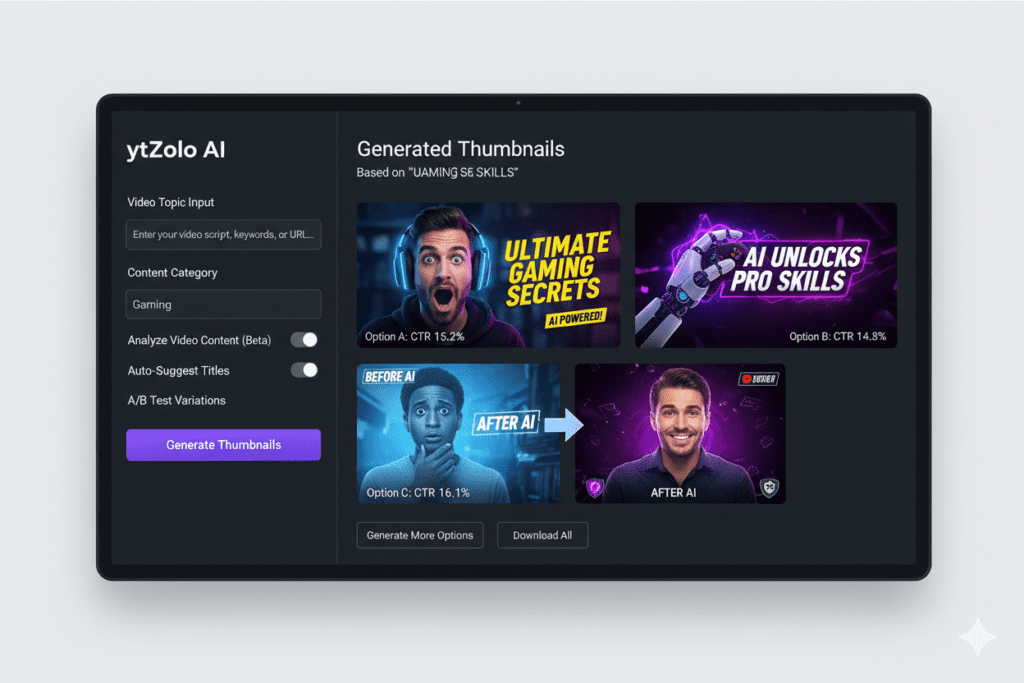
Hit generate. ytZolo’s AI engine analyzes your input, identifies high-performing thumbnail patterns in your niche, and produces multiple design variations in seconds.
You get real options — not cookie-cutter templates.
Step 4 — Review and Customize
Browse through your AI-generated thumbnail options. Make small tweaks if needed — adjust text, swap colors, reposition elements. The platform is designed to be fast and frictionless.
Step 5 — Download in YouTube-Ready Format
Download your final thumbnail in 1280×720 PNG format — the exact spec YouTube recommends. Upload directly to YouTube Studio.
Step 6 — A/B Test for Maximum CTR
Pro tip: Generate two or three thumbnail variations and use YouTube Studio’s built-in A/B testing feature. Let performance data decide which thumbnail wins — not gut feeling.
While you’re in ytZolo, let the platform also generate your video title, SEO description, and tags. Because every feature works together, your entire content package is optimized as one unified system — not disconnected pieces.
This integrated workflow is exactly what makes a difference, as explained in this guide on how AI tools create a complete YouTube content system.
6. What Makes a High-CTR AI Thumbnail
Not all thumbnails are created equal. Here’s what the data says about thumbnails that actually get clicked:
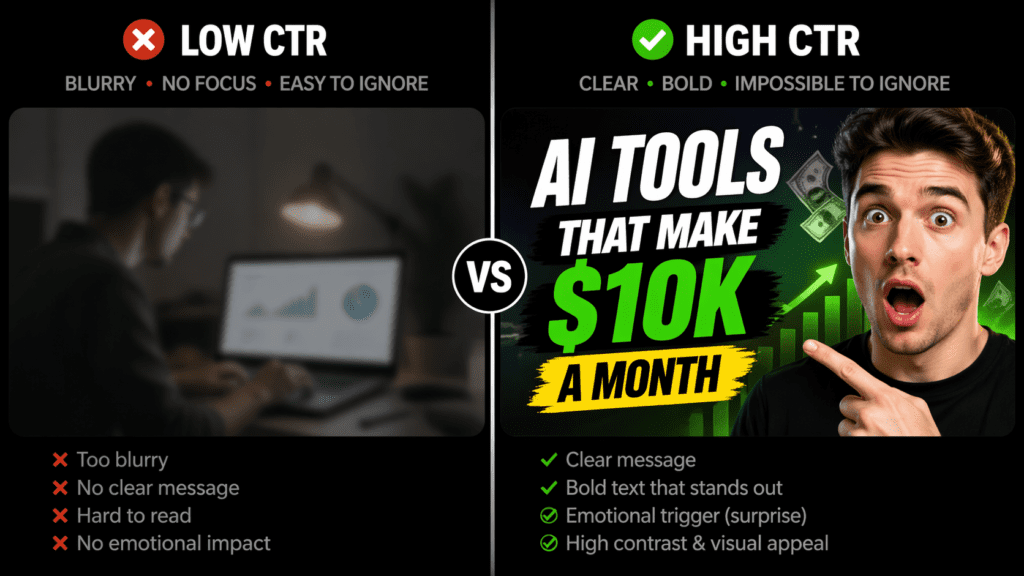
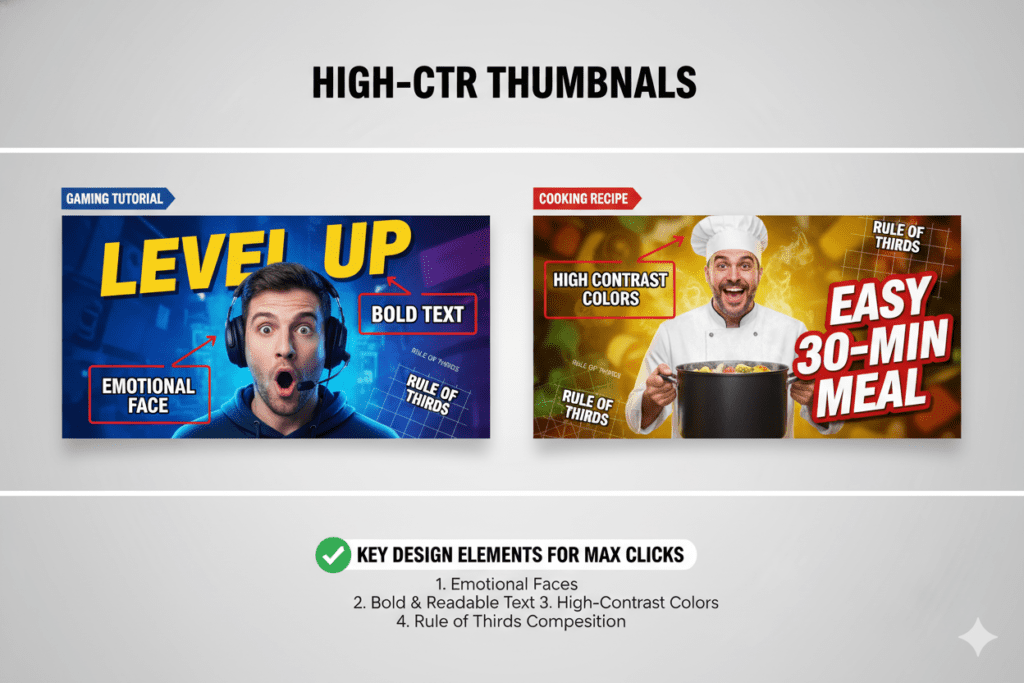
Faces and Emotions Videos with human faces generate significantly more views than those without. High-contrast facial expressions — surprise, excitement, curiosity — consistently outperform neutral shots.
Bold, Readable Text Text should be large enough to read on a phone screen at a glance. Limit yourself to 3–5 words maximum. More text = smaller text = unreadable on mobile.
High-Contrast Colors Bright, contrasting color combinations (yellow + black, red + white, blue + orange) stop the scroll. Muted or pastel palettes get lost in the feed.
The Rule of Thirds Place your focal point (your face or key visual) on one side of the frame. Leave the other side for text. This creates natural visual balance that draws the eye.
Pattern Interruption Look at what your competitors are doing — then do something different. If everyone in your niche uses red backgrounds, try deep black or electric blue. Standing out in the feed is half the battle.
Mobile-First Thinking Since 70% of YouTube traffic is on mobile, your thumbnail needs to look great at 120×90 pixels. Simple, bold, clear. Complex designs become blurry noise at small sizes.
AI tools trained on YouTube performance data — like ytZolo — automatically apply all of these principles when you create a thumbnail for YouTube AI.
7. Why ytZolo Is Better Than Other Thumbnail Tools
There are plenty of tools out there. So why are serious creators choosing ytZolo?
Let’s break it down:
ytZolo vs. Canva
Canva is a design tool. It gives you templates and drag-and-drop capabilities — but there’s zero AI strategy behind what makes a thumbnail convert on YouTube. You’re still relying entirely on your own design instincts and trial and error.
ytZolo is a growth-first AI platform. Every feature is built from the ground up with one goal: helping your videos reach more people and get more clicks.
ytZolo vs. Generic AI Image Tools (Midjourney, DALL-E)
Generic AI image generators can create beautiful visuals — but they’re not designed around YouTube CTR, video metadata, or creator workflow. You’d still need to add text, format it correctly, and guess whether the image will actually perform.
ytZolo creates thumbnails that are engineered for clicks — not just aesthetically pleasing.
ytZolo vs. TubeBuddy and VidIQ
TubeBuddy and VidIQ are analytics-first tools with some content features added on. They’re valuable for data — but they don’t write your scripts, generate your titles, or build your entire video metadata package in seconds.
ytZolo is a creation-first AI platform that also understands discoverability. It combines thumbnail creation with AI-powered titles, scripts, descriptions, and tags in one seamless workflow.
ytZolo vs. Standalone Thumbnail Generators
Single-purpose thumbnail tools only solve one problem. ytZolo solves your entire content workflow. Your title informs your thumbnail. Your tags reinforce your description. Your script is built to maximize watch time. It’s a complete growth engine — not just a generator.
When you create a thumbnail for YouTube AI using ytZolo, you’re not just getting an image. You’re getting an optimized content package designed to help your video rank, get clicked, and grow your channel.
This is possible because ytZolo connects every part of your content workflow, as explained in this guide on AI tools for YouTube growth and optimization.
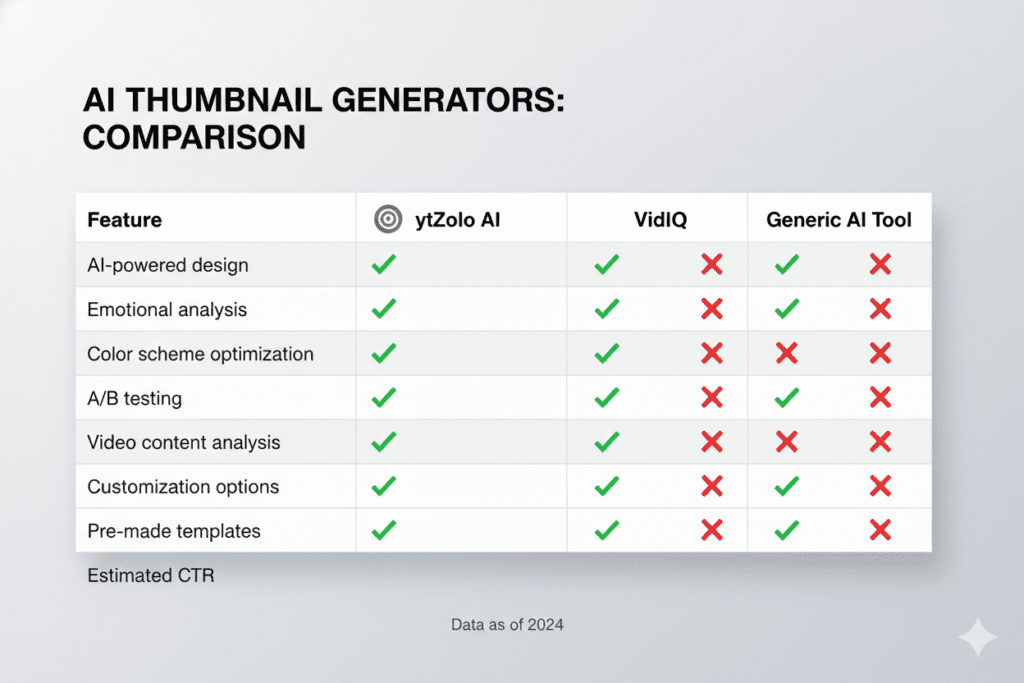
| Feature | ytZolo | Canva | VidIQ | Generic AI |
|---|---|---|---|---|
| AI Thumbnail Generation | ✅ | ❌ | ❌ | Partial |
| YouTube CTR Optimization | ✅ | ❌ | Partial | ❌ |
| AI Title Generator | ✅ | ❌ | Partial | Partial |
| AI Script Writing | ✅ | ❌ | ❌ | Partial |
| SEO Tags & Descriptions | ✅ | ❌ | ✅ | ❌ |
| All-in-One Dashboard | ✅ | ❌ | Partial | ❌ |
| Built for YouTube Growth | ✅ | ❌ | Partial | ❌ |
8. Manual Thumbnail Methods Are Costing You Growth
Every week you spend designing thumbnails manually is a week your competitors are pulling ahead.
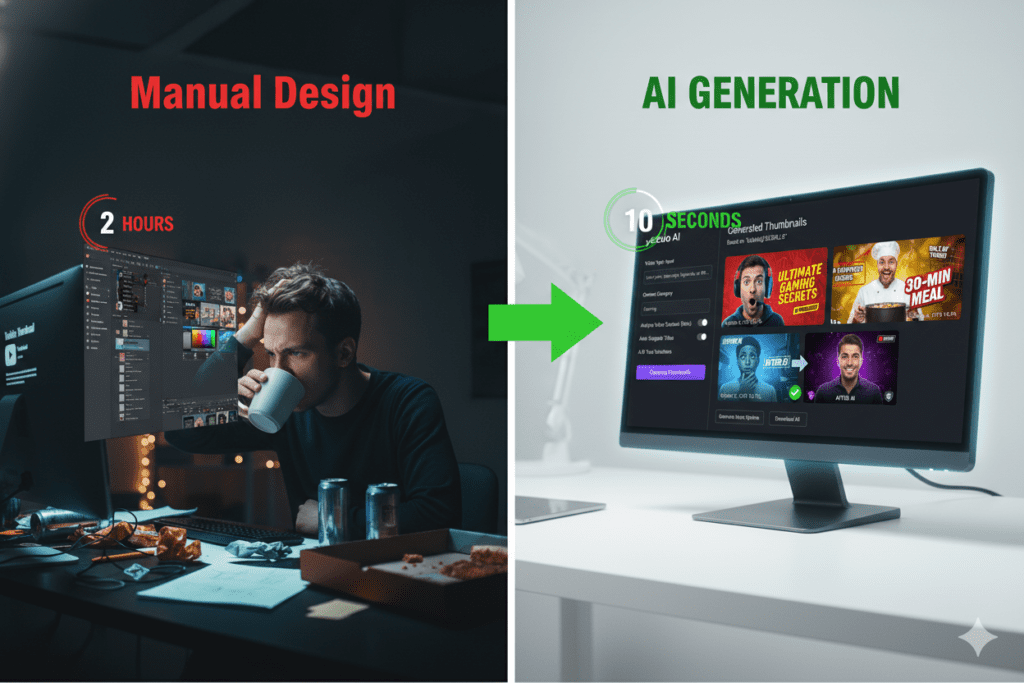
Think about the math. If you’re spending 2–3 hours per video on thumbnail design, and you upload twice a week, that’s 4–6 hours every week spent on a single asset — one that AI can produce in under a minute.
That’s 200+ hours per year you could be spending on better content, more uploads, or growing your channel strategy.
And the performance difference is real. Creators who move from manual thumbnail design to AI-generated thumbnails consistently report:
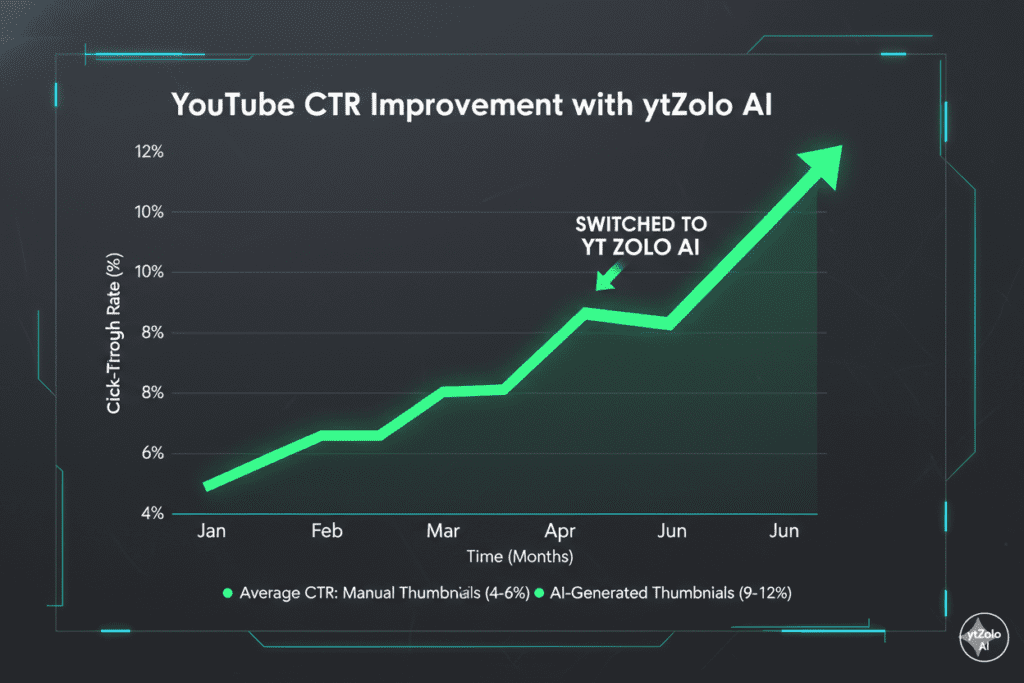
- CTR improvements of 20–40% within the first few videos
- 2–3 hours saved per video in the content production process
- Faster channel growth because more clicks signal more impressions from YouTube’s algorithm
Manual methods aren’t just slow. They’re strategically outdated.
In 2026, over 1 million YouTube channels were using AI creation tools every single day, according to YouTube CEO Neal Mohan’s January 2026 annual letter. The creators not using AI aren’t just falling behind on speed — they’re falling behind on results.
The question isn’t whether to use AI to create thumbnails for YouTube. The question is which tool will give you the biggest edge.
The answer serious creators keep coming back to is ytZolo.
For deeper creator growth strategies, check out the ytZolo blog — packed with tutorials, tips, and real-world case studies.
9. Real Results: What Happens When You Use AI Thumbnails
The numbers are clear.
YouTube’s algorithm weighs CTR heavily as an early signal. When your video gets high CTR in its first 48 hours, YouTube interprets it as a signal that the content is valuable — and starts pushing it to a wider audience. It’s a snowball effect.
A strong thumbnail doesn’t just get you clicks. It gets you algorithmic momentum.
Here’s what the data shows across channels using AI thumbnail generation:
- Channels that move to AI thumbnails see an average of 15–40% CTR improvement from A/B testing alone
- Gaming channels — which have the highest thumbnail optimization culture — achieve organic CTRs of up to 8.5%, far above the platform average
- In 2026, YouTube introduced “Quality CTR” as an algorithm factor — meaning both your click rate and your early watch time now determine whether your video gets pushed wider
According to research highlighted in Ahrefs’ content marketing guides, YouTube videos that are properly optimized — including thumbnails aligned with search intent — get significantly more organic traffic than unoptimized content.
The bottom line: when you consistently create thumbnails for YouTube AI, you’re stacking the algorithm in your favor — video after video.
10. FAQ: Create A Thumbnail for YouTube AI
❓ Can YouTube detect if my thumbnail was made with AI?
No. YouTube does not have a detection system for AI-generated thumbnails, and there are no platform policies against using AI to create thumbnails for YouTube. AI thumbnails are fully compliant with YouTube’s Terms of Service you can review them here.
❓ What size should a YouTube AI thumbnail be?
The ideal YouTube thumbnail size is 1280×720 pixels with a 16:9 aspect ratio. This ensures your thumbnail looks sharp and clear on all devices. The best AI tools, including ytZolo, automatically produce thumbnails in this exact format.
❓ How do I create a thumbnail for YouTube AI without design experience?
Tools like ytZolo are specifically built for creators without design skills. You simply enter your video topic or title, let the AI generate multiple thumbnail options, and choose the one that fits your brand. No Photoshop, no Canva skills, no design experience required.
❓ Do AI thumbnails actually improve CTR?
Yes — consistently. Creators who switch from manual design to AI-generated thumbnails report CTR improvements of 20–40% within the first few uploads. This is because AI applies data-backed principles — color psychology, emotional expression, mobile optimization — that manual design often misses.
❓ Is ytZolo free to use?
ytZolo offers a free plan to get started — no credit card required. You can create and export AI thumbnails immediately. Premium plans unlock more advanced features, higher output volumes, and access to the full suite of AI tools for scripts, titles, tags, and descriptions. Visit ytzolo.com to explore current plans.
Conclusion: Stop Guessing. Start Growing.
Your thumbnail is the difference between a video that grows your channel and one that disappears into the void.
In 2026, the smartest creators aren’t spending hours in Canva hoping for the best. They create thumbnails for YouTube AI tools that understand what makes people click — and they’re building channels faster because of it.
The formula is simple:
- Better thumbnails → Higher CTR
- Higher CTR → More algorithmic reach
- More reach → Faster channel growth
And the fastest path to better thumbnails is ytZolo — the all-in-one AI platform built for YouTube creators who are serious about growth. From viral thumbnails to click-worthy titles, SEO-optimized descriptions, and strategic tags, ytZolo gives you everything you need to compete at the highest level.
Not someday. Today.
Start creating smarter, faster, and more viral YouTube content with ytZolo today.
👉 Try ytZolo Free — No Credit Card Required
For more creator strategies, growth tips, and AI tool guides, visit the ytZolo blog.
External Resources:

