
Quick Answer
Neither tool wins outright. ytZolo is purpose-built for YouTube pre-production—thumbnails, titles, scripts, descriptions, and tags inside a single dashboard. ChatGPT is a flexible general-purpose AI that handles scripts and strategy prompts extremely well but requires you to build your own YouTube workflow from scratch. The better choice depends entirely on whether you want a ready-made YouTube system or a customizable AI foundation.
Introduction
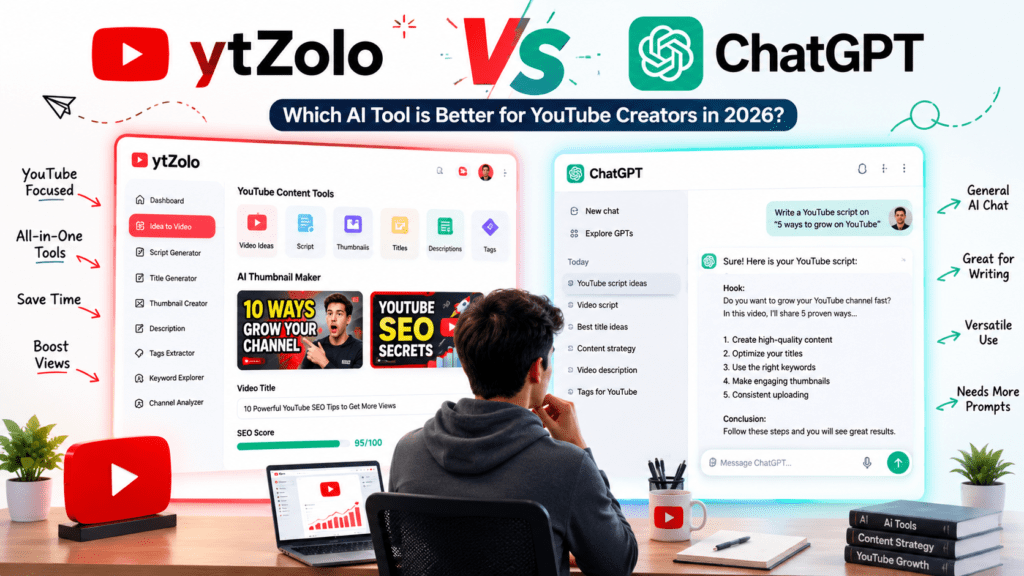
If you’re a YouTube creator comparing tools in 2026, you’ve almost certainly landed on the ytZolo vs ChatGPT debate. They’re different in design philosophy, pricing, and who they’re built for—yet creators often treat them as direct replacements for each other.
This article breaks down both tools across every dimension that matters for a YouTube content creation AI workflow: script quality, thumbnail generation, YouTube SEO, keyword research, pricing, ease of use, and scalability. Whether you’re a solo creator trying to reduce your upload workload, an agency running multiple channels, or someone building a faceless YouTube channel with AI, this comparison will help you make a clearer decision.
One thing worth noting upfront: the sources below reflect product features and pricing as of June 2026. Pricing and feature sets for both tools change frequently—always verify on the official product pages before committing.
Table of Contents
Why This Comparison Matters in 2026
The scale of AI adoption on YouTube has shifted the competitive baseline. More than 1 million YouTube channels were using AI creation tools daily as of December 2025, according to YouTube’s own annual letter from CEO Neal Mohan. That means creators who aren’t using AI YouTube automation tools are increasingly competing against ones who are.
The two tools creators most commonly evaluate are ChatGPT—because most people already have an account—and ytZolo—because it’s one of the first platforms built specifically around the YouTube workflow. The comparison is natural, but the tools aren’t built for the same job.
Understanding the difference saves you time and money. It also helps you understand whether you need one, the other, or both working together in your YouTube AI workflow.
How We Evaluated Both Tools
To give this comparison real grounding, we assessed both platforms across the following criteria:
- AI output quality – script structure, keyword integration, hook writing
- YouTube-specific features – title generation, description generation, tag generation, thumbnail creation
- YouTube SEO AI capabilities – keyword research, optimization for click-through rate and watch time
- Workflow automation – how many steps the tool handles without switching platforms
- Ease of use – setup time, interface clarity, learning curve
- Prompt customization – flexibility to adjust tone, format, and niche
- Pricing – free plan generosity, value of paid tiers
- Collaboration – support for teams and agencies
- Export options – download formats, resolution, watermarks
- Scalability – how well each tool handles growing content volume
We also reviewed community feedback from Reddit threads, product documentation, and third-party review platforms including AI tool directories to supplement observations.
Quick Comparison Table
| Feature | ytZolo | ChatGPT |
|---|---|---|
| Primary purpose | YouTube content studio | General-purpose AI assistant |
| Best for | YouTube creators, agencies | Writers, developers, researchers, creators |
| Script writing | Yes (hook + body + CTA) | Yes (highly flexible) |
| Thumbnail creation | Yes (AI-generated, HD) | No (image generation limited to DALL-E) |
| Title generation | Yes (YouTube-optimized) | Yes (with custom prompts) |
| Description generation | Yes (SEO-formatted) | Yes (manual formatting required) |
| Tag generation | Yes | Yes (with prompting) |
| YouTube SEO AI | Built-in | Requires manual prompt engineering |
| Keyword research | Basic built-in | Requires external tools |
| Workflow automation | High (all-in-one) | Low (requires setup per task) |
| Prompt customization | Moderate | Very high |
| Learning curve | Low | Moderate to high (for YouTube use) |
| Collaboration | Basic (history library) | Limited on individual plans |
| Free plan | Yes (limited credits) | Yes (limited messages, includes ads) |
| Starting paid price | ~$6.70/month (annual) | $8/month (Go) / $20/month (Plus) |
| Multi-model access | GPT-4, Claude, Gemini | GPT models only |
| Ideal for beginners | Yes | Moderate |
Note: Pricing details are accurate as of June 2026 but are subject to change. Verify on official product pages before purchasing.
What is ytZolo?
ytZolo is an all-in-one AI content studio built specifically for YouTube creators. It aggregates multiple large language models—including GPT-4, Claude, and Gemini—alongside an image generation engine to handle the most time-consuming parts of video pre-production.
The platform was designed around one insight: the creative part of YouTube (filming and editing) is only a fraction of the actual work. The AI YouTube assistant side of the workflow—researching keywords, writing titles, generating thumbnails, drafting descriptions, and building scripts—often takes as long or longer than the video itself. ytZolo is built to compress that entire pipeline.
Core Features
AI Thumbnail Generator – Generates multiple high-CTR thumbnail variations from a text description. No design tools required. Exports at full HD resolution with no watermarks.
Viral Script Generator – Creates hooks, body content, and calls to action for any video length. Scripts are structured for retention, with attention to the first 30 seconds, which directly affects YouTube’s watch time metrics.
SEO Optimizer – Generates titles, descriptions, and tags optimized for YouTube search. The description output includes keyword placement in the opening lines and semantic layering throughout.
Multi-model flexibility – Users can switch between AI models depending on the task—choosing a more creative model for scripts and a more structured model for descriptions, for example.
Batch mode and history library – Generate multiple content assets in sequence and access previous outputs for iteration or reuse.
Who ytZolo is Built For
- Solo creators who publish consistently and need to reduce pre-production time
- Agencies managing multiple YouTube channels needing a standardized workflow
- Niche channels that want to test multiple content angles before filming
- Educational creators, online coaches, and businesses investing in YouTube content marketing
Strengths
- Covers the complete YouTube pre-production stack in one place
- YouTube-native outputs (not generic text that needs reformatting)
- No design skills required for thumbnails
- Multiple AI models in one subscription
- Low learning curve for beginners
Weaknesses
- Limited keyword research depth compared to dedicated YouTube SEO tools like TubeBuddy or VidIQ
- Credit-based system means heavy usage requires plan monitoring
- Language support is optimized for English, though underlying models support other languages
- No video editing capabilities (it’s a pre-production tool only)
What is ChatGPT?
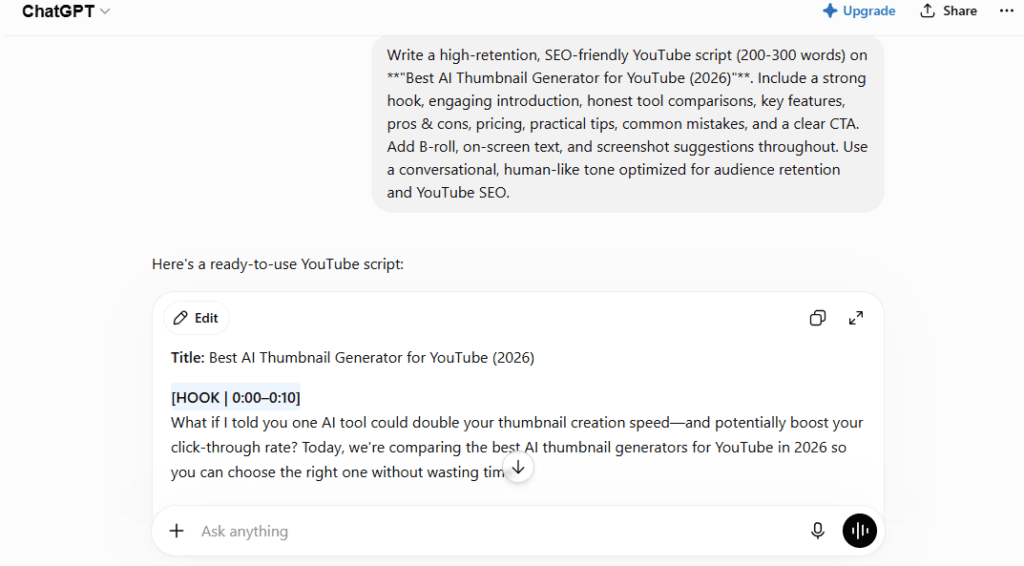
ChatGPT is OpenAI’s conversational AI assistant, and in 2026 it’s one of the most widely used AI tools in the world, with over 900 million weekly users across all plans. It’s a general-purpose language model capable of handling text, code, image interpretation, audio, and more.
For YouTube creators, ChatGPT functions as a highly flexible AI script generator, brainstorming partner, and content strategy assistant. Its strength is adaptability—with the right prompting, it can produce almost anything a creator needs. Its limitation is that “almost anything” requires the creator to know what to ask for and how to ask it.
Capabilities Relevant to YouTube Creators
- Writing long-form video scripts with structured hooks and retention patterns
- Generating YouTube title ideas, descriptions, and tag lists
- Brainstorming video concepts and content calendars
- Conducting basic competitive research and topic analysis
- Writing YouTube SEO-friendly video descriptions with keyword integration
- Custom GPTs and saved prompts for repeatable workflows
Limitations for YouTube Use
- No built-in thumbnail generation (image output is via DALL-E and is not YouTube-optimized)
- No native YouTube keyword research or analytics integration
- Requires significant prompt engineering to get YouTube-formatted outputs
- Outputs need manual reformatting to match YouTube metadata requirements
- No batch generation or history library for multi-video workflows
ChatGPT Plans in 2026
ChatGPT now offers seven pricing tiers. The relevant ones for individual creators are:
- Free – GPT-5.3 access, limited messages, includes ads in the US as of February 2026
- Go – $8/month, more messages, still includes ads, missing advanced features like Sora and Deep Research
- Plus – $20/month, full model suite including GPT-5.5, Deep Research (10 runs/month), Sora, ad-free
- Pro $100 – $100/month, launched April 9, 2026, GPT-5.5 Pro, 5x Plus usage limits
- Pro $200 – $200/month, maximum capability and usage for power users
For most YouTube creators using ChatGPT as an AI YouTube assistant, the Plus plan at $20/month is the practical entry point for professional use.
Feature-by-Feature Comparison
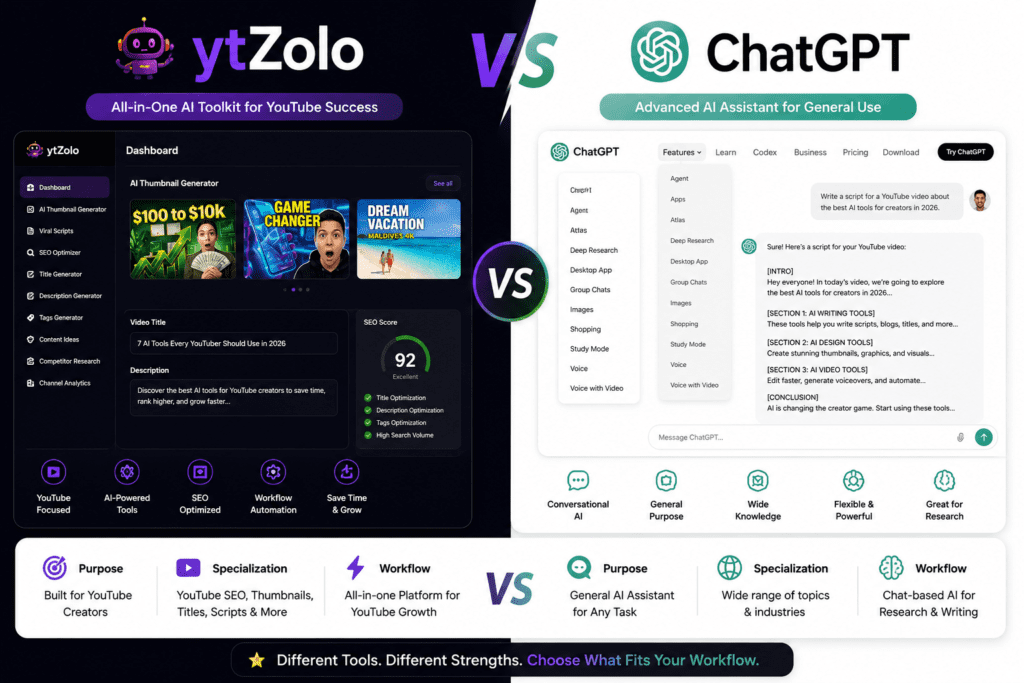
Script Writing
Both tools generate video scripts. The difference is in how much setup that requires.
In ytZolo, you enter your topic, select your niche and video type, and receive a structured script with a hook, body, and CTA in under 60 seconds—according to user feedback from the platform’s community. The script is formatted for YouTube: retention-aware, paced for camera delivery, and built around the first 30 seconds where watch time is most fragile.
In ChatGPT, the output quality depends almost entirely on your prompt. A creator who invests time in prompt engineering—specifying video structure, hook types, audience, pacing, tone, and SEO keywords—can produce scripts that are arguably more customized than ytZolo’s outputs. The ceiling is higher. But the floor is lower, and getting to that ceiling requires knowledge and practice.
For experienced creators with strong AI prompting skills, ChatGPT as an AI script generator can match ytZolo’s output quality. For newer creators or anyone who wants consistent results without expertise, ytZolo’s structured approach wins for YouTube video script generation.
Winner for beginners: ytZolo | Winner for power users: ChatGPT (with skilled prompting)
Thumbnail Workflow
This is the clearest category difference in the comparison.
ytZolo generates AI thumbnails directly from a text description. Multiple high-resolution variants come out in one generation—ready to download with no watermark, no design software, and no additional tools. The outputs are tuned for click-through mechanics: high contrast, emotional expression, text placement, and niche-specific visual patterns.
ChatGPT does not have a native thumbnail generator built for YouTube. You can use DALL-E (integrated into Plus and above) to generate images, but the outputs are general-purpose AI images, not thumbnail-optimized visuals. You’d still need Canva or a similar tool to resize, add text, and format them correctly for YouTube.
If thumbnails are part of your YouTube content creation AI workflow—and they should be, given that YouTube’s Creator Academy confirms 90% of top-performing videos use custom thumbnails—ytZolo has a significant practical advantage here.
Winner: ytZolo
SEO Optimization
YouTube SEO AI is where workflow design matters most.
ytZolo’s SEO optimizer generates titles, descriptions, and tags together as a set—which reflects how YouTube actually indexes content. Descriptions include keyword placement in the opening lines and semantic layering throughout. Titles are generated with CTR mechanics in mind, not just keyword density.
ChatGPT can do all of this, but each output requires a separate prompt unless you’ve built a custom GPT or saved prompt chain. There’s no automatic connection between the title, description, and tags—you build that relationship manually.
For creators who want YouTube SEO handled as part of a unified AI YouTube automation workflow, ytZolo’s approach is more practical. For creators who prefer to control every aspect of their SEO strategy and integrate it with external tools like TubeBuddy or VidIQ, ChatGPT’s flexibility gives more room to maneuver.
Winner: ytZolo (for workflow integration) | Depends on workflow (for advanced SEO control)
Keyword Research for YouTube
Neither tool is a dedicated YouTube keyword research platform—that space belongs to VidIQ, TubeBuddy, and tools like Ahrefs’ YouTube keyword functionality.
ytZolo includes basic keyword guidance built into its SEO optimizer. It surfaces keyword suggestions during description and title generation, which is useful for typical creator workflows but doesn’t replace dedicated research tools.
ChatGPT can discuss keyword strategy, help you identify semantic clusters around a topic, and brainstorm search intent variations. With web search enabled (available on Plus and above), it can pull some current trend data. But it cannot access YouTube-specific search volume data, competition scores, or algorithm trend signals.
For serious YouTube keyword research, both tools benefit from being paired with a dedicated tool. On that level playing field, ChatGPT’s conversational approach to keyword brainstorming can be more exploratory and flexible.
Winner: Depends on your workflow | Pair either tool with VidIQ or TubeBuddy for complete YouTube keyword research
Title Generation
ytZolo generates YouTube-optimized titles by default—they’re built for the algorithm, not just the topic. The generation considers CTR, keyword placement, and what’s working in the niche.
ChatGPT generates titles that are often well-written but require you to specify that they should be optimized for YouTube, click-worthy, front-load the primary keyword, and sit within a character count range. Without that specificity, the outputs can be generic.
With a well-crafted prompt, ChatGPT’s AI title generator output can match or exceed ytZolo’s. Without one, ytZolo reliably produces YouTube-native title options faster.
Winner: ytZolo (for speed) | ChatGPT (for maximum customization)
🔗 Related: [viral youtube title generator] and [youtube seo title generator free] — title generation across different platforms
Description Generation
Similar pattern to titles. ytZolo generates YouTube descriptions that include keyword placement in the first 25 words, semantic layering throughout the body, and a structure that serves both the algorithm and the viewer.
ChatGPT can produce descriptions with all the same qualities—but requires prompting that specifies YouTube description structure, keyword usage, character limits, and the creator’s tone. Creators who’ve built saved prompts for this task find ChatGPT extremely efficient here.
Winner: ytZolo (out of the box) | ChatGPT (with saved prompts)
Tag Generation
ytZolo generates a tag set alongside titles and descriptions in the same workflow step. Tags are contextually connected to the other metadata elements—not generated in isolation.
ChatGPT generates tag lists when asked. The quality is good, but tags aren’t connected to the rest of the metadata generation unless you manage that relationship explicitly in your prompt.
Winner: ytZolo (for integrated tag generation) | Tie (for output quality with good prompting)
🔗 Related: [video tag generator for youtube free] — tag generation tools and how to use them effectively
Content Planning
This is an area where ChatGPT for YouTube use has a genuine edge. The conversational format of ChatGPT makes it excellent for brainstorming content calendars, researching what’s trending in a niche, analyzing competitor positioning, and building a strategic content roadmap.
ytZolo is optimized for generating assets for videos you’ve already decided to make—not for helping you decide what to make in the first place.
For creators who need help at the ideation and planning stage of their YouTube creator tools workflow, ChatGPT is more useful here.
Winner: ChatGPT
Workflow Automation
ytZolo’s all-in-one approach means a creator can go from topic to script to title to description to thumbnail inside one platform without switching tabs. That’s meaningful time savings for creators publishing consistently. Users report saving 10 or more hours per week compared to building the same workflow manually across separate tools.
ChatGPT requires you to build your own YouTube AI workflow. This can be done effectively with Custom GPTs and saved prompt libraries, but it takes setup time and ongoing maintenance. The upside is flexibility; the downside is friction for creators who just want to upload.
Winner: ytZolo
Prompt Customization
ChatGPT wins this category by a wide margin. Its Custom GPT feature, system prompts, and conversational memory give experienced users an extremely high level of control over output style, tone, format, and accuracy.
ytZolo’s customization is more limited—you can adjust some parameters like niche and video type, but the system is designed to work within defined templates. For creators who want tight control over every output, that can feel restrictive.
Winner: ChatGPT
Ease of Use
ytZolo was built for creators who aren’t AI experts. The interface is focused—you enter a topic, select options, and receive YouTube-ready outputs. The learning curve is very low.
ChatGPT’s interface is simple, but using it effectively for YouTube requires knowledge of prompt engineering, which is a real skill gap for many creators. Getting high-quality YouTube-specific outputs from ChatGPT consistently is a learned process.
Winner: ytZolo (for YouTube-specific ease of use)
AI Accuracy and Output Quality
Both platforms use strong underlying models. ytZolo draws from GPT-4, Claude, and Gemini. ChatGPT Plus and above now runs on GPT-5.5, which is currently among the most capable models available. Neither tool invents features or fabricates channel-specific data.
Where ytZolo’s outputs are more consistently accurate for YouTube is in format and structure—the outputs are already shaped for YouTube. Where ChatGPT outputs can exceed ytZolo is in nuance, narrative depth, and original thinking when prompted well.
Winner: Tie (different strengths in different areas)
Pricing
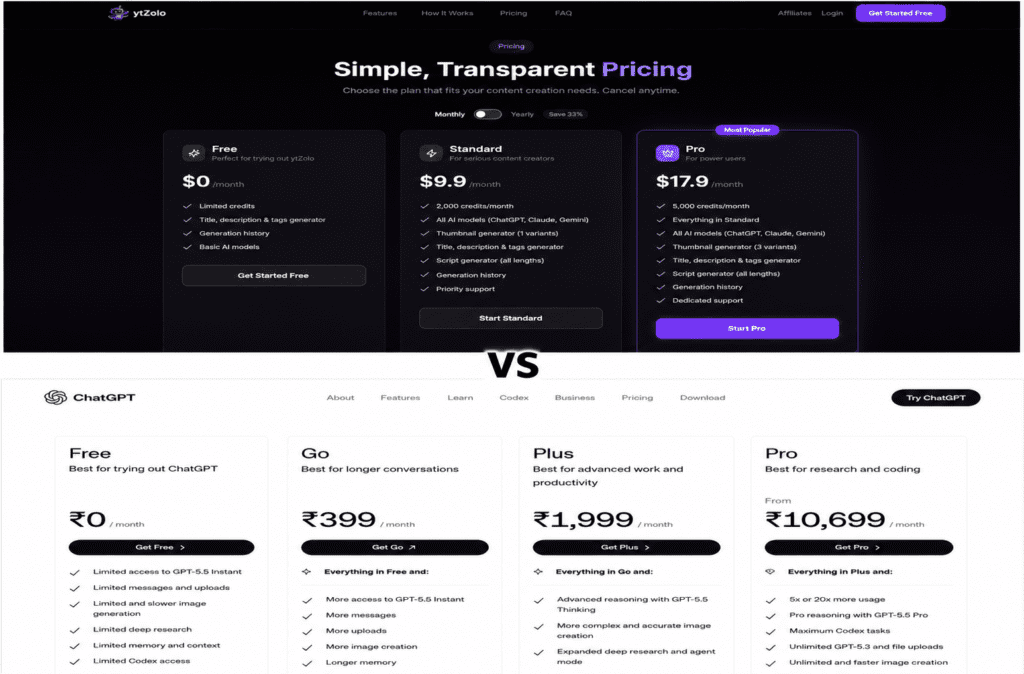
ytZolo offers three main tiers:
- Free – Limited credits. Includes title, description, and tag generation with basic AI models.
- Standard – Approximately $6.70/month billed annually ($79.90/year), or approximately $19/month billed monthly. Includes 2,000 credits/month, all AI models, thumbnail generator (1 variant), script generator, and priority support.
- Pro – Approximately $12/month billed annually ($143.90/year). Includes 5,000 credits/month, thumbnail generator (3 variants), all models, and dedicated support.
ChatGPT (as of June 2026):
- Free – $0/month (with ads in the US since February 2026), GPT-5.3 access with message caps
- Go – $8/month, more messages but includes ads, missing advanced features
- Plus – $20/month, full model suite, ad-free, Deep Research (10 runs/month), Sora access
- Pro $100 – $100/month (launched April 9, 2026), GPT-5.5 Pro, 5x Plus usage limits
- Pro $200 – $200/month, maximum usage for heavy users
- Business – $20/user/month (annual) or $25/user/month (monthly), minimum 2 users, team features and privacy controls
For most YouTube creators, the relevant comparison is ytZolo Standard (~$6.70–$19/month) vs ChatGPT Plus ($20/month). At similar price points, ytZolo includes YouTube-specific features that ChatGPT doesn’t offer natively. ChatGPT Plus includes a more powerful underlying model and broader capabilities beyond YouTube.
Winner: ytZolo (better value specifically for YouTube creators) | ChatGPT (if you need AI capabilities beyond YouTube)
Customer Support
ytZolo offers priority support on Standard plans and dedicated support on Pro plans. Community resources are available through the blog and documentation.
ChatGPT’s support model is primarily self-service at the Free and Plus levels. Business and Enterprise plans include structured support options.
Winner: ytZolo (for individual creator support) | ChatGPT (for enterprise-level teams)
Scalability
For creators scaling a single channel, ytZolo’s credit-based model scales reasonably well with the Pro plan offering 5,000 credits per month.
For agencies managing dozens of channels or creators building complex multi-platform workflows, ChatGPT’s API access and the Business/Enterprise tiers offer more structural flexibility.
Winner: Depends on the use case | ytZolo (single creator scaling) | ChatGPT (agency and enterprise scaling)
Real-World Use Cases
New YouTubers
A creator launching their first channel needs speed and clarity, not complexity. ytZolo’s low learning curve and all-in-one workflow means you can generate a complete set of video assets—script, thumbnail, title, description, tags—without learning prompt engineering. For new YouTubers, that eliminates a significant friction point. ChatGPT is valuable but requires more setup before it becomes consistent.
Better fit: ytZolo
🔗 Related: [best youtube hashtags for views] — getting the metadata right from your first upload
Professional Creators (500K+ subscribers)
Experienced creators often have established brand voices and specific content formulas. ChatGPT’s customization depth—through saved prompts, Custom GPTs, and memory features—lets professional creators build highly personalized AI systems that match their tone precisely. ytZolo’s template-driven approach can feel less flexible at this level.
Better fit: ChatGPT (or both tools together)
Agencies Managing Multiple Channels
ytZolo’s batch mode and history library simplify managing content pipelines across multiple channels. It standardizes pre-production without requiring each client to have their own ChatGPT workflow setup.
ChatGPT Business offers team workspaces and admin controls, which matter for agency compliance and collaboration.
Better fit: ytZolo (pre-production pipeline) + ChatGPT Business (team collaboration)
Faceless Channels
Faceless YouTube channels using AI to generate voiceover-ready scripts benefit significantly from ytZolo’s structured script output. The hook, body, and CTA format works directly with text-to-speech workflows. The thumbnail generator also removes the need for a face-based thumbnail strategy.
Better fit: ytZolo
🔗 Related: [ai tools for content creators] — building a full faceless channel workflow
Educational Creators
Educational channels need well-structured, accurate scripts. ChatGPT’s depth of knowledge and conversational research mode makes it excellent for educational content planning and fact-checking. ytZolo handles the formatting and metadata side efficiently.
Better fit: ChatGPT (content accuracy and depth) + ytZolo (metadata and thumbnails)
Gaming Channels
Gaming creators often post high-volume content with fast-turnaround thumbnails. ytZolo’s batch thumbnail generation and quick metadata workflow suits gaming content schedules well. ChatGPT can assist with community engagement scripts and strategy.
Better fit: ytZolo (for volume and thumbnails)
Business and Brand Channels
Brand channels need polished, on-message scripts that go through approval workflows. ChatGPT’s flexibility and integration with business tools (on Business and Enterprise plans) makes it better suited for brand YouTube strategies. ytZolo handles the SEO and thumbnail side efficiently alongside it.
Better fit: ChatGPT (script and strategy) + ytZolo (metadata and visuals)
Podcast Creators (Video Podcasts)
Podcast creators uploading to YouTube need descriptions, chapters, and titles for every episode. ytZolo’s batch mode and description generator handles this efficiently. ChatGPT can assist with show notes, guest research, and content repurposing.
Better fit: ytZolo (metadata) + ChatGPT (show notes and repurposing)
YouTube Shorts Creators
Shorts need ultra-tight hooks and optimized titles for a mobile-first audience. Both tools handle short-form scripts. ytZolo’s pre-built format for hooks works well for Shorts. ChatGPT offers more flexibility for experimental Short formats.
Better fit: ytZolo (for speed) | ChatGPT (for experimental formats)
🔗 Related: [youtube video script generator ai] — how different tools handle short-form versus long-form scripts
Can You Use ytZolo and ChatGPT Together?
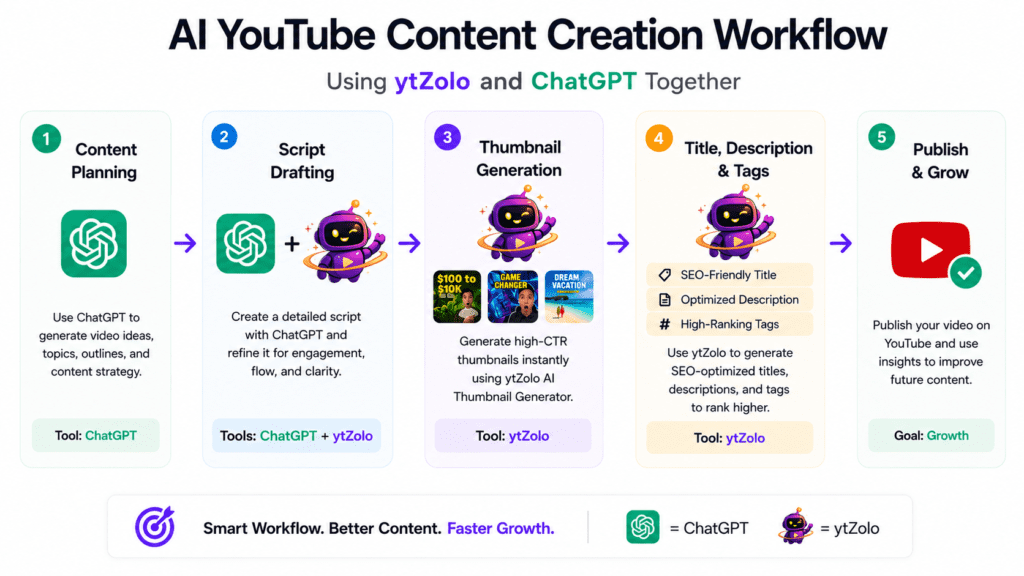
Yes, and this is a genuinely useful combination for many creators. The tools address different stages of the YouTube content creation AI workflow and complement each other rather than competing.
Here’s one example of how a combined workflow might look:
Stage 1: Content planning with ChatGPT Use ChatGPT to brainstorm 20 video ideas based on your niche, identify seasonal trends, analyze competitor gaps, and build a content calendar. ChatGPT’s conversational depth is well-suited to this exploratory phase.
Stage 2: Asset generation with ytZolo Once you’ve chosen a video topic, switch to ytZolo for the execution. Generate your script, title options, description, tags, and thumbnail variations in a single session. The platform’s YouTube-native output formatting saves reformatting time.
Stage 3: Script refinement with ChatGPT If the ytZolo script needs personalizing—adding your own stories, adjusting tone, or deepening a technical section—return to ChatGPT to refine specific sections.
Stage 4: Publish with ytZolo assets Use the ytZolo-generated title, description, tags, and thumbnail directly in YouTube Studio.
This workflow keeps ChatGPT in the high-creativity, high-flexibility role and ytZolo in the production-line role. For creators who publish frequently, this combination can be more efficient than using either tool alone.
The cost consideration: ytZolo Standard (~$6.70–$19/month) + ChatGPT Plus ($20/month) = roughly $27–$39/month combined for a complete YouTube AI workflow. That’s comparable to or less than paying separately for Canva Pro, a keyword tool, and a script assistant.
Pros and Cons
ytZolo
| Pros | Cons |
|---|---|
| All-in-one YouTube workflow | Credit limits on lower plans |
| No design skills needed for thumbnails | Less customization than ChatGPT |
| Low learning curve | Limited standalone keyword research |
| Multi-model access (GPT-4, Claude, Gemini) | Pre-production only (no editing) |
| YouTube-optimized outputs by default | English-optimized interface |
| Affordable entry-level pricing | Fewer integration options |
| Batch mode for multi-video workflows | Limited team collaboration features |
ChatGPT
| Pros | Cons |
|---|---|
| Extremely flexible and customizable | Requires prompt engineering for YouTube use |
| Most powerful models available (GPT-5.5) | No native YouTube thumbnail generation |
| Strong content planning and brainstorming | No built-in YouTube SEO workflow |
| Team and enterprise collaboration features | General outputs need YouTube formatting |
| Web search integration (Plus and above) | Free tier includes ads (February 2026) |
| API access for custom integrations | Higher cost for advanced features |
| Very broad capability beyond YouTube | Can feel overwhelming for new users |
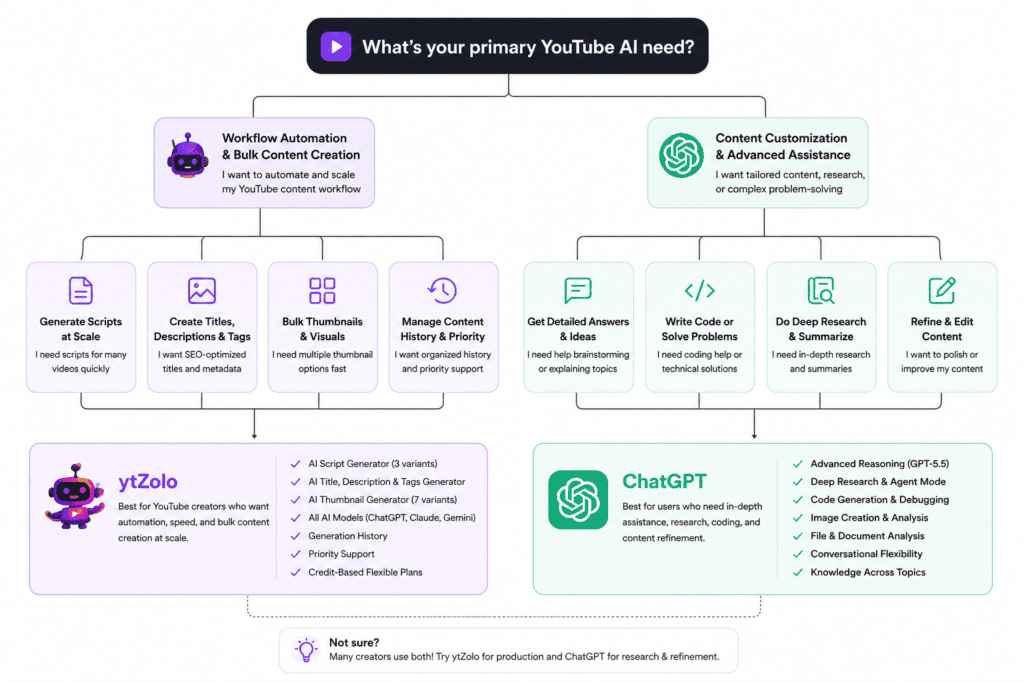
Who Should Choose ytZolo?
ytZolo is a strong fit if:
- You’re a solo creator and want a faster path from idea to published video
- You upload consistently (weekly or more) and need to reduce pre-production time
- You don’t have design experience but need professional thumbnails
- You’re running a faceless channel using AI-generated voiceover scripts
- You want AI YouTube automation without learning prompt engineering
- You’re managing a niche channel and need quick content iteration
- You’re new to AI tools and want an accessible starting point
- You want YouTube-specific outputs without manual reformatting
Skip ytZolo if you need a tool that goes beyond YouTube, or if your content strategy requires deep customization and you have the time to build it.
Who Should Choose ChatGPT?
ChatGPT is a strong fit if:
- You’re an experienced creator comfortable with prompt engineering
- You need AI support for content beyond YouTube (blog posts, social captions, email newsletters)
- You’re planning and strategizing your content calendar, not just producing assets
- You work with a team and need collaboration and shared workspace features
- Your YouTube scripts require deep research, unique angles, or high narrative complexity
- You’re running a brand channel where message accuracy and tone control matter
- You need API access to build custom tools or integrations
- You’re already a ChatGPT user and want to extend it to YouTube use
Skip ChatGPT as your primary YouTube tool if you’re a beginner who needs ready-made YouTube outputs and doesn’t have time to build prompt workflows.
🔗 Related: [chatgpt for youtube scripts] — how to use ChatGPT specifically for YouTube content
Common Mistakes When Choosing AI Tools for YouTube
Choosing based only on price The cheapest tool isn’t always the most cost-effective. A tool that saves you three hours per video is worth more than a cheaper one that still requires manual reformatting and multiple steps. Consider workflow cost, not just subscription cost.
Ignoring your actual workflow If you’re asking “which tool is better for YouTube creators?”—the real question is which tool fits your process. A creator who’s great at prompting gets more from ChatGPT. A creator who wants speed and simplicity gets more from ytZolo. Neither answer is universal.
Overlooking the learning curve ChatGPT’s learning curve for YouTube-specific use is real. Building reliable, repeatable prompt workflows takes time. Factor that time into your decision.
Using generic prompts Both tools underperform with low-effort prompts. “Write me a YouTube script about cooking” will produce mediocre results in either platform. Specific inputs produce specific, useful outputs.
Expecting AI to replace editing AI YouTube tools handle pre-production well. They don’t handle video editing, color grading, audio mixing, or the camera work that makes your content watchable. Both tools work on what happens before and after filming—not during post-production.
Treating the choice as permanent Most creators who commit to a single tool discover the limitations within a few months and eventually combine tools. Building a flexible workflow from the start is more useful than locking into one platform.
Frequently Asked Questions
Q: Is ytZolo free? Yes, ytZolo has a free plan with limited credits that includes basic title, description, and tag generation. Paid plans start at approximately $6.70/month billed annually. Verify current pricing on ytzolo.com, as plans may change.
Q: Can ChatGPT replace ytZolo for YouTube creators? ChatGPT can perform most of the same text tasks—scripts, titles, descriptions, tags. What it can’t replace is ytZolo’s integrated thumbnail generation, the all-in-one YouTube-native workflow, or the batch generation mode. For many creators, the two tools are more complementary than competitive.
Q: Does ytZolo use ChatGPT? Yes. ytZolo’s platform draws on multiple AI models including GPT-4, Claude, and Gemini. Users can switch between models depending on the task.
Q: Which AI tool is better for YouTube SEO? ytZolo has a more integrated YouTube SEO workflow that generates titles, descriptions, and tags together. ChatGPT can produce equally strong SEO content with good prompting, but requires more manual coordination. For dedicated YouTube SEO AI, pair either tool with VidIQ or TubeBuddy for keyword data.
Q: Can I use ChatGPT for YouTube thumbnails? Not directly as a YouTube thumbnail workflow. ChatGPT Plus includes DALL-E image generation, but outputs are not designed for YouTube CTR optimization and require additional formatting. ytZolo generates HD thumbnails ready to upload.
Q: Is ytZolo better than ChatGPT for beginners? For YouTube-specific tasks, yes. ytZolo’s structured interface produces YouTube-ready outputs without prompt engineering knowledge. ChatGPT has a steeper learning curve for consistent YouTube use.
Q: How much does it cost to use both ytZolo and ChatGPT? ytZolo Standard runs approximately $6.70–$19/month depending on billing cycle. ChatGPT Plus is $20/month. Combined, a dual-tool YouTube workflow can run roughly $27–$39/month—comparable to building a separate stack of individual tools.
Q: Does ChatGPT offer a free plan for YouTube creators? Yes. ChatGPT’s free tier includes access to GPT-5.3 with message limits and, as of February 2026, includes ads in the US. For consistent YouTube content creation AI use, the Plus plan at $20/month is more practical.
Q: Which tool is better for YouTube Shorts? Both handle short-form scripts. ytZolo’s formatted hook output works well for Shorts. ChatGPT offers more flexibility for testing different short-form formats and ideas.
Q: Can ytZolo generate content in languages other than English? The underlying AI models (GPT-4, Claude, Gemini) support multiple languages, but ytZolo’s interface and optimization is primarily designed for English. Results in other languages may vary.
Q: Do I need both tools? Not necessarily. ytZolo alone covers the complete YouTube pre-production workflow for most creators. ChatGPT adds value if you need content planning depth, research capability, or use AI for tasks beyond YouTube. The combination is stronger than either tool alone for high-volume or strategic creators.
Q: Does ChatGPT have a YouTube-specific mode? Not natively. You can build Custom GPTs within ChatGPT that are trained specifically for YouTube workflows, but this requires setup time and some technical familiarity.
Q: Which tool is better for agencies? ytZolo’s batch mode suits pre-production at scale. ChatGPT Business offers team collaboration, admin controls, and privacy features that matter for client-facing work. Agencies managing multiple channels often benefit from using both.
Q: Is AI-generated content allowed on YouTube? Yes, as of YouTube’s July 2025 policy update. AI content that provides genuine value to viewers is permitted. What’s prohibited is inauthentic, mass-generated spam content that doesn’t serve real viewers. Both ytZolo and ChatGPT produce content within permitted usage when used responsibly.
Q: Which tool produces better video scripts? With expert prompting, ChatGPT can produce deeper, more nuanced video scripts. ytZolo produces reliably structured scripts faster and with less setup. The best choice depends on your skill level and how much time you’re willing to invest in the scripting process.
What I Noticed While Comparing
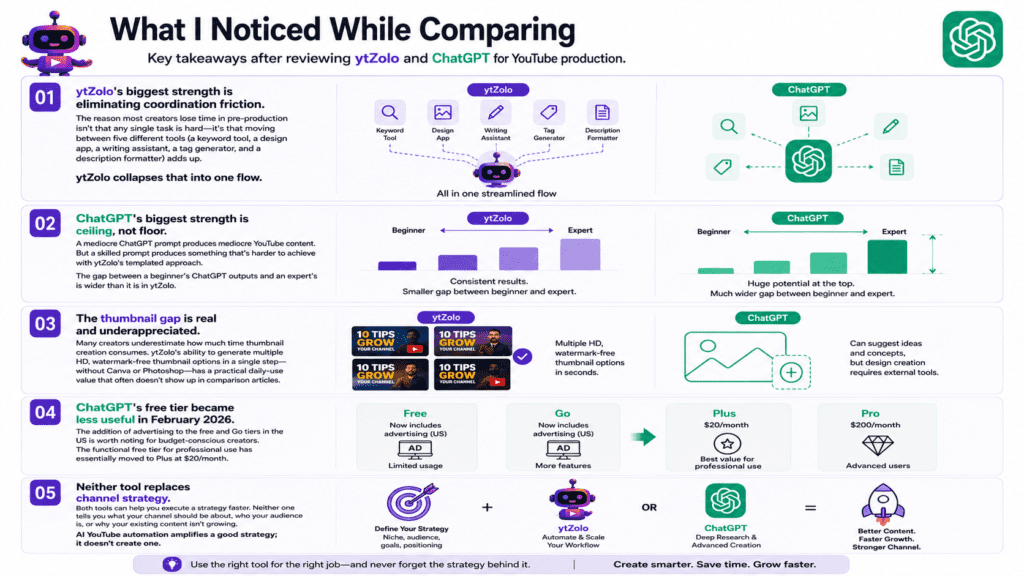
A few things stand out after reviewing both platforms in the context of YouTube production:
ytZolo’s biggest strength is eliminating coordination friction. The reason most creators lose time in pre-production isn’t that any single task is hard—it’s that moving between five different tools (a keyword tool, a design app, a writing assistant, a tag generator, and a description formatter) adds up. ytZolo collapses that into one flow.
ChatGPT’s biggest strength is ceiling, not floor. A mediocre ChatGPT prompt produces mediocre YouTube content. But a skilled prompt produces something that’s harder to achieve with ytZolo’s templated approach. The gap between a beginner’s ChatGPT outputs and an expert’s is wider than it is in ytZolo.
The thumbnail gap is real and underappreciated. Many creators underestimate how much time thumbnail creation consumes. ytZolo’s ability to generate multiple HD, watermark-free thumbnail options in a single step—without Canva or Photoshop—has a practical daily-use value that often doesn’t show up in comparison articles.
ChatGPT’s free tier became less useful in February 2026. The addition of advertising to the free and Go tiers in the US is worth noting for budget-conscious creators. The functional free tier for professional use has essentially moved to Plus at $20/month.
Neither tool replaces channel strategy. Both tools can help you execute a strategy faster. Neither one tells you what your channel should be about, who your audience is, or why your existing content isn’t growing. AI YouTube automation amplifies a good strategy; it doesn’t create one.
Final Verdict
There’s no universal winner in the ytZolo vs ChatGPT comparison—and any article that tells you otherwise is oversimplifying a genuinely nuanced choice.
Choose ytZolo if your priority is producing complete YouTube content assets quickly, with minimal setup, inside a single platform designed specifically for YouTube creators. It’s the right tool for consistent solo creators, beginners who want professional outputs without expertise, faceless channel operators, and anyone who wants AI YouTube automation without building a prompt library from scratch.
Choose ChatGPT if you’re an experienced creator who needs deep content customization, uses AI for tasks that extend well beyond YouTube, or works within a team that needs collaboration and privacy features. ChatGPT for YouTube becomes especially valuable when you invest time in building proper YouTube-specific prompt workflows.
Consider using both if you publish frequently, manage multiple channels, or want to combine ChatGPT’s planning and research depth with ytZolo’s production efficiency. At roughly $27–$39/month combined, the dual-tool stack can replace a more expensive collection of separate tools.
The best AI for YouTube creators is the one that actually gets used consistently. For most creators, the lower friction of ytZolo means it becomes a daily habit faster. For creators with the skills and time to build it, ChatGPT offers more long-term flexibility.
The goal isn’t to pick the “best” tool. It’s to build a YouTube AI workflow that’s sustainable, matches your skill level, and helps you show up consistently for your audience.
Key Takeaways
- ytZolo is purpose-built for YouTube and covers scripts, thumbnails, titles, descriptions, and tags inside one platform.
- ChatGPT is a general-purpose AI with higher output ceiling but requires prompt engineering to use effectively for YouTube.
- ytZolo has a lower learning curve and is more accessible to beginners and consistent solo creators.
- ChatGPT offers more customization, better content planning capability, and team collaboration features.
- The thumbnail workflow is the clearest differentiator: ytZolo generates HD YouTube thumbnails natively; ChatGPT does not.
- Both tools can be used together for a more complete YouTube AI workflow.
- ytZolo’s pricing starts lower for YouTube-specific use; ChatGPT Plus at $20/month is the practical minimum for professional creator use.
- Neither tool replaces YouTube channel strategy, editing, or the core creative decisions that drive channel growth.

