
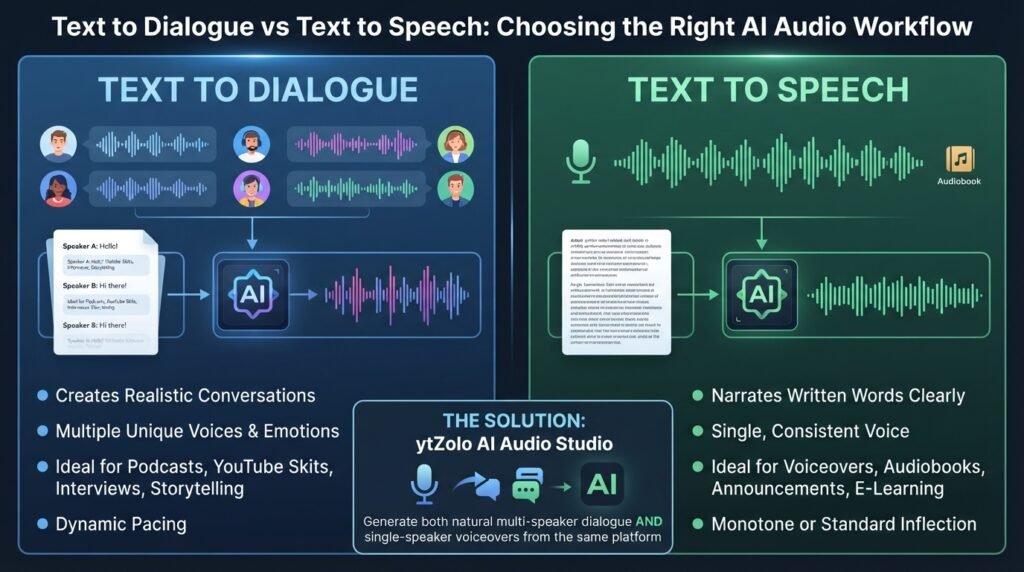
Both convert written words into audio, but Text to Dialogue vs Text to Speech isn’t simply a feature comparison. They solve two different content creation challenges.
If you’ve ever pasted a two-person script into a standard text-to-speech tool and found the result robotic or confusing, you’ve already experienced the difference. Traditional narration tools are designed to read text in a single voice, while text-to-dialogue technology creates realistic conversations by assigning unique voices, pacing, and emotion to each speaker.
One is built for voiceovers, audiobooks, and announcements. The other is designed for podcasts, YouTube skits, interviews, educational conversations, and character-driven storytelling.
Choosing the wrong tool often leads to unnecessary editing, awkward transitions, and unnatural audio. Instead of forcing a narration engine to mimic a conversation, creators can use platforms like ytZolo to generate natural multi-speaker dialogue while also creating single-speaker voiceovers from the same AI Audio Studio.
In this guide, you’ll learn what separates Text to Dialogue from Text to Speech, how the underlying AI technologies work, where each approach performs best, and how choosing the right workflow can save time while producing more engaging, professional-quality audio.
Table of Contents
What Is Text to Speech (TTS)?
Text to Speech is the original version of this technology. You type text, pick one voice, and the tool reads it back in a single, continuous narration.
It’s built for a single speaker reading a single script. Think audiobooks, blog-to-audio conversion, or a calm narrator walking through a tutorial.
Modern AI voice generator tools have moved far past the robotic, syllable-stitched speech synthesis of a decade ago. Neural models now capture pitch, pacing, and emphasis, so a single narration track can still sound natural and expressive.
But it’s still one voice, one continuous read. That’s the core limitation this format was never designed to solve.
What a Narration Workflow Usually Looks Like
The typical flow is short. You paste in a script, pick a voice from a library, adjust the reading speed if needed, then generate and download the file.
There’s no character setup, no turn-by-turn structure, and no need to decide who’s “speaking” at any given moment, because only one voice is doing the talking.
That simplicity is exactly why narration tools remain the fastest way to turn written content into audio. A blog post can become a podcast episode in minutes rather than hours.
Common Narration Use Cases
- Audiobook chapters and long-form storytelling
- Explainer and tutorial voiceovers
- Course narration for e-learning modules
- Blog-to-audio and article read-alouds
- IVR prompts and in-app guidance
- Accessibility narration for visually impaired audiences
What Is Text to Dialogue?
Text to Dialogue takes the same underlying speech synthesis and applies it to a conversation instead of a monologue.
You write a script with multiple speakers. The tool assigns a distinct voice to each character and handles the back-and-forth turn-taking automatically.
This is what powers YouTube skits, two-host podcast intros, interview-style content, and training roleplay scenarios where more than one voice needs to sound alive on the same track.
Per-speaker emotion and tone control is usually part of the package too, so one character can sound irritated while another stays calm, in the same generated clip.
What a Dialogue Workflow Usually Looks Like
You still start with a script, but now each line is tagged to a speaker — “Sarah:” or “Tom:” — instead of one continuous block of narration.
From there, you assign a voice to each named speaker, and the tool renders the whole exchange as a single audio file with natural turn-taking and pacing between lines.
Some platforms let you set a mood or delivery style per line, so the same character can sound calm in one sentence and tense two lines later.
That speaker-tagged structure is the main thing that separates a Text to Dialogue script from a plain narration script from the very first step.
Common Dialogue Use Cases
- YouTube skits and character-driven shorts
- Podcast cold opens and two-host segments
- Customer-support or sales training roleplay
- Animated explainer videos with multiple characters
- Interview-format content and mock Q&As
- Audiobook passages that include spoken dialogue between characters
Why the Confusion Exists
Both formats run on the same core technology: neural speech synthesis trained on large amounts of recorded human speech. That shared foundation is part of why the naming gets muddled.
Search behavior doesn’t help either. Plenty of people type “text to speech” when what they actually need is a conversation between two characters, simply because narration tools were the first thing most creators encountered.
Marketing language adds to it too. Some platforms label everything “AI voice generation” without separating narration from multi-speaker features, which leaves creators guessing until they’ve already generated the wrong kind of file.
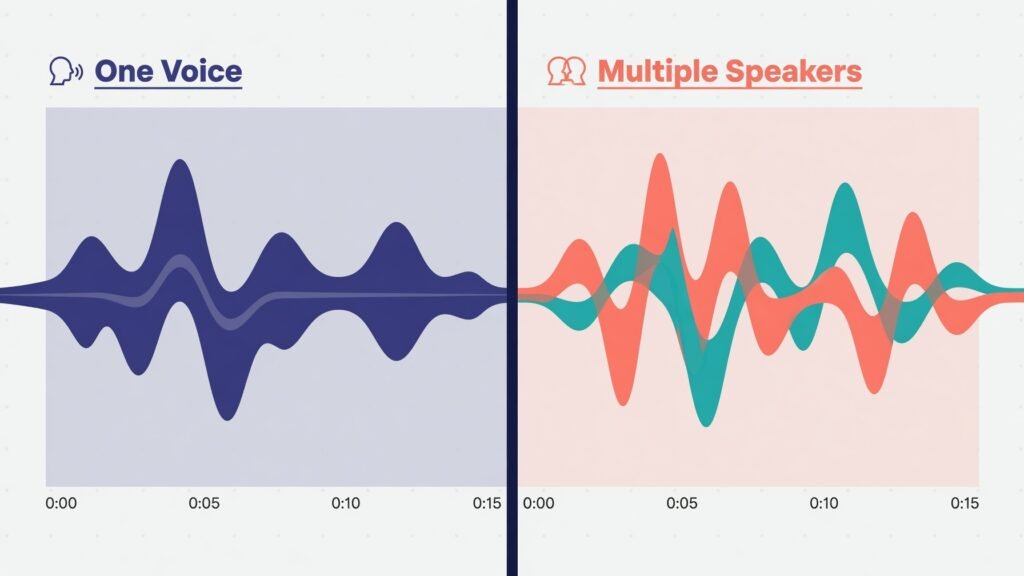
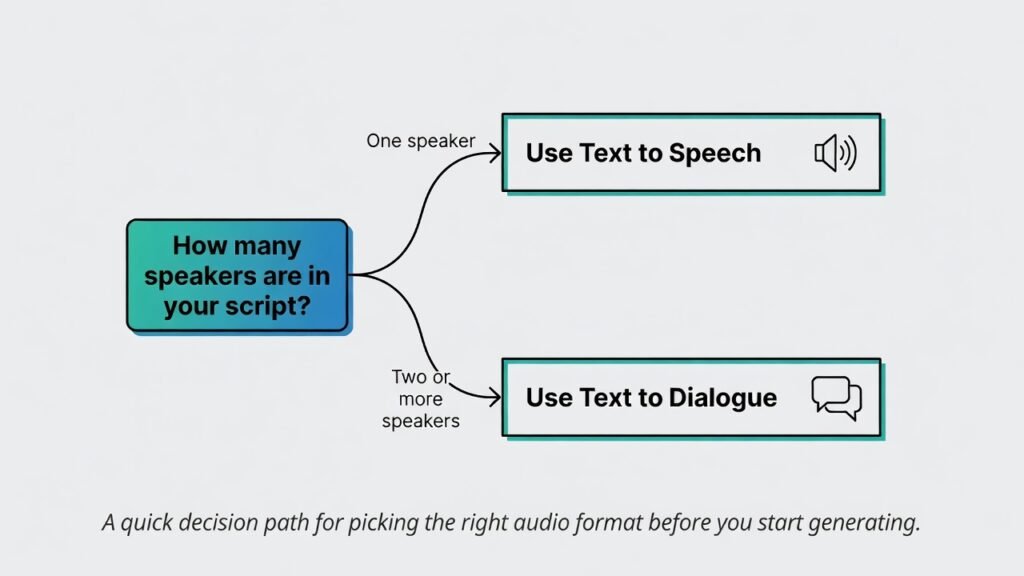
The clearest way to cut through it: ask how many people are talking in your script. One means narration. Two or more means dialogue.
How the Technology Actually Differs
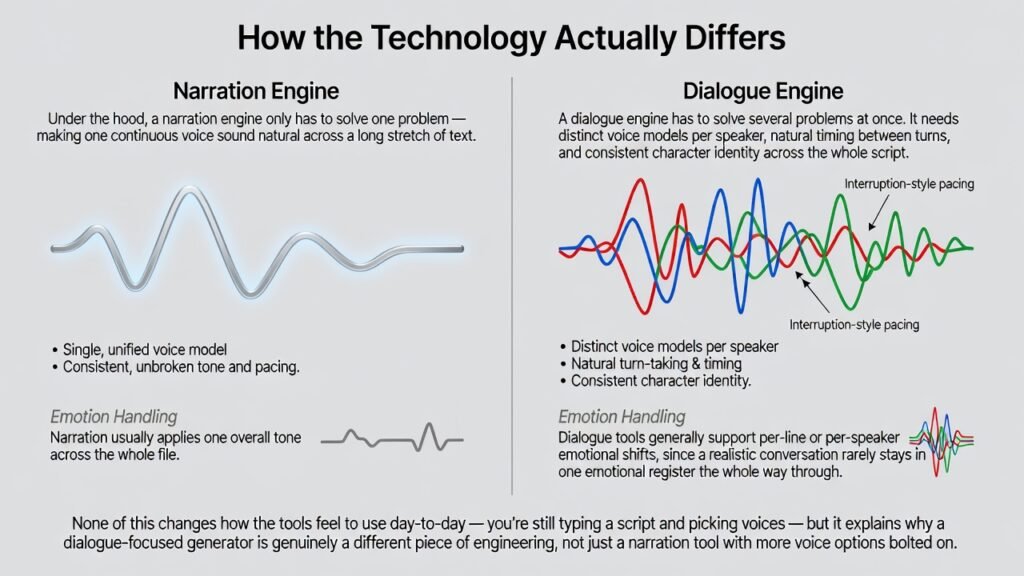
Under the hood, a narration engine only has to solve one problem — making one continuous voice sound natural across a long stretch of text.
A dialogue engine has to solve several problems at once. It needs distinct voice models per speaker, natural timing between turns, and consistent character identity across the whole script.
That’s also why dialogue tools tend to handle interruption-style pacing and short back-and-forth exchanges better than a narration engine ever will, because narration engines are tuned for long, uninterrupted reads instead of quick exchanges.
Emotion handling differs too. Narration usually applies one overall tone across the whole file. Dialogue tools generally support per-line or per-speaker emotional shifts, since a realistic conversation rarely stays in one emotional register the whole way through.
None of this changes how the tools feel to use day-to-day — you’re still typing a script and picking voices — but it explains why a dialogue-focused generator is genuinely a different piece of engineering, not just a narration tool with more voice options bolted on.
Text to Dialogue vs Text to Speech: Key Differences Table
| Feature | Text to Speech (TTS) | Text to Dialogue |
|---|---|---|
| Speakers | One | Multiple |
| Best use case | Narration, audiobooks, single-narrator videos | Conversations, skits, interviews |
| Tone variation | Limited, mostly uniform | Per-speaker emotion control |
| Ideal for | Blog-to-audio, explainer voiceovers | YouTube skits, podcasts, training roleplay |
| Setup complexity | Low — one voice selection | Slightly higher — assign a voice per character |
| Script format | Plain continuous text | Lines tagged by speaker name |
| Output feel | One steady read | Natural back-and-forth exchange |
Text to Dialogue vs Text to Speech: Quick Recap
If you remember nothing else from this table, remember this: one speaker means narration, two or more speakers means a conversational format.
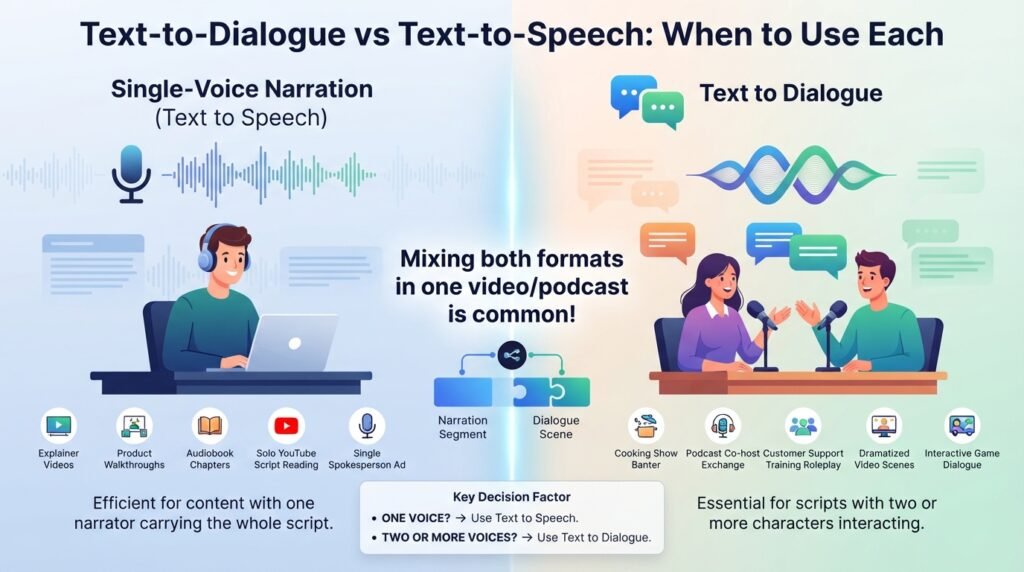
Text to Dialogue vs Text to Speech: When to Use Each
Reach for single-voice narration when your content has one narrator carrying the whole script. Explainer videos, product walkthroughs, and audiobook chapters all fall here.
It’s also the faster option when you’re converting a written YouTube script or blog post into audio and don’t need character separation.
Reach for Text to Dialogue the moment your script has two or more people talking to each other. A cooking-show banter segment, a podcast cold open, or a customer-support training scenario all need distinct voices, not one narrator reading both parts.
Mixing both formats inside a single video is common too — narration for the voiceover, a conversational format for a dramatized scene in the middle.
Scenario: Faceless YouTube Channels
Most faceless explainer channels run entirely on narration. One steady voice carries the hook, the body, and the call-to-action, which keeps production simple and consistent across every upload.
Skit-style or reaction-format channels are the exception. If your video has two characters bantering, you need speaker separation, not a single reading voice trying to cover both parts.
Scenario: Podcasts
Long-form solo commentary — think a single host talking through news or analysis — works fine as narration, especially for scripted intros and outros.
The moment you script a two-host exchange, an interview segment, or a dramatized cold open, dialogue generation becomes the better fit, since it keeps each host’s voice and tone distinct.
Some podcasters use Text to Speech for the solo intro and switch to a conversational format the moment a second host joins.
Scenario: E-Learning and Training
Straightforward course narration — a single instructor voice walking through slides — is a narration job through and through.
Roleplay-based training, like a simulated customer call or a negotiation exercise, needs two or more voices responding to each other, which is exactly what dialogue generation is built for.
Scenario: Marketing and Ads
A single spokesperson-style ad read is narration. A testimonial-style ad with two people talking, or a scripted “customer asks, expert answers” format, calls for dialogue instead.
Scenario: Games and Interactive Media
NPC lines delivered one at a time are usually narration jobs, generated individually per character. Branching conversations where characters respond to each other in sequence lean toward dialogue-style generation instead.
Common Mistakes Creators Make
Most of these mistakes come down to one thing: picking the wrong format — Text to Speech or Text to Dialogue — before checking how many people are actually talking in the script.
Using narration for a two-person script. The result is one flat voice reading both parts, sometimes with awkward “he said, she said” phrasing patched in to make it make sense.
Using a dialogue tool for simple narration. This usually just adds unnecessary setup steps — assigning a “speaker” for content that never needed more than one voice in the first place.
Ignoring pacing between turns. In dialogue-heavy scripts, unnaturally long or short gaps between lines are one of the fastest ways to make a conversation sound artificial.
Skipping a script format check. Dialogue tools expect lines tagged by speaker. Pasting in a narration-style script without that structure often produces a garbled or misattributed read.
Forgetting per-speaker tone. A flat, single-emotion delivery across an entire dialogue scene is one of the more common giveaways that a conversation was AI-generated without much tuning.
Can One Tool Do Both?
Historically, creators needed a narration-focused app for voiceovers and a separate conversational AI tool for multi-speaker scenes. That meant exporting files back and forth between platforms and paying for two subscriptions.
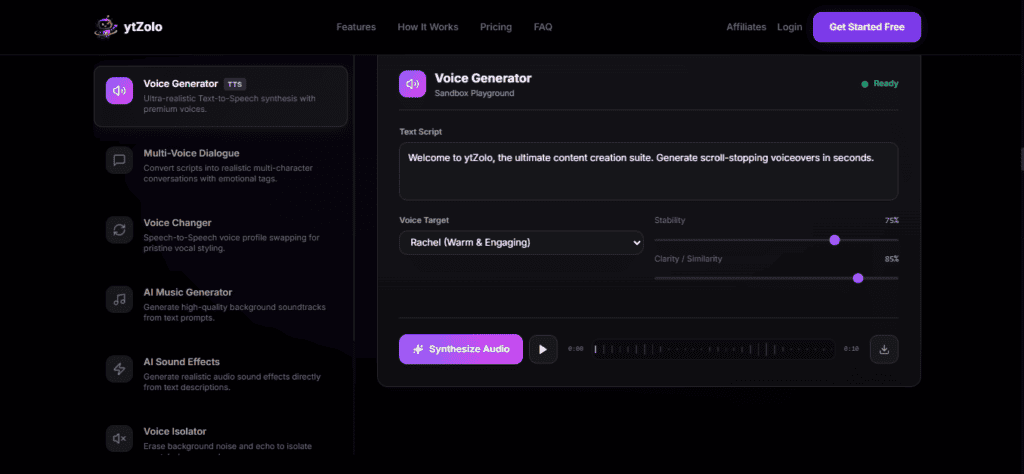
ytZolo supports both Text to Speech and Text to Dialogue inside one Audio Studio, so creators don’t need separate tools for narration and multi-speaker content.
The same dashboard that handles single-voice narration also generates full conversations, meaning your script writer, voice generation, and even background scoring through the AI music generator live in one workflow instead of four separate logins.
For creators localizing content into other languages, this same dialogue-aware foundation is also what powers multilingual dubbing — our AI dubbing software comparison covers that side of the workflow in more depth.
Text to Dialogue vs Text to Speech: Why One Dashboard Is Enough
Once narration and dialogue generation live in the same place, the choice stops being about which tool to open and starts being about which format the script actually needs.
Step-by-Step: Generating Narration in ytZolo’s Audio Studio
Step 1 — Open the Audio Studio. Head to ytzolo.com and select the voice generation tool from your dashboard.
Step 2 — Paste your script. Drop in your full narration text, whether that’s a video voiceover, an audiobook chapter, or ad copy.
Step 3 — Pick a single voice. Choose from the voice library, filtering by language, gender, and tone until you find a match for your content.
Step 4 — Preview and adjust. Fine-tune pacing and pitch, then listen to a short preview before committing to the full generation.
Step 5 — Generate and export. Download the finished narration as an MP3 or WAV file and drop it into your video editor.
Step-by-Step: Generating a Conversation with Text to Dialogue
Step 1 — Write a speaker-tagged script. Label each line with the character’s name, so the tool knows exactly who’s speaking at each point.
Step 2 — Assign a voice per character. Pick a distinct voice for each named speaker from the library.
Step 3 — Set tone per line, if needed. Adjust delivery for individual lines where a character’s emotion should shift mid-scene.
Step 4 — Preview the exchange. Play back the conversation to check pacing and timing between turns before finalizing.
Step 5 — Generate and download. Export the full multi-speaker conversation as a single audio file, ready to sync with your video.
Quick Example
Here’s how the same source material sounds different depending on the format. This is illustrative text, not literal audio.
As Text to Speech (single narrator voice):
“Sarah walked into the room. She asked Tom if he was ready. Tom said he needed five more minutes.”
As Text to Dialogue (two distinct speaker voices):
Sarah: “Are you ready to go?” Tom: “Give me five more minutes.”
Notice the difference. The narration version tells the scene in third person with one voice. The dialogue version lets Sarah and Tom actually speak, each in their own voice and tone.
Here’s a second example, this time for an educational context rather than a scene.
As narration (single instructor voice):
“Photosynthesis is the process by which plants convert sunlight into energy. It happens in the chloroplasts, using a pigment called chlorophyll.”
As a conversational format (student and teacher):
Student: “Wait, how do plants actually turn sunlight into food?” Teacher: “It happens in the chloroplasts. There’s a pigment called chlorophyll that captures the light.”
The second version tends to hold attention better in short-form educational content, since a question-and-answer rhythm mirrors how people naturally absorb new information.
Free vs Paid: What Changes
Free tiers are a reasonable way to test whether a platform’s voices fit your project before committing to a subscription, for both narration and dialogue generation.
That said, free plans usually come with real limits worth knowing upfront:
- Watermarked exports, which aren’t usable in a finished, published video
- Character or minute caps per month on generated audio
- A smaller voice selection, with premium voices locked behind a paywall
- No commercial usage rights, meaning the audio can’t legally go on a monetized channel
- Fewer speakers per dialogue scene, on plans that support conversational generation at all
Dialogue generation specifically tends to be gated more tightly on free tiers than basic narration, since multi-speaker scenes require more processing per minute of finished audio.
If you’re just testing a workflow or producing something personal and non-monetized, a free plan is genuinely useful for both formats. If the content is going on a monetized channel or a client’s project, budget for a paid tier from the start.
FAQ
What’s the main difference between Text to Speech and Text to Dialogue? Text to Speech generates a single continuous voice reading a script. Text to Dialogue generates a conversation between two or more distinct voices, with natural turn-taking between speakers.
Can I use Text to Dialogue for a solo voiceover? You can, but it adds unnecessary setup. A single-narrator script is faster and simpler to produce with a standard narration tool.
Does Text to Dialogue support more than two speakers? Many platforms support three or more speakers in a single scene, though quality and pacing can vary depending on how many voices are talking in close succession.
Is Text to Dialogue the same as an AI dialogue generator for writing? Not quite. A dialogue-writing tool generates the script text itself. Text to Dialogue takes an existing script and turns it into spoken audio with multiple voices.
Can I control how emotional each speaker sounds? On most modern platforms, yes. You can typically adjust tone per line or per speaker, so a character can sound calm in one moment and tense in the next.
Do I need to format my script a specific way for dialogue generation? Yes. Lines are usually tagged by speaker name, similar to a screenplay format, so the tool knows exactly who’s talking at each point.
Which format is better for audiobooks? Narration handles most audiobook content, since a single narrator typically carries the whole book. Dialogue generation is useful for passages with spoken conversation between characters.
Is one format more expensive than the other? Dialogue generation is sometimes priced or capped more restrictively on free and entry-level plans, since multi-speaker scenes take more processing to render than a single voice track.
Can I switch between formats within the same project? Yes, and it’s common practice. Many videos use narration for the main voiceover and switch to dialogue generation for a dramatized scene or interview segment partway through.
Do both formats support multiple languages? Most platforms that support multilingual narration also support multilingual dialogue generation, though voice selection per language can vary between the two formats.
Is there a real technical difference between the two, or is it mostly marketing? It’s real. Text to Dialogue has to manage multiple voice models, speaker identity, and turn timing at once, which Text to Speech never has to solve for a single continuous voice.
Conclusion
Narration-based and conversational audio both start from the same core speech synthesis technology, but they’re built for different scripts. One narrates. The other converses.
At its core, Text to Dialogue vs Text to Speech isn’t really a competition — it’s a matter of matching the format to the script in front of you.
Knowing which one your project needs — before you start generating audio — saves you from re-recording later. Many creators end up needing both in the same video.
Explore the full toolset in ytZolo’s Audio Studio to see narration and multi-speaker dialogue generation side by side, or read our AI voice generator guide for a deeper look at building natural-sounding narration from scratch.
If your project also needs multilingual versions of either format, our AI dubbing software comparison walks through how narration and dialogue translate across languages.
For background reading on how neural speech synthesis works under the hood, the W3C’s Speech Synthesis Markup Language reference is a solid technical starting point.
Try ytZolo’s Audio Studio free →
About the Author
Anshika Verma Email: anshika@ytzolo.com
Anshika Verma researches AI creator tools, voice synthesis, and YouTube production workflows. Her work focuses on testing AI voice and audio platforms against real production use cases, translating that testing into practical guidance for creators, agencies, and marketing teams.
Note: Feature details for ytZolo’s Audio Studio should be verified directly on ytzolo.com before publishing, as these update over time.

