
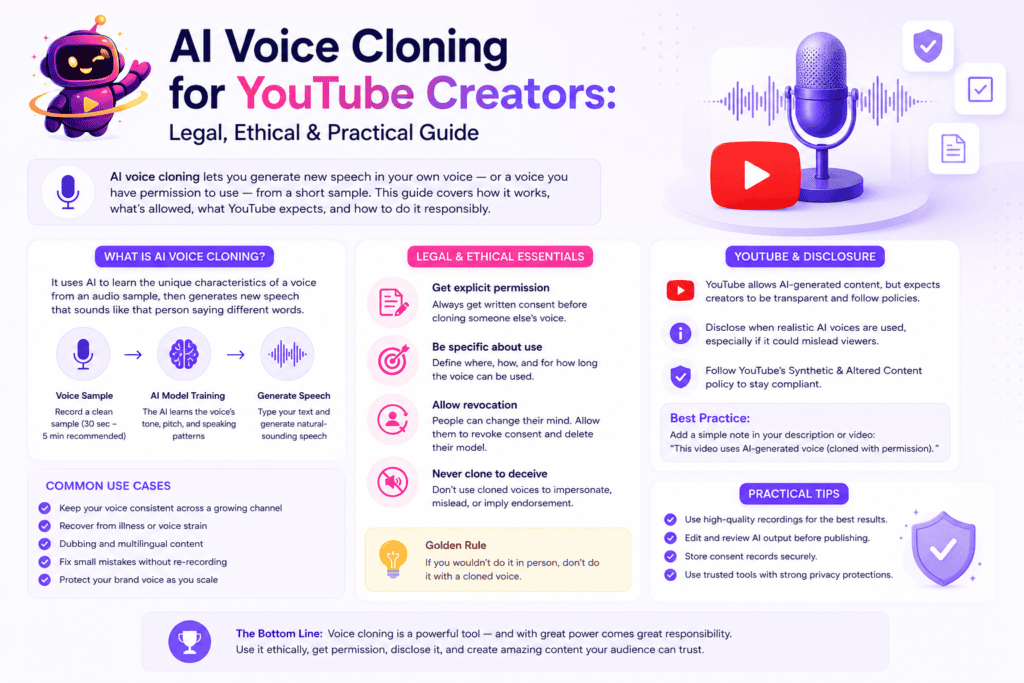
📋 Quick Summary: AI voice cloning lets creators generate new speech in their own voice, or in a voice they have explicit permission to use, from a short audio sample.
This guide explains how voice cloning works, where the legal and ethical boundaries lie, what YouTube expects creators to disclose when using synthetic voices, and the best practices for creating AI-generated narration responsibly.
It also shows how platforms like ytZolo fit into modern creator workflows by combining AI voice generation, voice cloning, dubbing, and other audio production tools in a single workspace.
Typing a script and hearing it come back in your own voice, without ever touching a microphone, sounds like a gimmick until you actually need it.
Maybe you lost your voice to illness for a week and still had a video due. Maybe you’re dubbing a video into five languages and want every version to sound unmistakably like you.
That’s the real pitch behind this technology — and it’s also exactly why voice cloning comes with more legal and ethical weight than a standard AI voiceover.
This guide walks through what the technology actually is, how creators are using it responsibly on YouTube, and where the rules — platform rules, consent rules, and plain common sense — draw the line.
Table of Contents
What Is AI Voice Cloning?
AI voice cloning is a process that trains a model on a sample of someone’s real voice, then uses that model to generate new speech in the same voice.
Unlike a standard AI voice generator, which picks from a library of pre-built synthetic voices, voice cloning creates a model of one specific, identifiable person’s voice.
That’s the core distinction. A regular voice generator gives you a voice. Cloning gives you your voice — or someone else’s, with their permission.
The output can say things the original speaker never recorded, in the same tone, pacing, and accent as the source sample.
That capability is what makes this technology so useful for creators, and also why it sits under tighter legal and ethical scrutiny than generic text-to-speech.
How Voice Cloning Works
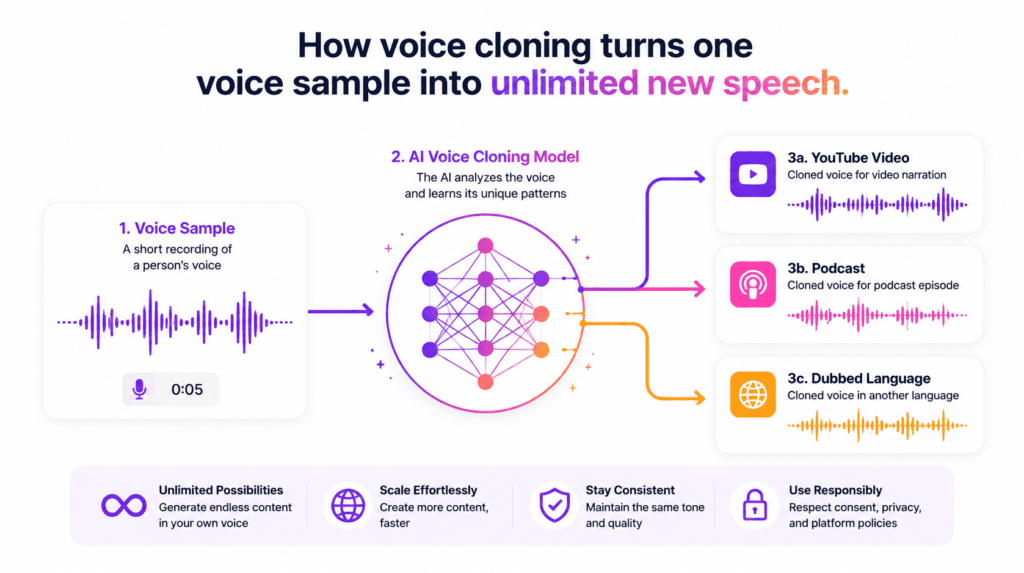
You don’t need a technical background to use this technology, but understanding the basic pipeline helps you get a cleaner clone.
1. Record a voice sample. Most tools ask for anywhere from 30 seconds to a few minutes of clear, noise-free audio.
2. The model learns your voice. Machine learning analyzes pitch, tone, pacing, and pronunciation patterns unique to that voice.
3. You type a script. The cloned voice model reads any text you provide, in your voice, without you recording a word of it.
4. Fine-tune the delivery. Adjust pacing, emotion, and emphasis so the output doesn’t sound flat or over-processed.
5. Export and use. Download the finished audio and drop it into your video, podcast, or dubbed track.
The quality of your source recording matters more than almost anything else in this chain. A noisy, inconsistent sample produces a noisy, inconsistent clone.
Why YouTube Creators Use Voice Cloning
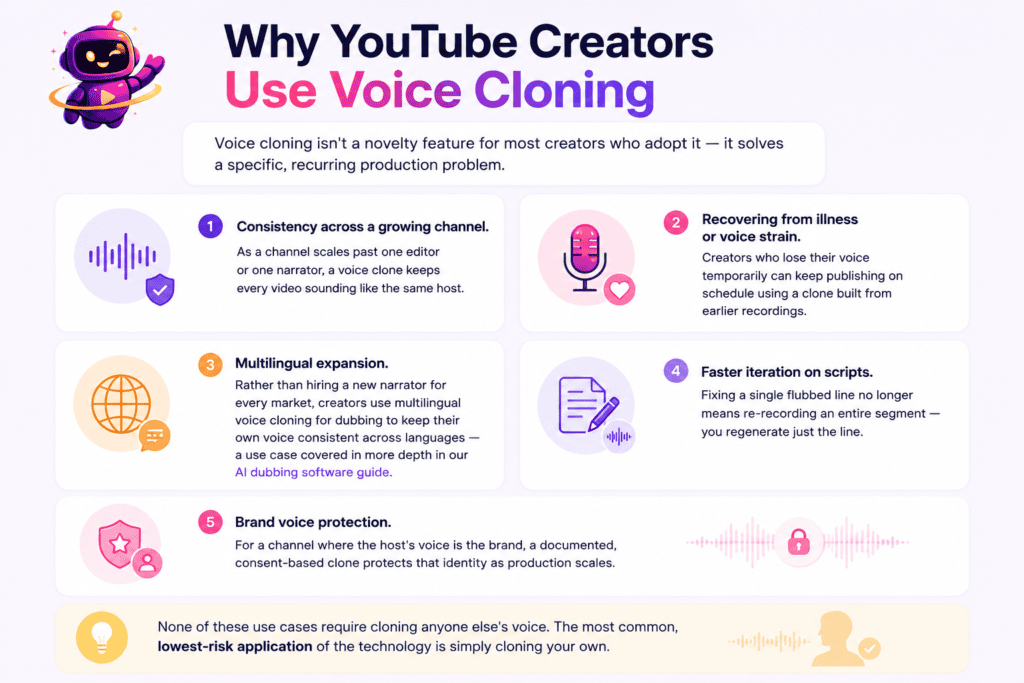
Voice cloning isn’t a novelty feature for most creators who adopt it — it solves a specific, recurring production problem.
Consistency across a growing channel. As a channel scales past one editor or one narrator, a voice clone keeps every video sounding like the same host.
Recovering from illness or voice strain. Creators who lose their voice temporarily can keep publishing on schedule using a clone built from earlier recordings.
Multilingual expansion. Rather than hiring a new narrator for every market, creators use multilingual voice cloning for dubbing to keep their own voice consistent across languages — a use case covered in more depth in our AI dubbing software guide.
Faster iteration on scripts. Fixing a single flubbed line no longer means re-recording an entire segment — you regenerate just the line.
Brand voice protection. For a channel where the host’s voice is the brand, a documented, consent-based clone protects that identity as production scales.
None of these use cases require cloning anyone else’s voice. The most common, lowest-risk application of the technology is simply cloning your own.
Is Voice Cloning Legal?
Yes — AI voice cloning is legal in the vast majority of cases, but legality depends heavily on whose voice you clone and how you use the result.
Cloning your own voice for your own content carries essentially no legal risk. You own your voice, and using a tool to reproduce it is no different than recording yourself.
Cloning someone else’s voice is where the law gets specific. Many regions recognize a “right of publicity” — a legal protection over a person’s voice, likeness, and identity, especially when it’s used commercially.
Several U.S. states have passed or strengthened laws specifically targeting unauthorized voice cloning in recent years, reflecting how seriously regulators now treat this issue.
The Federal Trade Commission has also actively warned consumers about AI voice cloning being used in impersonation scams, and has pushed for stronger protections against unauthorized cloning.
Regardless of jurisdiction, the practical rule is simple: never clone a real person’s voice — a celebrity, a colleague, a family member — without their clear, documented permission.
YouTube’s Rules on Voice Cloning
YouTube doesn’t ban voice cloning. It bans undisclosed, deceptive use of a cloned voice that could mislead viewers.
If you clone your own voice to narrate your own content, there’s generally nothing to disclose — it’s still authentically you, just produced differently.
The disclosure requirement kicks in when a video uses a synthetic or altered voice to make it look or sound like a real, identifiable person said something they didn’t.
That includes cloning another creator’s voice, a public figure’s voice, or even your own voice used to fabricate a statement you never actually made.
Our full breakdown of YouTube’s AI-generated content disclosure requirements covers exactly when the label is required and how to add it inside YouTube Studio.
The short version: transparency protects both your audience and your channel. When in doubt, disclose.
The Consent Framework Every Creator Should Follow
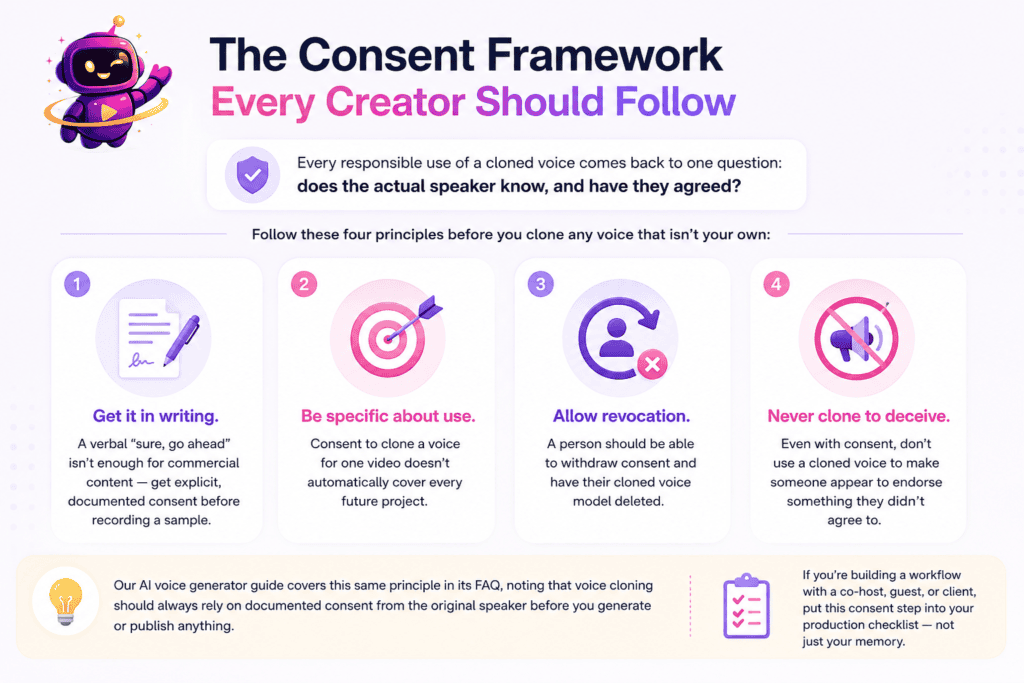
Every responsible use of a cloned voice comes back to one question: does the actual speaker know, and have they agreed?
Follow these four principles before you clone any voice that isn’t your own:
- Get it in writing. A verbal “sure, go ahead” isn’t enough for commercial content — get explicit, documented consent before recording a sample.
- Be specific about use. Consent to clone a voice for one video doesn’t automatically cover every future project.
- Allow revocation. A person should be able to withdraw consent and have their cloned voice model deleted.
- Never clone to deceive. Even with consent, don’t use a cloned voice to make someone appear to endorse something they didn’t agree to.
Our AI voice generator guide covers this same principle in its FAQ, noting that voice cloning should always rely on documented consent from the original speaker before you generate or publish anything.
If you’re building a workflow with a co-host, guest, or client, put this consent step into your production checklist — not just your memory.
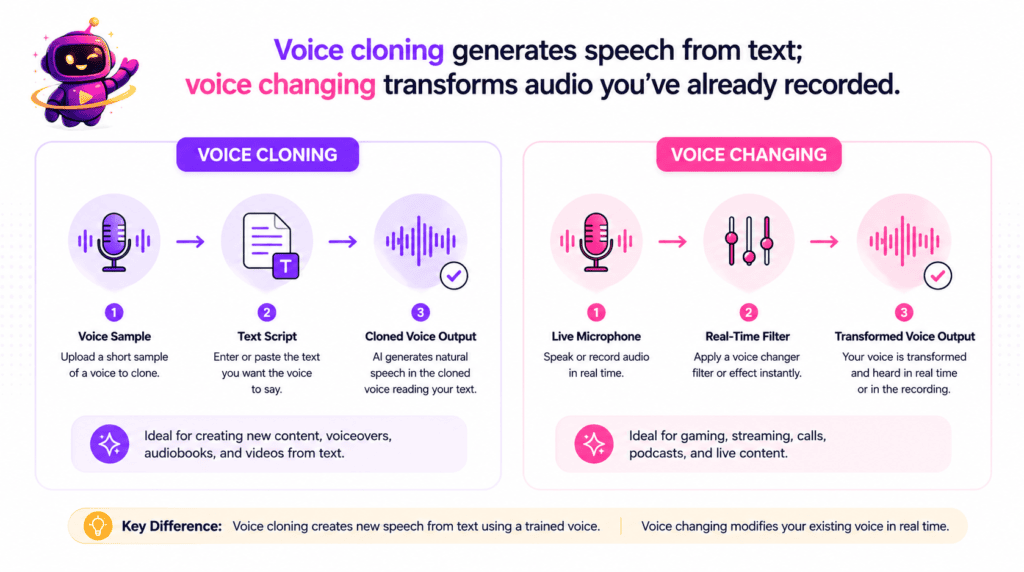
AI Voice Cloning vs. Voice Changing
Creators frequently mix these two terms up, and the confusion leads to picking the wrong tool for the job.
AI voice cloning builds a model of one specific, real voice and generates new speech from typed text in that voice.
Voice changing takes audio you’ve already recorded and transforms it in real time or after the fact — shifting pitch, tone, or character — without needing a script.
If you want to type a line and have it read back in a real person’s exact voice, that’s cloning. If you want to speak live and sound different while you talk, that’s a voice changer.
For a full side-by-side, see our dedicated comparison on AI voice changer vs. AI voice generator, which breaks down when each tool actually fits your workflow.
What to Look For in a Voice Cloning Tool
Not every platform that offers voice cloning handles consent, quality, or licensing the same way.
Before you commit to a subscription, check for these essentials:
- A consent verification step, not just an upload box with no accountability
- Commercial usage rights included on the plan you can actually afford
- Clear deletion controls so a cloned voice model can be removed on request
- Emotion and pacing control, so the clone doesn’t read every line in the same flat tone
- Multilingual output, if dubbing or global audiences are part of your plan
The pillar guide’s “Key Features to Look For” section is a good place to double-check general voice-generation criteria before you narrow in on a cloning-specific tool — it’s worth reviewing that list to look for voice cloning support alongside the standard features.
If you’re comparing platforms head-to-head, our best AI voice generator roundup tests realism, pricing, and licensing across nine tools, several of which offer cloning as a premium tier.
How to Clone Your Voice with ytZolo
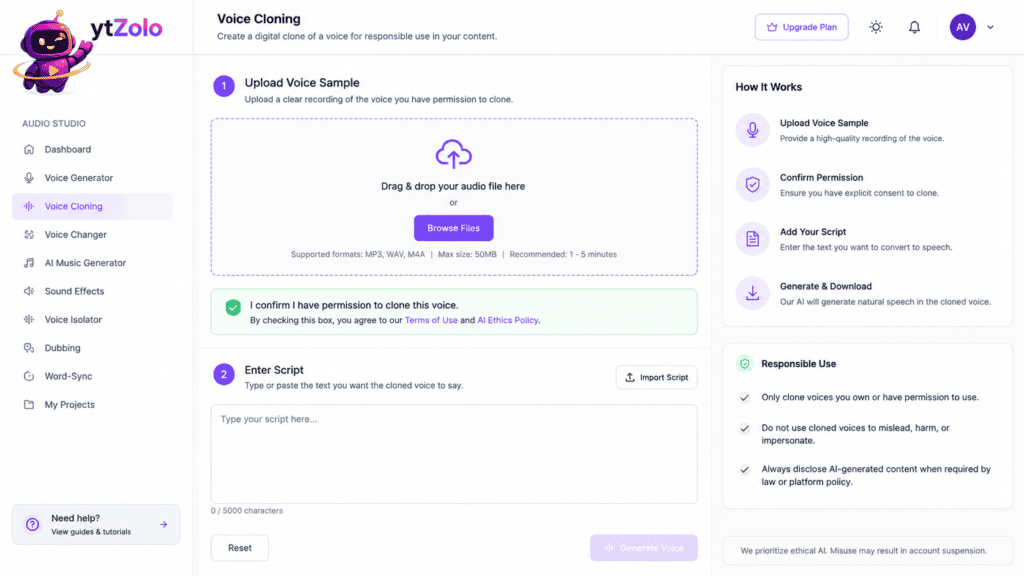
Here’s the general workflow for building a voice clone inside ytZolo’s Audio Studio.
Step 1 — Record or upload a sample. Provide a short, clean audio clip of the voice you’re cloning, ideally recorded in a quiet space.
Step 2 — Confirm consent. If the voice isn’t your own, complete the platform’s consent step before the model is created.
Step 3 — Let the model train. The tool processes your sample and builds a voice profile in the background.
Step 4 — Type your script. Paste in your video narration, ad read, or dubbed script text.
Step 5 — Preview and adjust. Listen to a short preview and fine-tune pacing or tone before generating the full file.
Step 6 — Generate and export. Download the finished audio and drop it straight into your editor.
Because voice cloning lives inside the same dashboard as scripting, titles, and thumbnails, your cloned narration stays part of one connected production workflow instead of a separate tool.
Risks of Voice Cloning — and How to Avoid Them
Voice cloning technology carries real misuse potential, and creators benefit from understanding it even if they never intend to misuse it themselves.
Impersonation scams. Bad actors have used cloned voices to mimic family members or executives in fraud attempts, prompting the FTC to issue direct consumer warnings about harmful voice cloning.
Unauthorized commercial use. Cloning a public figure’s voice to sell a product or promote content, without consent, is both an ethical violation and a growing legal liability.
Audience trust damage. Even legal, consented use of a cloned voice can hurt viewer trust if it isn’t disclosed when disclosure is warranted.
Model theft or leaks. A poorly secured voice model can be extracted and misused by someone other than the creator who built it.
Protecting your channel comes down to three habits: only clone voices with documented consent, disclose synthetic voice use when YouTube’s policy requires it, and choose a platform with real accountability controls, not just a raw cloning feature.
If robotic-sounding output is your main concern rather than misuse, our guide on why AI voices sound robotic covers the technical fixes separately from the policy side covered here.
FAQ
Is AI voice cloning free? Some platforms offer limited free trials for voice cloning, but full cloning features — especially commercial licensing — are typically part of a paid tier.
Can I clone my own voice legally? Yes. Cloning your own voice for your own content carries no meaningful legal risk, since you’re the rights holder of your own voice.
Do I need permission to clone someone else’s voice? Always. Documented, explicit consent from the actual speaker is required before cloning or publishing any voice that isn’t your own.
Does YouTube require a disclosure label for AI voice cloning? Only when the cloned voice makes it appear a real, identifiable person said something they didn’t. Cloning your own voice to narrate your own script typically doesn’t require a label.
How much audio do I need to clone a voice? Most tools need anywhere from 30 seconds to a few minutes of clean, high-quality audio to build an accurate voice model.
Can a cloned voice be detected as AI-generated? Detection tools are improving, but quality varies. That’s a key reason disclosure and consent matter more than trying to make a clone undetectable.
What’s the difference between AI voice cloning and a standard AI voice generator? A standard AI voice generator uses pre-built synthetic voices. AI voice cloning builds a model of one specific, real person’s voice instead.
Clone Your Voice the Responsible Way
Voice cloning gives creators genuine production flexibility — consistent narration, faster fixes, and true multilingual reach in their own voice.
None of that value requires cutting corners on consent or disclosure. The creators who get the most out of this technology are the ones who treat it as seriously as it deserves.
Explore ytZolo’s Audio Studio →
About the Author
Anshika Verma Email: anshika@ytzolo.com
Anshika Verma researches AI creator tools, voice synthesis, and YouTube production workflows. Her work focuses on testing AI voice and audio platforms against real production use cases, and translating that testing into practical, policy-aware guidance for creators, agencies, and marketing teams.

