How to Create YouTube Thumbnails with AI Free (And Why Most Creators Are Doing It Wrong)
July 16, 2026
TL;DR — Quick Summary Custom thumbnails drive the vast majority of high-performing YouTube videos, and AI tools like ytZolo now let you create YouTube thumbnails with AI free in minutes instead of hours. This guide covers: why thumbnails outrank video quality for clicks, how AI thumbnail generators actually work under the hood, a 6-step workflow to create your first one today, the 7 most common AI thumbnail mistakes, the psychology behind high-CTR designs, niche-specific prompt examples, an AI vs Canva vs Photoshop comparison, and a full FAQ covering sizing, testing, and copyright.
Table of Contents
Introduction: The Thumbnail That Changed Everything
Imagine this. You’ve just spent 8 hours filming, editing, and polishing the best video of your life. You upload it. You wait.
Crickets. No views. No clicks. Nothing.
That was me six months ago. And after a lot of painful trial and error, I figured out what was wrong — it wasn’t the video. It was the thumbnail.
Here’s a stat that should shake every creator awake: according to YouTube’s Creator Academy, the vast majority of top-performing videos on YouTube use custom thumbnails rather than auto-generated frames. That’s not a coincidence. That’s strategy.
Your thumbnail is the first thing people see before they hear your voice or watch a single second of content. It’s your storefront, your headline, your first impression — all packed into a 1280×720 pixel image.
The good news? You no longer need to be a professional designer or spend hours in Photoshop to create thumbnails that stop the scroll. Today, you can create YouTube thumbnails with AI free, in minutes, and the results genuinely compete with hand-designed work.
In this guide, I’ll walk you through exactly how AI thumbnail generators work, a step-by-step process to make your first one today, the mistakes that quietly kill CTR, and why ytZolo is the all-in-one platform creators are switching to.
Why Your Thumbnail Is More Important Than Your Video
This might sound harsh, but a mediocre video with a great thumbnail will almost always outperform a great video with a mediocre one.
Why? Because no one can watch your video if they don’t click on it first.
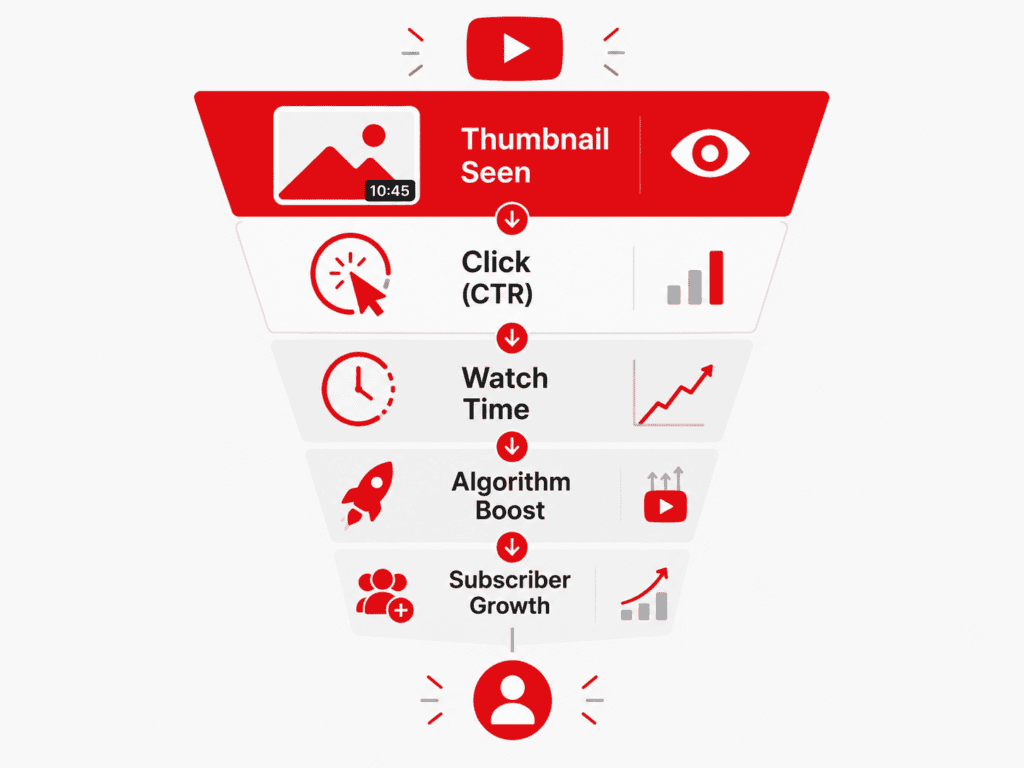
YouTube’s algorithm pays close attention to Click-Through Rate (CTR) — the percentage of people who see your video and click it. Higher CTR means more promotion, more promotion means more views, and more views mean more subscribers. It’s a snowball that starts with a single click, and that click starts with your thumbnail.
Creators who understand this treat thumbnails like the most important part of content creation — because in many ways, they are. A well-crafted thumbnail isn’t just design. It’s psychology, strategy, and storytelling packed into a single frame.
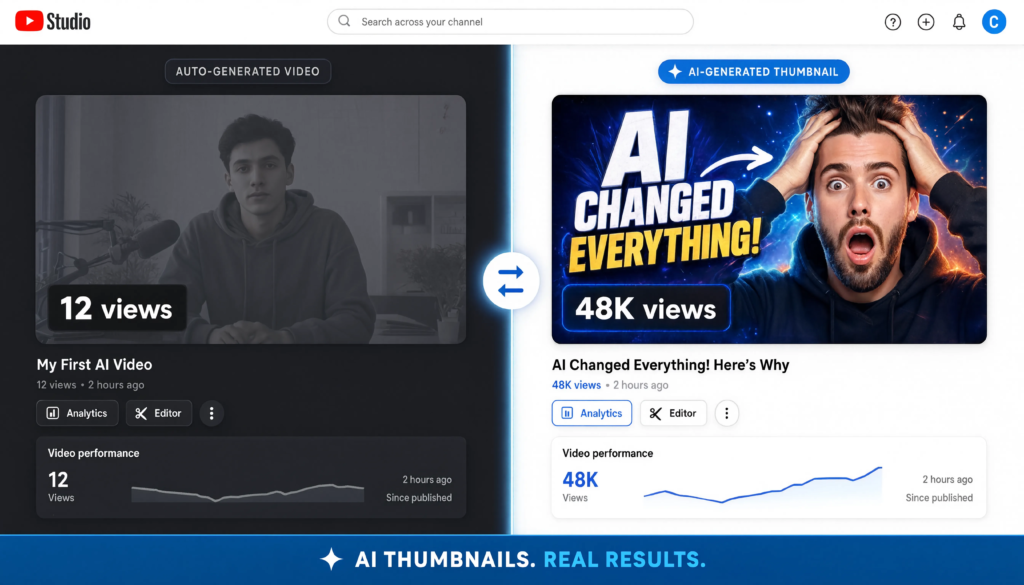
ai thumbnail generator
How AI Actually Generates YouTube Thumbnails
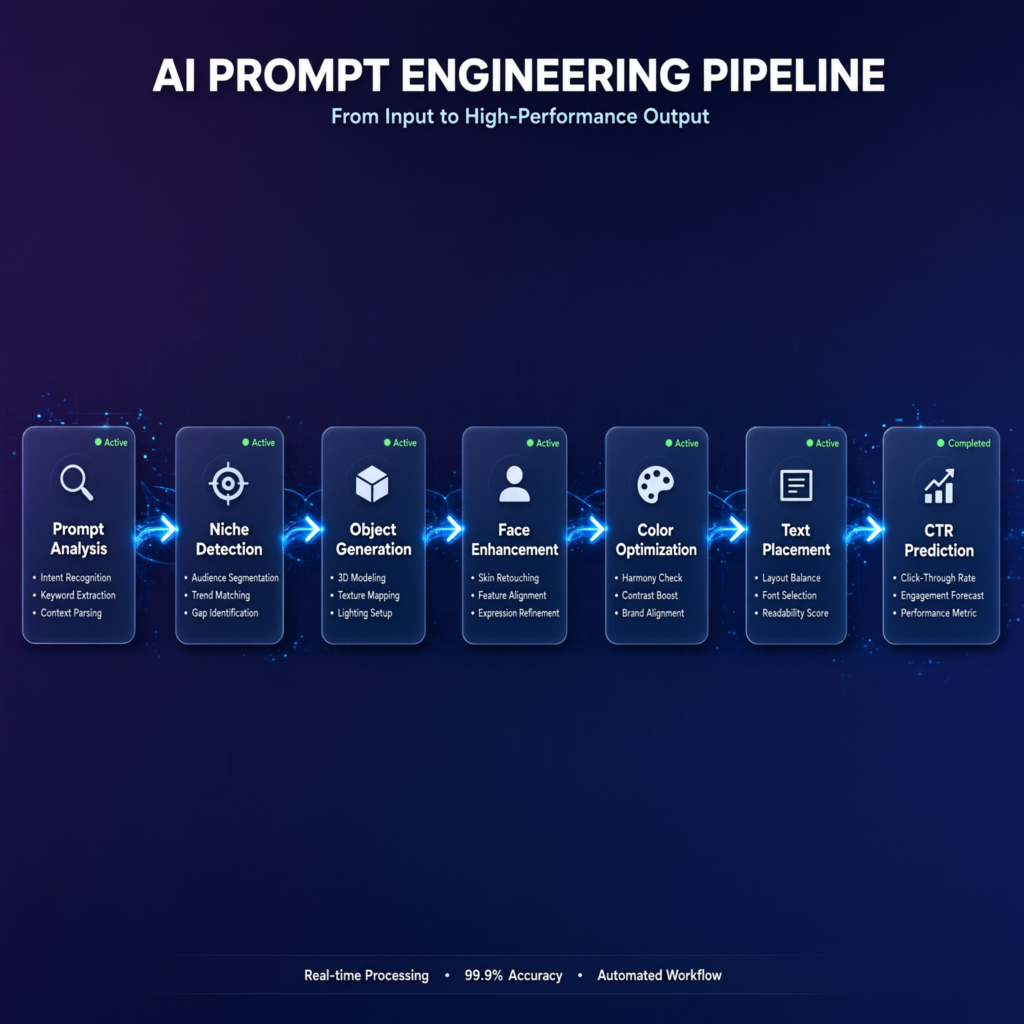
Most creators use AI thumbnail tools without understanding what’s happening behind the scenes — and that’s fine, but knowing the process helps you write better prompts and get better results. Here’s roughly what a YouTube-focused AI thumbnail generator does when you hit “generate”:
Prompt analysis — the AI parses your topic or script for the emotional hook, subject, and setting
Niche detection — it cross-references visual patterns common in your content category (gaming, finance, fitness, tech, etc.)
Object and scene generation — it builds the core image: faces, objects, backgrounds, and composition
Face enhancement — expressions are sharpened for clarity and emotional readability at small sizes
Color optimization — palettes are adjusted for contrast against YouTube’s white/dark feed backgrounds
Text placement — headline text is positioned to avoid overlap with faces or key visual elements
CTR prediction — some tools, including ytZolo, score variations against patterns associated with higher click-through before you even download
This is the core difference between a general-purpose AI image generator and one built specifically for YouTube: the latter is optimized for clicks, not just aesthetics.
create youtube thumbnails with ai free
What Makes an AI-Generated Thumbnail Actually Work?
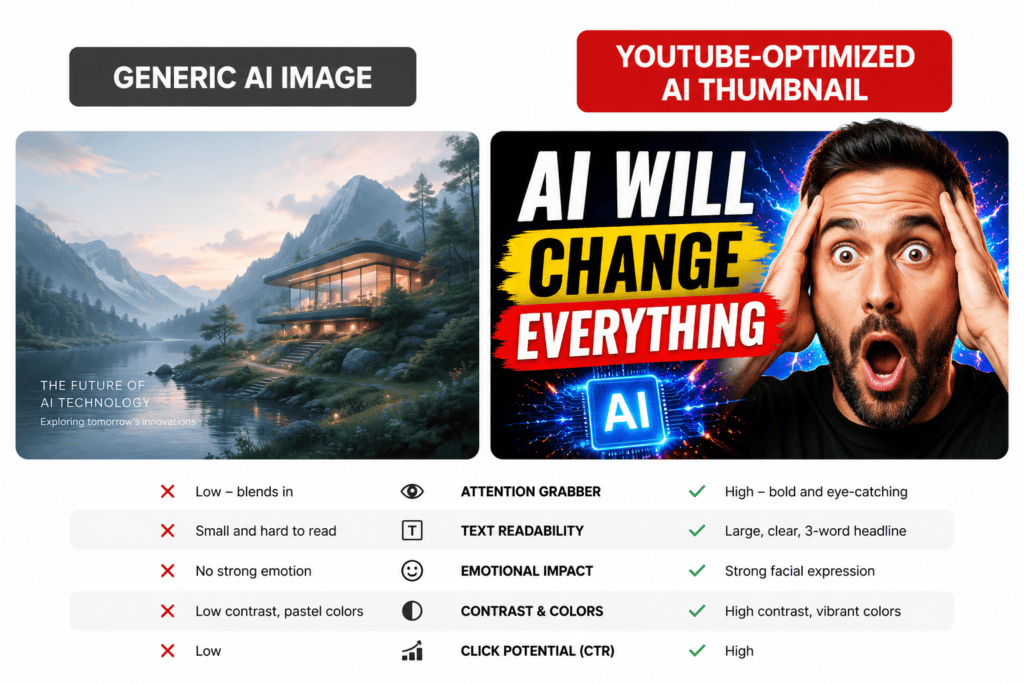
Not all AI thumbnails are created equal. There’s a big difference between a generic AI image and a thumbnail engineered to get clicks.
High-converting thumbnails share a few key traits:
Bold, readable text — legible even at small sizes on mobile screens
High contrast colors — so the thumbnail pops in a crowded feed
A clear focal point — usually an expressive face or a visually striking object
An emotional hook — curiosity, shock, excitement, or relatability
Niche relevance — it signals to the right viewer that “this video is for you”
Generic AI image tools can make beautiful images, but they don’t understand YouTube. They don’t know CTR psychology, feed dynamics, or what’s currently working in your specific niche. That’s the gap between AI art and AI built for YouTube growth.
AI image comparison for YouTube thumbnails
The Psychology Behind High-CTR Thumbnails
This is one of the most overlooked parts of thumbnail design — and one of the biggest levers for CTR. Understanding why certain thumbnails get clicked helps you (and the AI) make better creative decisions.
Curiosity gap — showing just enough to raise a question, not enough to answer it
Emotional faces — shock, joy, fear, and surprise all outperform neutral expressions
High contrast — sharp color separation makes a thumbnail visually “louder” than neighboring videos
Pattern interrupt — an unexpected visual element breaks the scroll
Visual hierarchy — the eye should land on one clear focal point first, not a cluttered scene
Color psychology — red and yellow tend to signal urgency; blue signals trust; each niche has its own conventions worth studying
Eye tracking — viewers’ eyes are drawn to faces and eyes first, then text, then background
When you create YouTube thumbnails with AI free using a tool that’s aware of these principles, your output starts closer to “click-ready” instead of just “pretty.”
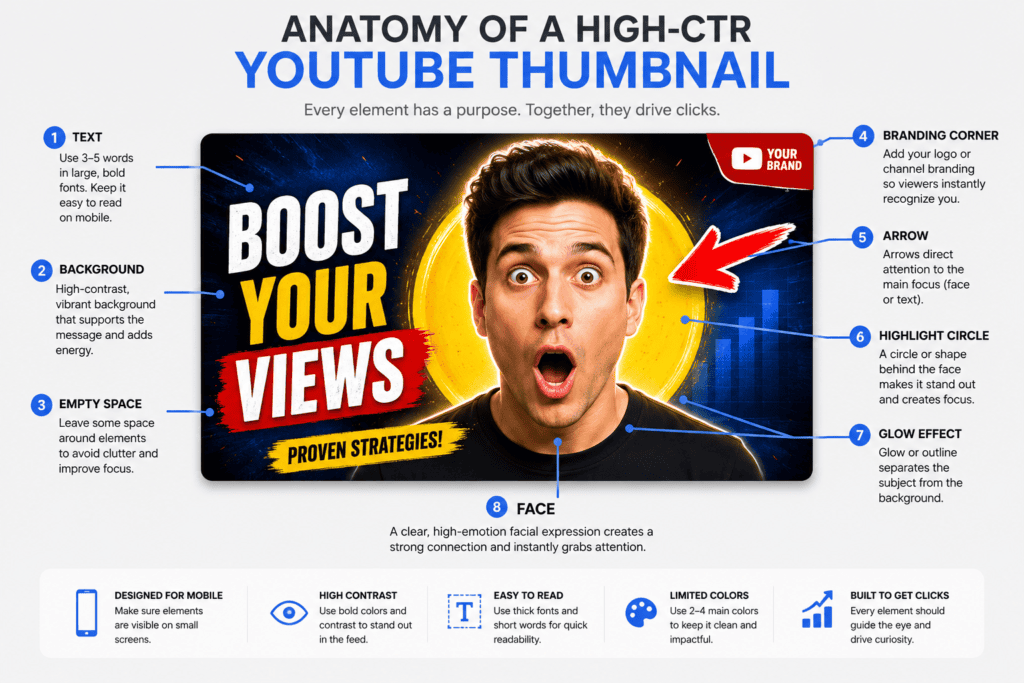
Thumbnail Anatomy: The 8 Elements of a Click-Worthy Design
Every high-performing thumbnail is really a composition of the same core building blocks, arranged differently depending on niche and platform trends:
Face — the emotional anchor of the design
Text — a short, punchy headline (3–5 words)
Background — simplified or blurred so it doesn’t compete with the subject
Arrow — optional, used to direct attention to a specific detail
Highlight/circle — draws the eye to a key object or result
Glow/lighting effects — adds drama and depth
Empty space — breathing room that keeps the design from feeling cluttered
Branding — a consistent color, font, or logo placement so viewers recognize your channel instantly
AI thumbnail generator
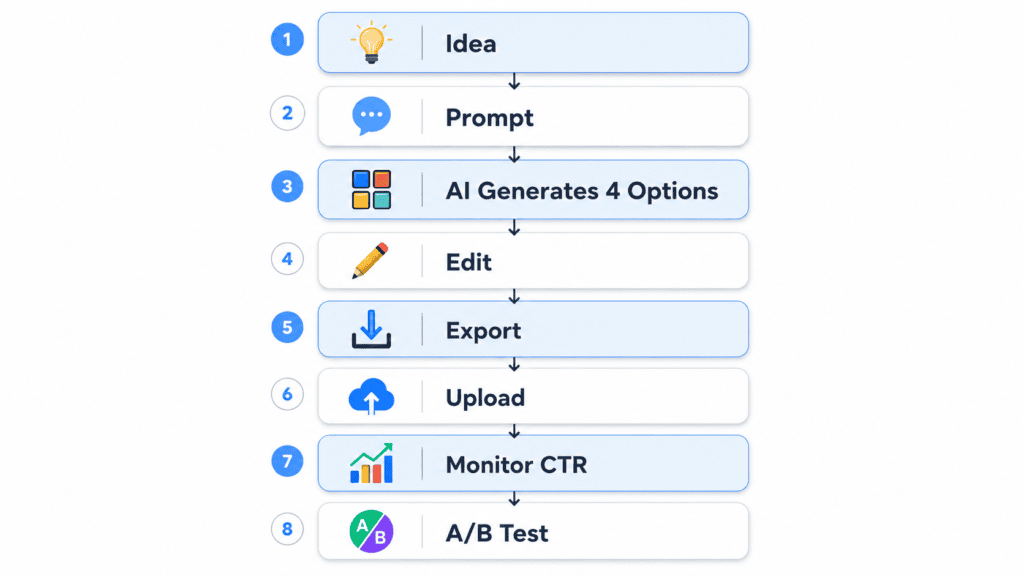
How to Create YouTube Thumbnails with AI Free — Step by Step
Ready to start? Here’s a simple, actionable process to get your first AI-generated thumbnail done today.
Step 1: Know your video’s core hook. Before you touch any tool, write down the one thing your video promises the viewer — a transformation, a secret, a surprising result. Your thumbnail needs to visually communicate that hook in under two seconds.
Step 2: Choose the right AI thumbnail tool. Look for tools that offer YouTube-optimized dimensions (1280×720), custom text overlay options, niche customization, no watermarks, and multiple design variations. ytZolo checks all of these boxes and connects your thumbnail to your broader video strategy — titles, scripts, descriptions, and tags — so everything works together.
Step 3: Input your video topic or script. Feed in a clear, specific description. Instead of “cooking video,” try “how I lost 20 lbs eating pasta every day.” The more specific, the better the output.
Step 4: Generate and select from multiple variations. Always generate at least 3–5 thumbnail variations. This isn’t just about picking a favorite — it’s about having options to A/B test.
Step 5: Make small customizations. Adjust text if needed, confirm your face or key visual is clearly readable at small sizes, and check that colors stand out against YouTube’s white feed background.
Step 6: Download and upload. Download in PNG format for the best quality, keep the file under YouTube’s 2MB limit, and upload through YouTube Studio under “Custom Thumbnail.”
Step-by-step workflow diagram
AI Thumbnail Prompt Examples by Niche
The quality of your AI thumbnail output depends heavily on prompt specificity. Here are real starting-point prompts by niche:
Gaming: “Create a dramatic YouTube thumbnail featuring a shocked gamer holding a glowing sword with cinematic lighting.”
Finance: “Minimalistic thumbnail with a stock market chart crashing and a worried investor in the foreground.”
Fitness: “Before vs after body transformation split image with bold yellow typography.”
Tech: “Modern workspace with a glowing laptop, AI interface overlay, and blue neon lighting.”
Cooking/Food: “Close-up of a steaming dish with a chef’s excited reaction in the corner, warm golden lighting.”
Travel/Vlog: “Wide shot of a dramatic landscape with the creator in the foreground pointing at something off-screen, high saturation.”
Try variations of these prompts with your own topic swapped in, and always generate multiple options before choosing.
AI thumbnail generator
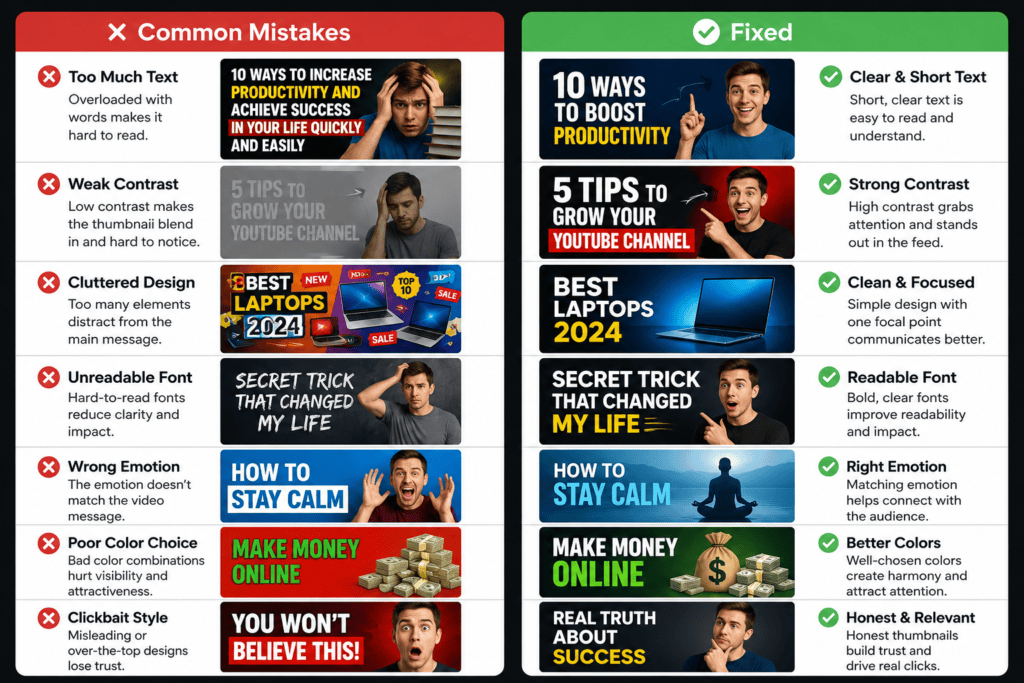
7 Mistakes to Avoid When Creating AI Thumbnails
Even with AI doing the heavy lifting, these mistakes quietly tank CTR:
Too much text — if viewers have to read a sentence, they’ve already scrolled past
Weak contrast — a thumbnail that blends into a white or dark feed background gets ignored
Cluttered design — too many elements competing for attention confuses the eye
Unreadable fonts — thin or overly stylized fonts disappear at mobile thumbnail size
Wrong emotion — an expression that doesn’t match the video’s actual content hurts retention, not just CTR
Poor color balance — clashing or muddy colors reduce visual impact
Misleading clickbait — a thumbnail that overpromises what the video delivers tanks watch time and can trigger YouTube policy issues
How do you generate thumbnail with AI
Why Manual Thumbnail Design Is Holding You Back
Let’s be real. The old way of designing thumbnails is broken for most creators.
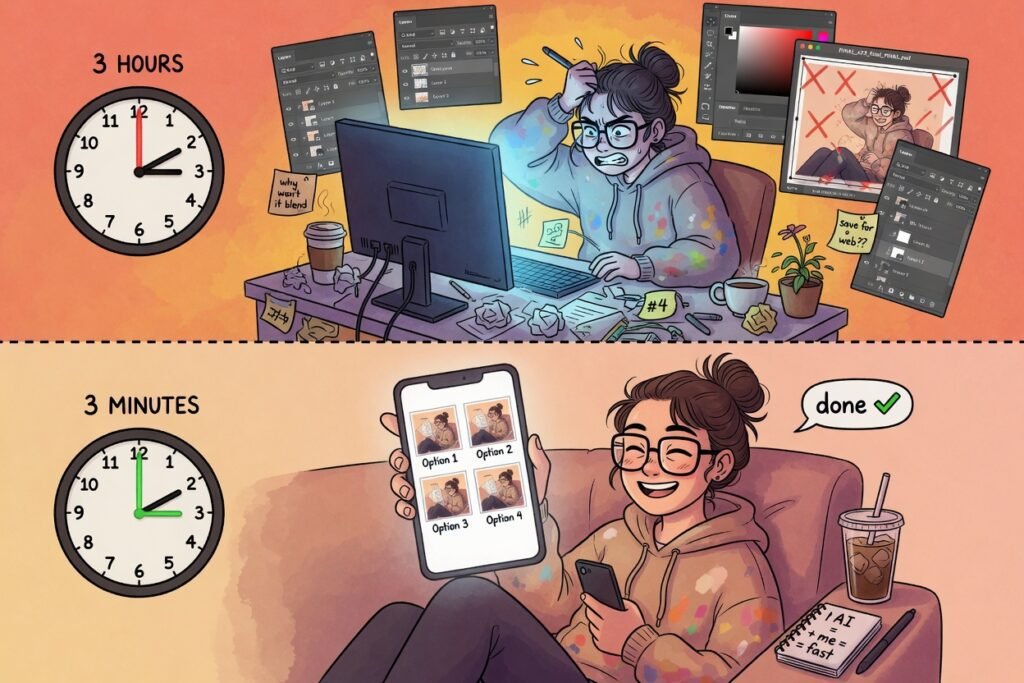
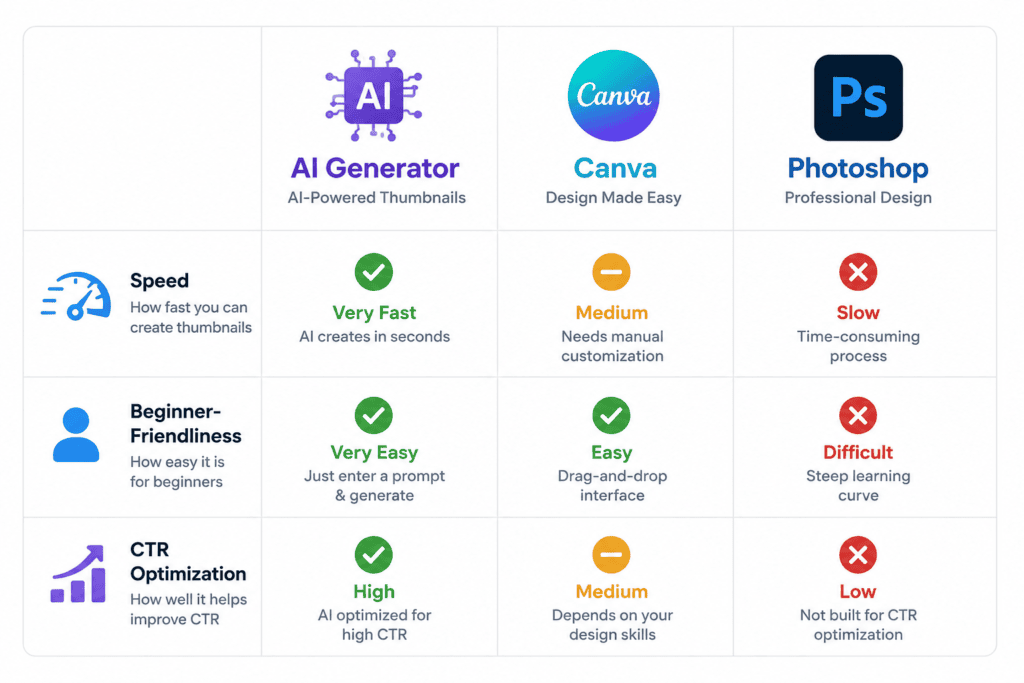
Opening Photoshop, picking fonts, sourcing stock images, cutting out backgrounds, adjusting layers — it can easily eat up 2–3 hours per video. For a creator publishing twice a week, that’s potentially 20+ hours a month spent on thumbnails alone.
And even after all that time, you’re still guessing. You don’t know if yellow text or blue text gets more clicks. You don’t know if your face or a product image should be the focal point. You’re designing by intuition, not data.
AI changes this completely. You go from hours of guesswork to minutes of precision — designs informed by patterns that actually correlate with clicks, ready to test immediately.
Canva is a solid general design tool, but it’s a blank canvas — it doesn’t know your niche or predict what converts. Photoshop offers full creative control but demands real design skill and time. An AI thumbnail generator built for YouTube specifically closes that gap by combining speed, niche awareness, and CTR-informed design in one step.
create youtube thumbnails with ai free
Why ytZolo Is Better Than Other AI Thumbnail Tools
There are plenty of tools that let you create YouTube thumbnails with AI free. Here’s how ytZolo compares, honestly.
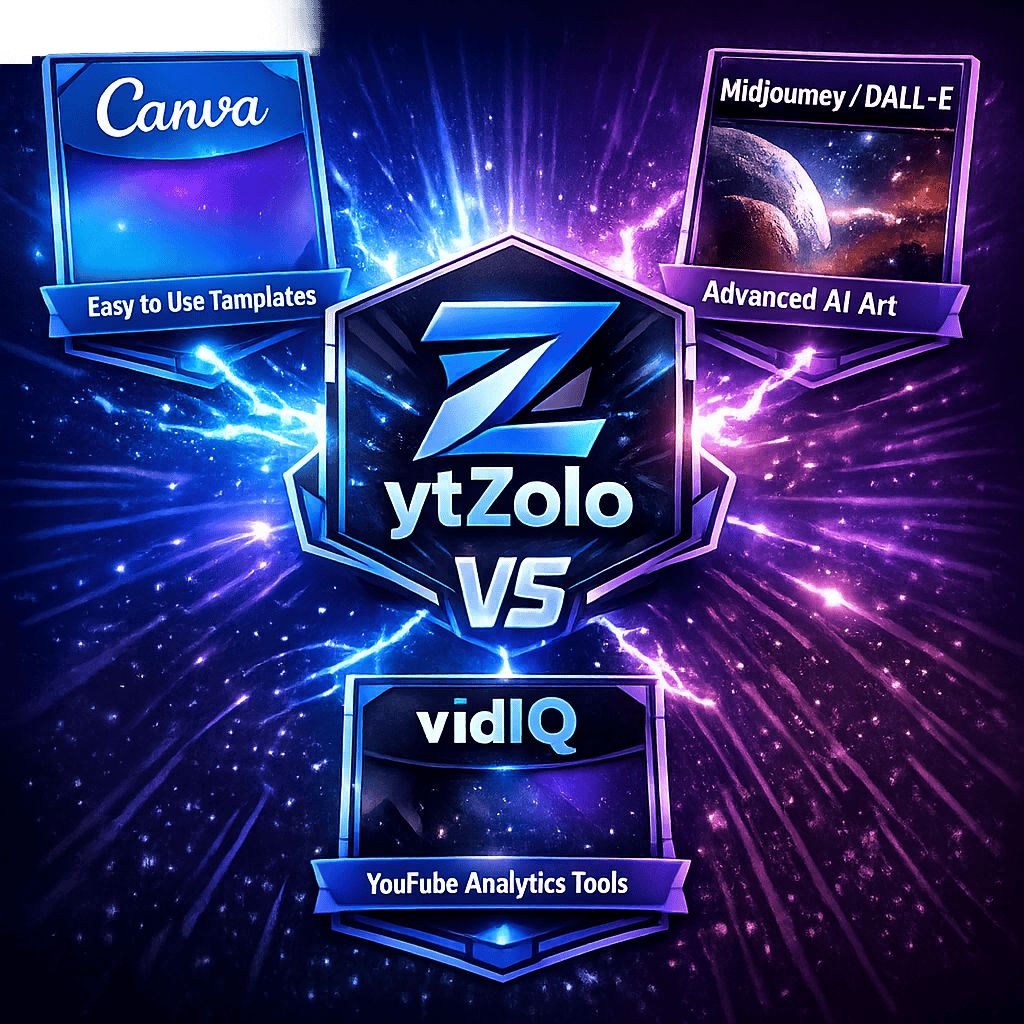
ytZolo vs. Canva:Canva doesn’t know your niche or YouTube’s algorithm, and won’t tell you which design is more likely to convert. ytZolo is built specifically for YouTube creators — every feature is tuned for channel growth, not just visual polish.
ytZolo vs. generic AI image generators (Midjourney, DALL-E): These tools produce stunning images but have no concept of YouTube CTR, metadata, or niche trends. You’d still manually add text, resize for YouTube, and guess whether it works. ytZolo automates all of this in one workflow.
ytZolo vs. vidIQ Thumbnail Maker: vidIQ’s thumbnail tool is solid, but ytZolo goes further with an all-in-one approach covering your entire content workflow — thumbnails, titles, scripts, SEO descriptions, tags, and growth strategy in one place.
What makes ytZolo genuinely different is that it’s not just a thumbnail maker — it’s a complete AI YouTube growth system that helps you generate thumbnails optimized for your niche’s click patterns, write titles that pair with your visual, draft full scripts from one idea, and build a consistent content pipeline without burning out.
How ytZolo Helps You Create AI Thumbnails That Convert
Here’s what the ytZolo experience looks like for a working creator.
You have a video idea. You open ytZolo and type in your topic. Within seconds, you have a scroll-stopping thumbnail concept designed for your niche, 3–5 variations ready to test, a curiosity-driven title that complements the visual, a full video script, an SEO-optimized description, and tags that put your video in front of the right audience.
The platform is built on the idea that YouTube growth isn’t about one element — it’s about how your thumbnail, title, content, and SEO work together. When everything aligns, CTR goes up, watch time goes up, and the algorithm rewards you with more reach.
ytZolo offers a free plan to get started, no credit card required. You can create YouTube thumbnails with AI free, download them, test the title generator, and experience the full workflow before committing to a paid plan.
ytZolo thumbnail generation interface
Case Study: From 3.2% to 7.8% CTR
One creator in the tech review niche was publishing consistently but stuck at a 3.2% average CTR — well below the category benchmark. After switching from manually designed thumbnails to AI-generated, high-contrast versions with clearer focal points and shorter text, their CTR climbed to 7.8% within a few weeks of consistent A/B testing. The change wasn’t a new video style or a bigger budget — it was simply better-designed thumbnails tested systematically instead of published on a guess.
Use your face whenever possible. Thumbnails with expressive human faces consistently outperform text-only or object-only designs.
Test, test, test. Never assume your first thumbnail is your best. Use YouTube Studio’s A/B testing features to rotate thumbnails and track CTR over 1–2 weeks.
Match your thumbnail to your title. They should work together to create a complete curiosity loop.
Keep text short and punchy. Three to five words max — viewers scan feeds in milliseconds.
Study what’s working in your niche. Search your topic on YouTube and note colors, expressions, and text styles in top-performing videos.
Stay consistent with your brand. Pick a recognizable color palette, font, and visual format.
Update old thumbnails. One of the most underused growth hacks — refreshing thumbnails on underperforming videos has helped many creators significantly boost views on old content without touching the video itself.
FAQ: Your Top Questions Answered
Can I really create YouTube thumbnails with AI free? Yes. Several tools — including ytZolo — offer free plans that let you generate and download AI-created thumbnails without paying upfront. Free plans typically include a limited number of monthly generations, with paid plans unlocking more volume and advanced features.
Do AI-generated thumbnails actually improve CTR? Yes, when used correctly. AI tools trained on YouTube performance patterns understand what drives clicks: high contrast, emotional expressions, bold readable text, and niche-specific trends. Creators switching from manual to AI-optimized thumbnails often report meaningful CTR improvements within weeks.
Q: How do you generate thumbnail with AI for YouTube? Generating a YouTube thumbnail with AI takes only a few minutes. First, choose a specialized tool like ytZolo and input your video’s core topic or script hook (e.g., “how I lost 20 lbs eating pasta every day”).
The AI then analyzes your niche to generate 3–5 high-contrast layout variations tailored to current viewer click patterns. From there, you can easily customize the text overlay, fine-tune the colors for maximum feed visibility, and download the final 1280×720 PNG image ready to upload.
What’s the best free AI tool to create YouTube thumbnails? ytZolo stands out because it’s a complete YouTube growth platform, not just a thumbnail maker — you get thumbnails alongside titles, scripts, descriptions, and tags in one aligned workflow. Start free at ytzolo.com.
What size should my YouTube thumbnail be? 1280×720 pixels with a 16:9 aspect ratio. Maximum file size is 2MB. PNG format gives the best quality. Most AI thumbnail tools, including ytZolo, export in the correct dimensions automatically.
How many thumbnail variations should I test per video? Start with 2–3 variations per video. Upload your primary choice, then swap it after 1–2 weeks if CTR is below your channel average. YouTube’s A/B testing features (for eligible channels) make this easier over time.
Does YouTube allow AI-generated thumbnails? Yes. YouTube permits AI-assisted thumbnails as long as they aren’t misleading about the video’s actual content. YouTube does require disclosure for certain types of AI-generated or altered content in videos — check YouTube’s current AI content policies for specifics.
Are AI-generated thumbnails copyright-free? Generally, thumbnails you generate and own through a legitimate AI tool’s terms of service are yours to use commercially, but policies vary by platform. Always check the specific tool’s licensing terms before publishing at scale.
Can AI create thumbnails without any design skills at all? Yes — that’s the core value proposition. You describe your video topic, the AI generates the composition, text, and color choices, and you make minor tweaks rather than building the design from scratch.
How many words of text should be on a thumbnail? Ideally 3–5 words maximum. Anything longer becomes unreadable at mobile thumbnail size and gets scrolled past.
Conclusion: Your Thumbnails Deserve Better
Every day spent manually designing thumbnails — or worse, uploading with a weak auto-generated frame — is a day of views, subscribers, and revenue left on the table.
The smartest creators in 2026 aren’t working harder. They’re using AI to move faster, look more professional, and grow with less effort. They create YouTube thumbnails with AI free, and they do it in minutes instead of hours.
You don’t need a graphic design degree. You don’t need Photoshop. You don’t need a team. You just need the right tool.
ytZolo is the all-in-one AI platform built for exactly this — helping creators build smarter thumbnails, better titles, stronger scripts, and more optimized content from idea to publish.





Pingback: Best Thumbnail Maker Without Login — Free & Fast 2026
Pingback: Best Free AI Thumbnail Generator for YouTube in 2026
Pingback: Free Thumbnail Generator for YouTube: Best AI Tools (2026)
Pingback: Best YouTube Shorts Thumbnail Generator – AI Tools 2026
Pingback: Free AI Thumbnail Generator: Best Tools for YouTube 2026
Pingback: YouTube AI Generated Content Disclosure Policy 2026 Proven
Pingback: Best Free AI YouTube Thumbnail Generators 2026 Viral+No Flop
Pingback: Best Free AI Image Generators for YouTube Thumbnails 2026
Pingback: Best Free AI Tools for YouTube Thumbnails (2026)
Pingback: ytZolo vs InVideo AI: Honest 2026 Comparison
Pingback: Free AI YouTube Thumbnail Maker: 11 Best Tools Compared
Pingback: Free AI Thumbnail Maker for YouTube: Proven Click Boosts 2026