
Table of Contents
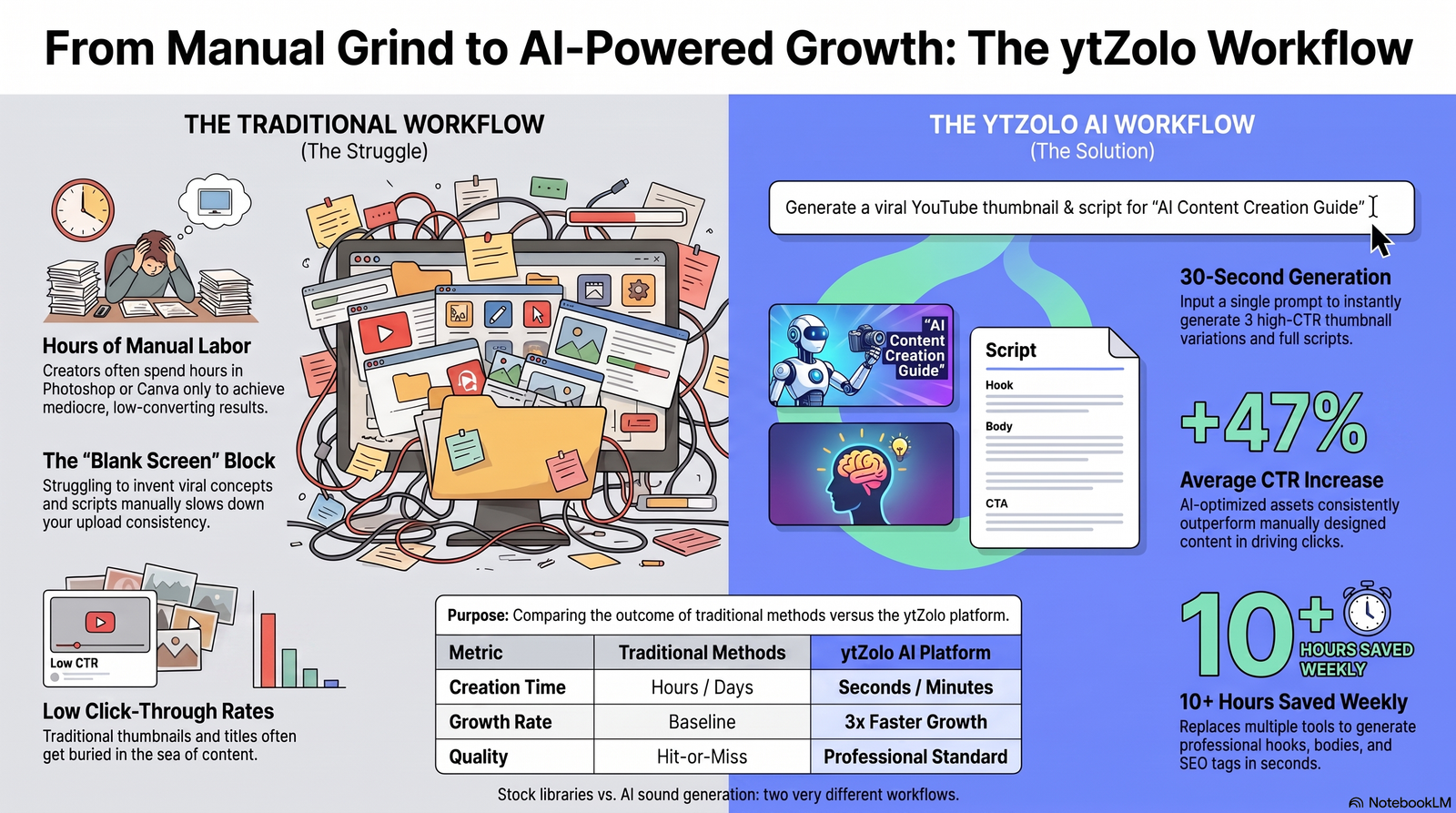
An empty folder of downloaded WAV files, twelve browser tabs open to sound libraries, and a video still missing its footstep audio — this is the reality for most editors on a Tuesday night. Searching stock libraries for “footsteps on gravel, slightly muddy, medium pace” rarely returns a usable match on the first try.
That’s the gap an AI sound effects generator is built to close. Instead of digging through a library hoping someone already recorded the exact sound you need, you describe it in plain language and get an original clip in seconds.
This guide compares the leading AI sound effects generator tools of 2026 — including ytZolo, ElevenLabs, Adobe Firefly, Stable Audio, and Meta’s AudioCraft — on quality, pricing, licensing, and ease of use. You’ll also get 20 ready-to-use prompts, a step-by-step workflow, and answers to the questions creators ask most.
What Is an AI Sound Effects Generator?
An AI sound effects generator is software that creates original audio clips from a text prompt, instead of retrieving a pre-recorded file from a library. You type a description — “heavy wooden door creaking open slowly” — and the model synthesizes a new sound that matches it.
How it differs from a stock library
A stock library is a fixed catalog. If the exact sound you need isn’t in it, you either compromise or layer multiple clips together. A sound effect generator has no fixed catalog — it generates on demand, so the range of possible outputs is limited only by how well you describe what you want.
The technology behind it: neural audio synthesis
Most modern text-to-audio tools rely on neural audio synthesis — diffusion or transformer-based models trained on large volumes of labeled audio. These models learn the relationship between language (“metallic clang,” “distant thunder,” “soft rain on a tin roof”) and the acoustic properties that produce that sound, then generate a new waveform matching the prompt.
Practical examples
- A horror channel needs a specific creaking-floorboard sound that builds tension for exactly four seconds — instead of trimming a stock clip, they describe the pacing directly.
- A gaming channel needs a UI “level up” chime that doesn’t sound like every other creator’s — a generated sound is inherently harder to duplicate than a library download used by thousands of other channels.
- A podcast host wants a subtle transition whoosh between segments, generated once and reused across every episode for brand consistency.
How AI Sound Effects Generation Works
The mechanics are simpler than most people expect. In plain terms, generating a sound effect follows the same basic loop across nearly every AI sound effects generator on the market:
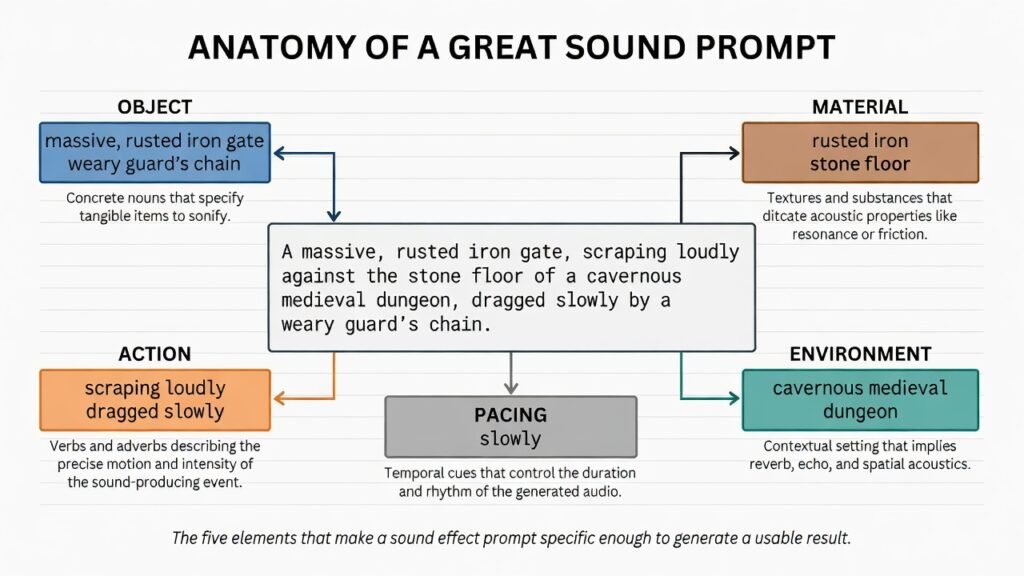
- Write a prompt. Describe the sound — object, action, material, environment, and pacing.
- The AI synthesizes audio. The model converts your text into an audio waveform in seconds, sometimes offering multiple variations.
- Preview and select. Listen to the generated options and pick the closest match, or regenerate with an adjusted prompt.
- Download and edit. Export the file (typically WAV or MP3) and drop it into your video editing timeline.
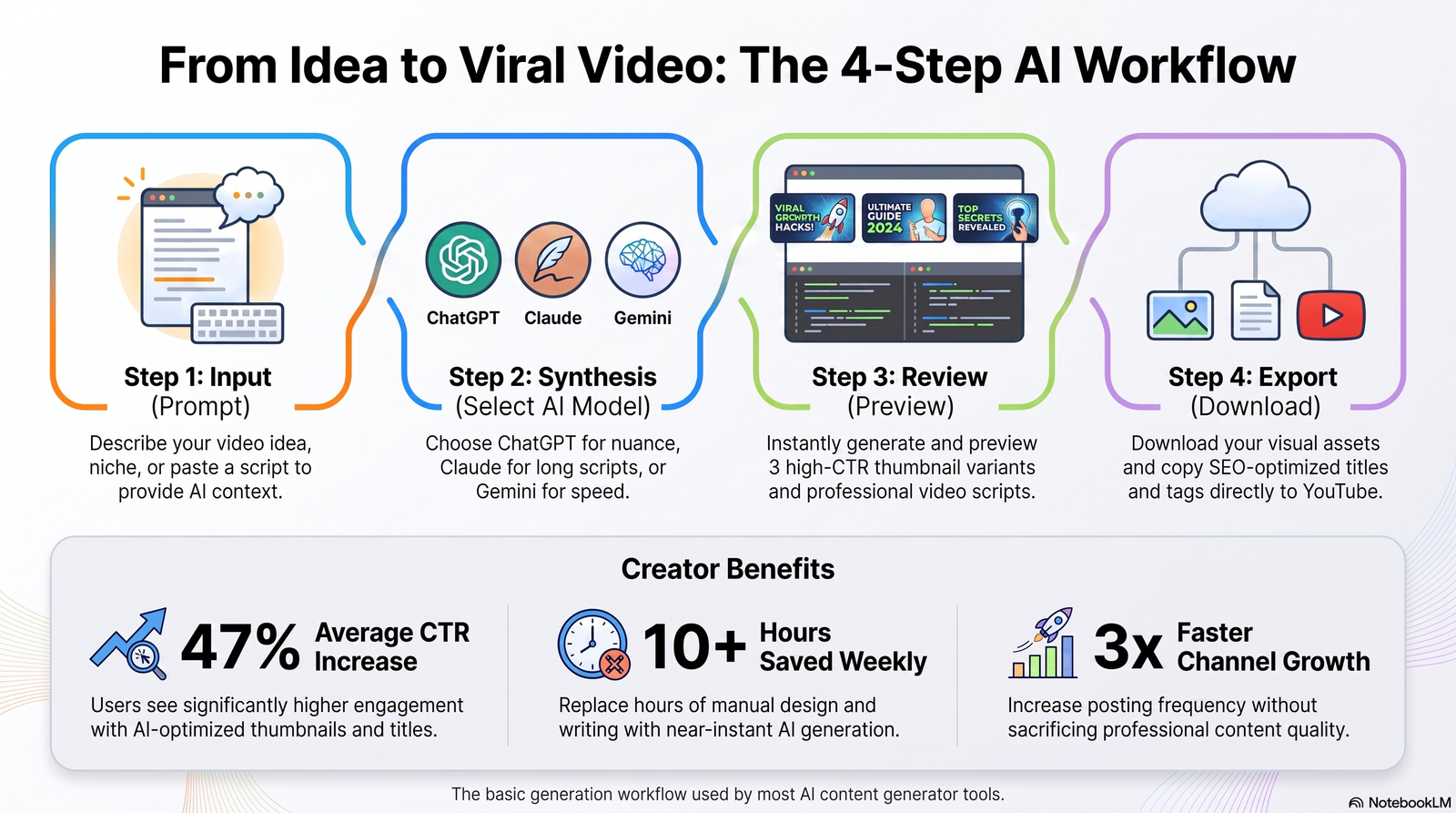
This loop is fast enough that iterating on a prompt three or four times to nail the exact sound still takes less time than scrolling through search results in a traditional library.
Why Creators Are Moving Beyond Stock Libraries
Stock sound libraries built the foundation of video editing audio for two decades, but several frictions push creators toward generation instead.
- Uniqueness. Popular stock effects get reused across thousands of videos — viewers start to recognize them, which can undercut a channel’s originality.
- Copyright and claims. Even “free” sound effects sometimes carry attribution requirements or get miscategorized, leading to unexpected copyright claims on YouTube.
- Speed. Searching, previewing, and downloading from a library takes longer than describing a sound and generating it directly.
- Customization. A generator lets you control exact duration, intensity, and character of a sound instead of accepting whatever a library happens to have.
- Workflow integration. Tools that combine sound generation with voice, music, and editing keep audio production inside one timeline instead of scattered across apps.
None of this makes stock libraries obsolete — for large, curated music catalogs they’re still strong — but for one-off, specific, or brand-distinct sound effects, generation has become the faster path.
Best AI Sound Effects Generator Tools (2026)
Below is a comparison of the tools creators most often shortlist when evaluating a sound effect generator, based on published features and pricing information from each vendor.
| Tool | Best For | Commercial License | AI Quality | Customization | Ease of Use |
|---|---|---|---|---|---|
| ytZolo | Creators who want sound effects alongside voice, music, and YouTube content tools | Paid plans | Good, prompt-based | Duration and style via prompt | Beginner-friendly |
| ElevenLabs | High-fidelity, standalone sound design | Paid plans required; free tier requires attribution | High, prompt-based | Prompt + duration control | Beginner-friendly |
| Adobe Firefly | Editors already inside Adobe apps | Included with Creative Cloud/Firefly plans | Good, improving | Moderate | Familiar to Adobe users |
| Stable Audio | Musicians and sound designers wanting open, flexible generation | Depends on plan tier | High for music and ambience | Strong (fine-tuned control) | Moderate learning curve |
| AudioCraft (Meta) | Developers and researchers | Open-source, self-managed licensing | Research-grade, variable | Requires technical setup | Technical, not beginner-friendly |
| Voicemod | Real-time voice changing + soundboard effects | Paid plans | Good for real-time use | Preset-driven | Very easy |
| Freesound | Free, community-uploaded stock clips (not AI-generated) | Varies by upload (CC licenses) | N/A — library, not generative | None (library only) | Easy |
| Pixabay Sound Effects | Free stock library | Free, royalty-free | N/A — library, not generative | None (library only) | Very easy |
| Epidemic Sound | Curated music + SFX library for regular uploaders | Included in subscription | N/A — library, not generative | None (library only) | Easy |
| Artlist | Music, SFX, footage, and templates bundled | Included in subscription | N/A — library, not generative | Limited (AI tools on higher tiers) | Easy |
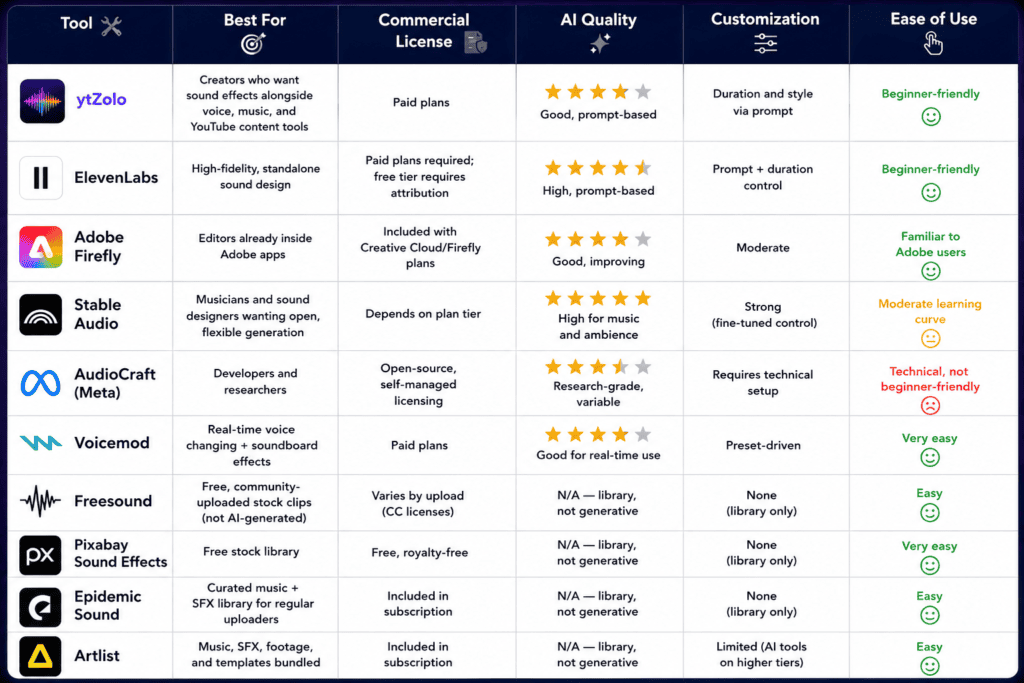
A quick note on categories: tools like Freesound, Pixabay, Epidemic Sound, and Artlist are primarily libraries — you search and download pre-existing clips. ElevenLabs, ytZolo, Adobe Firefly, Stable Audio, and AudioCraft are generative — they create new audio from text. Comparing them directly only makes sense once you know which type of workflow you actually need, which is why the section below breaks that down further.
Why ytZolo Stands Out
Rather than repeating marketing claims, here’s what’s factually documented about ytZolo’s audio capabilities.
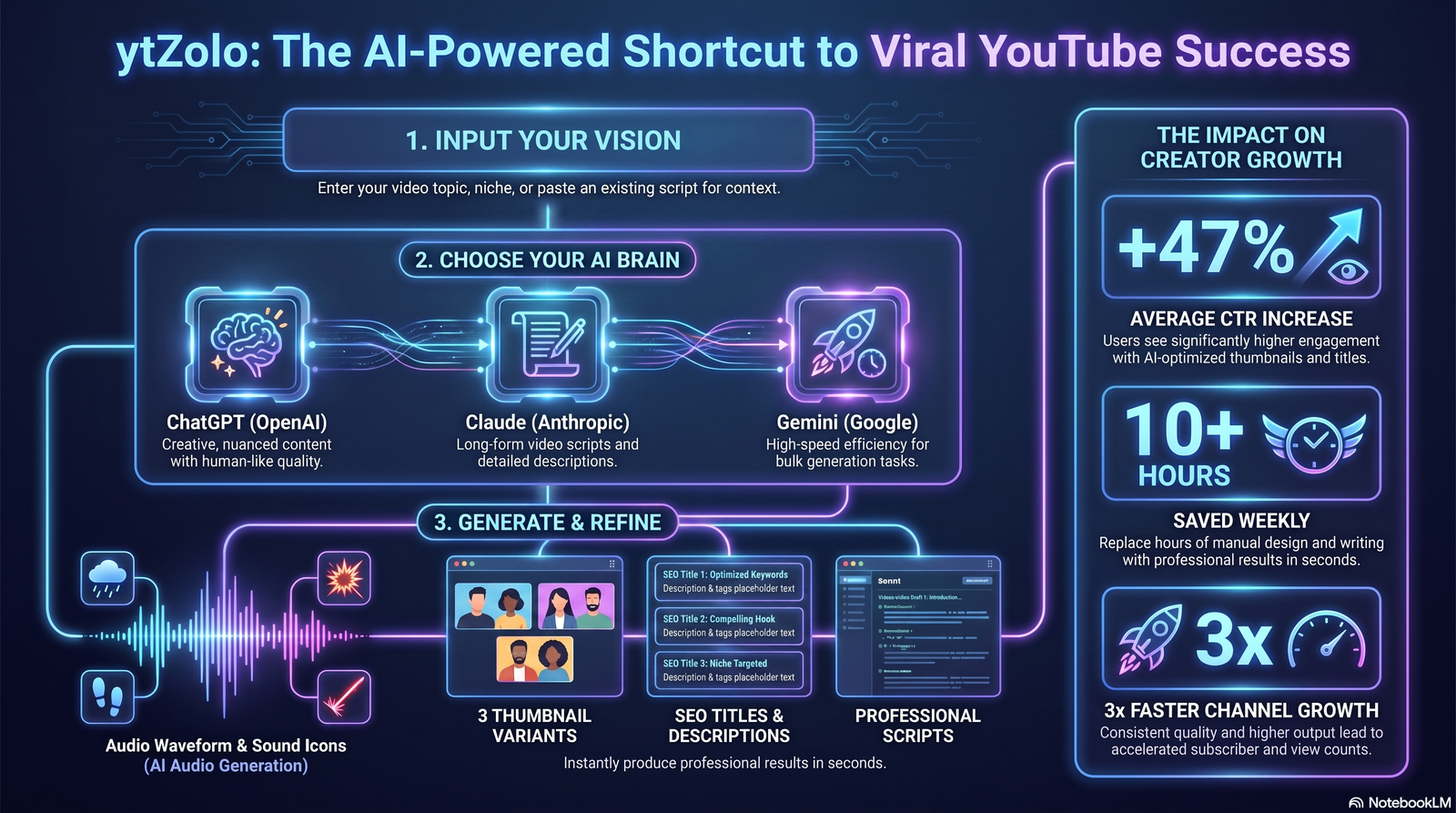
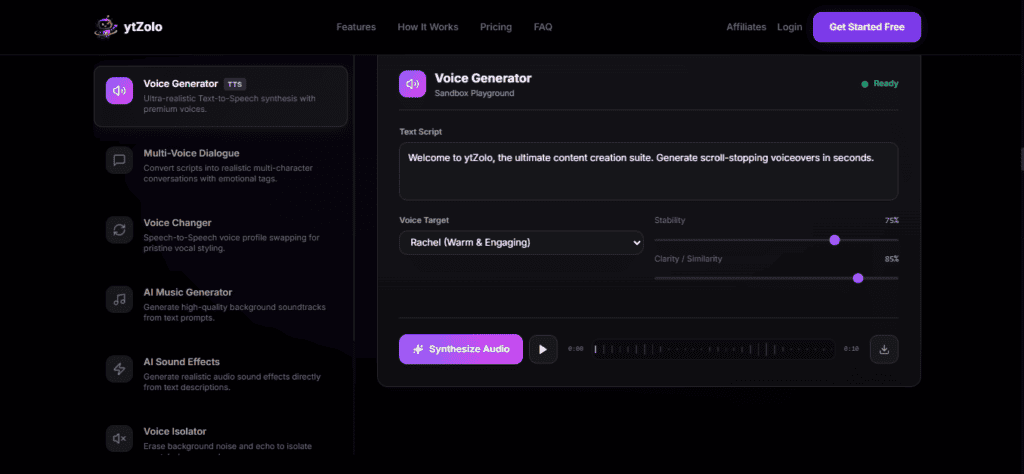
ytZolo is built around an AI Audio Studio that sits alongside its content-creation tools (titles, scripts, descriptions, thumbnails). Inside the Audio Studio, the platform offers:
- AI Sound Effects — generate custom sound effects from a text description.
- AI Music — create background music tracks from a prompt.
- Voice Generator — text-to-speech voiceover generation.
- Voice Changer — transform a recorded voice into different tones and styles.
- Multi Voice Dialogue — convert plain text into multi-speaker conversations, useful for educational content, podcasts, and role-play videos.
- Dubbing — translate and dub video content into other languages.
- Voice Isolation — remove background noise and isolate clean vocals from a recording.
- Forced Alignment — automatically synchronize spoken audio with text, which speeds up subtitle, transcript, and caption creation.
The practical advantage is workflow consolidation: a creator who writes a script, generates a voiceover, adds sound effects, and needs the video dubbed into another language can do all four inside the same platform instead of exporting files between four separate subscriptions. For a deeper look at how the dubbing side compares to dedicated dubbing tools, see ytZolo’s own AI dubbing software comparison.
ytZolo offers a free plan with limited credits, plus Standard and Pro tiers with higher monthly credit allowances — see the pricing comparison section below for what’s publicly confirmed.
Step-by-Step Tutorial: How to Generate a Sound Effect
- Open your AI sound effects generator and locate the sound effects or text-to-SFX tool.
- Write a specific prompt describing the object, material, action, and pacing (see the prompt guide below).
- Set the duration, if the tool allows it — most sound effects work best between 1–8 seconds.
- Generate and listen to the output. Most tools return one or more variations.
- Regenerate or refine the prompt if the tone, pitch, or intensity isn’t quite right.
- Download the file in WAV or MP3 format.
- Drop it into your video editing timeline, align it to the visual cue, and adjust volume/EQ to sit properly under dialogue or music.
Prompt Engineering Guide: 20 Real Examples
The quality of what you get from any AI sound effects generator depends heavily on how you write the prompt. Include the object, material, action, environment, and pacing — vague prompts return vague results.
For a deeper walkthrough of prompt structure and more examples, see our guide on how to write AI sound effect prompts that actually work.
| # | Category | Example Prompt |
|---|---|---|
| 1 | Nature | “Gentle rain falling on leaves in a quiet forest, distant birds” |
| 2 | Gaming | “8-bit style coin collect chime, short and bright” |
| 3 | Sci-Fi | “Spaceship engine powering up, low hum rising to a whir” |
| 4 | Podcast | “Soft whoosh transition, one second, subtle and modern” |
| 5 | Horror | “Slow wooden floorboard creak, tense and drawn out” |
| 6 | Comedy | “Cartoon boing sound, playful and exaggerated” |
| 7 | Transitions | “Quick swipe transition sound, clean and punchy” |
| 8 | Explosions | “Distant explosion with a deep bass thud and light debris fall” |
| 9 | Magic | “Sparkling magical chime, ascending pitch, fantasy style” |
| 10 | Vehicles | “Car engine starting on a cold morning, slight sputter” |
| 11 | Animals | “Small dog barking twice, medium distance, outdoors” |
| 12 | UI Sounds | “Soft notification pop, single short beep, modern app style” |
| 13 | Rain | “Heavy rainstorm on a metal roof with occasional thunder” |
| 14 | City Ambience | “Busy city street ambience, distant traffic and footsteps” |
| 15 | Footsteps | “Footsteps on gravel, medium pace, one person walking” |
| 16 | Weapons | “Sword unsheathing, metallic and sharp, fantasy game style” |
| 17 | Kitchen | “Chopping vegetables on a wooden cutting board, steady rhythm” |
| 18 | Office | “Keyboard typing, fast pace, mechanical keys” |
| 19 | Fantasy | “Dragon roar, deep and powerful, echoing” |
| 20 | Sports | “Basketball bouncing on a hardwood court, three bounces” |
Real YouTube Use Cases
- Education — subtle UI chimes and transition sounds that keep tutorials feeling polished without distracting from the lesson.
- Gaming — custom impact and UI sounds that don’t overlap with commonly reused stock effects. See our full AI sound effects for gaming channels prompt guide.
- Faceless channels — layering ambience and Foley sounds compensates for the lack of on-camera presence.
- Documentary — historically appropriate ambience (footsteps on cobblestone, period-accurate machinery) that’s hard to source from a general stock library.
- Podcast — consistent transition and stinger sounds generated once and reused for brand identity across every episode.
- Product Reviews — clean UI and unboxing-adjacent sound cues that make demos feel more produced.
- Shorts — quick, punchy transition and comedic sounds that match short-form pacing.
- Travel — environmental ambience (market noise, ocean waves, airport chatter) to fill gaps in on-location audio.
- Vlogs — light transition sounds between scenes without needing a full sound library subscription.
- Animation — Foley for character movement, footsteps, and object interaction that matches a specific animation style.
AI Sound Effects vs Stock Libraries (Epidemic Sound, Artlist)
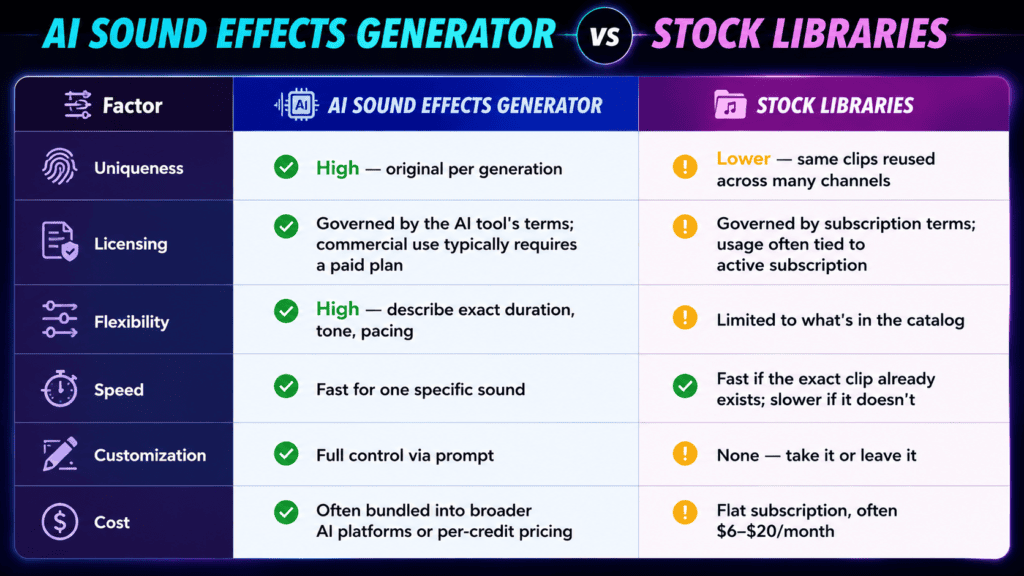
Stock libraries like Epidemic Sound and Artlist remain strong choices for creators who mainly need background music and are comfortable with pre-recorded catalogs. Here’s how the two approaches compare on the factors that matter most.
| Factor | AI Sound Effects Generator | Stock Libraries |
|---|---|---|
| Uniqueness | High — original per generation | Lower — same clips reused across many channels |
| Licensing | Governed by the AI tool’s terms; commercial use typically requires a paid plan | Governed by subscription terms; usage often tied to active subscription |
| Flexibility | High — describe exact duration, tone, pacing | Limited to what’s in the catalog |
| Speed | Fast for one specific sound | Fast if the exact clip already exists; slower if it doesn’t |
| Customization | Full control via prompt | None — take it or leave it |
| Cost | Often bundled into broader AI platforms or per-credit pricing | Flat subscription, often $6–$20/month |
Both approaches have a place. Music-heavy projects often still lean on curated libraries for their depth of professionally produced tracks, while specific, one-off, or brand-distinct sound effects increasingly come from generation.
For a deeper breakdown of licensing, cost, and use-case fit, see our full comparison of AI sound effects vs stock libraries.
Pros and Cons
Pros
- Original sounds that aren’t recycled across thousands of other videos
- Full control over duration, tone, and pacing
- Faster than searching a library when the exact sound doesn’t already exist
- No need to browse and preview dozens of clips
- Often bundled with voice, music, and dubbing tools in all-in-one platforms
Cons
- Output quality can vary and sometimes requires regenerating a prompt
- Free tiers are usually limited to non-commercial use or carry attribution requirements
- Longer or more complex sequences (e.g., a 30-second ambience loop) may need multiple generations stitched together
- Highly specific real-world sounds (a particular vintage machine, for example) may still be easier to find in a specialized library
- Requires learning how to write effective prompts to get consistent results
Pricing Comparison
Pricing changes frequently across these platforms, so treat the figures below as a general snapshot rather than a guarantee — always check the vendor’s own pricing page before subscribing.
| Tool | Free Tier | Entry Paid Plan | Notes |
|---|---|---|---|
| ytZolo | Yes, limited credits | Standard plan with monthly credits (check ytzolo.com pricing for current rates) | Bundles sound effects with voice, music, dubbing, and YouTube SEO tools |
| ElevenLabs | Yes, 10,000 credits/month, requires attribution | Starter plan around $5/month | Sound effects share the same credit pool as TTS, dubbing, and voice cloning |
| Adobe Firefly | Limited free generations | Included with Creative Cloud/Firefly subscription plans | Pricing tied to broader Adobe subscription |
| Stable Audio | Limited free tier | Paid tiers vary by usage volume | Strong for music and ambience generation |
| AudioCraft (Meta) | Free, open-source | N/A — self-hosted | Requires technical setup; no managed commercial licensing |
| Epidemic Sound | No free tier; 30-day trial | Around $9.99/month (Creator plan) | Library subscription, not generative |
| Artlist | Preview only | Around $199/year (Personal/Standard) | Library subscription; higher tiers bundle AI credits and footage |
| Pixabay Sound Effects | Fully free | N/A | Royalty-free library, no generation |
| Freesound | Fully free | N/A | Community-uploaded library under varying Creative Commons licenses |
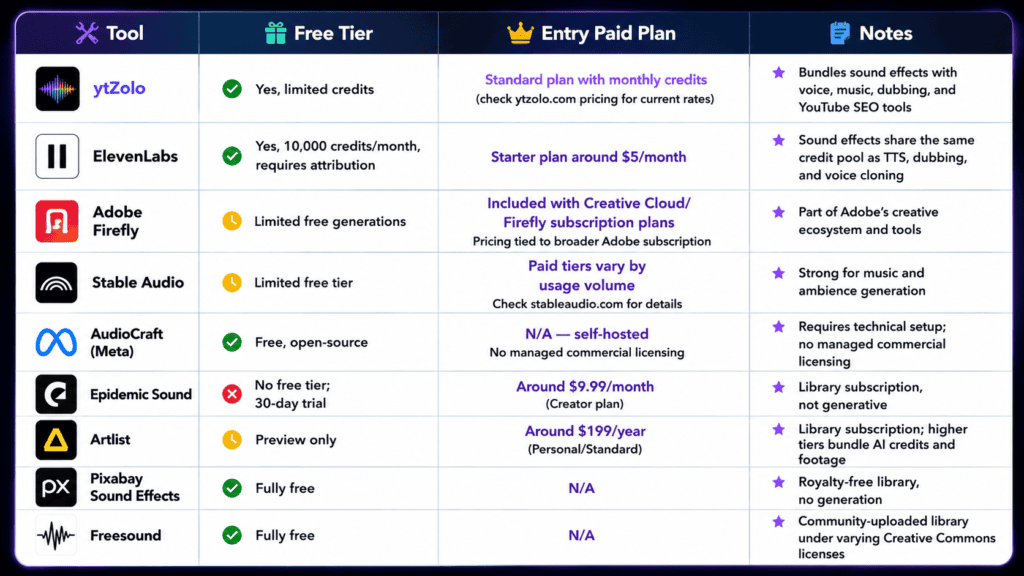
Pricing for AI credit systems (ytZolo, ElevenLabs, Adobe Firefly, Stable Audio) is not directly comparable one-to-one, since each platform defines “credits” and output length differently. The safest approach is to test each tool’s free tier against your actual use case before committing to a paid plan.
For a full breakdown of free-tier limits across every tool, see our guide to the best free AI sound effects generator tools.
Common Mistakes When Using an AI Sound Effects Generator
- Writing vague prompts like “scary sound” instead of describing the object, material, and pacing.
- Skipping the licensing terms and assuming free-tier output is cleared for commercial YouTube use. For a full breakdown of licensing terms across tools, see are AI sound effects copyright-free?
- Generating at the wrong duration, then stretching or looping a clip until it sounds unnatural.
- Ignoring EQ and mixing — a generated sound effect at full volume can clash with dialogue or music.
- Not previewing multiple variations before settling on the first result.
- Overusing dramatic effects in every transition, which fatigues viewers rather than adding polish.
- Forgetting to normalize loudness across the whole video, causing jarring volume jumps.
- Using stock and AI-generated sounds inconsistently, creating a mismatched sonic identity across a channel.
- Not testing sounds against the final video edit, only in isolation.
- Assuming higher-priced tools always sound better for every category of effect — some tools excel at ambience, others at short impacts.
- Neglecting mono vs. stereo settings, which can cause phase issues when layering multiple effects.
- Not saving successful prompts for reuse, forcing creators to reinvent effective wording every time.
SEO Tips: How Sound Design Affects YouTube Performance
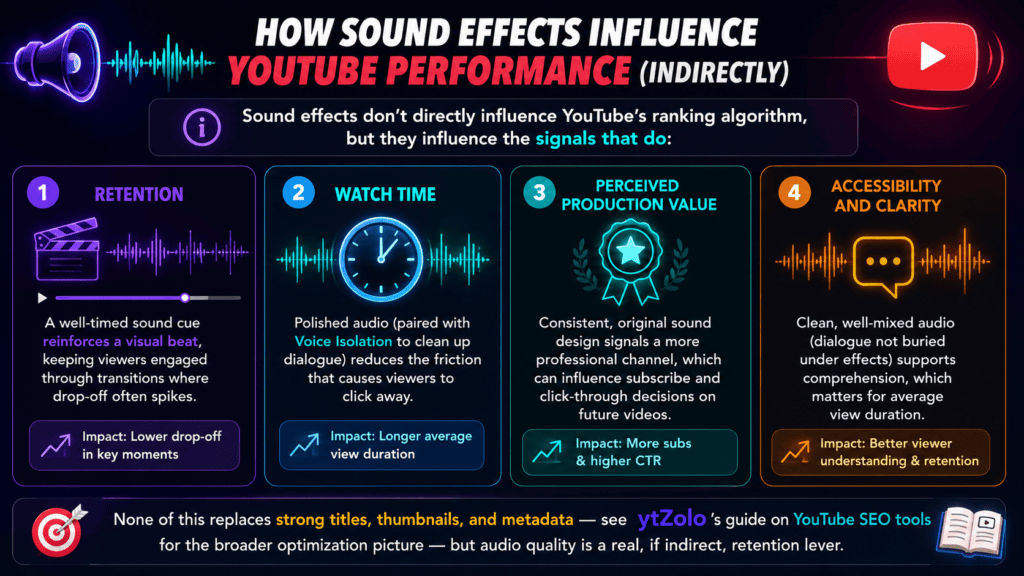
Sound effects don’t directly influence YouTube’s ranking algorithm, but they influence the signals that do:
- Retention — a well-timed sound cue reinforces a visual beat, keeping viewers engaged through transitions where drop-off often spikes.
- Watch time — polished audio (paired with tools like Voice Isolation to clean up dialogue) reduces the friction that causes viewers to click away.
- Perceived production value — consistent, original sound design signals a more professional channel, which can influence subscribe and click-through decisions on future videos.
- Accessibility and clarity — clean, well-mixed audio (dialogue not buried under effects) supports comprehension, which matters for average view duration.
None of this replaces strong titles, thumbnails, and metadata — see ytZolo’s guide on YouTube SEO tools for the broader optimization picture — but audio quality is a real, if indirect, retention lever.
The Future of AI Sound Design
A few trends are shaping where AI sound effects generator tools are headed next:
- Multimodal generation — models that can watch a video clip and generate matching sound automatically, rather than requiring a manual text prompt for every cue.
- Real-time generation — sound effects created live during streaming or gameplay recording, instead of a separate post-production step.
- Deeper workflow integration — platforms consolidating sound effects with voice, music, dubbing, and editing so creators stop juggling separate subscriptions.
- Better licensing clarity — as more creators rely on generated audio, platforms are under pressure to make commercial-use terms simpler and easier to verify at a glance.
Final Verdict
There’s no single “best” AI sound effects generator for every creator — the right choice depends on whether you need a standalone, high-fidelity tool or a generator built into a broader content workflow.
- If you want sound effects alongside voice generation, music, dubbing, and YouTube content tools in one place, ytZolo’s AI Audio Studio is worth testing on its free tier.
- If you want the highest standalone audio fidelity and don’t mind managing a separate subscription, ElevenLabs is a strong specialist option.
- If you’re already inside the Adobe ecosystem, Firefly’s audio tools slot into an existing workflow with no extra login.
- If you need deep, technical control over generation and have the skills to self-host, AudioCraft is a capable open-source starting point.
- If your primary need is music, not one-off sound effects, a curated library like Epidemic Sound or Artlist may still serve you better than a generator.
Test the free tiers of two or three tools against your actual use case before committing to a paid plan — the “best” tool is the one that reliably produces the sound you need, in the time you have.
FAQ
1. What is an AI sound effects generator? It’s software that creates original audio clips from a text description, using neural audio synthesis, instead of retrieving a pre-recorded file from a library.
2. Is there a free AI sound effects generator? Yes. Most major platforms, including ytZolo and ElevenLabs, offer free tiers with limited credits, though commercial use typically requires a paid plan.
3. Can I use AI-generated sound effects commercially on YouTube? Usually yes, but only on paid plans. Free-tier output often requires attribution or is restricted to non-commercial use — always check the specific tool’s terms.
4. Are AI-generated sound effects copyright-free? They’re free of the copyright issues tied to sampling someone else’s recording, but the AI platform’s own terms of service still govern how you can use the output.
5. How does AI sound effects generation actually work? A neural network trained on labeled audio learns the relationship between language and acoustic properties, then generates a new waveform matching your text prompt.
6. What’s the difference between a sound effect generator and a stock library? A generator creates new audio on demand from a prompt; a library returns pre-existing recordings from a fixed catalog.
7. Which AI sound effects generator is best for YouTube creators? It depends on whether you want a standalone specialist (like ElevenLabs) or a tool integrated with the rest of your YouTube workflow (like ytZolo’s Audio Studio).
8. Can AI sound effects replace stock libraries entirely? Not entirely — libraries still offer deep, curated music catalogs that generation doesn’t fully replicate yet, but for specific one-off effects, generation is often faster.
9. How long does it take to generate a sound effect? Typically a few seconds to under a minute, depending on the platform and current server load.
10. What file formats do AI sound effects come in? Most tools export WAV or MP3, both of which drop directly into standard video editing software.
11. Can I control the exact duration of a generated sound effect? Many tools let you set a target duration; others generate a default length that you trim afterward.
12. Do I need technical skills to use an AI sound effects generator? No — most consumer-facing tools (ytZolo, ElevenLabs) use a simple text-prompt interface. Tools like AudioCraft require more technical setup.
13. What makes a good sound effect prompt? Specificity: describe the object, material, action, environment, and pacing rather than a single vague word.
14. Can AI generate ambience and background sounds, not just short effects? Yes, many tools handle longer ambience loops (rain, city noise, forest sounds) as well as short impact effects.
15. Is ElevenLabs or ytZolo better for sound effects specifically? ElevenLabs is a specialist audio tool with a strong reputation for fidelity; ytZolo integrates sound effects with voice, music, dubbing, and YouTube content tools in one subscription.
16. Are AI sound effects good enough for professional game development? Many are usable for indie and mid-size projects; AAA productions still often rely on custom Foley recording alongside AI-assisted tools.
17. What’s the difference between AI sound effects and AI music generation? Sound effects are short, functional audio cues (footsteps, whooshes, impacts); music generation creates longer, melodic or rhythmic compositions.
18. Can I edit a generated sound effect after downloading it? Yes — exported files work like any other audio clip and can be trimmed, layered, or processed in your editing software.
19. Do AI sound effects generators work for podcasts? Yes, they’re commonly used for transitions, stingers, and intro/outro sounds in podcast production.
20. How do I choose between a free and paid AI sound effects generator plan? Start with the free tier to test output quality and workflow fit, then upgrade once you need commercial licensing or higher generation volume.
Author
Anshika Verma 📧 anshika@ytzolo.com
Anshika researches and tests AI creator tools hands-on, comparing pricing, output quality, and real production workflows across voice, music, sound design, and video platforms. She writes to help YouTube creators cut through marketing claims and make informed decisions about the tools they add to their workflow, based on what she’s actually verified rather than what a vendor claims.

