
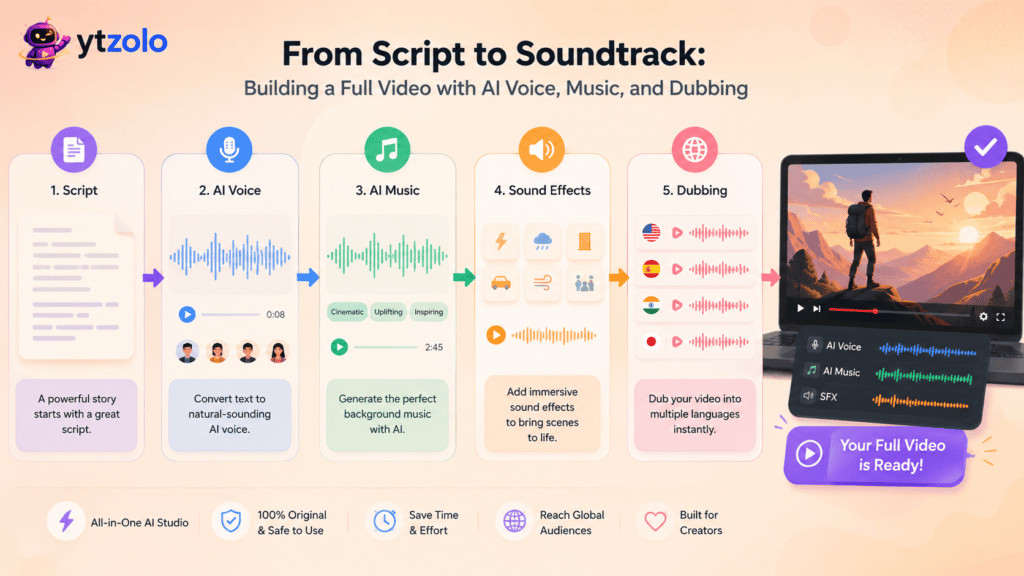
Quick Summary: A modern AI video production workflow no longer stops at editing software — it starts with a script, moves through AI voice and music generation, layers in sound effects and dubbing, and ends with SEO metadata that gets the video discovered. This guide walks through every stage of that workflow, shows where each piece connects to the next, and explains how a platform like ytZolo handles the whole chain — from the first line of a script to a fully scored, dubbed, publish-ready video — without switching between five separate tools.
Table of Contents
Introduction
Most creators don’t think of their process as a “workflow” until something in it breaks. The script is fine, the footage is fine, but the video still feels flat — and nine times out of ten, the missing piece is audio. A voice that sounds robotic. Music that doesn’t match the pacing. A dub that’s clearly an afterthought.
That’s because video production has quietly become an audio problem as much as a visual one. Viewers decide whether to keep watching based on how a video sounds almost as much as how it looks, and each audio layer — voice, music, sound effects, dubbing — used to require its own app, its own subscription, and its own learning curve.
An AI video production workflow changes that shape. Instead of stitching together a script tool, a voice generator, a stock music site, an SFX library, and a separate dubbing service, the whole chain runs through connected AI steps. This guide walks through what that looks like in practice — script, voice, music, sound design, and dubbing — and where a platform like ytZolo fits as the connective layer between them.
What Does an AI Video Production Workflow Actually Look Like?
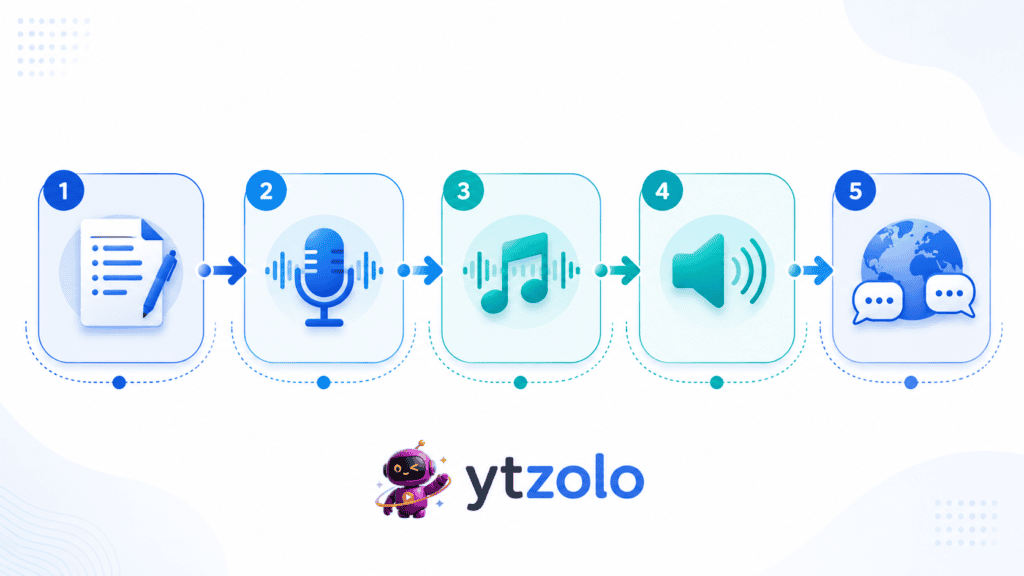
Strip away the tool names and a video production workflow is really just five decisions, made in order:
- What are you saying? (script)
- Who is saying it, and how does it sound? (voice)
- What’s the emotional bed underneath it? (music)
- What punctuates the moments in between? (sound effects)
- Who else needs to understand it, in what language? (dubbing)
Traditional production treats these as five separate jobs, often outsourced to five separate people or tools. An AI-driven workflow treats them as five connected outputs of the same source material — the script feeds the voice, the voice’s pacing informs the music, and the finished audio mix becomes the basis for the dubbed version.
Stage 1: The Script Is the Root of Everything Downstream
Every later stage depends on the script — not just the words, but the pacing, tone, and structure. A script written for a fast-paced Shorts hook needs a different voice delivery and a different music bed than a slow, reflective documentary-style video.
This is why starting with an AI script writer instead of a blank page matters more than it seems. A structured script — hook, body, transitions, call to action — gives every downstream tool something concrete to react to. Vague scripts produce vague voiceovers and mismatched music, because there’s nothing specific for the AI to key off of.
If you’re producing at any real volume, a free AI YouTube script writer that outputs a clean, section-by-section draft saves the voice and music stages from guessing at tone later.
Stage 2: Turning the Script Into a Voice
Once the script is locked, the next decision is who says it and how. An AI voice generator converts text into natural-sounding narration without a microphone, a quiet room, or a re-record when you change a line.
For videos with more than one speaker — interviews, skits, or explainer formats with a back-and-forth — a Text to Dialogue feature generates multi-speaker conversations from a script, which is a different job than single-voice narration. It’s worth understanding the distinction before choosing a tool, since text to dialogue and text to speech solve different problems even though both start from written text.
Creators who want a distinct on-camera or character identity often reach for an AI voice changer at this stage too, altering tone, pitch, or style without a second recording session. And if a raw recording has background noise or inconsistent levels, a voice isolator step cleans it up before it ever reaches the music stage — because mixing music under a noisy vocal track only makes the problem louder.
A production note that gets skipped constantly: narration pacing should be finalized before generating music. Music that’s built to match a script’s rhythm has to know where the pauses, emphasis points, and section breaks actually land — and that only becomes clear once the voice track exists.
Stage 3: The Soundtrack Layer — Where AI Music Enters the Workflow
This is the stage most creators either skip or handle badly, and it’s the one covered in depth in ytZolo’s pillar guide on AI music generators. Music isn’t decoration layered on top of a finished video — it’s a pacing tool that shapes how long viewers stay.
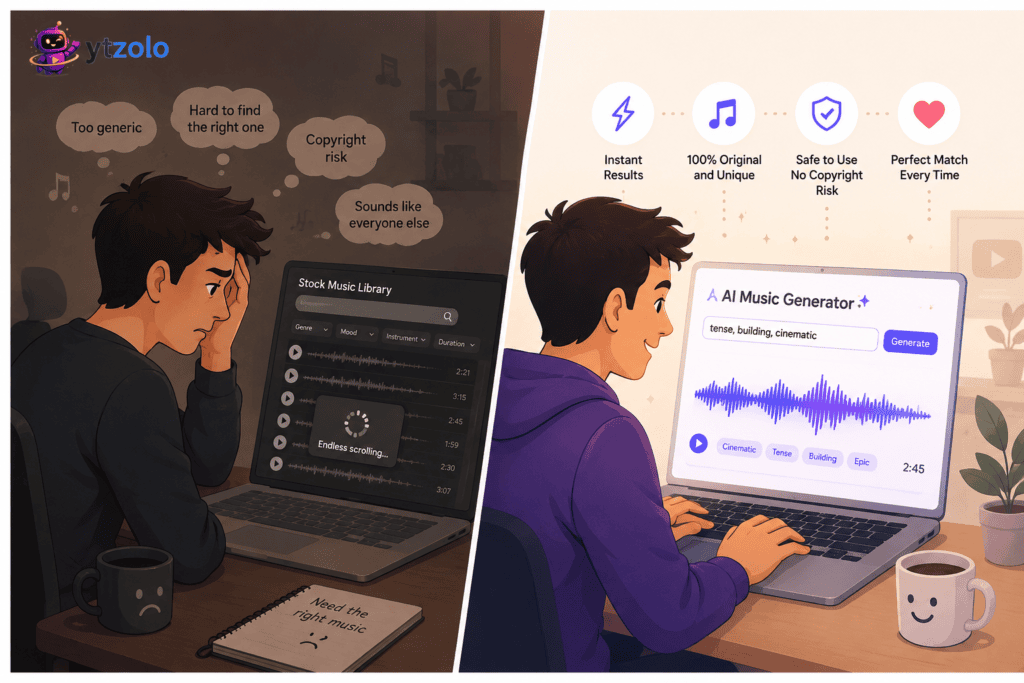
An AI music generator composes an original track from a mood or genre description instead of pulling a pre-made file from a catalog. That distinction matters for two reasons: originality and licensing clarity. Two channels searching the same stock library can end up with the same background track; two prompts into an AI generator produce different results almost every time.
Licensing terminology trips creators up here more than any other part of the workflow. Copyright-free and royalty-free sound interchangeable but aren’t — one describes who holds rights over the composition, the other describes whether you pay per use. It’s worth reading through what AI music copyright-free actually means before assuming a track is safe for every use case, especially on a monetized channel.
For creators specifically hunting for a background bed rather than a full song with vocals, royalty-free background music generated by AI is usually the better search term than “AI music” broadly, since it filters toward instrumental, loopable tracks built for video rather than standalone releases.
And because this guide is specifically about YouTube production, it’s worth pointing to the more focused breakdown of an AI music generator built for YouTube use cases — retention pacing, Shorts hooks, and channel-consistent sound — rather than general-purpose music generation.
Short musical cues deserve their own attention too. A distinct, recognizable few seconds of intro music does more for channel identity than most creators give it credit for, the same way a consistent visual intro does. Getting that opening cue right — distinct from the outro, short enough not to cause drop-off — is a small production decision with an outsized effect on watch time.
AI Music + the Rest of the Workflow
The real value of AI music shows up when it’s not treated as a standalone step. Generated inside the same platform that already holds your script and your voice track, the music generator can key off the same context — tone, pacing, length — instead of starting from zero.
That’s the difference between “add some music” and a soundtrack that was actually built for this specific video. For a deeper walkthrough of how that connection works end-to-end, the complete AI music generator guide covers the mechanics, the licensing questions, and a full tool comparison in one place.
It’s also worth knowing how an AI-composed track differs from licensing a stock song outright — the tradeoffs in originality, cost, and consistency are laid out in ytZolo’s comparison of AI music versus stock music, and for anyone building tracks from a written mood description rather than picking presets, the mechanics behind text-to-music AI generation are worth understanding before relying on it for a full episode run.
Monetization is the other question that comes up constantly at this stage — whether a generated track is actually safe to use on a channel earning ad revenue depends entirely on the platform’s license tier, not on the fact that it was AI-made. Confirm commercial-use terms before publishing at scale, the same way you’d check terms on any licensed asset.
Stage 4: Sound Effects — The Layer Most Videos Skip
Background music carries emotional tone; sound effects carry moments. A whoosh on a transition, a soft click on a text callout, an ambient room tone under a talking-head segment — these are small, but their absence is more noticeable than their presence.
An AI sound effects generator produces these on demand from a short description, which matters because SFX libraries are usually even harder to search than music libraries — the terminology is less standardized, and “whoosh” alone returns hundreds of barely-different options. Generating one from a description that matches your exact transition is faster than filtering a catalog by ear.
This stage is easy to skip when you’re racing to publish, but it’s often the cheapest, fastest layer to add relative to how much polish it adds to the final cut.
Stage 5: Dubbing — Taking the Same Video to a New Audience
Once script, voice, music, and effects are locked, the video is functionally finished for its original language. Dubbing extends that same finished asset to a new audience instead of starting a second production from scratch.
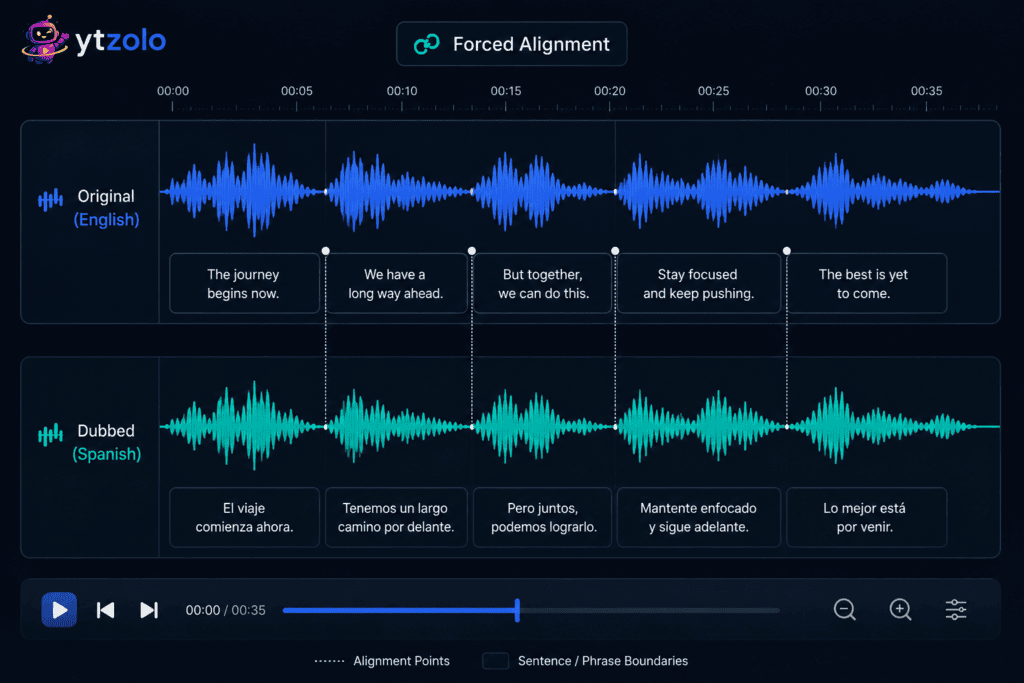
AI dubbing translates and re-voices a video into another language, ideally preserving the pacing and emotional tone of the original narration rather than producing a flat, literal read. This is where forced alignment — syncing the new spoken audio back to the original timing and captions — becomes the technical piece that makes a dub feel native instead of obviously translated.
The tool landscape here is more varied than most creators expect, with different platforms optimized for different priorities — voice quality, lip sync accuracy, language coverage, or workflow integration. A full breakdown of how these tradeoffs play out is covered in ytZolo’s AI dubbing software comparison, which is worth reading before committing to a single tool if international growth is a real goal rather than a someday idea.
Voice conversion technology sits underneath a lot of this — the same underlying tech that changes a voice’s tone or style for creative reasons is closely related to what powers natural-sounding dubbed narration. Understanding how voice conversion actually works makes it easier to judge whether a dubbing tool’s output will sound convincing or noticeably synthetic.
Podcasts benefit from this exact same chain, just packaged differently — narration, a short musical bed for intros and segment breaks, and increasingly, dubbed versions for audiences in other languages. The workflow doesn’t change; only the final export format does.
Stage 6: Closing the Loop With SEO and Thumbnails
A perfectly produced video with no discoverability plan is still a video nobody finds. This is the stage that gets treated as separate from production, when really it’s the same workflow finishing its job.
The AI tools that boost YouTube SEO work from the same script and topic data already used to generate the voice and music — titles, descriptions, and tags that reflect what the video is actually about, rather than generic keyword stuffing. Pairing that with a thumbnail built with AI closes the loop: the same core idea now has a script, a voice, a soundtrack, a dub, and a discoverability package, all pulled from one source.
Putting the Full Workflow Together: A Step-by-Step Walkthrough
Here’s what running the entire chain looks like in practice, using ytZolo as the reference workflow:
Step 1: Write or import the script. Start from a topic and let the script writer generate a structured draft, or paste in a script you’ve already written. Everything downstream reads from this.
Step 2: Generate the voice track. Choose a voice, tone, and pacing that fits the script’s audience. For multi-speaker formats, generate dialogue instead of single narration.
Step 3: Generate the music bed. Describe the mood, not just the genre — feed in the same context as the script so the track matches pacing, not just topic.
Step 4: Layer in sound effects. Add transition cues, ambient tone, or emphasis effects at the specific moments the script and voice track call for them.
Step 5: Mix the audio. Balance narration, music, and effects — narration first, music underneath at reduced volume, effects placed precisely rather than looped continuously.
Step 6: Generate dubbed versions if needed. Run the finished narration through dubbing for target languages, checking that forced alignment keeps timing intact.
Step 7: Generate SEO metadata and a thumbnail. Pull title, description, tags, and thumbnail concepts from the same original topic and script.
Step 8: Export and assemble in your video editor. Bring voice, music, effects, and (if applicable) dubbed tracks into your editor for final visual assembly and export.
The ytZolo Full-Suite Workflow at a Glance
| Stage | Feature | Output | Where It Feeds Next |
|---|---|---|---|
| Script | AI Script Writer | Structured hook, body, CTA | Sets tone for voice and music |
| Voice | AI Voice Generator | Natural narration or dialogue | Pacing informs music timing |
| Music | AI Music Generator | Mood-matched background track | Sits under narration in the mix |
| Sound Effects | AI Sound Effects Generator | Transition and ambient cues | Layered at specific timeline points |
| Dubbing | AI Dubbing Studio | Localized, aligned narration | Reuses the finished original mix |
| SEO & Thumbnail | YouTube SEO Tools | Titles, tags, thumbnail concepts | Publishes the finished video |
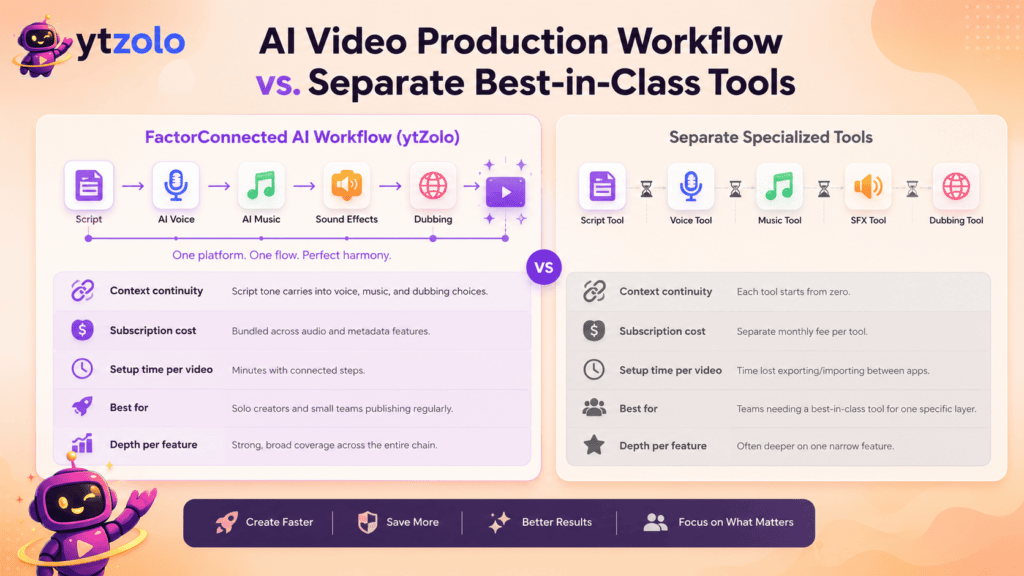
AI Video Production Workflow vs. Separate Best-in-Class Tools
| Factor | Connected AI Workflow (e.g., ytZolo) | Separate Specialized Tools |
|---|---|---|
| Context continuity | Script tone carries into voice, music, and dubbing choices | Each tool starts from zero context |
| Subscription cost | Bundled across audio and metadata features | Separate monthly fee per tool |
| Setup time per video | Minutes moving between connected steps | Time lost exporting/importing between apps |
| Best for | Solo creators and small teams publishing regularly | Teams needing a best-in-class tool for one specific layer |
| Depth per feature | Strong, broad coverage across the chain | Often deeper on one narrow feature |
Neither approach is universally “better” — a team with a dedicated sound designer may still prefer a specialized SFX tool, and a music-first creator chasing vocal-heavy tracks may want a dedicated song generator. The connected-workflow approach earns its place specifically when the bottleneck is tool-switching itself, not any single feature’s quality.
Common Mistakes in an AI Video Production Workflow
Generating music before the voice track is final. Music built to match narration pacing needs that narration to actually exist first.
Treating dubbing as a separate project. Dubbing works best as an extension of a finished mix, not a from-scratch redo.
Skipping sound effects entirely. They’re often the fastest layer to add and the one viewers notice most by its absence.
Ignoring licensing terms until after publishing. Confirm commercial-use rights for music and voice assets before a video goes live on a monetized channel, not after a claim shows up.
Publishing without SEO metadata generated from the same source material. Bolted-on titles and tags rarely match what the video is actually about as precisely as metadata generated from the original script.
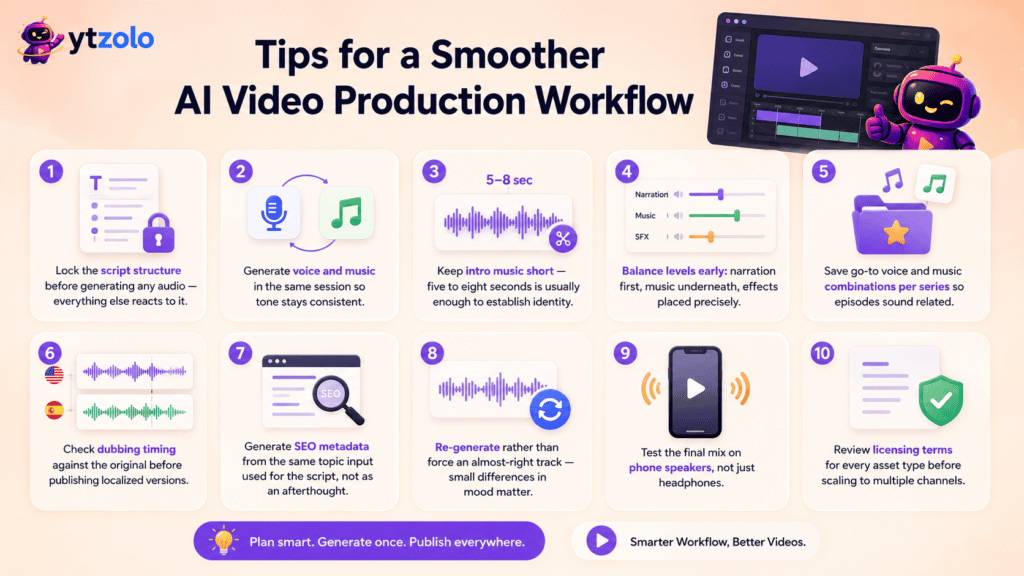
Tips for a Smoother AI Video Production Workflow
- Lock the script structure before generating any audio — everything else reacts to it.
- Generate voice and music in the same session so tone stays consistent.
- Keep intro music short — five to eight seconds is usually enough to establish identity.
- Balance levels early: narration first, music underneath, effects placed precisely.
- Save go-to voice and music combinations per series so episodes sound related.
- Check dubbing timing against the original before publishing localized versions.
- Generate SEO metadata from the same topic input used for the script, not as an afterthought.
- Re-generate rather than force an almost-right track — small differences in mood matter.
- Test the final mix on phone speakers, not just headphones.
- Review licensing terms for every asset type before scaling to multiple channels.
Frequently Asked Questions
What is an AI video production workflow? It’s the full chain of AI-assisted steps — scripting, voice generation, music, sound effects, and dubbing — used to produce a finished video from a single starting idea, instead of treating each step as a separate manual task.
Do I need separate tools for voice, music, and dubbing? Not necessarily. Platforms like ytZolo combine these into one workspace, though dedicated specialized tools may still suit teams prioritizing one specific layer.
Does AI-generated music work well with AI-generated voice? Yes, particularly when both are generated with the same script and tone as context, since the pacing tends to match more naturally than pairing tools with no shared input.
Is AI dubbing good enough for a professional video? For most creator use cases, yes — quality varies by platform, and forced alignment is the feature that determines whether a dub feels native or obviously translated.
Can I use AI sound effects on a monetized channel? Usually yes, under a commercial-use license, but confirm the specific platform’s terms before publishing at scale.
How long does a full AI video production workflow take per video? Once you’re familiar with the tools, generating script, voice, music, and effects for a standard video typically takes well under an hour, excluding visual editing.
What’s the biggest mistake creators make in this workflow? Generating audio layers out of order — usually music before the voice track is finalized — which forces rework once pacing shifts.
Can this workflow scale to a podcast, not just YouTube video? Yes. The same script-to-voice-to-music chain applies to podcast production, with dubbing added for multilingual audience expansion.
Is ytZolo only useful for the audio side of production? No — it also covers scripting, titles, descriptions, tags, and thumbnail concepts, so the same platform handles both the audio chain and the discoverability side.
Final Thoughts
An AI video production workflow isn’t really about any single tool being impressive on its own — voice generators, music generators, and dubbing tools all exist as standalone products.
The advantage shows up in the connections between them: a script that informs the voice, a voice that informs the music, and a finished mix that becomes the basis for both dubbing and metadata, instead of five disconnected files that happen to end up in the same video editor.
Whether you build that chain across five separate subscriptions or inside one platform like ytZolo, the sequence matters more than the tool list. Lock the script, generate the voice, build the soundtrack around it, layer in effects, then extend the finished mix through dubbing and metadata — in that order, not reshuffled to fit whatever tool happens to be open first.
Author
Anshika Verma Email: anshika@ytzolo.com
Anshika researches AI creator tools, YouTube growth workflows, and content automation hands-on, testing platforms across scripting, SEO, thumbnails, and audio production before writing about them. Her recommendations are based on direct use of these tools rather than promotional claims, with a focus on what actually holds up in a real creator’s publishing schedule.

