
July 2026 · By Anshika Verma · Content & SEO Researcher, ytZolo · ~14 min read
Quick Answer: AI sound effects for gaming channels let you generate original impact sounds, UI chimes, weapon effects, and ambient audio from a simple text prompt instead of spending hours searching stock sound libraries. The fastest workflow is to write a specific prompt (object + material + action + pacing), generate 2–3 variations, sync the best sound to your gameplay edit, and export it as a high-quality WAV file. Tools like ytZolo make this process even faster by generating custom AI sound effects from detailed prompts, helping gaming creators produce unique, copyright-safe audio that better matches their gameplay and keeps viewers engaged.
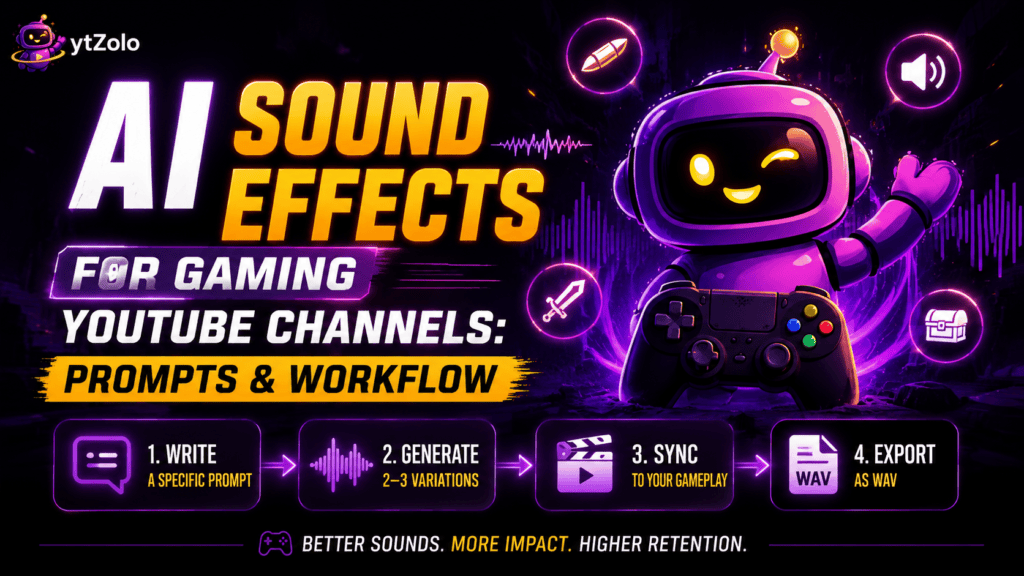
Table of Contents
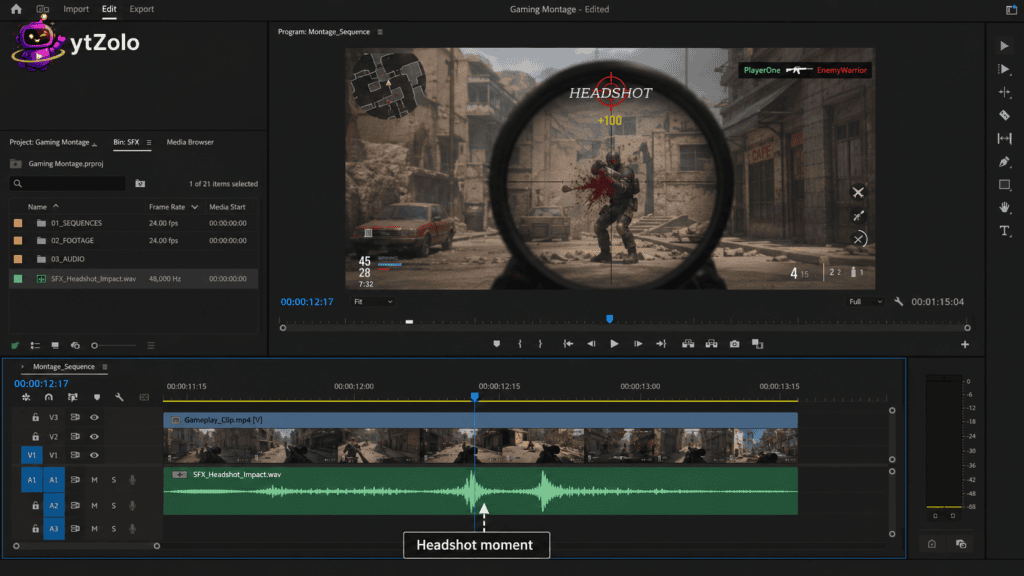
Every gaming editor knows this moment: the headshot lands, the montage cut is perfect, and the only thing missing is a punchy impact sound that doesn’t sound like the same stock hit used in ten thousand other videos.
That’s exactly the gap AI sound effects for gaming channels are built to close. Instead of scrolling a stock library hoping someone already recorded your exact sound, you describe it in plain language and get a clip that’s yours alone.
This guide covers everything you need to start using a gaming SFX generator in your workflow — prompt formulas, a repeatable production process, and how to avoid copyright headaches on the impact sounds you generate.
Why Gaming Channels Need Their Own Sound Design
Gaming is one of the most saturated niches on YouTube, and viewers hear the same stock “coin pickup” or “explosion” clip across dozens of channels every week.
That repetition quietly hurts perceived production value, even when the gameplay itself is excellent. AI sound effects for youtube gaming solve this by generating a sound that’s statistically unlikely to exist anywhere else.
There’s also a practical angle. Custom sound design gives you exact control over pacing — a headshot ping that lands in 0.3 seconds instead of whatever length a downloaded clip happens to be.
For context on how this fits the bigger picture, ytZolo’s AI sound effects generator comparison guide breaks down the tools, pricing, and licensing across the category in more depth.
What Is a Gaming SFX Generator?
A gaming sfx generator is a text-to-audio tool that synthesizes original sound from a written description rather than retrieving a pre-recorded file.
You type something like “metallic sword unsheathing, sharp and fast, fantasy game style,” and a neural audio model produces a new waveform that matches it.
This differs fundamentally from a sound library, where you’re limited to whatever someone already uploaded. A generator has no fixed catalog — the output is bound only by how clearly you describe the sound.
For gaming specifically, that means level-up chimes, footstep sets across surfaces, weapon reloads, and UI clicks can all be produced on demand, matched to your channel’s exact tone.
How AI Sound Effects for YouTube Gaming Actually Work
The underlying mechanism is neural audio synthesis — models trained on large volumes of labeled sound that learn the relationship between language and acoustic texture.
When you type “8-bit coin collect, short and bright,” the model has learned what “8-bit,” “coin collect,” and “bright” sound like together, and generates a matching clip.
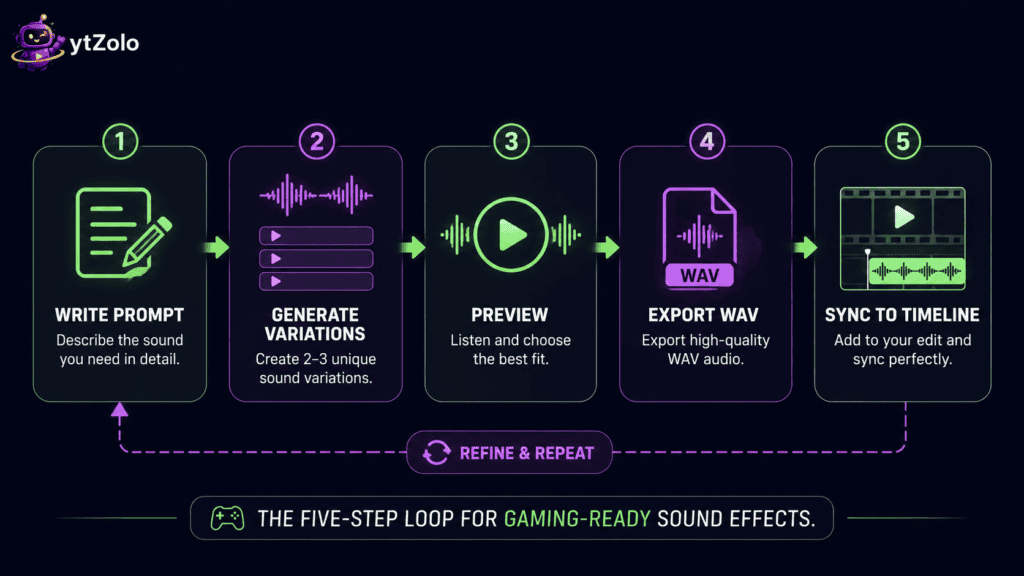
Most tools follow the same basic loop: write a prompt, generate a few variations, preview them, and export the one that fits your cut.
This loop usually takes under a minute per sound — faster than searching, previewing, and downloading from a traditional stock library, especially once you’ve built a habit of writing specific prompts.
Step-by-Step Workflow
Here’s a repeatable process for generating AI sound effects for gaming channel content without breaking your editing flow.
- Identify the beat. Watch your rough cut and mark every moment that needs an audio cue — kill, pickup, menu open, jump scare.
- Write a specific prompt. Include the object, material, action, and pacing, not just a genre label.
- Generate 2–3 variations. Most tools return multiple takes per prompt; don’t settle for the first one.
- Preview against picture. Play the sound over your actual footage, not in isolation — timing reads differently in context.
- Adjust duration or intensity. Regenerate with a tighter prompt if the sound runs too long or feels too soft for the moment.
- Export as WAV. WAV keeps full quality for layering; MP3 is fine for quick drafts.
- Sync, then mix. Drop it on the beat, then EQ and level it so it doesn’t fight your commentary or music bed.
30 Ready-to-Use Prompts for Custom Impact Sounds AI
Prompt quality is the single biggest factor separating a generic result from a genuinely usable, channel-specific sound. Below are prompts organized by the categories gaming channels use most.
Impacts and Combat
| # | Prompt |
|---|---|
| 1 | Sharp punch impact, meaty and fast, no reverb |
| 2 | Heavy sword slash through the air, whooshing metal edge |
| 3 | Gunshot with tight crack and short tail, no echo |
| 4 | Arrow release and thud into a wooden target |
| 5 | Shield block, metallic clang with a slight ring |
Explosions and Environment
| # | Prompt |
|---|---|
| 6 | Distant explosion, deep bass thud with light debris fall |
| 7 | Grenade blast, sharp initial crack followed by rumble |
| 8 | Collapsing stone wall, heavy debris and dust settling |
| 9 | Fireball whoosh, rising pitch with a crackling tail |
| 10 | Electric zap, quick and crisp, sci-fi weapon style |
UI, Menus, and Power-Ups
| # | Prompt |
|---|---|
| 11 | 8-bit coin collect chime, short and bright |
| 12 | Level-up fanfare, ascending and triumphant, half a second |
| 13 | Menu hover click, soft and modern, minimal |
| 14 | Achievement unlock, sparkling chime with a satisfying ring |
| 15 | Health pickup pop, quick positive blip |
| 16 | Inventory item equip, mechanical click and snap |
| 17 | Game-over stinger, low descending tone, dramatic |
| 18 | Countdown beep, three short pulses, building tension |
Footsteps and Movement
| # | Prompt |
|---|---|
| 19 | Footsteps on gravel, medium pace, one character |
| 20 | Sprinting footsteps on wooden floor, fast and light |
| 21 | Heavy armored footsteps on stone, slow and deliberate |
| 22 | Jump and landing, quick thud with a slight bounce |
Horror and Suspense (Gaming Skits)
| # | Prompt |
|---|---|
| 23 | Slow creaking door in an abandoned building, tense |
| 24 | Distant whisper, low and unsettling, short loop |
| 25 | Jump-scare stinger, sharp orchestral hit, sudden |
| 26 | Heartbeat building tension, low frequency, gradual increase |
Sci-Fi and Fantasy
| # | Prompt |
|---|---|
| 27 | Spaceship engine powering up, low hum rising to a whir |
| 28 | Magic spell cast, sparkling ascending chime, fantasy style |
| 29 | Teleport effect, rising pitch swirl with a soft pop |
| 30 | Dragon roar, deep and powerful, echoing |
For a deeper breakdown of prompt structure and 20 additional cross-niche examples, see the full AI sound effect prompts guide.
Prompt Engineering Tips for Gaming SFX
A vague prompt like “explosion sound” returns a vague, generic result almost every time.
Specificity is what separates a custom impact sounds ai output that feels unique from one that sounds like every other channel’s downloaded clip.
- Name the object and material. “Metal sword” and “wooden club” hitting the same target produce very different sounds.
- Describe the action, not just the category. “Slash” and “unsheathe” are both sword sounds but nothing alike.
- Set the pacing. Words like “quick,” “sustained,” or “building” tell the model how the sound should evolve.
- Reference the game genre or tone. “Retro 8-bit” versus “modern AAA” changes the texture the model reaches for.
- State the environment when it matters. A footstep on gravel outdoors reads differently than one in a stone dungeon.
Save prompts that work well. Reusing a proven prompt for recurring cues — your channel’s signature level-up sound, for example — keeps your audio identity consistent across videos.
Syncing Sound Effects to Your Gameplay Edit
Generating the sound is only half the job — timing determines whether it actually lands.
Drop each generated clip directly on the frame where the visual event happens, not a beat before or after, since even small offsets read as sloppy to viewers.
Layer sparingly. Stacking three loud effects on the same frame usually muddies the mix rather than adding impact.
Normalize loudness across the full video afterward so a punchy new sound effect doesn’t suddenly spike louder than your commentary track.
AI Sound Effects vs Stock Libraries for Gamers
Stock libraries like Pixabay and Mixkit are still useful for ambience and background layers, but gaming impact sounds are where generation tends to pull ahead.
| Factor | AI Sound Effects | Stock Libraries |
|---|---|---|
| Uniqueness | Original per generation | Same clips reused across many channels |
| Exact pacing | Full control | Limited to what’s in the catalog |
| Cost model | Credit-based, often bundled | Flat monthly subscription |
| Best for | One-off impacts, UI cues, weapon sounds | Ambience, background music beds |
If you’re weighing the two approaches for your whole channel, ytZolo’s AI sound effects vs stock sound library comparison walks through licensing, pricing, and long-term cost in more detail.
For creators who still want to test free options first, the best free AI sound effects generator tools roundup covers which platforms genuinely allow commercial gaming use without a watermark.
Copyright and Content ID Considerations
A generated sound effect avoids the copyright risk tied to sampling someone else’s original recording, since the waveform is newly synthesized.
That said, “AI-generated” isn’t automatically the same as “cleared for commercial use.” Free tiers on most sound effect generators restrict output to non-commercial projects or require attribution.
Before publishing a gaming video monetized through ads, confirm your plan tier allows commercial use — this is usually stated clearly in the tool’s terms, not buried in fine print.
It’s also worth understanding how YouTube’s own Content ID system works, since even legitimately licensed sound can occasionally trigger an automated claim that needs a dispute.
For broader licensing context on any sound assets you mix in, the Creative Commons framework explains the different permission tiers you’ll see referenced across free libraries.
Building a Full Gaming Audio Workflow with ytZolo
Sound effects rarely exist in isolation on a gaming channel — most videos also need voiceover, background music, and sometimes multi-speaker dialogue for skits.
ytZolo’s AI Audio Studio keeps these pieces in one place instead of splitting your workflow across four separate subscriptions:
- AI Sound Effects — generate custom impact sounds, UI cues, and ambience from a prompt.
- AI Music Generator — background tracks and stingers for montages and intros.
- Voice Generator — text-to-speech voiceover for faceless gaming commentary.
- Voice Isolator — clean up commentary recorded over a noisy PC fan or mic hiss.
- Multi Voice Dialogue — script out multi-character gaming skits with distinct voices.
For creators building out their broader gaming channel toolkit beyond audio, ytZolo’s AI tools for gaming channels guide covers titling, thumbnails, and SEO tools that pair naturally with a strong sound design pass.
Common Mistakes Gaming Creators Make
- Writing one-word prompts like “explosion” instead of describing material, action, and pacing.
- Skipping the licensing check and assuming free-tier output is automatically cleared for monetized videos.
- Overusing dramatic stingers on every cut, which fatigues viewers instead of adding punch.
- Ignoring loudness normalization, causing jarring volume jumps between commentary and effects.
- Not testing sound against the actual edit, only previewing it in isolation first.
- Reusing the same generated sound everywhere without variation, recreating the exact problem stock libraries caused.
How Sound Design Affects Gaming Channel Growth
Sound effects don’t directly influence YouTube’s ranking algorithm, but they shape signals the algorithm does track.
A well-timed impact sound reinforces the visual beat at exactly the moment viewers are most likely to drop off, which supports retention.
Polished audio also signals production value, which plays into whether a first-time viewer subscribes after one video.
None of this replaces a strong hook or a viral title for your YouTube gaming channel — sound design is a retention lever that works alongside titling and thumbnails, not instead of them.
Final Verdict
AI sound effects for gaming channel content are worth adopting the moment recycled stock impacts start feeling like a ceiling on your production value.
- If you want impact sounds, UI cues, and ambience generated on demand alongside voice, music, and dialogue tools, a bundled option like ytZolo’s Audio Studio keeps the whole audio pipeline in one place.
- If your channel leans heavily on long ambience beds or licensed music tracks, a stock library still earns its subscription — pair it with AI generation for the one-off, channel-specific hits.
- If you’re just starting out, test a free tier first: write five prompts from the categories above, generate variations, and see how close the output lands to what your channel actually needs before committing to a paid plan.
The channels that stand out in 2026 aren’t the ones with the biggest sound library — they’re the ones whose audio nobody else’s viewers have heard before.
FAQ
1. What are AI sound effects for gaming channels? They’re original audio clips generated from a text prompt — footsteps, impacts, UI chimes — instead of pulled from a pre-recorded stock library.
2. Is there a free gaming SFX generator? Yes, several tools offer free tiers with limited credits, though commercial use on a monetized gaming channel usually requires a paid plan.
3. Can I use AI-generated sound effects on YouTube commercially? Generally yes on paid plans. Always check the specific tool’s terms before publishing to a monetized channel.
4. Are AI sound effects for YouTube gaming copyright-free? They’re free of the copyright risk tied to sampling someone else’s recording, but the AI platform’s own terms of service still govern commercial use.
5. What makes a good gaming sound effect prompt? Specificity — name the object, material, action, environment, and pacing rather than a single vague genre word.
6. How long does it take to generate a custom impact sound? Typically a few seconds to under a minute, depending on the platform and current load.
7. Can AI sound effects replace a full stock library for gaming? Not entirely — libraries still cover long ambience and background beds well, but for one-off impacts and UI cues, generation is usually faster and more distinct.
8. Do gaming skits need multi-voice dialogue tools too? If your channel produces character-based skits, a multi-voice dialogue tool paired with sound effects and music covers the full audio production in one workflow.
9. What file format should I export gaming sound effects in? WAV for editing and layering; MP3 is acceptable for quick drafts or lower-bandwidth uploads.
10. Can I control the exact duration of a generated impact sound? Most tools let you set a target duration, or you can trim the output afterward in your editor.
Author
Anshika Verma 📧 anshika@ytzolo.com
Anshika is a Content & SEO Researcher at ytZolo who tests AI audio and creator tools hands-on, comparing prompt quality, licensing terms, and real production workflows across sound effects, voice, and music generation. She writes to help gaming creators build a distinct sonic identity without relying on the same recycled stock clips as everyone else in the niche.

