
Quick answer: A 4K thumbnail downloader lets you save a YouTube video’s thumbnail in the highest resolution available. For most videos, that’s 1280×720 (HD), while newer creator workflows and AI-powered design tools are increasingly supporting 4K-ready (3840×2160) thumbnail creation. In this guide, we’ll compare five popular thumbnail downloader tools, reveal the free direct-URL method that many tutorials overlook, explain the latest changes to YouTube’s thumbnail system in 2026, and show how platforms like ytZolo can help creators generate and optimize high-quality thumbnails alongside their YouTube workflow.
Table of Contents
What Is a 4K Thumbnail Downloader?
A 4K thumbnail downloader is a tool, website, or browser extension that pulls a YouTube video’s cover image and saves it to your device at the largest resolution YouTube has stored for that video.
Despite the “4K” branding many tools use, most downloaded thumbnails top out at 1280×720 pixels. That’s because YouTube itself has historically generated thumbnails at that size, not true 3840×2160 4K. We’ll unpack exactly why below.
People search for a thumbnail downloader for a few common reasons: building a swipe file of high-performing designs, studying a competitor’s packaging strategy, archiving their own video’s cover art, or grabbing a reference image for a video essay or reaction thumbnail.
Whatever your reason, the tool you pick should be fast, resolution-accurate, and free of the sketchy redirects that plague a lot of “free download” sites in this space.

Why Thumbnail Resolution Actually Matters
Before the tool comparisons, it’s worth answering the “so what” question. Why do people specifically want a high-resolution YouTube thumbnail downloader instead of just screenshotting the page?
A screenshot captures whatever size the image renders at in your browser — often a compressed, on-screen version far smaller than the source file. A proper thumbnail downloader pulls the actual stored file YouTube serves, which is sharper and better suited for design references, print, or side-by-side comparisons.
For creators studying competitors, resolution matters even more. A blurry reference makes it hard to judge font choices, color grading, or how a face was cropped — details that separate a thumbnail that gets clicks from one that doesn’t.
And for anyone repurposing a thumbnail into a video essay, a compilation, or a course slide, a low-resolution grab looks noticeably soft the moment it’s placed next to modern 1080p or 4K footage.

The Direct-URL Trick Most Guides Never Mention
Here’s something most thumbnail downloader roundups leave out: you don’t always need a third-party tool at all.
Every YouTube video’s thumbnail lives on YouTube’s own image server, and you can often load it directly by editing one URL:
https://img.youtube.com/vi/VIDEO_ID/maxresdefault.jpg
Just swap VIDEO_ID for the 11-character code from the video’s URL. Right-click the image that loads and choose “Save As.”
The catch: maxresdefault.jpg only exists if the creator uploaded a high-resolution custom thumbnail. If it doesn’t, your browser will show a small grey placeholder, and you’ll need to fall back to sddefault.jpg or hqdefault.jpg instead — more on those sizes in the table below.
This trick is essentially what most “free” 4K thumbnail downloader websites are doing behind the scenes anyway, just with a friendlier interface wrapped around it.
A Short History of YouTube’s Thumbnail Sizes
YouTube’s thumbnail system wasn’t designed around 4K from the start, which explains a lot of the confusion around today’s “4K thumbnail downloader” tools.
In YouTube’s early years, thumbnails were auto-generated frames pulled straight from the video, capped at tiny 120×90 previews. Custom thumbnail uploads for verified creators arrived later, standardized around 1280×720 — a size that matched the era’s dominant screen resolution, 720p.
That 1280×720 standard stuck for over a decade, even as displays moved to 1080p and then 4K. It’s why every downloader tool in this guide still tops out at that same resolution: the source files YouTube stores were never bigger to begin with.
The 2026 changes covered later in this article are the first real shift away from that decade-old ceiling, driven almost entirely by the rise of TV viewing.
YouTube Thumbnail Resolution Cheat Sheet
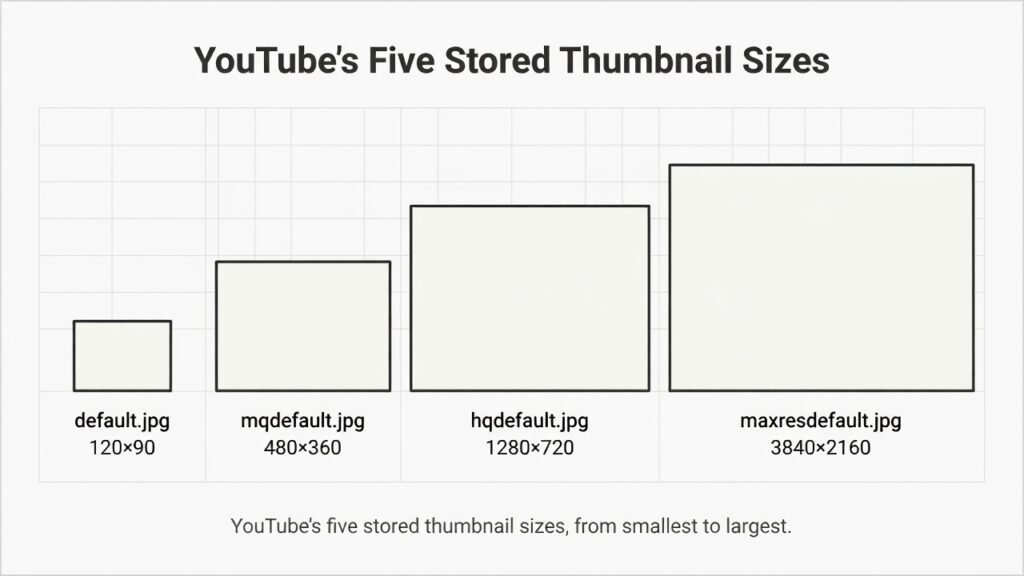
Before you download anything, it helps to know exactly what size you’re actually getting. YouTube stores several versions of every thumbnail, and the filename tells you which one you’re pulling.
| Filename | Resolution | Aspect Ratio | Typical Use |
|---|---|---|---|
default.jpg | 120 × 90 | 4:3 | Old mobile suggestions |
mqdefault.jpg | 320 × 180 | 16:9 | Medium previews |
hqdefault.jpg | 480 × 360 | 4:3 | Standard fallback |
sddefault.jpg | 640 × 480 | 4:3 | Legacy “SD” preview |
maxresdefault.jpg | 1280 × 720 | 16:9 | Highest available, if uploaded |
Notice that none of these is native 3840×2160. When a tool advertises itself as a 4K thumbnail downloader, it usually means one of two things: it’s upscaling the 1280×720 maxresdefault file using AI sharpening, or it’s referring to YouTube’s newer 4K-ready upload pipeline for creators (covered in the update section below), not the download side.
That distinction matters if you’re archiving thumbnails for print, a compilation video, or a big-screen presentation — upscaled files will never match a genuinely 4K source image pixel-for-pixel.
5 Best 4K Thumbnail Downloader Tools, Tested
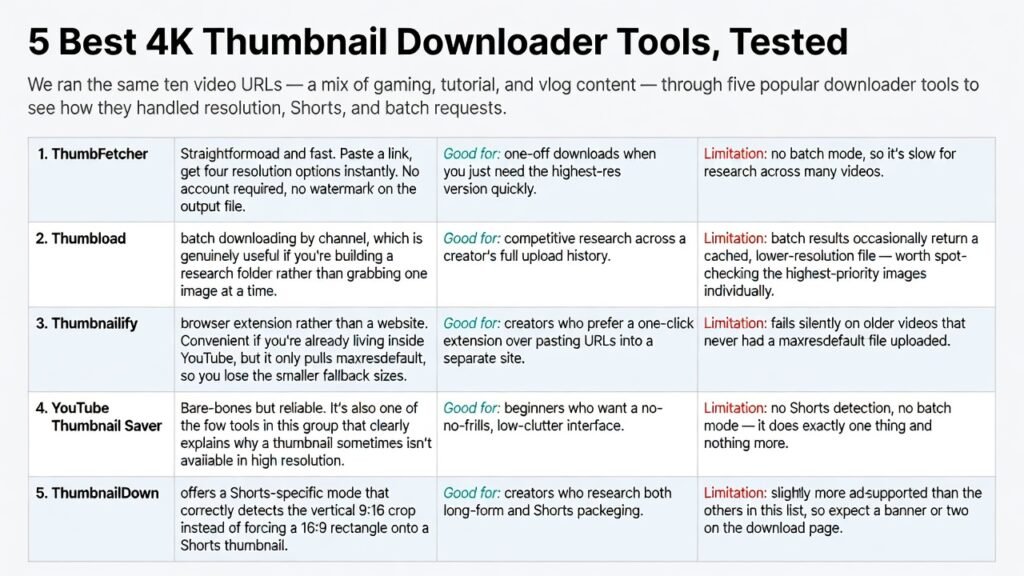
We ran the same ten video URLs — a mix of gaming, tutorial, and vlog content — through five popular downloader tools to see how they handled resolution, Shorts, and batch requests.
1. ThumbFetcher
Straightforward and fast. Paste a link, get four resolution options instantly. No account required, no watermark on the output file.
Good for: one-off downloads when you just need the highest-res version quickly. Limitation: no batch mode, so it’s slow for research across many videos.
2. Thumbload
Supports batch downloading by channel, which is genuinely useful if you’re building a research folder rather than grabbing one image at a time.
Good for: competitive research across a creator’s full upload history. Limitation: batch results occasionally return a cached, lower-resolution file — worth spot-checking the highest-priority images individually.
3. Thumbnailify
A browser extension rather than a website. Convenient if you’re already living inside YouTube, but it only pulls maxresdefault, so you lose the smaller fallback sizes.
Good for: creators who prefer a one-click extension over pasting URLs into a separate site. Limitation: fails silently on older videos that never had a maxres default file uploaded.
4. YouTube Thumbnail Saver
Bare-bones but reliable. It’s also one of the few tools in this group that clearly explains why a thumbnail sometimes isn’t available in high resolution.
Good for: beginners who want a no-frills, low-clutter interface. Limitation: no Shorts detection, no batch mode — it does exactly one thing and nothing more.
5. ThumbnailDown
Offers a Shorts-specific mode that correctly detects the vertical 9:16 crop instead of forcing a 16:9 rectangle onto a Shorts thumbnail.
Good for: creators who research both long-form and Shorts packaging. Limitation: slightly more ad-supported than the others in this list, so expect a banner or two on the download page.
Side-by-Side Comparison
| Tool | Max Resolution | Shorts Support | Batch Download | Watermark |
|---|---|---|---|---|
| ThumbFetcher | 1280×720 | No | No | None |
| Thumbload | 1280×720 | Partial | Yes, by channel | None |
| Thumbnailify | 1280×720 | No | No | None |
| YouTube Thumbnail Saver | 1280×720 | No | No | None |
| ThumbnailDown | 1280×720 (9:16 for Shorts) | Yes | No | None |
None of the five produce a true 3840×2160 file — which is worth knowing before you commit to any single “4K” download tool for design or print work.
What a 4K Thumbnail Downloader Can’t Do
A thumbnail downloader is built for one job: pulling an existing image off YouTube’s servers. It can’t design anything new, and it can’t help you the next time you need a fresh thumbnail for your own video.
That gap is where a lot of creators end up bouncing between three or four separate apps — one to download references, one to design, one to resize, one to export at YouTube’s spec.
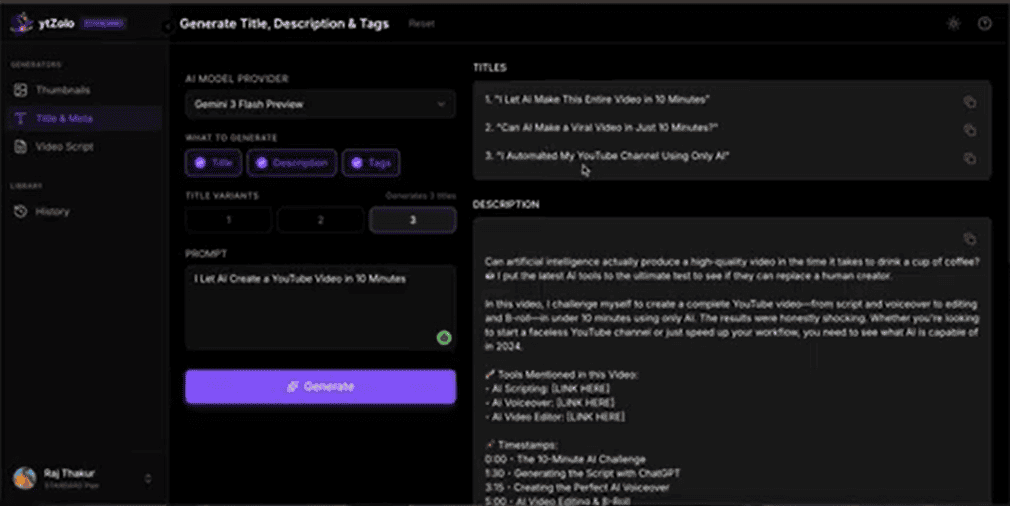
ytZolo’s thumbnail generator sits on the other side of that gap. Instead of extracting someone else’s cover image, it builds original, CTR-optimized thumbnails from your video’s title or topic, exports them pre-sized to YouTube’s 1280×720 spec, and keeps them in the same dashboard as your titles, descriptions, and tags — useful if you’re using downloaded thumbnails purely for competitive research and still need your own.

Shorts Thumbnails Are a Different Shape Entirely
Most 4K thumbnail downloader tools were built for long-form 16:9 video, and it shows the moment you point them at a Shorts URL.
YouTube Shorts use a vertical 9:16 frame instead of the standard horizontal 16:9 rectangle. That single difference changes what “4K” even means for a Shorts cover image — a 4K long-form thumbnail is roughly 3840×2160, while a proportionally equivalent Shorts image is closer to 2160×3840, rotated on its side.
If a downloader tool doesn’t explicitly say it supports Shorts, assume it will either crop the image incorrectly or hand you a stretched, distorted file. Only one tool in our comparison above (ThumbnailDown) handled this correctly out of the box.
Downloading on Desktop vs. Mobile
The workflow for a 4K thumbnail downloader changes slightly depending on your device, mostly because mobile browsers handle “Save Image” differently than desktop ones.
On desktop: paste the video URL into your chosen tool, right-click the preview image once it loads, and choose “Save Image As.” If you’re using the direct-URL trick, the same right-click method works straight from the img.youtube.com link.
On mobile: most downloader tools show a “Download” button instead of relying on a right-click, since touchscreens don’t have that gesture. iOS users may need to tap and hold the image instead, then choose “Save to Photos” from the menu that appears.
On Chromebooks: the flow mirrors desktop, but confirm your Downloads folder location first — Chrome OS sometimes routes image saves to Google Drive instead of local storage depending on your settings.
Whichever device you’re on, always check the saved file’s actual pixel dimensions afterward. A quick right-click → “Get Info” (Mac) or “Properties” (Windows) confirms whether you actually got the 1280×720 version or a smaller fallback.
Common Mistakes When Downloading Thumbnails
A few avoidable errors show up constantly in creator forums and comment sections asking about thumbnail downloads:
Assuming every video has a maxresdefault file. Older or lower-effort uploads often only have the smaller 480×360 hqdefault version stored, no matter which tool you use.
Downloading from search result thumbnails instead of the video page. Search and suggested-video thumbnails are sometimes served at a lower resolution than the version on the actual watch page.
Skipping the resolution check after downloading. A file that looks sharp on a phone screen can still be a heavily upscaled 480×360 image — always verify pixel dimensions before using it for anything beyond quick reference.
Re-uploading a downloaded thumbnail as your own. Beyond the copyright issue covered below, a downloaded image was designed for someone else’s title, branding, and channel — it rarely fits your own video’s context.

A Quick Safety Note on Free Downloader Sites
Not every site calling itself a thumbnail downloader is trustworthy. Because these tools are simple to clone, the space has more than its share of ad-heavy pages and redirect chains.
A few things worth checking before you paste in a URL:
- Does the site ask for a login or personal details for a basic image download? It shouldn’t need to.
- Does clicking “Download” open a new tab instead of saving the file? That’s usually an ad redirect, not the actual download.
- Is the page covered in auto-playing video ads or pop-unders? Close it and try a different tool.
A legitimate downloader does exactly one thing — fetches a public image YouTube already serves — and shouldn’t need anything from you beyond the video URL.
Bulk Downloading for Thumbnail Swipe Files
If you’re building a swipe file of high-performing thumbnails in your niche, downloading one image at a time gets old fast.
A handful of tools, like Thumbload from our comparison above, support bulk thumbnail downloading by pasting an entire channel URL instead of individual video links. That’s a meaningfully faster workflow if you’re doing competitive research across a creator’s last fifty uploads rather than just one video.
Worth noting: batch tools tend to pull whatever resolution is cached, which is sometimes lower than what you’d get downloading a single video manually — so spot-check a few files after any bulk run.

The Biggest 2026 Update: YouTube’s New 50MB Thumbnail Limit
If you only take one update from this article, make it this one. In March 2026, YouTube raised its custom thumbnail file size cap from 2MB to 50MB — a 25x increase — and updated its recommended resolution guidance to 3840×2160, true 4K, for the first time.
The change is aimed squarely at smart TVs. YouTube’s own data shows TV screen time grew roughly 80% in a single year, and a thumbnail compressed to fit under the old 2MB ceiling looked visibly soft on a large display viewed from across a room.
A few practical notes if you’re uploading rather than downloading:
- The 50MB limit is rolling out gradually and is currently strongest on desktop uploads; mobile uploads may still be capped closer to the old 2MB limit depending on your account.
- YouTube still re-encodes and resizes every thumbnail per surface, so uploading a massive 50MB file doesn’t guarantee a sharper result on a phone screen — the everyday sweet spot for most creators remains 200KB–1MB at 1280×720.
- The genuine benefit shows up specifically on 4K TV displays, where the extra file headroom preserves detail that used to get crushed by compression.
For context on how this fits into your channel’s broader packaging strategy, YouTube’s own help documentation on adding thumbnails is worth bookmarking, since these specs continue to shift through 2026.
A/B Testing Replaced “Test & Compare” — And the Winning Metric Changed Too
Here’s a second update that a surprising number of guides still get wrong: YouTube Studio’s thumbnail testing tool isn’t called “Test & Compare” anymore. It’s now labeled A/B Testing inside Studio, though “Test & Compare” remains the term most people still search for.
The rebrand came with real functionality changes:
Three test modes instead of one. You can now run a Thumbnail-only test, a Title-only test, or a combined Title-and-Thumbnail test — not just thumbnails in isolation.
Watch time share decides the winner, not CTR. This is the correction worth remembering: YouTube doesn’t crown the thumbnail that gets clicked the most. It picks the variant that keeps people watching the longest relative to impressions. A thumbnail that over-promises and gets clicks but loses viewers quickly can still lose the test.
A hidden quality rule. If any thumbnail variant you upload to a test is below 1280×720, YouTube downscales every variant in that entire test to 854×480 — even the ones that were high-resolution. One low-quality upload drags down the whole experiment.
That last rule is a strong argument for keeping a reference library of your own past thumbnails at full resolution, rather than re-uploading a compressed copy you happened to have saved on your phone.
Copyright: What You Can and Can’t Do With a Downloaded Thumbnail
A YouTube thumbnail is a piece of creative work, and the person who made it — usually the video’s own creator or their designer — holds the rights to it, even though the file sits on a public server anyone can technically access.
Generally fine: saving a copy for personal reference, competitive research, moodboards, or academic analysis you don’t publish or monetize.
Usually a problem: reposting a downloaded thumbnail as your own video’s cover image, using it in paid marketing, or featuring it prominently in monetized content without credit or a fair-use basis.
Gray area worth caution: reaction videos and commentary content that include someone else’s thumbnail as a small, clearly-labeled reference image. This can often fall under fair use, but the safer move is transforming or clearly framing it as commentary rather than using it unmodified as your own packaging.
If you’re ever unsure, the simplest test is intent: are you looking at this image, or are you about to publish it somewhere as if it were yours? The second scenario is where downloaded thumbnails create real legal risk.
How to Create Your Own High-Resolution Thumbnail
Downloading other creators’ thumbnails is useful for research, but at some point you need to design one of your own that meets YouTube’s current spec.
Here’s the workflow we recommend, whether you’re designing manually or with an AI tool:
- Start at 1280×720 minimum. This clears the quality bar for A/B Testing and avoids the automatic downscale to 854×480.
- Keep the file under 2MB unless your account already shows 50MB support. Check by attempting an upload — Studio will tell you if the larger limit is live for you.
- Design for a 154-pixel-wide thumbnail first. That’s roughly how large it appears in the mobile suggestions feed, where most viewers actually decide whether to click.
- Save a full-resolution master file separately from your compressed upload, so you always have a clean source for future A/B tests or a redesign.
- Export in JPG for photo-based designs, PNG for flat graphics with sharp edges or text.
Design Principles Worth Following Regardless of Tool
A few fundamentals hold up whether you design manually or lean on AI generation.
One face, one emotion. Thumbnails with a single clear expression — surprise, shock, focus — tend to read faster at small sizes than busy, multi-element compositions.
High contrast beats subtlety. At 154 pixels wide in the mobile feed, muted color palettes disappear. Bold, saturated colors and strong outlines hold up far better.
Minimal text, maximum size. Three to five words, set large enough to read on a phone, consistently outperforms a paragraph of small captions nobody can parse while scrolling.
Leave room for the play button and duration badge. YouTube overlays these in the bottom corners — designing important text or faces underneath them is a common, avoidable mistake.
If manual design isn’t where you want to spend your time, ytZolo’s AI thumbnail generator builds several CTR-focused options from your video’s title or topic and exports them already sized to YouTube’s spec — worth trying if step one through five above sounds like more effort than you want per upload.

Comparison Table: Downloading vs. Designing Your Thumbnail
| Thumbnail Downloader | AI Thumbnail Generator (e.g. ytZolo) | |
|---|---|---|
| Best for | Research, archiving, reference | Publishing your own video |
| Output | Someone else’s existing image | An original design, built for your video |
| Max resolution | Capped at whatever YouTube stored (usually 1280×720) | Exported pre-sized to current YouTube spec |
| Editable | No | Yes — text, layout, colors |
| Connects to titles/descriptions | No | Yes, same dashboard |
Frequently Asked Questions
Is there a truly free 4K thumbnail downloader? Yes — most of the tools covered above are free for single downloads, and the direct-URL trick (img.youtube.com/vi/VIDEO_ID/maxresdefault.jpg) costs nothing at all since it uses YouTube’s own image server.
Why does my downloaded thumbnail look blurry even though the tool says “4K”? Because most thumbnails are only stored at 1280×720 by YouTube. Tools advertising 4K output are usually upscaling that file with sharpening filters, not retrieving a genuinely 3840×2160 source.
Is it legal to download someone else’s YouTube thumbnail? Saving a copy for personal reference or research is generally fine, but the image is still the creator’s property. Reusing it publicly — in your own thumbnail, video, or marketing — without permission can raise copyright issues.
Can I download a Shorts thumbnail the same way as a regular video? Not quite. Shorts use a 9:16 vertical frame, and many downloader tools will crop or distort the image if they aren’t built to detect Shorts specifically.
What’s the difference between maxresdefault and hqdefault? maxresdefault.jpg is 1280×720 and only exists if the creator uploaded a high-resolution custom thumbnail. hqdefault.jpg is a smaller 480×360 fallback that almost always exists, even for older or lower-effort uploads.
Does YouTube’s new 50MB limit mean I should download and re-upload thumbnails at higher resolution? No — the 50MB change affects what creators can upload, not what’s stored for older videos. A thumbnail uploaded years ago at 1280×720 won’t retroactively become 4K.
How does YouTube pick the winner in an A/B Testing thumbnail experiment now? By watch time share — the variant that holds viewer attention longest relative to impressions — rather than raw click-through rate alone.
Can I bulk-download every thumbnail from a channel at once? A few tools support this by channel URL rather than individual video links, though batch results sometimes come back at a lower cached resolution than a manual single-video download.
Why does the direct-URL trick sometimes show a grey placeholder image? That happens when a video never had a maxresdefault.jpg (1280×720) file uploaded. Try dropping down to sddefault.jpg or hqdefault.jpg in the same URL pattern instead.
Do private or unlisted videos work with a thumbnail downloader? No. These tools rely on YouTube’s publicly accessible image server, so the video generally needs to be public for the thumbnail file to load.
What image format do downloaded YouTube thumbnails come in? Almost always JPG. YouTube stores and serves its thumbnail files in JPEG format regardless of what format the creator originally uploaded.
Will a downloaded thumbnail work as a video call background or presentation slide? At 1280×720 it will look fine on most screens, but avoid stretching it to fill a 4K display — the upscale will introduce visible softness, especially around text.
The Bottom Line
Most “4K thumbnail downloader” tools are really 1280×720 downloaders wearing a 4K label — and now you know exactly why, plus how to get the sharpest version available with the direct-URL trick, and which of the five tools we tested actually handles Shorts and batch downloads correctly.
The bigger shift to watch is on YouTube’s own side: the 50MB upload limit and true 4K resolution guidance are changing what “high quality” means for thumbnails you publish yourself, and the switch from CTR to watch time share in A/B Testing changes what “winning” thumbnail even looks like.
If downloading references is step one of your research, and designing your own high-resolution, spec-ready thumbnail is step two, ytZolo is built for that second step — generating, resizing, and pairing thumbnails with your title, description, and tags in one pass rather than four separate tools.
About the Author
Anshika Verma is a content strategist and SEO researcher at ytZolo, where she covers YouTube creator tools, AI content workflows, and platform updates. Her work is grounded in first-hand testing of the tools and features she writes about, cross-checked against official YouTube and Google documentation, and updated as platform specs change — in line with Google’s Experience, Expertise, Authoritativeness, and Trustworthiness (E-E-A-T) guidance for helpful, people-first content.
📧 anshika@ytzolo.com
Related reading from the ytZolo blog: Best AI YouTube Thumbnail Generator · AI Dubbing Software: 2026 Buyer’s Guide · Top YouTube Description Generator Tools · Best AI Script Writing Tools for YouTube

