
Quick Summery
In short: it’s a workflow-based comparison of YTZolo, Descript, and VEED for content creators. Verdict — no single winner, they cover different stages of the pipeline:
- YTZolo → best for pre-production (scripts, titles, thumbnails, SEO), plus a brand-new (unproven) Audio Studio for voice/music/sound effects.
- Descript → best for editing, especially podcasts and dialogue-heavy video (text-based editing, audio cleanup, voice cloning, dubbing).
- VEED → best for fast, browser-based timeline editing with strong subtitles and templates for social/marketing video.
Most creators end up combining YTZolo with Descript or VEED rather than picking just one.
Table of Contents
Introduction
Most creators don’t wake up wanting to compare software. They wake up with a video idea, a deadline, and five browser tabs open because no single tool covers the whole job.
That’s why searches like “YTZolo vs Descript vs VEED” have become common. Creators aren’t just curious about feature lists — they’re trying to figure out which parts of their workflow each tool actually solves, and where they’ll still need something else.
This comparison is written for YouTube creators, video editors, podcasters, course creators, agencies, marketing teams, and beginners who are trying to build a repeatable content pipeline without paying for five overlapping subscriptions.
Who this is for: anyone deciding which of these three platforms — or which combination of them — belongs in their workflow in 2026.
How this was researched: this article is based on publicly available information as of July 2026, including each company’s official website and pricing pages, help documentation, and independent reviews on sites like G2, Capterra, and Trustpilot.
Where a feature or price could not be independently verified at the time of writing, that is stated explicitly rather than guessed at. Software pricing and features change often — always confirm current details on the official websites linked throughout this article before making a purchase decision.
A quick note on YTZolo specifically: its AI Audio Studio (voice generation, multi-voice dialogue, voice changing, AI music, sound effects, and voice isolation) is a newly launched addition to the platform. Because it launched very recently, third-party pricing data and independent reviews for this specific module are not yet widely available.
Where this article describes these features, it is based on direct product review rather than third-party documentation, and pricing for the Audio Studio should be confirmed on ytzolo.com before you subscribe.
Table of Contents
- Quick Verdict
- What Each Platform Actually Is
- The Complete Content Workflow, Compared Stage by Stage
- Detailed Feature Comparison Table
- Best For: Use-Case Breakdown
- Real-World Scenarios
- Pricing Comparison
- Pros and Cons
- Decision Framework
- Frequently Asked Questions
- Methodology and Editorial Policy
- About the Author
- Conclusion
YTZolo vs Descript vs VEED: Quick Verdict
| Criteria | Winner | Reason |
|---|---|---|
| YouTube pre-production (scripts, titles, thumbnails, SEO) | YTZolo | Purpose-built for YouTube ideation, scripting, and metadata; not a general editor. |
| Text-based video/podcast editing | Descript | Editing by editing a transcript is Descript’s core, mature feature. |
| Browser-based video editing with templates | VEED | Timeline-based online editor with subtitles, brand kits, and templates built in. |
| AI voice generation & voice cloning | Descript and YTZolo (new) | Descript’s Overdub-style AI Speech is long-established; YTZolo’s Voice Generator is a newly launched, unverified-at-scale alternative. |
| Multi-language dubbing | Descript | Documented dubbing in 30+ languages with proofreading, included from the Business plan up. |
| AI music & sound effects | YTZolo (new) | Purpose-built AI Music Generator and Sound Effects tool; Descript and VEED lean on stock libraries instead. |
| Screen recording | Descript | Native screen recorder integrated into the same editor used for cutting footage. |
| YouTube SEO & metadata | YTZolo | The platform’s original, most established use case. |
| Budget-conscious solo creators | YTZolo | Free plan centers on the pre-production tasks solo creators do most often. |
| Teams and agencies needing collaboration | Descript or VEED | Both offer multi-seat plans, shared brand assets, and review workflows; YTZolo is not positioned as a team collaboration tool. |
What Each Platform Actually Is
Before comparing features stage by stage, it helps to understand what each product was actually built to do, because these three tools did not start from the same starting point.
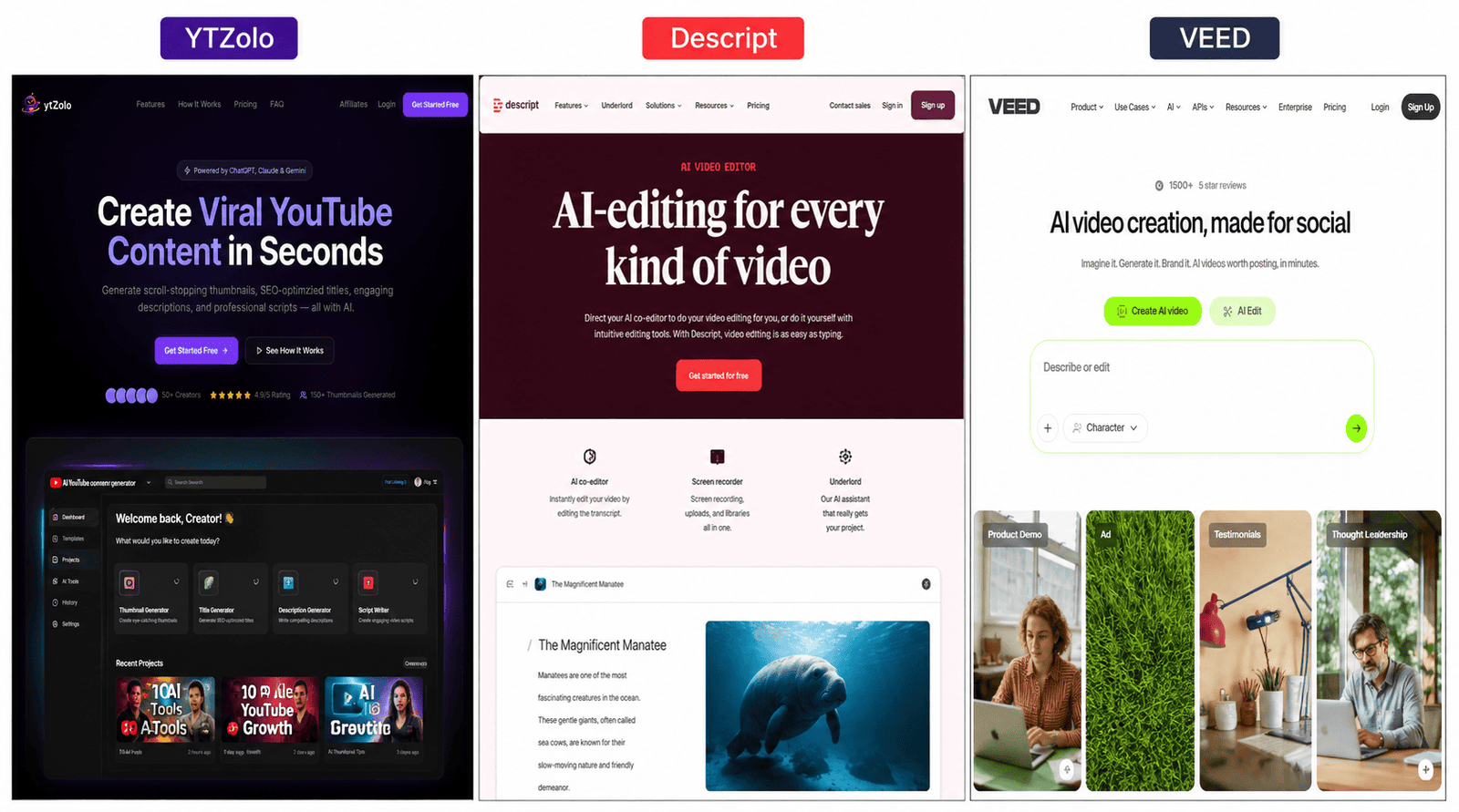
YTZolo is an AI content studio built specifically around the YouTube pipeline. Its core, longest-established features are AI script generation, title generation, description and tag writing, and AI thumbnail creation, all aimed at improving click-through rate, watch time, and search visibility.
In 2026, YTZolo added an Audio Studio module (Voice Generator, Multi-Voice Dialogue, Voice Changer, AI Music Generator, AI Sound Effects, and Voice Isolator), extending it from a pre-production and SEO tool toward a broader audio-production suite. YTZolo does not currently market itself as a timeline-based video editor.
Descript is a text-based video and podcast editor: you edit your recording by editing its transcript. Built around that core, Descript has layered on an AI assistant (Underlord), AI voice cloning and text-to-speech (AI Speech), audio cleanup (Studio Sound), screen recording, multi-track podcast editing, captions, and dubbing/translation into 30+ languages on its higher tiers.
VEED is a browser-based online video editor. Its foundation is a traditional timeline editor with auto-subtitles, and it has since added AI tools including AI avatars, an AI voice generator, a voice dubber, background noise removal, and access to third-party AI video-generation models (such as Veo and Sora variants) inside its “AI Playground.”
The Complete Content Workflow, Compared Stage by Stage
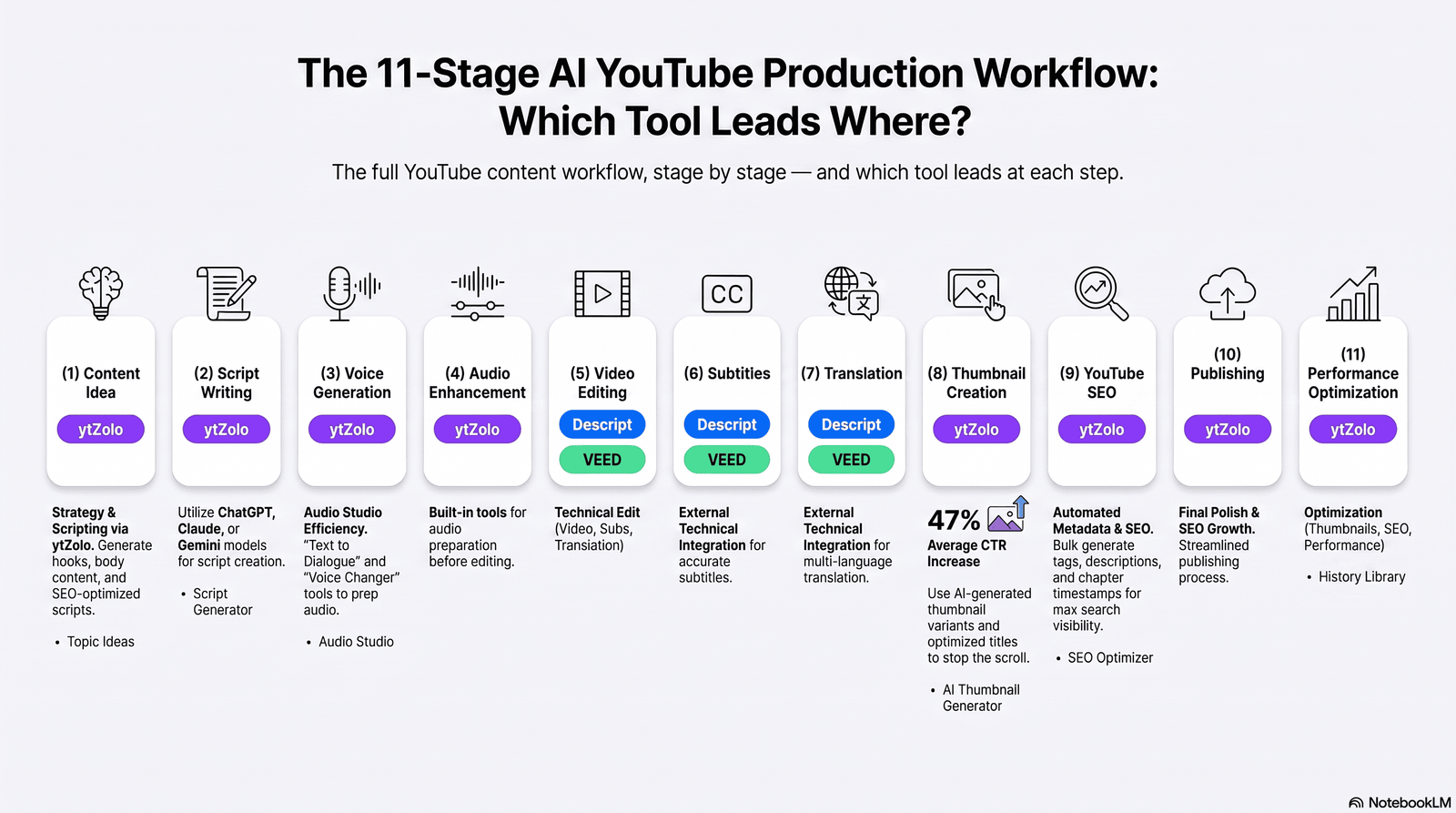
Feature-matching two products against each other tells you what boxes are checked. It doesn’t tell you which tool to open first on a Tuesday morning when you have a video due Friday. So instead of listing features in isolation, here’s how each platform performs at every stage of a real content pipeline.
Stage 1: Content Idea
Best tool: YTZolo
YTZolo’s core value proposition is idea-to-publish content generation for YouTube specifically, including content strategy and topic suggestions tied to what tends to perform in a given niche.
Descript and VEED both include general-purpose AI writing assistance (Descript’s Underlord can brainstorm and outline; VEED offers AI tools aimed at video creation), but neither is built primarily around YouTube topic ideation.
Limitations: Idea generation from any AI tool is a starting point, not a strategy. Cross-check suggestions against your own audience data in YouTube Studio or a keyword tool before committing production time.
Best for: Solo creators and faceless-channel operators who need a starting point fast; less relevant for creators who already have an established editorial calendar.
Stage 2: Script Writing
Best tool: YTZolo, with Descript as a strong secondary option
YTZolo’s script generator is built specifically for YouTube pacing — hooks, retention structure, and calls to action for long-form and Shorts. Descript’s Underlord can also draft scripts and outlines as part of its broader AI assistant, and because Descript is also your editor, a Descript-drafted script stays inside the same tool you’ll use to record and cut. VEED does not position script generation as a core feature.
Limitations: AI-drafted scripts still need a human pass for accuracy, voice, and claims — especially for anything factual, medical, financial, or legal.
Best for: YouTubers and educators who script every video; agencies producing scripts at volume for multiple clients or channels.
Stage 3: Voice Generation
Best tool: Tie between Descript and YTZolo
Descript’s AI Speech lets you generate a custom voice clone or choose from a stock voice library, with the feature available (at limited capacity) from the Hobbyist plan and scaling up through higher tiers.
YTZolo’s newly launched Voice Generator offers text-to-speech synthesis with adjustable stability and clarity/similarity controls and a library of named voices, plus a Multi-Voice Dialogue tool for generating multi-character conversations with emotional tags (for example, indicating a laugh or a whisper within the script).
VEED also offers an AI Voice Generator and text-to-speech tools as part of its AI toolset.
Limitations: Because YTZolo’s Audio Studio just launched, voice count, supported languages, and output quality at scale are not yet independently benchmarked the way Descript’s Overdub-style feature has been over several product cycles. Test the free or trial tier before relying on any of these three for a client-facing deliverable. Feature availability may change — verify the latest information on each official website.
Best for: Faceless channels, audiobook and podcast narration, and anyone patching a flubbed line without re-recording.
Stage 4: Audio Enhancement
Best tool: Descript, with YTZolo’s new Voice Isolator as a narrower alternative
Descript’s Studio Sound applies noise reduction, echo removal, and EQ in one click and is one of the platform’s most consistently praised features across independent reviews.
YTZolo’s newly added Voice Isolator targets background noise and echo removal specifically.
VEED also offers background-noise removal for both video and audio as part of its AI tools.
Limitations: No AI cleanup tool fully replaces a decent microphone and a quiet room; all three work best as a rescue tool, not a substitute for good recording conditions.
Best for: Podcasters and interview-based creators recording in inconsistent environments.
Stage 5: Video Editing
Best tool: Descript for transcript-based editing; VEED for timeline-based browser editing
Descript’s defining feature is editing video by editing text: delete a filler word from the transcript and it’s cut from the video. VEED uses a more conventional drag-and-drop timeline, which suits creators who think visually rather than textually. YTZolo, as of this writing, does not offer a general-purpose video editor or timeline — it remains focused on pre-production and audio generation rather than assembling final video cuts.
Limitations: Descript’s transcript-first approach has a learning curve for creators used to timeline editors, and it is not built for advanced color grading or complex motion graphics. VEED’s browser-based performance can slow down on longer, high-resolution projects.
Best for: Talking-head, interview, and podcast-to-video creators (Descript); marketers and social teams assembling templated, subtitle-heavy videos quickly (VEED).
Stage 6: Subtitles and Captions
Best tool: Tie between Descript and VEED
Descript offers dynamic, customizable captions with unlimited use across all plans, plus multi-language transcription in 25 languages. VEED’s auto-subtitle generator is one of its most established features and is widely cited in independent reviews for accuracy, though free and entry-tier plans cap the number of subtitle minutes per month. YTZolo does not currently offer a standalone subtitle generator.
Limitations: Automatic captions still need a manual proofread, particularly for names, jargon, and numbers.
Best for: Any creator publishing to platforms where captions materially affect watch time and accessibility — which today is nearly everyone.
Stage 7: Translation and Dubbing
Best tool: Descript
Descript’s official pricing page documents caption translation in 61 languages and audio dubbing (translated voice) in 30+ languages, with a proofreading step available on the Business plan. VEED also offers a Voice Dubber and video translator tool. YTZolo does not currently publish a dedicated dubbing or translation feature.
Limitations: Machine dubbing still struggles with idioms, humor, and lip-sync precision on close-up shots; budget time for a manual review pass on anything client-facing.
Best for: Channels and businesses localizing content for multiple language markets.
Stage 8: Thumbnail Creation
Best tool: YTZolo
AI thumbnail generation, producing multiple export-ready variants trained toward YouTube-style click-through performance, is one of YTZolo’s original, most-reviewed features. Descript and VEED both include general AI image generation, but neither positions thumbnail creation as a dedicated, YouTube-specific workflow the way YTZolo does.
Limitations: Thumbnail variant counts are tied to your plan tier; always verify current limits on the pricing page rather than assuming unlimited generation.
Best for: Any YouTuber who currently outsources thumbnail design or struggles with Photoshop-style tools.
Stage 9: YouTube SEO (Titles, Descriptions, Tags)
Best tool: YTZolo
This is YTZolo’s founding use case: AI-generated titles, descriptions, and tags built around keyword and CTR patterns specific to YouTube. Descript can generate YouTube descriptions and show notes as part of its broader “Market/Promote” AI tools, but SEO metadata is not its primary focus. VEED does not centre its product around YouTube SEO.
Limitations: No AI tool can guarantee rankings; YouTube’s algorithm weighs audience retention and engagement heavily, not metadata alone. Treat AI-suggested titles and tags as a draft to validate against your own channel data.
Best for: Creators who currently guess at titles and tags, or agencies standardizing SEO practices across multiple channels.
Stage 10: Publishing
Best tool: None of the three is a direct-publishing platform in the way a scheduling tool is
Descript and VEED both allow you to export finished video directly, and Descript offers shareable web pages for published content. YTZolo’s outputs (scripts, thumbnails, metadata) are typically assembled and uploaded manually through YouTube Studio, since it is not a video editor. None of the three replaces a dedicated multi-platform scheduler.
Best for: All three fit into a publishing workflow rather than replacing YouTube Studio itself.
Stage 11: Performance Optimization
Best tool: YTZolo for metadata iteration; none of the three replaces analytics tools
YTZolo’s workflow is built to let you regenerate and A/B test titles, thumbnails, and descriptions based on performance. Descript’s Underlord can repurpose long-form content into short clips based on what’s likely to perform. None of the three tools replaces YouTube Studio Analytics, TubeBuddy, or VidIQ for actual performance data — they help you act on it faster.
Limitations: Treat all three as production accelerators, not analytics platforms.
Detailed Feature Comparison Table
| Category | YTZolo | Descript | VEED |
|---|---|---|---|
| Company overview | AI YouTube content studio (scripting, SEO, thumbnails; audio generation newly added) | Text-based video/podcast editor with an AI assistant layer | Browser-based online video editor with AI tools |
| Target audience | YouTubers, faceless-channel operators, marketers, agencies | Podcasters, YouTubers, corporate video teams | Marketers, social teams, agencies, educators |
| Ease of use | Beginner-friendly, form-based generation UI | Moderate learning curve (transcript-editing paradigm) | Beginner-friendly, familiar timeline UI |
| AI script writing | Yes — core feature | Yes, via Underlord (write/brainstorm) | Limited; not a core focus |
| Video editing (timeline) | Not offered | Text-based, not a traditional timeline | Yes — timeline-based |
| Text-based editing | Not applicable | Yes — core feature | Not applicable |
| Voice generator (TTS) | Yes — newly launched | Yes — AI Speech | Yes — AI Voice Generator |
| Voice cloning | Feature availability may change; verify on ytzolo.com | Yes — custom voice clones | Feature availability may change; verify on veed.io |
| Voice changer | Yes — newly launched | Not documented as a standalone feature | Not documented as a standalone feature |
| Audio cleanup / noise removal | Yes — Voice Isolator (newly launched) | Yes — Studio Sound | Yes — background noise removal |
| Subtitle generator | Not offered | Yes — dynamic captions, unlimited on all plans | Yes — auto-subtitles, minutes capped by plan |
| AI dubbing | Yes — newly launched | Yes — 30+ languages (Business plan and up) | Yes — Voice Dubber |
| Translation | Not offered | Yes — captions in 61 languages | Yes — video translator |
| AI music | Yes — newly launched AI Music Generator | Not a dedicated feature; stock music library | Not a dedicated feature; stock library |
| AI sound effects | Yes — newly launched | Stock sound effects library | Stock sound effects library |
| Screen recorder | Not offered | Yes — native screen recorder | Feature availability may change; verify on veed.io |
| Templates | Limited | Layout packs and templates | Yes — extensive template library |
| Stock assets | Not offered | Royalty-free stock library (plan-dependent) | Stock video, image, and audio library |
| Thumbnail generator | Yes — core feature | Not offered | Not a dedicated feature |
| YouTube SEO tools | Yes — core feature (titles, tags, descriptions) | Limited (AI-generated descriptions/show notes) | Not offered |
| Metadata generator | Yes — core feature | Partial, via Underlord’s “Publish” tools | Not offered |
| Blog/show-notes generator | Not offered | Yes, via Underlord | Not offered |
| Repurposing (clips from long-form) | Not offered | Yes — Underlord “Create Clips” | Feature availability may change; verify on veed.io |
| Podcast editing | Not a core focus | Yes — core feature (multi-track) | Feature availability may change; verify on veed.io |
| Brand kit | Not offered | Yes — Brand Studio (Business plan) | Yes — brand kit on paid plans |
| Collaboration | Not positioned as a team tool | Yes — seats scale by plan | Yes — seats scale by plan |
| Integrations / API | Not documented | Yes — public API + MCP (open beta) | Yes — Fabric API and AI Playground integrations |
| Export quality | Image/text exports (not applicable to video) | Up to 4K (Creator plan and above) | Up to 1080p/4K depending on plan; verify current cap |
| Languages | Primarily English-optimized generation | 25-language transcription; 61-language caption translation | Auto-subtitles in 100+ languages per third-party reviews; verify on veed.io |
| Pricing model | Credit-based subscription tiers | Media-hours + AI-credits subscription tiers | Credit-based subscription tiers |
| Free plan | Yes | Yes (60 media minutes/month) | Yes (watermarked exports) |
| Support | Priority support on paid plans | Email, in-app chat, priority support (SLA) on higher plans | Standard and priority support by plan |
| Security | Not independently documented at time of writing | SOC 2 Type II compliant | Feature availability may change; verify on veed.io |
| Pros | Fast, YouTube-specific pre-production; simple UI | Deep, mature editing + AI toolset; strong audio cleanup | Fast browser editing; strong subtitle and template library |
| Cons | No native video editor; Audio Studio very new and unproven at scale | Steeper learning curve; credit system can be confusing | Can be sluggish on long/high-res projects; AI features are credit-metered |
| Best for | YouTube pre-production and now audio generation | Podcast/video editing-heavy workflows | Fast, templated, browser-based video production |
Feature availability, limits, and pricing change frequently on all three platforms. Always confirm current details on ytzolo.com, descript.com, and veed.io before subscribing.

Best For: Use-Case Breakdown
Best for YouTubers: YTZolo covers the pre-production grind (scripts, titles, thumbnails, tags) that eats the most non-camera time; pair it with Descript or VEED for the actual edit.
Best for video editors: Descript, for anyone who wants to cut dialogue-driven footage faster by editing a transcript instead of a timeline.
Best for podcasters: Descript, given its native multi-track recording, Studio Sound cleanup, and mature podcast-editing workflow.
Best for agencies: A combination — YTZolo for standardizing scripts and metadata across client channels, and Descript or VEED for delivering the finished edit, depending on whether the work is talking-head/interview (Descript) or templated/social (VEED).
Best for businesses: Descript’s Business plan (Brand Studio, translation/dubbing, priority support) fits corporate video and training content; VEED’s Business tier suits marketing teams producing templated social and ad video at volume.
Best for marketing teams: VEED, for its template library and brand kit tools built around fast turnaround social content.
Best for freelancers: Descript’s Hobbyist or Creator plan offers a strong feature-to-price ratio for solo, dialogue-heavy editing work.
Best for beginners: YTZolo’s form-based, no-editing-skill-required generation UI has the shallowest learning curve of the three for pre-production tasks; VEED is the easiest of the three for actual video editing.
Best for professional creators: Descript, for its depth (multi-track audio, Underlord, dubbing, API access) once a channel outgrows basic tools.
Best for Shorts creators: YTZolo for fast script and title generation on high-volume short-form output; VEED or Descript’s clip-repurposing tools for turning long-form into Shorts.
Real-World Scenarios
Launching a YouTube channel: Start in YTZolo for niche ideation, scripts, titles, and thumbnails, then edit and export video in Descript (if it’s talking-head content) or VEED (if it’s more visually templated).
Editing a podcast: Descript is the practical default — multi-track recording, transcript-based cutting, and Studio Sound cleanup are all built for this exact workflow.
Creating short-form videos: YTZolo for rapid-fire scripts and titles; VEED for fast, template-driven assembly with subtitles baked in.
Repurposing long-form content into clips: Descript’s Underlord “Create Clips” feature is purpose-built for this; VEED can also work but repurposing is less central to its design.
Creating educational videos: Descript for scripted, talking-head lessons with clean audio; YTZolo to draft the lesson script and generate a matching thumbnail and title.
Marketing videos: VEED, for brand kits, templates, and fast turnaround; layer in YTZolo-style AI-generated voiceover if a script-to-voice pipeline fits the workflow.
Social media content: VEED, for multi-format export and subtitle-heavy short clips built around templates.
Faceless YouTube channels: YTZolo for scripts, titles, and thumbnails, combined with an AI voice tool (from either YTZolo’s new Voice Generator or Descript’s AI Speech) for narration, then assembled in a video editor.
Pricing Comparison
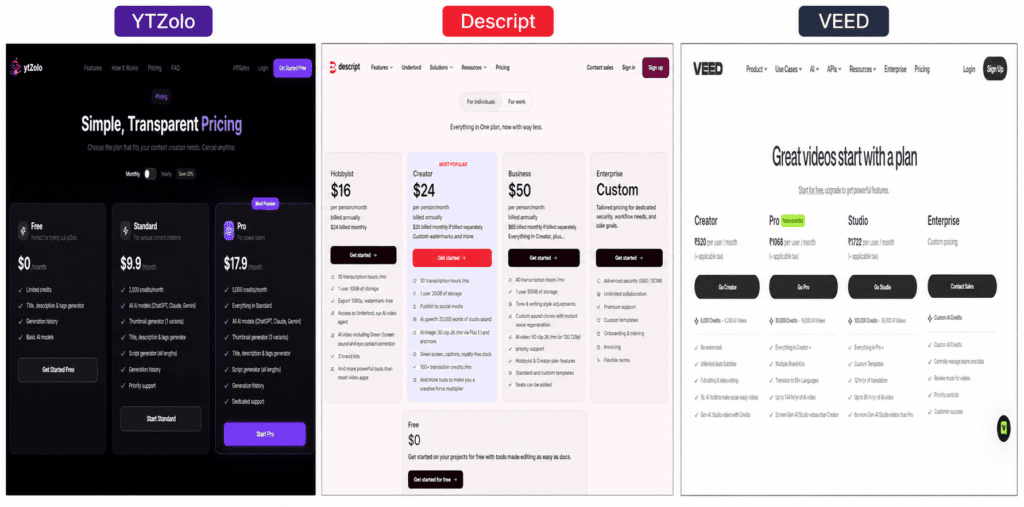
Pricing for all three products is tiered, credit- or usage-metered, and changes over time. The figures below reflect publicly reported pricing as of mid-2026; always check each company’s official pricing page for current numbers before subscribing, since third-party sources sometimes lag behind live pricing changes.
Descript (verified against descript.com/pricing)
| Plan | Monthly (paid monthly) | Monthly (billed annually) | Included |
|---|---|---|---|
| Free | $0 | $0 | 60 media minutes/month, 100 one-time AI credits, 720p export, watermarked |
| Hobbyist | $24 | $16 | 10 media hours/month, 400 AI credits/month, 1080p export, watermark-free |
| Creator | $35 | $24 | 30 media hours/month, 800 AI credits/month, 4K export, up to 3 seats |
| Business | $65 | $50 | 40 media hours/month, 1,500 AI credits/month, Brand Studio, dubbing in 30+ languages, up to 5 seats |
| Enterprise | Custom | Custom | Advanced security, SSO/SCIM, custom credits and terms |
VEED
Independent pricing reviews (G2, and multiple third-party trackers) place VEED’s entry paid plan in the roughly $12–$24/month range and its higher individual/team tier in the roughly $20–$35/month range, with a Business/Studio tier reported between roughly $50–$70/month, all with meaningful annual-billing discounts advertised as “up to 51% off.”
These figures vary between sources and were not independently confirmed on VEED’s own pricing page at the time of writing (the live pricing table did not render for review). Confirm exact current pricing at veed.io/pricing before subscribing.
YTZolo
Independent third-party listings (as of mid-2026) describe a Free plan, a Standard plan in the roughly $6.70–$19/month range with around 2,000 monthly credits, and a Pro plan with around 5,000 monthly credits, all covering the core script/title/thumbnail/SEO toolset.
Pricing and credit allocations specifically for the new Audio Studio (voice, music, sound effects) have not yet been independently documented. Confirm current plans and whether Audio Studio is bundled or billed separately at ytzolo.com/pricing.
Free Plan Comparison
| YTZolo | Descript | VEED | |
|---|---|---|---|
| Free plan exists | Yes | Yes | Yes |
| Main limitation | Limited monthly credits | 60 media minutes/month, 720p, watermarked | Watermarked exports, capped subtitle minutes |
| Credit card required | Reported as not required | Not required | Not required |
Upgrade Recommendation
If your main bottleneck is pre-production (titles, thumbnails, scripts, tags), YTZolo’s free or Standard tier is the lower-cost starting point. If your bottleneck is the edit itself — especially dialogue-heavy audio or video — Descript’s Hobbyist or Creator plan offers the clearest jump in capability per dollar based on currently published pricing. If you need fast, templated video assembly with strong subtitles, VEED’s entry paid tier is the more direct fit.
Pros and Cons
YTZolo
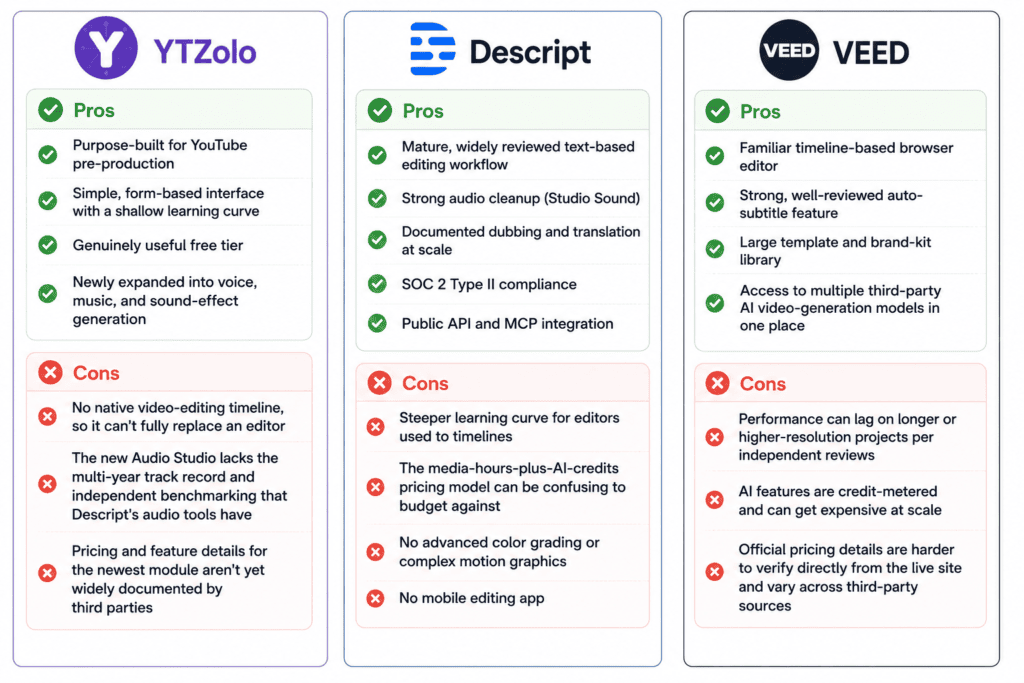
Pros: Purpose-built for YouTube pre-production; simple, form-based interface with a shallow learning curve; genuinely useful free tier; newly expanded into voice, music, and sound-effect generation.
Cons: No native video-editing timeline, so it can’t fully replace an editor; the new Audio Studio lacks the multi-year track record and independent benchmarking that Descript’s audio tools have; pricing and feature details for the newest module aren’t yet widely documented by third parties.
Descript
Pros: Mature, widely reviewed text-based editing workflow; strong audio cleanup (Studio Sound); documented dubbing and translation at scale; SOC 2 Type II compliance; public API and MCP integration.
Cons: Steeper learning curve for editors used to timelines; the media-hours-plus-AI-credits pricing model can be confusing to budget against; no advanced color grading or complex motion graphics; no mobile editing app.
VEED
Pros: Familiar timeline-based browser editor; strong, well-reviewed auto-subtitle feature; large template and brand-kit library; access to multiple third-party AI video-generation models in one place.
Cons: Performance can lag on longer or higher-resolution projects per independent reviews; AI features are credit-metered and can get expensive at scale; official pricing details are harder to verify directly from the live site and vary across third-party sources.
Decision Framework
Choose YTZolo if your biggest time drain is pre-production — coming up with ideas, writing scripts, generating titles and thumbnails, and optimizing metadata — and you already have (or don’t yet need) a separate video editor.
Choose Descript if you record dialogue-heavy audio or video (podcasts, interviews, talking-head YouTube) and want to edit by editing text, plus you need audio cleanup, voice cloning, or multi-language dubbing in one platform.
Choose VEED if you want a familiar, browser-based timeline editor with strong auto-subtitles, templates, and brand-kit tools, especially for marketing or social content produced at volume.
Choose more than one if your workflow spans pre-production and post-production — which, realistically, describes most consistent YouTube channels. A common combination is YTZolo for scripting, titles, thumbnails, and SEO, paired with Descript or VEED for the edit itself.
Frequently Asked Questions
1. Is YTZolo better than Descript? They solve different problems. YTZolo focuses on YouTube pre-production and SEO; Descript focuses on editing. Neither is categorically “better” — it depends on which stage of your workflow needs the most help.
2. Is VEED better than Descript for video editing? VEED uses a more traditional timeline interface, which many creators find faster to learn. Descript’s text-based editing is faster once you’re used to it, especially for dialogue-heavy content. Try both free tiers before deciding.
3. Does YTZolo have a video editor? As of this writing, YTZolo does not offer a general-purpose timeline video editor. It focuses on scripting, thumbnails, SEO metadata, and (newly) audio generation.
4. Can YTZolo generate AI voices? Yes — YTZolo recently launched a Voice Generator, Multi-Voice Dialogue tool, and Voice Changer as part of a new Audio Studio module. This is a new addition, so confirm current capabilities and pricing on ytzolo.com.
5. Does Descript offer voice cloning? Yes. Descript’s AI Speech feature includes custom voice clones and stock AI voices, available (with limits) starting on the Free plan and scaling with paid tiers.
6. Does VEED have AI dubbing? Yes, VEED offers a Voice Dubber and video translator as part of its AI toolset.
7. Which tool is cheapest for a solo creator just starting out? YTZolo’s free plan is generally the lowest-friction starting point for pre-production tasks. For editing, Descript and VEED both offer usable free tiers with export limitations (watermarks, capped minutes).
8. Is Descript good for podcast editing? Yes — multi-track recording, transcript-based editing, and Studio Sound audio cleanup are core, long-established Descript features widely used by podcasters.
9. Does YTZolo have an AI music generator? Yes, a newly launched AI Music Generator lets users generate instrumental or scored background music from text prompts, as part of the new Audio Studio.
10. What is Descript’s Underlord? Underlord is Descript’s AI co-editor. It can remove filler words and silences, suggest B-roll, generate clips from long-form content, and draft scripts, descriptions, and show notes from natural-language prompts.
11. Can VEED remove background noise? Yes, VEED offers background noise removal for both video and audio as part of its AI tools.
12. Which tool supports the most languages for translation? Descript’s official pricing page documents caption translation in 61 languages and audio dubbing in 30+ languages. VEED also offers translation and dubbing tools; confirm current language coverage on veed.io.
13. Does YTZolo offer subtitles or captions? No — YTZolo does not currently offer a standalone subtitle or caption generator. Descript and VEED both do.
14. Is there a free trial for Descript’s paid plans? Descript offers a permanent free plan rather than a time-limited trial; you can use core editing and AI tools before upgrading.
15. Does VEED have a free plan? Yes, with watermarked exports and capped auto-subtitle minutes per month, based on independent pricing reviews. Confirm current limits on veed.io.
16. Which is best for a YouTube automation or faceless channel? Typically a combination: YTZolo for scripts, titles, and thumbnails, an AI voice tool for narration, and Descript or VEED to assemble the final video.
17. Can I use YTZolo, Descript, and VEED together? Yes. Many creators combine a pre-production tool like YTZolo with an editing tool like Descript or VEED rather than treating them as mutually exclusive.
18. Does Descript have a mobile app for editing? Independent reviews note that Descript does not currently offer a dedicated mobile editing app; editing is done through the desktop or web app.
19. What are “AI credits” and why do they matter? On Descript, YTZolo, and VEED, many AI-powered actions (voice generation, AI editing assists, avatar or video generation) consume a metered credit pool rather than being unlimited, even on paid plans. Budget your plan choice around expected AI usage, not just the base subscription price.
20. Is VEED good for team collaboration? Yes, VEED’s higher tiers include brand kits, shared assets, and collaboration features aimed at marketing teams and agencies.
21. Does Descript offer an API? Yes — Descript has a public API with Model Context Protocol (MCP) support, in open beta as of 2026, allowing programmatic or AI-assistant-driven editing.
22. Which tool is best for generating YouTube thumbnails? YTZolo, whose AI thumbnail generator is one of its original, most-established features, producing multiple export-ready variants.
23. Does YTZolo optimize for YouTube SEO specifically? Yes — title, description, and tag generation aimed at YouTube search and click-through performance is YTZolo’s founding use case.
24. Is Descript worth it for a beginner? It can be, but expect a learning curve around the transcript-editing paradigm. Beginners who want the shallowest learning curve for actual video editing often find VEED’s timeline interface more immediately familiar.
25. How often should I re-check pricing for these tools? Given how frequently SaaS pricing and credit systems change (as documented across multiple 2025–2026 pricing overhauls for Descript alone), check the official pricing page immediately before subscribing or renewing, not just when you first research the tool.
26. Does YTZolo require a credit card for the free plan? Multiple independent listings report that YTZolo’s free plan does not require a credit card, though you should confirm this directly on ytzolo.com, since sign-up requirements can change.
27. Can these tools replace hiring a professional video editor? For straightforward, templated, or dialogue-driven content, yes, for many creators. For complex color grading, advanced motion graphics, or high-end commercial production, independent reviews of both Descript and VEED note real limitations compared to professional NLEs like Premiere Pro or DaVinci Resolve.
Methodology and Editorial Policy
How products were evaluated: Each platform’s official website, pricing page, and help documentation were reviewed directly. Where official pricing pages did not fully render or disclose exact current figures, multiple independent third-party sources (G2, Capterra, Trustpilot, and dedicated SaaS-pricing review sites) were cross-checked, and any discrepancy or uncertainty is disclosed in the relevant section rather than resolved by guessing.
Research process: Research was conducted in July 2026 using official product pages, documentation, and recent independent reviews. YTZolo’s newly launched Audio Studio features were reviewed via direct product materials provided for this article, since third-party documentation for a feature this new does not yet exist at scale.
Verification process: No feature is presented as existing on any platform unless it appears on that company’s official site, documentation, or in independently corroborated third-party reviews. Wherever a detail could not be verified this way, the article states so explicitly and recommends confirming on the official website.
Limitations: Software pricing, credit allocations, and feature sets for all three products change frequently. VEED’s live pricing table did not fully render during research for this article, so its pricing figures rely on third-party sources rather than a direct read of veed.io. YTZolo’s Audio Studio pricing and full capability set were not yet documented by independent third parties at the time of writing. This article will be revisited as more verifiable information becomes available.
Last updated: July 14, 2026
Sources: Official pricing and documentation pages for descript.com and ytzolo.com; independent reviews and pricing trackers including G2, Sonix, Notta, BuyersPrint, FluxNote, Flowith, CheckThat.ai, and SaaSworthy; direct product screenshots and demonstration material for YTZolo’s newly launched Audio Studio.
Disclaimer: This article reflects publicly available information as of July 2026 and is not sponsored by Descript or VEED. Feature availability, pricing, and capabilities may change after publication — always verify current details on each company’s official website before making a purchase decision.
Conclusion
There’s no single winner in the YTZolo vs Descript vs VEED comparison, because the three products aren’t fully interchangeable — they’re built around different stages of the same content pipeline.
- Best overall for a full YouTube workflow: a combination of YTZolo (pre-production and SEO) with Descript or VEED (editing) — few solo creators will find one platform that covers idea-to-publish end to end today.
- Best for YouTubers specifically: YTZolo, for scripts, titles, thumbnails, and SEO.
- Best for editing: Descript, for transcript-based dialogue and podcast editing; VEED, for timeline-based browser editing.
- Best for podcasting: Descript.
- Best emerging AI features: YTZolo’s new Audio Studio (voice, music, sound effects) is worth testing, but it’s new enough that you should verify capabilities directly before building a production workflow around it.
- Best value for pre-production on a tight budget: YTZolo’s free and entry-tier plans.
Whichever combination fits your workflow, confirm current features and pricing directly on ytzolo.com, descript.com, and veed.io before subscribing — all three platforms update their plans often enough that details in any review, including this one, can shift after publication.
About the Author
Anshika Verma Content Strategist & Researcher, YTZolo 📧 anshika@ytzolo.com
Anshika Verma is a content strategist and researcher at YTZolo, where she researches AI creator tools, YouTube growth workflows, video production software, and SEO trends to help creators make informed decisions about the tools they use.

