
July 28, 2026 · Anshika Verma
Quick Answer
To extract vocals from a song, upload the track to an AI-powered separation tool, let the model split the audio into vocal and instrumental stems, then preview and download the isolated vocal.
Tools like ytZolo’s AI Voice Isolator handle this in under a few minutes, no DAW or manual EQ work required. Manual methods exist too, but they take longer and rarely sound as clean.
You found the perfect sample. The vocal line is instantly recognizable, the melody is catchy, and you already know exactly where it fits in your remix.
There’s just one problem — it’s buried under drums, bass, and a full instrumental mix.
This is the exact moment most bedroom producers and cover artists start searching for how to extract vocals from a song, and the honest answer is that AI has made this far easier than it used to be.
This guide walks through how vocal extraction actually works, when it works well, and how to pull a clean vocal from a track using an AI-powered workflow — without needing a recording studio or years of mixing experience.
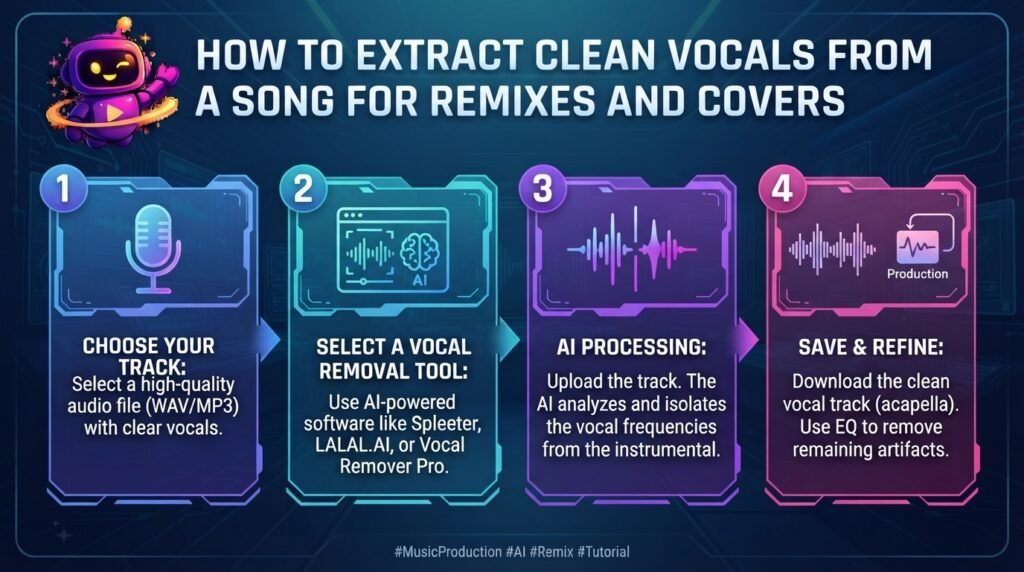
Table of Contents
What Does It Mean to Extract Vocals from a Song?
Pulling the vocal out of a track means separating the singing voice from every other element in the mix — drums, bass, guitars, synths, and background instrumentation.
The output is usually two files: an isolated vocal track (often called an acapella) and an instrumental track with the vocals removed.
This is different from simply turning down volume or applying an EQ filter. A real extraction process identifies the voice as its own distinct layer inside the song, then rebuilds it separately.
It’s a close cousin of the same technology used to isolate voice from background noise in podcasts and videos — just aimed at music instead of speech.
Why Producers and Creators Extract Vocals from Songs
There isn’t one single reason people search for how to pull the vocal out of a track — the use case usually shapes the workflow.
- Remixes and mashups — pairing an existing vocal with a new beat or instrumental
- Acapella practice tracks — singers rehearsing pitch and timing without the full mix
- Cover versions — recording a new instrumental while keeping the reference vocal for guidance
- Sampling — pulling a short vocal phrase or hook into a new production
- Karaoke and instrumental tracks — removing vocals entirely for backing tracks
- Music education — studying phrasing, harmony, or vocal technique in isolation
Each of these starts the same way: separating a mixed song into clean, workable stems.
How AI Extracts Vocals from a Song
A few years ago, this kind of separation required professional stem files from a label or studio. Today, AI models can approximate that split from a regular stereo MP3 or WAV.
Spectrogram and Frequency Analysis
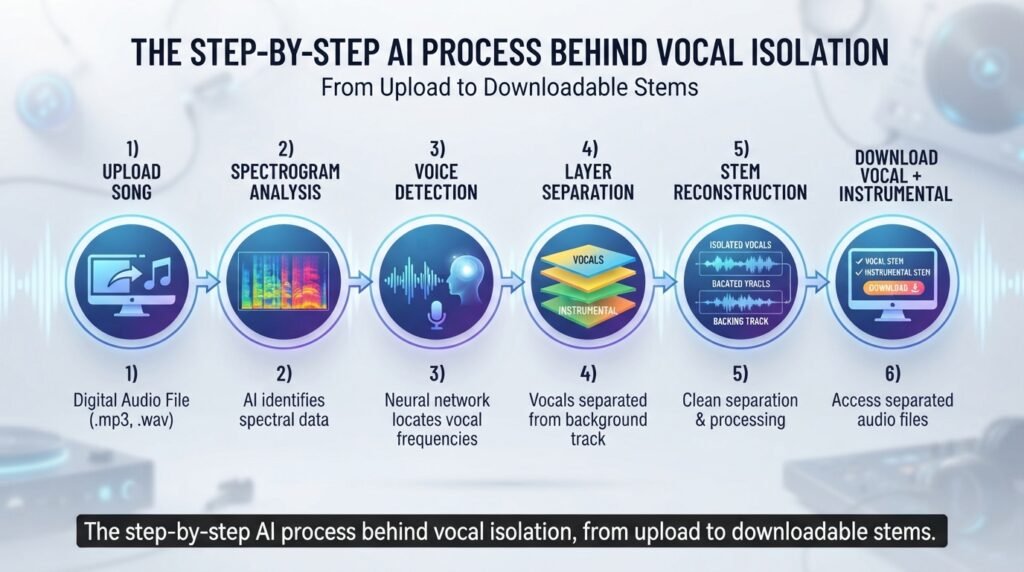
The AI first converts the audio into a spectrogram — a visual map of every frequency in the track over time.
This lets the model see where a human voice sits, even when it overlaps with instruments occupying a similar frequency range.
Source Separation Modeling
A neural network trained on thousands of songs learns the distinct shape and texture of a singing voice compared to guitars, drums, and synths.
It then splits the track into separate “sources” — this is the same core concept covered in ytZolo’s guide to how AI voice isolation actually works, applied here to music instead of speech.
Stem Reconstruction
Once the voice layer is identified, the model reconstructs it as a standalone track and rebuilds the remaining instrumentation as a separate instrumental stem.
The result is two usable files from what started as a single mixed-down song.
Vocal Extraction vs. Voice Isolation: What’s the Difference?
These two terms overlap, and it’s worth clarifying before you pick a tool.
Voice isolation, as covered in ytZolo’s breakdown of vocal isolation vs. noise reduction, typically separates speech from background noise — traffic, hum, room echo.
Pulling a vocal out of a full song is music source separation. It separates a singing voice from a full musical arrangement, which is a more complex layering problem than speech-versus-noise.
Both rely on the same underlying spectrogram-and-neural-network approach, just trained and tuned for different types of audio.
Step-by-Step: Extracting Vocals with ytZolo’s Audio Studio
Here’s a practical walkthrough using ytZolo’s AI Voice Isolator, part of the broader Audio Studio.
- Open the Audio Studio and select the Voice Isolator tool
- Upload the song file (MP3, WAV, and other common formats are supported)
- Let the AI analyze the track and separate the vocal from the instrumental layer
- Preview both the isolated vocal and the instrumental stem before exporting
- Download the vocal for a cover or acapella, or the instrumental for a remix or karaoke track
- Send the isolated vocal into another Audio Studio tool — like AI Music Creation — to build a new backing track around it
Because isolation and music tools live in the same dashboard, a remix project doesn’t require bouncing between separate apps for extraction, mixing, and mastering.
Tips for Cleaner Vocal Extraction Results
The quality of your source file has a bigger impact on results than most people expect.
- Use the highest-quality file available. A 320kbps MP3 or WAV extracts far more cleanly than a low-bitrate download.
- Avoid heavily compressed streaming rips. Compression artifacts confuse the model’s ability to separate layers.
- Check for dense mixes. Songs with layered harmonies or heavy reverb on the vocal are harder to fully separate.
- Preview before committing. Always listen to the output before building a full remix or cover around it.
- Keep a backup of the original. If one extraction attempt sounds off, you may want to reprocess the same source file.
A cleaner starting point almost always means a cleaner extracted vocal on the other end.
Best File Formats for Extracting Vocals from a Song
Format matters almost as much as source quality when it comes to clean separation.
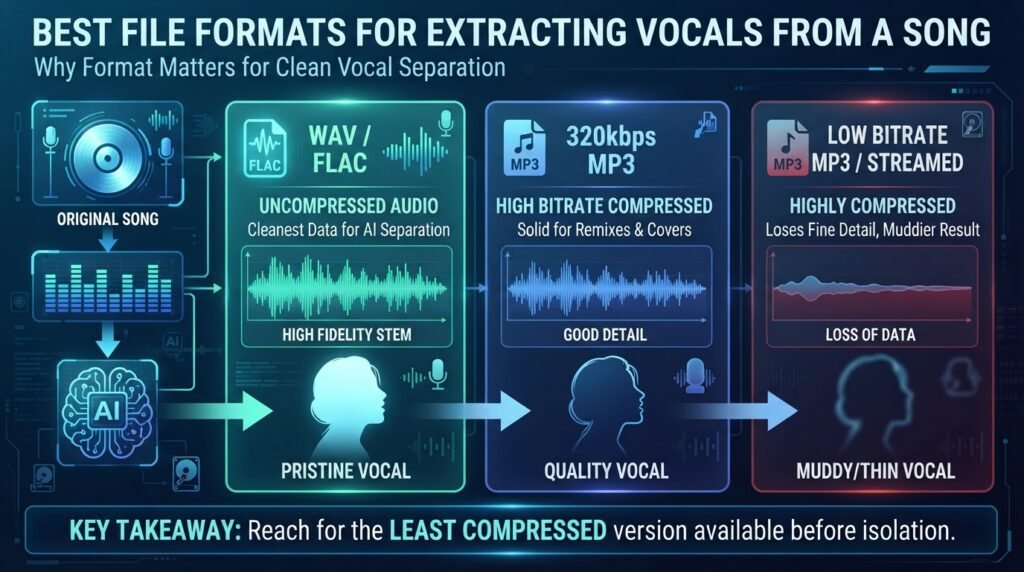
WAV and FLAC give the AI the most uncompressed data to work with, which usually produces the cleanest vocal stem.
320kbps MP3 is a solid middle ground — widely available and still detailed enough for most remix and cover projects.
Low-bitrate MP3 or streamed audio (128kbps and below) tends to lose fine detail in the vocal, which shows up as a slightly muddier or thinner extraction.
If you have a choice between formats before you isolate the vocal, reach for the least compressed version available.
Common Problems When You Extract Vocals from a Song
Even strong AI models run into a few predictable limitations worth knowing upfront.
Instrumental bleed. Faint traces of drums or synths sometimes linger in the vocal stem, especially in dense, layered productions.
Reverb and delay tails. Vocals recorded with heavy studio effects can carry some of that reverb into the isolated track.
Harmonized vocals. Multiple vocal layers singing in harmony are harder to cleanly separate than a single lead voice.
Low-quality source audio. A vocal extracted from a low-bitrate file will always sound thinner than one pulled from a lossless source.
Setting realistic expectations here matters — AI vocal extraction gets remix-ready results fast, but it isn’t the same as an original studio stem handed over by the artist.
AI Extraction vs. Manual DAW Methods
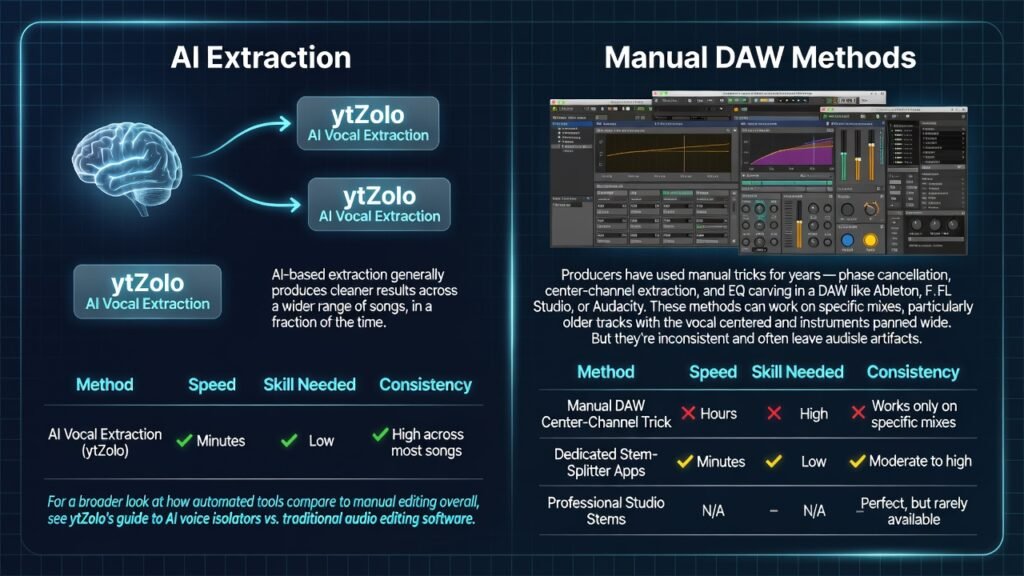
Producers have used manual tricks for years — phase cancellation, center-channel extraction, and EQ carving in a DAW like Ableton, FL Studio, or Audacity.
These methods can work on specific mixes, particularly older tracks with the vocal centered and instruments panned wide. But they’re inconsistent and often leave audible artifacts.
AI-based extraction generally produces cleaner results across a wider range of songs, in a fraction of the time. For a broader look at how automated tools compare to manual editing overall, see ytZolo’s guide to AI voice isolators vs. traditional audio editing software.
| Method | Speed | Skill Needed | Consistency |
|---|---|---|---|
| AI Vocal Extraction (ytZolo) | Minutes | Low | High across most songs |
| Manual DAW Center-Channel Trick | Hours | High | Works only on specific mixes |
| Dedicated Stem-Splitter Apps | Minutes | Low | Moderate to high |
| Professional Studio Stems | N/A | N/A | Perfect, but rarely available |
For most remix and cover projects, AI extraction covers the vast majority of use cases without touching a DAW at all.
Real-World Use Cases for Extracted Vocals
A remix producer pulling a hook from a track to build an entirely new beat underneath it.
A cover artist using the original vocal as a pitch and timing guide while recording a fresh instrumental.
A singer practicing with a karaoke-style instrumental after removing the lead vocal from a favorite track.
A content creator sampling a short vocal phrase for a transition or intro in a video edit.
A DJ building a mashup by pairing an acapella from one song with the instrumental from another.
A music teacher isolating a vocal line to demonstrate phrasing or breath control to a student, without the distraction of a full arrangement.
Each scenario relies on the same core skill: knowing how to pull a clean, workable vocal out of a finished track before building something new around it.
Beyond music production, this same underlying technology extends into adjacent workflows too.
Extracted Vocals and Localization Workflows
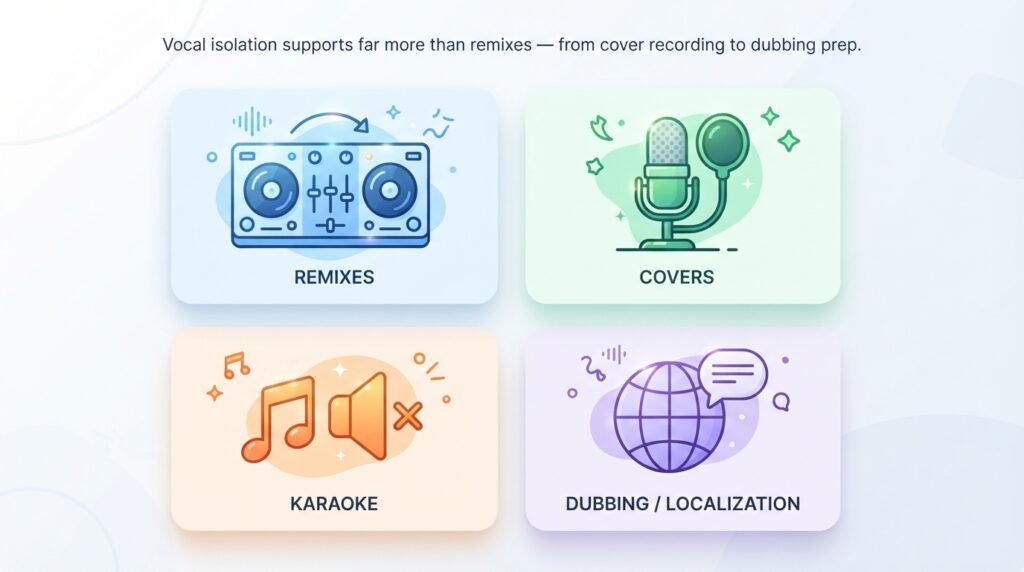
Clean, isolated vocals aren’t only useful for remixes — they’re also a common pre-processing step in voice isolation for dubbing and multilingual localization projects.
A translator or dubbing tool works far more accurately on an isolated vocal track than on a full mixed song or video with background music underneath.
This is one reason the same source-separation technology shows up across music production, podcasting, and video localization pipelines.
Copyright Considerations for Remixes and Covers
Pulling the vocal out of a commercially released song doesn’t automatically grant rights to redistribute or monetize the result.
Covers, remixes, and mashups built from extracted vocals often still require licensing, depending on how and where they’re published — platform policies and regional copyright law both apply.
This article isn’t legal advice, but it’s worth checking a platform’s content policies and, where relevant, mechanical or sync licensing requirements before releasing a remix publicly.
Using extracted vocals for personal practice, private demos, or reference tracks generally carries far less risk than public release or monetization.
How to Choose the Right Vocal Extraction Tool
A few practical factors separate a genuinely useful tool from one that just looks good in a demo.
- Separation quality — does the instrumental stem stay free of vocal residue, and vice versa?
- Speed — how long does a full song take to process?
- Format support — does it handle MP3, WAV, and other common formats?
- Output flexibility — do you get both the vocal and the instrumental stem?
- Workflow fit — does it connect to other production tools you already use?
- Privacy — are uploaded files encrypted and deleted after processing?
If your workflow includes more than just vocal isolation — such as extracting vocals, cleaning background noise, generating AI music, mixing, mastering, dubbing, or creating a completely new backing track — a bundled Audio Studio can significantly simplify the process.
Instead of exporting and re-importing files across multiple separate apps, you can handle every stage of production in one workspace. This reduces compatibility issues, speeds up editing, maintains consistent audio quality, and makes vocal isolation far more efficient for creators producing music, podcasts, voiceovers, or YouTube videos at scale.
Frequently Asked Questions
Can I extract vocals from any song? Most songs work reasonably well, though dense mixes, heavy harmonies, and low-quality source files produce less clean results.
Is it legal to isolate a vocal from a song? Extraction itself is usually fine for personal use. Publishing or monetizing the result often requires licensing, depending on the platform and jurisdiction.
What’s the difference between an acapella and an extracted vocal? An official acapella is a studio-released vocal-only track. An extracted vocal is an AI-approximated version pulled from the full mixed song.
Does AI vocal extraction work on live recordings? It can, though results are generally less clean than studio recordings due to crowd noise and inconsistent mic levels.
Can I extract just the instrumental instead of the vocal? Yes — most vocal isolation tools also output the remaining instrumental as a separate stem.
Will the extracted vocal sound studio-quality? It depends on the source file. A high-quality WAV produces a noticeably cleaner extraction than a low-bitrate MP3.
Can I use extracted vocals in a remix I plan to sell? That typically requires licensing the original song. Check platform rules and copyright requirements before monetizing.
How is this different from noise reduction? Noise reduction lowers background volume. Vocal isolation identifies the voice as a separate layer and rebuilds it — closer to source separation than simple filtering.
Can AI separate multiple vocalists singing together? Lead vocals separate more cleanly than tightly layered harmonies, where accuracy naturally drops.
Do I need a DAW to isolate vocals? No. AI-based tools handle extraction in a browser upload, though a DAW is still useful for building the remix or cover afterward.
Which file format gives the best extraction results? WAV or FLAC files produce the cleanest results because they’re uncompressed. A high-bitrate MP3 (320kbps) is a reasonable second choice.
Can I extract vocals from a song downloaded in low quality? Yes, but expect a thinner, less detailed vocal stem. Low-bitrate source files simply give the AI less data to reconstruct.
Final Thoughts
Learning how to pull a clean vocal out of a mixed song used to mean chasing down rare stem files or fighting with manual EQ tricks that only worked half the time.
AI has changed that math. Upload a track, let the model separate the layers, preview the result, and download exactly the stem your remix or cover needs.
It isn’t flawless — dense mixes, harmonized vocals, and low-quality sources still push the limits of what any model can cleanly separate. But for the vast majority of remix, cover, and sampling projects, it’s the fastest path from a full song to a usable vocal stem.
For creators building an entire production pipeline — extraction, new instrumentals, dubbing, or a full YouTube upload — keeping every step inside one Audio Studio turns a multi-app workflow into a single dashboard.
About the Author
Anshika Verma Email: anshika@ytzolo.com
Anshika Verma is a content researcher specializing in AI audio technology, YouTube production workflows, and search-optimized content strategy. Her work focuses on evaluating AI tools for creators against real-world recording and editing conditions, following Google’s Experience, Expertise, Authoritativeness, and Trust (E-E-A-T) framework.

