
By Anshika Verma · Content & SEO Researcher, ytZolo · ~13 min read
Quick answer: Choosing between phoneme level alignment vs word level comes down to what your project actually consumes. For most creator workflows — captions, subtitles, dubbing, audiobooks — word-level alignment is what you need. It gives a start and end timestamp for each word, which matches how subtitle formats like SRT and VTT actually display text. Phoneme-level alignment goes one layer deeper, timing individual speech sounds inside each word. That precision matters for animated lip-sync and detailed phonetic research, but it’s overkill for a standard caption file. Our full guide to forced alignment covers the basics if you’re new to the term.
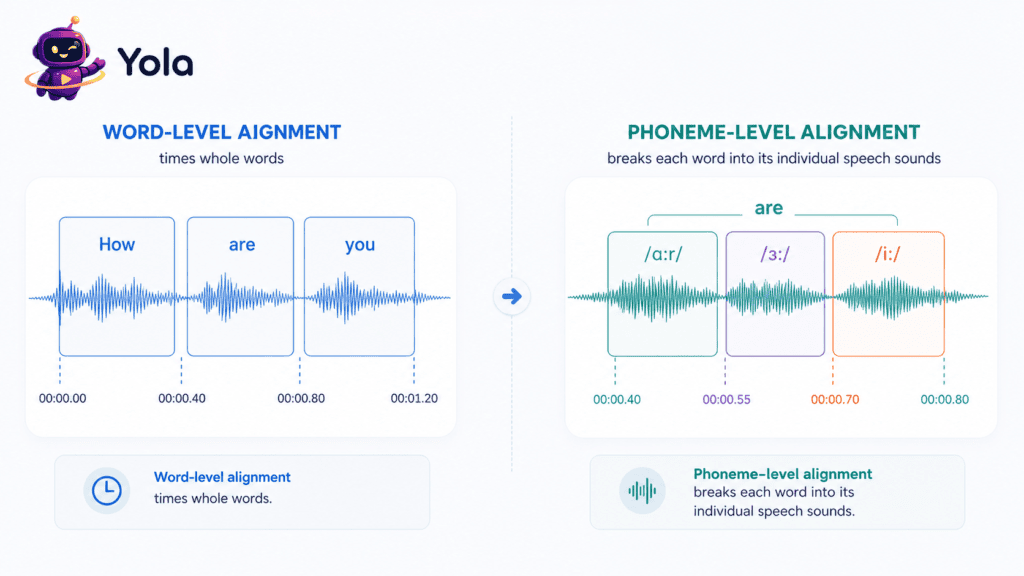
Table of Contents
Phoneme Level Alignment vs Word Level: Why This Comparison Matters
Every forced alignment tool asks you to pick a granularity before it runs. Get it wrong and you either waste processing time on detail you’ll never use, or you end up with output too coarse for the job.
This guide breaks down phoneme-level alignment vs word-level alignment in plain terms: what each one outputs, where they’re used in real production pipelines, and how to decide which one your project needs.
If you haven’t read our forced alignment explainer yet, that’s the place to start for the broader concept. This post picks up where that guide leaves off.
What “Alignment Granularity” Actually Means
Forced alignment always does the same basic job: it takes a script and its matching audio, then calculates when each unit of that script was spoken.
The question is what counts as a “unit.” That choice is the entire phoneme-level alignment vs word-level alignment debate in one sentence.
Word-level alignment treats each word as the smallest timed unit. Phoneme-level alignment treats each individual speech sound — consonants, vowels, syllable fragments — as the smallest timed unit.
Both approaches use the same underlying acoustic models, commonly built on architectures like Wav2Vec2, paired with a dynamic programming search (often a Viterbi-style algorithm) that finds the best-matching timeline.
The difference is simply how fine-grained the output timestamps are.
Word-Level Alignment, Explained
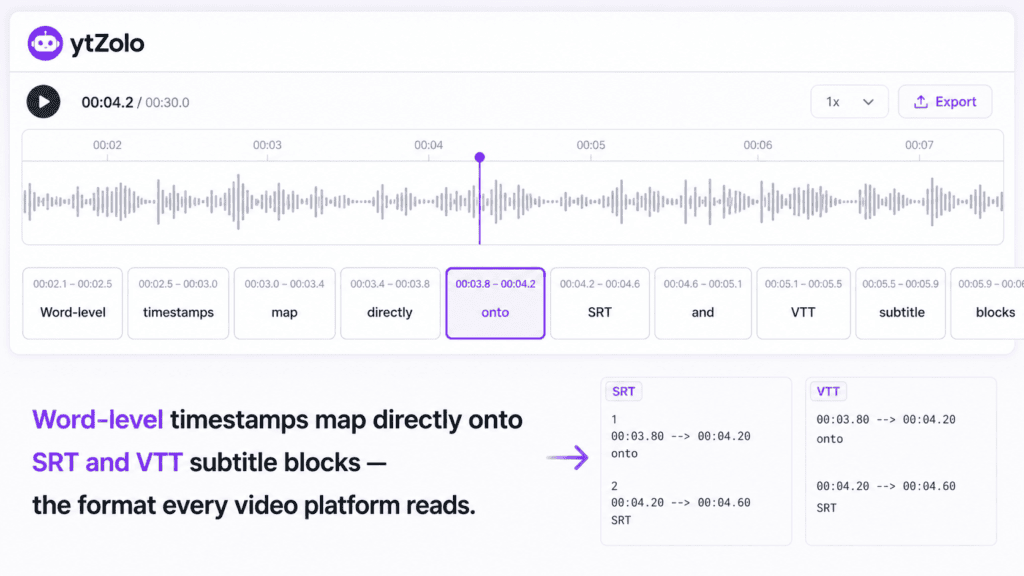
Word-level alignment outputs one timestamp pair per word: a start time and an end time, matched against your original script text.
This is the format almost every subtitle standard expects. SRT and WebVTT files display and time captions word-by-word or line-by-line, not sound-by-sound.
Where Word-Level Alignment Is Used
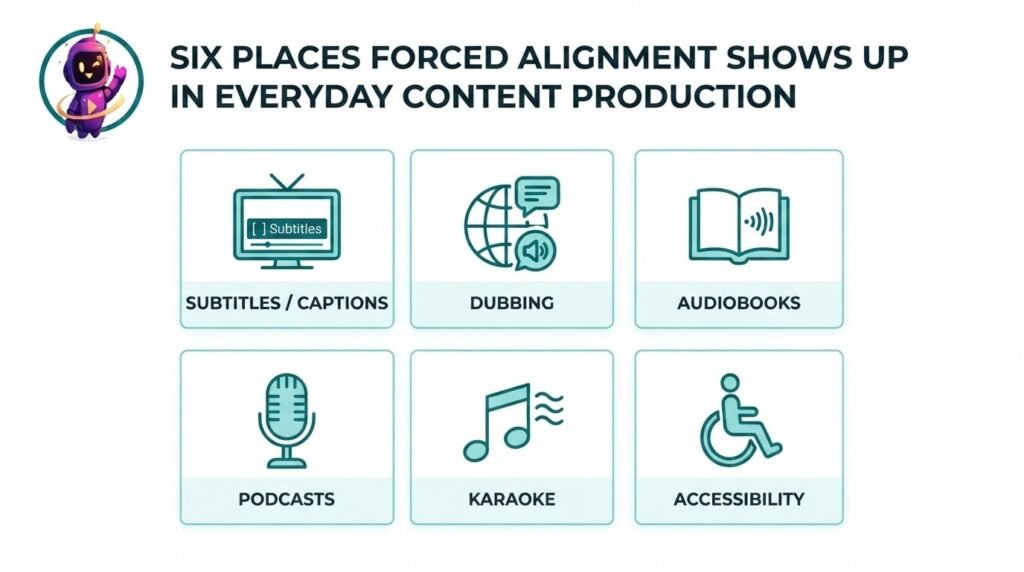
Captioning and subtitling for YouTube, streaming platforms, and social video all run on word-level timing. So does most dubbing and localization work, where a translated script needs to land on the right beats in a new voice track.
Audiobook and podcast production uses it too — chapter markers, read-along highlighting, and searchable transcripts all key off word timestamps rather than individual phonemes.
Why Word-Level Is the Default for Creators
Word-level output is smaller, faster to generate, and directly compatible with the file formats video platforms actually read. There’s no extra conversion step needed before publishing.
For the vast majority of caption, subtitle, and dubbing workflows, phoneme-level detail simply isn’t consumed by anything downstream. The extra precision goes unused.
Phoneme-Level Alignment, Explained
Phoneme-level alignment goes one step further, timing the individual sounds that make up each word. In the word “cat,” for example, it would produce separate timestamps for the /k/, /æ/, and /t/ sounds rather than one timestamp for the whole word.
This resolution matters when the downstream use actually needs sound-by-sound timing, not just word boundaries.
Where Phoneme-Level Alignment Is Used
Animated lip-sync is the clearest example. A character’s mouth shape has to match the specific sound being made at that instant, not just the word being spoken — “smile” and “spoon” start with very different mouth positions even though both are single syllables.
Detailed phonetic and linguistic research also relies on phoneme-level output, since researchers studying pronunciation, accent, or speech disorders need timing at the sound level, not the word level.
Karaoke-style lyric syncing sometimes uses phoneme or syllable-level timing too, since matching a vocal melody note-for-note requires finer resolution than word boundaries alone.
Why Most Creators Don’t Need It
Phoneme-level alignment takes more processing time and produces a much larger, more complex output file. If nothing in your pipeline reads that level of detail, it’s added cost with no corresponding benefit.
Unless you’re building character animation, running phonetics research, or working on a project that specifically consumes phoneme timing data, word-level output covers the job.
Phoneme-Level Alignment vs. Word-Level: Side-by-Side
| Word-Level Alignment | Phoneme-Level Alignment | |
|---|---|---|
| Smallest timed unit | Whole word | Individual speech sound |
| Typical output | Start/end timestamp per word | Start/end timestamp per phoneme |
| File compatibility | Matches SRT, VTT directly | Needs conversion for standard subtitle formats |
| Processing time | Faster | Slower, more compute-intensive |
| Best for | Captions, subtitles, dubbing, audiobooks | Lip-sync animation, phonetics research |
| Overkill for | — | Standard captioning and subtitling |
| Underpowered for | Frame-accurate mouth animation | — |
How to Decide: Phoneme Level Alignment vs Word Level
The decision usually comes down to one question: does anything downstream actually read sound-level timing, or does it just need word boundaries?
If you’re publishing captions, subtitles, dubbed audio, or an audiobook, word-level alignment is the right call almost every time.
If you’re animating a character’s mouth to match dialogue, or you’re doing academic phonetic transcription, phoneme-level is worth the extra processing cost.
A useful gut-check: open the file format your project actually needs (SRT, VTT, or a lip-sync rig format). If it only has slots for whole-word timing, phoneme-level output just gets discarded or re-aggregated back to word level anyway.
A Quick Scenario Checklist
- YouTube captions or subtitles → word-level
- Multilingual dubbing → word-level
- Audiobook chapter markers → word-level
- 2D/3D animated character lip-sync → phoneme-level
- Academic speech/phonetics research → phoneme-level
- Karaoke lyric video with note-tight timing → phoneme or syllable-level
Compute Cost and File Size: The Practical Trade-Off
Beyond use case, there’s a practical resource question in the phoneme-level alignment vs word-level debate: processing time and output size scale with granularity.
A phoneme-level pass has to estimate probabilities across many more, much shorter time slices — often as short as 20 milliseconds per segment — compared to the wider windows a word-level pass works with.
That translates directly into longer processing times on long-form content, and a noticeably larger output file once every phoneme boundary gets its own timestamp entry.
For a single short video, the difference is negligible. For a creator or agency processing dozens of hours of content a month, running everything at phoneme-level by default adds real, ongoing compute cost for detail that never gets used downstream.
The practical rule: default to word-level, and only reach for phoneme-level when a specific downstream tool — a lip-sync rig, a phonetics analysis script — actually consumes that finer data.
Preparing Your Audio Matters Either Way
Granularity choice aside, alignment accuracy at either level depends heavily on clean input audio. Background noise, overlapping speakers, or heavy music under dialogue will degrade timing precision no matter which level you choose.
Running noisy files through a voice isolator before alignment is one of the highest-leverage steps for improving results on both word-level and phoneme-level output.
Matching your script’s punctuation to natural speech pauses also helps the model place boundaries correctly, since both alignment types rely on the text being an accurate, typo-free match to what’s actually spoken.
Does the Alignment Level You Choose Affect SEO?
Search engines that crawl caption and transcript files care about accurate, well-timed text — not whether the underlying process ran at word or phoneme granularity. What matters for on-page and video SEO is that the final subtitle file is correctly synced and readable.
Since word-level output is already the format search crawlers and accessibility tools expect, choosing phoneme-level alignment and then converting it down to word boundaries adds an unnecessary step without any ranking upside.
In other words: for SEO purposes, correctly synced word-level captions do everything phoneme-level captions would do, with less processing overhead.
Open-Source Tools vs. Platform Tools
If you’re evaluating open-source options, tools like the Montreal Forced Aligner and Gentle both support word-level output, and MFA in particular can also produce phoneme-level TextGrids for linguistic research.
Both require local setup — Python environments and dependency management for MFA, a Docker or local install for Gentle — which is a reasonable trade-off for research teams who want direct model control.
Platform-based tools, by contrast, typically default to word-level output since that’s what nearly every creator workflow actually consumes, with alignment running as one step alongside scripting, voice generation, and dubbing rather than a standalone task.
When Alignment Drifts: Recognizing Out-of-Sync Captions
Even accurate alignment can look “off” if the source video is later trimmed, re-encoded, or has frames dropped after the caption file was generated — the audio and text stop lining up even though the original alignment pass was correct.
Signs of drift include captions that start on time but fall progressively later by the end of a long video, or timing that’s consistently off by a fixed offset across the whole file.
The most reliable fix is re-running alignment against the final, exported version of your audio rather than an earlier cut, since even small edits shift every timestamp that comes after them.
Accessibility Requirements Don’t Care About Granularity Either
Accessibility standards like the W3C’s Web Content Accessibility Guidelines require captions to be accurate and synchronized with the audio — they don’t specify phoneme-level detail as a requirement.
A caption file that’s technically complete but consistently a second or two off timing can fail an accessibility review even if every word is spelled correctly, which is exactly why sync accuracy matters more than granularity for compliance work.
Word-level alignment, done well, satisfies this requirement completely for standard captioning and subtitling projects.
How ytZolo Handles Alignment Granularity
ytZolo’s Audio Studio runs forced alignment at word level by default, since that matches what caption files, dubbing tracks, and audiobook exports actually need.
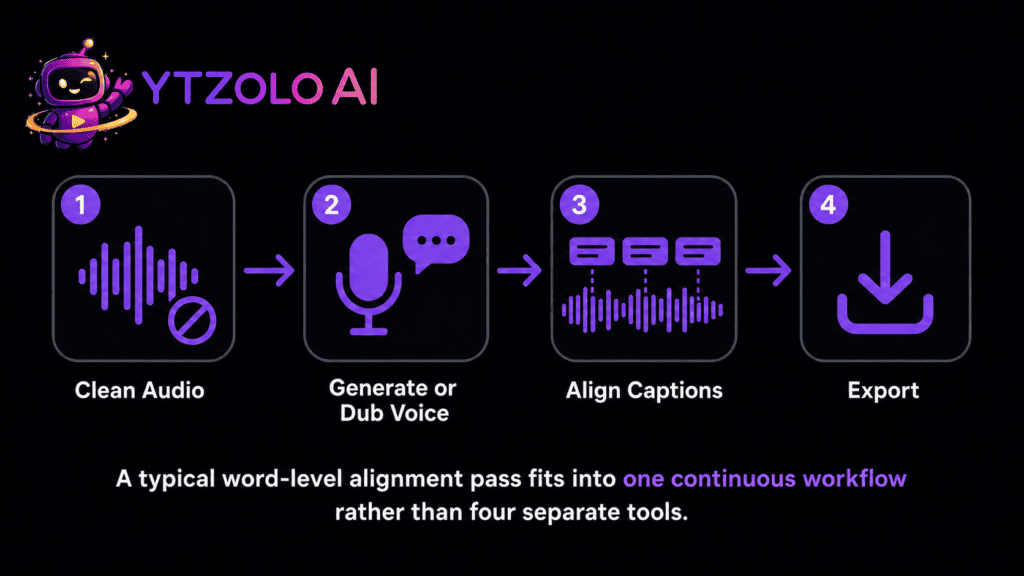
It sits alongside the platform’s AI voice generation, Dubbing Studio, and Voice Isolator, so a typical workflow — clean the audio, generate or dub the voice track, align captions to it, export — happens without switching between separate apps or converting file formats along the way.
For deeper detail on how alignment accuracy affects dubbed output specifically, our AI dubbing accuracy guide covers what still benefits from a manual review pass.
Final Verdict
If you only take one thing from this comparison: default to word-level alignment. It’s faster to generate, matches SRT/VTT subtitle formats natively, and covers captions, subtitles, dubbing, and audiobook production without any extra conversion step.
Reach for phoneme-level alignment only when something downstream specifically consumes sound-level timing — animated lip-sync rigs or phonetic research being the two clearest cases. Outside of those, the added processing time and file complexity buy you precision nobody’s going to use.
| Your project | Verdict |
|---|---|
| YouTube captions, subtitles, dubbing, audiobooks | Word-level — this is your default |
| Animated character lip-sync | Phoneme-level — worth the extra processing cost |
| Academic phonetics/linguistics research | Phoneme-level — required resolution |
| Karaoke or note-tight lyric video | Phoneme or syllable-level — case by case |
| Unsure which your tool needs | Start with word-level, upgrade only if output falls short |
When in doubt, the safest move in the phoneme level alignment vs word level decision is to start at word-level, since it’s the format nearly every publishing pipeline already expects — and only add phoneme-level detail once you have a specific, confirmed use for it.
Frequently Asked Questions
Is phoneme-level alignment more accurate than word-level?
Not necessarily “more accurate” — it’s more granular. Word-level alignment can be just as precise at the word boundary; it simply doesn’t subdivide further. Choose based on what your output format actually needs, not on an assumption that finer always means better.
Can I convert phoneme-level output into word-level captions?
Yes. Since phoneme timestamps nest inside word boundaries, most tools and scripts can aggregate phoneme-level output back up to word-level timing. It’s rarely necessary to run alignment twice at different granularities for the same audio file.
Does YouTube use word-level or phoneme-level captions?
YouTube’s caption system, along with virtually every subtitle standard, operates at word or line level. Phoneme-level timing has no native display format on the platform.
Do animators really need phoneme-level alignment, or is word-level close enough?
For basic 2D talking-head animation, word-level timing combined with a handful of standard mouth shapes is often sufficient. Phoneme-level alignment becomes valuable for higher-fidelity animation where mouth shapes need to match specific vowel and consonant sounds precisely.
Which is faster to process, word-level or phoneme-level alignment?
Word-level alignment is generally faster since the model is solving a coarser timing problem. Phoneme-level alignment requires finer-grained probability estimates across the audio, which adds processing time.
Does switching between word-level and phoneme-level alignment require different source files?
No. Both approaches work from the same audio and script inputs — the only difference is the granularity setting passed to the aligner. You don’t need separate recordings or transcripts for each output level.
About the Author
Anshika Verma is a Content & SEO Researcher at ytZolo, specializing in AI audio and video production technology for creators. She writes about voice AI, dubbing, localization, and alignment tooling, drawing on hands-on testing of forced alignment, transcription, and text-to-speech systems across the industry. Reach her at anshika@ytzolo.com.
This article was researched and fact-checked against current published documentation on forced alignment models and creator tooling as of August 2026.

